-
Where can I find a proper THICC morph for G8F or G3F?
Ok, ok, so I nixed the dials and made a quickie ZBrush morph, I wanted her to look more like this model...
Here are my morphed V8 character's pics: 1 2 3 I wanted to make her round, but not too big, so you can use this as a base to dial in extra morphs, hope this is what you're looking for, and if so, I'll give ya the morphs, no charge!
That ZBrush morph looks great! I don’t usually do “thick” models but I do pinups and I could see that working great for that. If you are willing to share, I’d love those morphs!
No prob, let me "wrap" them up for you!
Thanks @takezo_3001

My pleasure, enjoy, I'll be looking forward to seeing the morphs in the wild!
 Hitoshi Sensei by Mechasar... AMAZING!
But ... he looks like his head is way too big ... Can one scale the head down separately?
It's apprpriate for his age and body type but... you do know about the Head Propogating Scale morph on your basic G8M, right? :)
Where can I find a proper THICC morph for G8F or G3F?Ok, ok, so I nixed the dials and made a quickie ZBrush morph, I wanted her to look more like this model...
Here are my morphed V8 character's pics: 1 2 3 I wanted to make her round, but not too big, so you can use this as a base to dial in extra morphs, hope this is what you're looking for, and if so, I'll give ya the morphs, no charge!
That ZBrush morph looks great! I don’t usually do “thick” models but I do pinups and I could see that working great for that. If you are willing to share, I’d love those morphs!
No prob, let me "wrap" them up for you!
Thanks @takezo_3001
RetiredOne question: what's the "Clone Asset" save do? (Image from @Catherine3678ab's tutorial.)
I have no idea ... don't recall anybody ever saying to use it so I haven't been. Should we?
Edit to add: it could be that the files would be saved in data, into different folders. No difference to the user files that I'm aware of.
Edit and update: well I took a that, it appears to be for a different work flow altogether so am staying with saving the autofit clones as morph assets. It works.
Where can I find a proper THICC morph for G8F or G3F?Ok, ok, so I nixed the dials and made a quickie ZBrush morph, I wanted her to look more like this model...
Here are my morphed V8 character's pics: 1 2 3 I wanted to make her round, but not too big, so you can use this as a base to dial in extra morphs, hope this is what you're looking for, and if so, I'll give ya the morphs, no charge!
That ZBrush morph looks great! I don’t usually do “thick” models but I do pinups and I could see that working great for that. If you are willing to share, I’d love those morphs!
No prob, let me "wrap" them up for you!
Where can I find a proper THICC morph for G8F or G3F?Ok, ok, so I nixed the dials and made a quickie ZBrush morph, I wanted her to look more like this model...
Here are my morphed V8 character's pics: 1 2 3 I wanted to make her round, but not too big, so you can use this as a base to dial in extra morphs, hope this is what you're looking for, and if so, I'll give ya the morphs, no charge!
That ZBrush morph looks great! I don’t usually do “thick” models but I do pinups and I could see that working great for that. If you are willing to share, I’d love those morphs!
Where can I find a proper THICC morph for G8F or G3F?~SNIP~
I'll grab up some of the morphs you guys mentioned, and mess around with them a bit. Hopefully I can create something like I'm talking about. If not, would anyone be interested in attempting to do an accurate Mia Sand morph for G8F? I'd of course be willing to pay for it.
I already made a ZBrushed thicc morph, but I can surely do a ZBrushed Mia Sand morph for G8 instead of my V8, hell, I'd do it for free as I love Mia Sand's figure and I would be doing it for myself as much as for you! Like you, I cannot stand the deflated butt-look and fake-boob style that Daz has defaulted to for V8 which is why I made these morphs to begin with!
Where can I find a proper THICC morph for G8F or G3F?Hey guys, thanks so much for all the input! Glad so many people were interested in helping out. I definitely found some dial sets and morphs in this thread that I'll be grabbing up as soon as possible, found some new thigh morphs amongst them that I didn't know existed.
As far as thicc goes, I wasn't so much referring to the tradition afro-American meaning of thicc, I more meant very curvy without being fat at all. Basically, my ideal shape for a woman is the fitness model known as Mia Sand, images found here: https://www.girlswithmuscle.com/images/?name=Mia+Sand
I don't find excessive fat to be attractive at all in my Daz females, or in real life, tbh. I'm definitely not a proponent of the "big is beautiful" movement going around these days, but I do support a healthy, natural curvy body shape, and of course the fitness model body shape like I just linked to.
I do enjoy mixing and matching huge numbers of morphs and sliders myself, by no means am I new to the mix-and-match style of character shaping done in Daz. In fact, I've generally found the various characters available for Daz to be too much like the generic G8F base, with the exception of some of the morphs shared in this thread. I'm currently at work, so I don't have access to my render library, but I'll attach a render here that I made recently, using a custom morph I commissioned a friend to build for me, which I then modified further.
Mostly what I'm looking for is the kind of thigh-butt combination that Mia Sand has, all the rest of the body I can easily do using the morphs available. If you look at her thighs, her frontal thigh muscles extend forwards past her hips quite a bit, and her thigh muscles also extend to the back and sides considerably as well. Also, the way they connect to her buttocks is more of a smooth transition than is typically possible with Daz females. Daz female buttocks tend to either be gaunt and shriveled looking, like in the G8F base, or squarish/oversized like in some of the morphs you guys linked. Take a look at the pics I shared of Mia Sand, her butt doesn't stick out a lot, its more of a bubble butt that looks form and solid, and connects to her thigh muscles without a big divet or dip between them. My girlfriend has a backside like I'm describing, and she says its basically a common result of specific weight training exercises, particularly squats and leg pressing.
I'll grab up some of the morphs you guys mentioned, and mess around with them a bit. Hopefully I can create something like I'm talking about. If not, would anyone be interested in attempting to do an accurate Mia Sand morph for G8F? I'd of course be willing to pay for it.
DAZ women are too tallYou know!
This "problem" along with the introduction of IK chains might open up an opportunity for utility makers to create a thingame that starts with one character's hand on another's, uh, shoulder, or counter top wherever the pose suggests, and have the pose adapt to the position of the target shoulder as either the acting character and/or the target deviate from some standard scale and/or morph. This would not necessarily eliminate the need for tweaking entirely, but help posers in a hurry to sort things out more quickly. V3D is already most of the way there already and she explains things so nicely avec son accent mignon.
This, in turn, could open up a type of IK-chainy interactive pose sets. I mean there's at least one pose set posted every day on Daz, and somebody's buying them (!). Not every posesmith does interactive poses, but for the ones who do, this could create a new line of products. Or else they could adapt existing pose sets, and we'd have to buy them all over again if we wanted to take advantage of this new functionality.
I'm not saying that such a thing is a necessity for pro posers, but Daz would make money, PAs would make money, we would complain about cash-grabbing, the Kama Sutra would spring to life, and everyone would be happy!
I don't know about that. Personally, I've never gotten IK chains to work properly when I've tried to pose a figure by moving the end of said chain (like pulling on a hand, or end of a rope to reprosition it). Instead, evarything goes haywire with things twisting at odd angles and such. It's not pretty.
DAZ women are too tallYou know!
This "problem" along with the introduction of IK chains might open up an opportunity for utility makers to create a thingame that starts with one character's hand on another's, uh, shoulder, or counter top wherever the pose suggests, and have the pose adapt to the position of the target shoulder as either the acting character and/or the target deviate from some standard scale and/or morph. This would not necessarily eliminate the need for tweaking entirely, but help posers in a hurry to sort things out more quickly. V3D is already most of the way there already and she explains things so nicely avec son accent mignon.
This, in turn, could open up a type of IK-chainy interactive pose sets. I mean there's at least one pose set posted every day on Daz, and somebody's buying them (!). Not every posesmith does interactive poses, but for the ones who do, this could create a new line of products. Or else they could adapt existing pose sets, and we'd have to buy them all over again if we wanted to take advantage of this new functionality.
I'm not saying that such a thing is a necessity for pro posers, but Daz would make money, PAs would make money, we would complain about cash-grabbing, the Kama Sutra would spring to life, and everyone would be happy!
DAZ women are too tallI'm not requesting everything be made to fit my specific requirements, just saying that diversity in pose packs is awesome. I've only seen one pack for couples with significant size differences, but there are dozens of couple packs for the standard. It's just an underserved market.
And way to much work for a creator to have different height variations in a single package. There is no way a creator can account for everyones custom variations, so the best thing they can do is work from a a base unless they include a custom morph which will depend on every users that uses their poses to use that custom morph also and that won't happen.
If I was creating a couples pose set why would I inlude a height variation of my choice other than the base knowing full well most won't be able to use it?
I agree with you on this point, FSMCDesigns. I have used the height morph to make all my females 5' 7" (although I did bring Xia down to 5' 3") and make all the males 6' 0". Then it works across all the characters I own when I create a pose that involves more that one person.
Muelsfell Halfblood Anashia HD for G8 Females [Released]She's gorgeous!! I love her horns and the forehead morph, and especially how sharply defined her features are (that always looks great in dramatic lighting). The hair is awesome, too--I work with a lot of horned characters and more hair options are always great to have.
Are you considering doing a version of this character for G8M?
Thanks!
Probably not doing a G8M version. I do have a G8M character coming out next, but it's not anything like Anashia. I have to be careful when doing G8 characters and create them for the love of it rather than the hopes they will sell well, haha.
DAZ women are too tallI'm not requesting everything be made to fit my specific requirements, just saying that diversity in pose packs is awesome. I've only seen one pack for couples with significant size differences, but there are dozens of couple packs for the standard. It's just an underserved market.
And way to much work for a creator to have different height variations in a single package. There is no way a creator can account for everyones custom variations, so the best thing they can do is work from a a base unless they include a custom morph which will depend on every users that uses their poses to use that custom morph also and that won't happen.
If I was creating a couples pose set why would I inlude a height variation of my choice other than the base knowing full well most won't be able to use it?
This is exactly why it matters that Daz women are so tall. If pose builders work with a base, and that base happens to be one of the tallest female figures available, who is abnormally tall for a real-world woman, then the poses they create are going to be skewed towards unusually tall women.
Muelsfell Halfblood Anashia HD for G8 Females [Released]She's gorgeous!! I love her horns and the forehead morph, and especially how sharply defined her features are (that always looks great in dramatic lighting). The hair is awesome, too--I work with a lot of horned characters and more hair options are always great to have.
Are you considering doing a version of this character for G8M?
DAZ women are too tallI'm not requesting everything be made to fit my specific requirements, just saying that diversity in pose packs is awesome. I've only seen one pack for couples with significant size differences, but there are dozens of couple packs for the standard. It's just an underserved market.
And way to much work for a creator to have different height variations in a single package. There is no way a creator can account for everyones custom variations, so the best thing they can do is work from a a base unless they include a custom morph which will depend on every users that uses their poses to use that custom morph also and that won't happen.
If I was creating a couples pose set why would I inlude a height variation of my choice other than the base knowing full well most won't be able to use it?
EDIT DIM & Content Library Problem with "Advanced DAZ Studio Light Bundle" wont show as installedI THINK I've got it all installed and showing as installed. Every single item of Smart Content is flagged as NEW in the corner.
I had to use DIM to uninstall the remaining problem items, reboot PC, update metadata one at a time on the grayed out icons for the problematic items, then use DAZ Connect inside Studio to re-install the problematic items.
Loaded up a G8 base figure and was able to adjust various morph sliders.
One annoyance: now I have all the POSER versions of assets that came in both Studio and Poser versions showing in my Smart Content. That's from the bulk re-install of all content. Maybe I can search for "CF" or something in DIM and uninstall the Poser versions so they are not cluttering up Smart Content.
I'd like to thank those who contributed ideas and advice on this issue. I've only had DAZ about 2-1/2 months this was my first major problem. I lost a few days of being able to create any scenes or even use my existing scenes due to missing content, butI think I am back in business here.
Creating a Geograft from other figuresAs RawArt says - you'd need to make a (partial) copy of the thing you wanted to graft, move it to line up with the area you wanted to graft it to, and create new geometry to bridge the gap so the two would weld together - then you'd need to rig that (you couldn't transfer the old rigging as the two would no longer line up). You'd also need to redo morphs, including settings up JCMs, though in some modellers you could load the original morphs as morph maps/blend shapes on the exported model befoe trimming and adjusting and then have thema vailable on the trimmed version for export as shapes for the new figure.
I'm not sure if it would be possible to set up a trimmed version of the grafting figure so that it could be fitted without distorting and just have it hide parts of the base figure, but not try to have it weld - it might be doable if the bones were renamed and you perhaps then added soem dummy bones that matched the area of the base figure to which it would.parent, but the result would be distinctly Heath Robinsonish.
Lekkulians 2 Genesis 8 [commercial]OK, one more 'try it out' render. This time with minor shaping morph adustments but still largely the Lekkulian morph.
Rock-star Lekkulian
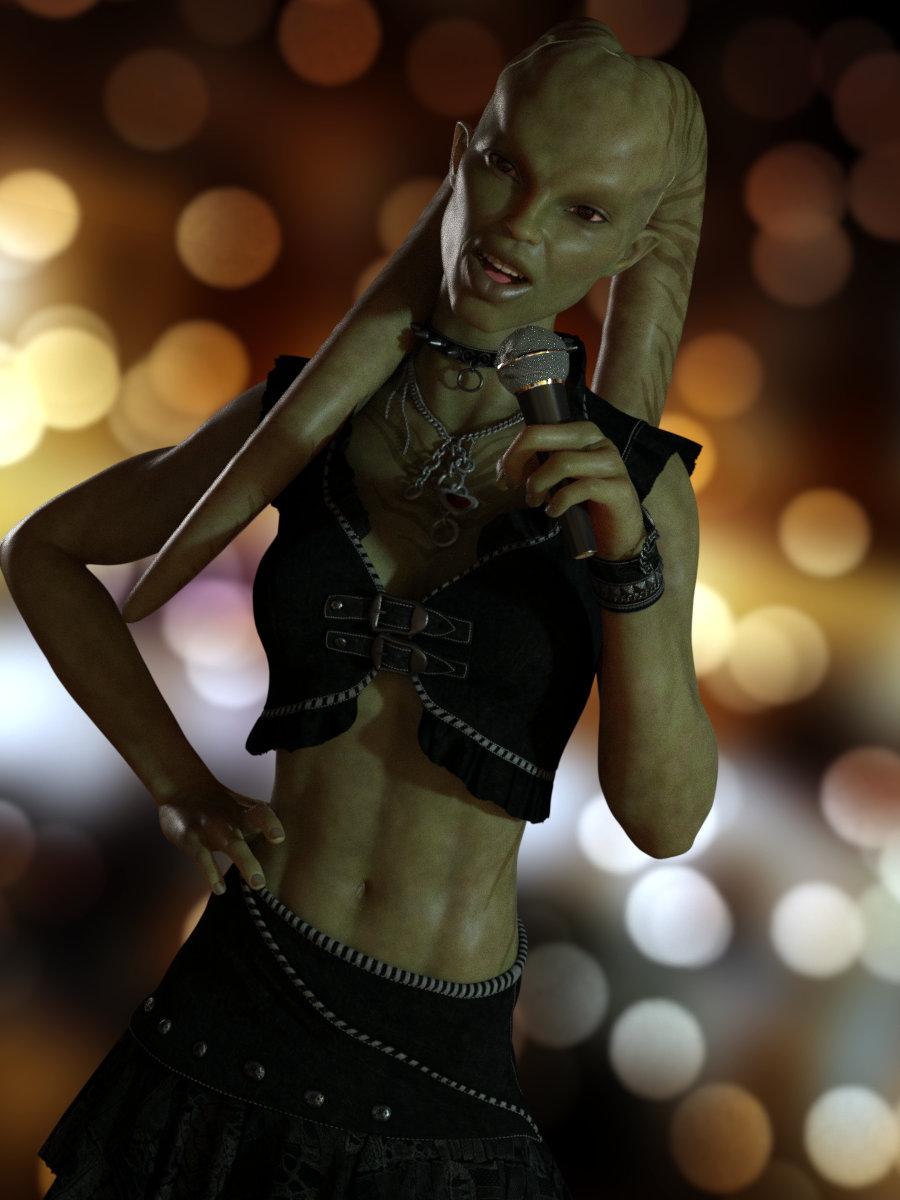 Lekkulians 2 Genesis 8 [commercial]
Aaand 'probably' immediately became 'already'
Here's a quickie "Hello" render - I'm very happy with this purchase (especially as the tax refund just came through so I feel not at all guilty about buying something). The morph looks great, the lekku are easy to adjust and pose, and the textures are superlative.
I'm also impressed with how well the gloves fit the 3-finger+thumb morph.

(Edit - the outfit is for G3F and I've just noticed I didn't adjust it for pokethrough - the pants are showing up somewhat but that's my fault, not the morph - at first sight I thought it was rips in the pants but on closer inspection it's just plain old pokethrough
).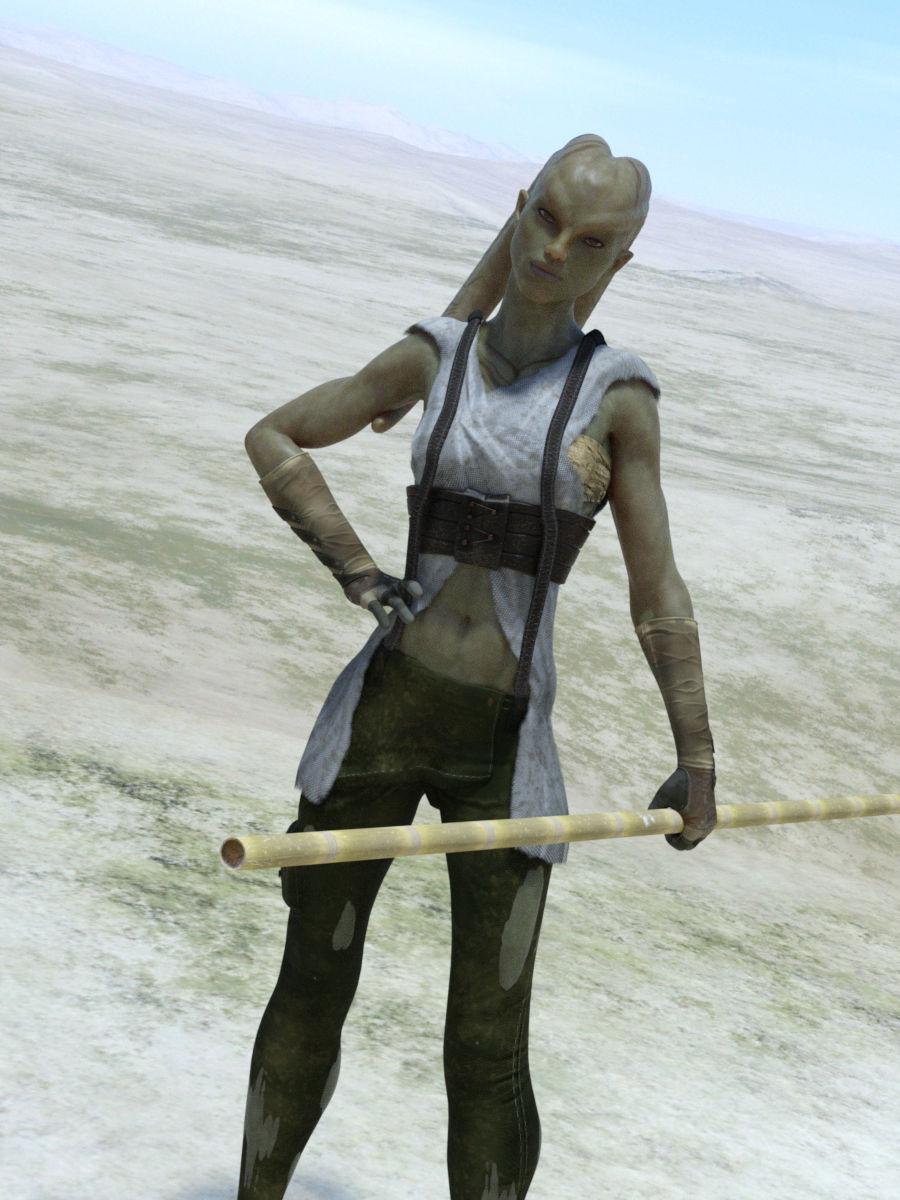 daz importer: importing daz characters to blender 2.8
If there are materials defined correctly for an object, but they are not showing in the viewport, my first thought would be to check the UV mapping, just based on always checking the obvious first before looking for anything complicated to explain the issue.
Are both the figures in your scene base G8F?
As for losing the morph, which morph(s) are you using to make the character into a child? If I have the same moprh, I may be able to test it. Also, what happens if you use the same morph on both figures in your scene? Or on a single figure alone in a scene? Trying to determine if it can be transferred at all.
Daz 3D is part of

Connect
DAZ Productions, Inc.
7533 S Center View Ct #4664
West Jordan, UT 84084Licensing Agreement | Terms of Service | Privacy Policy | EULA
© 2026 Daz Productions Inc. All Rights Reserved.