-
Darwins' Schtuff Pt Deux
Thank you!
Here he is without hair or the jacket; Head Morph, Fantasy Head Addition, Base Skin, Dragon Eyes, and the markings. I need to reconfigure/redo the forehead portion, but it gives a good idea on where I'm going with this.
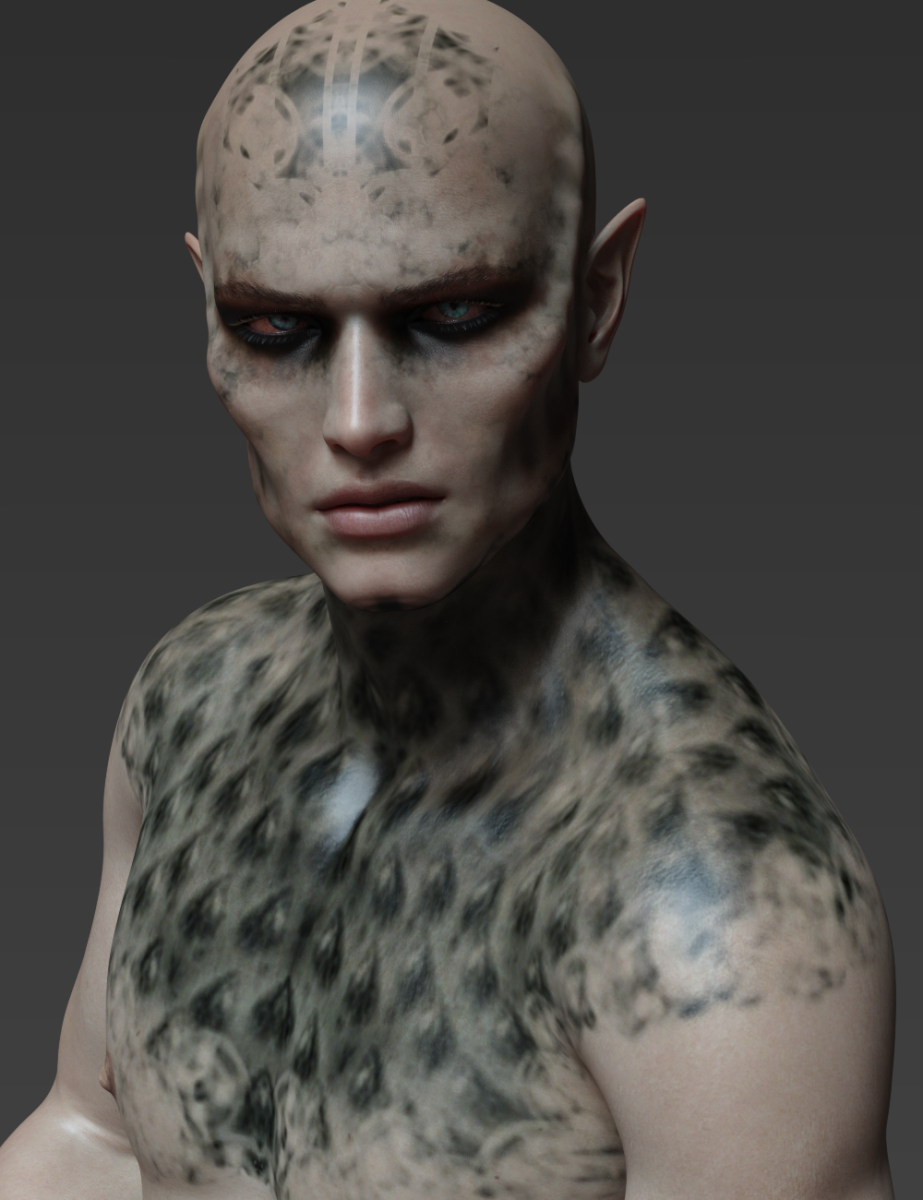
This char looks pretty cool
 Dolb character without Ollie 8
The morph would look different, but just like with Maxx and the Brute, I would argue that it's worth buying Dolb just for all the extra stuff you get, and the morph is more of a bonus.
Daz Studio Pro 4.12 - Highlights4.12.0.85 (September 24, 2019)
- Face Transfer pane
- Added an icon to the pane action
- Window > Panes (Tabs) > Face Transfer
- Added an icon to the pane action
- General Interface
- Fixed an issue in text fields that validate user input (e.g., render filename properties/widgets) and ultimately prevented users from being able to type/insert words (a set of word characters encapsulated by spaces) mid-field based on whether or not the text cursor was positioned on the left (or right) side of an existing space character and the validator for the field is configured to consolidate consecutive space characters
- If the text cursor was positioned on the right side of an existing space character, behavior was as expected
- Consecutive spaces are temporarily allowed while editing, but are consolidated when editing is finished - i.e., when the text field loses focus or when the return/enter key is pressed
- Fixed an issue in the Highway and Main Street styles where the contrast of the value for properties in a property view (e.g., Parameters pane, Surface pane, etc) that are not at their default values was not significant enough to be distinguished from the view/item background when selected/hovered over
- Fixes a regression resulting from optimizations made in a recent build to increase perfomance and decrease system resource usage
- Standard dialogs (i.e., with Help, Accept and Cancel buttons) now explicitly select the "Accept" button (where applicable) by default
- Fixes a regression resulting from recent work on the Create New Item dialog that caused the 'Cancel" button to be selected by default
- Fixed an issue in text fields that validate user input (e.g., render filename properties/widgets) and ultimately prevented users from being able to type/insert words (a set of word characters encapsulated by spaces) mid-field based on whether or not the text cursor was positioned on the left (or right) side of an existing space character and the validator for the field is configured to consolidate consecutive space characters
- Fixed bugs and/or made improvements in various areas; see the Change Log for details
Two suggestions.Another possible starting place for the Dracula outfit would be the Grantham Hall Suit.
Spot on! Good recommendation. Converting that this weekend for sure to G8M. :)
Still looking for the cape and the medallion, though. :)
Also, i would LOVE a Bela Lugosi like morph character. :)
While a bit more stylized than the picture attached by the OP, I've always felt Vendetta for G2M by Luthabel would do a great dracula outfit. The long collared cape is especially imposing.
That is a great cape and Luthbel makes great stuff but you are right about it being stylized.
Two suggestions.Another possible starting place for the Dracula outfit would be the Grantham Hall Suit.
Spot on! Good recommendation. Converting that this weekend for sure to G8M. :)
Still looking for the cape and the medallion, though. :)
Also, i would LOVE a Bela Lugosi like morph character. :)
While a bit more stylized than the picture attached by the OP, I've always felt Vendetta for G2M by Luthabel would do a great dracula outfit. The long collared cape is especially imposing.
Two suggestions.Another possible starting place for the Dracula outfit would be the Grantham Hall Suit.
Spot on! Good recommendation. Converting that this weekend for sure to G8M. :)
Still looking for the cape and the medallion, though. :)
Also, i would LOVE a Bela Lugosi like morph character. :)
Celebrity Look-a-Likes for 3D figures Part 2Has anybody seen a morph that comes close to Emily Hampshire (Twelve Monkeys and Schitt's Creek)? I don't need identical, but just looking for essence.
Question about Arion BraidThe high doesn't have a morph so can't be moved. It is part of the main hair but you can push it down a bit with a dFormer.
You can make the bun larger. I didn't try hiding it.
The braid by itself is just the braid and a big bald head. You could use the braid and the fillers with other hair pieces. I haven't tried that yet.
Muelsfell Halfblood Anashia HD for G8 Females [Released]She looks great. i am uncertain if I will buy her without a mate but top notch job on her as a morph. i would love prehensile horns for both sexes with this unusual race. I love your stuff, this is my only complaint. I hope you make a horn set in the future for G8M as well. . :)
Need mountain terrainif you don't need high resolution, you can make your own using terragen > https://planetside.co.uk/free-downloads/terragen-4-free-download/
and create HDRI's with this basic guide > https://planetside.co.uk/forums/index.php/topic,23976.msg242129.html#msg242129
open EXR's in photoshop https://www.exr-io.com/ or use luminance http://qtpfsgui.sourceforge.net/
Thanks p0rt ! I had used Terragen in the past. It seems like Terradome 3 is similar and works within DAZ Studio, so it's nice to have a couple options.
terradome comes with the catch of needing all the extra morph pack's, to actually be able create something of use, its good for creating parkland and fields with low polygons, but not HDR's
Export - Import obj, how do I preserve morphs?Really wish I could be helpful here, you're so helpful to everyone else. I remember having a similar issue some time ago ...years naturally, and I'm not fully convinced I ever found a solution. I will experiment again. I do think that baking the morph into the static obj might be helpful.
[Released] RSSY Hair Converter from Genesis 2 Male to Genesis 8 Male [Commercial]It is not happening with G2F on the convertor, so here is that. I found a set of freebie thrid party clones and I am going to try them and see if it helps.
So it is something about the G2M. I really wonder what got messed up on your G2M.
I know, right? I am wondering if I somehow screwed it up in my attempts to morph it or such. I must go home tonight and check for any extraneous morphs that are hiding in my folders. I tried reinstalling but if there is a hidden morph somewhere on the clone alone in my many directories, I am thinking that may be the culprit. :)
DAZ women are too tallYou know!
This "problem" along with the introduction of IK chains might open up an opportunity for utility makers to create a thingame that starts with one character's hand on another's, uh, shoulder, or counter top wherever the pose suggests, and have the pose adapt to the position of the target shoulder as either the acting character and/or the target deviate from some standard scale and/or morph. This would not necessarily eliminate the need for tweaking entirely, but help posers in a hurry to sort things out more quickly. V3D is already most of the way there already and she explains things so nicely avec son accent mignon.
This, in turn, could open up a type of IK-chainy interactive pose sets. I mean there's at least one pose set posted every day on Daz, and somebody's buying them (!). Not every posesmith does interactive poses, but for the ones who do, this could create a new line of products. Or else they could adapt existing pose sets, and we'd have to buy them all over again if we wanted to take advantage of this new functionality.
I'm not saying that such a thing is a necessity for pro posers, but Daz would make money, PAs would make money, we would complain about cash-grabbing, the Kama Sutra would spring to life, and everyone would be happy!
I don't know about that. Personally, I've never gotten IK chains to work properly when I've tried to pose a figure by moving the end of said chain (like pulling on a hand, or end of a rope to reprosition it). Instead, evarything goes haywire with things twisting at odd angles and such. It's not pretty.
I've seen something similar in other software ages ago (didn't know about DAZ IK-chains till I read this thread), which also allowed figures to connect, like, placing a hand of one character on the hip of another character. For very small pose adjustments to either character, it worked great. But it seemed like there was always some "hard limit" position, where a pose went haywire. Arms twisting upside down, knees and ankles snapping in weird angles. It was probably some mathematical problem combined with (default) pose limitations though, but I have no doubt the solution to it would be complex and require many more lines of code and possibly long datasets for each character on when to change the state of some joint. Overall, more work than it'd be worth, both for the creator of this "glue one bodypart to another characters' bodypart" and for the creator of the character (who would have to supply such a for each character created!).
Overall, this brings me to the use of standard posesets: No they don't always "fit" right. But that is not the point of these sets. They're there to provide a quick startingpoint to get to the pose you actually want. It's still faster to use some pre-made poses that are similar to the pose you want, and tweak them, than it is to pose from scratch. All those tiny details, like the gradual twist of a spine, the bend of the fingers, the bend of feet and ankles, most of those will already be in the right ballpark for where you want them. Getting the pose where you want it can take as little as 10 minutes, instead of that one hour. Unless you cut corners and leave out half those tiny details I just mentioned..
Need mountain terrainTerradome 3 is the only one I know that can give you that kind of terrain by itself (i.e., not with some other structure included). Plus, you can morph it many ways, add multiple zones, texture it with their special shaders that are slope- and altitude-dependent. There have been a couple of new terrain shaders that can do something similar.
Where can I find a proper THICC morph for G8F or G3F?~SNIP~
I'll grab up some of the morphs you guys mentioned, and mess around with them a bit. Hopefully I can create something like I'm talking about. If not, would anyone be interested in attempting to do an accurate Mia Sand morph for G8F? I'd of course be willing to pay for it.
hell, I'd do it for free as I love Mia Sand's figure and I would be doing it for myself as much as for you!
Ugh, ARTISTS. Just shut up and take his money, already!
...after you send me the morphs, too.
Did you want the thicc morphs that I gave to wonderland as well? I'll post it here then, for everyone on this thread!
switching headsYou probably need to remove or zero the head morph for the first character first, the preset for the second character can only zero the morphs the creator also had when saving it, it can't account for every morph possible or any which would be created in the future.
Where can I find a proper THICC morph for G8F or G3F?*snip*
As far as thicc goes, I wasn't so much referring to the tradition afro-American meaning of thicc, I more meant very curvy without being fat at all. Basically, my ideal shape for a woman is the fitness model known as Mia Sand, images found here: https://www.girlswithmuscle.com/images/?name=Mia+Sand
*snip*
Mostly what I'm looking for is the kind of thigh-butt combination that Mia Sand has, all the rest of the body I can easily do using the morphs available. If you look at her thighs, her frontal thigh muscles extend forwards past her hips quite a bit, and her thigh muscles also extend to the back and sides considerably as well. Also, the way they connect to her buttocks is more of a smooth transition than is typically possible with Daz females. Daz female buttocks tend to either be gaunt and shriveled looking, like in the G8F base, or squarish/oversized like in some of the morphs you guys linked. Take a look at the pics I shared of Mia Sand, her butt doesn't stick out a lot, its more of a bubble butt that looks form and solid, and connects to her thigh muscles without a big divet or dip between them. My girlfriend has a backside like I'm describing, and she says its basically a common result of specific weight training exercises, particularly squats and leg pressing.
I'll grab up some of the morphs you guys mentioned, and mess around with them a bit. Hopefully I can create something like I'm talking about. If not, would anyone be interested in attempting to do an accurate Mia Sand morph for G8F? I'd of course be willing to pay for it.
My go-to base for muscular curvy is Olympia 8 (the HD Add-On shows the clay render). Then I use the Breast Ultitlies and Glute Utilities by Hellboy for size, though the DO body morphs work too.
Here is a quick render of Olympia 8 body at 100% with Voluptuous at 64% and Thighs Tone at 100%. With both Utilites randomized at 150%. (The head is Tara 2 50% and Gia 8 50%.) It's possible to go bigger than this and push it a little. You can probably use muscularity morphs too.
 Genesis 3 Males with blown up joints - tried reinstalling still not fixed
Doing some more troubleshooting, clearing logs and using a text compare I spotted this. Every time I load fresh G3M into the scene, I see this on the problem machine in the beginning of the log file that's not on the good machine:
Json Parser (53,16): Unhandled exception during parsing.
Json Parser (53,16): Unhandled exception during parsing.
Json Parser (53,16): Unhandled exception during parsing.
Json Parser (53,16): Unhandled exception during parsing.
Json Parser (53,16): Unhandled exception during parsing.
I loading up the base Genesis 3 male. Bent the arms 60 downward, saved file on both machines. This is in the proper machine's log which is missing in the problem machine:Loaded Morph Deltas in 0 min 0.0 sec.
Loaded file: pJCMShldrDown_75_R.dsf
Loaded Morph Deltas in 0 min 0.0 sec.
Loaded file: pJCMShldrDown_75_L.dsf
Loaded Morph Deltas in 0 min 0.0 sec.
Loaded file: pJCMShldrDown2_75_R.dsf
Loaded Morph Deltas in 0 min 0.0 sec.
Loaded file: pJCMShldrDown2_75_L.dsfSo it seems the JCMs aren't loading. How to fix???
daz importer: importing daz characters to blender 2.8If, as you say, there are materials correctly defined on the character that is rendering black, they are assigned to the correct areas of the mesh, and there is a correct UV map for the mesh, then it seems to me the importer has done everything we can expect it to do. If all these are present, then it is Blender that is behaving very strangely for you, and I cannot for now offer any explanation for that.
However, if I transfer a G8F model to Blender using the importer, and then delete the 'Base Female' UV map the importer creates, the figure instantly turns completely black. So I still suspect that your figure that is rendering black has no UV map, in which case the importer has perhaps failed to create one for it.
As for the 'lost' child morph, I have the Growing Up morphs for G8F. I applied an age preset to a single base G8F in DS, made no other changes, and transferred the scene to Blender using the importer. The character reflects the morph shape correctly in Blender, so I am afraid I cannot reproduce that issue. Have you tried applying the morph to a just a single figure in a scene to see if it will work for you like that?
switching headsYes I noticed I have a few characters with individual head and body morphs, however when I select the head of one character and choose 'apply head morph' from another character, it does not replace the current head with the new one it just creates something horrible looking instead.
Daz 3D is part of

Connect
DAZ Productions, Inc.
7533 S Center View Ct #4664
West Jordan, UT 84084Licensing Agreement | Terms of Service | Privacy Policy | EULA
© 2026 Daz Productions Inc. All Rights Reserved.