-
Daz Studio 4.12 - Animation Features
There is a lot of information available on the new Face Transfer feature (which is understandable) but one of the other new features advertised is improved animation capabilities and new IK tool. But I have not seen any information on this or how to use it. It would be great if Daz would make a short video showing what is available in this area, I am excited to see the improvements in animation capabilities.
DAZ Studio 4.12 ... Face creation abilities????It's still not showing up under Panes. I did the full install of 4.12. Still no pane. Moved my content from 4.10. Tried looking for the pane. Uninstalled 4.10, restarted computer, opened 4.12 loaded up G8M, selected Head, and there is still not Face Transfer Pane.
The problem is you probably haven't downloaded and ungraded Genesis 8 Male Starter Essentials & Genesis 8 Female Starter Essentials as is required for Face Transfer to work.
No Face Transfer PaneSo anybody has anymore suggestions besides the usual Window>Panes(Tabs)>Face Transfer
Since in my plugin folder it doesn’t have Face Transfer at all to put my serial number in and the developers seemed kinda annoyed with these similar forums appearing more lately i might seek a refund to avoid this headache.
Yes, in DIM you must download and update the Genesis 8 Male Starter Essentials and Genesis 8 Female Starter Essentials and restart DAZ Studio after you do that. Those updates are required in addition to the DAZ Studio 4.12.0.86 Release (and 4.12.0.85 Public Beta if you use Public Betas) updates.
DAZ Studio 4.12 ... Face creation abilities????I'm sorry, silly question.
How do I use the free Face Transfer? I can't see it in Daz Studio
No offense but this indeed a silly question since it has been postes 1000 times in this thread.
DAZ Studio 4.12 ... Face creation abilities????I really love the face transfer. It got my bone structure and complex perfectly. Can’t wait to make more. Thanks daz.
DAZ Studio 4.12 ... Face creation abilities????Sorry for asking again but Face Transfer obviously has a problem with the space between the lips and the nose since it is to big compared to the real picture. Can anybody tell me which morph can correct this problem? I already searched the shape tab “face”, “nose” and “lips” but I didn’t find anything.
Besides that, my wish for an update: please correct this issue. Thank you.
DAZ Studio 4.12 ... Face creation abilities????I'm sorry, silly question.
How do I use the free Face Transfer? I can't see it in Daz Studio
No Face Transfer PaneAre you on a Mac or PC with Windows 32-bit?
From the product page: https://www.daz3d.com/face-transfer-unlimited
"Only available for PC - Windows 64-bit"
Any idea when/if it will be available for the Mac?
Looking for your opinions on favorite examples of Irish, Hispanic, and Indian :)For Irish, if you used the body morph from https://www.daz3d.com/caprice-hd-for-genesis-8-female with the textures from https://www.daz3d.com/pearl-for-genesis-3-and-8-female your results shouldn't be too far from typical. If my Ulster-Scots relations are anything to go by that is.
Silas 8 is here !Boy, the shine wore off Silas' thread quick! Having been spoiled by the superiority of Babina's skin (she replaced Zelara as my favourite Genesis 8 skin), I was hoping for more of the same. Unfortunately, Silas' skin quality is more on the lines of Latonya than Darius 6 (who is still reigning king). His release is helpful, and his morph was a nice option to build upon.
 DAZ Studio 4.12 ... Face creation abilities????
So from what I'm seeing, if you save a transfer with the watermark and then add a new texture over, it erases the watermark? Or is that post work?
The watermark is on the photo you use. If you put on a new texture, it overrides the photo texture...
That's actually fairly sueful then. There's something about the textures generated by these that just hits the uncanny valley a bit too hard for me, so I usually overwrite with those anyway. May be worth the upgrade.
This was done using the beta so if you don’t want to upgrade, just use the beta.
Except by not upgradig to the release version, you don't benefit from any improvements.
Don’t they keep upgrading the beta? Or is there now a new beta? The 4.11 release always crashed on me so I’ve been using the beta which has been more stable...
4.12 is now a release and not a beta.
So I already have it? I didn't download the release today but am using the beta I already had...
If it says beta, it isn't the new release, so improvments made to studio and face transfer are not there.
DAZ Studio 4.12 ... Face creation abilities????Face Transfer's the most fun I've had with Studio in years. I'll likely pick up Face Transfer Unlimited. The only thing I'm not wild about is how it handles mouths, but I have plenty of mouth morphs anyway.DAZ Studio 4.12 ... Face creation abilities????So from what I'm seeing, if you save a transfer with the watermark and then add a new texture over, it erases the watermark? Or is that post work?
The watermark is on the photo you use. If you put on a new texture, it overrides the photo texture...
That's actually fairly sueful then. There's something about the textures generated by these that just hits the uncanny valley a bit too hard for me, so I usually overwrite with those anyway. May be worth the upgrade.
This was done using the beta so if you don’t want to upgrade, just use the beta.
Except by not upgradig to the release version, you don't benefit from any improvements.
Don’t they keep upgrading the beta? Or is there now a new beta? The 4.11 release always crashed on me so I’ve been using the beta which has been more stable...
4.12 is now a release and not a beta.
So I already have it? I didn't download the release today but am using the beta I already had...
No Face Transfer PaneNo, we're moderators. We volunteer to do this. And we mainly merge because it becomes difficult to monitor the different threads and keep straight which ones had which problems and which got a response with what information. A lot of the time, we work at cross-purposes and keep having to repeat information and can easily miss one thread or another.
Face Transfer works with what I outlined. To the best of my knowledge, it doesn't work with 4.11.
Daz Studio 4.12 Pro, General Release! (*UPDATED*)While using Face Transfer, the color of the bodies versus the texture on the face are drastically different. Is there a simple way resetting the face texture so the face and body match. Example of problem below
If you don't want to correct the face textures to match the body's textures, you can use any textures and should be able to reload the ones you had on the figure to begin with.
[Released] Character Converter from Genesis 8 Female to Genesis 3 Female - Conv JCMs too[Commercial]Does it convert HD morphs also?
HD morphs become regular morphs unfortunately. So they are converted, but just not converted as HD.
Will increasing the converted HD morph's intensity (dial number) result in something like HD?
DAZ Studio 4.12 ... Face creation abilities????So from what I'm seeing, if you save a transfer with the watermark and then add a new texture over, it erases the watermark? Or is that post work?
The watermark is on the photo you use. If you put on a new texture, it overrides the photo texture...
That's actually fairly sueful then. There's something about the textures generated by these that just hits the uncanny valley a bit too hard for me, so I usually overwrite with those anyway. May be worth the upgrade.
This was done using the beta so if you don’t want to upgrade, just use the beta.
Except by not upgradig to the release version, you don't benefit from any improvements.
Don’t they keep upgrading the beta? Or is there now a new beta? The 4.11 release always crashed on me so I’ve been using the beta which has been more stable...
4.12 is now a release and not a beta.
DAZ Studio 4.12 ... Face creation abilities????Here is a couple actors. They came out ok. Karen looks the best out of these 2. This is straight renders no post work.
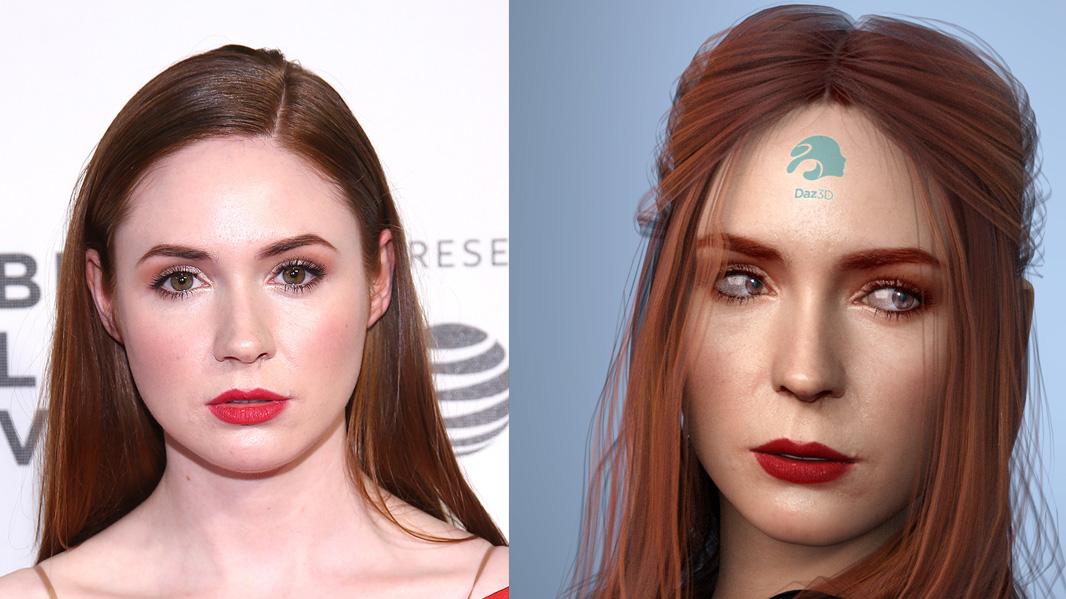
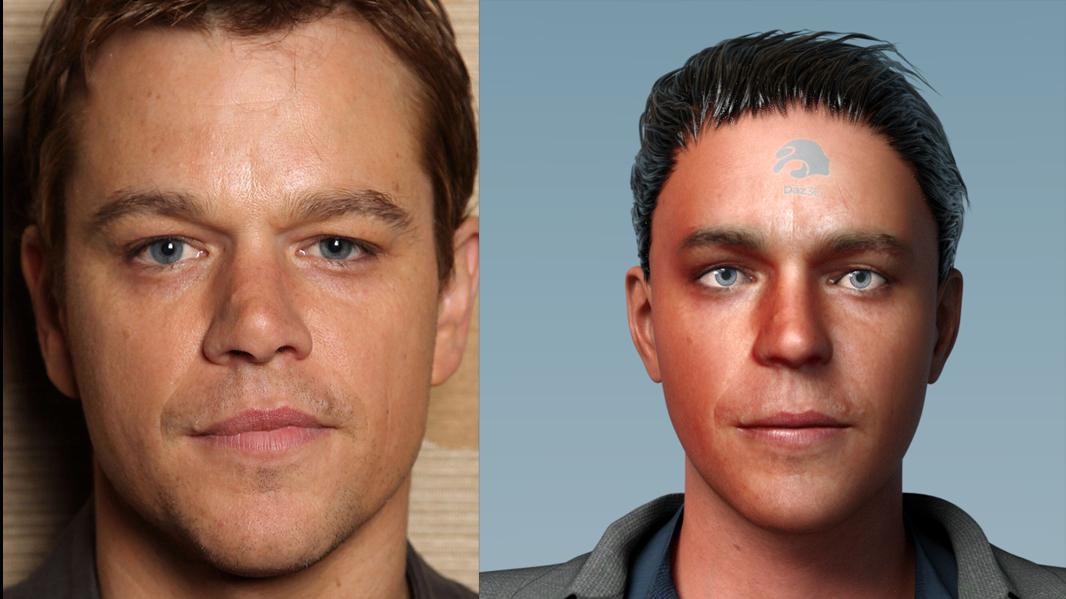
It looks like the problem with the space between the nose the top lip being too big and the lips smushed in still exists in release as it was in beta. This seems to be the largest glaring issue with the shapes generated.
Thank you very much for pointing this out. I've made a couple of tests and the space between the nose and the lips was always too much. I almost searched one hour to find the appropriate morph in DAZ until I gave up so FOR THE LOVE OF GOD, where is this morph??? How can I correct this? I don't even know how this space is called
 No Face Transfer Pane
I haven't seen the developer responding. Where is that?
1) You never found it in the first place before purchasing it?
2) You are on Windows 64 bit?
3) You are using which version of Daz Studio? Look in th About panel.
4) You have updated you Genesis 8 Female and male Essentials with DIM?
5) You load a new Genesis 8 and select the head?
6) Anfd look in Windows>Panes>Face Transfer?
DAZ Studio 4.12 ... Face creation abilities????So from what I'm seeing, if you save a transfer with the watermark and then add a new texture over, it erases the watermark? Or is that post work?
The watermark is on the photo you use. If you put on a new texture, it overrides the photo texture...
That's actually fairly sueful then. There's something about the textures generated by these that just hits the uncanny valley a bit too hard for me, so I usually overwrite with those anyway. May be worth the upgrade.
This was done using the beta so if you don’t want to upgrade, just use the beta.
Except by not upgradig to the release version, you don't benefit from any improvements.
Don’t they keep upgrading the beta? Or is there now a new beta? The 4.11 release always crashed on me so I’ve been using the beta which has been more stable...
Daz 3D is part of

Connect
DAZ Productions, Inc.
7533 S Center View Ct #4664
West Jordan, UT 84084Licensing Agreement | Terms of Service | Privacy Policy | EULA
© 2026 Daz Productions Inc. All Rights Reserved.