-
Daz Studio 4.12 Pro, General Release! (*UPDATED*)
I installed Daz 4.12, to use Face Transfer.
With 4.12, when I render, it does not use my GPU, how to set ???
I do not have the money to buy a new graphics card.Windows 7. Processor i7 - GPU Asus dual-gtx 1060 6gb - 32gb RAM
Thank you in advance for helping me. EdIf you are rendering with Iray, look on the Advanced tab of the Render Settings pane. You should see the listed devices, make sure that they are checked and uncheck the CPU ones.
DAZ Studio 4.12 ... Face creation abilities????Everyone seem to be doing actors. Has anyone done themselves or a friend yet? I'm staying away from the actors because from what I've seen, Face Transfer will work better with a photo that is not very busy (i.e. long hair and such). Maybe an ideal photo would be one where the model have their hair pulled back or no hair at all (like the Will Smith render)?
in my art studio thread on this topic started last week there are many of my ugly head
https://www.daz3d.com/forums/discussion/351636/is-there-a-face-transfer-thread/p1
a few other people's heads too
I liked what I saw. Maybe some people are looking for things to be exactly like something but as far as I'm concerned, I believe in stylization, so if the image looks close to recognizable then that's more than enough to work with.
DAZ Studio 4.12 ... Face creation abilities????Again, does anybody know how the morph between mouth and nose is called since this is the part which gets messed up everytime via Face Transfer? The goal is to reduce the space between mouth and nose. Thank you.
I also would like to shorten the distance between the nose and mouth, but I can't find any face morphs that do this. Some morphs do contain the word philium, but they only change the shape of the philium, they don't change the vertical distance around it. A morph like that would have to shorten the head too, I think.
Use tab [SHAPING] section mouth, erc_mouth height and section nose, erc_nostril wing height to change the gap .
is there a Face Transfer threadHere is my first attempt at using Face Transfer. My verdict - as good as FaceGen, will buy the plugin when available for purchase.
I've attached a copy of the picture I used (actor Grant Gustin). Below, I show both pre and post adding morph tweaks. I'm sure someone better at playing with morph sliders would do a much better job. Often I know where I need to get to, but moving the right sliders is another issue. For example, the top of his head/face (eyes to forehead area) should be broader.

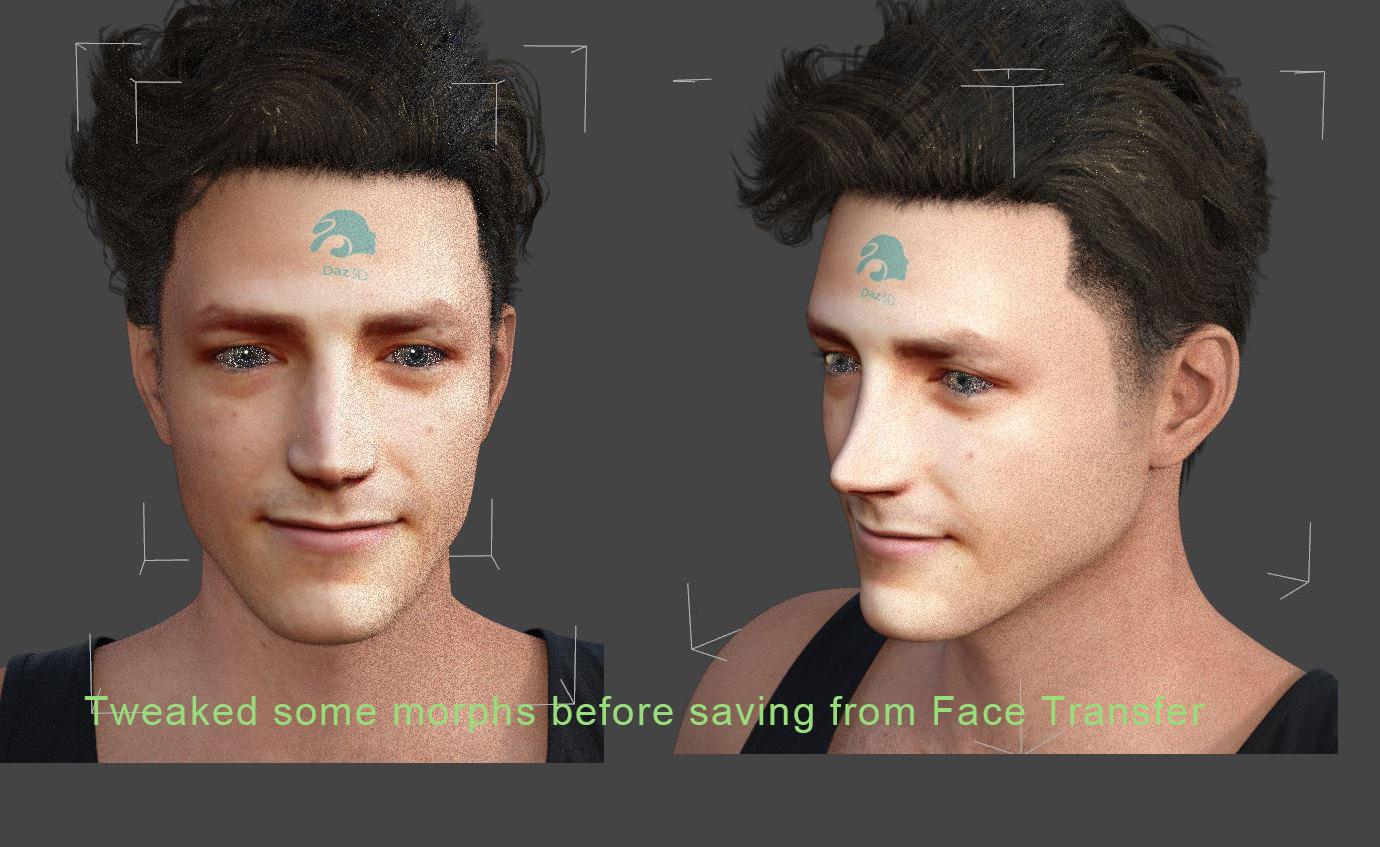
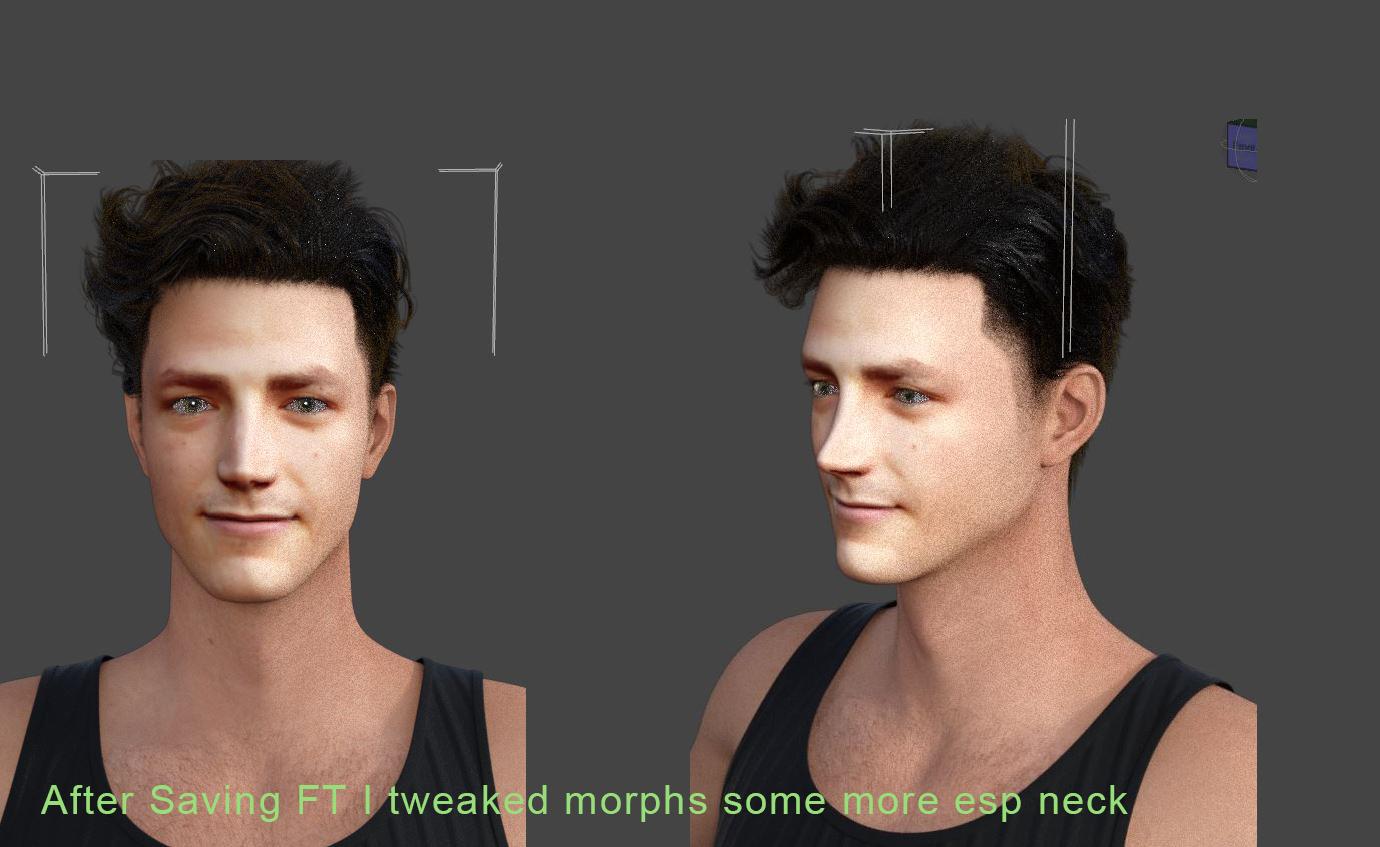
Rendered:
Note, solely in the attachments, I have a second copy of this first render, where I attempted to paint in more eyebrows.
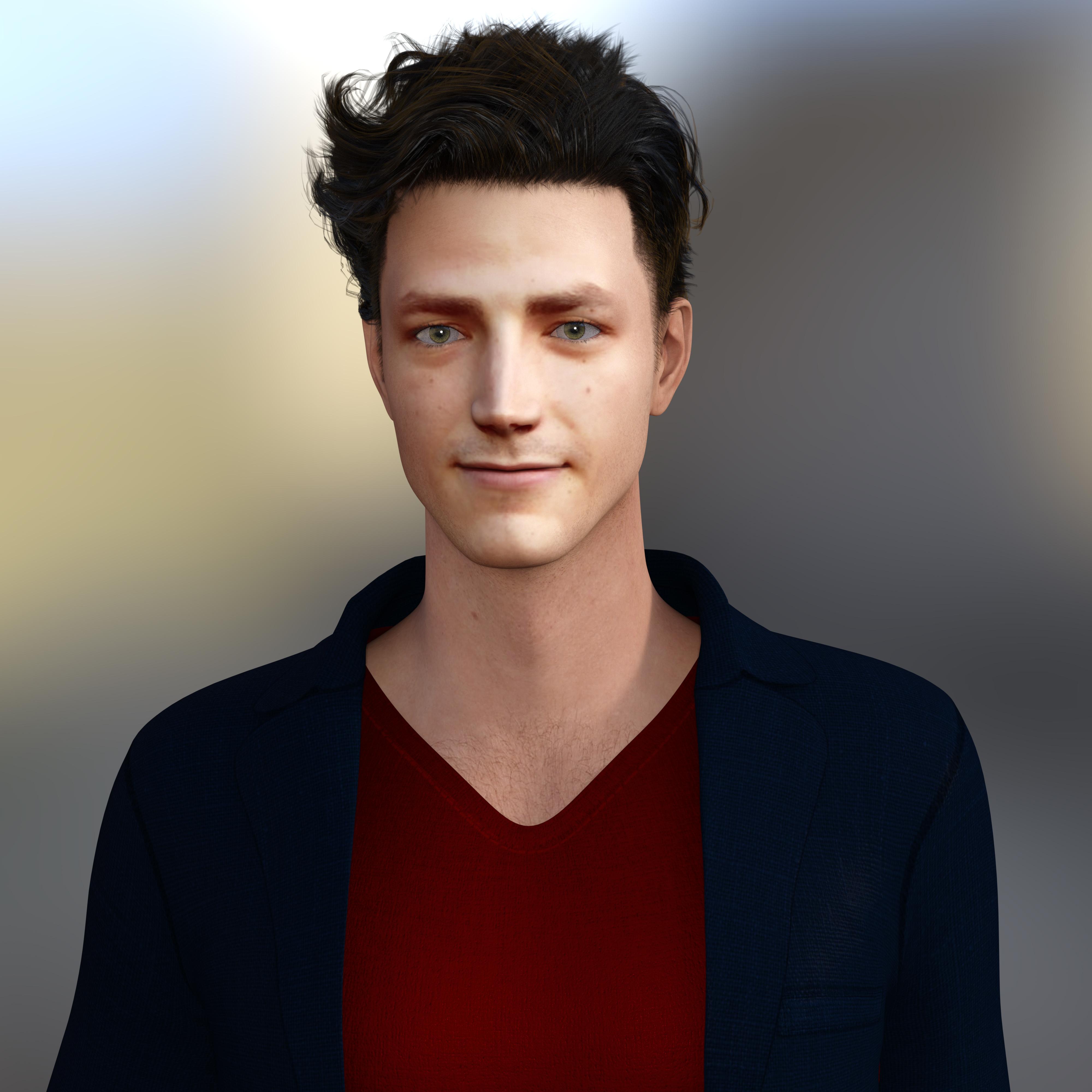
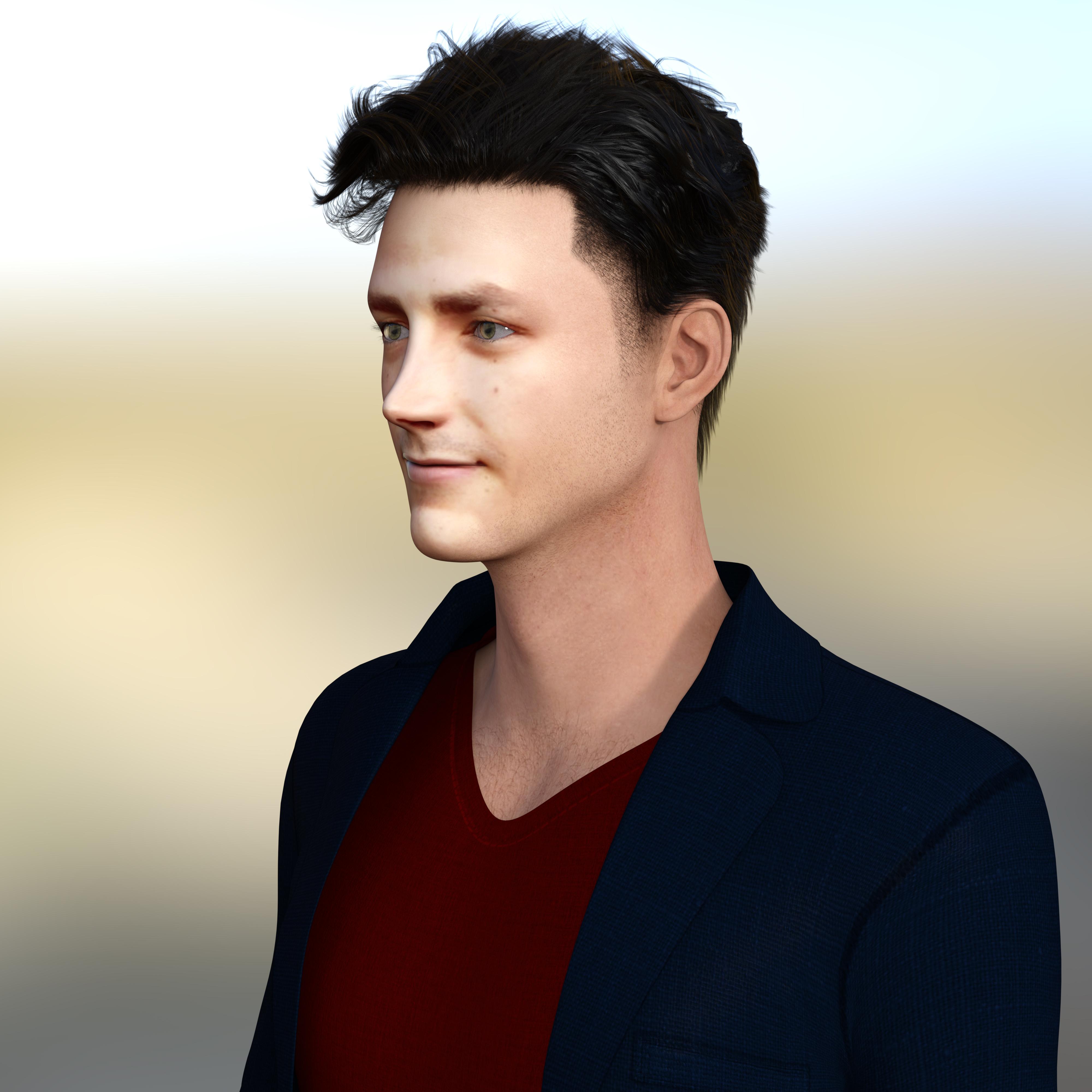

Edit to add - I may have changed the eyes. I tried, but it was unclear whether the new materials "took" so I don't know if the end result is with another character's eyes.
I knew right away this was Grant Gustin without even reading this. This is a good render.
DAZ Studio 4.12 ... Face creation abilities????Everyone seem to be doing actors. Has anyone done themselves or a friend yet? I'm staying away from the actors because from what I've seen, Face Transfer will work better with a photo that is not very busy (i.e. long hair and such). Maybe an ideal photo would be one where the model have their hair pulled back or no hair at all (like the Will Smith render)?
I did because if you are like me & not that artistic you aren't even sure if the way famous people look in their pictures in Google Searches is actually accurate. Even using high resolution pictures of myself I was not sure because light intensity and light angle are so important to what your eye notices. So I used my finger tips to feel the contour of my face and I realized not only was Face Transfer way off but FaceGen was way off too though by not as much. It's interesting learning experience, especially in perception, even when I try to see details I know are there in real life it's hard to notice them in a picture if the lighting does not emphasize it. I never paid that much attention to face geometry before 3D models hobby.
One or two others also did their own faces and posted the results in a thread about Face Transfer in the Art Studio thread here: https://www.daz3d.com/forums/discussion/351636/is-there-a-face-transfer-thread#latest
New Barbie...but where's the love for GI Joe and Stretch Armstrong?
Even though I was a Barbie superfan, I also had GI Joe. He had painted on hair and that humungious dogtag. Like Barbie, he had stiff straight arms and legs. I remember stretch, but I had Gumby and Pokey. Good times. Wonder if someone here with decent modeling skills can make faux figures that can avoid infringment.
Had many other dolls in the Barbie related clan, but Hasbro's Tressy was an oddball. She had hair you could grow and shorten. A button on her abdomen (think big belly button) you pressed while pulling a chunk of hair out of the top of her head which made it grow, and a spot at the base of her spine in back where you had to stuck in a metal key to wind it back down. "And it really really grows!"All this talk makes me want to work on a faux Barbie from G3 or G8, but use a morph for flat feet. I mean who can wear heels for 70 years.
Edited to add GI Joe hair possibly from the UK, bu as Richard said, maybe adopted by the US. Surely DS can make better hair for him????
LOL, looks like a sea urchin!
Face Transfer Free not loadingFrom Rob:
The Face Transfer plugin failing to load on some machines may be due to a dependent library (e.g., msvcp140.dll) that does not exist on the user's machine. If this is the case, until we update the package to either include the VS 2015 redistributable or we can get a 3rd party library compiled with an earlier version of the compiler, users that experience this issue can download/install "Visual C++ Redistributable for Visual Studio 2015" from Microsoft @ https://www.microsoft.com/en-us/download/details.aspx?id=48145 and this should resolve the issue.
Face Transfer failed to load base materialI get this error message too and there's a hint in the logs:
2019-09-25 19:45:12.505 WARNING: ..\..\..\..\..\src\sdksource\general\dzcontentmgr.cpp(2652): Invalid filename passed to DzContentMgr::openFile()
2019-09-25 19:45:14.443 Face Transfer failed to load the base material preset.
The image will still transfer, but with reduced quality.
I think Face Transfer is sending a bad filename to the content manager. It might be a bug, because it happens every time I use it.
But the log doesn't tell us "what" filename it's sending. Probably one that doesn't exist.
DAZ Studio 4.12 ... Face creation abilities????Again, does anybody know how the morph between mouth and nose is called since this is the part which gets messed up everytime via Face Transfer? The goal is to reduce the space between mouth and nose. Thank you.
I also would like to shorten the distance between the nose and mouth, but I can't find any face morphs that do this. Some morphs do contain the word philium, but they only change the shape of the philium, they don't change the vertical distance around it. A morph like that would have to shorten the head too, I think.
Daz Studio 4.12 Pro, General Release! (*UPDATED*)I installed Daz 4.12, to use Face Transfer.
With 4.12, when I render, it does not use my GPU, how to set ???
I do not have the money to buy a new graphics card.Windows 7. Processor i7 - GPU Asus dual-gtx 1060 6gb - 32gb RAM
Thank you in advance for helping me. EdFace Transfer Free not loadingI installed Daz Studio on to my MSI laptop (Which would be my perfered machine but Daz won't work right on there) and the Face Transfer is working right there. Now there is a vast difference in machines here, my Desktop is an AMD Phenom II x6 with a non NVidia GPU, but my Laptop is i7 Nvidia 980 GPU, is my Desktop to old?
And as for my Laptop not working with Daz, this is the problem, It won't conect to Smart Content and stalls Daz. Product menus take about 5 to 10 minutes to open. But if I wait and load something in the view pane posing and all is normal, and the IRay render is almost instant.
Is GenX worth it?Yup so I managed to export a V4 cr2 and it worked as the source figure, created a descent looking Agnes morph:) Some morphs seem to have been lost on the way, but nothing I can't fix with the Genesis original morphs, so tks again... now off to experiment some more
 New Barbie
...but where's the love for GI Joe and Stretch Armstrong?
Even though I was a Barbie superfan, I also had GI Joe. He had painted on hair and that humungious dogtag. Like Barbie, he had stiff straight arms and legs. I remember stretch, but I had Gumby and Pokey. Good times. Wonder if someone here with decent modeling skills can make faux figures that can avoid infringment.
Had many other dolls in the Barbie related clan, but Hasbro's Tressy was an oddball. She had hair you could grow and shorten. A button on her abdomen (think big belly button) you pressed while pulling a chunk of hair out of the top of her head which made it grow, and a spot at the base of her spine in back where you had to stuck in a metal key to wind it back down. "And it really really grows!"All this talk makes me want to work on a faux Barbie from G3 or G8, but use a morph for flat feet. I mean who can wear heels for 70 years.
Edited to add GI Joe hair possibly from the UK, bu as Richard said, maybe adopted by the US. Surely DS can make better hair for him????
DAZ Studio 4.12 ... Face creation abilities????Everyone seem to be doing actors. Has anyone done themselves or a friend yet? I'm staying away from the actors because from what I've seen, Face Transfer will work better with a photo that is not very busy (i.e. long hair and such). Maybe an ideal photo would be one where the model have their hair pulled back or no hair at all (like the Will Smith render)?
in my art studio thread on this topic started last week there are many of my ugly head
https://www.daz3d.com/forums/discussion/351636/is-there-a-face-transfer-thread/p1
a few other people's heads too
FACE TRANSFER UNLIMITED PROBLEMSI have daz studio 4.12.0.67, I looked undre the panes tab and it's not there.
The only thing under my panes tab that start with ''F'' is figure setup.
you might want to re install daz 4.12 & all the starter essentials again then..Because all starter essentials have been updated as well
I assure you the face transfer tab is there between environments tab and figure set up tab
DAZ Studio 4.12 ... Face creation abilities????Everyone seem to be doing actors. Has anyone done themselves or a friend yet? I'm staying away from the actors because from what I've seen, Face Transfer will work better with a photo that is not very busy (i.e. long hair and such). Maybe an ideal photo would be one where the model have their hair pulled back or no hair at all (like the Will Smith render)?
It was a model photo, but that's exactly what I used. Hair drawn back tightly in a bun, so it was barely visible on the image. Also very even lighting (possibly too even?), mouth closed (resulting in a model with the mouth slightly opened). But, this particular photoset of the model was made specifically for 3D CG modeling. It also came with photos from all sides, tilting the head up and down, mouth opened and closed, etcetera.
Looking directly from the front, the face transfer looks somewhat similar. But pan the camera a few degrees around the model, and it quickly becomes an alien.
Daz Studio 4.12 Pro, General Release! (*UPDATED*)Every time i want to save a Face Transfer my DAZ Crashes - What is that all about?
What are your system specifications, and what security software are you using?
DAZ Studio 4.12 ... Face creation abilities????I purchased it but won't get a chance to play with it until this weekend.
I'm curious as to speed to create the morph?
I'm not interested in re-creating famous people, but more wanting to create quickly random characters. I tend to get lost in tweaking dial morphs and waste time.
From what I'm seeing posted, it seems even though it doesn't match perfectly an actor, it does create a unique morph that seems to suit what I want it to do.
Any of those who tested it, quick/painless to get a morph? Or is it tons more work to get a decent morph from what's produced by the default push buttons?
Daz inc. innovating,imitating or stagnating??I have been animating Daz characters in Cinema 4D since V3, but I've always composed the animations in Poser, since the animation tools have historically been terrible in Daz Studio, plus Poser had PoserFusion and InterPoser Pro (3rd party plugin) to get the figures into Cinema 4D, and DS really only had Riptide obj & mdd importer. Mimic Pro (lip sync) worked well with Poser, too.
Fast-forward to where we are now, and Poser has abandoned PoserFusion, and InterPoser Pro is dead as well. Mimic Pro is so old it won't run on my Mac. Honestly, I was despairing, but the DS 4.12 Timeline looks to be a game-changer as far as animating goes--not only is it vastly better than before, but seems to be even better than Poser's animation tools, so I may finally get to cut loose Poser.
That said, DS is still going to be problematic for me since it doesn't have a PoserFusion equivalent to host Daz figures in Cinema 4D. You can use FBX, and I also bought the iClone suite to see what that could do, but it seems like in both instances the characters lose integrity in terms of mesh and weight-mapping, unless I'm doing something wrong. The truest transfer I have found is still Riptide, but even that is on life support, as the developer is no longer updating it, so it doesn't work in C4Dr20. So for the time being I'm stuck using C4Dr14 and 16.
So, the upshot for me as an animator is that the DS 4.12 timeline is a huge leap forward in animating, but I would give my eye teeth for a "DazFusion" plugin for C4D (or even better, an InterDaz Pro), and an update of Mimic Pro (I'm still using V4 & M4, and like them!). In these two big issues, I can agree with some of Wolf's frustration, and I think I can probably speak for him as well that--as animators--our frustration isn't that DS is a bad program, it's that DS and the Daz figures have such great features and great potential for animation that the hurdles and sometimes flaming hoops we have to jump through to work with them are maddening because it feels like we're constantly almost there....
DAZ Studio 4.12 ... Face creation abilities????Everyone seem to be doing actors. Has anyone done themselves or a friend yet? I'm staying away from the actors because from what I've seen, Face Transfer will work better with a photo that is not very busy (i.e. long hair and such). Maybe an ideal photo would be one where the model have their hair pulled back or no hair at all (like the Will Smith render)?
Daz 3D is part of

Connect
DAZ Productions, Inc.
7533 S Center View Ct #4664
West Jordan, UT 84084Licensing Agreement | Terms of Service | Privacy Policy | EULA
© 2026 Daz Productions Inc. All Rights Reserved.