-
Toon Base T-Shirt textures not loading [SOLVED!!]
A meesage appeared: "The files listed below could not be found: /data/Daz 3D/Genesis 9/Base/Morphs/Spearcarrier's Ghostfox/Genesis Transfer Poses/Transfer Genesis 2M to 9.dsf
When I click Ok, I keep having the issue :(
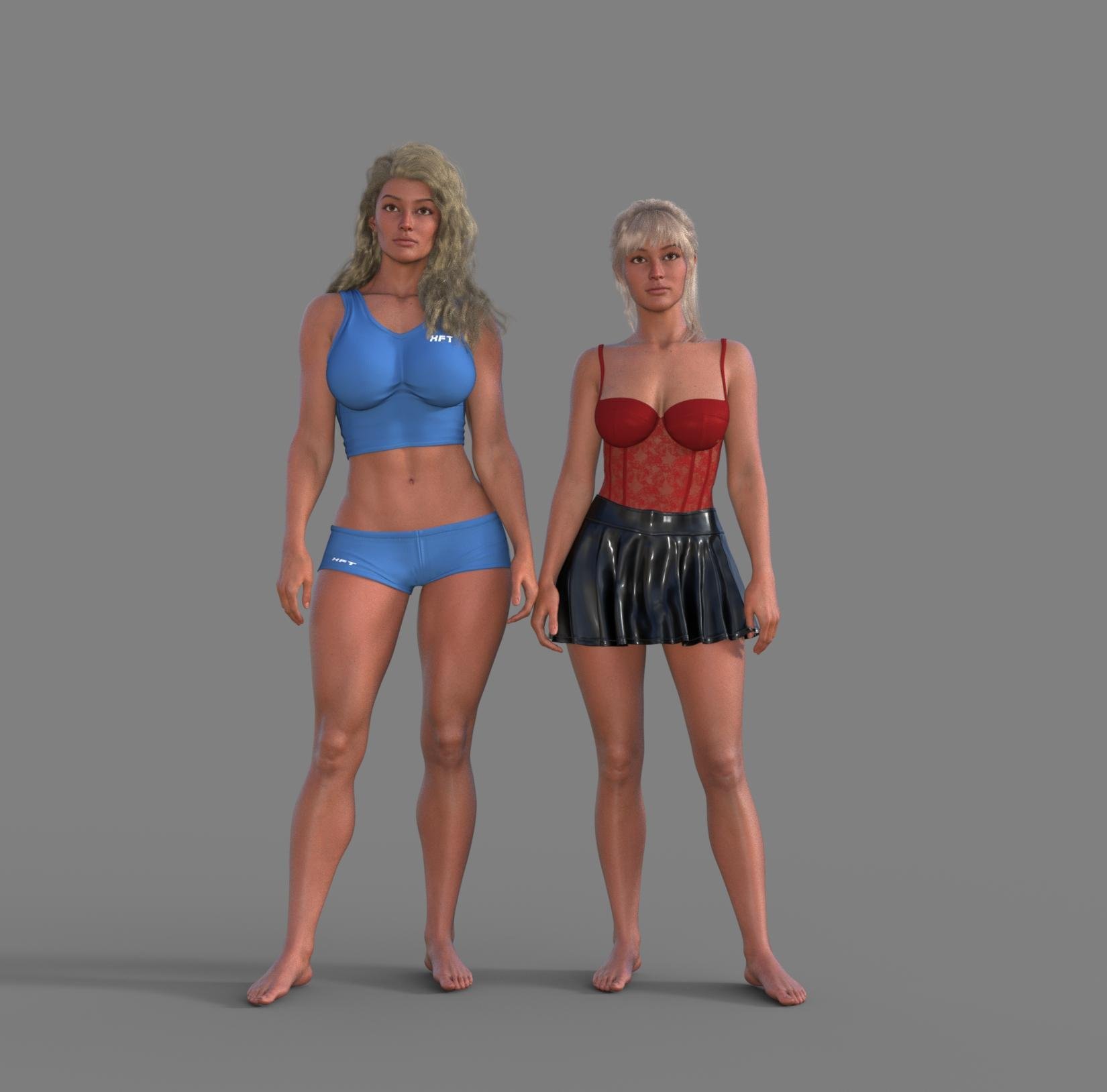
Elena 9Now that I'm home again, and the Premier shape was released, I have a comparison with Elena and the Eden form. She's tall and muscular, height like the slender form, but built like a warrior. It's okay-it's easy to do a morph to look like her so it's not critical if you don't have Premier.
 Toon Base T-Shirt textures not loading [SOLVED!!]
This is what my Log says:
2025-02-06 17:04:56.577 [INFO] :: Begin asset load (open): /People/Genesis 9 Toon/Clothing/Daz Originals/Base Clothing/Toon Base T-Shirt.duf
2025-02-06 17:04:56.607 [INFO] :: Clearing the scene...
2025-02-06 17:04:56.644 [INFO] :: *** Scene Cleared ***
2025-02-06 17:04:56.648 [INFO] :: Determining missing assets...
2025-02-06 17:04:57.765 [INFO] :: Setting textures...
2025-02-06 17:04:57.767 [WARNING] :: \src\sdksource\fileinput\dzassetdaz.cpp(6476): Node parent not found.
2025-02-06 17:04:58.068 [INFO] :: Scanning for addons...
2025-02-06 17:04:58.307 [INFO] :: Creating node geometry...
2025-02-06 17:04:58.317 [INFO] :: Creating UV sets...
2025-02-06 17:04:58.317 [INFO] :: Creating materials...
2025-02-06 17:05:01.068 [INFO] :: Resolving legacy figures...
2025-02-06 17:05:01.069 [INFO] :: Preparing modifiers...
2025-02-06 17:05:01.070 [INFO] :: Creating modifiers...
2025-02-06 17:05:01.157 [INFO] :: Resolving 10 formulas...
2025-02-06 17:05:01.157 [INFO] :: Finding formula properties...
2025-02-06 17:05:01.158 [INFO] :: Sorting formula properties...
2025-02-06 17:05:01.158 [INFO] :: Creating ERC Links...
2025-02-06 17:05:01.158 [INFO] :: Finished resolving formulas.
2025-02-06 17:05:01.158 [INFO] :: Finalizing modifiers...
2025-02-06 17:05:01.158 [INFO] :: Finalizing channels...
2025-02-06 17:05:01.158 [INFO] :: Finalizing materials...
2025-02-06 17:05:01.159 [INFO] :: Sorting property groups...
2025-02-06 17:05:01.161 [INFO] :: Setting up follow targets...
2025-02-06 17:05:01.161 [WARNING] :: \src\sdksource\fileinput\dzassetdaz.cpp(2823): Failed to follow node.
2025-02-06 17:05:01.178 [INFO] :: Loaded morph deltas: 0m 0.3s - /data/Daz 3D/Genesis 9 Starter Essentials/G9 Base Shirt/Morphs/Daz 3D/Base/FitOverPants2.dsf
2025-02-06 17:05:01.316 [INFO] :: Finished asset load (open): 0m 4.740s - /People/Genesis 9 Toon/Clothing/Daz Originals/Base Clothing/Toon Base T-Shirt.duf
2025-02-06 17:05:01.837 [INFO] :: Unlocking viewport redraw...
2025-02-06 17:05:01.838 [INFO] :: Viewport redraw unlocked.
2025-02-06 17:05:02.582 [INFO] :: Loaded image: BaseToon_TShirt5Stripes_BaseColor.jpgAny idea, guys?
Help me find this figure! What figure was used for this prop?Hi, @Halcon Bluesky Thank you for your interest in my hairstyles. Some of them have the hair styled behind the ears, while others do not. If by "lock of hair" you are referring to Carme Hair, I should mention that it has morphs to push the lower hair behind the shoulders, but it does not include any morph to push the side lock behind the ears. However, these locks have bones and can be hidden by selecting and hide the bone in the Scene tab.
The hairstyle was not designed to look like that, and I think the hair may appear a bit sparse at the temple if the lock is hidden. I have attached some test renders to demonstrate how it can be modified, along with screenshots of the Scene and Parameters tabs. I like it better if the lock just get's smaller.
Have a creative day!Looking for G8 foot morphA morph cannot merge mesh.
For that you would need a geograft.
Looking for G8 foot morphHi All.
I am looking for a foot morph for G8 male & female,
that would keep the big toe but fuse the other four toes into one.
something like the image But keeping the shape of the foot and not looking like a sock.
Anyone know of such a thing?
As always thanks ahead of time
[Released] RSSY Character And Material Conversion Bundle Genesis 8 to Genesis 9 [Commercial]Well, I tried a bunch more characters from diverse artists and most of them wouldn't load. The ones that would sometimes crashed the script, sometimes Daz Studio. One eventually completed but the resulting morph was empty and it still crashed Daz Studio. I ended up uninstalling the script and material suit - I won't bother asking for a refund as it was so cheap, but I'm not sure what the circumstances would be when I decided to re-install it and try again. Each 'conversion' takes hours and the contant disappointment and frustration has really got to me. The dealbreaker though, was the 'duplicate formulas' error every time G9 loaded. This has gone now that I have uninstalled the script. Since no-one else seems to be having similar problems, I can only assume this is a 'me' issue. Ah well, so much promise...I didn't see the point in posting my log, since I had to uninstall anyway.
Elena 9Yes she's not bad. The one I'm missing is an extra morph for non attached earlobs.
Evil Flow Ghost Hair alternative for G8F [SOLVED]Auto-follow means that it will generate a projected morph in the hair, for G9 morphs not directly supported. Not that it can be used on other generations.
My suggestions is like nemesis10, to position and scale the hair, so it matches, and then parent to head bone.
DAZ Studio slowly falling behind a paywall?Richard Haseltine said:
Why would budget stop you using 4.23.x.x? It's free and doesn't break any existing plug-ins etc. - the older Mesh Grabbers still work, and should until we move to the enxt major version 9at which point the latest version of 4.x.x.x will still be available).
My understanding is that Mesh Grabber 4 had been under development by the original author. It was then bought buy Daz and renamed Geometry Sculpter, which was then built into DS 4.23 and made available only with a Premier sub, making Mesh Grabber 3 incompatible with 4.23.
EDIT: The product pages for Mesh Grabber - including the morph editor and rotations - say they're all compatible with DS 4.23, so I happily stand corrected on that point, but I'm still never subscribing to Premier until a (much) cheaper annual plan is made available.
Keep getting stuck in render, no progressI get this same behaviour on one particular character (which I reported a very long time ago). I thought it was something to do with that particular mesh morph and subdivision, but turns out I get the same issue if I use the character materials on any morphed G9 or even the base mesh at a high subdivision. The problem resolves if I use any other materials. So for me, at least, it's a combination of those materials and high subdivision. Yet the character is supposed to be HD. Maybe there's a silly parameter value in the shader preset.
DForce-ify a pillow that squishes when sat on instead of flattening during simcarrie58 said:
So I haven't tried this yet but it looks to do what OP is wanting done ......
I've thought about getting this but will it really work on pillows?
Morph MasterTugpsx said:
Thanks for the information. It's similar to the process I am testing with 2 planes, one that is revealed when the other is deformed. The old movie magic trick.
the problem is to keep the deformation I have to use clone objects (boots only to reduce poly count) that are then set to invisible to maintain the impression in the surface. I'll check into this a bit more.Do the collision deformation then save it as a morph. You can dial the morph in or out to change the amount of deformation. I did something like that in this little video https://www.dropbox.com/scl/fi/d9touk2wowmer21sd3432/Plane-on-G9-Head_chf3_prob3.mp4?rlkey=zajqbmyf9i9wnt0xb61q7i5uj&dl=0
Clothing issueRichard Haseltine said:
Capes generally need custom bones where they hang free (or just simulate using dForce) - with the Transfer Utility they follow the nearest bone which tends not to be entirely desirable.
I see, I did create my own bones after creating vertex groups in Blender and setting them all up in Figure Setup in DAZ. How do you then fit the cape onto the character to make it follow any pose?
Clothing issueCapes generally need custom bones where they hang free (or just simulate using dForce) - with the Transfer Utility they follow the nearest bone which tends not to be entirely desirable.
Clothing issueHi! I'm working on converting a character from Blender to Daz Genesis 9 and I have had no issues with all of the clothing and accessories using Transfer Utility except for the cape.
#1 is how it looks like without the cape when I do apply a pose to the character. #2 and #3 is how it looks like when I used Transfer Utility on the cape followed by the same pose. I have attached the screenshot of my settings as well.
Need some assistance regarding this! I have been trying different solutions and none seem to work
Why do all my newly purchased Genesis 9 characters look the same?crosswind said:
It is said that some "FN" characters have issues of duplicate formulas, i.e. no head/body morph is loaded and dialed.
Have you checked DS log to see if there's duplicate formula errors?
I've taken a new screenshot to better illustrate the issue.
This time, I loaded Lyusan and Rei from my Library into the scene and removed their textures for better visibility.
Rei is meant to be a child-like figure, small with a rounded face, while Lyusan should appear more adult. Both are of Asian origin, but they don’t resemble that at all—they’re clearly missing their morphs.
This isn’t limited to just these two characters. Any new characters I purchase seem to be missing their morphs, while older ones in my library work fine.
I already tried deleting the cache in the data folder to see if that would fix anything, but it had no effect.
The characters' body and head shape morphs are set to 100%, yet adjusting these sliders does nothing. However, if I apply morphs from other figures, the shapes do change. This suggests that their own morphs aren’t working at all.
Hopefully, this new information helps narrow down the issue.
[Released] RSSY Character And Material Conversion Bundle Genesis 8 to Genesis 9 [Commercial]wings76fan said:
I'm having trouble with a plus-size female I created. I tried using the RSSY Character Converter Genesis 8 to 9 but the resulting figure was all twisted (both with zero and restore options).
I then tried using ManFriday figure converter which got the morph onto a G9 dev figure. I then tried to use the Material Suit converter to convert the G8 Hierarchical figure to this G9 morphed figure but got the error that there is an unknown figure in the hierarchical material preset. Any help?
From the manual:
The Converted Character’s Body is wrinkled. Because of the way that morphs must be converted, a morph that on Genesis 8 appears to only touch a small part of the head can affect the whole body on Genesis 9. You need to show Currently Used parameters to show all morphs on the converted character. Then, one by one, dial in the morphs to find the offending morph(s). Once you find them, delete the morphs from your HD (click the Gear icon, Parameter Settings, and look at File Path for the asset to figure out where the morph is and what it is called). You should also resave the character with the offending morph(s) dialed out (set to 0).
[Released] RSSY Character And Material Conversion Bundle Genesis 8 to Genesis 9 [Commercial]francescaheroofspace said:
Hi there,
I am REALLY struggling with this addon. The material suit works perfectly, but every time I try to export my Genesis 8 morphs, it completely zeroes them and exports the Genesis 8 default to Genesis 9. I have tried every setting and troubleshooting under the sun, even making my own morph and exporting to parametrers, nothing has worked. Zero and Restore make no difference either. Could you please help me figure this out? I desperately need this plugin to work for a short film and I'm completley lost.
Any help would be appreciated, thank you!
Argh, just seeing this message now. I am sorry for the late response. I would need to see the Daz Log as it converted a character (and it is ZERO for sure).
Can't get Fantasy Deer Fawn Kit to work [SOLVED - with lovely detailed instructions]I don't own any of these products, but here what I would try:
1. Load Genesis 8.1 Female (the base version)
2. Apply the various shapes preset to get Genesis 8.1 to 'shape' like Amira, which can be done either by dialing the morphs or by using the presets in '/People/Genesis 8 Female/Characters/BJ Amira/'
- Amira 01 Head Apply
- Amira 01 Body Apply
- Amira 02 HD Details Apply (if you want the HD details of course)
3. Apply Amira's mat presets, 'Amira MAT' should be enough.
Bonus step. If you're planning to use Amira another time, you should save a Character Preset of the current result. As Amira's brows seems to be baked into her textures, it should be straighforward, but as a precaution, also save your current scene a Scene Subset (with only the character as part of the subset saved): Character preset's main advantage is that you can load them with another G8.1F selected and Daz will ask if you want to replace the current figure with the Character Preset, a Scene subset will load the character where it was when you saved the subset.
Note: Saving a Character Preset can be perplexing to say the least and having a backup scene subset to not lose the work already done is a great idea (some elements will also not be saved as part of a character preset). If you need more help on the subject, just ask.
I'm saving Character Presets in 'My Library' but I don't remember if I had to create the directory I'm using ('Presets/Characters') or not.
4. Try using the fantasy deer fawn kit, it should now work.
What you are possibly missing: Genesis 8.1 is backward compatible with Genesis 8 (except for the Expressions but it can be fixed by removing some files and maybe some products) but the reverse is not true and the Fawn kit is labeled as Genesis 8.1.
In particular:
1. The surfaces of Genesis 8.1 is sligthly different. So while you can apply any Genesis 8 skin to Genesis 8.1, the reverse is not true. There is one exception: a Genesis 8 Geoshell settings won't work without some work on Genesis 8.1.
2. For a reason I don't understand, while Genesis 8.1 can, AFAIK, use any morph from Genesis 8, the reverse is not true.
3. Genesis 8.1 can use any clothes made for Genesis 8, but if a clothing item was set to have 'Genesis 8.1/Female' as a Prefered Base and not Genesis 8/Female, that clothes will show an autofit dialogue box if you're trying to fit it on Genesis 8.
To reduce the amount of headache, I'm only using Genesis 8.1 and the first thing I do when I'm using a Genesis 8 character is the first three steps and the bonus step.
Daz 3D is part of

Connect
DAZ Productions, Inc.
7533 S Center View Ct #4664
West Jordan, UT 84084Licensing Agreement | Terms of Service | Privacy Policy | EULA
© 2026 Daz Productions Inc. All Rights Reserved.