-
How to filter parameter search better?
If OP means filtering in Parameters pane rather than Smart Content or somewhere else :
Filter in Parameters pane doesn't support Query Pattern like " that you use for searching products / items in Smart Content ~~
To search a morph, just type in the full or partial label, for Eyes Closed, type in Eyes Closed, you should get it. Filtering in Parameters pane also supports Regular Expressions, like: rx::Closed.* (started with "Closed").
Besides, there're lots of build-in filters in DS 4.23+ which make searching in Parameters much easier and quicker.
AIUTO...CHI CONOSCE L’ITALIANO? PARTE QUATTORDICICrios said:
Gente, cosa ne pensate sinceramente di G9. Lo sto provando spassionatamente a causa della condizione obsoleta del mio PC, ma non mi convince. Nei morph, tipo Rin, quello free DAZ Originals, Testa e corpo sembrano sproporzionati. Per non parlare dei morph masculine e femine, non mi convincono tanto.
Dipende da cosa ci devi fare...
A me personalmente è scomodissima la parte del seno quando faccio vestiti attillati.. se passo da seno maschile a femminile (o viceversa) troppe volte la mesh si deforma malamente e non c'è modo diretto di correggere le cose. In compenso i vestiti sono unisex e così faccio per maschi e femmine.
Fare armature per il seno è complicato...Inoltre tocca armarsi di morph di terze parti (o crearseli) per avere figure "sensuali". I corpi base sono troppo tozzi (fianchi larghi e braccia esili) e sullo store non trovo figure così interessanti da dire wow lo prendo. Pure io uso troppo spesso Kin nei render che è quella un po' più interessante (perchè è quasi anime come proporzioni).
AIUTO...CHI CONOSCE L’ITALIANO? PARTE QUATTORDICISi concordo, G1 è il migliore. G2 è G3 e G8 sono utili solo se hai bei morph per loro, altrimenti lasciano il tempo che trovano. Ora ho convertito i merchant di G3 a G8, e devo dire che è diventato più interessante.How to filter parameter search better?For example, there is a morph called Eyes Closed, but it does not show up if type exactly that because of the space it's treating it like a different word. It's really tedious to search eyes and go through 100s of morph. Please advise if there is a better way to search.
AIUTO...CHI CONOSCE L’ITALIANO? PARTE QUATTORDICICrios said:
Gente, cosa ne pensate sinceramente di G9. Lo sto provando spassionatamente a causa della condizione obsoleta del mio PC, ma non mi convince. Nei morph, tipo Rin, quello free DAZ Originals, Testa e corpo sembrano sproporzionati. Per non parlare dei morph masculine e femine, non mi convincono tanto.
Onestamente l'idea di riproporre G1 è buona, ma hanno sfondato tutto come loro solito. Il rig è rotto, tutte quelle ossa in più sono poco utili, le UV sono incasinate e i morph difficili da mixare.
Secondo me hanno raggiunto il vero apice proprio con G1: Ottima quantità di poligoni, leggerissimo nelle scene complesse, eccellente gestibilità delle textures, ampia possibilità di morph, incredibile versatilità delle UV Maps, Rig perfetto per le pose e le animazioni, possibilità di far indossare al modello praticamente qualsiasi set di abiti/capelli/scarpe anche non nativi, morph che si mischiano alla perfezione... Insomma, il top.
AIUTO...CHI CONOSCE L’ITALIANO? PARTE QUATTORDICIGente, cosa ne pensate sinceramente di G9. Lo sto provando spassionatamente a causa della condizione obsoleta del mio PC, ma non mi convince. Nei morph, tipo Rin, quello free DAZ Originals, Testa e corpo sembrano sproporzionati. Per non parlare dei morph masculine e femine, non mi convincono tanto.AIUTO...CHI CONOSCE L’ITALIANO? PARTE QUATTORDICITiziano said:
Secondo voi, qual è il metodo migliore per fare una faccia truccata così a un G8M?
Prendi la texture e ci dipingi sopra, fatto.

Puoi usare Blender che è gratuito e abbastanza semplice da usare per quella singola operazione. I passaggi per prepararlo sono grossomodo gli stessi per la creazione dei morph.
Altrimenti puoi usare GIMP e disegnare tutto direttamente sulla texture, ricorda però che potrebbero essere necessari alcuni tentativi in quanto le linee rette a volte vengono stortate un pochino sul modello.
Altra chance è quella di cercare un kit pronto sui vari store, tipo quello Geisha qui su DAZ3D.
Elena 9OrangeFalcon said:
Now that I'm home again, and the Premier shape was released, I have a comparison with Elena and the Eden form. She's tall and muscular, height like the slender form, but built like a warrior. It's okay-it's easy to do a morph to look like her so it's not critical if you don't have Premier.
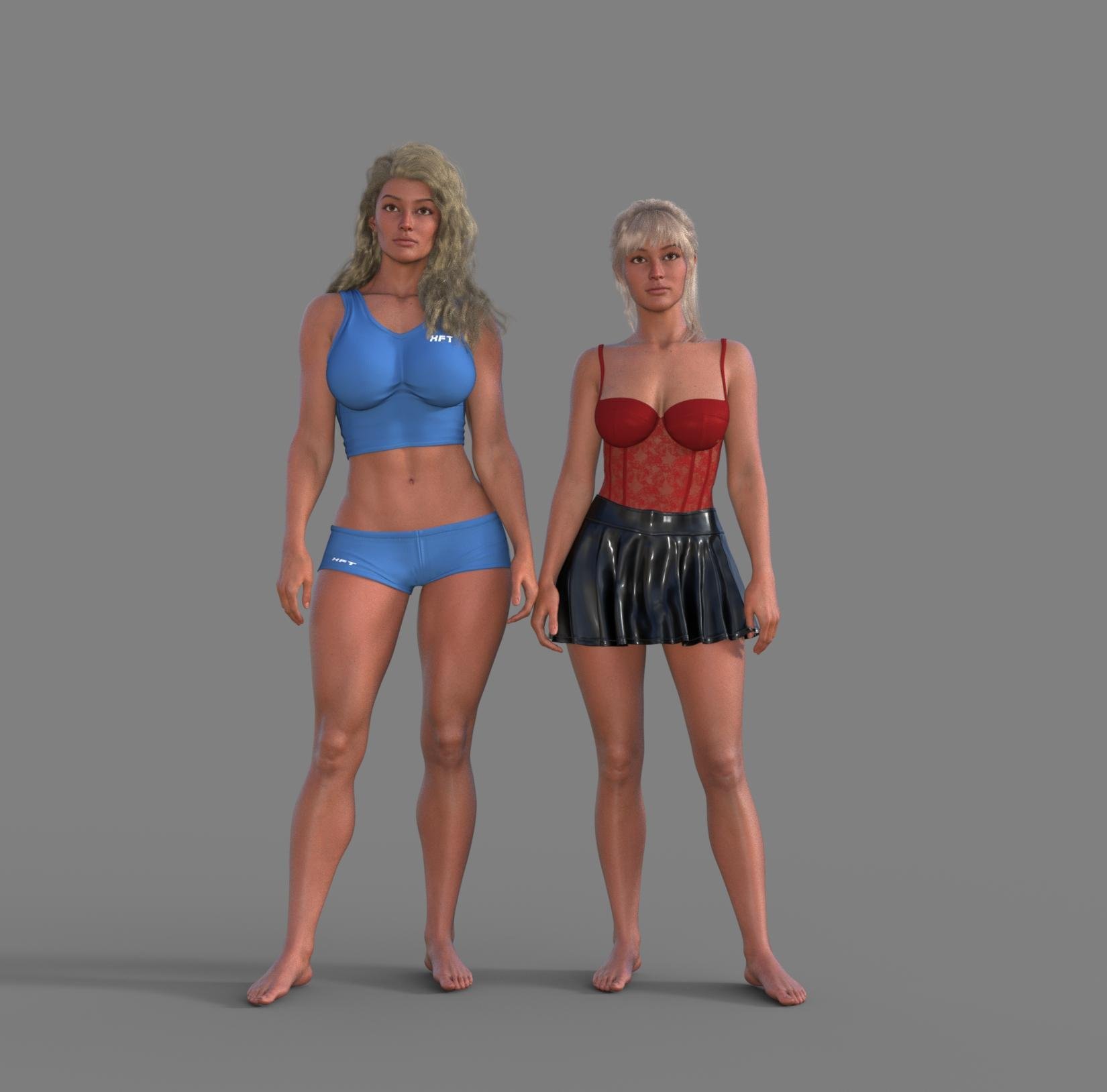
Thanks for the comparison render! It does confirm that the Eden character's form can pretty much be made wtih morphs. Elena is looking good!
Toon Base T-Shirt textures not loading [SOLVED!!]taiuri said:
A meesage appeared: "The files listed below could not be found: /data/Daz 3D/Genesis 9/Base/Morphs/Spearcarrier's Ghostfox/Genesis Transfer Poses/Transfer Genesis 2M to 9.dsf
When I click Ok, I keep having the issue :(
Yeah, that is very weird! (The morph you can ignore, it's likely a freebie morph from Spearcarrier that didn't get saved right or something). But it's so strange that the shirt is black still. I have no idea what might be causing that. As you shown, your other toon clothing looks fine. It's just so weird.
Toon Base T-Shirt textures not loading [SOLVED!!]A meesage appeared: "The files listed below could not be found: /data/Daz 3D/Genesis 9/Base/Morphs/Spearcarrier's Ghostfox/Genesis Transfer Poses/Transfer Genesis 2M to 9.dsf
When I click Ok, I keep having the issue :(
Elena 9Now that I'm home again, and the Premier shape was released, I have a comparison with Elena and the Eden form. She's tall and muscular, height like the slender form, but built like a warrior. It's okay-it's easy to do a morph to look like her so it's not critical if you don't have Premier.
Toon Base T-Shirt textures not loading [SOLVED!!]This is what my Log says:
2025-02-06 17:04:56.577 [INFO] :: Begin asset load (open): /People/Genesis 9 Toon/Clothing/Daz Originals/Base Clothing/Toon Base T-Shirt.duf
2025-02-06 17:04:56.607 [INFO] :: Clearing the scene...
2025-02-06 17:04:56.644 [INFO] :: *** Scene Cleared ***
2025-02-06 17:04:56.648 [INFO] :: Determining missing assets...
2025-02-06 17:04:57.765 [INFO] :: Setting textures...
2025-02-06 17:04:57.767 [WARNING] :: \src\sdksource\fileinput\dzassetdaz.cpp(6476): Node parent not found.
2025-02-06 17:04:58.068 [INFO] :: Scanning for addons...
2025-02-06 17:04:58.307 [INFO] :: Creating node geometry...
2025-02-06 17:04:58.317 [INFO] :: Creating UV sets...
2025-02-06 17:04:58.317 [INFO] :: Creating materials...
2025-02-06 17:05:01.068 [INFO] :: Resolving legacy figures...
2025-02-06 17:05:01.069 [INFO] :: Preparing modifiers...
2025-02-06 17:05:01.070 [INFO] :: Creating modifiers...
2025-02-06 17:05:01.157 [INFO] :: Resolving 10 formulas...
2025-02-06 17:05:01.157 [INFO] :: Finding formula properties...
2025-02-06 17:05:01.158 [INFO] :: Sorting formula properties...
2025-02-06 17:05:01.158 [INFO] :: Creating ERC Links...
2025-02-06 17:05:01.158 [INFO] :: Finished resolving formulas.
2025-02-06 17:05:01.158 [INFO] :: Finalizing modifiers...
2025-02-06 17:05:01.158 [INFO] :: Finalizing channels...
2025-02-06 17:05:01.158 [INFO] :: Finalizing materials...
2025-02-06 17:05:01.159 [INFO] :: Sorting property groups...
2025-02-06 17:05:01.161 [INFO] :: Setting up follow targets...
2025-02-06 17:05:01.161 [WARNING] :: \src\sdksource\fileinput\dzassetdaz.cpp(2823): Failed to follow node.
2025-02-06 17:05:01.178 [INFO] :: Loaded morph deltas: 0m 0.3s - /data/Daz 3D/Genesis 9 Starter Essentials/G9 Base Shirt/Morphs/Daz 3D/Base/FitOverPants2.dsf
2025-02-06 17:05:01.316 [INFO] :: Finished asset load (open): 0m 4.740s - /People/Genesis 9 Toon/Clothing/Daz Originals/Base Clothing/Toon Base T-Shirt.duf
2025-02-06 17:05:01.837 [INFO] :: Unlocking viewport redraw...
2025-02-06 17:05:01.838 [INFO] :: Viewport redraw unlocked.
2025-02-06 17:05:02.582 [INFO] :: Loaded image: BaseToon_TShirt5Stripes_BaseColor.jpgAny idea, guys?
Help me find this figure! What figure was used for this prop?Hi, @Halcon Bluesky Thank you for your interest in my hairstyles. Some of them have the hair styled behind the ears, while others do not. If by "lock of hair" you are referring to Carme Hair, I should mention that it has morphs to push the lower hair behind the shoulders, but it does not include any morph to push the side lock behind the ears. However, these locks have bones and can be hidden by selecting and hide the bone in the Scene tab.
The hairstyle was not designed to look like that, and I think the hair may appear a bit sparse at the temple if the lock is hidden. I have attached some test renders to demonstrate how it can be modified, along with screenshots of the Scene and Parameters tabs. I like it better if the lock just get's smaller.
Have a creative day!Looking for G8 foot morphA morph cannot merge mesh.
For that you would need a geograft.
Looking for G8 foot morphHi All.
I am looking for a foot morph for G8 male & female,
that would keep the big toe but fuse the other four toes into one.
something like the image But keeping the shape of the foot and not looking like a sock.
Anyone know of such a thing?
As always thanks ahead of time
[Released] RSSY Character And Material Conversion Bundle Genesis 8 to Genesis 9 [Commercial]Well, I tried a bunch more characters from diverse artists and most of them wouldn't load. The ones that would sometimes crashed the script, sometimes Daz Studio. One eventually completed but the resulting morph was empty and it still crashed Daz Studio. I ended up uninstalling the script and material suit - I won't bother asking for a refund as it was so cheap, but I'm not sure what the circumstances would be when I decided to re-install it and try again. Each 'conversion' takes hours and the contant disappointment and frustration has really got to me. The dealbreaker though, was the 'duplicate formulas' error every time G9 loaded. This has gone now that I have uninstalled the script. Since no-one else seems to be having similar problems, I can only assume this is a 'me' issue. Ah well, so much promise...I didn't see the point in posting my log, since I had to uninstall anyway.
Elena 9Yes she's not bad. The one I'm missing is an extra morph for non attached earlobs.
Evil Flow Ghost Hair alternative for G8F [SOLVED]Auto-follow means that it will generate a projected morph in the hair, for G9 morphs not directly supported. Not that it can be used on other generations.
My suggestions is like nemesis10, to position and scale the hair, so it matches, and then parent to head bone.
DAZ Studio slowly falling behind a paywall?Richard Haseltine said:
Why would budget stop you using 4.23.x.x? It's free and doesn't break any existing plug-ins etc. - the older Mesh Grabbers still work, and should until we move to the enxt major version 9at which point the latest version of 4.x.x.x will still be available).
My understanding is that Mesh Grabber 4 had been under development by the original author. It was then bought buy Daz and renamed Geometry Sculpter, which was then built into DS 4.23 and made available only with a Premier sub, making Mesh Grabber 3 incompatible with 4.23.
EDIT: The product pages for Mesh Grabber - including the morph editor and rotations - say they're all compatible with DS 4.23, so I happily stand corrected on that point, but I'm still never subscribing to Premier until a (much) cheaper annual plan is made available.
Keep getting stuck in render, no progressI get this same behaviour on one particular character (which I reported a very long time ago). I thought it was something to do with that particular mesh morph and subdivision, but turns out I get the same issue if I use the character materials on any morphed G9 or even the base mesh at a high subdivision. The problem resolves if I use any other materials. So for me, at least, it's a combination of those materials and high subdivision. Yet the character is supposed to be HD. Maybe there's a silly parameter value in the shader preset.
Daz 3D is part of

Connect
DAZ Productions, Inc.
7533 S Center View Ct #4664
West Jordan, UT 84084Licensing Agreement | Terms of Service | Privacy Policy | EULA
© 2026 Daz Productions Inc. All Rights Reserved.