-
Genesis 8.1 / Victoria 8.1
Having glanced through this post since the introduction of G8.1 i'm curious as to what I've done differently to everyone else as I have both G8 and G8.1 expressions visible and working right out the box. All visemes are also available and working. I have a quite extensive library of G8F expressions and as of yet have not found a single expression that does not work as expected on 8.1, including expresions from other sites where I know the artist is working hard to update their expression products to work with 8.1. There are some sight differences on a few expressions, but nothing noticable without doing a mesh to mesh overlay comaparison. All the files that people are pormpting to remove in the G8_1 folder are all still intact.
The new G8 essentials were installed in the same way I install all updates to anything that directly effects studio and/or base resources. That method is to ensure everything related to Daz is shut down on my PC with a windows restart. I used DIM to uninstall starter essentials (I never use Daz Central or Connect, only DIM or manual inatall), clear it from the install tab and download and install again via DIM. Another windows rertart, open Daz (4.15 beta and/or 4.15 general) and all expressions working as expected.
So, what am I doing that others aren't?
New Desktop- Downloaded Daz Studio 4.15 Pro-No productsHello!
I got a new desktop computer. I downloaded Daz Studio 4.15 Pro from Daz Central. Where are my Products? This is the message I am getting. Please not I have Norton and Daz is on the Access list. I have the previous version of Daz on my laptop. Do I need to back up my products to an external hard drive and port them into the new version. My Daz Central install is also not work if I want to just install my products again on my desktop. Please respond as if I am a 2 year old. I am not that confident of my technical skills unless I have steps to follow.
Resource Error
---------------------------
A valid PostgreSQL CMS connection could not be established. Several DAZ Studio features that require a valid PostgreSQL CMS connection, such as context aware content views and loading content installed using the Daz Connect service, will not be available. Check your network, anti-virus, and firewall settings for conflicts.
A Li'l Side Render Fun #2022 - Tuesday is Soylent Green Day editionSci Fi Funk said:
Title: WELL THAT MAKES US BOTH LIARS
WIP
I'm glad to say thanks to Carrara's CPU based renderer, I can (slowly) render with my mini-Pc. This was a 3 hour render. It's taken a while to remember about biased lighting rigs, but after getting nowhere for a while, the Luminance Lighting Pack came to my rescue. I've added some spot lights for the shevling area.
This is a WIP so there are a number of things to fix. The biggest one is that the central character is not in the shot yet. Plus the DOF isn't how I want it, and there a few modeling mistakes to fix. Also I've chosen a daytime render, whereas the frame in the film is at night. The net curtains I'm using don't look so good at night, but with a clear day and some Dystopian buildings behind them they look more net cutainy if there is such a term.
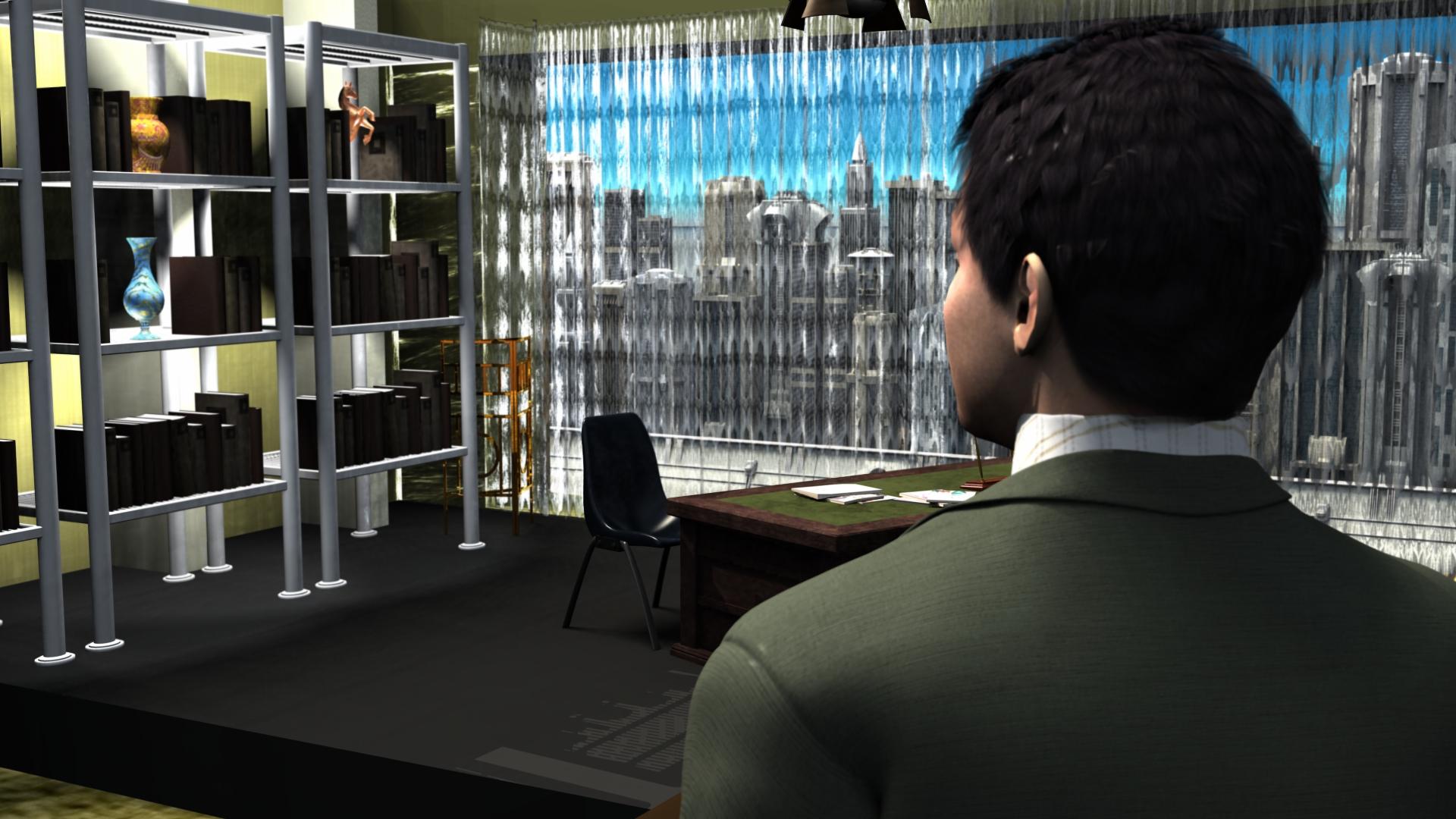
Nice scene, turned out well !!
A Li'l Side Render Fun #2022 - Tuesday is Soylent Green Day editionTitle: WELL THAT MAKES US BOTH LIARS
WIP
I'm glad to say thanks to Carrara's CPU based renderer, I can (slowly) render with my mini-Pc. This was a 3 hour render. It's taken a while to remember about biased lighting rigs, but after getting nowhere for a while, the Luminance Lighting Pack came to my rescue. I've added some spot lights for the shevling area.
This is a WIP so there are a number of things to fix. The biggest one is that the central character is not in the shot yet. Plus the DOF isn't how I want it, and there a few modeling mistakes to fix. Also I've chosen a daytime render, whereas the frame in the film is at night. The net curtains I'm using don't look so good at night, but with a clear day and some Dystopian buildings behind them they look more net cutainy if there is such a term.
Daz to Maya Update 1.7Daz central is useless. You have to go to the update site and download code/ download as zip.
Fortress of Solitude look-alike product?Roman_K2 said:
Some of those promo shots do look like the original early 1960's comic book appearances of the FOS.
For me the main thing re: the FOS was that Superman had his own mainframe, the "Super Univac". Hot damn, I was only 9 years old but I wanted one!

"In June 1952, UNIVAC entered service at the Pentagon as the first U.S. commercially built digital computer. It weighed over 13 tons and consumed 125KW of power. Its central memory (RAM) stored only 12,000 characters, the equivalent of about 12 kilobytes (kB)."
LOL I'm pretty sure your smart phone has more computing power than even a "Super Univac" would possess. Just this page only is 42 kilobytes.
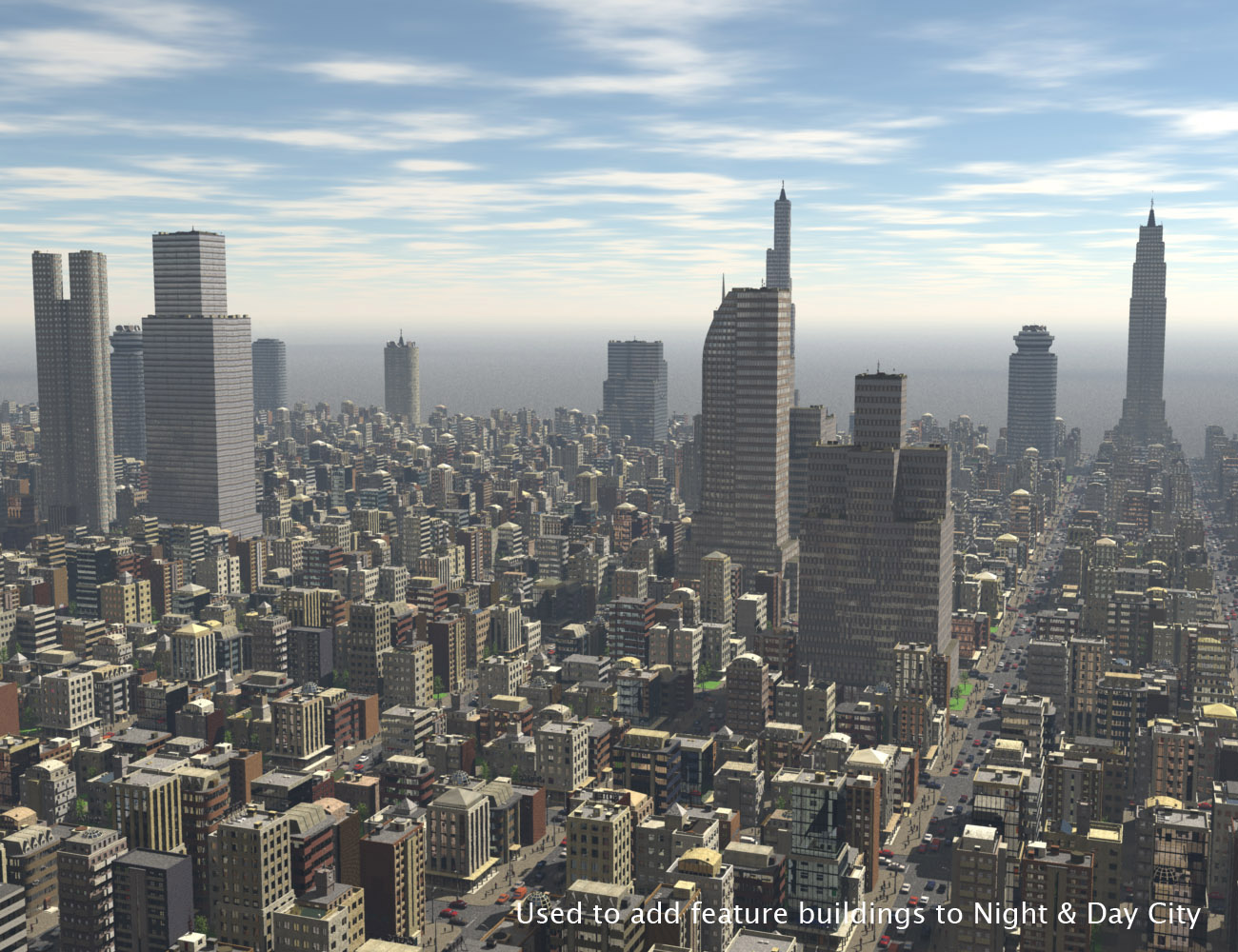
Carrara Sale Email Message Alert threadI used that this morning - evidentally, I didn't have the incredible Central City District yet. I have the Night & Day City, but didn't have this one - what a huge oversight!
Well, it's mine now! I love how the Night & Day City system works and all of the incredible Lo-Rez vehicle and people it comes with. It's cool that this comes with All of those as well, in case you don't have/need that original product - but this image from the promos illustrates beautifully how well they're made to work together! (Central City District adds the sky scrapers in this image)
 Genesis 8 Morphs doesn't show up.
PerttiA said:
Morphs are not poses and therefore can not be found on Posing-tab, use the Properties-tab instead.
I'm apprciated your answer but I'm not sure if that is the problem that I have.
I can't add the morph to begin with. It's not that I look at the wrong tab when that tab doesn't exists. It doesn't show up in my library at all. You can see on the left side (from the screenshot) that the Genesis Morph folder have nothing on it. If you look at another image, you will see that even daz central can't find the resources and I've reinstalled it multiple times.
Hexagon missing.Thanks. I looked for Hexagon. It's not installed.
I tried uninstalling and reinstalling Hexagon via DAZ Central. The reinstall gets to 50%. I tried uninstalling and reinstalling DAZ Central. Still no Hexagon, but now I get 'install' instead of 'open'.
Genesis 8 Morphs doesn't show up.I've purchased and download Genesis 8 Morph(42083) but I can't use it. I downloaded it through Daz Central and it doesn't show a file and when I click open from daz central. It sais that Resouce Error Could not find the 42083 product.
Wacky Modelling ~ In Carrara ~I'm watching a series of lectures about Victorian England, the lecture this morning was about democracy in late 19th century England (spoiler: not everybody was for it). This came up:
"On 19 September 1893 the governor, Lord Glasgow, signed a new Electoral Act into law. As a result of this landmark legislation, New Zealand became the first self-governing country in the world in which women had the right to vote in parliamentary elections. In most other democracies – including Britain and the United States – women did not win the right to the vote until after the First World War. New Zealand’s world leadership in women’s suffrage became a central part of our image as a trail-blazing ‘social laboratory’. "
https://nzhistory.govt.nz/politics/womens-suffrage
So a tip of the Mounted Rifle hat to the Kiwis.
 Clothing Converter from Genesis 3 Female to Genesis 8 Female Not finding Clothes
A lot of scripts cannot work on files installed by Connect. If you installed with Central why are files in "cloud'?
Storytelling Feedback for It's Raining Men Contest 2020 (Updated May 30)Feedback for @smoke14
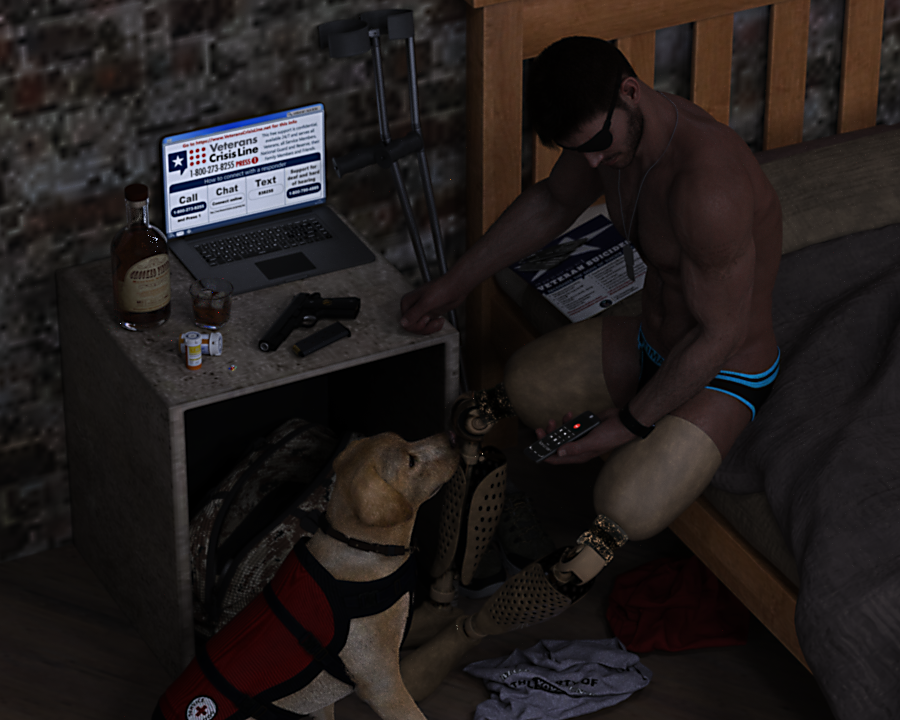
I love the theme of the entry and all the detail that went into selecting and positioning the items in the room. From the wrinkled shirt on the floor, the open duffle bag, the pills, gun, alcohol, and the dog. Everything was included for the sake of the story and that is wonderful! Congrats on a job well done!
Now, your biggest area of opportunity is to establish more mood through light and colors. In this case, a central theme is "hope". The fact that he's made the decision to finally get help is a point that can be introduced and established better through lighting. Perhaps you could add a stream of warm (yellow/orange), soft light coming through the window. Maybe that light falls on his leg and his dog companion. And although he may still be partly in the shadows, the light is finally reaching out to him and moving him to choose life.
I would also encourage you to switch out the wall for a different shader of bricks, as the low texture graphic becomes a point of distraction. You might also want to replace the texture of the box/nightstand, as that also looks a bit blurry and pixelated. Like with Symms, check where you're cropping when it comes to the dog. It might work a bit more to zoom out and give the figures more breathing room.
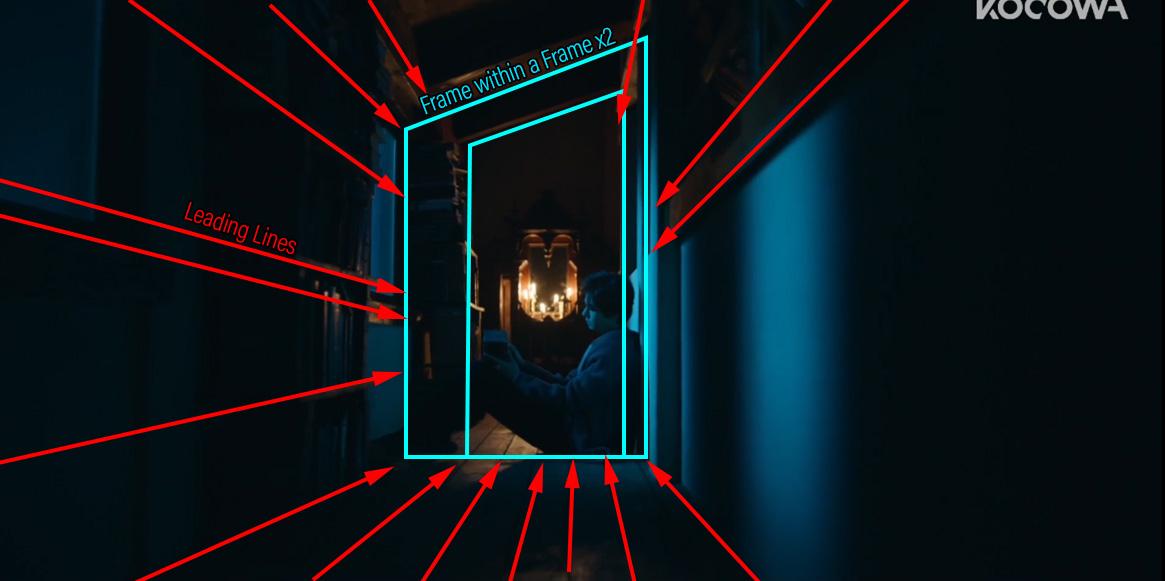
Although I think the angle is good since the man is feeling vulnerable, you could also try to position the camera near the bed and use the edge of the bed as a leading line towards the figure of the man and his dog.
Here are some resources that you may find helpful:
- IG Photographer's Toolbox
- Really helpful product to get different cinematic cameras already set up.
- "Leading Lines" in Popular Films
- This will be helpful if you decide to try and use leading lines to draw our focus towards the figure; forgoing the high angle you have right now.
- How Filmmakers Manipulate Our Emotions Through Color
- Great explanation of the power of colors and their use in films to elicit emotions. There is a mood experiment at 2:40 that you'll find very interesting.
- 5 Lighting Concepts Every Cinematographer Needs To Know
- How light affects the mood portrayed. You'll find the portion that talks about Low Key (4:00) and Soft vs Hard Light (5:57) especially useful. But the entire video has knowledge that will come in handy for sure.
These are some handy references that may also be helpful:
Mood: Worried but with some hope. Perhaps in your case, you could punch the warmth a bit more, but a combination with a blue/aqua would create a beautiful harmony for your render.
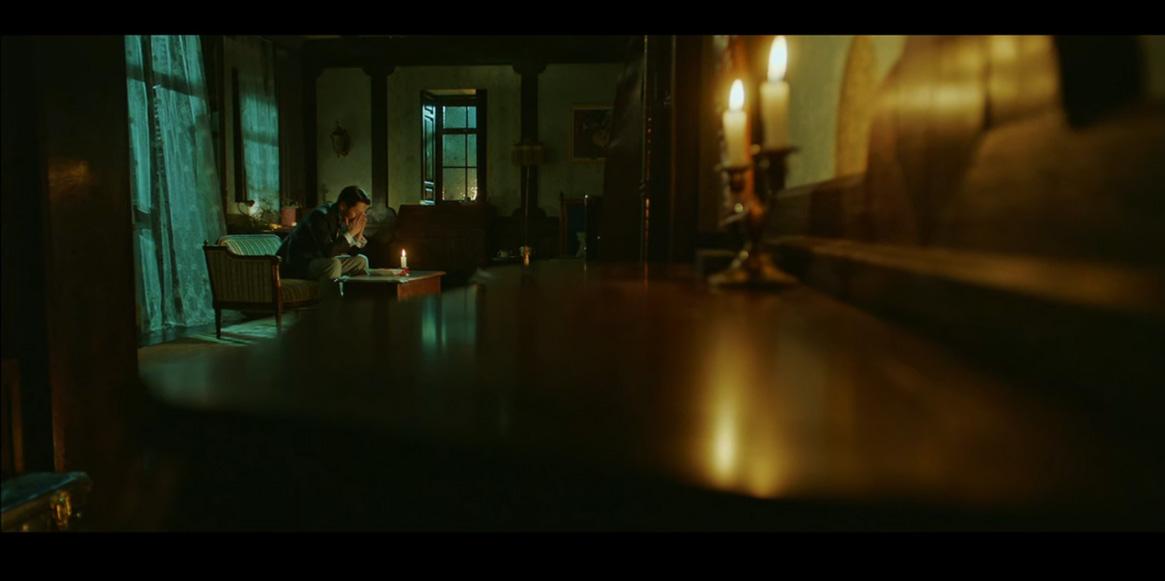
Or you can go for a single color (monochrome) and use the light to create different shades. Notice here how the light comes in through the window, softening everything and giving it an almost hazy/heavenly vibe.
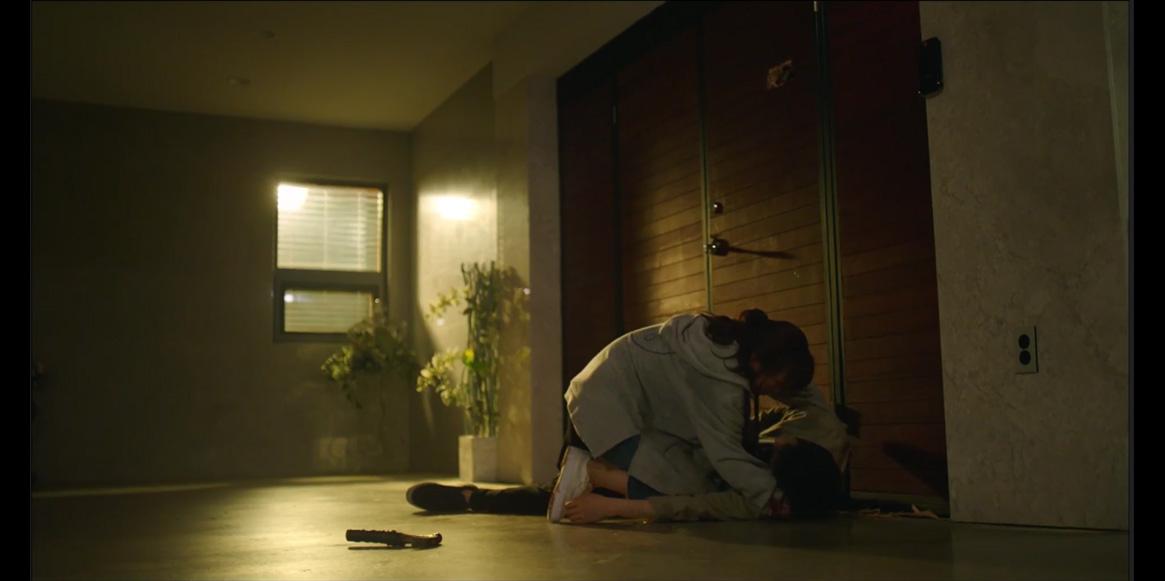
You could also emphasize the feeling for "sadness" or "solitude" by dominating the scene with blues and then having just a pinch of warmth (perhaps the glare from the laptop, or he could have a small lamp nearby):
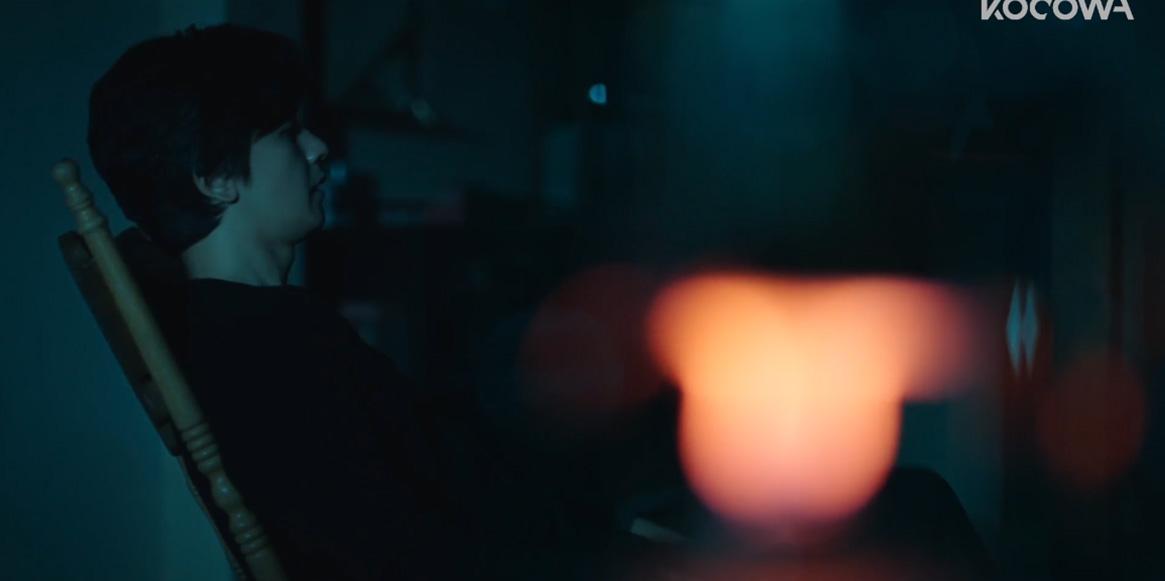
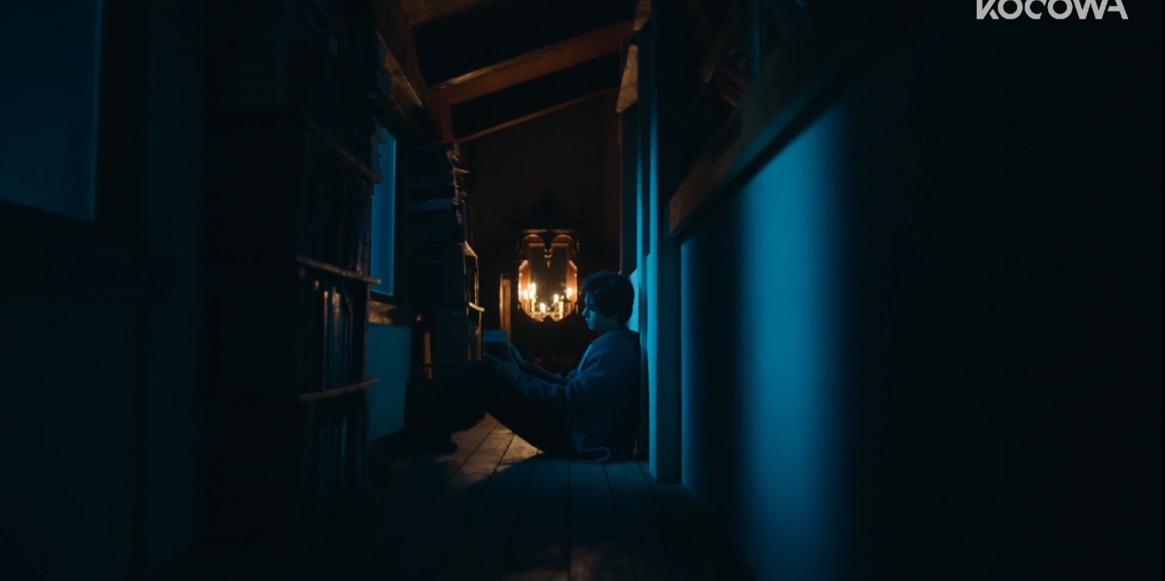
And this reference should help with what I mean about using the edge of the bed to create lines that lead us to the character. In addition, boxing is used in this example as well. Boxing (Frame within a Frame) is used to establish a character that feels like he's trapped. The tighter the box, the more claustrophobic he feels. The more boxes, the more he's trapped. I wrote an article about that, describing its uses via examples from Korean Dramas which you can read here: Popular Visual Cues in K-Dramas, Part 2.
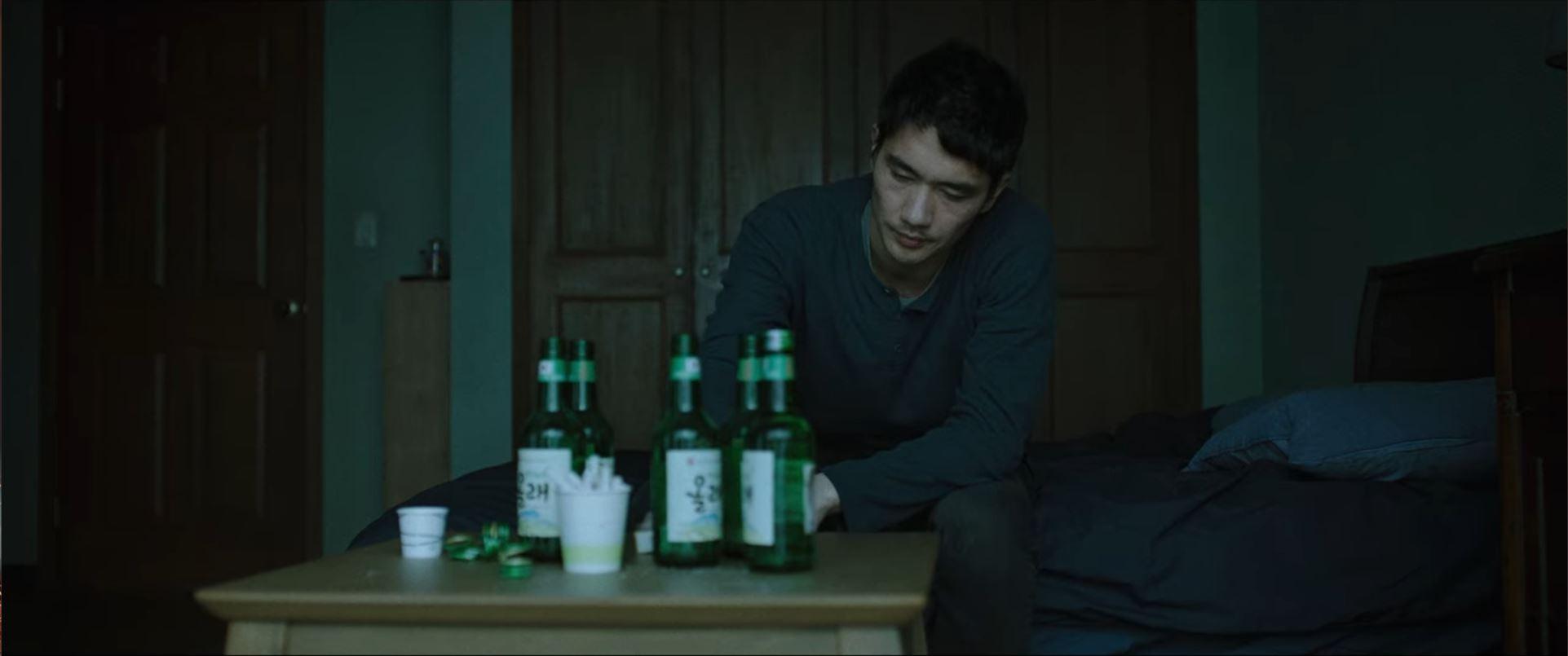
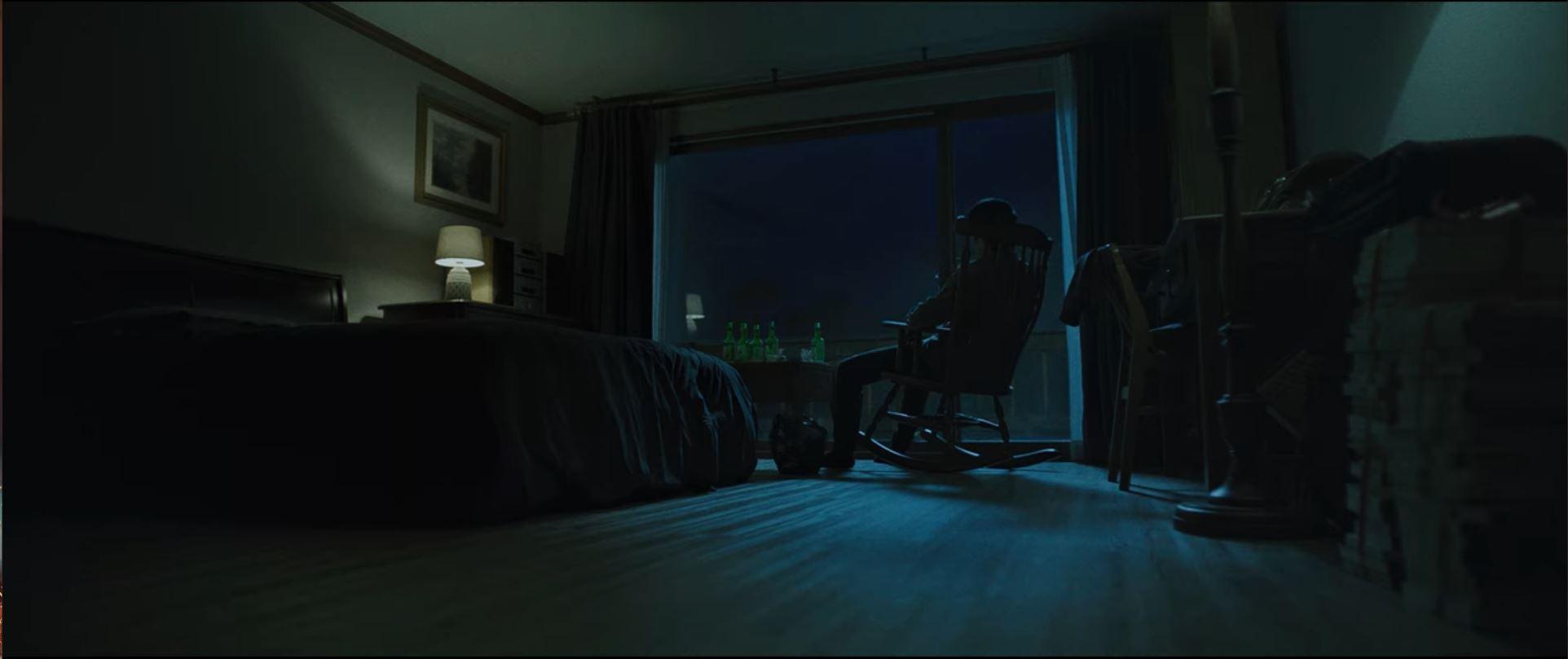
Update 4/12: I saw a movie over the weekend called "Night in Paradise" on Netflix and I came across some perfect reference for you. These shots are amazing at building a mood that could fit your render. Take note of the composition (how small the character looks and how isolated), the lighting choices, and the colors. Notice how by spacing things out, the shot feels un-cluttered. I especially like the second one, which leans more towards sadness and loneliness. But I think the first one (with a soft light of a new day) fits your concept much better.
 Paths are not honored between DAZ studio and DAZ Central.
My suggestion: replace Daz Central with DIM, see this link: https://www.daz3d.com/forums/discussion/382131/daz-install-manager-dim-1-4-0-67-now-available-updated
DC is fine for "simple" installations where things mostly rely on default settings or maybe having a base directory moved to another drive. But the moment when you start customizing things in more detail then it can't cope (at least that's my impression based on posts on this forum as well as some testing with DC).
See, while DIM might be a little trickier to configure it also provides a lot more control. I can tell it where to download packages (drive D on my end), I can specify the location for my manifest files, where and if to place shortcuts, where to install updates, where my CMS is located (and which port it's using) and... I can set up where my Daz 3D library is at and which applications I'm using (DS, Bryce, Hexagon and even ZBrush).
You can't do any of this with Daz Central... as such my suggestion above. Stop using it and grab DIM instead.
Paths are not honored between DAZ studio and DAZ Central.I have used plain DAZ to download and install my products; they are on an external drive.
After formatting my main drive; I was about to install DAZ studio again, then I saw that DAZ central was out; so I installed it and set the install path on my D drive; which is my external drive I use for 3d content.
When DAZ Central got installed, it automatically installed DAZ studio BUT didn't ask me where to install; so I ended up with DAZ studio installed on my C drive, and all the paths to content are now relative to that drive.
And now, here is where things go pretty crazy.
- In DAZ Studio, I see no installed content; even if content preferences I have my D drive set for content for CMS cluster directory, DAZ connect data, DAZ studio formats and Poser formats. I have about 40 GB of content installed in my D drive folder, which was downloaded from my previous install of DAZ studio; so the content should be there for sure
- In Daz Central I see nothing installed, not even DAZ Studio (which launched right after Daz Central installed it as first thing, mind you). In the DAZ Central settings I set the application path to wherever it was installed originally (so on C/DAZ folder); not sure if there is a bug with Daz Central not being able to see the installation it just did.
Basically now I would like to understand how do I sync all the content between those 2 apps? I can't use C drive, so it has to be D drive; but it seems that neither DAZ studio nor Daz Central are able to see my installed content.
Paid items disappearing from product libraryJust a heads up, I just found that Freak 5 was somehow removed from my product library, even though I bought it in January 2013. Gonna have to go through my orders and make sure everything else is still there now (AAAAAAAAAAAAAAAAAARRRRRRRRRRRRRRRGGGGGGGGGGGGGGGGGGGHHHHHHHHHHHHHHH!!!!!!!!!) That's 1,246 orders to check.
Might have had something to do with me trying DAZ Central (NOT using that, caused too many issues with content). So if you've tried it, double check your product library.
Do I Need to Reinstall ALL This?I'm tellin' you, *everything* is in F:\My DAZ 3D Library. Runtime, Data, People, Environments, Textures, Shaders, Hair, Lights.... Everything. As to how it got there, as near as I can remember, I just created the file and then moved everything over in one go. Until a couple of days ago, when I switched from Win 7 to Win 10, everything worked beautifully. Didn't matter if I installed from DIM or Central, it was just there and ready to use. For my Renderosity stuff, I just sent it to my Downloads on C:\, and then drag and dropped them into F:\My DAZ 3D Library as I unzipped and opened them.
I have a feeling I'm going to have to just tell my DIM to install all 6250 items, and leave it alone for...well, no telling how long. I don't think I'm going to suss out a way for content to simply be recognized as installed.
That's why I want to make SURE my DIM is set up to install to the right folder.
How to change the default C drive settings?Central should allow you to set the base path to use, but I'm not sure how it handls chnages. Instal manager will pick up on what Central did, and will allow editing of individual paths https://www.daz3d.com/get_install_manager/
DIM Log In not workingWell this was informative. 1. Changed my mind on Daz Central after reading this. Thanks. I was trying to figure out where it was going to put stuff. I like the way DIM tells me what I have to download, what is downloaded, and what is installed. I have used it for so long, I can't Imagine life without it. Think I will stick with what has worked well for me.
2. Taoz... I followed the path to the UserAccounts and blew away my account. I recreated it, and logged in with no trouble. (I guess it got glitched somehow.) I did have to set up my paths again.. and for a minute I thought, "oh no!", but then I thought, "I got this." I just had to remember the alternate location of my installs. Now I am downloading and installing bunches of new packages.
Thanks All!
DIM Log In not workingUninstalling and reinstalling won't help if it's an account issue or an issue with your local settings, as it won't touch either of them. Go to
%AppData%/daz 3d/InstallManager/UserAccounts/
and try removing the .ini file that has your account details (with Install Manager and Central closed), then try restarting DIM and see if it will let you log in (but you will lose all your settings, so if you are using cistom locations you will need to restore them).
Daz 3D is part of

Connect
DAZ Productions, Inc.
7533 S Center View Ct #4664
West Jordan, UT 84084Licensing Agreement | Terms of Service | Privacy Policy | EULA
© 2026 Daz Productions Inc. All Rights Reserved.