-
Announcement about phasing out 3Delight - do we lose our 3Delight products?
kyoto kid said:
Havos said:
kyoto kid said:
Havos said:
kyoto kid said:
...yeah, GenX/GenX2 along with utilities like Zev0's XTransfer and Skin Builder are sort of my "bread and butter" toolls for original custom, character design. This is the primary reason I pretty much let the G9 train drop me off at the next station as there is little to no compatibility with older generation characters in this respect,
I may just stay with 4.x.x, not only because of having access to 3DL, but also the tools above I depend on.
The good thing about GenX, XTransfer and Skinbuilder is that they do not have to be run when building a scene to render. You can transfers morphs or generate skins in an older version of DS, then use the generated assets inside a more modern version of DS.
...actually GenX and XTransfer add morph channels and as they likely will not be supported in Daz "whatever". Not sure that the controls will transfer over to the new version since those plugins will not be supported by the new SDK (particularly GenX as the creator passed on a while back and there was never an update for G8).
The only way I am able to use the GenX morphs with G8 is through XTransfer. Sadly the latter was not updated to G9, most likely because of the return to the "unisex" mesh base This is also likely the reason we have not seen a Skin Builder 9 either.
Moving to a totally new SDK tends to break everything until PAs update plugins and scripts to function with it.
I am not sure what you mean by morph channels, I thought that was a Poser only thing. Both Gen X and XTransfer create dsf files for the morphs and these are already supported in DS 2025. I have used both characters with GenX and XTransfer morphs in 2025 and they work just fine. There are a number of scripts and plug-ins I am concerned about in DS 2025, however GenX and XTransfer are not one of those.
...apologies, I meant morph sliders. Normally that sort of thing would not work under a new SDK until the plugin/script was updated.
Morph sliders are part of DS itself and are not part of any plug in. Sliders that work in DS 4 work just fine in DS 2025.
A morph that requires an active plug in could in theory not work in a latter version but that does not apply to the morphs created by Gen X or XTransfer. They are needed to move the morphs between generations, but after that they are not required to even be installed to use the transferred morphs.
Looking for shorts for a G8FI could have done that, but one of the laces in the top deformed badly when autofitting (why I didn't investigate), so I decided to take the V4 top and G8F into blender, and just fit it there.
When I then realised that Daz couldn't simulate it, I guessed that there might be some double vertecex. And cleaining that up in blender is easy. After that is was just a new transfer to G8F and it was good. It is only the laces that has dynamic strength for simulation. I furthernore lowered gravity to 0.1, else the laces would bend downwards.
Announcement about phasing out 3Delight - do we lose our 3Delight products?Havos said:
kyoto kid said:
Havos said:
kyoto kid said:
...yeah, GenX/GenX2 along with utilities like Zev0's XTransfer and Skin Builder are sort of my "bread and butter" toolls for original custom, character design. This is the primary reason I pretty much let the G9 train drop me off at the next station as there is little to no compatibility with older generation characters in this respect,
I may just stay with 4.x.x, not only because of having access to 3DL, but also the tools above I depend on.
The good thing about GenX, XTransfer and Skinbuilder is that they do not have to be run when building a scene to render. You can transfers morphs or generate skins in an older version of DS, then use the generated assets inside a more modern version of DS.
...actually GenX and XTransfer add morph channels and as they likely will not be supported in Daz "whatever". Not sure that the controls will transfer over to the new version since those plugins will not be supported by the new SDK (particularly GenX as the creator passed on a while back and there was never an update for G8).
The only way I am able to use the GenX morphs with G8 is through XTransfer. Sadly the latter was not updated to G9, most likely because of the return to the "unisex" mesh base This is also likely the reason we have not seen a Skin Builder 9 either.
Moving to a totally new SDK tends to break everything until PAs update plugins and scripts to function with it.
I am not sure what you mean by morph channels, I thought that was a Poser only thing. Both Gen X and XTransfer create dsf files for the morphs and these are already supported in DS 2025. I have used both characters with GenX and XTransfer morphs in 2025 and they work just fine. There are a number of scripts and plug-ins I am concerned about in DS 2025, however GenX and XTransfer are not one of those.
...apologies, I meant morph sliders. Normally that sort of thing would not work under a new SDK until the plugin/script was updated.
Announcement about phasing out 3Delight - do we lose our 3Delight products?kyoto kid said:
Havos said:
kyoto kid said:
...yeah, GenX/GenX2 along with utilities like Zev0's XTransfer and Skin Builder are sort of my "bread and butter" toolls for original custom, character design. This is the primary reason I pretty much let the G9 train drop me off at the next station as there is little to no compatibility with older generation characters in this respect,
I may just stay with 4.x.x, not only because of having access to 3DL, but also the tools above I depend on.
The good thing about GenX, XTransfer and Skinbuilder is that they do not have to be run when building a scene to render. You can transfers morphs or generate skins in an older version of DS, then use the generated assets inside a more modern version of DS.
...actually GenX and XTransfer add morph channels and as they likely will not be supported in Daz "whatever". Not sure that the controls will transfer over to the new version since those plugins will not be supported by the new SDK (particularly GenX as the creator passed on a while back and there was never an update for G8).
The only way I am able to use the GenX morphs with G8 is through XTransfer. Sadly the latter was not updated to G9, most likely because of the return to the "unisex" mesh base This is also likely the reason we have not seen a Skin Builder 9 either.
Moving to a totally new SDK tends to break everything until PAs update plugins and scripts to function with it.
I am not sure what you mean by morph channels, I thought that was a Poser only thing. Both Gen X and XTransfer create dsf files for the morphs and these are already supported in DS 2025. I have used both characters with GenX and XTransfer morphs in 2025 and they work just fine. There are a number of scripts and plug-ins I am concerned about in DS 2025, however GenX and XTransfer are not one of those.
Announcement about phasing out 3Delight - do we lose our 3Delight products?kyoto kid said:
Havos said:
kyoto kid said:
...yeah, GenX/GenX2 along with utilities like Zev0's XTransfer and Skin Builder are sort of my "bread and butter" toolls for original custom, character design. This is the primary reason I pretty much let the G9 train drop me off at the next station as there is little to no compatibility with older generation characters in this respect,
I may just stay with 4.x.x, not only because of having access to 3DL, but also the tools above I depend on.
The good thing about GenX, XTransfer and Skinbuilder is that they do not have to be run when building a scene to render. You can transfers morphs or generate skins in an older version of DS, then use the generated assets inside a more modern version of DS.
...actually GenX and XTransfer add morph channels and as they likely will not be supported in Daz "whatever". Not sure that the controls will transfer over to the new version since those plugins will not be supported by the new SDK (particularly GenX as the creator passed on a while back and there was never an update for G8).
The only way I am able to use the GenX morphs with G8 is through XTransfer. Sadly the latter was not updated to G9, most likely because of the return to the "unisex" mesh base This is also likely the reason we have not seen a Skin Builder 9 either.
Moving to a totally new SDK tends to break everything until PAs update plugins and scripts to function with it.
I am not sure what you mean by morph channels, I thought that was a Poser only thing. Both Gen X and XTransfer create dsf files for the morphs and these are already supported in DS 2025. I have used both characters with GenX and XTransfer morphs in 2025 and they work just fine. There are a number of scripts and plug-ins I am concerned about in DS 2025, however GenX and XTransfer are not one of those.
Looking for shorts for a G8FThat's interesting, @Felis, thanks. Am I right, that when you cut out the things you tried but didn't work, you'd 1) autofit to G8, 2) export as obj, 3) merge vertices in a modeller and export as a new obj, 4) import the new obj into DS, 5) then convert to figure, and 6) transfer rigging from G8F? Hope I've got that right. Regards, Richard.No Fingernail Morph for Genesis 9?NewGuy said:
@Write Idea Will this do? The poles on the nail tips are tricky to remove and this is quick and dirty, but hopefully will help.
Just download the zip file, unzip to your root folder and you will find the shape presets under People/Genesis 9/Shapes/NewGuy/NG REM FN . Alternatively the morph is under Actor/Hands/NG RemFN.
Merry Christmas!
Edit to add: I'm not sure how the textures will respond to this as the old UVs still apply, might be some distortion. Let me know how it works out!
@NewGuy, this is beyond perfect. Thank you so much! I'm going to make the textures in Substance Painter, so I should be able to adjust for any disformaties in the maps.
I'm glad I bought so many of your products! I have all of your "Build Your Own" pose sets for G9 (and a few for G8), and "Faces Of" expressions sets. They are a wonderful go-to sets. So easy to use. I'm gonna go pick up your Stool Pose set just for your generosity!

For anyone reading this, the "Build Your Own" poses and "Faces of" expression products are AMAZING...
• NG Build Your Own Standing Weighted Poses for Genesis 9
• NG Build Your Own Standing Straight Poses for Genesis 9
• NG Build Your Own Lying Lateral Poses for Genesis 9
• NG Build Your Own Bending Poses for Genesis 9
• NG Build Your Own Lying Prone Poses for Genesis 9
• NG Build Your Own Lying Supine Poses for Genesis 9
• NG Faces of Sadness and Pain for Genesis 9
• NG Faces of Fear and Surprise for Genesis 9
• NG Faces of Anger and Disgust for Genesis 9Merry Christmas!
No Fingernail Morph for Genesis 9?@Write Idea Will this do? The poles on the nail tips are tricky to remove and this is quick and dirty, but hopefully will help.
Just download the zip file, unzip to your root folder and you will find the shape presets under People/Genesis 9/Shapes/NewGuy/NG REM FN . Alternatively the morph is under Actor/Hands/NG RemFN.
Merry Christmas!
Edit to add: I'm not sure how the textures will respond to this as the old UVs still apply, might be some distortion. Let me know how it works out!
 Announcement about phasing out 3Delight - do we lose our 3Delight products?
Havos said:
kyoto kid said:
...yeah, GenX/GenX2 along with utilities like Zev0's XTransfer and Skin Builder are sort of my "bread and butter" toolls for original custom, character design. This is the primary reason I pretty much let the G9 train drop me off at the next station as there is little to no compatibility with older generation characters in this respect,
I may just stay with 4.x.x, not only because of having access to 3DL, but also the tools above I depend on.
The good thing about GenX, XTransfer and Skinbuilder is that they do not have to be run when building a scene to render. You can transfers morphs or generate skins in an older version of DS, then use the generated assets inside a more modern version of DS.
...actually GenX and XTransfer add morph channels and as they likely will not be supported in Daz "whatever". Not sure that the controls will transfer over to the new version since those plugins will not be supported by the new SDK (particularly GenX as the creator passed on a while back and there was never an update for G8).
The only way I am able to use the GenX morphs with G8 is through XTransfer. Sadly the latter was not updated to G9, most likely because of the return to the "unisex" mesh base This is also likely the reason we have not seen a Skin Builder 9 either.
Moving to a totally new SDK tends to break everything until PAs update plugins and scripts to function with it.
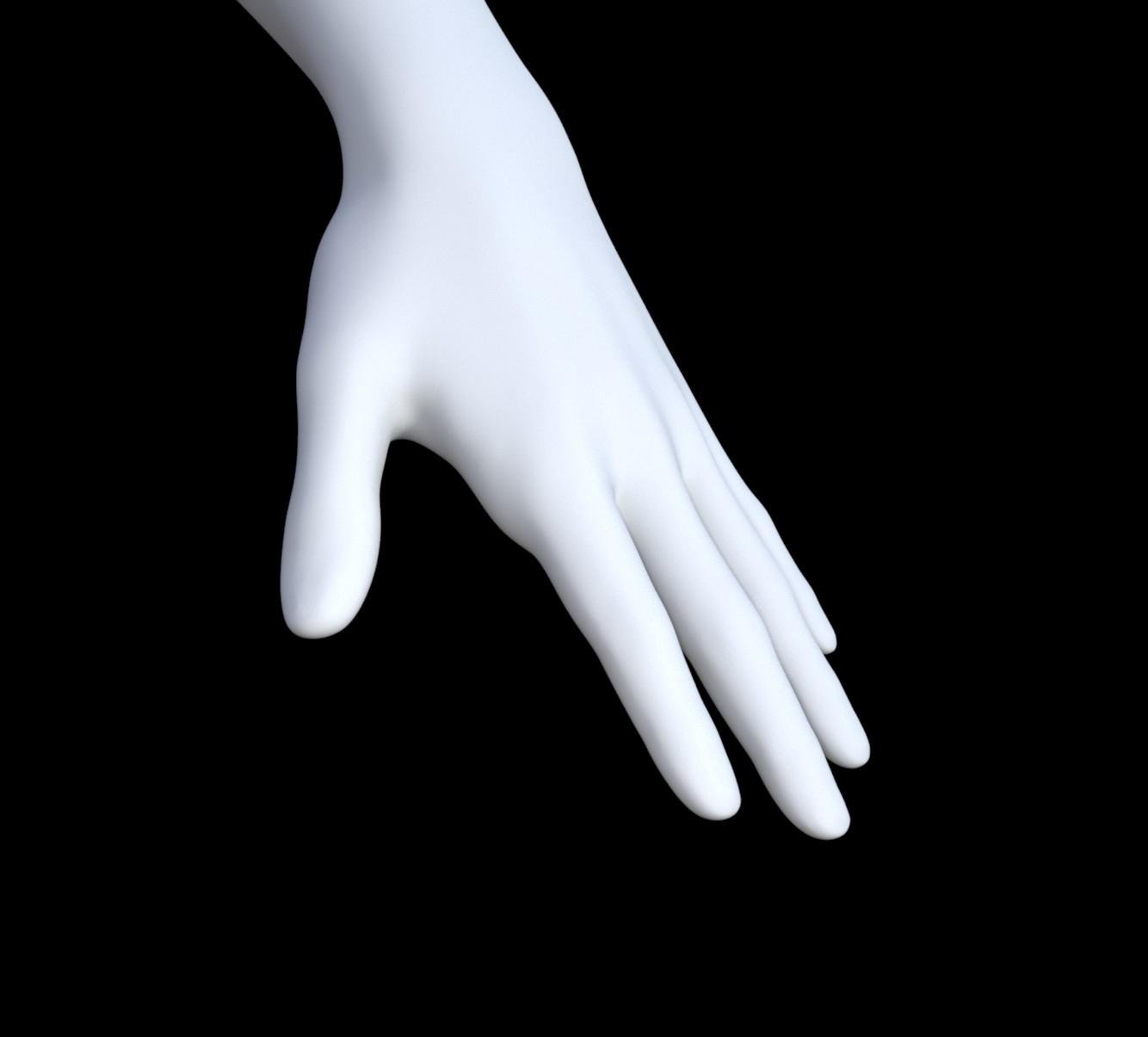
No Fingernail Morph for Genesis 9?Can anyone think of or recommend a morph to remove Genesis 9's fingernails?
I want to do a realistic glove texture, but the nails are a major eyesore. I thought about creating a geograft, but it doesn't work. I'm using HD morphs on Genesis 9 figure, and the mesh doesn't connect properly. @RawArt had a few for the older Genesis figures (No Suit Genesis 8 Male, No Suit Genesis 8 Female, etc...), but none for Genesis 9.
If anyone can think of any, it'd be greatly appreciated! Thanks in advance!
How to use facial expression animations inside UE4?Daz expressions are bone-based, and they don't translate well to the facial rig in UE. What works reliably is to turn them into morph based expressions first, then export those to UE so you can drive them with curves. It's a little tedious to do, but with a few hotkeys setup, you can do it. Here's what I do:
- in Daz Studio, dial in the expression on your character
- switch character to base resolution, then export as OBJ
- reset expression
- import the OBJ with Morph Loader and create morph slider
- now enable that on the export in the Daz to Unreal bridge (or the FBX dialogue if you do it manually)
- in Unreal Engine, open the mesh and you should have curve that animates the expression
With an FK Control rig in sequencer (UE 5), you can animate it. Hope this helps!
Can you dForce-simulate in stages?SofaCitizen said:
I don't believe that is posible. There are ways to take the outcome of a simulation and bake it into a morph which you can then dial in and simulate with that also in effect - although I don't know if that would truely give you the correct result you are wanting.
It would be the starting point of a new simulation, it would lose all the momentum and energy from the simulation that took it to that point - so it would be an abrupt transition if you spliced the sequences together in an animation, for example.
It might be better to use the timeline to simulate so that you can setup the body part to naturally push the clothing in the desired way.
Can you dForce-simulate in stages?SofaCitizen said:
I don't believe that is posible. There are ways to take the outcome of a simulation and bake it into a morph which you can then dial in and simulate with that also in effect - although I don't know if that would truely give you the correct result you are wanting.
It might be better to use the timeline to simulate so that you can setup the body part to naturally push the clothing in the desired way.
Thanks for responding! The idea of letting the figure wiggle out of the clothes in a timeline sounds like fun to watch.
I managed to rig a solution for my immediate need by choosing the shirt I wanted from the content tab, and dragging it into the scene while holding the alt-button down. Then it wasn't parented and I could hang it on a G9 hand and run the dforce simulator. For anyone trying to follow this approach, you may have to remove dForce and re-add dForce to the garment. Also, I found the best result when using a gravity of 0.05.Can you dForce-simulate in stages?I don't believe that is posible. There are ways to take the outcome of a simulation and bake it into a morph which you can then dial in and simulate with that also in effect - although I don't know if that would truely give you the correct result you are wanting.
It might be better to use the timeline to simulate so that you can setup the body part to naturally push the clothing in the desired way.
Split lipI'm not sure if this is the right spot to post this. If not, please direct me to the right place. Hi fam, I'm Z, I'm new to Daz3d studio & i'm currently stuck. I need to split my g9's top lip. sorta like a canine. I've searched & searched and bought a bunch of stuff, but nothings worked. Is there like an animal morph (or whatever) to make the G9 lips n nose more animal like? Any help is greatly appreciated <3
Feng Characters
If the Property Hieararchy panel is not open (I don't think it is by default), and if you don't know how to open it, you can open it by going to Windows > Panes (Tab) and search for Property Hieararchy.
What you should see if the problem is not fixed on your computer:
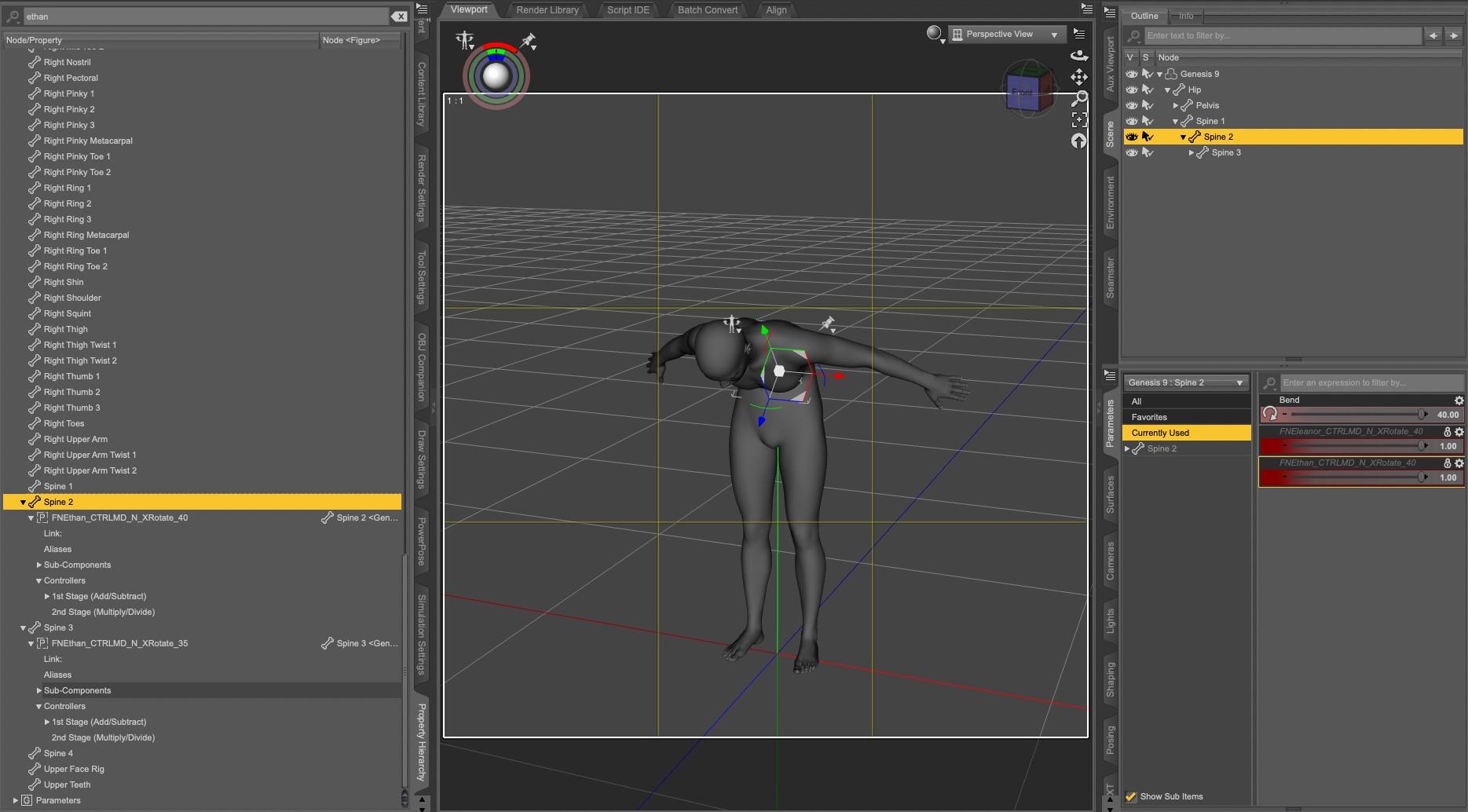
You can also check in the Property Hieararchy panel with Genesis 9 selected, searching for Ethan and you should have one property related to him on spine 2 and one on spine 3.
If the 2nd stage of either property has Ethan Body as shown on the following screenshot, you're good (and you likely forget you fixed it a couple of months ago). If not, you'll have to switch the parameters panel into Edit Mode, then click on 'FN Ethan Body' and drag and drop it onto 2nd Stage:
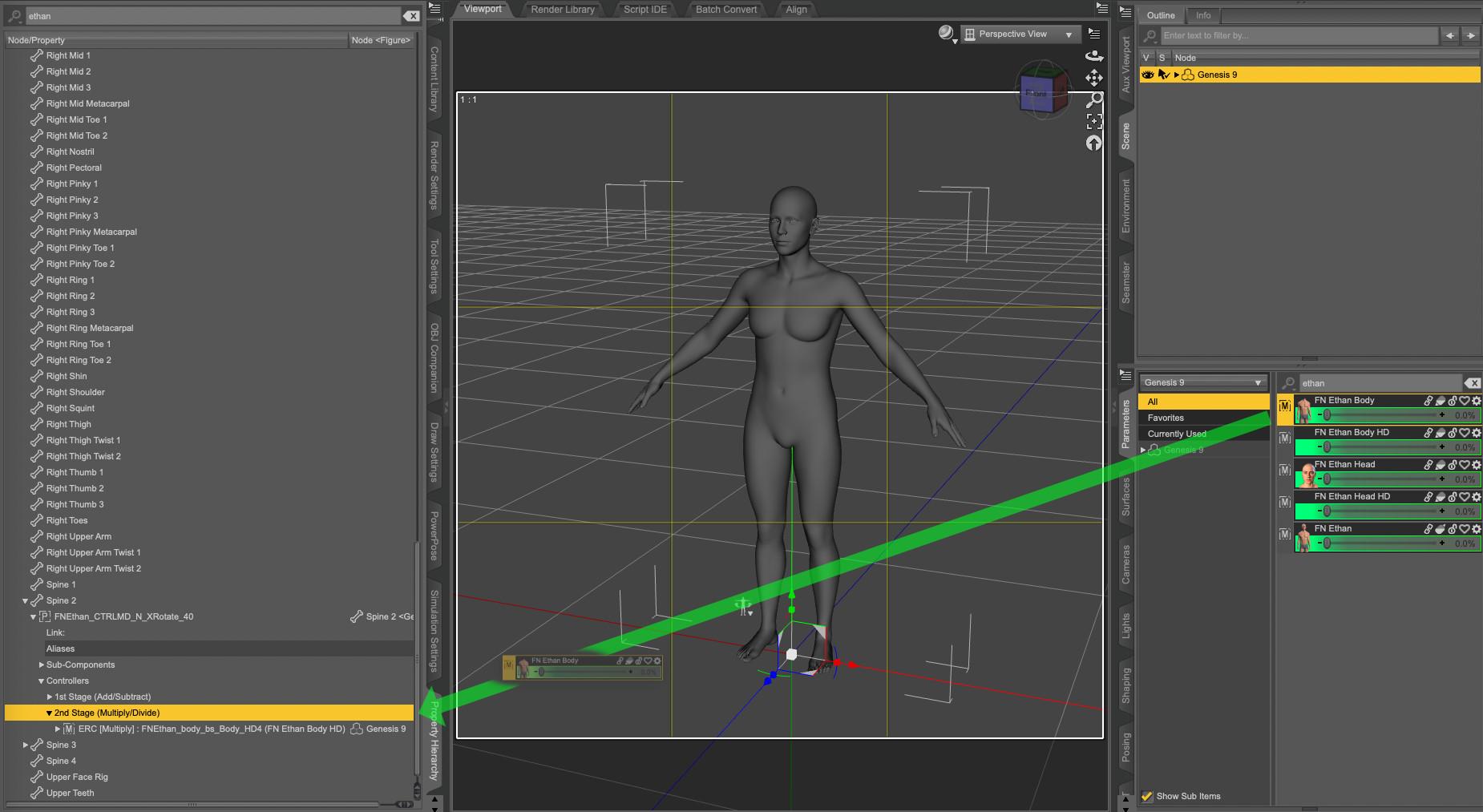
At that point, if you select back the spine bone impacted by Ethan morph, it should now no longer have any Ethan property dialed at 1.
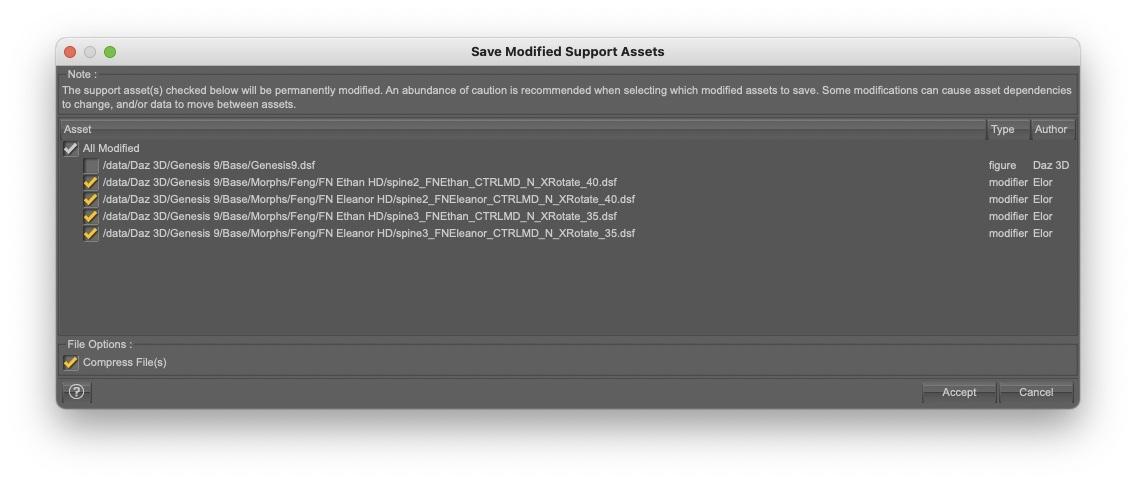
You'll have to do it for all Feng characters that have the same problem, and once you're done, the easiest way to save these changes is, with Genesis 9 selected, to go to 'File > Save As > Support Asset > Save Modified Assets', and
be very cautious to only save the properties you modified. As an example, for some reasons, DS though Genesis 9 was changed too, so I unchecked it, keeping only Ethan and Eleanor related modifiers checked (I also don't know why DS decided I was the author of the modifiers):
And voila.
Feng CharactersElor said:
@3DSaga > To see the problem, load Genesis 9, bend Spine 2 or 3 to the higher limit and while keeping Spine 2 or 3 selected, show Currently Used with Show Hidden Properties active: you should see Ethan's spine2_FNEthan_CTRLMD_N_XRotate_40 or spine3_FNEthan_CTRLMD_N_XRotate_35 at 1 (and any other Feng character with the same problem should have their respective 'cbc morphs' active too: in my case, I also saw the one from Eleanor).
To fix the problem, you'll have to add the morph controling Ethan's body as the second stage controler (or something like that) on spine2_FNEthan_CTRLMD_N_XRotate_40 and spine3_FNEthan_CTRLMD_N_XRotate_35.
Bonus question: what does CBC mean?

Thanks Elor for the additional information. Following your instructions, I do see some Feng controllers, but their values are all "0". Am I correct to understand this means they're not influencing other G9 characters?
Feng Characters@3DSaga > To see the problem, load Genesis 9, bend Spine 2 or 3 to the higher limit and while keeping Spine 2 or 3 selected, show Currently Used with Show Hidden Properties active: you should see Ethan's spine2_FNEthan_CTRLMD_N_XRotate_40 or spine3_FNEthan_CTRLMD_N_XRotate_35 at 1 (and any other Feng character with the same problem should have their respective 'cbc morphs' active too: in my case, I also saw the one from Eleanor).
To fix the problem, you'll have to add the morph controling Ethan's body as the second stage controler (or something like that) on spine2_FNEthan_CTRLMD_N_XRotate_40 and spine3_FNEthan_CTRLMD_N_XRotate_35.
Bonus question: what does CBC mean?
installing victoria 4.2 into poser 13Did you run the
/Runtime/Libraries/!DAZ/DzCreateExPFiles-v4
file from a file browser? That is needed to build the index of installed morphs that the figure file loads - it needs to be redone every time you install or uninstall an ExP product (morph packs and some characters)
G9 NipplesThe nipples on G9 are HD morphs. So you must dial a nipple morph, and then make sure your viewport has a high enough subD, to see them in viewport.
Daz 3D is part of

Connect
DAZ Productions, Inc.
7533 S Center View Ct #4664
West Jordan, UT 84084Licensing Agreement | Terms of Service | Privacy Policy | EULA
© 2026 Daz Productions Inc. All Rights Reserved.