-
HeadShop 13 Genesis 8
I bought Headsop 13 with Lovechild and had a serial number no problem. Have never had a problem with this vendor, so it isn't typical.
In these pictures, the middle picture is the original, the left picture is the Headshop one, and the right picture is the Face Transfer one. My first impression is this software works best on white people. On the two Black girls, regardless of light skin or dark skin, it seems to interpret their actual skin color as more of a blemish painted on the default skin color that it uses.
No instructions seem to be included. The included PDF file only explains how to install, which involves both clicking on a .exe installer and unzipping a file into a folder created by the installer. Everything I click on in the app generates a popup message linking me to a YouTube video in lieu of included documentation. Maybe I should actually look at those videos to see what I'm missing. But there don't seem to be many adjustments to make to the texture if it's way off. Even mirroring the texture didn't remove Hayley's hair from the texture. I am hoping this is just a case of me not knowing how to use the software yet.
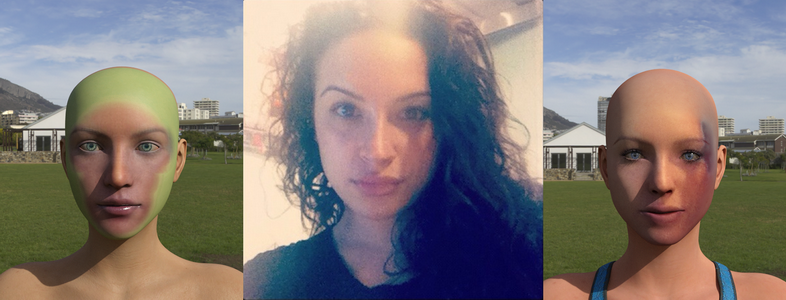
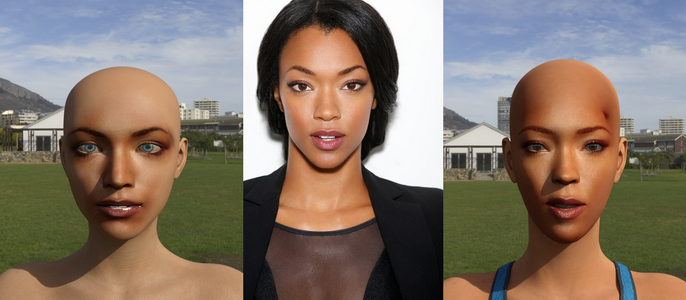
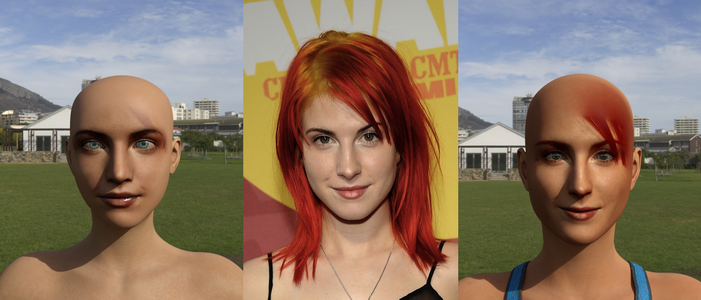
Photos like that first pic will never, ever work. You absolutely must have good quality photos for any of these sort of apps. The best result here is easily the best source photo, but still try for better pics. I know this may be tough if you are looking to do like celebs, but is very important to have a good source pic. If you take a pic yourself, you can control these things. Do NOT use a selfie cam. Use a proper camera, with a proper FOV. A big issue with many selfie pics is the FOV, it blows up the proportions. Mugshot style shots can work pretty well, but again, they need to be high resolution. Tie hair back, use soft, even lighting, and you can get decent results.
You are right. I actually got some really decent results from both using older flip phone photos and great results from high quality photos taken with a pro nikon camera.I was able to find instructions no problem, which isn't always the case with some products. A few are more elusive than the Holy Grail.
HeadShop 13 Genesis 8In these pictures, the middle picture is the original, the left picture is the Headshop one, and the right picture is the Face Transfer one. My first impression is this software works best on white people. On the two Black girls, regardless of light skin or dark skin, it seems to interpret their actual skin color as more of a blemish painted on the default skin color that it uses.
No instructions seem to be included. The included PDF file only explains how to install, which involves both clicking on a .exe installer and unzipping a file into a folder created by the installer. Everything I click on in the app generates a popup message linking me to a YouTube video in lieu of included documentation. Maybe I should actually look at those videos to see what I'm missing. But there don't seem to be many adjustments to make to the texture if it's way off. Even mirroring the texture didn't remove Hayley's hair from the texture. I am hoping this is just a case of me not knowing how to use the software yet.
Photos like that first pic will never, ever work. You absolutely must have good quality photos for any of these sort of apps. The best result here is easily the best source photo, but still try for better pics. I know this may be tough if you are looking to do like celebs, but is very important to have a good source pic. If you take a pic yourself, you can control these things. Do NOT use a selfie cam. Use a proper camera, with a proper FOV. A big issue with many selfie pics is the FOV, it blows up the proportions. Mugshot style shots can work pretty well, but again, they need to be high resolution. Tie hair back, use soft, even lighting, and you can get decent results.
HeadShop 13 Genesis 8In these pictures, the middle picture is the original, the left picture is the Headshop one, and the right picture is the Face Transfer one. My first impression is this software works best on white people. On the two Black girls, regardless of light skin or dark skin, it seems to interpret their actual skin color as more of a blemish painted on the default skin color that it uses.
No instructions seem to be included. The included PDF file only explains how to install, which involves both clicking on a .exe installer and unzipping a file into a folder created by the installer. Everything I click on in the app generates a popup message linking me to a YouTube video in lieu of included documentation. Maybe I should actually look at those videos to see what I'm missing. But there don't seem to be many adjustments to make to the texture if it's way off. Even mirroring the texture didn't remove Hayley's hair from the texture. I am hoping this is just a case of me not knowing how to use the software yet.
HeadShop 13 Genesis 8I would rather have the product work than have to get a refund. If it does what it says well then it would solve a longstanding problem for me.
I was assured by DAZ that they corrected the missing serial keys for HeadShop 13 for Genesis 8.
HeadShop 13 Genesis 8Can't find the needed serial in Account/Serial Numbers?
Using Character Converter G3F to G8FI have created some custom characters in HeadShop which I really like and have saved them as a Preset and Actor. Can I use Character Converter G3F to G8F to transfer my Actor Figures. So far I keep getting a message that no character has been selected (paraphrased}.
Basically is there some way of transfering my new actor without making a morph because the custom texture file is really important.
having issuesYou may have multiple installs of DAZ Studio. Please make sure that you install HeadShop to the working copy of DAZ Studio.
For better explanation see TroubleShooting in manual, Chapter 4: https://printahead.net/wp-content/uploads/2020/05/HS13-Manual.pdf
We can also do a skype/screen share sessions that usually fixes these issues. You can invite me on skype at lasloves.
i did what the TroubleShooting in manual sayed but still nothing
Please lets have a skype - it solves issues 98% of the time. Invite me as lasloves. I am on California time. Don't worry about English proficiency, I do the talking:-)
having issuesHave you entered the serial number, from https://www.daz3d.com/downloader/customer/serialnumbers I think, in Help>About Installed Plug-ins and restarted DS?
yes i have enter serial number on the HS13full.exe not on daz because in daz not showing me headshop Pluging in help>About Installed Pluging
having issuesYou may have multiple installs of DAZ Studio. Please make sure that you install HeadShop to the working copy of DAZ Studio.
For better explanation see TroubleShooting in manual, Chapter 4: https://printahead.net/wp-content/uploads/2020/05/HS13-Manual.pdf
We can also do a skype/screen share sessions that usually fixes these issues. You can invite me on skype at lasloves.
i did what the TroubleShooting in manual sayed but still nothing
having issuesYou may have multiple installs of DAZ Studio. Please make sure that you install HeadShop to the working copy of DAZ Studio.
For better explanation see TroubleShooting in manual, Chapter 4: https://printahead.net/wp-content/uploads/2020/05/HS13-Manual.pdf
We can also do a skype/screen share sessions that usually fixes these issues. You can invite me on skype at lasloves.
having issueshello i need help for headshop 13 not showing in daz Edit what to do there is no link between daz and headshop 13
How to create your own Head/Face without using FaceTransferoh yes, recently HeadShop 13 came out for use on a Mac. Might want to check that plugin.
Catherine, little correction: unlike the WIN version of HeadShop 13, the Macintosh version is not a plugin; it is a standalone. It creates the obj and jpg files that you will need to load in DAZ to your Genesis figure. Here's the how-to video of the process:
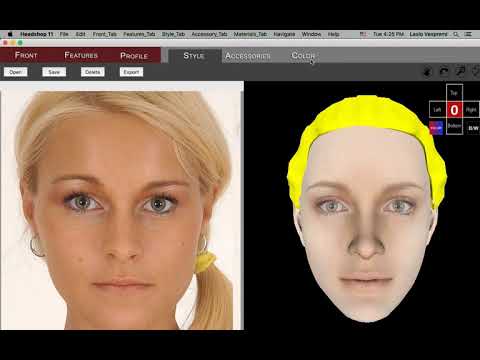 How to create your own Head/Face without using FaceTransfer
You can use Blender [lots of community support in their forums, some in these forums], Hexagon [dated but still useful and at times priceless for that bridge], ZBrush, and/or whichever modeler you like to work with.
Years back there was a skilled artist who make decent morphs using DForms in D/S ... so it is possible although not the route most would choose.
Once a shape is made, it needs to be an .obj to be brought into the default base resolution figure to make the morph. [and for G8, no eyelashes]
eta: oh yes, recently HeadShop 13 came out for use on a Mac. Might want to check that plugin. stand alone program.
"There's Always Another Sale™" (Report sales issue here.)Readme missing for https://www.daz3d.com/headshop-13-with-lovechild-macintosh
Will report.
"There's Always Another Sale™" (Report sales issue here.)Readme missing for https://www.daz3d.com/headshop-13-with-lovechild-macintosh
HeadShop 13 window capture requestI've done all of that. My version isn't there.
When it loads in, it says Headshop 6. But the actual window for Headshop (where you add the photo, move dots...etc) says "Headshop 13"... *scratches head*.
It's working as it should now (but it's being very temperamental).
Thanks for the reply, anyway.
Celebrity Look-a-Likes for 3D figures Part 2
I thought with all the talk about Gregorius' morph, I'd give it a quick go. This is a quick and dirty WIP. Yes not happy with the lips. I'll let you know what she turns out like when I get around to finishing her.
Good job. Is that Facegen/Headshop? The texture is good here (presumably taken from a photo of Naomi as the hair is included?) and the overall shape. How does it look from other angles?
No, its done the old way. Its a V4 with the morph done by a combination of dial turning and using an outside 3d application Argile (now obsolete) to move the vertices around. The texture is indeed from a photo. I'm not happy with it so I think I'm going to change the texture and I'm currently still playing around with the morph. Early days. Once I'm happy with it, I'll post more pictures :) She is very pretty.
Ah, ok - cool. Are you in Poser or do you just prefer V4 to the later generations?
Never got out of using poser, but I have tried to morph lower density figures such as genesis and I find it is a real pain. V4 has a higher poly count.
HeadShop 13 window capture requestCould someone who owns HS13 post a screen of (or let me know) what the window looks like, please? Mainly just to see if it says "HeadShop 13". I've installed 13, but I have no idea if it's working.
I can't check what version I bought originally, as the page for it is no longer on/in the store. Plus, I can't even remember if the original version that I bought was compatible with G8. I've attached a picture of the image in my (Product Library) of the first version of HeadShop that I own/bought.
Yes the splash screen for HS13 says so.
https://www.daz3d.com/headshop-13-with-lovechild-
https://www.daz3d.com/headshop-13-with-lovechild--upgrade-from-hs12
https://www.daz3d.com/abalone-llc uncheck to hide what you own so you can see all the products.
Have a figure in the scene selected {G8 or G3}, down at or near the bottom of the Edit drop down will be "Start Headshop... "
Celebrity Look-a-Likes for 3D figures Part 2I thought with all the talk about Gregorius' morph, I'd give it a quick go. This is a quick and dirty WIP. Yes not happy with the lips. I'll let you know what she turns out like when I get around to finishing her.
Good job. Is that Facegen/Headshop? The texture is good here (presumably taken from a photo of Naomi as the hair is included?) and the overall shape. How does it look from other angles?
No, its done the old way. Its a V4 with the morph done by a combination of dial turning and using an outside 3d application Argile (now obsolete) to move the vertices around. The texture is indeed from a photo. I'm not happy with it so I think I'm going to change the texture and I'm currently still playing around with the morph. Early days. Once I'm happy with it, I'll post more pictures :) She is very pretty.
Ah, ok - cool. Are you in Poser or do you just prefer V4 to the later generations?
Celebrity Look-a-Likes for 3D figures Part 2I thought with all the talk about Gregorius' morph, I'd give it a quick go. This is a quick and dirty WIP. Yes not happy with the lips. I'll let you know what she turns out like when I get around to finishing her.
Good job. Is that Facegen/Headshop? The texture is good here (presumably taken from a photo of Naomi as the hair is included?) and the overall shape. How does it look from other angles?
No, its done the old way. Its a V4 with the morph done by a combination of dial turning and using an outside 3d application Argile (now obsolete) to move the vertices around. The texture is indeed from a photo. I'm not happy with it so I think I'm going to change the texture and I'm currently still playing around with the morph. Early days. Once I'm happy with it, I'll post more pictures :) She is very pretty.
Daz 3D is part of

Connect
DAZ Productions, Inc.
7533 S Center View Ct #4664
West Jordan, UT 84084Licensing Agreement | Terms of Service | Privacy Policy | EULA
© 2026 Daz Productions Inc. All Rights Reserved.