-
Moving DAZ to a New Computer - The Complete Guide
I just got done moving Daz to a new computer. Although there is a substantial amount of information available on how to do this, it is quite fragmented spread across different posts, within posts, and across the internet. This is my attempt to organize the steps into one place. There are other ways to do this but this is what I did in January 2024 and everything worked after I got done.
I do need to give credit to WP Guru. His YouTube video below is the core of what I did.
https://www.youtube.com/watch?v=UZau8cv5saQ&t=2s
1.) Install Daz Import Manager (DIM) or Daz Central to new computer.
WP Guru explains this in detail. I am more use to DIM so I used that. He gives directions on where you can find the download link for that on the Daz website, Account>Product Library.
2.) Use the newly installed DIM to install a fresh version of Daz Studio on the new computer.
Again, WP Guru does a good job of explaining how to do this. I installed to the default location on the C drive.
3.) Move your content Libraries to the new computer.
WP Guru does a good job of explaining what and how to find these. If you have everything on an external hard drive then it is just a matter of plugging these into the new computer. Otherwise, I have everything on a second internal drive, so I had to copy everything to an external USB and move them to the second hard drive on the new machine.
4.) Map those newly moved content Libraires in Daz so Daz can find them.
WP Guru explains this pretty well. Essentially what you have to do in DAZ is go to:
Edit Menu>Preferences>Content Tab>Content Directory Manager>click on DAZ Studio Formats>click on your directory name>chose Edit. Then you can navigate to the location of your directory. Do this for each library you have. The two important default ones are My DAZ 3D Library and My Library.
5.) Tell DIM where the content libraires are on the new computer so it knows where to install new content. Again, WP Guru explains this but you need to open DIM and then:
Gear Icon in upper right> Advanced Settings>Installation> click the “+” button on the bottom. It is going to make you type in the name of your directory and then you can navigate to the location.
6.) Save your layout. If you changed your work place layout at all from one of the default layouts then you should save it so you do not have to redo on the new machine.
Windows>Work Space>Save As> name your layout
7.) Move/copy the CMS and the Studio4 folder. These are your saved user settings. The CMS folder contains custom categories you may have created and the Studio4 folder contains user settings such as the saved layout from above. Here is the default location for both of these folders:
C:>Users> (Your user name) AppData>Roaming>DAZ 3D
AppData is hidden so you have to enable show hidden files.
There are other ways to do this but I just copied both of these folders to a USB drive and moved them to the new computer. Before I copied them onto the new machine, I moved the native folders on the new computer to a new folder just in case. If you installed Daz to the default locations, these folders are in the same location above and you just copy the folders from your old machine to the same location but now on your new machine. Also, it’s not a bad idea to make backups of these folders from time to time.
8.) Move your DIM Manifest folder to new computer. If you do not do this, then all your installed content will show in DIM as uninstalled and ready for down load. This can be found at at:
Daz 3D Insatall Manager>Install Manager>manifest files.
After that has been moved, you need to tell DIM where to find it. For that:
Start DIM>click on the gear in the upper right hand corner> go to the Installation tab. The top field is the Manifest field where you can navigate to the correct location. Also, if you do not know where this is, you can use this field on your old computer to find it. I keep mine with nmy content libraires.
9.) Reinstall purchased plugins. You can do this from DIM and they are going to show up as installed. I did uninstall and then reinstalled one at a time. A curve ball here is that some of them may not show up after they are installed until you reenter the license serial number. To do this you need to go into DAZ to the Main Menu and then Help>About Installed Plugins. You can find the license codes at the Daz website > Account>Serial Numbers. Then just cut and paste the serial number into Daz.
Another complication is remembering what was a plugin that needs to be reinstalled. One place to look is the Serial Number page on the Daz website above. Another thing is that it seems like all the plugins have Win-64 bit in their description. So I searched DIM for 64-bit to get a list of plugins.
10.) Backup. After I verified everything worked, and it did. I initiated a backup using BackBlaze.
Pretty in Pink texture problemThank you again FenixPhoenix for trying to help me with this problem, I really do appriciate it so much.
I downloaded the DAZ 4.22 program where you directed me. The search feature can be really fussy which makes finding things hard at times, and having the exact search helps a lot which is why I had trouble finding it before. Unfortunatly I am using Windows, not Mac, so it is just an exe file, not a zip. This did help me though, because DIM ate my DAZ program Again, and DAZ Central Which is being discontinued has now totally stopped working, and I needed the exe. file to reinstall DAZ again. I did a test render using the 3Delight render engine, and that worked fine, so the problem is definitly in Iray only, which leaves a missing dll file a possability, but since this problem occured exactly at the same time as when DIM ininstalled my 4.21 version of DAZ forcing me to installe 4.22 I am still concerned that it could also be an incompatability with my very old OS (Win7 pro). I have put in a request with support for a copy of the previous version (4.21) so that I can test that, and also told them the name of the dll file in the thread you linked me to incase it is the missing file that is the problem but that somehow it is being blocked without me knowing it.
Only other thing I can think of is if someone who is using Windows not Mac, could do a search of the files in their installed but working DAZ 4.22 program to see if it has "freeimage.dll" and let me know if it is even a thing for this version of DAZ.
Pretty in Pink texture problemFenixPhoenix said:
Maybe this thread will help: https://www.daz3d.com/forums/discussion/98756/iray-pink-render-problem-solved
Hi FenixPhoenix,
Thank you very much for your help, and this link. I suspect that this may be related to what is happening, but I am having trouble sorting it out still. I searched for the dll file that the link says is missing, and it Is missing from my DAZ program. I am using Norton, and have had trouble in the past with it being overly agressive with graphic program files, but there is no record of it blocking or quarintining anything from DAZ. I tried to use DIM to download the DAZ program Zip file so I can restore the file, But can not get it to download it, but it did uninstall my program Again! *Gurr*. So I used DAZ Central to to reinstall the program *again*, and the dll file is still missing. I did find a dll file with the exact same name in my Poser program files and tried copying that and adding it to the right spot in my DAZ program, but It did not work.... still pretty in Pink.. it is tweeked for Poser so probably not the same thing eventhough it has the same name. When I do a google search about trying to download the DAZ 4. pro Zip, all it does is take me to the download for DIM... which will not download it for me. It is probably me messing up in DIM, but I can't figure out a way around it so that I can get the zip and manually install that file. Maybe the missing file has a different name now since the thread was from 2016 and I am looking for the wrong dll and it is a different one missing? That is still a problem since I can't seem to get to a downloaded zip file using DIM, and when I go to my account at the DAZ site I can get to a serial number, but not a zip that way.
Not sure what do do. I suspect that I am messing up big with DIM, but I have never opened it before a week ago, and it is not very intuitive and to try and learn it in the middle of a problem is difficult.BTW, love your content, and have many of your products. Just bought the HD scars for Gen9 today, and would love to test it out, but no textures are a big problem ;p.
Kim
Pretty in Pink texture problemHi everyone, Hope you can help me with this strange problem.
I am still using Win 7 pro and was using DAZ central. I hope to be upgraded to Win10 in the next month or two, but was not having a lot of problems with Win 7 other than it bogging down a bit at times. When they anounced that DAZ central would be discontunined soon, I decided to try DIM, and when I did, for some reason, my DAZ3D 4.21 just went Poof and disappeared.... doesn't even show in my installed programs list when I search for it. The folders with all the program files and the runtimes are still there, but the short cut is gone and it doesn't show as an installed program when I search my programs for it. I poked around DIM looking for a way to show it or update it that way but it is not even on the list with DIM. After waiting over 3 weeks without hearing from customer service, I decided to open DAZ central again, and it gave me the option of installing DAZ3D (it apparently it also thought DAZ was uninstalled even thought I never did anything I know of to cause that). So I reinstalled DAZ3d. Of course it gave me the newest version (4.22) which I had been avoiding updating to since I still have Win7pro and was worried about compatibility issues with the older OS. I Opened the program, and everything seemed to work, Set up a scene, and everything looked good in the preview, and then I clicked Render. Oy! No textures on anything, and everything is bright pink !!! All my previous .DUF saved scenes have the same problem even though before when using 4.21 they worked perfect. the textures are there, because I can see them in the preview, and can see changes that I make to them, but no matter what I do, every thing is untextured pretty in Pink renders.
Here is a link to one of the renders;
Lovely isn't it ;p.
Any help would be appriciated. I'm very concerned that it may just be a problem with 4.22 not being compatable with win7pro, however that doesn't explain why the program dissappeared when I tried to use DIM...DIM is an older program right? If it is a compatability issued, How can I roll back to 4.21 from 4.22 until I get my computer upgraded to win 10. Or is there something else that I need to do.... some setting burried somewhere that needs changed?
Next question: A little general info one. I know I can upgrade to win10 with the hardware I have, but is Win 11 better IF it is compatible with my computer? Mostly I just play with DAZ and Photoshop. No gaming or anything.
Thank you in advance.
Kim
Learning 3Delight AgainSven Dullah said:
Right, I'm also about to pass out, bad, bad fullmoon:)) But, before I go, no, my 4.20 has all the goodies, so not sure what's going on there...and yes, the teeth look very bright. Do you use SSS on them? If so, tune down SSS scale or strength or darken the SSS color. Could also be highlights with too low glossiness or too high roughness, whichever you prefer. The sclera is also to white for my taste...maybe they suffer from the same thing? And, obviously, if it's just the diffuse color, should be an easy fix;)
What I thought. My 3DL settings not quite ready for "Show Us Your Renders" topic. ; )
Very strange about the DAZ Studio UI. Support ticket time if open in 4.22 & can show them screen shots.
Anyway, take of yourself. Almost constantly dark for you this time of year? Would drive me crazy I think.
In central Texas, had record cold snap & now time for pruning/removing bushes & plants killed off. Looking forward to the exercise. : )
Thanks again for taking time to help out.
Wanting to make 3Delight look more photorealisticdesfen said:
how do the surface materials compare to the one used for the central stone wall in your Shaded Haven render, the wall with the tap in it
The surfaces in the testscene were just the aweSurface default with a generic diffuse color using the color picker, and the default specular roughness is 1%, with 100% reflection strength, (I dialed back a bit on reflections here). The SH stonewall I set to maybe 30% roughness and maybe dialled in some diffuse roughness too. 0% roughness equals perfectly sharp reflections, which should be used only for extremely glossy surfaces like mirrors, smooth metal and glass/water. Most surfaces use values arond 15-50%, think asphalt, stone walls, sand, fabrics etc.
And then there's the Glossy Freznel slider which is linked to the IoR (index of refraction) value, which makes surfaces at a grazing angle more reflective, the smaller the freznel roughness is set to, or the higher the IoR:) Read the manual;) Anyway, most dielectic materials use an IoR of about 1.5. Fabric is different, usually very rough with a rough glossy freznel, and a lower IoR.
Wanting to make 3Delight look more photorealisticdesfen said:
Sven Dullah said:
...so I made a series of demo-renders, much easier than trying to explain;)
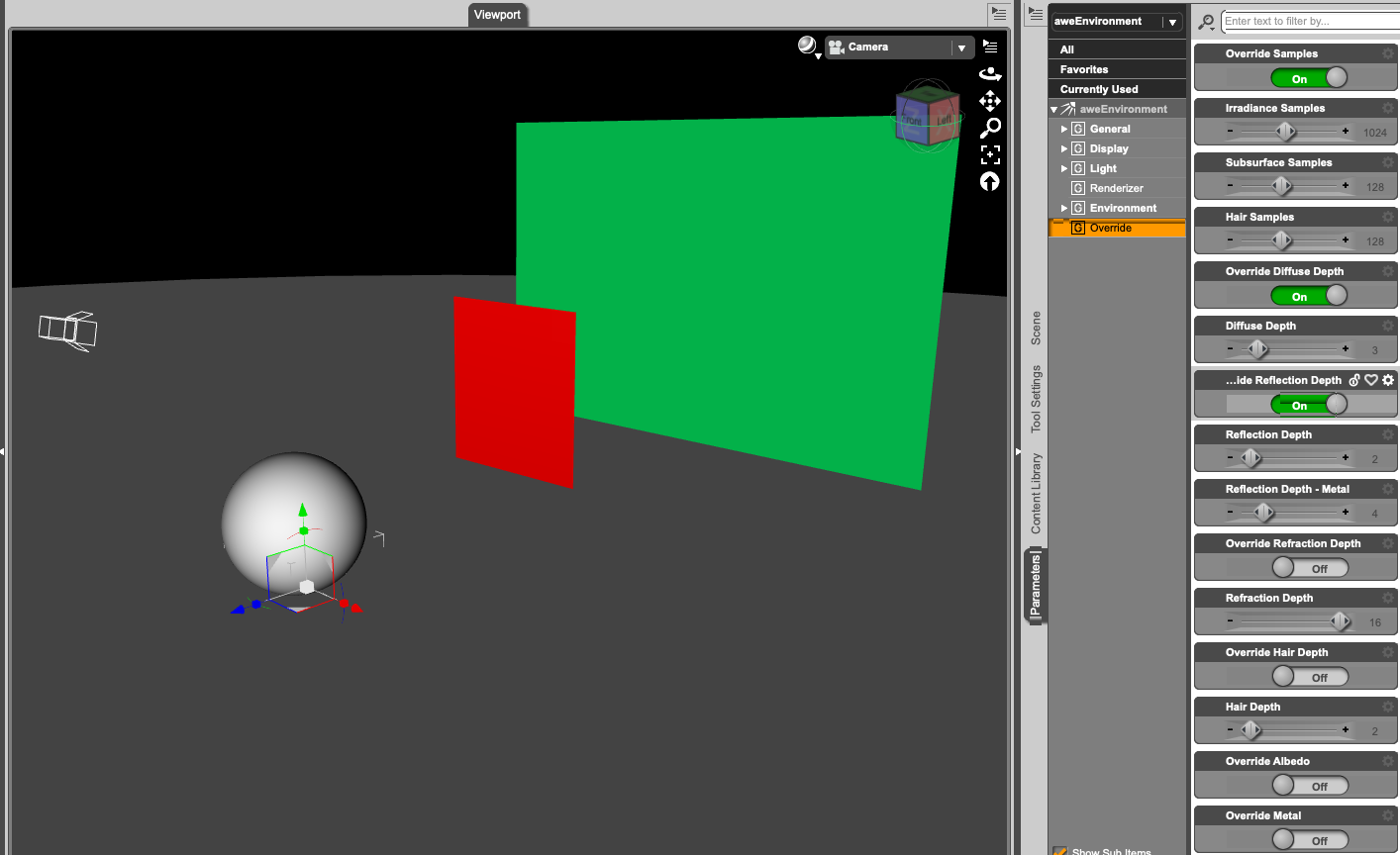
There's the aweEnvironment with a pitchblack env. sphere that does not contribute to the lighting, a ds standard spotlight with pure white light, physical falloff and raytraced shadows, aimed at the red plane but slightly overlapping to partly illuminate the bigger green plane. Also a ground plane and a sphere with an almost white diffuse color. Diffuse roughness is 0 on everything, so pure Lambert diffuse here:
Diffuse Depth 3, Reflection depth 2 (wowie's defaults)
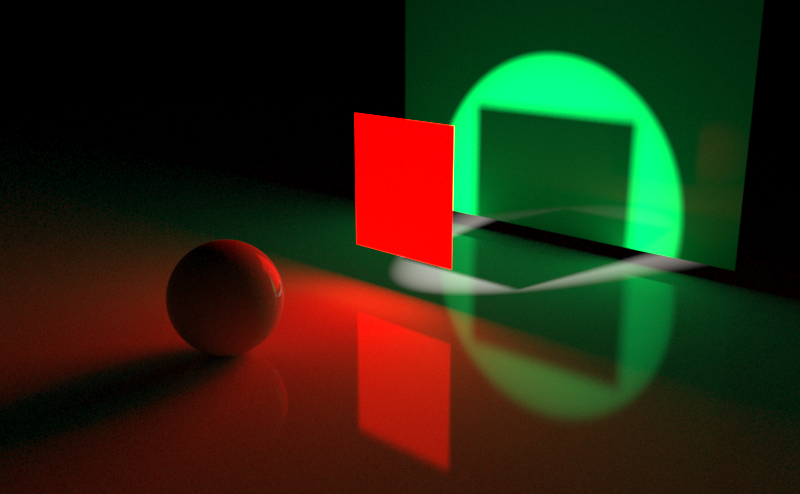
DD0 RD0 = no bounce light no reflections, only primary rays
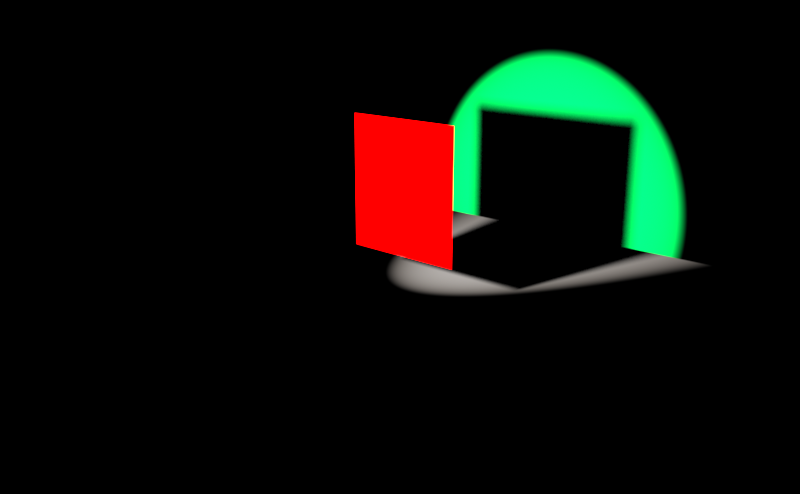
DD1 RD0
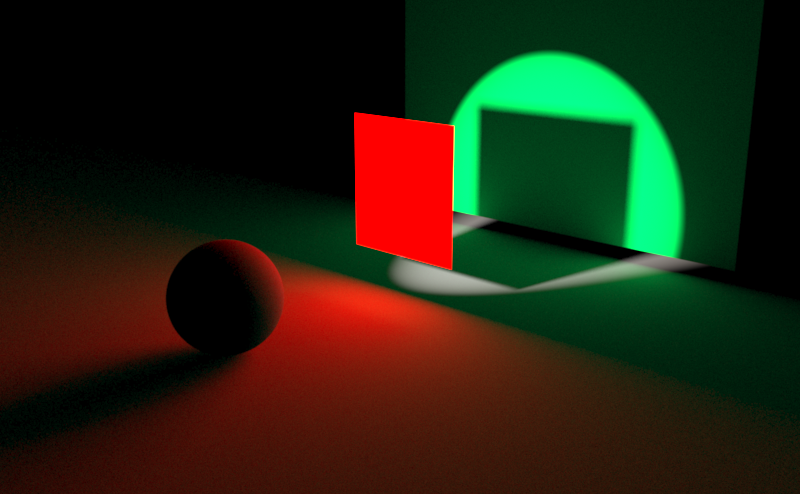
DD3 RD0
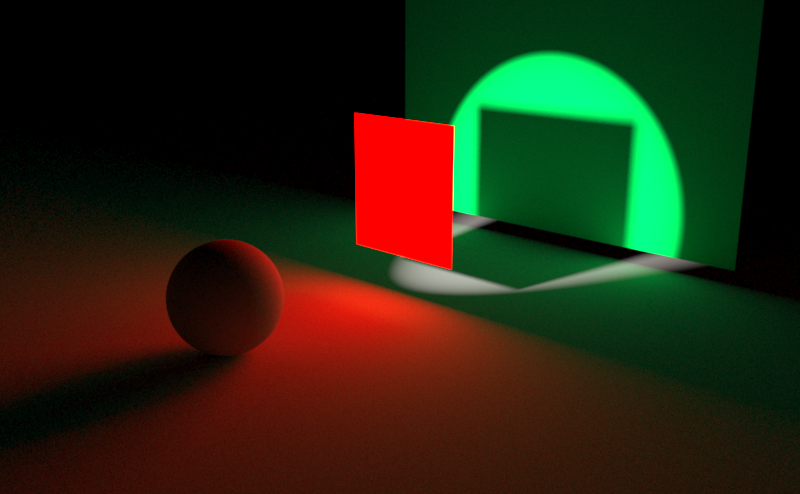
DD16 RD0
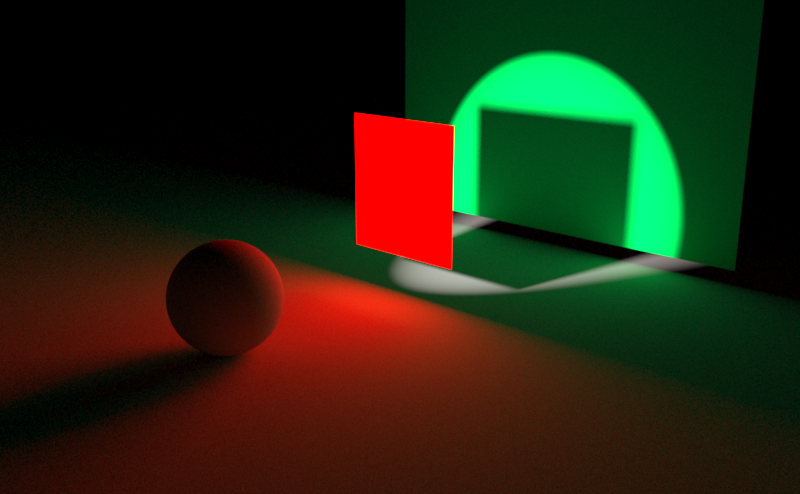
DD3 RD 16
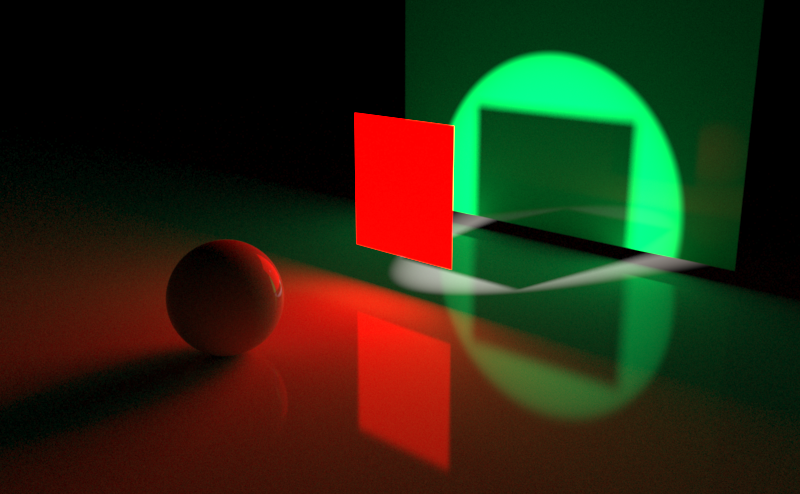
My conclusion: The difference between DD3 and DD16 is smaller than one would think, which means wowie did a great job under the hood, optimizing his stuff for speed.
nice, these renders look pretty good
how do the surface materials compare to the one used for the central stone wall in your Shaded Haven render, the wall with the tap in it
and also, the surface that's being used for the green wall in the test render, how do i apply it to every surface in the Shaded Haven
Wanting to make 3Delight look more photorealisticSven Dullah said:
...so I made a series of demo-renders, much easier than trying to explain;)
There's the aweEnvironment with a pitchblack env. sphere that does not contribute to the lighting, a ds standard spotlight with pure white light, physical falloff and raytraced shadows, aimed at the red plane but slightly overlapping to partly illuminate the bigger green plane. Also a ground plane and a sphere with an almost white diffuse color. Diffuse roughness is 0 on everything, so pure Lambert diffuse here:
Diffuse Depth 3, Reflection depth 2 (wowie's defaults)
DD0 RD0 = no bounce light no reflections, only primary rays
DD1 RD0
DD3 RD0
DD16 RD0
DD3 RD 16
My conclusion: The difference between DD3 and DD16 is smaller than one would think, which means wowie did a great job under the hood, optimizing his stuff for speed.
nice, these renders look pretty good
how do the surface materials compare to the one used for the central stone wall in your Shaded Haven render, the wall with the tap in it
Hot New (Northern) Season, New Sales Thread: Report Issues Here "Reporting Only"Taoz said:
barbult said:
Lightning Deals is still broken. I just cleared the cart. Daz should not be allowed to continue to advertise one price and charge another, especially after having been informed of the problem. If they can't make their sales work, they should take them down. They are really trashing their reputation with all these sales and pricing errors, and a customer service department that doesn't even respond when a ticket is submitted. I'm really fed up with all this.
Another issue is that if you leave the page open, and countdown hits 01:00:00, the hour counter doesn't change so that instead of going down to 00:59:59 it goes up to 01:59:59, which means that if you don't do anything it terminates when it shows 01:00:00 and not 00:00:00. So whenever it says 01:XX:XX always refresh the page to ensure that it shows the actual time.
Also, tokens seem to work for some Lightning Deals items, and not for others.
Yeah, the hour counter is a pretty embarrassing bug. Just remember that the items come out every three hours, starting at midnight US Central Time.
Missing Download - Campus Casuals for Genesis 9I'm not sure this is the right place, but I just purchased this product. However, there's no download link. It's not showing up in Install Manager, Daz Central or available for manual install. Has anyone else ever had an issue like this other products? Clicking on "Daz Connect Offline Package" leads to a 404/text script.
The [Disco Chives] Misplaced Parrot Complaint Thread...well we didn't quite get the "snowmageddon" that was forecast. Too much warm are above the cold layer on teh ground which turned it into ice pellets and sleet. Of course that made streets extra slippery. Other areas, particularly north of the Columbia river, actually got more snow. Here in central Portland about an inch & half of snow/sleet by the time it was all over. That's the difficulty in accurately predicting conditions in the western valleys. If the wind brings in a thicker dome of cold air it's all snow if not it's a ,mix of snow, ice pellets and/or freezing rain TEH real "villain were the strong winds with gusts clocked over around 65 mph in some areas. Many trees were toppled due to snow and ice in the branches.
Streets were blocked, houses and cars were damaged, and the entire Metro LRT network was shut down Saturday afternoon due to a myriad of weather related issues from frozen switches, debris on the overhead lines, downed trees, ice on the tracks, and power outages (in the metro area alone there were 3,200 power individual outages affecting over 127,000 customers, mostly from fallen trees that took out power lines. .
...and it's not over yet, for one, temperatures were frigid this area, with highs in the low to mid teens Saturday and today, after a brief respite on Monday we're back into it on Tuesday as the forecast calls for freezing rain (upwards of a third to half inch of ice) which again could bring down power lines and trees again and make travel extremely dangerous. . At least it won't be nearly as windy as it was Saturday.
Fortunately I'm stocked up to ride it out to Friday if need be. which is great as I finally feel lI'm almost over this cold that hit me last weekend.
low poly buildings and street building systemI have bought three sets that are building systems for the modern world and one for a science fiction world.
https://www.daz3d.com/v3digitimes-buildings-and-skyscrapers-generator-vol-1
https://www.daz3d.com/central-business-district
https://www.daz3d.com/night-and-day-city-for-daz-studio
https://www.daz3d.com/x-bit-future-space-city-bundle
These don't match everything you want, but maybe looking them over might give you some ideas. As I was putting the first three into my new laptop, I had the chance to look at the props and options again and was amazed at the offerings. (I haven't made it down to the 'X' part of the alphabet yet to review. When I first installed it though I was impressed if you need it for Sci-Fi.)
If you have images of what you want in the backgrounds, it might help others to locate sets that might fit close to them. For example, I have lived/visited in a number of seaside communities and each one was different in vegetation, buildings, industry, ... Some had working harbors, others were totally tourist traps, and another was a regular bedroom town with a beach a mile or so away with sand dunes (and missle silos and a nasty riptide).
But if you have anything in your sets you like, but they are not low poly, look into MattyManx's MMX Resource Saver Shaders series. Another PA, Code66, has products that might help you, including the https://www.daz3d.com/old-town-construction-kit which is for what it says, older town buildings.
Mary
"File not found" errorsThe timeline of the issue goes like this:
cleared out my base Downloads folder to clear up some space
should have just been miscellaneous downloads, but some part of my Daz content was there apparently
started getting Postgre SQL not found errors
reinstalled the Postgre file, the error went away, but now I get "file not found" errors when loading various assets
for the record, these are all first-party Daz Shop assets
some work, some don't, seemingly at random across all asset categories: figures, wardrobe, shaders, etc.
I've tried completely reinstalling from scratch, but nothing works
this also seemed to coincide with the 4.21 to 4.22 update and retirement of Daz Central
Solved - Help with LAMH player?Catherine3678ab said:
I have both in my Product Library and I assure you that neither has DIM downloads. Only manual, zip and .exe.

Maybe once there were, but there certainly aren't any now.
It is coming up on my DIM as available. I have it hidden as I don't need it because I have the full LAMH and installing the two causes conflicts so you can't have both installed at the same time.
From the main download page. https://www.daz3d.com/look-at-my-hair-free-player
Install Types:
 DIM Manual InstallDaz Central Ending - New Enhanced Install Manager
I'm so grateful that Daz Central seems to be hanging on. It's still fully working - whether intentionally or by oversight, I don't know - but I'm so glad that I can keep working in my usual way.
I install everything via DIM and always have - but Central is absolutely the best way to find items or to check what I have quickly.
Daz Studio fully borked. Please help.Richard Haseltine said:
morrisonmp said:
Install Manager is just... the worst. I know a lot of people use it but I miss Daz Central. Never had a single issue using it. Was able to configure my drives with no problems. Since I started using DIM, I haven't even been able to use Daz Studio. Like, I'm a couple of weeks of no productivity now because my libraries and installs are just completely borked.
The code is the same, use the basic Settings in DIM to set a base path and the installation behaviour is also the same (it's just that DIM allows for finer control) - DIM and daz Central used the same options, so if you had Daz Central isntalled DIM would have used exactly the same paths unless you changed them.
I hear you. And in theory, this should work. But I've checked, double-checked, and worked with it for three days now. That's on top of having it fail already once before, downloading everything, and then having to start over again. According to my Daz Studio content directory and DIM, I should be correct and fine, but instead, I can't see any of my content in Daz Studio and I can't seem to get it to download where I tell it, and it keeps resetting settings each time I close and re-open it.
If anyone has any solutions, I'd love to hear them, because right now I'm closing in on two weeks of no productivity because my library is completely inaccessible.
Daz Studio fully borked. Please help.morrisonmp said:
Install Manager is just... the worst. I know a lot of people use it but I miss Daz Central. Never had a single issue using it. Was able to configure my drives with no problems. Since I started using DIM, I haven't even been able to use Daz Studio. Like, I'm a couple of weeks of no productivity now because my libraries and installs are just completely borked.
The code is the same, use the basic Settings in DIM to set a base path and the installation behaviour is also the same (it's just that DIM allows for finer control) - DIM and daz Central used the same options, so if you had Daz Central isntalled DIM would have used exactly the same paths unless you changed them.
Daz Studio fully borked. Please help.Install Manager is just... the worst. I know a lot of people use it but I miss Daz Central. Never had a single issue using it. Was able to configure my drives with no problems. Since I started using DIM, I haven't even been able to use Daz Studio. Like, I'm a couple of weeks of no productivity now because my libraries and installs are just completely borked.
The [Disco Chives] Misplaced Parrot Complaint ThreadDiomede said:
PerttiA said:
kyoto kid said:
Diomede said:
Non-Complaint - Happy New Year! I stayed home and started to watch three versions of dracula on the Universal Monsters Channel, but fell asleep before midnight local.
Complaint - Greyhound Bus company closed its downtown location, and now it costs more to Uber to the new location than it does to bus half way across the country.
...they did the same where I live and donm't understand why as we had a nice fairly new terminal which had a roof over where the buses loaded/unloaded. Now buses stop at a curb totally in the open along a street that parallels the tracks leading into Union Station (Portland OR). No protection from the weather or even a place to sit while waiting and definitely not a great place after sundown.
The ticket office is 4 blocks away. and you have to carry your own luggage over to the stop (no more checked luggage). or waste monbey for a short taxi ride,
I can understand this in a small town, but in a major city it is ridiculous
What?... You still have ticket offices? Ours has gone to Web/Mobile apps/whatever tags and if one manages to find a bus going anywhere, one may not be able to pay for it (cash not accepted)
Apparently, Greyhound Bus was recently bought by a German bus company, Flixbus. Looks like there is some growing pains! There are no shortage of options to use as a bus station. We have an Amtrak terminal, a large downtown city bus transfer station, and a large under-utilized riverside market, all capable of serving as a place for Greyhound/Flixbus to use. Instead, Greyhound/Flixbus directs me to a city 57 miles away. The cynic in me suspects that Greyhound/Flixbus tried to get the city to pay for a new bus station and the mayor/council refused. The really cynical person in me suspects Greyhound/Flixbus didn't even bother to try.
...ah that explains why I have been seeing FlixBus here instead of Bolt as of late. I just thought Bolt changed their name.
One would imagine a European company understood the need for a central terminal facility as they tend to be further ahead of us when it comes transportation options to the automobile. Portland really needs a better option than what I described. There are empty buildings/properties in the city centre I'm sure would be more adequate Crikey, even our local transit system has shelters at most bus stops.
Lost my DAZ Studio updating at 4.22Studio disappeared in the process and no way to re-install it....I tried with IM, it shows my DAZ Studio 4.22 as "ready to install" but everytime I try, the process ends with a failure. I retry and I get same result.
I tried also unistalling DAZ Central and re-installing the IM, but nothing. I am currently unable to use Daz Studio, it is just vanished from my pc in the upgrding process :((
Daz 3D is part of

Connect
DAZ Productions, Inc.
7533 S Center View Ct #4664
West Jordan, UT 84084Licensing Agreement | Terms of Service | Privacy Policy | EULA
© 2026 Daz Productions Inc. All Rights Reserved.