-
UltraScenery - new(er) territory [Commercial]
Tiffanie Gray - IDLM said:
Anyone else having issues with Ultra Scenery not appearing in Daz 2025 public build? No script, nothing and if you load an old scene the land form appears, but no foliage even when rendered. Has there been an update? I know there were some issues with older scripts not working in Daz 2025....
Many scripts and all plugins (as I understand it) will break in DS 6. And if they get updated it most likely will not be untill DS 6 is in beta, to avoid having to redo some changes again.
And whether the update will be free or cost extra is up to the PAs. There are some scripts that will not be updated as the PA is no longer active.
UltraScenery - new(er) territory [Commercial]Scripts and plugins are not expected to work yet in the DS 2025 Alpha. UltraScenery is just one of many that don't work. DS 2025 is still evolving too much for PAs to finalize any script updates, I am told.UltraScenery - new(er) territory [Commercial]Anyone else having issues with Ultra Scenery not appearing in Daz 2025 public build? No script, nothing and if you load an old scene the land form appears, but no foliage even when rendered. Has there been an update? I know there were some issues with older scripts not working in Daz 2025....
Daz Studio 2025 ALPHA - version 6.25.2025.35308! (Updated December 19, 2025)Pickle Renderer said:
Probably not going out on a limb here when I say that maybe there are some significant changes to the object model such that certain scripts will no longer work? The very simple ones I write still work, but some products seem to have broken.
There were changes to both the script engine and the SDK, so yes some scripts don't work as is.
Daz Studio 2025 ALPHA - version 6.25.2025.35308! (Updated December 19, 2025)Probably not going out on a limb here when I say that maybe there are some significant changes to the object model such that certain scripts will no longer work? The very simple ones I write still work, but some products seem to have broken. Alternatively... if I discover such things with the alpha I should report an issue?
What is the best GPU i can buy now for Daz ?savagestug said:
If you are planning to get into generative AI, the 5000 series may be a better choice. You will just have to deal with many existing scripts not working with DS 2025
Do scene creation in DS 4, using CPU rendering to preview, then send it over to DS 6 for rendering - the only thing that won't transfer, unless you are a Premier member with Geometry Sculptor installed, is Mesh grabber Modifiers: those will have to be baked down to morphs in DS 4.
What is the best GPU i can buy now for Daz ?If you are planning to get into generative AI, the 5000 series may be a better choice. You will just have to deal with many existing scripts not working with DS 2025
RRRR - It was a great idea, but... Render ContestTag: Totte#01
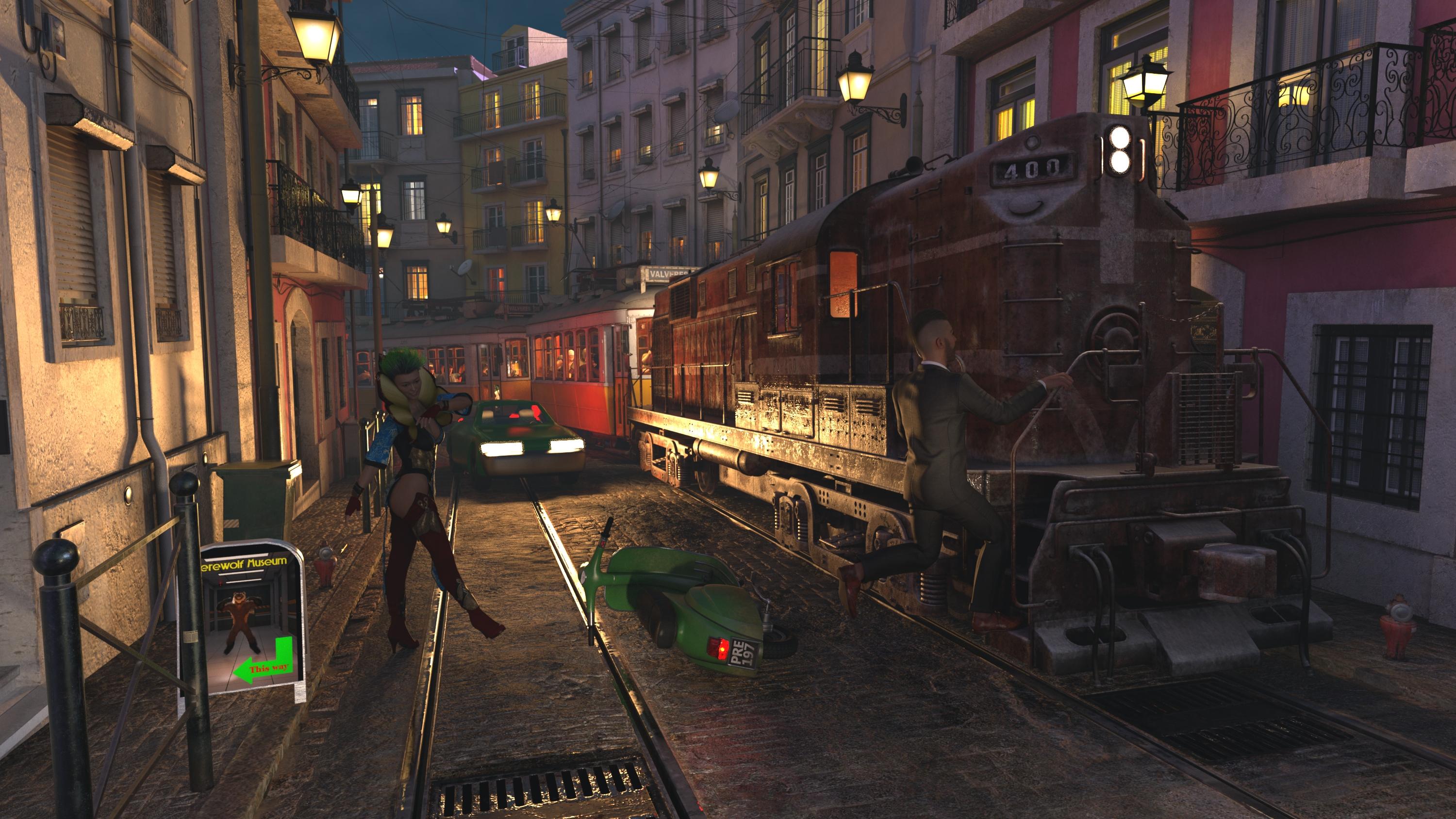
#1930 Parkside Freight 2017 (#47443)
#6254 XI Street of Lisbon (#109235)
#1850 Containment Hallway (#46165)
#411 Genesis 3 Female Body Morphs (#22050)
LB1 #1243 Lotus Maiden Outfit Textures (#24478)
LB2 #5796 ManWolverine for Genesis 9 (#103879)Also used:
XI Tram of Lisbon
LowPi Crowd Generation Bundle
LP Medieval Life Expansion
LP A Dinner and a Show Expansion
Mei Lin 7 + Lotus Maiden Outfit For genesis 3 females + Electro Hair
Traffic Patterns ( Sedan car )
Ty for genesis 9 + Gentlemen Style Outfit for Genesis 9 + Louie Beard + M3D Viking Hair
Italian scooterScripts, Shaders and Lights used:
Skies of Economy
Code 66 Merry Xmas 2025
Invisi Lights
Emission Profile MasterThe Happy Train
In Lisbon, entertainment entrepreneur Remigio Fernandes created the Happy Train. He added an engine and pulled trams around the tram tracks that now worked as moving bars. The result caused traffic problems as the trains had to share the streets with cars and people, and tourists just dropped their rented scooters on the streets everywhere to jump on the train.
 Your thoughts about Laptops
Vram is the most important, imo 8gb is the bare minium. Id see about aiming for 4090m(16gb), 3080m ti(16gb), 4080m(12gb). In that order would be my go to list especially since your not aiming for the top end 50xx laptop with 24gb.
The 50xx cards must use Alpha to render and Alpha doesnt do scripts yet which is a pain.
Laptop cooler is a must(less you go with Eluktronics/XMG water cooled laptop), look into the one with the foam cushion sealing. shows it can drop by ~10deg.
Also as a stop gap you could render in 480 or 720 and use an Ai upscaler, reduce render times and keep quailty.
Fatal Error 4.24 With Windows UpdateSaxa -- SD said:
IceDragonArt said:
Yeah I'm not uninstalling and reinstalling windows 11 I literally just put this machine together a month ago. Its not critical, I have 4.10 installed and it works just fine for using my scripts etc. And I render in the alpha so its still doable. I loathe microsoft but until someone comes up with something else thats really viable, I guess we are stuck with it. It screwed up my GOG installer as well but undoing the update fixed that. The error in daz clearly indicates its an iray issue and seems to only be affecting 4.24
Well that's good if you're happy with 4.10 working :)
Loath is an apt word these days.I keep watching Linux as a dual boot option. Too much work yet for DAZ (with DAZ still supporting MACs but not Linux officially) but for some other things Linux has come a long ways exponentially in last few years.
FYI: winOS, including 11, auto-makes a 'system restore'. You should definately have one from before the windows update.
Only very aggressive AVs may require you to restore from boot-up. Most of times just works in windows (have read that system restore works as before in Win11 too, other than kept for shorter timepsans now - so don't leave for too long if remotely interested).And importantly, Windows has an option to toggle on or off 'the update all your drivers' as well when it does updates (or Win10 did - so would expect same for Win11).
Have mine turned off forever. So for example, i updated Nvida drivers when i wanted to.
Suspect this is why your IRAY is borked for 4.24. (and GOG, and so on)----
Hi Wendy!
Yeah good ole compat mode. Been awesome for a few things.
Probs be worth a try, as it doesn't even take but a minute.
Given 4.10 works, likely not. But who knows with Windows and its INSISTENCE that everything be current (ignoring some people have tried and true software that they don't need broken by needless updates).
Happy 3D'ing!I will look for that. And I will definitely consider the system restore
Fatal Error 4.24 With Windows UpdateIceDragonArt said:
Yeah I'm not uninstalling and reinstalling windows 11 I literally just put this machine together a month ago. Its not critical, I have 4.10 installed and it works just fine for using my scripts etc. And I render in the alpha so its still doable. I loathe microsoft but until someone comes up with something else thats really viable, I guess we are stuck with it. It screwed up my GOG installer as well but undoing the update fixed that. The error in daz clearly indicates its an iray issue and seems to only be affecting 4.24
Well that's good if you're happy with 4.10 working :)
Loath is an apt word these days.I keep watching Linux as a dual boot option. Too much work yet for DAZ (with DAZ still supporting MACs but not Linux officially) but for some other things Linux has come a long ways exponentially in last few years.
FYI: winOS, including 11, auto-makes a 'system restore'. You should definately have one from before the windows update.
Only very aggressive AVs may require you to restore from boot-up. Most of times just works in windows (have read that system restore works as before in Win11 too, other than kept for shorter timepsans now - so don't leave for too long if remotely interested).And importantly, Windows has an option to toggle on or off 'the update all your drivers' as well when it does updates (or Win10 did - so would expect same for Win11).
Have mine turned off forever. So for example, i updated Nvida drivers when i wanted to.
Suspect this is why your IRAY is borked for 4.24. (and GOG, and so on)----
Hi Wendy!
Yeah good ole compat mode. Been awesome for a few things.
Probs be worth a try, as it doesn't even take but a minute.
Given 4.10 works, likely not. But who knows with Windows and its INSISTENCE that everything be current (ignoring some people have tried and true software that they don't need broken by needless updates).
Happy 3D'ing!Fatal Error 4.24 With Windows UpdateSaxa -- SD said:
Did you reinstall Win11? That would likely re-installs latest, via auto-download to get you up-to-date, as windows is fond of (it's their computer - not yours).
You should have a system restore from before your update? But that may not work with reinstall (never tried that).
That restores everything the way it was before. Works 100% of the time over the years, but am not a user of Win11. System Restore is very common and generally easy to use. Likely Downside going forward is win11 is updating something it shouldn't. Meaning until you find what it is updating you would have to keep Windows updates on hold until you find out what it's changing, or keep a restore point (kept for <30 days another stupid WinOS development - which they are doing ad nauseum these days).
Should also mention that someone posted here not too long algo that current OctaneRender supports 5*** series cards. And that would be for older 4,24.*.*, which means you would have to get working again.
https://home.otoy.com/render/octane-render/purchase/
But means a monthly-sub and redoing your textures. But given the long uncertainty over scripts and DAZ 2025 and full implentation, it may be a consideration. It is REALLY abysmal this whole situation of IRAY-DAZweddedToIray. Just had to laugh that OTOY's plugin for DAZ works (havn't seen any posts to contrary).
Yeah I'm not uninstalling and reinstalling windows 11 I literally just put this machine together a month ago. Its not critical, I have 4.10 installed and it works just fine for using my scripts etc. And I render in the alpha so its still doable. I loathe microsoft but until someone comes up with something else thats really viable, I guess we are stuck with it. It screwed up my GOG installer as well but undoing the update fixed that. The error in daz clearly indicates its an iray issue and seems to only be affecting 4.24
Fatal Error 4.24 With Windows UpdateDid you reinstall Win11? That would likely re-installs latest, via auto-download to get you up-to-date, as windows is fond of (it's their computer - not yours).
You should have a system restore from before your update? But that may not work with reinstall (never tried that).
That restores everything the way it was before. Works 100% of the time over the years, but am not a user of Win11. System Restore is very common and generally easy to use. Likely Downside going forward is win11 is updating something it shouldn't. Meaning until you find what it is updating you would have to keep Windows updates on hold until you find out what it's changing, or keep a restore point (kept for <30 days another stupid WinOS development - which they are doing ad nauseum these days).
Should also mention that someone posted here not too long algo that current OctaneRender supports 5*** series cards. And that would be for older 4,24.*.*, which means you would have to get working again.
https://home.otoy.com/render/octane-render/purchase/
But means a monthly-sub and redoing your textures. But given the long uncertainty over scripts and DAZ 2025 and full implentation, it may be a consideration. It is REALLY abysmal this whole situation of IRAY-DAZweddedToIray. Just had to laugh that OTOY's plugin for DAZ works (havn't seen any posts to contrary).
Scripts crashing on MacBook Proumblefugly said:
I recently created a script for my wife recently which worked fine for her when it was unencrypted, encrypted it threw a few errors. Encrypted and unencrypted both worked on My PC and we have identical PC setups for the most part. Only difference is she has an MSI 3090 Ti and a 10700k and mine is a 3090 Ti FE and 10900k.
Running the same version of DS?
When you encrypt you define which minimum DS version. Also, if you run different versions of DS it can be an API not available,. but I've also see encrypted scripts fail, but when debugging them they work like a charm. Usually something horribly silly like an ininitialized variable or something else, but i've had to change a few scripts just because they fail when they are compressed. Could be utf-8 characters somewhere in a comment it a MessageBox that screws up the encrypt/decrypt ( guessing here but I've had those in comments by accidents causing weird errors ).
Scripts crashing on MacBook Pro@mwafarmer_29f4d488a0: I just accidentally found out that even built in scripts crashes the same way. Tried to load an M4 and DS crashed when it wanted to show the PowerLoader script.
In daz3d alpha 2025 is there a way to zero pose without getting ask do I want to restore or zero posNo.
There are scripts that can zero poses and bypass that popup, somtimes included with pose packs, but i personally use Zero Pose utilities
I can't guarantee they will work with 2025, as i haven't done much with that version of studio.
Daz Studio and LinuxIt's interesting that I find there are users working on this type of Linux integration. Testing wine seems good so far. I'm surprised it works with NPU-type graphics. Will be testing the render engine and creation of a new regine engine for research purposes into another development, and fixing up the path issues with the Daz to Blender. The first fix requires many changes and new scripts to make it work alongside extracting it directly into the Blender folder. Will try to update anyone working in a similar context.
[Released] TackyFeet - Tools to remove feet sliding in animationsTalking hypothetically, if I had the time!!! and ability to work on it, how would you see your script working ? ---
There are a number of ik like scripts
https://sites.google.com/site/mcasualsdazscripts/mcjautolimb
https://www.daz3d.com/limbstick-for-genesis-9
and DAZ Studio's pins (Pin Translation and Pin Rotation)How would what you want,
differ from the above scripts and TackyFeet?
and what would be the same?Discussion point:
Even with just two bones they can be rotated in multiple ways so that the end reaches a target. Choosing the best X,Y,Z rotation for a robot arm is a slightly different problem to human/animal movement.
Humanoid robot often achieve this with a pre constructed reference library of movement sequences for that specific robot. The algorithm looks for the best match in the library to the figures previous movements and a weighting of figures desired future movements.
To use that approach the script would need to have a library for each figure it is to work with. Users may have purchased a few movement sequences that could be used however, a robot's movement library is stored in a highly optimised way so that the match can be done quickly.The movement sequences stored in DAZ would be very slow to match against, unless they were pre-processed and stored in a temporary optimised container. For a minimal project, the libraries could be quite simple {each bone pair’s min, mid, max extension}. Allowing the user to select and modify the points in the library could overcome much of the problem.
user defined movement hints format..., user customising rotation limits and bone lengths..., obstacle avoidance..., figure balance..., AI(slow & need QT6/DAZ Studio6 & licencing)...
Ultimate Pose Mixer Pro with Mega Pose Toolkit (Commercial)Update / clarification
A lot of this discussion happened through PM, so here is a summary for all users.
Thanks to FrankTheTank for the very thorough testing and for comparing multiple figure generations : this really helped pinpoint what is actually happening here.What we’re seeing is not a bug in Ultimate Pose Mixer, but a limitation of the Active Pose Tool (this is the one with the little "bone" icon) when used together with bone locking on certain generations.
On Genesis 3 and Genesis 8, locking bones (manually or via scripts) and then using Active Pose to manually pose unlocked limbs can result in the described “rubber limb” behavior. This may be due to the way those rigs handle ghost bones and joint constraints.
Active Pose does pinning, not true locking. And pinning and locking are not equivalent at the rig level. Mixing the two on G3/G8 leads to deformation issues.
This is why:
-
the issue does not occur on G1, G2, or G9
-
it also happens even without Ultimate Pose Mixer, if bones are locked manually
In practice, Ultimate Pose Mixer is designed primarily for locking + applying/changing poses, and works as intended with tools such as pose loading, rotation manipulators, Universal Tool (including IK), and PowerPose.
I’m honestly surprised this hasn’t been reported before, but it’s likely because relatively few users rely heavily on Active Pose, compared to other posing tools.
Since G3 and G8 are older generations, it’s unlikely DAZ will revise Active Pose behavior for them. I’ll therefore clearly document this limitation in the product documentation and reference it here for future users.
Many thanks again to Frank for bringing this up and for helping identify the limits of this workflow. The clarification itself makes the product and its usage/limitation clearer for everyone.
Skin Builder 8 Merchant Resource for Genesis 8 Female (Commercial)Hi. We are busy with updates on scripts. Unfortunately it is in the scripters hands to compile it, not mine. I'll keep people posted.
Daz 3D is part of

Connect
DAZ Productions, Inc.
7533 S Center View Ct #4664
West Jordan, UT 84084Licensing Agreement | Terms of Service | Privacy Policy | EULA
© 2026 Daz Productions Inc. All Rights Reserved.