-
UltraScenery - new(er) territory [Commercial]
paulawp (marahzen) said:
Gogger said:
I love this new release, Waterfall Builder by Lantios - it integrates wonderfully with UltraScenery! I posted a proof-of-concept over in that product's thread, but am focusing on incorporating waterfalls into UltraScenery now.
Still sort of just mucking about, but loving how well it blends in with various ecologies!
Here is the setup as seen from high above. I create two instances of UltraScenery and place one behind the other. The front has a stream or other waterway and the back one is left flat or something raised up a little. The back is to provide trees for behind the waterfall cliff. The waterfall scene (one of two presets included with Waterfall Builder) is placed at the back edge of the front USC and placed over the water feature. (hide the lake and lake bed. I also remove the 'wet' rocks from the base of the waterfall, as they are a little overdone IMHO). Ta Da! Something new for UltraScenery!!!
This is the Australian Ecology with Default USC sky.
And this is playing around with Aspens and and Orestes HDRI Sky.
I've had it wishlisted since it came out, just hasn't quite made it into the cart yet. Looking forward to trying it out.
Thanks for the information, interesting enough we are all on a similar path. I was using "The Water Fall Tool" for Daz Studio by Nerd3D released back in 2009.
Sadly the product is no longer available in the store since it was a great package that contaied animated water flow. Check out the docs here.
http://docs.daz3d.com/doku.php/public/read_me/index/9482/start
I intend to investigate this newer version to see what a combined KitBash will provide.
UltraScenery - new(er) territory [Commercial]Gogger said:
I love this new release, Waterfall Builder by Lantios - it integrates wonderfully with UltraScenery! I posted a proof-of-concept over in that product's thread, but am focusing on incorporating waterfalls into UltraScenery now.
Still sort of just mucking about, but loving how well it blends in with various ecologies!
Here is the setup as seen from high above. I create two instances of UltraScenery and place one behind the other. The front has a stream or other waterway and the back one is left flat or something raised up a little. The back is to provide trees for behind the waterfall cliff. The waterfall scene (one of two presets included with Waterfall Builder) is placed at the back edge of the front USC and placed over the water feature. (hide the lake and lake bed. I also remove the 'wet' rocks from the base of the waterfall, as they are a little overdone IMHO). Ta Da! Something new for UltraScenery!!!
This is the Australian Ecology with Default USC sky.
And this is playing around with Aspens and and Orestes HDRI Sky.
I've had it wishlisted since it came out, just hasn't quite made it into the cart yet. Looking forward to trying it out.
UltraScenery - new(er) territory [Commercial]Gogger said:
I love this new release, Waterfall Builder by Lantios - it integrates wonderfully with UltraScenery! I posted a proof-of-concept over in that product's thread, but am focusing on incorporating waterfalls into UltraScenery now.
Still sort of just mucking about, but loving how well it blends in with various ecologies!
Here is the setup as seen from high above. I create two instances of UltraScenery and place one behind the other. The front has a stream or other waterway and the back one is left flat or something raised up a little. The back is to provide trees for behind the waterfall cliff. The waterfall scene (one of two presets included with Waterfall Builder) is placed at the back edge of the front USC and placed over the water feature. (hide the lake and lake bed. I also remove the 'wet' rocks from the base of the waterfall, as they are a little overdone IMHO). Ta Da! Something new for UltraScenery!!!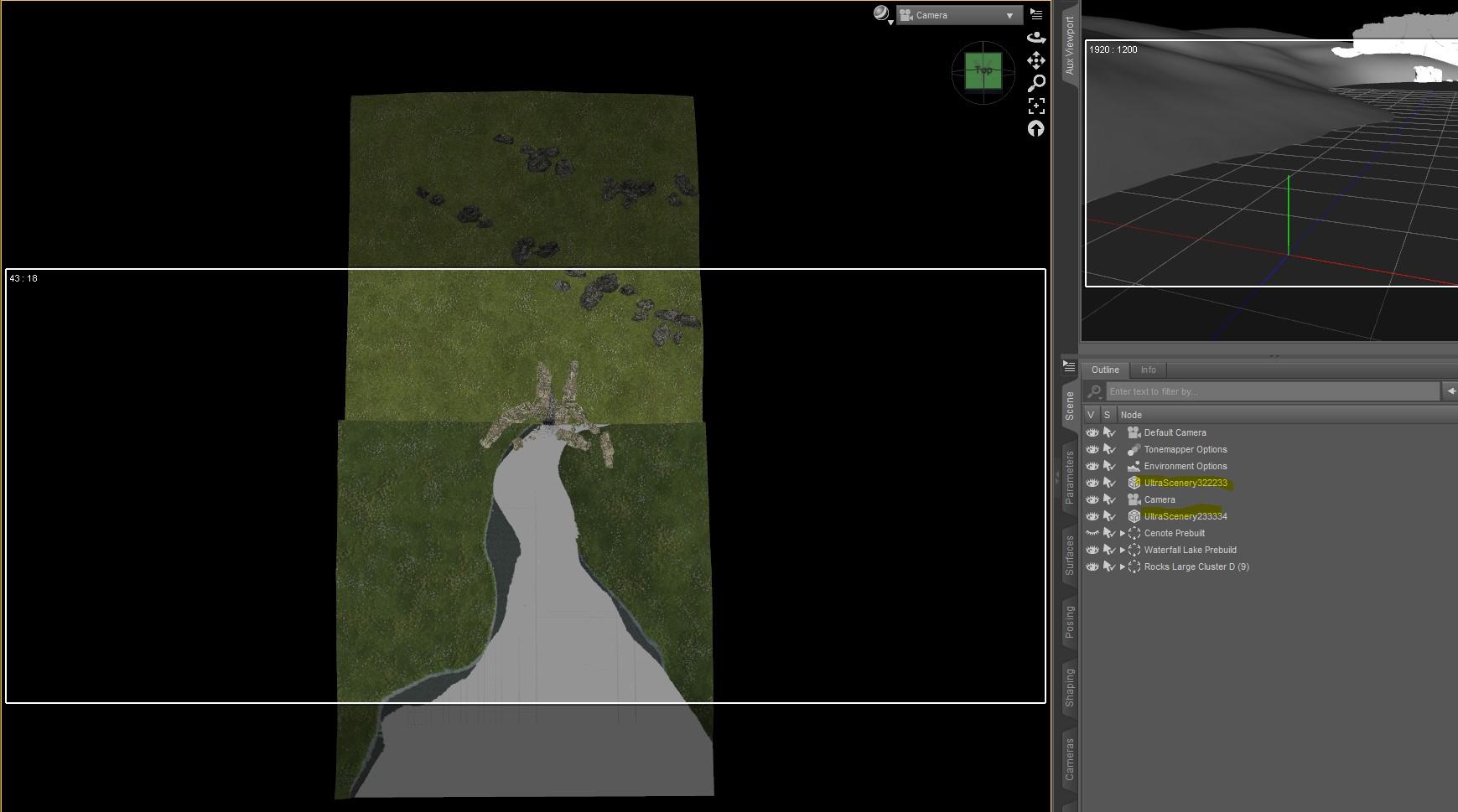
This is the Australian Ecology with Default USC sky.
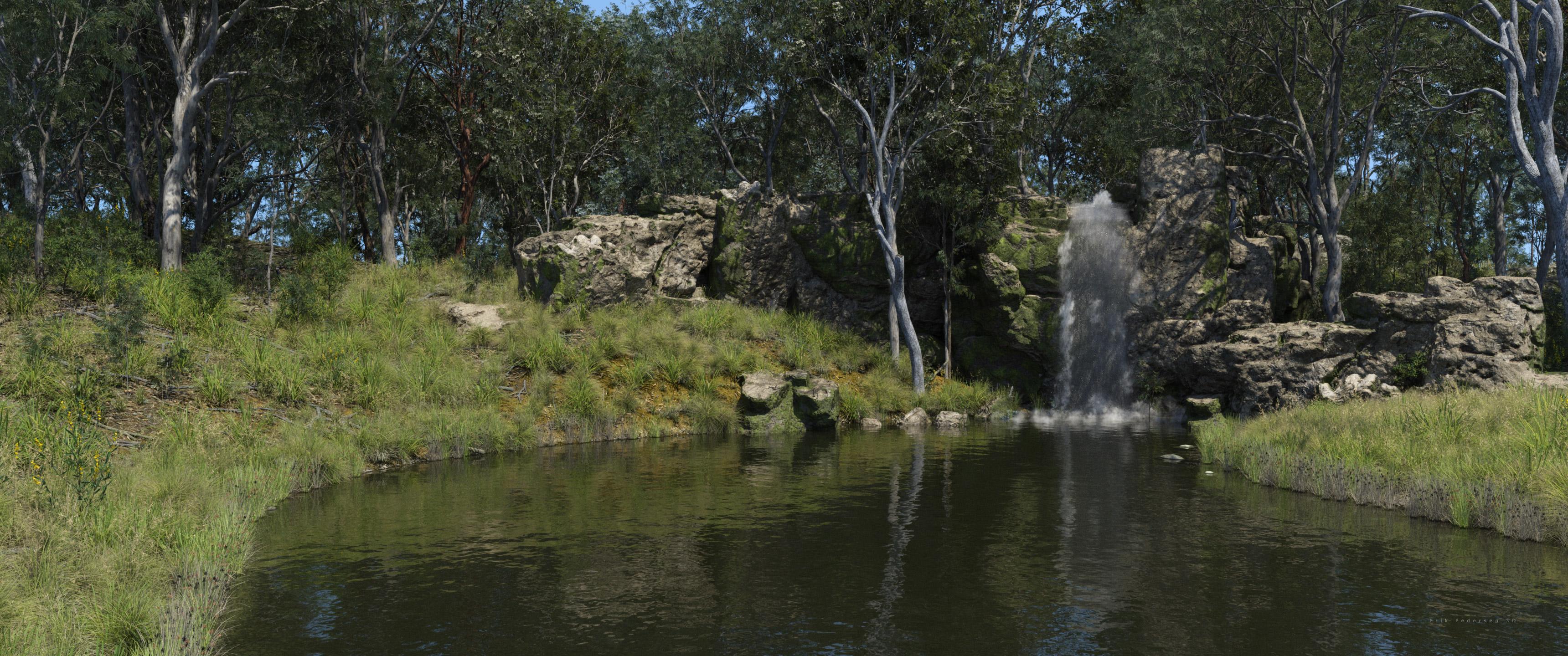
And this is playing around with Aspens and and Orestes HDRI Sky.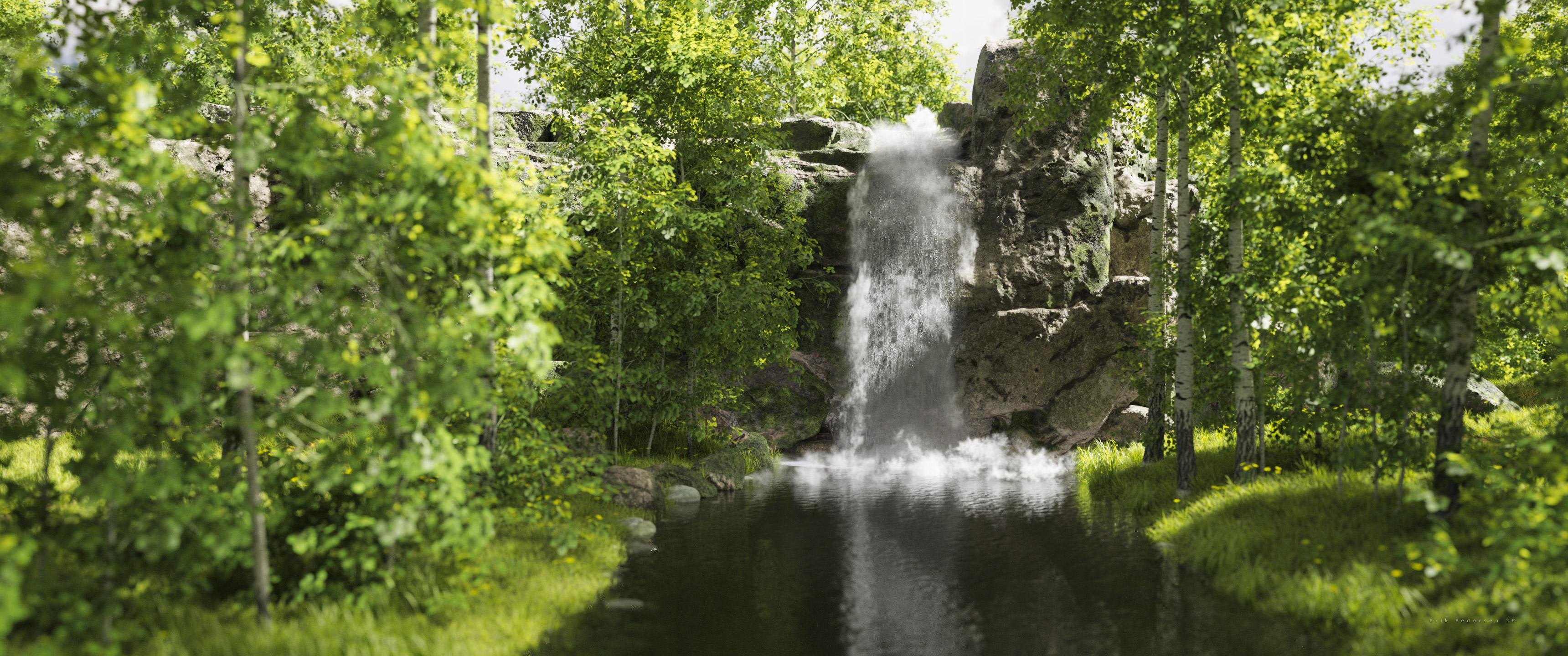
Oh nice, I passed that one because I wasn't sure how well it might integrate, I might need to reconsider
UltraScenery - new(er) territory [Commercial]I love this new release, Waterfall Builder by Lantios - it integrates wonderfully with UltraScenery! I posted a proof-of-concept over in that product's thread, but am focusing on incorporating waterfalls into UltraScenery now.
Still sort of just mucking about, but loving how well it blends in with various ecologies!
Here is the setup as seen from high above. I create two instances of UltraScenery and place one behind the other. The front has a stream or other waterway and the back one is left flat or something raised up a little. The back is to provide trees for behind the waterfall cliff. The waterfall scene (one of two presets included with Waterfall Builder) is placed at the back edge of the front USC and placed over the water feature. (hide the lake and lake bed. I also remove the 'wet' rocks from the base of the waterfall, as they are a little overdone IMHO). Ta Da! Something new for UltraScenery!!!This is the Australian Ecology with Default USC sky.
And this is playing around with Aspens and and Orestes HDRI Sky.
Need Advice On How To Light A Character During the DayI'm working on my first daytime scene. First scene is to show the area first which has the character, sort of a wide shot. Orestes Iray HDRI Skydomes - Summer Day is being used to provide light which has a Sun.
Is it enough to light the scene? Do I need to use anything to resemble the Sun?
Currently I have the Environment Intensity set at: .60. See TBDT EI 1
I'm not sure if or what needs adjusting in Evironment Tone Mapping? See TBDT TM 1
Also have a question about if I've set up the Camera correctly? See TBDT Camera 1
Should I use V3Digitimes Scene Optimizer to help render the scene as my computer is old?
Thnak You in advance for your replies.
RRRR - Weird Holiday Traditions Render Contest *CLOSED*acb said:
Pull#3:
- Dforce Servant Dress For Genesis 8 Female(s) #62107
- Adrie Hd For Sahira 8 #69339
- Iray SciFi VFX Kit #93607
- Warrior Animal Shields #83327
- Gummy Shader Presets For Iray #60769
- Texture Atlas For Daz Studio #10674 ...that doesn't make any sense
- -> redraw: Mrs Chow 8 Pro Bundle #58305
- Dforce Corsican Raider Outfit For Genesis 8 And 8.1 Males #82478
Tag: acb#03
The Gummy Bear Competition
Like every year, there's a fair in town for the princess's birthday. And like every year, there's a gummy bear stand - run by three older Asian women. And just before the big fireworks start, they hold a gummy bear competition, as usual. This year, a maid and a pirate competed against each other in the final. The maid won. Apparently, the hook on the pirate's hand is not suitable for shoveling gummy bear material. Excuses - I would say.
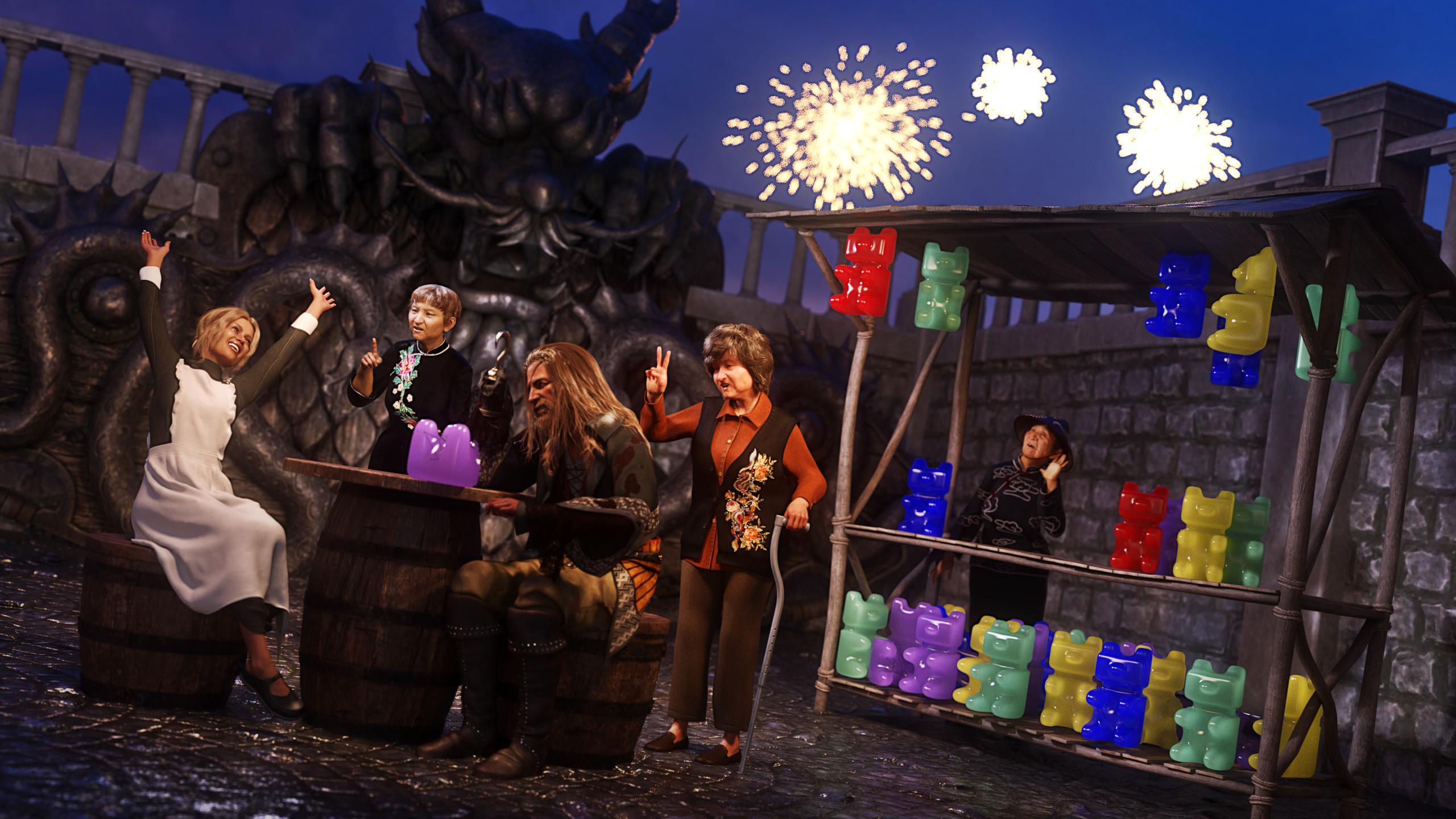
- Dforce Servant Dress For Genesis 8 Female(s) (maid's dress)
- Adrie Hd For Sahira 8 (maid)
- Iray SciFi VFX Kit (fireworks)
- Warrior Animal Shields (three shields build the statue in the background)
- Gummy Shader Presets For Iray (gummy bear material - not suitable for hooks)
- Dforce Corsican Raider Outfit For Genesis 8 And 8.1 Males (pirate's clothes)
- Mrs Chow 8 Pro Bundle
- Mrs Chow 8 (asian woman center)
- Tao HD for Mrs Chow 8 (asian woman left)
- Zhirong for Mrs Chow 8 (asian woman right)
- Liling Hair for Genesis 8 and Genesis 3 Females (Tao's hair)
- Z Young at Heart - Poses and Expressions for Mrs Chow 8 and Genesis 8 Female (all three asian women's poses - with slight adaptations)
- Lucinda Hair for Genesis 3 and 8 Female(s) (Mrs Chow's hair)
- dForce Nainai Outfit for Genesis 8 Female(s) (Mrs Chow's chlothes)
- dForce Long Sleeve Cheongsam for Genesis 8 Female(s) (Tao's clothes)
- dForce Traditional Outfit for Genesis 8 Female(s) (Zhirong's clothes)
Additional items:
- Medieval City Block (environment)
- Wolfgang 8.1 (pirate)
- Drago Hair and Beard with dForce for Genesis 3 and Genesis 8 Male(s) (pirate's hair)
- dForce Blaze High Seas Outfit for Genesis 8.1 Males (hook & eye patch)
- MEGA Updo 2 Hair for Genesis 8 and 8.1 Females (maid's hair)
- English Village Pub Props 1 (stools and table)
- Medieval Market Stall 03 (stall)
- Emergency Room Props (walking stick)
- Orestes Iray HDRI Skydomes - Day's End (hdri)
The gummy bear model is my doing.
Show Us Your Bryce Renders Part 13Welcome to 2025 everyone, may your renders look fantastic !
Sci-Fi scene - Terrain is Tectonics Evolved Vol.3 By Orestes, Building is SF Tower 2 by www.grafik-3d-portal.de, Sky is Afternoon Sun by DAZ3D, Spaceship by me.
 Sylvia 9
Oso3D said:
The vast majority of the content I use in a promo render, I have no idea what product it came from.
My best bet is to try to apply a material for an item, navigate to that folder, and hope it's similar enough to the store name to find.And if it's a pose or light setup? Pretty much nothing to really go on other than 'does this look familiar' and scroll through my library.
In many scenes I'm adding and taking items out as I go, I am not keeping track of products. I change my mind. Maybe I use a different shirt. Maybe I whip up a new material on the fly. Maybe I use a bunch of stuff then I zoom in and realize 3/4 of the stuff I used is no longer in frame.
Having to keep even semi-accurate list of what I'm using in a promo is a lot of work.The advantage to everyone listing products is a reliance on VERY indirect benefits. If I have a choice between spending an hour listing products so that maybe other people list my products so maybe somebody makes an additional purpose, the profit in that compared to spending an hour actually making a new product... you're trading away time you KNOW will make you decent money on the whisper of maaaaybe.
I only list products when I can name them off the top of my head, like UltraScenery, Orestes skies, very exotic armors, or my own products. If I have to spend any significant time tracking it down, no thanks.
I appreciate the contructive feedback and an explanation directly from a PA. I think what would help everyone if it were common for everyone to reference products in the store to help you with your promo images, as that'd help with us customers. But because that isn't the case, and the situation has snowballed so much over the years, we have no idea what's being used (sometimes). And even if one PA did it 100% with no errors, we'd all have to be dependent on everyone else doing it, accurately, for it to make a difference. And what frustrates me is as several of us have posted about this very issue, another post came up looking for another mysterious product.
I'm not even mad at the PAs-Daz themselves could have to way to tell us what it is, or require it to be done, but they're silent on it. I suppose there's no solution to it and we won't know what's being used unless someone else identifies it and we get lucky.
Sylvia 9The vast majority of the content I use in a promo render, I have no idea what product it came from.
My best bet is to try to apply a material for an item, navigate to that folder, and hope it's similar enough to the store name to find.And if it's a pose or light setup? Pretty much nothing to really go on other than 'does this look familiar' and scroll through my library.
In many scenes I'm adding and taking items out as I go, I am not keeping track of products. I change my mind. Maybe I use a different shirt. Maybe I whip up a new material on the fly. Maybe I use a bunch of stuff then I zoom in and realize 3/4 of the stuff I used is no longer in frame.
Having to keep even semi-accurate list of what I'm using in a promo is a lot of work.The advantage to everyone listing products is a reliance on VERY indirect benefits. If I have a choice between spending an hour listing products so that maybe other people list my products so maybe somebody makes an additional purpose, the profit in that compared to spending an hour actually making a new product... you're trading away time you KNOW will make you decent money on the whisper of maaaaybe.
I only list products when I can name them off the top of my head, like UltraScenery, Orestes skies, very exotic armors, or my own products. If I have to spend any significant time tracking it down, no thanks.
UltraScenery - new(er) territory [Commercial]memcneil70 said:
@tsroemi I have used some of Flipmode's Easy Environments sets' HDRIs which have a distant background image along with sky and light. It just depends on what foreground I used. I also use Orestes Iray HDRI Skydomes, PRO-HDR-SKIES by Com Jackson and the Skies of series by DimensionTheory which also have backgroud images. Maybe these can keep you going until a specific set for USC2 is released?
After USC being released so many years ago, we have become used to a large body of products for it and it naturally feels like USC2 is skimpy, even though the USC items can be used with it, except some of the tools, which were incorporated. It would be nice to have some other biomes. Although the Tropics, if apply to the USA, are actually only seen in the Pacific Islands and Florida or the Gulf Coast. (Not sure never been there. Too humid and bugs.) But going south, would work for parts of Central America, South America, Africa, and Asia.
Mary
Thanks for the hints, I'll try that!
UltraScenery - new(er) territory [Commercial]@tsroemi I have used some of Flipmode's Easy Environments sets' HDRIs which have a distant background image along with sky and light. It just depends on what foreground I used. I also use Orestes Iray HDRI Skydomes, PRO-HDR-SKIES by Com Jackson and the Skies of series by DimensionTheory which also have backgroud images. Maybe these can keep you going until a specific set for USC2 is released?
After USC being released so many years ago, we have become used to a large body of products for it and it naturally feels like USC2 is skimpy, even though the USC items can be used with it, except some of the tools, which were incorporated. It would be nice to have some other biomes. Although the Tropics, if apply to the USA, are actually only seen in the Pacific Islands and Florida or the Gulf Coast. (Not sure never been there. Too humid and bugs.) But going south, would work for parts of Central America, South America, Africa, and Asia.
Mary
2024 Christmas Caper Contest _TAOZ & FAE3D CONGRATS!Nobody guessed all but I will post the results later today. It's after midnight right now and I am heading to bed, too tired to even look at the DAZ Store..
@Fae3D you came so close to guessing them all. So far two wrong, but will revisit it later after some sleep . The football was Z Utilities Sports and the Sack was Orestes Bag O Terror and Cheer
@Taoz, you're the reason I'm quitting and heading to bed LOL. You did nail some but some others had me scratching my head wondering what image I posted, so I figured I should revisit it after a bit of sleep and a cup of coffee. For example I'm what the heck Feeling sick, did I post the page with Santa in bed sick? That's when I realized you were right, I was wrong, and I needed some sleep. Good job. I'll finish yours in the morning.
I'll touch base with you guys in a bit after some shut eye. Merry Christmas.
Wrapped Up ! (Tied Up ! Cobweb edition)How about these products?
dForce SY Nets and Webs for Genesis 8
dForce Iray Cobweb Kit
Orestes Cobwebs
Iray WebWorxRender your buys! Use buys from the current month and the previous month of salesacb said:
Caught!
Who doesn't know this?
Fullmoon's high in the sky. And you just want to go outside without waking your spouse. But you're a werewolf and hard to miss.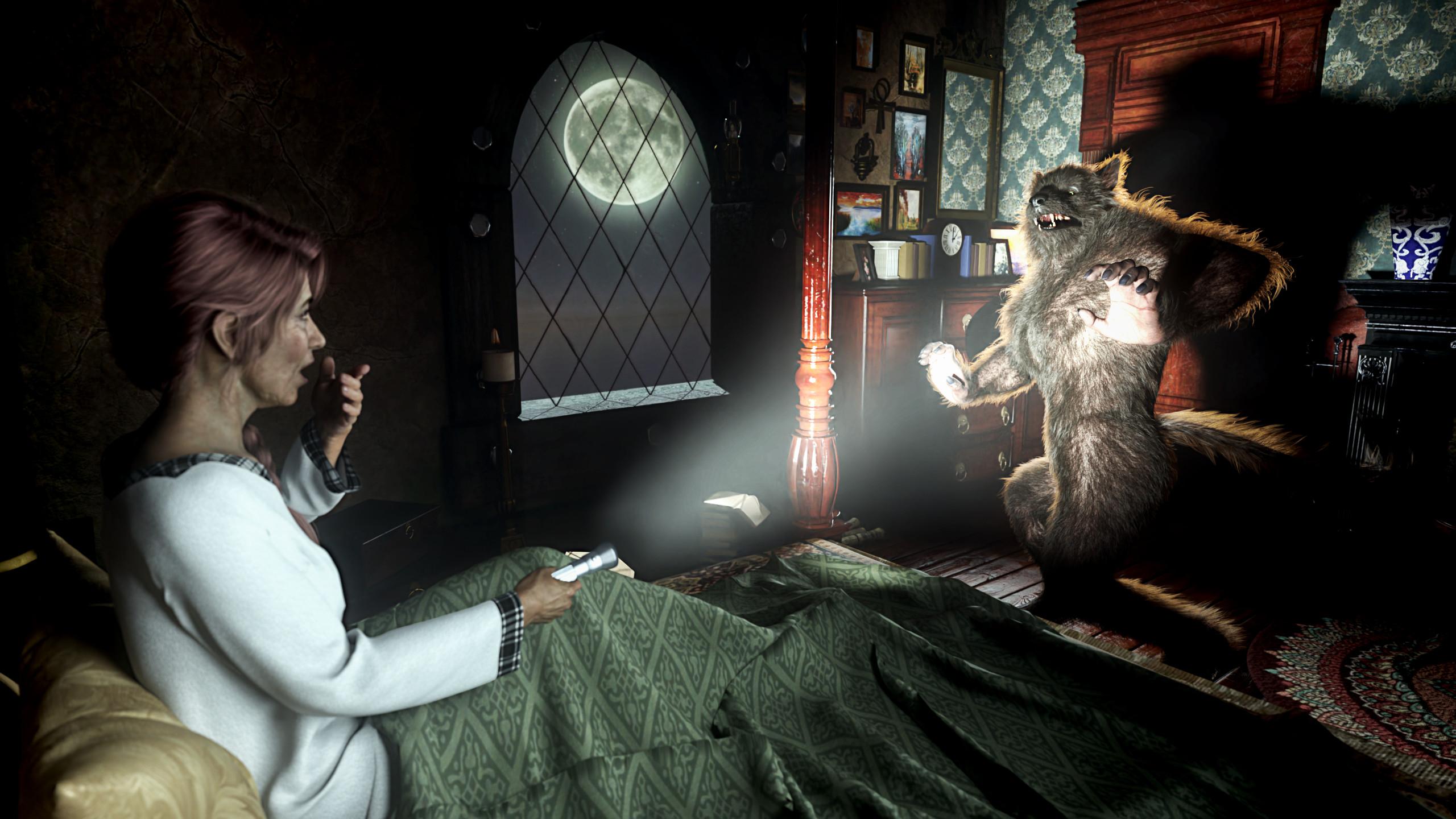
I love this render so much!
 That werewolf is more cute than frightening, which can't hurt in this situation. The details are really lovely, of the lived-in room, their expressions and the light from the flashlight! Wonderful capture!
And who doesn't know this indeed! My hubby decided to grow a bit of a beard, and I'm still not used to it. When I first see him in the morning, I probably have a similar reaction on my face!
 Epic Battle Render Contest (This Weekend!)
Hi all!
Long time Daz member, first time (that I remember) competition entrant. Sadly, the creative juices weren't flowing as freely as I'd like them to, so this will probably be my only entry.
This work is called "The Protector" and I used the MKTG Ghost Bride Outfit.
I also used:
Futuristic Samurai Compound - Environment and Props
Orestes Iray HDRI Skydomes - Starry Night
DD PBR Metal Panel Shaders for Iray Vol 1
Cybernetics Iray Shaders on a couple of sphere primitives
Lots of Photoshop adjustment layers.Need Some Suggestions On How To Light A Character At Nightcrosswind said:
n.aspros123 said:
crosswind said:
Firstly, personally suggest you use some good HDRI map rather than Sun-Sky mode, like the ones from Orestes Graphics , there're quite a few ~~, e.g.
https://www.daz3d.com/orestes-iray-hdri-skydomes--darkest-night
https://www.daz3d.com/orestes-iray-hdri-skydomes--a-night-in-august
Secondly, simply add one or two spotlights to lit your characters, with higher Temperature and/or cold color tone.
As for navigating the scene / manipulating figures in a big environment:
1) better activate keyboard navigation, tweak the Speed (Edit - View - Increase Move Speed... ) and then navigate with keys;2) Alt + Drag a character preset or a scene sub-set... into the scene next to the existing character, or directly load the 2nd character. Then copy XYZ Translation values from 1st character to 2nd character.
@crosswind Thank you for responding. Do you simply double click on the HDRI map once it's found in the content Library to load it in?
Yes, then tweak settings in Render Settings pane, under Environment, as needed.
What else do I need to know about night time HDRI's?
Check Sickleyield's tutorial firstly... That was the only tut from which I ever learnt for the subject matter.
Then just have more and more experiments with various settings ...
Thank you all for your replies. They are very welcomed.
@crosswind I used this HDRI from the same creator you suggested. https://www.daz3d.com/orestes-iray-hdri-skydomes--winter-moon I turned the intensity way down .010 to simulate night as the moon was still tuning the sky a grey colour.
I also turned on Bloom. What do you all think?
My PC hardware is 10 years old. i74790K 16GB DDR3RAM and GTX 1080Ti. Should I try the Post Denoiser Tool in the Filtering Section to help with Rendering or leave it off? If I leave it off, what should I set the Progressive Rendering settings too to get a denoised but sharp render? I dropped the Post Denoiser Start Iteration to 2. Default is 8. IDK what I'm with doing with the Denoiser, first time using it.
Need Some Suggestions On How To Light A Character At Nightn.aspros123 said:
crosswind said:
Firstly, personally suggest you use some good HDRI map rather than Sun-Sky mode, like the ones from Orestes Graphics , there're quite a few ~~, e.g.
https://www.daz3d.com/orestes-iray-hdri-skydomes--darkest-night
https://www.daz3d.com/orestes-iray-hdri-skydomes--a-night-in-august
Secondly, simply add one or two spotlights to lit your characters, with higher Temperature and/or cold color tone.
As for navigating the scene / manipulating figures in a big environment:
1) better activate keyboard navigation, tweak the Speed (Edit - View - Increase Move Speed... ) and then navigate with keys;2) Alt + Drag a character preset or a scene sub-set... into the scene next to the existing character, or directly load the 2nd character. Then copy XYZ Translation values from 1st character to 2nd character.
@crosswind Thank you for responding. Do you simply double click on the HDRI map once it's found in the content Library to load it in?
Yes, then tweak settings in Render Settings pane, under Environment, as needed.
What else do I need to know about night time HDRI's?
Check Sickleyield's tutorial firstly... That was the only tut from which I ever learnt for the subject matter.
Then just have more and more experiments with various settings ...
Need Some Suggestions On How To Light A Character At Nightcrosswind said:
Firstly, personally suggest you use some good HDRI map rather than Sun-Sky mode, like the ones from Orestes Graphics , there're quite a few ~~, e.g.
https://www.daz3d.com/orestes-iray-hdri-skydomes--darkest-night
https://www.daz3d.com/orestes-iray-hdri-skydomes--a-night-in-august
Secondly, simply add one or two spotlights to lit your characters, with higher Temperature and/or cold color tone.
As for navigating the scene / manipulating figures in a big environment:
1) better activate keyboard navigation, tweak the Speed (Edit - View - Increase Move Speed... ) and then navigate with keys;2) Alt + Drag a character preset or a scene sub-set... into the scene next to the existing character, or directly load the 2nd character. Then copy XYZ Translation values from 1st character to 2nd character.
@crosswind Thank you for responding. Do you simply double click on the HDRI map once it's found in the content Library to load it in?
What else do I need to know about night time HDRI's?
Need Some Suggestions On How To Light A Character At NightFirstly, personally suggest you use some good HDRI map rather than Sun-Sky mode, like the ones from Orestes Graphics , there're quite a few ~~, e.g.
https://www.daz3d.com/orestes-iray-hdri-skydomes--darkest-night
https://www.daz3d.com/orestes-iray-hdri-skydomes--a-night-in-august
Secondly, simply add one or two spotlights to lit your characters, with higher Temperature and/or cold color tone.
As for navigating the scene / manipulating figures in a big environment:
1) better activate keyboard navigation, tweak the Speed (Edit - View - Increase Move Speed... ) and then navigate with keys;2) Alt + Drag a character preset or a scene sub-set... into the scene next to the existing character, or directly load the 2nd character. Then copy XYZ Translation values from 1st character to 2nd character.
Buy Something That Doesn't Work in Carrara? Post your Questions and Workarounds here. (please)therixx said:
I made an image using Them Bones Bundle by Orestes Graphics (see the "Show us your Renders!!!" thread).
Thank you for the explanation. I own 'Them Bones.' I am sure I will refer to your notes. Much appreciated.
Daz 3D is part of

Connect
DAZ Productions, Inc.
7533 S Center View Ct #4664
West Jordan, UT 84084Licensing Agreement | Terms of Service | Privacy Policy | EULA
© 2026 Daz Productions Inc. All Rights Reserved.