-
Official Release of Carrara 8.5 **Update - 8.5.1.19**
Happy 13th Anniversary of Daz doing nothing with Carrara
 How did you discover Daz/Poser?
Totally my husband's fault. In November 2009, I saw my then boyfriend creating these 3D graphic characters. He loved one called Aiko as he loves anime. I thought it looked cool so he sent me a link to this site called daz3d. At that time I think you could get the base prgram free (it was a long time ago) but if you wanted the Pro version you had to buy it. He told me there was lots of freebie content. He did warn me though. He said "like any good drug the first taste is free" and laughed. I had just missed the October sale. Within a month I became monthly Daz+ subscriber which switched to yearly in March when they offered a decent discount. I bought the Pro version then too. I spend way too much here but I love dabbling. I'm 66 and still working full time so I don't get to play as much as I would like to but I am retiring from my day job as of February 1, 2027 and hope to spend more time on my hobbies. Doing the things I love instead of the things I need to to pay the bills. My husband still uses Daz but doesn't spend anywhere near what I do and creates even less. He is a big fan of what I can do and I am not nearly as talented as some others here but I enjoy it. My Mum is an artist and I have what my sister calls the art gene. I also have Bryce, Hexagon, Carrara and Poser 13 which I dabble in but Daz was the first one I learned and therefore the one I tend to fall back on.
How did you discover Daz/Poser?Saw Poser 1 advertised in a 3D mag or other mag ... it was beyond my price range at the time..1996 or so. Kept reading the mags and tried different software... then one day I was at one of those huge mega outlet malls and went into a software shop, and there in the software clearance bin was a copy of Poser 1 for $29. I snagged it. I still have it. Stuck with P4 for a very long time, using V1,2,3,4. I also found Vista Pro, then Bryce, Ray Dream Studio (Carrara). and several others. I loved the interface of Metacreations products. Kai Krause was the designer. I mainly plodded along, as I still do today.
How did you discover Daz/Poser?I was in Totsuka, Japan serving in the US Navy at the Telecommunications Station they had there, where a colleague introduced me to Poser 1.0 when he learned I was looking for some 3D applications for my personal computer. It was by Fractal Designs back then. From there, I branched out to their Ray Dream Studio, and also Bryce by Mojo I've been following their products through upgrades and evolution ever since.
I did feel that RDS was superior to the early versions of Carrara, and I was only forced to fully go with Carrara when my first computer finally died and I was unable to reinstall RDS onto my replacement machine. Throughout it all, I was acquiring tons of models from Zygote.
When Zygote became DAZ, I tried the DAZ Studio and had a hard time adjusting to the new UI vs how Poser did theirs. But eventually, I became used to it--only years later of being on DS so much, I'm finding the Poser UI feels rather clunky now!
 Then I lost my access to Carrara when I tried to add an Adessa writing tablet to my system because the Adessa drivers were incompatible with Carrara. That disaster forced me to pick up Blender, and I quickly picked up on how powerful and great Blender is! Eventually, the Carrara/Adessa conflicts were finally fixed and I was able to start using Carrara again, but I haven't gone back to it because Blender is so much better. I've also got Hexagon & Pegasus, but I've rarely have needed to use them.
So far, my highest use apps are DS & Blender, and I LOVE how transferring between them has become so much easier in recent years!!
 How did you discover Daz/Poser?
I got Carrara 5 on a magazine cover disc
went to the Evocia site and was redirected to DAZ3D
it was 2009
I had a crappy Dell laptop that really couldn't run DAZ Studio
so I used Carrara, Which I upgraded to 7 in 2010 with the DAZ book, Figures, Characters and Avatars then also bought Poser7
didn't really use D|S until 4 as that didn't crash loading everything
I actually started out as an iClone3 user late 2008 as Reallusian Crazytalk came bundled on my laptop so went to their site once I got internet
How did you discover Daz/Poser?Got Poser about 23 years ago and started with V3. Used Bryce and Carrara even before Daz aquired them. Also did a bit in Vue back then.
I had a store in Rendo with another account 20 years ago for a short time, but my main job consumed me and i had to abandon it.Started to change to Cinema 4D with Daz content, but left it as well, when they started with their yearly maintenance fee.
Changed to Blender and will use my huge Daz library there with Diffeomorphic and by enhancing/modifying the content. As this is still a hobby, this will take some time until I reach some goals.
How did you discover Daz/Poser?Back in the early 2000s, I was on a couple of forums dedicated to the Star Wars Roleplaying games and became online friends with several other members. One of them did some character portraits and got me interested in DS. That would have been DS2 & not long before Victoria 4 debuted. I think I must have had the worst learning curve in the history of 3D art. Fortunately, my friend was willing to spend a lot of time teaching me over the internet. I used Carrara for several years as well, but got away from it when I started using G3 more. While Daz said G3 & Carrara were compatible, in truth some G3 items didn't work in it.
Off Topic Thread #2Health update - Gastroscopy
Nothing serious or nasty found, so not about to drop off my perch yet !!!
Did find something that I will have to chat to my GP about, but other than that - good news !
Now to start on working about getting that replacement computer so I can get back to Carrara again ......
RRRR Render Contest - Turn the tideIt's time for a new RRRR Render Contest!
The theme for this round is Turn the tide - The challenge of making the best of a bad situation. Something went south, but how was it turned into something better, like the classic when life gives you lemons, make lemonade.
RRRR stands for Random Runtime Roulette Renders, and it's a contest that has been running for over twelve years now, on and off. We invite anyone to enter, specially all those new users who have shown up the past years. This is not the usual make a very nice render contest but more like tell a really great story, often fun, with your render!How does it work?
Make your pull of 4 items, and if your any Lucky Bastards, you pull one extra item per LB.Who can play?
Anyone can play!How do you prepare yourself for play?
The rules are very simple, but first you need to have all your items in some kind of order in a text file, dumped from the itemized history into a text file or a spread sheet. Remove things like software, gift certs, and special plugins from the list and items that wil not work with the software you work with. For example if you have items for Poser, Bryce or Carrara, and want to use DAZ Studio, remove those other items from your list. If you have loads of older figures, M3, M4, a ton of non Iray stuff and you only want to use Studio with Iray, remove all the junk from you list.Then you use a randomizer to randomly pick items from your list (your Runtime/My Library) for your start pull . You can use items from any store. Now build a scene with those 4 items plus any other items you want to add to make a fun scene. For newcomers I heartly recommend looking at the previous contests below to get ideas how you can do this.
Working randomizer:: https://www.random.org/integers
There are some situations where you allowed to redraw, these are:
- You pulled something that doesn’t work, broken thing, only works in a version / software not used etc etc, or you forgot to remove that item from you list even though you knew it wont work, or figure that out later.
- You pulled a software or add-on to a software or anything you should have filtered out from the list.
- You pulled only huge environment props and will not be able to render a scene without crashing.
- You pulled an item you already have been using in two RRRR renders in this content and that was picked randomly. Three is a curse - rule!Lucky Bastard Rule!
I say this again: If you have Lucky Bastards, you pull one extra item for each LB you have, simple as that.
Explaination of Lucky Bastards.
Lucky Bastards, or LBs, are a form of handicap system which makes the contest a little more difficult for those who have won.Current Lucky Bastards Standings
Player LBs Totte 3 acb 2 Fae3D 1 katywhite 1 emanuela1 1 luci45 1 aprilshowers2065 1
How to play?
You pull, you compose and you Render. You post your images and pulls in this thread (Don't miss that, entries without pulls and posts in this thread will be disqualified!!).
Then the entry should also be posted in the Entries only thread.Bundles
If you pull a bundle, use two or three complete items from it, or more if you like, but you do not need to use all, but only picking a hairpin from Victoria 8 Pro Bundle is “too little”. Clarification: A bundle still counts as only one pulled item.Poses, Expressions and textures/colors
If you pull a pose pack, an expression pack or a texture/color pack, you only need to use one of them, not all. For example if you pull 500 expressions for Genesis 8 Female, use one, if you pull 128 colors for Frappe Hair, use one.
Accidenty breaking the TOS
If your entry is removed by the forum mods because it accidentally, not deliberate, broke the TOS, you do not have to redo that entry but can move on and make a new pull.The rules of madness!
Now you have successfully and randomly picked your items, make a scene, you can add other items as well but the one you picked should be prominent or cleverly used. Render it, post it and make us all laugh! Remember though that the renders must follow the TOS of the forum. As we have a theme on the contest, the render should in some way touch that theme.The contest categories!
There are two categories Best and Funniest. Every image will compete in both categories.Contest duration!
It starts now at Friday August 7 - 2026, and will go on until Sunday September 27 2026 at 23:59:59 local DAZ time.This months sponsors so far:
Totte (Code 66) is sponsoring with two items from his store
Dartanbeck is sponsoring with items from his storeWe want more sponsors!
Do you want to sponsor the RRRR?
Please chip in a gift card sponsorship, sponsors can play, they should play, they are even extra encouraged to play, as sponsors always plays for keeps.Maximum number of entries?
For this round it will be a maximum of 12 entries per player.So, good luck and start your render engines!
One Drive Ba-tards Just Won't Stop Messing with CarraraLeave my file structure alone!
(Insert long string of curse words).
They have moved my GMIC data. Argh.
Yo, One Drive, You Suck!!!!!
Let's appreciate/discuss today's new releases - ongoinger still further threadI can get it for 29.22 with 2 tokens as well
and will when I get paid tomorrow

the size of the voxels are adjustable
one can crumble buildings
turn vampires to dust
like Carrara modifiers
What Do These Icons Mean?WendyLuvsCatz said:
since the original image was removed and RH refered to Powerloader
I had no idea what dsa was being refered to
hence my less than helpful post
its simply a DAZ studio native format like duf is for later versions
can be for many things including poses
.dsa, dsb, dse, and the old .ds are script files (the extensions distinguish between plain text, binary compressed, and binary encrypted). Befoe the .dsf/.duf files in DS 4 (which are just data) presets were scripts that made modifications to settings (and .daz scene files were a closed, binary format that was not really user-editable as a file).
as a Carrara and Poser user back in those days, I was forever opening the very crashy D|S3A and converting many to useable Poser and hence Carrara 7 compatible files
Carrara 8.5 at least reads duf files though not always with functionality
still not dsa
What Do These Icons Mean?since the original image was removed and RH refered to Powerloader
I had no idea what dsa was being refered to
hence my less than helpful post
its simply a DAZ studio native format like duf is for later versions
can be for many things including poses
as a Carrara and Poser user back in those days, I was forever opening the very crashy D|S3A and converting many to useable Poser and hence Carrara 7 compatible files
Carrara 8.5 at least reads duf files though not always with functionality
still not dsa
Freebie Challenge August 2026 - Plastique Fantastique! - Main Thread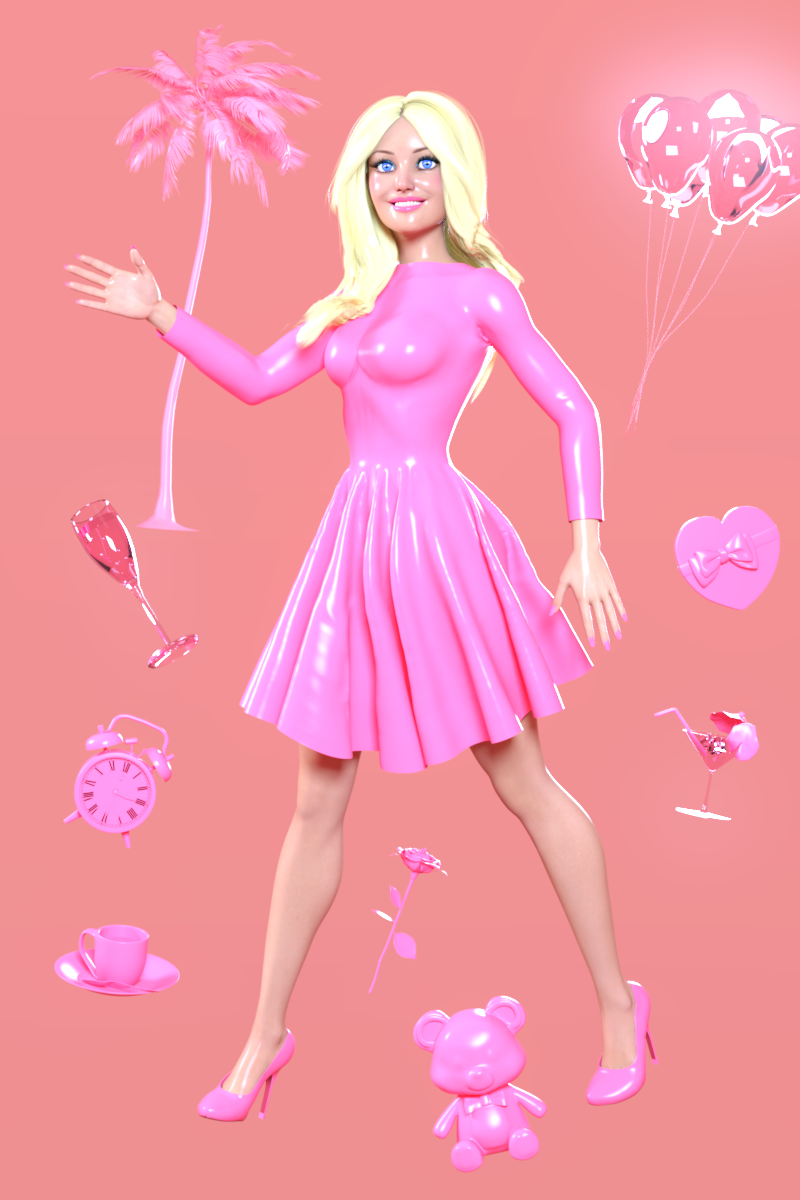
The world's first fully synthetic plastic was invented in 1907 by Leo Baekeland, who coined the term plastics. Since then plastics have taken over the world, especially once mass manufacturing became much cheaper around the 1950's and 60's.
Plastics are cheap, colourful, and versatile. Everything can be made of plastic: furniture, clothes, wigs, household objects, toys, medical equipment, computers. We achieve huge advances in technology and science as we use plastics to fly to the moon and connect the entire world through the internet. Life in plastic, it's fantastic!
Or is it, really? Looking at the environmental and health impact of plastics, they definitely have their dark side. Is recycling really the solution, or is it just green-washing? Does "plastic" automatically mean "cheap and disposable", or can plastics bring value to our lives? For better and for worse, plastics are all around us (and they may or may not be lead by Regina George.) The theme of August is: Plastique Fantastique!
Some useful links for the Contest
The KindredArts Free Resource Repo Here are the KindredsArt freebies and a rich list of sites that host freebies
Free 3D Models Link to DAZ's bi-weekly freebies
Limited Time Freebies Discussion Thread A thread under the Commons section of the forum, where DAZ's biweekly freebies are announced and, recently, even listed. It's useful for remembering which freebies were added and when.
The rules of the contest are:
-
Your entry must be a new render, especially made for this challenge.
-
Your entry must follow the DAZ TOS.
-
You may enter a maximum of 4 entries.
-
A minimum of five (5) Freebies must be included in your image
-
All Daz Bi-Weekly Freebies are allowed throughout the entire month in which they are free, as well as the following month (for a total of 2 months).
-
You may use a maximum of 5 paid items.
-
Base figures (Genesis 9, Genesis 8, etc.) as well as their basic morph packs may be used as needed. They do not count as either paid items or freebies.
-
DAZ Studio, Poser, Bryce, Carrara, Hexagon, and Blender are allowed.
-
DAZ AI Studio is not allowed. The use of image generating AI technology (midjourney, stable diffusion, etc.) is not allowed in any form.
-
Postwork is allowed. You must also include the raw render (before postwork) of your entry.
-
For a more detailed version of the rules see the PDF attached to this post; or ask your question in this thread, we're always happy to clarify!
-
Let's have fun and be creative with all the amazing resources that are available for free!
This contest ends on August 31st 2026.
Post your images and freebie links in this thread for link verification.
Once the links are verified, you can post your image and links in Entries Thread for judging.First Place: $15 store credit from KindredArts
Second Place: $10 store credit from KindredArts
Third Place: $5 store credit from KindredArtsPast Freebie Contests:
January 2022 - Around and around and around...
February 2022 - Mysteries of the heart
March 2022- Luck Of The Draw
April 2022 - New Beginnings
May 2022 - Cozy Corner
June/July 2022 - The Secret Life Of...
August 2022- Sniff, sniff... what's that smell?
September 2022-Cars Cars and More Cars
October 2022 - Horror Movies
November 2022 - Thieves, Robbers, and Fraudsters all around!
December 2022 - The Night is Darkest...
January 2023 Speed Demons and Slowpokes
February 2023- I See Red
March / April 2023 Magical
May 2023 - Sweet Music
June/July 2023 Holes, Gaps, Caves, Tunnels
August 2023 Fabulous Pink
September 2023 Gardening
October 2023 Hallowed Night
November 2023 Wobble, jiggle, sway, and shake
December 2023 / January 2024 Driving Home For...
February 2024 The Glow Up
March 2024 Power Source
April/Mai 2024 Soft as Plush, Smooth as Silk
June 2024 An Octopus' Garden
July/August 2024 Take A Break
September 2024 Fake Smiles and Real Joy
October 2024 "Monster Mash '24!"
November 2024 - Dreams
December 2024 - A Curious Christmas
January 2025 - Thank you, Saphirewild!
February 2025 - My Hallowed Valentine
March 2025 - Pride, Prejudice and other Shenanigans
April 2025 - The Little Ball of Calm
May 2025 - To Be Beautiful
June 2025 - Summer and Piracy
July 2025 - Design a Book Cover
August 2025 - Pure Cinema
September 2025 - Holiday Memories
October 2025 - Monster Mash!
November 2025 - The Winter Witch
December 2025 - Christmas!
January 2026 - When One Door Closes, Another Opens
February 2026 - Stronger Than You Think
March 2026 - The big blue
April 2026 - Free for All
May 2026 - Lies and Truth
June 2026 - Invasion
July 2026 - Summer Holidays
Voronoi Shatter Tool for DAZ Studio [Not For Sale Here]I am guessing also there is a limited market
while it sounds awesome, it also sounds very much like what Carrara can do with explode and shatter modifiers and bullet physics and has been able to do for 16 years in my use of it (likely RayDream before it too)
and DAZ has not exactly tried to incorporate any of Carrara's features into studio in the same amount of time they have owned it
I wish you the best and hope you can find a market
admittedly I only own your 3D content as not a big buyer of DAZ studio tools myself prefering other softwares
most tools I do own are so I can do some of the things I can already do in other software in studio only because the content I am rendering doesn't easily export to other software
I always export out of Studio where possible and suspect thats what most do
Grid for Carrara , need grid for Daz.I noticed a super old product " Grid for Carrara" SKU:4446 , software that allows a local home Render Farm to distribute rendering tasks between multiple computers . I had a light bulb moment ,if I linked all 5 computers in my house together... I could avoid building A 10,000$ rendering workstation to run Daz 6. Oh look heres one on amazon CLX Set Creator Workstation - AMD Ryzen 9 9950X3D2 4.3GHz, RTX Pro 6000, 4TB NVMe M.2 SSD, 192GB DDR5 Memory, 360mm AIO, WiFi, Windows 11 Pro, Black, AI-Accelerated Only $18,999.99 . So .. since 50 series cards catch on fire and 40 series are gone and nvlink was abandoned with the 3090 and server boards are the only way to run miti gpus at full 16x band width for each . Is it too much to ask, for a way to not pay a data center to render Daz ?
Buy Something That Doesn't Work in Carrara? Post your Questions and Workarounds here. (please)I bought a set off FAB marketplace
and of couse in DAZ Studio it loads untextured and I have find the maps manually
well
Carrara just to taunt me, gives a rendering failed in the ass room and the UI goes wonky
unusable
but
IT LOADS ALL THE TEXTURES!
OK, feel a tad better, it actually only loaded one texture

just showing how the UI screws up
Buy Something That Doesn't Work in Carrara? Post your Questions and Workarounds here. (please)how the hell does one unhide body part in Carrara after accidentally fitting geograft clothing
 DAZ Studio 6 and Plugins
Ron Knights said:
I pretty much gave up on paying for DAZ software years ago.
First I paid for DAZ Studio Advanced, then it was free. I bought Mimic, Carrara, Hexagon, etc only to see them abandoned.
I recently got some new plugins or programs... but they're already outdated with DAZ Studio 6.
Yeah, I have a similar path. Bought Studio Advanced as well, wasn't that version 2.x?? I also bought the Dynamic Clothing Control for OptiTex support only to see that fade. Bought Reality practically the day it was released and that eventually went sideways. I did buy one of the versions of Bryce, 7 maybe, and what's with that now?
more....Wacky Modelling ~ In Carrara ~Stezza said:
today we look into the future.....

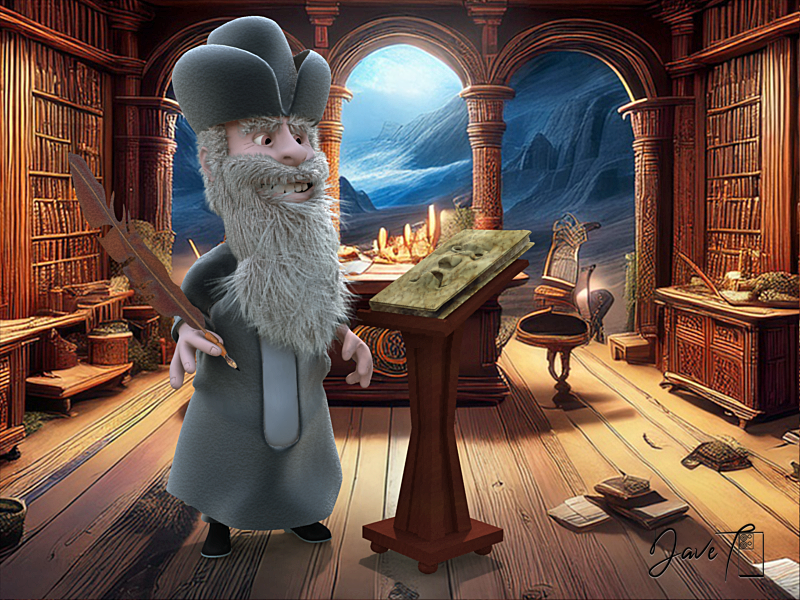
Nostradamus cubetrained, boned & morphed
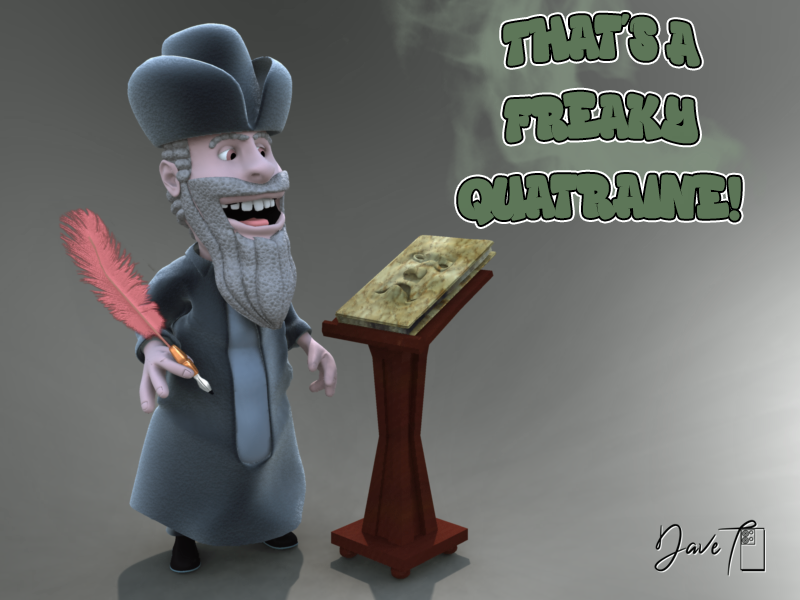
did some work on Nossy
modelled a new quill & gave him some Carrara fur and a couple of wrinkles...
Daz 3D is part of

Connect
DAZ Productions, Inc.
7533 S Center View Ct #4664
West Jordan, UT 84084Licensing Agreement | Terms of Service | Privacy Policy | EULA
© 2026 Daz Productions Inc. All Rights Reserved.














