-
New DS Filament Render Engine
hey thanks :) first thing i did when downloading was switch to viewport mode for filament but was confused and unimpressed as the light was super bright and was slightly confused then after learning to create the filament draw mode to alter the brightness i was impressed
New DS Filament Render EngineI just upgraded DAZ to the latest version and found out that it has this new feature. but unfortunately, it is not of much use because everything looks horrible unless you deliberately tweak your scene for this engine but then it will be not usable for iRay anymore
That's not true. All you need to do is adjust the Filament Draw Options Node to suit your taste - it doesn't affect the way the scene looks in Iray at all.
Go to Create >> New Filament Draw Options Node.
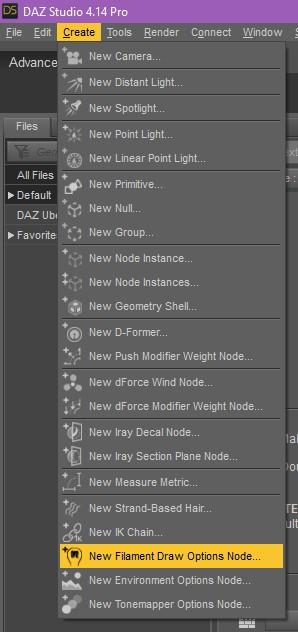
Select it in the Scene Tab and in the Parameters Tab adjust it's ISO Scale.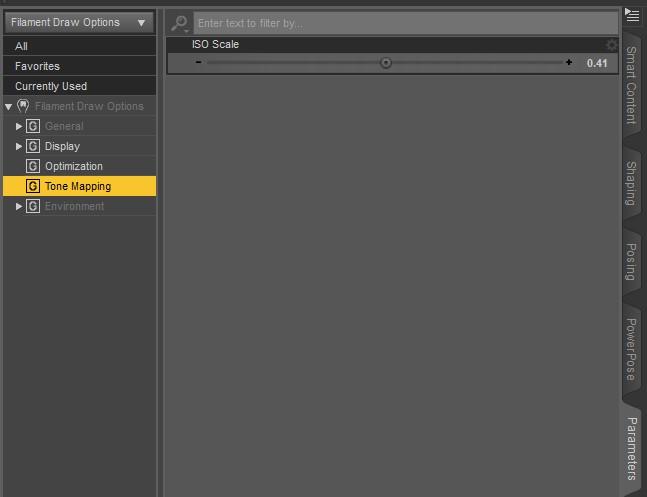
That brings the Filament Preview more in line with what you see in Iray.
Filament:
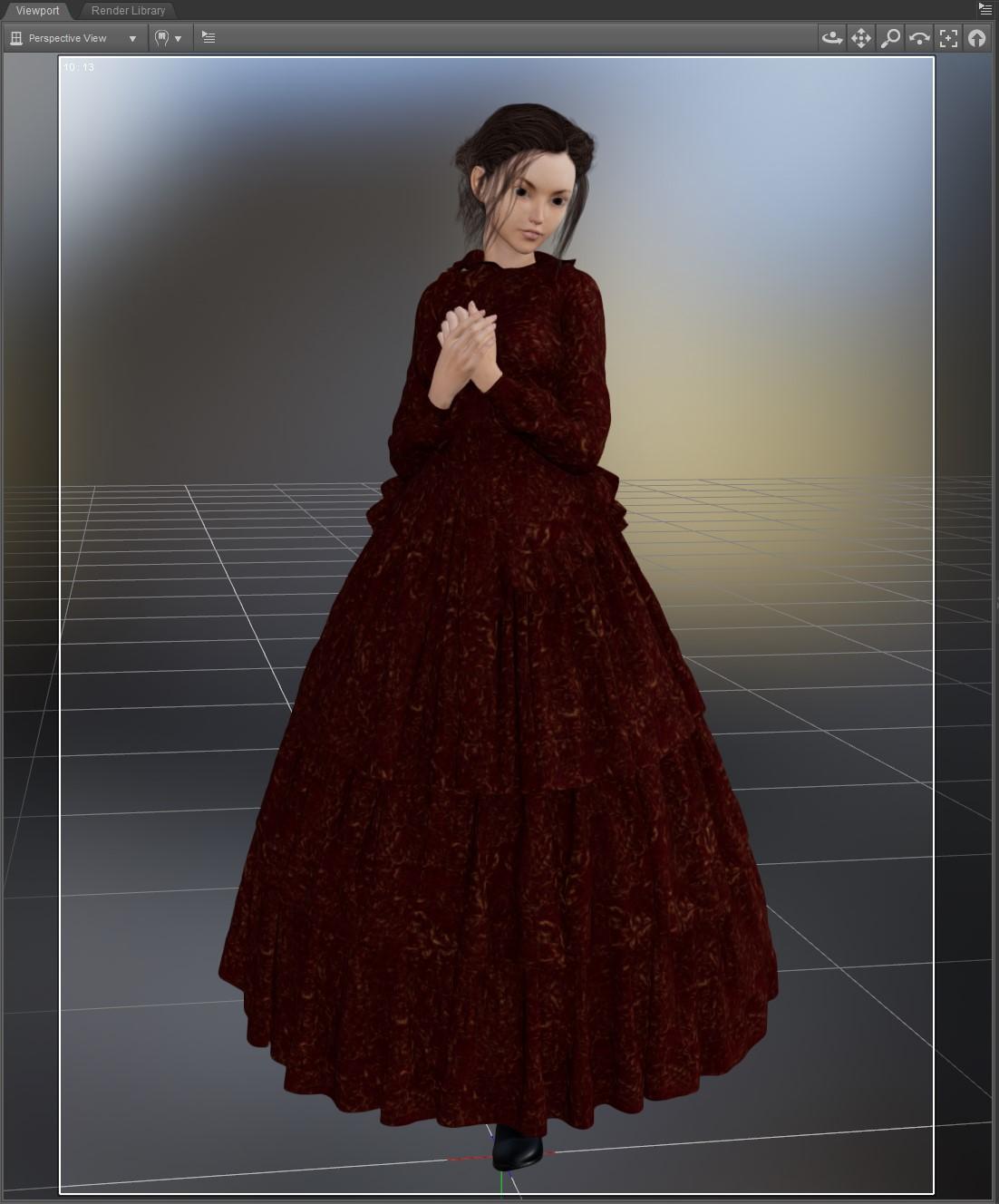
Iray:
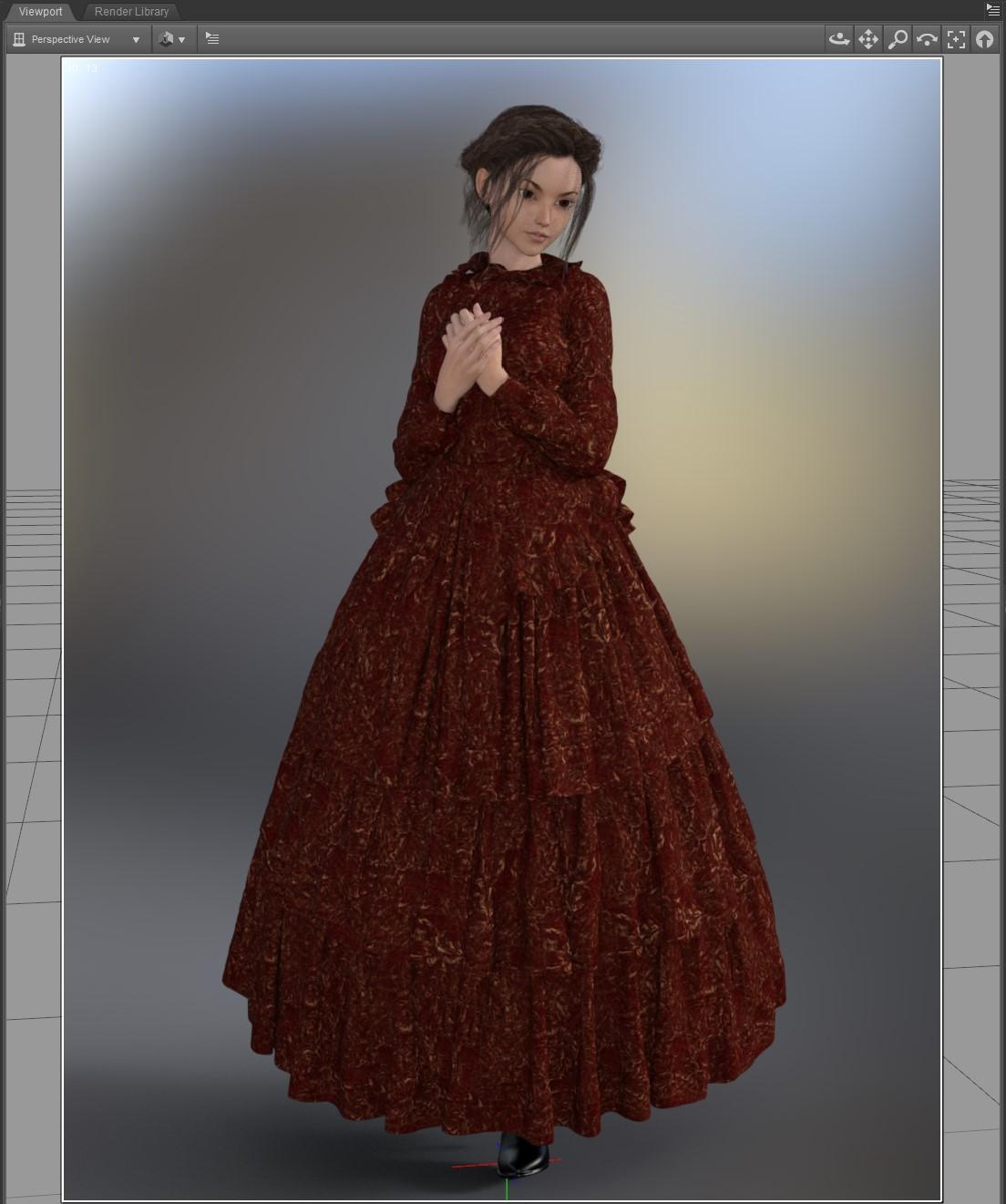
And just for comparison, what most people USED TO USE for a preview draw style, texture shaded:
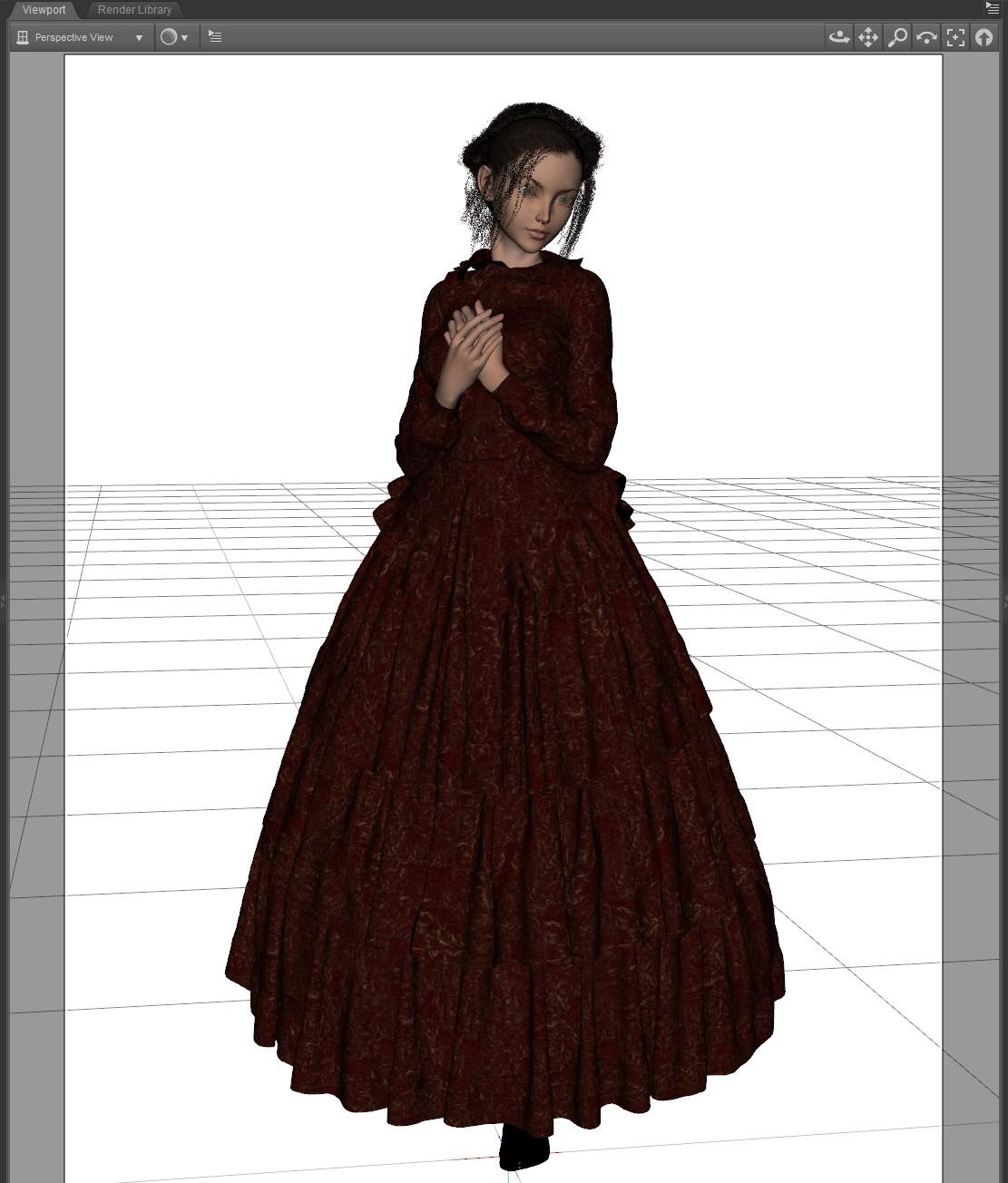
Filament preview is MUCH more in line with what you see with Iray.Thanks for sharing, try adjusting Exposure Value instead of the ISO in Draw Settings as a test. Raise exposure value from say 12 to 14. You will see that a switch of draw mode from Filament to iRay the scene is still within a decent range vs setting ISO so low (0.5) the scene is blacked out.
Filament Preview crashes DAZCan't you just not select it from the list of Drawstyles? However, I do see Filament DrawStyle in Help>About Installed Plug-ins - it's just after he FBX expoorter for me
Thank you Richard. I could just not select it I suppose.
Filament Preview crashes DAZCan't you just not select it from the list of Drawstyles? However, I do see Filament DrawStyle in Help>About Installed Plug-ins - it's just after he FBX expoorter for me
AIUTO...CHI CONOSCE L’ITALIANO? PARTE DODICIAl momento mi vengono in mente solo 2 possibili cause:
- La luce degli occhi si propaga all'interno della testa a causa del SSS. Togli il materiale emissivo agli occhi o magari applicalo solo sulle facce degli occhi verso l'esterno e disattiva il 2 sided.
- Lo shader ha settato il SSS in modo che le parti più fine siano più scure... fai una prova vedendo cosa succede in geometrie con lo spessore simile alla testa
No, vista la non uniformità della parte scura direi che si tratta di un'ombra. Fosse il materiale sarebbe su tutta la testa e non dominante su un solo lato e se fosse l'emissività degli occhi si poragherebbe maggiormente verso la parte alta della testa, proprio vicino all'occhio. Controlla non ci siano oggetti che bloccano la luce o che le luci siano posizionate correttamente.
In ogni caso, controlla anche che tutte le UV abbiano lo stesso colre di base (bianco o grigio, immagino), qualche volta i materiali IRay sono talmente buttati lì che i colori Diffuse sono praticamente casuali. Non so perchè....
In alternativa, riporta tutto allo shader di base e applica la "ghiacciatura" daccapo su una parte alla volta, e vedi se ci sono differenze man mano, io ho scovato molti errori shder così.Se alla fine non risolvi, molla IRay e usa 3Deligh o Filament, che funzionano meglio.
 Come saprai Filament utilizza correttamente un gran numero di shader IRay, io stesso sto ottenendo effetti incredibili anche solo con i materiali 3Delight.
Filament è carino, ma non è ancora implementato in DS per la vendita...
Quindi i render con Filament non possono essere usati commercialmente?

Spero cambino la licenza...
Credo che si laDAZ che non vuole che si usino i render in Filament per la pubblicità dei prodotti.
AIUTO...CHI CONOSCE L’ITALIANO? PARTE DODICI@Imago senti ma non capisco una cosa, Filament può usare sia gli Shader di Iray che di 3Delight?
Esatto, ma non tutti. Alcuni non vanno proprio, come quelli delle rifrazioni per 3Delight e gli emissivi IRay.
Ne ho provati un pò e qualcuno 3Dlight sembra funzionare, ma la compatibilità maggiore ce l'hai con IRay perchè è un motore puramente fisico e IBL come Filament.
In ogni caso, i materiali di bvase per 3Delight funzionano perfettamente come le bump map e le reflections.
Io feci un test veloce con un item per 3Delight (Rama Drums | 3D Models and 3D Software by Daz 3D), e devo dire che ne rimasi sinceramente sorpreso. Ma se il viewport è piccolino, come nel mio caso, non posso renderizzare in un formato più grande?
Certo, dalle impostazioni di render.
COme faccio? se non fa lìoutput in finestra esterna, lo faccio direttamente slaare con le misure che imposto?
New DS Filament Render EngineHere's something odd. I guess Filament doesn't like the omUberSurface.
Here's a scene I was working on, as you can see the hair looks fine:
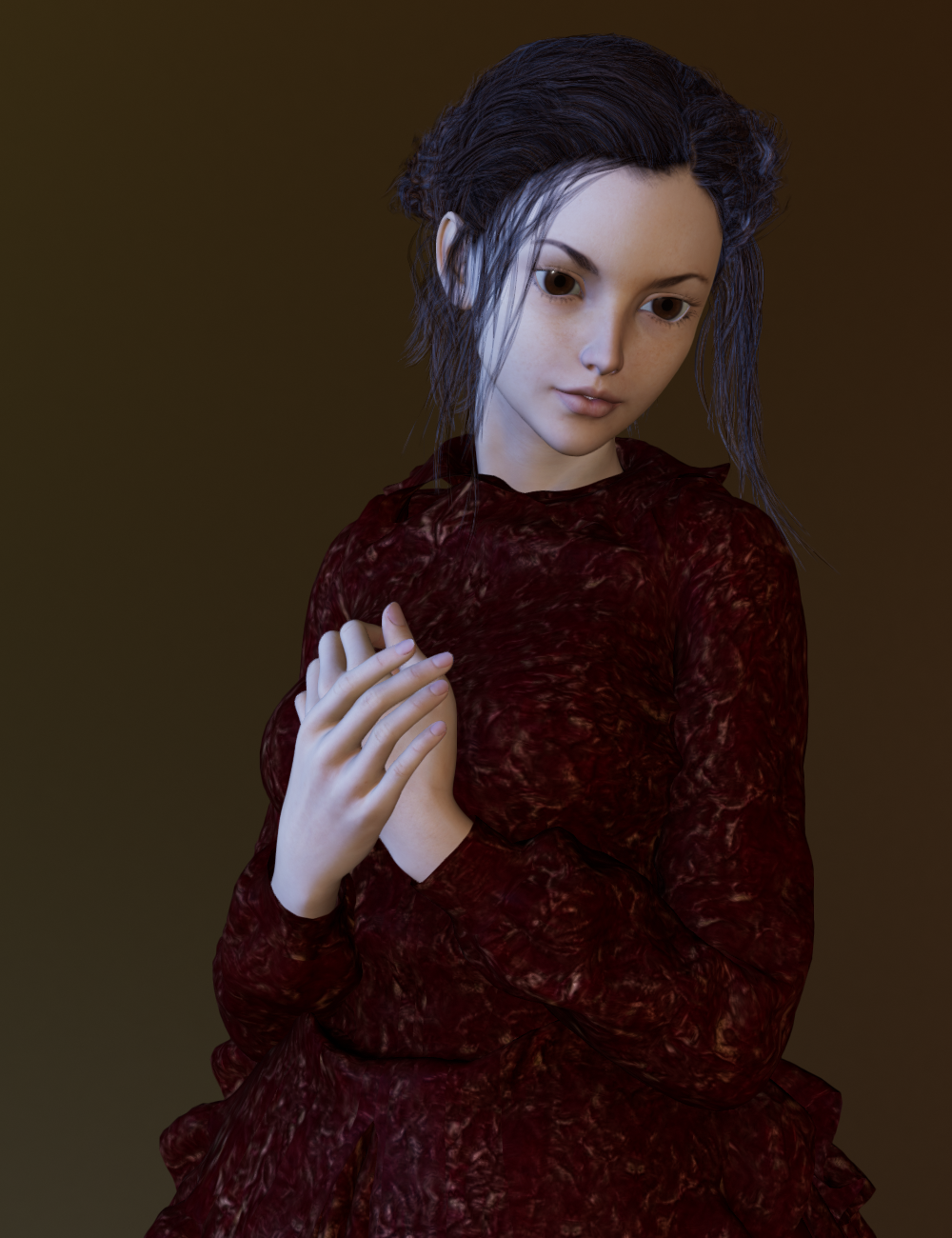
I add a pair of earrings that have the omUberSurface and the suddenly the hair looks like this:
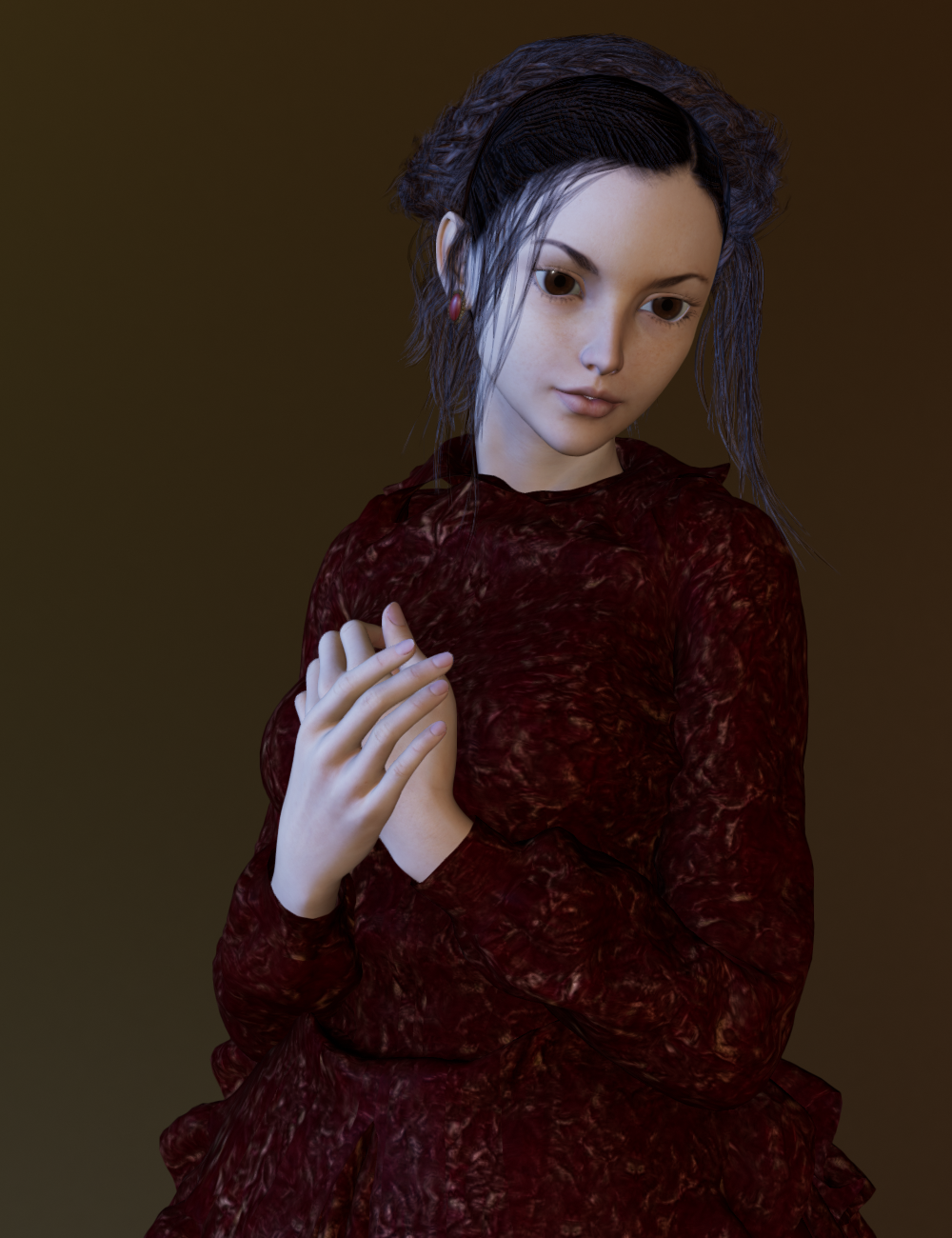
I switched the earrings visibility off and on in the scene tab and when the earrings are made invisible the hair goes back to normal.
I then applied the Iray Uber surface to the earrings and then switched them on and off and now the hair looks fine with the earrings:

So, maybe a glitch with the way Filament reads the omUberSurface?Could you please check it the hair has High Resolution settings or the "Base"?! And could you also, if it's not to much to ask, try other hairs too and name those that "work" like that? To be honest, i have not a lot of them and non that are not SBH are working like they could/should. Maybe it's a shader thing?! I don't know yet. But to say that all hair works out of the box is not really the truth.
Daz Studio 4.14 Pro, General Release!Hi there,I havnt read all through this so I dont know if anyone has answered this...My question is what has happened to poses and expressions in this update?
I gave up trying to use filament after the 6th time it crashed,and went back to Iray.
The poses eventually sort themselves out after about 5 mins,but the expression dials just dont cope at all.This has taken using this program to endless waiting hell! Has anyone found a solution. Im working in plain textured view and rendering in Iray and its agony!
AIUTO...CHI CONOSCE L’ITALIANO? PARTE DODICIAl momento mi vengono in mente solo 2 possibili cause:
- La luce degli occhi si propaga all'interno della testa a causa del SSS. Togli il materiale emissivo agli occhi o magari applicalo solo sulle facce degli occhi verso l'esterno e disattiva il 2 sided.
- Lo shader ha settato il SSS in modo che le parti più fine siano più scure... fai una prova vedendo cosa succede in geometrie con lo spessore simile alla testa
No, vista la non uniformità della parte scura direi che si tratta di un'ombra. Fosse il materiale sarebbe su tutta la testa e non dominante su un solo lato e se fosse l'emissività degli occhi si poragherebbe maggiormente verso la parte alta della testa, proprio vicino all'occhio. Controlla non ci siano oggetti che bloccano la luce o che le luci siano posizionate correttamente.
In ogni caso, controlla anche che tutte le UV abbiano lo stesso colre di base (bianco o grigio, immagino), qualche volta i materiali IRay sono talmente buttati lì che i colori Diffuse sono praticamente casuali. Non so perchè....
In alternativa, riporta tutto allo shader di base e applica la "ghiacciatura" daccapo su una parte alla volta, e vedi se ci sono differenze man mano, io ho scovato molti errori shder così.Se alla fine non risolvi, molla IRay e usa 3Deligh o Filament, che funzionano meglio.
Come saprai Filament utilizza correttamente un gran numero di shader IRay, io stesso sto ottenendo effetti incredibili anche solo con i materiali 3Delight.Filament è carino, ma non è ancora implementato in DS per la vendita...
Quindi i render con Filament non possono essere usati commercialmente?
Spero cambino la licenza...
Filament bring out the RendersNot my first Filament render. But one I wanted to share. I'll be going back to it when Filament can use DOF.
There's a teeny-tiny little bit of postwork
Oh, that looks great. The characters jump off the page.
AIUTO...CHI CONOSCE L’ITALIANO? PARTE DODICI@Imago senti ma non capisco una cosa, Filament può usare sia gli Shader di Iray che di 3Delight?
Esatto, ma non tutti. Alcuni non vanno proprio, come quelli delle rifrazioni per 3Delight e gli emissivi IRay.
Ne ho provati un pò e qualcuno 3Dlight sembra funzionare, ma la compatibilità maggiore ce l'hai con IRay perchè è un motore puramente fisico e IBL come Filament.
In ogni caso, i materiali di bvase per 3Delight funzionano perfettamente come le bump map e le reflections.
Io feci un test veloce con un item per 3Delight (Rama Drums | 3D Models and 3D Software by Daz 3D), e devo dire che ne rimasi sinceramente sorpreso. Ma se il viewport è piccolino, come nel mio caso, non posso renderizzare in un formato più grande?
Certo, dalle impostazioni di render.
New DS Filament Render EngineI can't imagine ever rendering animation without motion blur, which has kept me out of Daz Studio (among other reasons). Does Filament finally bring motion blur to Daz Studio? That would be news I could get behind.
How to make a environment map sharp (Hdri map)When I render the scene, the dome is too blurry while the HDRI is a very sharp image.
I am using Daz studio 4.14, where can I find the setting to change the blur? I cannot find any option that does the job.I'm using one of the HDRIs from https://www.daz3d.com/iradiance-hdri-variety-pack-one in the examples below. This is RoomC and it is an 8K HDRI (8192 pixels in 360 degrees). I reset all the environment parameters and put the camera at (0,0,0) rotated (-10,148,0) degrees. This is the base Iray HDRI render at 640x640 with the "standard" camera, 65mm equivalent lens, and no DOF:

So that is a 65mm equivalent lens and it therefore has a field of view of 31 degrees. This works out at 704 pixels in the HDRI, the image is rendered at 640 pixels so it is pretty much exactly a match for the HDRI resolution.
Firstly if DOF is switched on in the camera it affects the HDRI too; if the HDRI is of a room yet the environment settings "Dome Mode" is "Infinite Sphere" the HDRI will be falsely out of focus. Here's the same scene with the camera DOF turned on and the focal distance set to 2m. Because this is meant to be a room scene I set the f/ to 1.8. Notice that this is the camera f/, not the one in the "render settings" pane which is just bling and doesn't do anything useful:

Yep, that really is pretty close to what an infinitely large teddy bear taken at infinite distance with a camera focused on 2m with a f/1.8 lens looks like... It's not actually blurred, it's just out of focus. A very partial work round is to set the HDRI to "finite dome" and the dome radius to 2m. Do this by setting the "dome radius" field in the "environment settings" to the radius in metres, or, more consistent with Daz, set the "dome scale multiplier" to 1.0 and then set the "dome radius" in cm (the standard Daz unit).

This is a partial solution because, unless you use the Daz "spherical" lens distortion, parts of the HDRI will be out of focus. Using f/1.8 makes this obvious if you compare the first image with this one; only the very center is in focus. (The default Daz camera has a flat focal plane, the behaviour of most real world camera lens.) This can be fixed further by using "finite box" mapping of the HDRI but I have yet to work out how to get that set up correctly :-(. Anyway, it doesn't work for a scene with furniture in the HDRI as in my example scene; the furniture is closer than the wall, you can't get DOF right if the furniture in the HDRI is visible in the rendered scene.
The second possible problem is field of view; basically the problem @Hera and Richard commented on. While a 65mm lens has a 31 degree FoV the 80mm lens typically used for portraits only runs to 25degrees and a telephone shot with a 120mm lens only runs to 17 degrees. For an 8k HDRI those numbers equate to 577 pixels and 388 pixels. The latter is enough to show perceptually lower resolution even on a 640x640 image; the image still looks correct; scaling up a modern digital image by a factor of 2 pretty much never results in a perceptually significant loss of resolution so long as the image is presented 1:1 on the screen, i.e. with no further scaling:

That image is generated with no DOF, otherwise I would be conflating two different problems. Teddy's new friend is at 2m and the dome is still a finite sphere of radius 2m but that doesn't matter because I haven't used DOF. The camera is at (0,0,0) so, even with a finite dome, I can rotate the camera. I set the lens to 120mm then rotated the camera to get the teddies in the shot. The Daz teddy reveals the lower resolution of the image by comparison; our brains can't tell that the original teddy has lower resolution until presented with a new teddy which is actually, effectively, sharpened by the Daz rendering process. A partial solution to this is to increase the "pixel filter radius" in render settings/filtering; there's more about this in the dicussions on photo realism. I increased the radius to 2.2, a value recommended elsewhere, in the first image then I set it to 3.6 in the second to take account of the fact that the HDRI is being upsampled (3.6 is 640/388x2.2):


The effect is subtle but for me the last rendering of the new teddy is a better match for the first rendering of the HDRI; this illustrates a bug in Daz, the HDRI is being double [re]sampled somehow; it looks like it is upsampled to the output resolution then sampled by the pixel filter radius. I believe sampling an already sampled image produces the wrong answer. Another partial answer is to go to a 16k HDRI, that gives you 1409 pixels (wide) with a 65mm lens. So long as the HDRI is separated from rendered objects (i.e. the HDRI really is the background) this is likely to be sufficient up to 4k (3840 px wide on monitors). In any case careful composition with HDRIs so that they are actually outside the focal range combined with use of DOF is really the best answer.
A further, more obvious, problem arises when using Filament PBR rendering (i.e. "viewport" rendering with the viewport mode set to "Filament"). Both images below use a 120mm lens, infinite sphere and a reset pixel filter radius of 1.5. The left (first) image is Iray the second Filament:


So there is an exposure difference which can be corrected by altering the "EV" in the render settings/tone mapping options (BTW EV is the only setting that affects Filament), however the sampling of the HDRI is completely wrong; it looks like it might be even be pixel replication (the infamous "box" filter); please Daz, at least use bilinear. (Fant's algorithm works too but Fant might still hold the patent. Fant is bilinear when scaling up but degrades to a box when scaling down, however in the scale down case the order of the computation with respect to the input image dimensions is much better behaved than bilinear or bicubic.)
New DS Filament Render EngineHere's something odd. I guess Filament doesn't like the omUberSurface.
Here's a scene I was working on, as you can see the hair looks fine:
I add a pair of earrings that have the omUberSurface and the suddenly the hair looks like this:
I switched the earrings visibility off and on in the scene tab and when the earrings are made invisible the hair goes back to normal.
I then applied the Iray Uber surface to the earrings and then switched them on and off and now the hair looks fine with the earrings:
So, maybe a glitch with the way Filament reads the omUberSurface?Filament Preview crashes DAZIt's safer to disable the plugin to avoid accidentally clicking it, but I don't recall seeing reports of Filament crashing people's systems, so it might be helpful to know what your system specs are.
Alienware Aurora R7 Gaming Desktop running Window 10 64 bit
It came with 16 GB RAM which I upgraded to 32 GB
Intel Core i7, 3.20 GHz 3192 Mhz
NVIDIA GeForce GTX 1070
Why do YOU use DS instead of something else?...well said.
A major part of being in this for myself relates to the fact I used to paint in watercolour and oils which due to worsening arthritis I no longer can do. While the primary reason was for RPG character & setting as well as story illustration, I also enjoy just creating works at like I did when could still sit at a canvas on an easel or watercolour paper and deftly manipulate a brush for hours. I approach pretty much all my scenes wither as I would as if I was still painting or using a camera (replacing the old 35mm film camera kit I have with comparable digital gear is beyond my budget these days).
For rendering I use both Iray and 3DL as they each have their own strengths (though with new tools for 3DL like IBL Master and the AweShader system, it can approach a very stunning level of realism as well that reminds me of the "photorealism school" of painting). I do like Carrara's render engine (as well as it's ability to do network rendering and it's material building system) but without a true bridge between it and Daz, importing my custom designed characters over is, to say the least, disappointing as most of the resource utilities I use do not transfer over very well or at all. I also considered Octane because of it's out of core rendering until Otoy went full subscription. I haven't looked into Filament yet (haven't installed 4.14) but from what I gather, it is a viewport based render engine which seems more suitable for animation than single frame rendering and it would be yet another learning curve to throw onto an already overloaded plate (currently in the thick of learning modelling in Blender).
New DS Filament Render Enginehey guys so i've been gone a while and slightly confused about filament, i updates but i don't see it listed under the render engine in the render settings tab? is it just the viewport engine?
Welcome back! :D
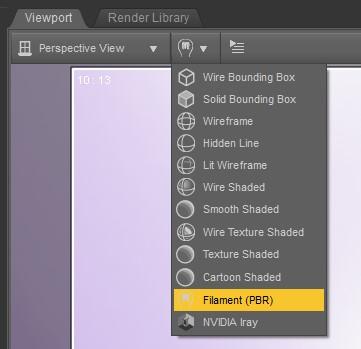
To render with Filament you need to first switch the viewport to the Filament draw style:
Then in the Render Settings tab switch the "Engine" to Viewport:
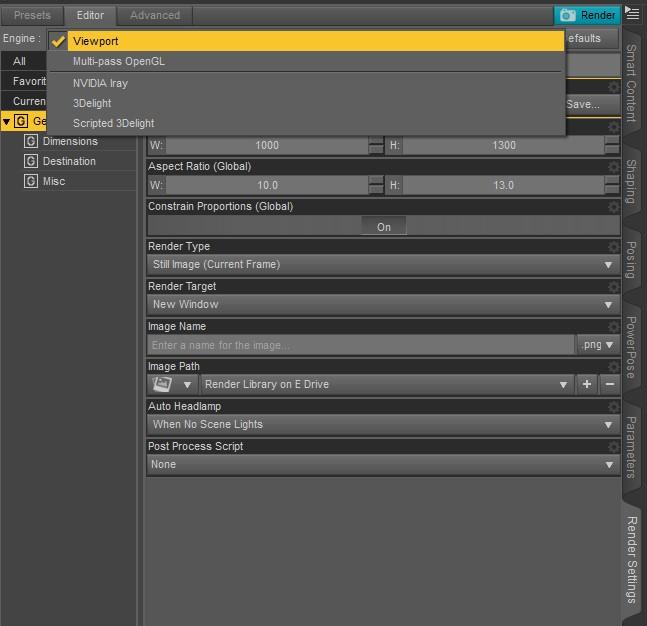
Then you can render Filament (or any other of the Viewport draw styles except Iray - to render with Iray you need to switch the Engine type back to "NVIDIA Iray").
If you're on a Mac it won't work as they've not yet updated it for Mac users.
New DS Filament Render Enginehey guys so i've been gone a while and slightly confused about filament, i updates but i don't see it listed under the render engine in the render settings tab? is it just the viewport engine?
Viewport works with the current viewport draw mode, whatever it is, except, you know, Iray.. Filament is set up as a draw mode.
Filament Preview crashes DAZIt's safer to disable the plugin to avoid accidentally clicking it, but I don't recall seeing reports of Filament crashing people's systems, so it might be helpful to know what your system specs are.
New DS Filament Render Enginehey guys so i've been gone a while and slightly confused about filament, i updates but i don't see it listed under the render engine in the render settings tab? is it just the viewport engine?
Daz 3D is part of

Connect
DAZ Productions, Inc.
7533 S Center View Ct #4664
West Jordan, UT 84084Licensing Agreement | Terms of Service | Privacy Policy | EULA
© 2026 Daz Productions Inc. All Rights Reserved.