-
Need some help making a Genesis 8 figure inspired by Leia Organa from Star Wars.
Hey there, I'm pretty new at using DAZ3D for character modelling, but so far I've found it really seems to be the most purpose-built software out there for that purpose. I've been working on some character models of characters from Star Wars, but I'm running into some trouble getting my figures to look as realistic as their counterparts. For example, my figures of Leia Organa are almost accurate, but not quite, particularly in the face area. I'm using a head model from Battlefront II for comparison, but I would like some help and suggestions about what I can do to achieve her look. My attempts are the model on the left and the one on the right, with DICE's Battlefront II model of Leia (well, her head) in the middle.
To achieve the appearance of anybody it is recommended to work from reference images, not other 3D models because they are not all quite as perfect as the real McCoy. Look up a good profile image and a good portrait image ... and morph to match what can be accomplished. Look also for a suitable texture to compliment the morph and as you have, the signature hairdo.
There are also a number of morph packages and Face Transfer and Face Transfer Shapes, etc. in the store to help folk make their characters.
Of the 3 images posted, I prefer the shiny one on the right as it caught something of 'the look' she could give.
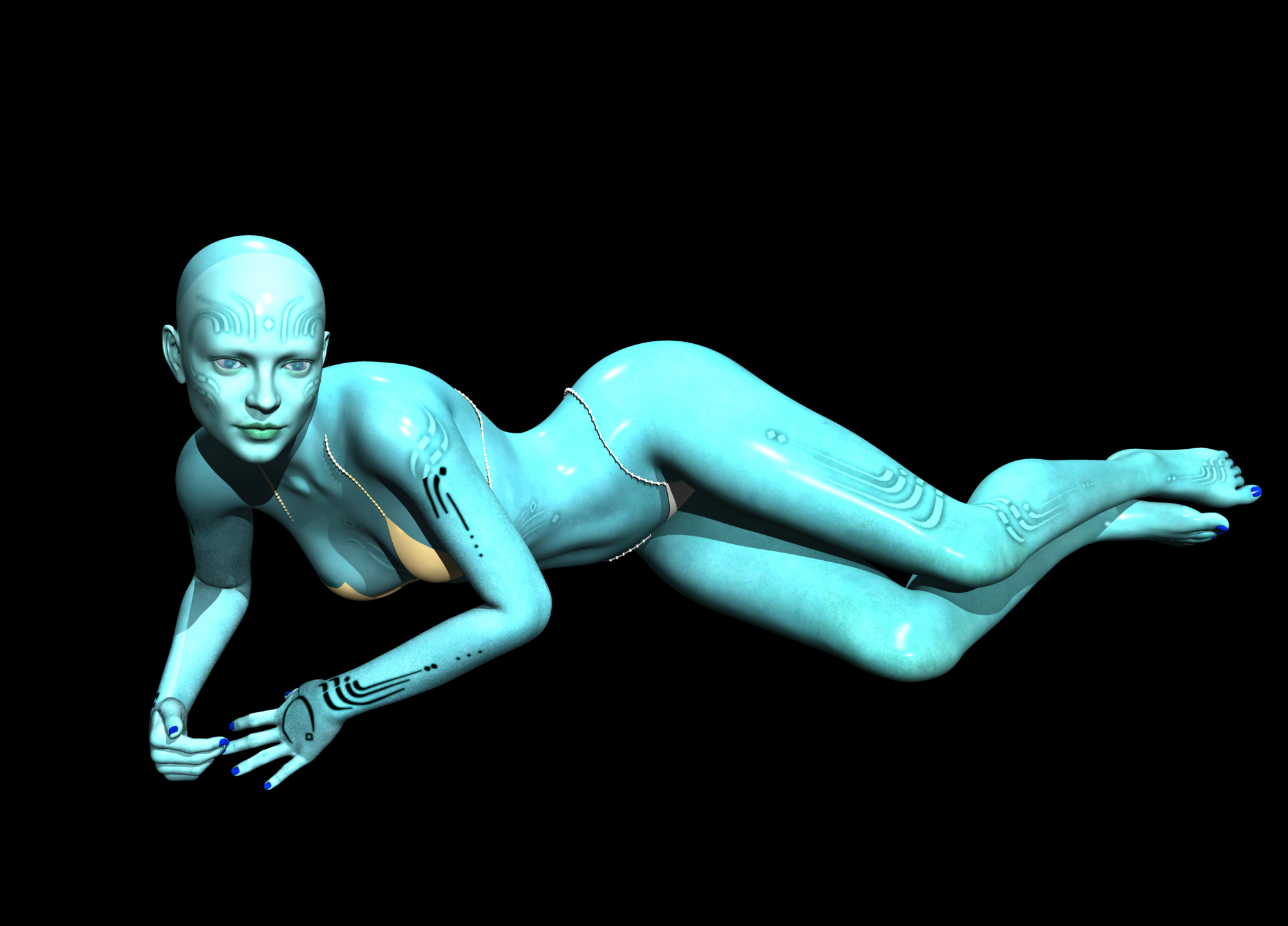
LilSideChallenge #09: theme - Kinky Green Onions (Orions)started playing with Zelara
confusing what should go in which shader channel
needs a layer to put the back bits.
and needs a zelara support morph.
and jewelry, thinkin splines should be good for that
 Things I'm Playing with ........
Well this is my first play with Face Transfer and while it doesn't look like the picture I still like it ,did some additional morphs to bring out the depth of the face and used Edwards skin
 DAZ Studio 4.12 ... Face creation abilities????
Thank you very much for releasing Face Transfer Shapes - much needed product. Purchased it at once.
DAZ Studio 4.12 ... Face creation abilities????Anyone using or interested in Face Transfer may also be interested in my new product - Face Transfer Shapes - which will be launched soon. It consists of a main "Fix" morph which adjusts the geometry to an "average" face, restoring the proper depth geometry, particularly noticable around the mouth and nose, and fixing the gap between the mouth and nose. There are then a number of further adjustment morphs for ethnicity, age and overall face shape to get the best match to the original image (these morphs can also be used independently, thus extending the usefulness of the product). There are morphs for both male and female characters.
A much needed product, Phil. Your "Robert De Niro" is really quite exceptional. I'm really enjoying the face transfer feature, but it takes a lot of extra work to make the result convincing. The morphing is very much the weak point and in my attempts it also makes the heads too small, and I generally either don't use the morph and create my own, or reduce it to 50% or more and add my own morphs from there. Your conversions though, as well as saving time and work, also look as if they will retain the character of the transfer.
Leisa 8Alessi, with those artificial rosebud lips sharp chin & turned up eye corner makeup, reminds me the hordes of V3 or V4 images we used to see at Renderosity during the early to mid 2000's. All wore identikit rosebud lips, sharp chin and turned up corners to their eyes. Feels very retro to me, and not in a good way. Not very keen on the Alessi character myself.
Gabi & Leighton are rather nice, but to get them you need a rather 'meh' base character. I felt Bidget was 'meh' too and haven't used her since, but 'Ellis for Bridget' was definitely much more of a must-buy than Gabi & Leighton, which is why I got 'Bridget', and why I won't be getting Leisa.
Regards,
Richard
Since I have lots of natural-looking characters, it's nice to have something different. I don't have a horde of V3 - V4 Renderosity identical characters that you are referring to. Besides, I was more struck by the makeup and tattoos. I especially like the raven/third eye and feathery make-up feature. Even if I didn't use the morph and just used the skin, it's a great addition. Besides I tend not to use characters out of the box and mix and match morphs so I hardly think she's part of a horde
How to make morphs show in keyframes for animations?I'm having issues with third party morphs such as hand poses, body controls, etc. These don't seem to show as keyframes on the timeline. So even if I delete all keyframes, that particular frame will still do whatever the morph is set to do on that frame. Selecting all Types such as Other (O) and Hidden (H) doesn't seem to help.
Any ideas? This issue really makes animations a lot harder than it should be.
Thank you
Clipping issue...?Oh I mentioned timeline thinking it was a DForce clothing item. Skip that idea then ;-)
Quick sketch for morphing:
If you have Hexagon, in D/S remove all the hair etc. from the figure except the 2 clothing pieces that are clipping. Fit/parent them to the figure. Send the figure over the bridge to Hexagon. [in D/S under Edit/Preferences, Advanced Bridge setting] In Hexagon do not move the figure one bit, "freeze" [lock] it on the sidebar in Hexagon. Select the clothing and use the smoothing or ballooning brushes to gently move the clothing where you want it.
In D/S select one clothing piece, in Hexagon, send that same clothing piece back over the bridge. In D/S make the morph, "reverse deformations", etc. and then find it and slide the dial up and if you like it, zero the morph and save the morph. Repeat for the 2nd clothing piece.
...........
By the way, it is a DForce clothing set, you might want to try using DForce with it, it should drape the clothing over the foot too.
Isn't using Dforce the same as simulation? I saw a daz tutorial about it... Have I been using it wrong?

Thank you so much for you help! I'll give morphs a try. For now I've managed to move the foot slightly and it's better :)Clipping issue...?Oh I mentioned timeline thinking it was a DForce clothing item. Skip that idea then ;-)
Quick sketch for morphing:
If you have Hexagon, in D/S remove all the hair etc. from the figure except the 2 clothing pieces that are clipping. Fit/parent them to the figure. Send the figure over the bridge to Hexagon. [in D/S under Edit/Preferences, Advanced Bridge setting] In Hexagon do not move the figure one bit, "freeze" [lock] it on the sidebar in Hexagon. Select the clothing and use the smoothing or ballooning brushes to gently move the clothing where you want it.
In D/S select one clothing piece, in Hexagon, send that same clothing piece back over the bridge. In D/S make the morph, "reverse deformations", etc. and then find it and slide the dial up and if you like it, zero the morph and save the morph. Repeat for the 2nd clothing piece.
...........
By the way, it is a DForce clothing set, you might want to try using DForce with it, it should drape the clothing over the foot too.
AIUTO...CHI CONOSCE L’ITALIANO? PARTE DODICICaspita, ma devi conservarli proprio tutti?Nei miei savefile ho notato che quelli con dForce pesano molto di più. Sembra essere perché è come se creassi dei morph personalizzati che sono salvati insieme alla scena.
Certo che li devo conservare tutti!

Si, il file della scena contiene tutti i dati della simulazione, per questo anche se salvi la scena accorciata (per esempio da 120 a 30) e poi la estendi di nuovo la simulazione è completa.
Per te che sei uno stiller non è necessario conservarli per intero, per cui puoi comodamente esportare come OBJ il modello come ti serve, importarlo nella scena e ripulire la simulazione cliccando sul pulsante "Clear" nel tab del DForce.

Vero, ottima pensata! :D
Per ora sto salvando tutto, e salvo a parte personaggi e ambienti, ma alla fine, dopo qualche tempo dalla fine di un fumetto, non modifico più nulla!
Però è vero che c'è un sito molto professionale dove pubblico ogni tanto che mi richiede tutti i file photoshop ecc. per correggere le mie castronerie grammaticali xD
Opinions on Marvelous Designer Video Tutorial?Keep in mind a morph is nothing but a dial that gets you from A to B. Both A & B will look good but not in between. That's why imo jcm's are so important they can help with that bridge in between A & B, then drape from there if wanted. As mentioned before I sometimes use MD to create my jcm's.Do JCMs help me do an animated drape of my clothing in Marvelous Designer in some way? Will your new tutorial show how to drape clothing on a pose like the one with the arms up and behind the head? Sorry if I sound clueless - I am!
Have you tried using MDD to export the animation from DAZ Studio? You will have MDD if you have the paid version of Animate 2.
Ooooh, so much to learn! I do have the paid version of Animate 2. I will try exporting MDD. Thanks for the tip, marble.
Opinions on Marvelous Designer Video Tutorial?Keep in mind a morph is nothing but a dial that gets you from A to B. Both A & B will look good but not in between. That's why imo jcm's are so important they can help with that bridge in between A & B, then drape from there if wanted. As mentioned before I sometimes use MD to create my jcm's.Do JCMs help me do an animated drape of my clothing in Marvelous Designer in some way? Will your new tutorial show how to drape clothing on a pose like the one with the arms up and behind the head? Sorry if I sound clueless - I am!
Have you tried using MDD to export the animation from DAZ Studio? You will have MDD if you have the paid version of Animate 2.
Oh that is a helpful tutorial/link.
Animate2 is a lot cheaper than the alembic exporter so MDD cache is probably a better option than alembic. And that said, I guess the OBJ morph target method is still a free alternative for people who dont want to pay for an export option from daz.
I seem to remember that Alembic exporter was on sale for a huge discount but I missed it (I now have it wishlisted waiting for the next huge discount). But that was how I happened across the MDD tutorial and I do have the paid version of Animate 2. All I need to do now is try it
Opinions on Marvelous Designer Video Tutorial?Keep in mind a morph is nothing but a dial that gets you from A to B. Both A & B will look good but not in between. That's why imo jcm's are so important they can help with that bridge in between A & B, then drape from there if wanted. As mentioned before I sometimes use MD to create my jcm's.Do JCMs help me do an animated drape of my clothing in Marvelous Designer in some way? Will your new tutorial show how to drape clothing on a pose like the one with the arms up and behind the head? Sorry if I sound clueless - I am!
Have you tried using MDD to export the animation from DAZ Studio? You will have MDD if you have the paid version of Animate 2.
Oh that is a helpful tutorial/link.
Animate2 is a lot cheaper than the alembic exporter so MDD cache is probably a better option than alembic. And that said, I guess the OBJ morph target method is still a free alternative for people who dont want to pay for an export option from daz.
How to Link Morph on One Prop with Morph on AnotherDon't know if that's the best discussion title, but here's the story. I have created a sword and matching scabbard. At this point each one is a simple prop, not a figure. Each prop has a morph for adjusting the length, and they were designed to match up in the original modeling. While it's certainly possible to simply apply the length morph to each prop separately, I am wondering whether or not there's a way to link them.
For example, adjusting the sword's length would automatically adjust the scabbard's length by the same amount. Is this possible? How would I go about it?
Tim
Opinions on Marvelous Designer Video Tutorial?Keep in mind a morph is nothing but a dial that gets you from A to B. Both A & B will look good but not in between. That's why imo jcm's are so important they can help with that bridge in between A & B, then drape from there if wanted. As mentioned before I sometimes use MD to create my jcm's.Do JCMs help me do an animated drape of my clothing in Marvelous Designer in some way? Will your new tutorial show how to drape clothing on a pose like the one with the arms up and behind the head? Sorry if I sound clueless - I am!
Not really, the problem is that a morph moves each vertex along a straight line from start position to end position, so it fails on rotations like this. Intermediate morphs might improve matters, but ti would still be using a series of straight lines to approximate an arc.
Opinions on Marvelous Designer Video Tutorial?Keep in mind a morph is nothing but a dial that gets you from A to B. Both A & B will look good but not in between. That's why imo jcm's are so important they can help with that bridge in between A & B, then drape from there if wanted. As mentioned before I sometimes use MD to create my jcm's.Do JCMs help me do an animated drape of my clothing in Marvelous Designer in some way? Will your new tutorial show how to drape clothing on a pose like the one with the arms up and behind the head? Sorry if I sound clueless - I am!
Have you tried using MDD to export the animation from DAZ Studio? You will have MDD if you have the paid version of Animate 2.
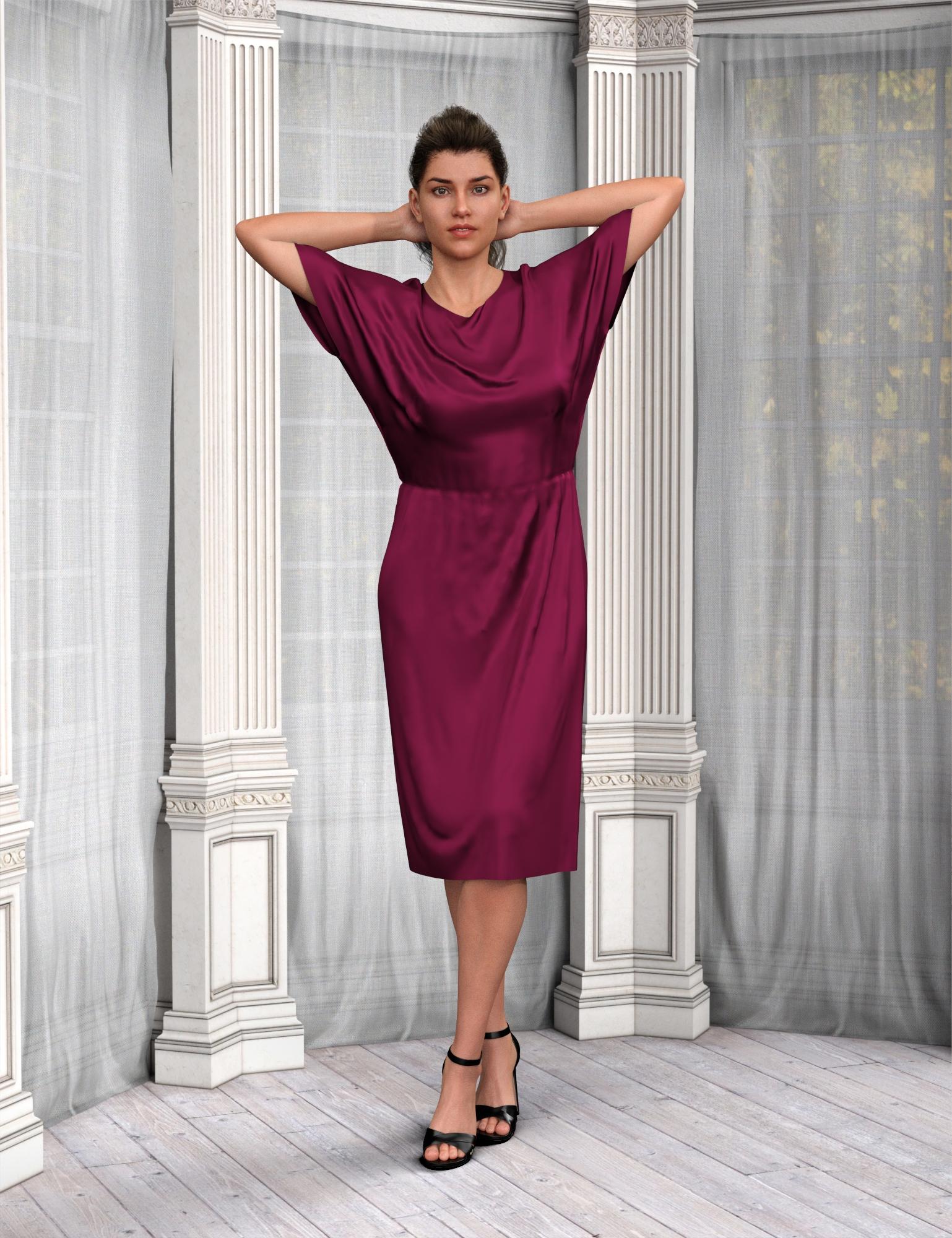
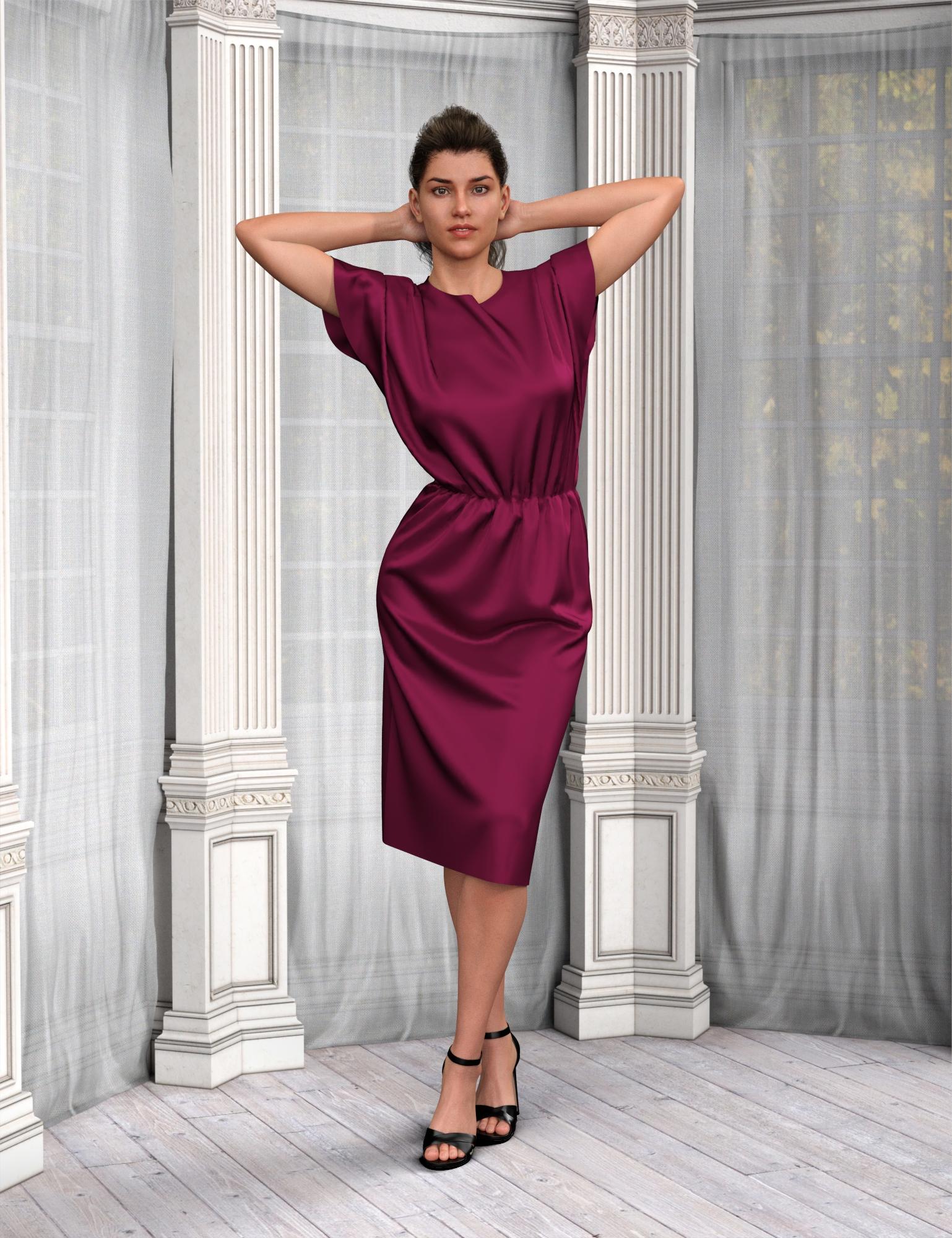
Opinions on Marvelous Designer Video Tutorial?I figured out a scheme that works for me, based on a comment from peenwolf about maybe needing multiple morphs. Here is a comparison of a loose fitting dress created in MD and draped in Daz dForce vs. draping in MD. MD kept quite a few additional wrinkle details that dForce wiped out. The difference is very visible. I can see why peenwolf prefers the MD draping.
dForce draping in Daz Studio
Marvelous Designer draping with morph targets
 AIUTO...CHI CONOSCE L’ITALIANO? PARTE DODICICaspita, ma devi conservarli proprio tutti?
Nei miei savefile ho notato che quelli con dForce pesano molto di più. Sembra essere perché è come se creassi dei morph personalizzati che sono salvati insieme alla scena.
Certo che li devo conservare tutti!
Si, il file della scena contiene tutti i dati della simulazione, per questo anche se salvi la scena accorciata (per esempio da 120 a 30) e poi la estendi di nuovo la simulazione è completa.
Per te che sei uno stiller non è necessario conservarli per intero, per cui puoi comodamente esportare come OBJ il modello come ti serve, importarlo nella scena e ripulire la simulazione cliccando sul pulsante "Clear" nel tab del DForce.
Opinions on Marvelous Designer Video Tutorial?Keep in mind a morph is nothing but a dial that gets you from A to B. Both A & B will look good but not in between. That's why imo jcm's are so important they can help with that bridge in between A & B, then drape from there if wanted. As mentioned before I sometimes use MD to create my jcm's.Do JCMs help me do an animated drape of my clothing in Marvelous Designer in some way? Will your new tutorial show how to drape clothing on a pose like the one with the arms up and behind the head? Sorry if I sound clueless - I am!
Opinions on Marvelous Designer Video Tutorial?Keep in mind a morph is nothing but a dial that gets you from A to B. Both A & B will look good but not in between. That's why imo jcm's are so important they can help with that bridge in between A & B, then drape from there if wanted. As mentioned before I sometimes use MD to create my jcm's.Daz 3D is part of

Connect
DAZ Productions, Inc.
7533 S Center View Ct #4664
West Jordan, UT 84084Licensing Agreement | Terms of Service | Privacy Policy | EULA
© 2026 Daz Productions Inc. All Rights Reserved.