-
Carrara not working (solved - but a plugin is not working)
Well that was quicker than expected, culprit causing the crash was the ERC Modifier plugin.
oh no
cuz i can't figure out how to spawn a fbm in the morph target tab. was looking forward to erc saving the day.
DAZ Studio 4.12 ... Face creation abilities????Character created from the photo using https://www.daz3d.com/face-transfer-unlimited
and applied the preset FTS Apply Fix 100% from https://www.daz3d.com/face-transfer-shapes-for-genesis-8
The hair used is https://www.daz3d.com/carlos-hair-for-genesis-8-and-genesis-3-males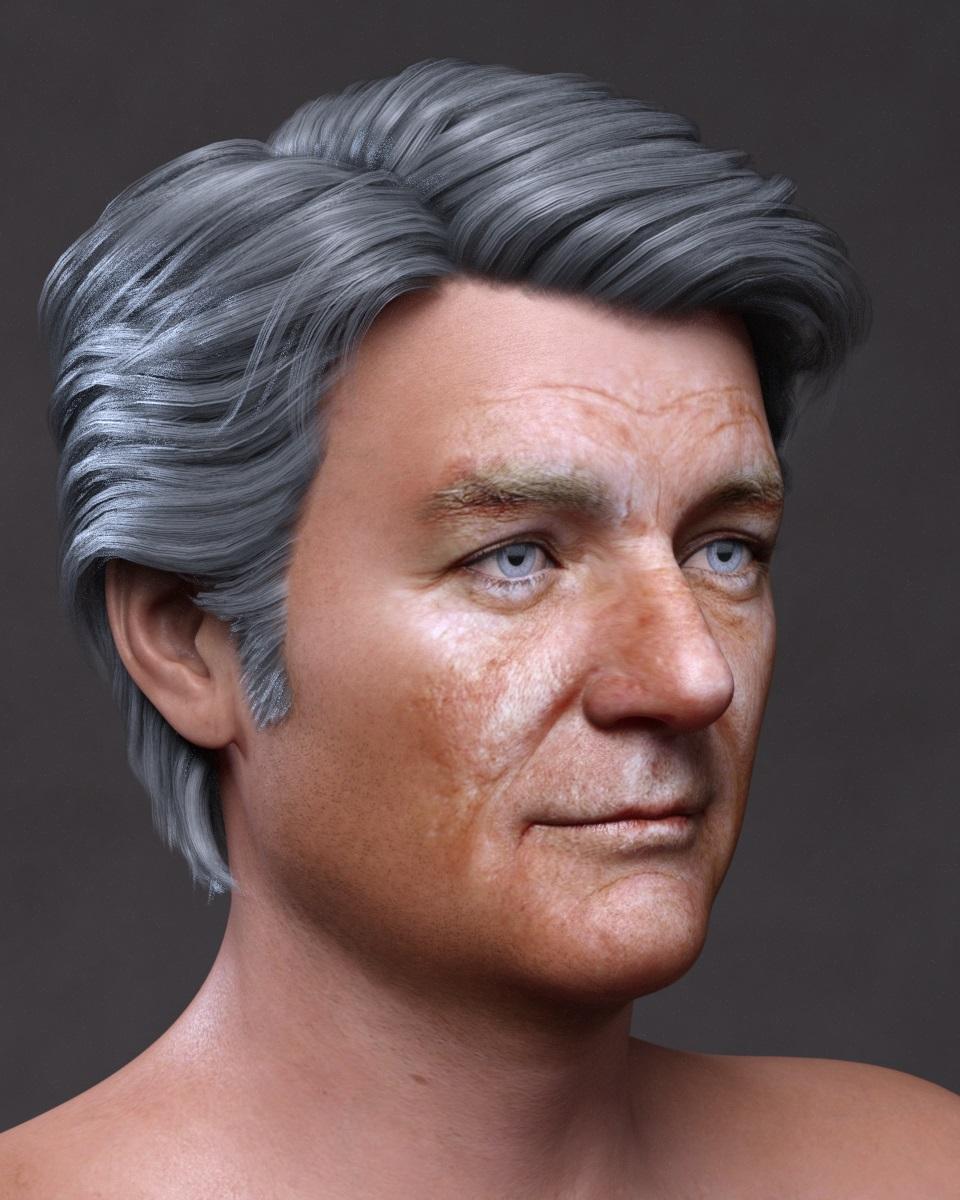 Bluejaunte's Amala
Overall, I think Amala's more a victim of poor timing on the release rather than any lack of appeal of the figure itself. The fact is that most folks have limited budgets, and during the PC+ sale there are so many tasty buying options being dropped every day that it's hard to commit to a higher priced set today when you KNOW that there'll be another huge set of ultra-bargains dropping tomorrow, and another the next day, and then another the day after that. ONE brand new item today at $16.OO... or EIGHT equally well made and comparably valued items for less than $2 each? And if you KNOW that the $16.00 item is going to be in a catch-up sale in a few weeks whereas you'll probably never see those eight items that cheap again? Which is why poor Amala got kicked out of my cart a couple of times, even though I own all 15 other BlueJaunte products. Happily, now that the smoke is clearing, I can report that Amala's coming to join her sisters at my house in this weekend's catch-up sale, but if I was a PA I know I wouldn't be happy to have my new products dropping into such a crazily hyper-competitive situation.
One other thought - For what it's worth, I've noticed that a large percentage of the vendors who regularly make the really odd and non-human female characters usually include a"normal" variant version as part of the set so that the product becomes less of a "only use it for very special occasions" kind of thing. If you ever try something like this again, you might consider that a less extreme upper-head morph option rather than a clothing add-on.
Arg! Impossible to find contentThat would not be legal. WEhn you buy content you are actually only buying a license to use that content, you cannot transfer the usage to someone else.
I notice that all the way through this thread you have not named the products which you are having difficulty with. It is quite possible that others have bought the same products and could help you, but they will need to know what you are struggling with. Presumably, as you are posting in the Daz 3d Forums you purchased the products from the Daz 3D store.
G8 feet fixing ?you can apply the foot morphs of bluejaunte's characters to any genesis 8 female. you just have to finesse one of the included parameters a little bit.
one of these days a PA with access to the HD tool and some anatomy chops is going to create a good HD foot morph package. i'm just hoping that happens before we're all using genesis X figures.
j
weird pose deforms after upgrade to 4.12I'd just submit the pose that is giving you grief, along with the details of the issue, to a support-ticket. Though, from the sounds of it, a hidden "correction" may be the guilty party here. It may be corrupt or just incorrectly triggered. Since it only happens on this specific base-model.
This released version of Daz, as it seems, has some unresolved issues in various places. To me, it seems like something went wrong in the preparations for release and possibly a "compile setting", or two, needs some adjustment. This release version is not acting anything like the beta version that it was derived from. There is definitely something wrong in this specific release.
As far as I can see it's not a morph that's the issue, and the odds are that it is some klind of issue with an add-on character. Until that can be elminated submitting a ticket against the pose, or blaming DS, is premature.
weird pose deforms after upgrade to 4.12I'd just submit the pose that is giving you grief, along with the details of the issue, to a support-ticket. Though, from the sounds of it, a hidden "correction" may be the guilty party here. It may be corrupt or just incorrectly triggered. Since it only happens on this specific base-model.
This released version of Daz, as it seems, has some unresolved issues in various places. To me, it seems like something went wrong in the preparations for release and possibly a "compile setting", or two, needs some adjustment. This release version is not acting anything like the beta version that it was derived from. There is definitely something wrong in this specific release.
As far as I can see it's not a morph that's the issue, and the odds are that it is some klind of issue with an add-on character. Until that can be elminated submitting a ticket against the pose, or blaming DS, is premature.
DAZ Studio 4.12 ... Face creation abilities????Thanks a lot for the comments, Leonides02 and PhilW.
@PhilW: You've made me very, very happy releasing this product. It adds so much flexibility to every Genesis 8 character created with Face Transfer.
XTransfer Module 1- Genesis 3 to Genesis 8 Morph Converter (Commercial)What androgynous are you talking about on G3? Only one I can think of is from Shape Shift, and that is also on the g8 version. Unless there is another androgynous thing you talking about? Also Cross Gender Morph transfer is only a consideration after we get the G8 to G3 module out.
I really just want to port the hundreds of simple morphs I have for the male figure to the female figure from G8M to G8F in the future. I look forward to this product but this is more of a suggestion for a future product. :)
G8 feet fixing ?Same problem here. ;-)
Unfortunately the $50 g8f foot fix ist currently the best solution. You also need to know about it, that it doesn't come with sculpted sole wrinkles (no HD morph like on g3f beauty toe product). At least you get displacement maps for this and it gets free updates every once in a while. You can also dial in HD-Morphs from base figures, if you have, but this affects the whole body.
Another solution is Liloo character https://www.daz3d.com/liloo-hd-for-genesis-3-and-8-female as she comes with a separate foot morph that can be applied to other g8f characters, but it's not the huge change as you might wish.You also might want to have a closer look at some characters with more detailed sculpted feet like the ones from https://www.daz3d.com/bluejaunte
Experimenting with dForce on older hairCheck if self collision is enabled: if so, disable it.
You also might need a morph to separate the mesh parts, if that doesn't work. Self collision helps it look more authentic as it doesn't pass through itself but can at times (or so it seems to me) get the mesh into a game of chase - or maybe follow the leader.
How long until Gen9?...face chips?
Maybe "face handles" would be a more familiar term — just like the non-rendering handles built into some long dresses to help pose them more easily. Open the Head body part in the Scene pane, open the Lower Jaw part, and you'll see Lower Face Rig and Upper Face Rig. Each of these contain the face handles dotted all over the front of the head. It's not too tricky to use subtle shifts here and there to customise the face into whatever you want. It's also way too easy to end up with something that makes Quasimodo look good, so don't overdo it.
FWIW, the Left and Right Pectoral on the Upper Chest seem to be the same sort of invisible handles. Gives a bit more flexibility to the... uh... flexible bits.
...I've never seen "face handles" either, unless they come with certain character (not figure) content that I don't purchase. All I see are the standard morph sliders.
No they come with the base figure.
Fit Control for Genesis 8 (Commercial)Hi. This has nothing to do with amount of morphs or morph directory but more to do with certain content. <snip> The issue lies when Fit Control scans followers (mainly when figure has a hair set loaded) on figure in order to detect what has FC Morphs on. We know this because we have a version without interface scanning and it works perfectly fine.
I proabably wasn't clear on my original post: After applying Fit Control, DAZ crashes and doesn't give me the opportunity to save any of the changes.
DAZStudio.exe caused ACCESS_VIOLATION in module "C:\Program Files\DAZ 3Dx\DAZStudio4\QtScript4.dll" at 0033:00000000D517E1BC, QScriptEngine::signalHandlerException()+18380 byte(s)
Okay, this is interesting... that's very similar to an error that I'm having - mainly with Scene Optimiser, but which I have since found I can replicate in Fit Control.
If I have the snake hair from Sixus1's V4 Medusa product in the scene and run Scene Optimiser, then DS will crash as soon as the script window is closed. Now, normally this hasn't affected Fit Control, as I only parent the snake hair to models (it distorts badly if fitted, as it has no rigidity groups), so Fit Control doesn't detect it as a fitted item, but I've found that if I do fit the hair to a G8 model and then run Fit Control, DS will crash as soon as the script closes.
(I should note, although it is originally a Poser model, the problem also applies to a version I've converted to weight mapping and saved in a Daz format. I won't post them here, but if the exact details are possibly useful to anyone, they start here in the Scene Optimiser thread).
I hadn't originally intended to pursue it as an error with Fit Control, because I had to go out of my way to replicate it, but seeing mention of similar symptoms and issues with interface scanning, I thought it would potentially be useful to mention; it seems there's something about the way in which scripts scanning certain models can cause this crash. (Although whether it's an inherent bug in DazScript or in some common code used for the purpose, I don't know).
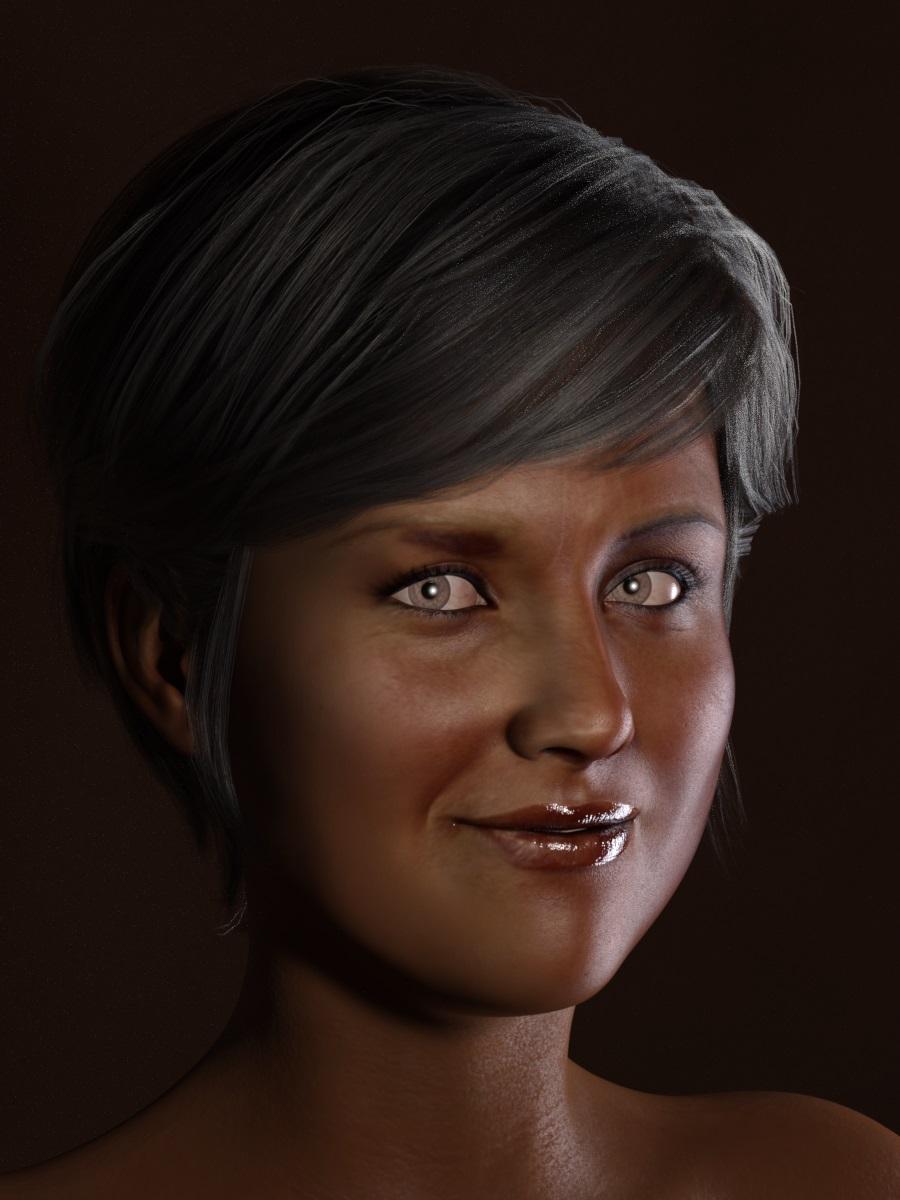
DAZ Studio 4.12 ... Face creation abilities????Character created from the photo using https://www.daz3d.com/face-transfer-unlimited
and applied the preset FTS Apply Fix 75% from https://www.daz3d.com/face-transfer-shapes-for-genesis-8
The hair used is https://www.daz3d.com/amelia-hair-for-genesis-8-females
 How long until Gen9?
...face chips?
Maybe "face handles" would be a more familiar term — just like the non-rendering handles built into some long dresses to help pose them more easily. Open the Head body part in the Scene pane, open the Lower Jaw part, and you'll see Lower Face Rig and Upper Face Rig. Each of these contain the face handles dotted all over the front of the head. It's not too tricky to use subtle shifts here and there to customise the face into whatever you want. It's also way too easy to end up with something that makes Quasimodo look good, so don't overdo it.
FWIW, the Left and Right Pectoral on the Upper Chest seem to be the same sort of invisible handles. Gives a bit more flexibility to the... uh... flexible bits.
...I've never seen "face handles" either, unless they come with certain character (not figure) content that I don't purchase. All I see are the standard morph sliders.
Lycan HD without Landon 8?I think I may be having a bit too much fun with this. By himself, without Landon 8, the Lycan holds up quite well. Now if you don't own Landon 8, (or even if you do,) he mixes really well with other characters. The following renders use the Lycan at 100% with Landon 8 at 0% as the base, and then have other characters dialed in.
1) Eibhear/Lycan mix; Eibhear uses Vladimir 8, but I also dialed his morph to 0%:

2) Glumgurgle/Lycan mix; Glumgurgle uses Ollie 8, so his morph is dialed to 0%. (Ollie actually makes the character smaller and thinner, so there's an advantage to not using him.) Sadly, I just found out Glumgurgle is no longer available.

3)The Monster HD/Lycan mix; The Monster HD at 100%:

4) The Old Chap/Rex/Lycan mix; The Old Chap at 100% and Rex Body at 70%. Old Chap reduces the body size so for the bulk I used Rex, who uses the G8M Body Morphs to achieve his body shape:

5) Kane/Lycan mix; Kane at 100%, Kane also uses the G8M Body Morphs to achieve his body shape:

I used the brown materials for these renders, too, so you can see both, between the two posts. It would be really easy to create a group of these with very different looks just by using different characters mixed in. I also tried him with Troll HD (for Floyd 8,) and Maxx HD (for Brute 8,) but both of those were too big to fit in the opening here. (Maxx might have fit, but I failed to notice he uses Brute 8 when I was dial-spinning.) As it is, I would have to make adjustments to the pose to actually use any of the above combinations in this doorway.
Anyway, I hope you guys had as much fun looking as I did dial-spinning!
Making Morphs in BlenderI often have issues with Morph Loader Pro, so I just want to confirm that this workflow would be viable:
If, for example, I have a G8M character that has several figure morphs loaded in to it (let's say Michael 50% and Vladimir 50% for example's sake). And then i export that morphed character as OBJ to Blender and make some small morph adjustments using editor in Blender (taking care to NEVER change the number of faces/geometry).
My question then is: Can that morph be successfully imported back via Morph Loader Pro?
Creating usable morphs in Daz for G8M?Using Reverse Deformations on import should work for adding a nwe morph on top of existing morphs. I suspect somethign happened to the vertex ordering of your OBJ, though usually that produces an even more dramatic effect.
Please remember to use Smooth Shaded view if you need to show a figure without clothing.
Got this issue figgured out a while back, it was the import options I was using in blender. But I made a morph for the belly button just as a test, and it morphs the neck as well for some reason..
Herschel Hoffmeyer RequestHerschel Hoffmeyer,
Would you consider making Genesis 8 Morphs for your Werewolf & Carnomoloch characters? your work is absolutely Top Notch Amazing! But I'd love to be able to have a Genesis 8 Human Character morph into your Crature/Moster Characters.
Thank you for your consideration!
Sincerely, D32un3D (Timothy Zurishaddai)
Things I'm Playing with ........I think you did a great job on yout morph!!
Daz 3D is part of

Connect
DAZ Productions, Inc.
7533 S Center View Ct #4664
West Jordan, UT 84084Licensing Agreement | Terms of Service | Privacy Policy | EULA
© 2026 Daz Productions Inc. All Rights Reserved.