-
Problem with Eye Collection on Genesis 8 Male
Now, if I morph a real face onto Genesis the eyes nolonger look as good. Magnified they're speckled. Is this fixable?
Need a little help with my corrective morphsAh... think I've got it... I don't set the control values in Property Hierachy pane... I set my scalar to 0.025, then apply 50 bend to the shoulder and reset the value of my morph to zero in the parameters tab, so that becomes its new normal? Seems to work anyhoo... should I ERC freeze at this point, or memorize the figure or something?
Need a little help with my corrective morphsYou need to edit the ERC link in the Property Hierarchy pane - assuming you have the Parameetrs pane in Edit mode you can right-click on you property there and select Show in Property Hierarchy, then expand to see the controllers (since somethine else is driving your morph). Assuming the morph is limited with a minimum of 0 you'd need to add a negative scalar value to keep it zeroed for while - in your case you'd want it to go from 0 to 1 over 55 degrees, so the multiplier would be 1/55 and the constant would be - 35 / 55 - that way, when the rotation was under 35 degrees rot * 1 / 55 would be less than - 35 / 55 and the morph would be zero, then as it rose over 35 it would start having a positive value until at 90 it was 90 * 1 / 55 - 35 / 55 = ( 90 - 35 ) / 55 = 1.
Thanks! That makes a lot more sense (never looked at the Property Hierarchy pane before!) I think I get the principle, though I need a little more help with the application if possible...
So, using my shoulder rotation (up) corrective morphs as an example, I have one morph to rotate x to 50, and another to rotate it from 50-90 (I chose these because the 50 gave a nice approximation of the Genesis 3 "T" shape) my multiplier would be 0.025 (1/40) and the constant would be -50/40?
What I'm not getting is where I input these control values in the Property Hierarchy pane... I can see where to input the scalar value (currently showing as 0.011111 as expected) but I can't see where or how to input the value range parameters of -50 and 40...there doesn't appear to be a place to input the required values.
Apologies for being such a noob!
What kind of clothing are you sorely missing?In case any PAs are paying attention, I'll say a) good mens' suits that look realistic, b) good mens' suits that look realistic c) good mens' suits that look realistic, e) flight suits + helmets for some of Polish's work (if nothing else!), f) backpacks, casual book backpacks- like 90% of students carry these days, hiking/camping, and military 3-day + full "ruck" backpacks, g) good mens' suits that look realistic, h) good mens' suits that look realistic.
Prop dickeys & shirt cuffs, morphable tie knot props sans neck wraparounds, separate open & closed jacket meshes with pointed shoulders morph.
Information on Publishing Things please...I'm thinking of publishing a set of vehicles and wondered about the material for them. Do I need to create my own shaders for them or do I use what I have already and material will transfer with the objects? (Sorry if I'm using the wrong terms, still new at this.) If not, is it common to have vehicles/objects in a neutral color/material and the buyer will use the shader they want to paint it with?
Thanks in advance for any input.
Is there any 3D program compatible with Daz Studio?Reallusion's iClone 7 can use DAZ assets, import Genesis figures and, as of version 7.4, supports iRay. As far as i know, that's the only software company that's made a real effort to incorporate DAZ products at that level.
Can you import .ds scene as well as obj and fbx into Carrara without losses?
Good - Carrara can read DUF files. No need to export to fbx, obj, collada dae or other formats. Genesis and Genesis 2 figures can be loaded directly in Carrara without cycling through Studio. Daz3D recently added a form of dynamic hair to Studio, which users only have partial control over; meanwhile Carrara has had dynamic hair for over a decade, and users have complete and direct control of its tools. Users havecomplete control to "grow" Carrara hair directly on the meshes for Genesis 1, 2, 3, 8 figures and apply dynamics, wind forces, collisions.. A plugin that often costs more than Carrara (depends on sales cycle) can be added to Studio to allow Daz instances to approximte the power of Carrara replicators.
Bad - Daz no longer supports Carrara. Eventually, something simple like an operating system update will cause Carrara functions to fail if Daz3D does not change this stance. They haven't even fixed a typo in the G3 figure files that causes Carrara to crash, even though a Carrara user identified the specific lines for them. Fortunately, a Carrara user created a solution so G3 and G8 figures can be loaded in Carrara using the DUF format. Conforming assets must have their rigging converted to blended weight. That means Carrara still preserves the functionality that comes with DUF that converting to another format (obj, etc.) might lose, but Carrara for G3 and G8 lack the improvements in rigging from blended to DualQ.
It is NOT some sort of shape morph of the G2 figures. The G3 and G8 figures load in Carrara with Misty's presets. The JCMs, etc. for G3 and G8 figures work in Carrara. The G3 and G8 conforming assets work in Carrara with blended weight.
Shopping Advice - Black Friday - Blue Monday SalesYeah, I would say a small case today would still beat those old cases that I swear were lined with freakin' razor blades, LOL. Also the motherboards and connectors are so modular now that part is pretty easy. Cord management could be a hassle.
Also, I read someone write about that motherboard you got, the 2nd GPU slot is right on the SATA ports, so any 2 slot size GPU in the 2nd slot will be a major problem. Obviously this build would not be wise for doing multiple GPUs anyway as it is with such a small case and that 450W PSU would need to be upgraded. But still, just know that you probably cannot ever use a 2nd GPU with this motherboard unless by some magic it is a rare single slot design. They do exist, but are super rare unless it is a very low power GPU.
The AMD 570 is a pretty hard deal to beat at its price, its a way better deal than the similarly priced 1650, they are not even close in performance. But as you know it will not work with Iray. If you are willing to go used, you may find Nvidia cards that can match that performance and price, though maybe not 8GB cards.
Some Nvidia alternatives could the be 970 or 1060 6GB. Those don't offer 8GB, but the 970 can be bought for under $100 with shipping included on ebay these days. The cheapest 1060 6GB I have seen is $116 shipped. These prices could fall a bit more, depending on the market. But the 1060 was one of the most popular GPUs that Nvidia ever released (actually, I think it was #1). So that means there are literally millions of them out there in the wild, and hundreds are up on ebay at any given time. There will never be a shortage of people selling them for years to come, which means you can pick and choose and look for a better deal. If you are lucky, you might find somebody selling one that still has a warranty on it, since EVGA offers extended warranties, and yes, these warranties transfer on second hand sales. Though those might cost a tad more for having a warranty still. But if that card fails, EVGA will replace it for you, no problem. I know this from my own experience after lightning killed my used EVGA. It was such a painless and good experience that I am solidly in the EVGA camp now simply because of their warranty support. Whenever I buy a new card, hopefully next year, I totally plan on it being EVGA, and I plan on buying their absurdly cheap 10 year warranty with it. They offer 5 year warranties, too, and maybe some of those 1060's have a 5 year warranty on them. It would have only cost the person who bought it like $15, so it is totally possible.
1060s can also be found in very small form factors, so they would fit easily in that case. That is something you will need to examine very closely, the physical size of any card so it fits in that case. GPUs can be very big. Even some of the cheaper cards like a 570 can have 3 fans and take up a lot of space. If you do go for a 1060, make sure its not a 3GB model, there are lots of those out there, too.
Thanks for the advice. I used to be a programmer and I'm really getting the Radeon RX 570 to check out a few programming concepts to see if they can spark my interest in programming again. If it doesn't than well $139 isn't that big a wasted investment.
After I satisfy myself messing around with that RX 570 than this summer (summer 2020!) I will be buying a Zoltec mini 2070 I think is what they called it. And you are right it does need two slots but because it actually does realtime ray tracing I want to put it in the motherboard's PCIe Express x16 3.0 slot and relegate the Radeon RX 570 to the PCIe Express x16 2.0 slot. That is if the case and motherboard layout support it. A 450W PS should be enough if the mb doesn't crash because of 2 GPUs. Gigabyte recommends against 2 GPUs too but they admit that this motherboard is technically supposed to be able to handle it. At any rate, I will probably upgrade to a 550W PS to eliminate lack of power as a culprit if I start having strange SW or HW behavior after upgrading to two GPUs. I also have no qualms about swapping them in and out as needed if 2 GPUs won't work.
I'm pretty satisfied that I've put together the most horse power in a PC as cheap as I could that I can buy in the USA. It's up to $970 now. Not that $970 is actually a little bit of money for 99% of us. That's because I decided not to dawdle around and added 3 more sticks of 1x16GB RAM to max (64 GB) that out and a 2 TB PCIe 3.0 NVMe SSD system disk (because, ahem, my DAZ Content Library is 400GB so that virtually rules out my planned 1 GB SSD which gets formatted down to 960GB) with a Seagate hybrid SSHD 2 TB 2.5" 7mm drive as an incremental with imaged backup drive. Those adjustments mean I won't finish the basic build of the desktop until February again.
Correction: a Zoltec RTX 2070 mini will bring the cost of the build up to $1400 but I'm not really considering that card a necessity of the build. You could sub it for the RX 570 and the basic build cost would be instead 1230 so that's a very expensive entry level desktop. It's no wonder I defer buying expensive latest gen GPUs in favor of waiting for one that can do 16GB 4K realtime ray-traced scenes, the RTX 2070s only have 8GB but at $400 it's reasonable to consider it when the rest of the desktop is finished for a few months.
OOT made hairstyles behaving oddly since Daz 4.12 updateI have black squiggly lines on the forehead. Other threads said to disable /enable smoothing but that didn't work. Anyone have a solution besides using morphs? because I dont want to morph anything.
edit: Fixed! by setting "collision iterations" higher than 0.
Is there any 3D program compatible with Daz Studio?Like wolf359, I use Cinema 4D and Vray as render engine. As I do mainly stills, I work with the OBJs for the moment. Nevertheless I have to re-create the materials for the characters and apply them.
It would be fun to get an FBX with JCMs to Cinema 4D in order to be able to pose in C4D. I already tried that and it worked, but unfortunately the default bone orientation is ignored by the FBX importer of C4D. The axis system works different as well and I don't get HD stuff with FBX. I can transfer the morphs though and manually add the ERC Links to them. Unfortunately at least G3 has dependencies between joints in the heel area.
I'm still working to get the HD stuff to Displacement maps.
So, yes, they could work fine, but it would require to write a plugin in C4D to natively import the Daz stuff. At least the figure. Maybe I'll do that one day.
What does not work
- dForce
- geografts
and other proprietary Daz stuff.I assume that all programs will have a problem with the proprietary Daz stuff.
DAZ Studio 4.12 ... Face creation abilities????I bought the Face Treansfer unlimited liscence but I was getting monster faces mostly. Face flat as a pancake, mouth open with super thin lips, all that. I could tweak a hundred morhps to make it looks sort of normal but it was just too much time and I thought "well, Face Transfer is a nice idea but poorly implemented" and figured that was that.
So when PhilW released the Face Transfer Shapes it was a day-1 buy for me. And boom! couple clicks and I have a human face. Getting an exact replica isn't that easy but I don't really want that. I don't use the Face Transfer generated skin (which never looks good anyway, for me at least) so it never looks like the original person. The skin makes a HUGE difference as some of the renders shown here by Artini illustrate very clearly. But Phil's Face Transfer shapes gives me a human shape that I can then tweak and make into an interesting original looking character. Huge improvement.
I was watching some old commercials from the 80s that popped up in my recommended videos list on Youtube and there was one of Brooke Shields tellign me she'd naver date a guy who smoked. I hadn't thought of her in 20 years but she was really stunning back in the day and as a model I recalled she posed for lots of photos with a deadpan expression so I thought "I bet she'd make a good test". This was what I got out of Face Transfer + FTS Main Fix + a couple of jaw adkustments that didn't really work as well as I'd hoped. But about 3 minutes work thanks to the Face Transfer Shapes. Honeslty the result looks more like someone you might say "you look a bit like Brooke Shields" to rather than Brooke Shields. But great start and good enough if you don't want a perfect clone of a specific person. Great product!
Oso Rock Dogs for Daz Dog 8 [Commercial]Yep! You should be able to copy/paste the gem materials to just about anything without a problem in most cases. Some of the weirder multicolored stones may not transfer as well (as they use maps), but ... most should.
I'd love to see any experiments.
DAZ Studio 4.12 ... Face creation abilities????Another character created from the photo using https://www.daz3d.com/face-transfer-unlimited
and applied the preset FTS Apply Fix 100% from https://www.daz3d.com/face-transfer-shapes-for-genesis-8
Rendered with iray maps from Astrid - https://www.daz3d.com/astrid-hd-for-gia-8
and using amazing Zahara hair - https://www.daz3d.com/zahara-hair-2-for-genesis-8-females
with its fairy expansion - https://www.daz3d.com/zahara-hair-2-fairy-expansion-megapack
I am still amazed how well Face Transfer Shapes works with different characters created.
Face Transfer Shapes and Face Transfer Unlimited were the best purchases ever for me. Custom G8M graft question.
Thx, tbh, I've done this already. Although I am a bit curious, how large can you make the graft before things go weird? Like, if I were doing genitals and a tail (for example), if I were to make the entire waist and pelvic area into a graft, would that still work in terms of posing? In sickleyield's video, she just did a simple tail graft but had an issue that she didn't address in the video, in which the tail would bend oddly when the hip was bent. She mentioned having to make a morph to fix it, but can you make a morph that goes with a graft and auto applies itself dynamically with the movement of the hip (or other joint) movements? In the case of the sickleyield video, how would you go about recreating those conditions in your modeling program in order to make the morph (or would it just be a long drawn out back and forth of trial and error)? If there's a video somewhere that I've missed that explains all this, please do link it. But I haven't been able to find anything.I'm just wondering, when it comes to things that graft directly to the body like genitals or tails, does it matter if you add 1000 extra polys? I mean, yes, I know that will increase render times, but I only mean in terms of functionality. I'm taking a crack at making a custom graft, but it'll be so much easier if I can also cut the faces that attach to the body.The ring of polys at the edge of the graft must match the ring of polys on the figure that you are grafting them onto. If you have 30 polys in the ring on the figure, you must have 30 on the edge of the graft, and the verts along the two edge loops must be at the same locations. Otherwise, the graft won't 'weld' to the figure mesh. Aside from that, you can have as many polys in the graft within that edge ring as you want.
Strictly, it's the ring of vertices that must match. Within that the mesh can be divided as much as needed, so one fix if more resolution is needed might be to increase the graft area to allow enough space to ramp up the divisions.
Shopping Advice - Black Friday - Blue Monday SalesYeah, I would say a small case today would still beat those old cases that I swear were lined with freakin' razor blades, LOL. Also the motherboards and connectors are so modular now that part is pretty easy. Cord management could be a hassle.
Also, I read someone write about that motherboard you got, the 2nd GPU slot is right on the SATA ports, so any 2 slot size GPU in the 2nd slot will be a major problem. Obviously this build would not be wise for doing multiple GPUs anyway as it is with such a small case and that 450W PSU would need to be upgraded. But still, just know that you probably cannot ever use a 2nd GPU with this motherboard unless by some magic it is a rare single slot design. They do exist, but are super rare unless it is a very low power GPU.
The AMD 570 is a pretty hard deal to beat at its price, its a way better deal than the similarly priced 1650, they are not even close in performance. But as you know it will not work with Iray. If you are willing to go used, you may find Nvidia cards that can match that performance and price, though maybe not 8GB cards.
Some Nvidia alternatives could the be 970 or 1060 6GB. Those don't offer 8GB, but the 970 can be bought for under $100 with shipping included on ebay these days. The cheapest 1060 6GB I have seen is $116 shipped. These prices could fall a bit more, depending on the market. But the 1060 was one of the most popular GPUs that Nvidia ever released (actually, I think it was #1). So that means there are literally millions of them out there in the wild, and hundreds are up on ebay at any given time. There will never be a shortage of people selling them for years to come, which means you can pick and choose and look for a better deal. If you are lucky, you might find somebody selling one that still has a warranty on it, since EVGA offers extended warranties, and yes, these warranties transfer on second hand sales. Though those might cost a tad more for having a warranty still. But if that card fails, EVGA will replace it for you, no problem. I know this from my own experience after lightning killed my used EVGA. It was such a painless and good experience that I am solidly in the EVGA camp now simply because of their warranty support. Whenever I buy a new card, hopefully next year, I totally plan on it being EVGA, and I plan on buying their absurdly cheap 10 year warranty with it. They offer 5 year warranties, too, and maybe some of those 1060's have a 5 year warranty on them. It would have only cost the person who bought it like $15, so it is totally possible.
1060s can also be found in very small form factors, so they would fit easily in that case. That is something you will need to examine very closely, the physical size of any card so it fits in that case. GPUs can be very big. Even some of the cheaper cards like a 570 can have 3 fans and take up a lot of space. If you do go for a 1060, make sure its not a 3GB model, there are lots of those out there, too.
Darwins' Schtuff Pt DeuxThat's awesome, Carola, thank you!
Sorry I've been so quiet- been working on a collab, and Tathar as well in Zbrush. When I get what I did fixed, I'll post a screen shot. ;)
Actually- this is what I gotta fix:
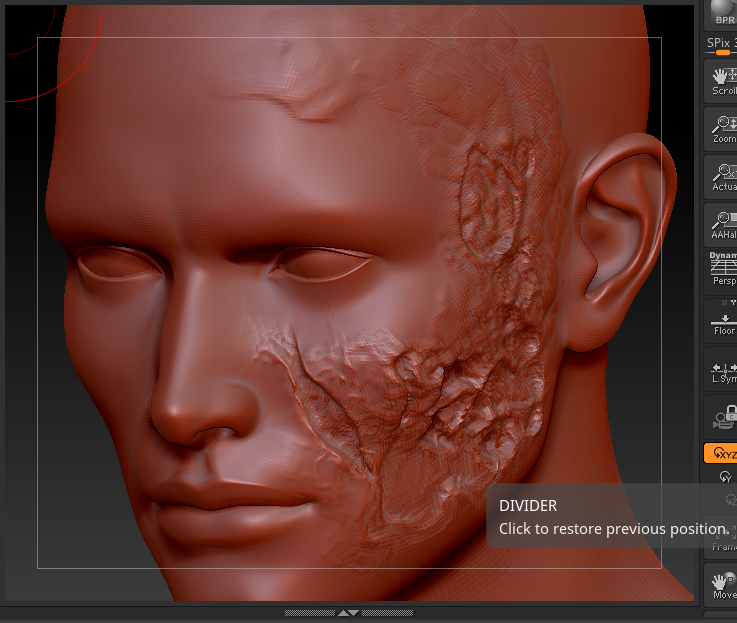
Updates soon!
Teaser!
JUST started the skin on him; no body morphs yet.
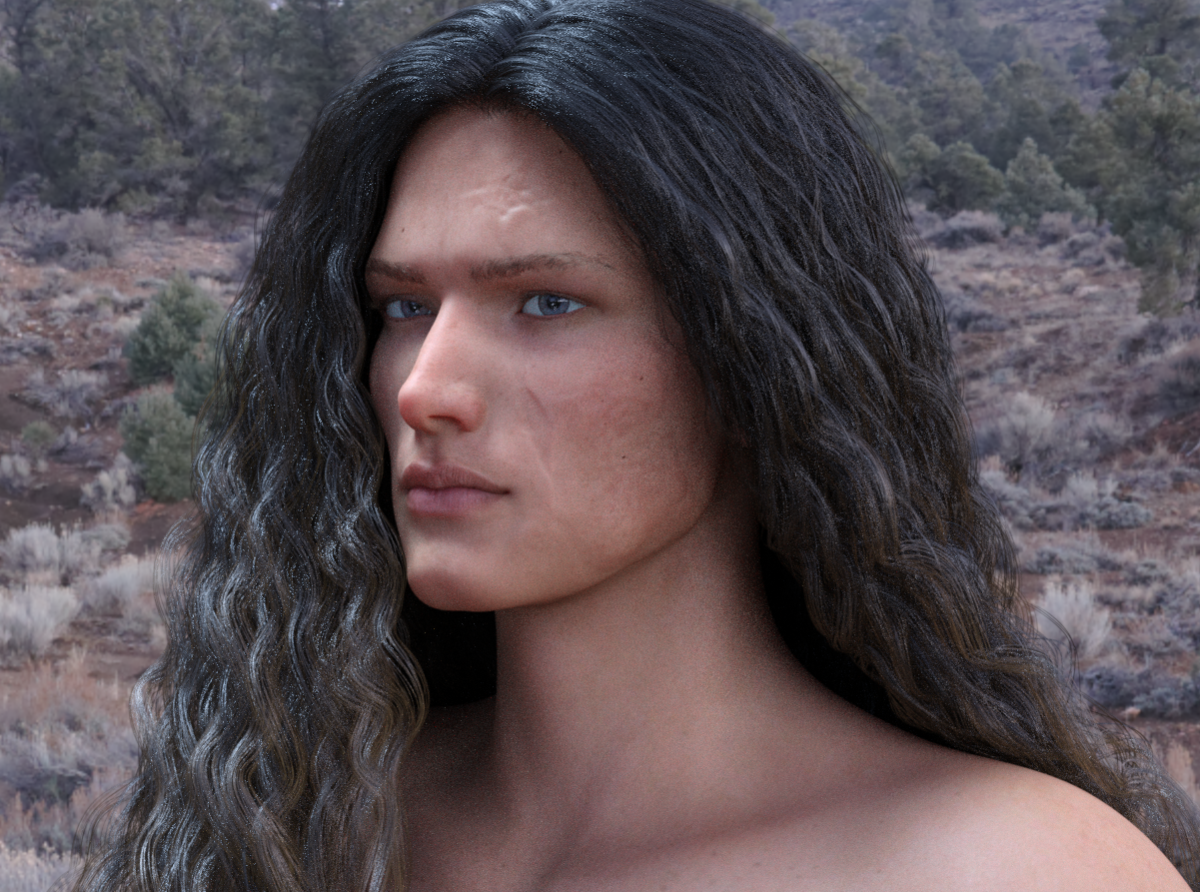
The skin's been updated since this was rendered, too, so it's a tad bit different-but you get the basic idea
Whoever this guy ends up being called. I took one look at the scar and immediately wanted him. It's wicked cool. There aren't enough characters with decent looking scars like this. I think this is still a work in progress, but it looks great so far.
When I was mentioning about the custom brow to work with the scaring, I was thinking back to this one which I think was mentioned is an earlier so the eyebrow might not be an issue by the time he's done.
So here is a peek of his base skin with the starting idea of the scarring (texture-wise). Testing out how it looked without the HD morph so far, to see if I matched the tonal range of a burn on such fair skin:
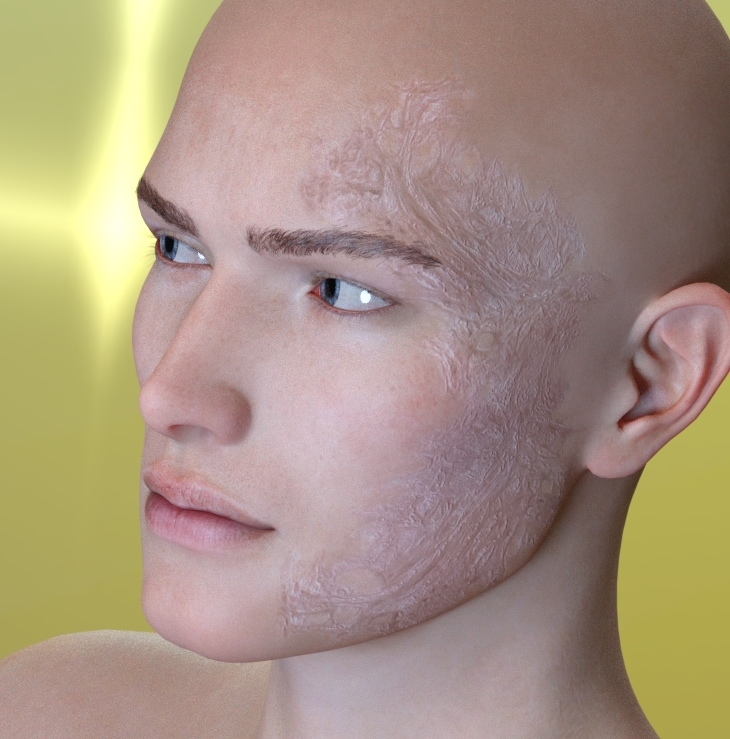
This is with the HD Morph added (SubD 3); The bottom needs shifted, and more added and I need to shift it away from the scarring going down the cheek, jaw and to the area where the jaw meets the neckline. The top- not bad. Need to add more to the top areas of the HD morph and along the side of his head/ear but it's getting there.
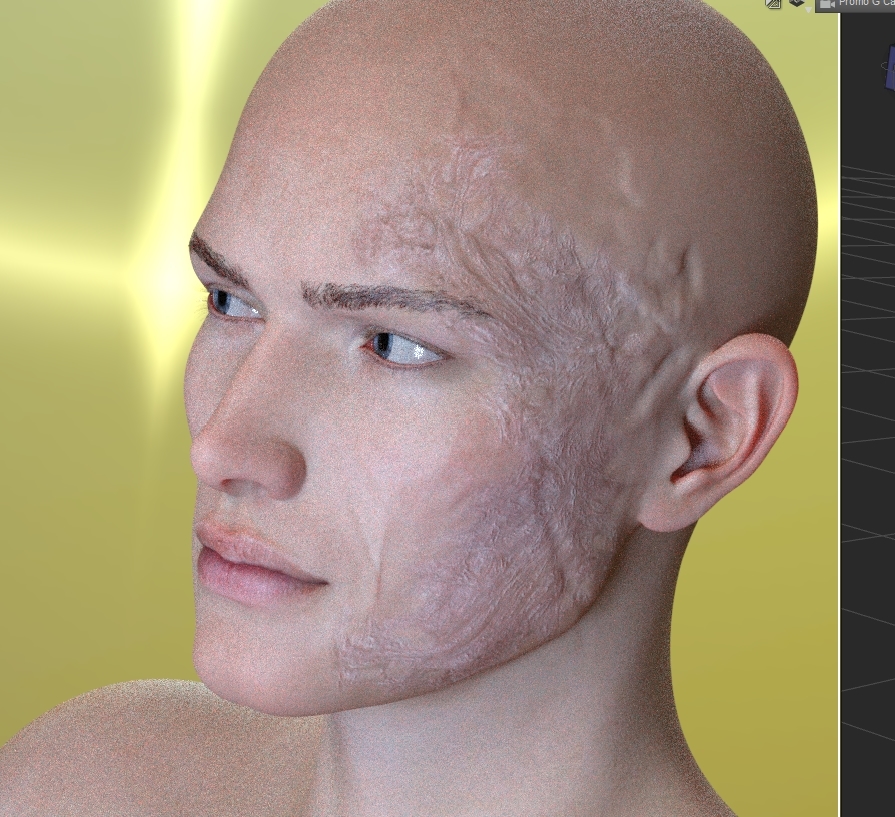
I'm loving what I'm seeing so far with this guy! Sorry, I should have quoted before, but was tired by the time I got through the thread. Over 100 posts since the last time I'd popped my head up in here and the forums in general. I'm only now getting a chance to sit back and breathe until the next book comes out.
Need a little help with my corrective morphsYou need to edit the ERC link in the Property Hierarchy pane - assuming you have the Parameetrs pane in Edit mode you can right-click on you property there and select Show in Property Hierarchy, then expand to see the controllers (since somethine else is driving your morph). Assuming the morph is limited with a minimum of 0 you'd need to add a negative scalar value to keep it zeroed for while - in your case you'd want it to go from 0 to 1 over 55 degrees, so the multiplier would be 1/55 and the constant would be - 35 / 55 - that way, when the rotation was under 35 degrees rot * 1 / 55 would be less than - 35 / 55 and the morph would be zero, then as it rose over 35 it would start having a positive value until at 90 it was 90 * 1 / 55 - 35 / 55 = ( 90 - 35 ) / 55 = 1.
G8F's teeth became rounded somehow...Probably a morph has been saved improperly. I find it tends to effect teeth and eyes the most.
G8 feet fixing ?you can apply the foot morphs of bluejaunte's characters to any genesis 8 female. you just have to finesse one of the included parameters a little bit.
one of these days a PA with access to the HD tool and some anatomy chops is going to create a good HD foot morph package. i'm just hoping that happens before we're all using genesis X figures.
j
How do you apply the bluejaunte footmorph to other G8F characters? As far as i can see in only find a seperate neutralizer morph.
Have the G8F character in the scene that you wish to apply the morph to selected and then under the "Parameters>YOUR CHARACTER>Actor>Feet" select from one of the "BJ" neutralize options (in green) and click on the cog next to the heart/favorite icon and uncheck the "Use Limits" and hit "Accept". After this you can now move the slider below 0 so anywhere between 0-100 will allow you to dial in the foot shape with -100% being full foot shape.
Thanks i did this already but the result .....is not very good there is some deformation ......not in a good way.
The Marvelous Designer ThreadHere's a question for those familiar with MD. I have bought dForce garments which come with built-in morphs. You can drape and then apply the morph to flare a skirt out to the right or left or to lift a gown from ankle to knee. I'm just musing on how best to do this with imported MD garments. Would it be best to create the required effect in MD before export (using pins and/or wind, for example) or to import the OBJ and create a morph in Blender or Hexagon?
I think the answer to this may very well be "It depends". If the morph that you are creating is a draped shape then MD is probably the way to go, if it is more of a geometric deformation (eg. just making a skirt wider but not adding any sort of drape) then a vertex modeller would probably handle this best.
G8 feet fixing ?you can apply the foot morphs of bluejaunte's characters to any genesis 8 female. you just have to finesse one of the included parameters a little bit.
one of these days a PA with access to the HD tool and some anatomy chops is going to create a good HD foot morph package. i'm just hoping that happens before we're all using genesis X figures.
j
How do you apply the bluejaunte footmorph to other G8F characters? As far as i can see in only find a seperate neutralizer morph.
Have the G8F character in the scene that you wish to apply the morph to selected and then under the "Parameters>YOUR CHARACTER>Actor>Feet" select from one of the "BJ" neutralize options (in green) and click on the cog next to the heart/favorite icon and uncheck the "Use Limits" and hit "Accept". After this you can now move the slider below 0 so anywhere between 0 and -100% will allow you to dial in the foot shape with -100% being full foot shape.
**Edited to clarify the range should be below 0 meaning -1 to -100% not positive values**
Daz 3D is part of

Connect
DAZ Productions, Inc.
7533 S Center View Ct #4664
West Jordan, UT 84084Licensing Agreement | Terms of Service | Privacy Policy | EULA
© 2026 Daz Productions Inc. All Rights Reserved.