-
Separating morphs into Head/Upper Neck & Body?
In order to save a morph asset the morphs have to be available, it isn't a way to split xisting morphs. What exactly ddi you do in the save dialogues?
Teen Raven thoughts...Raven's mouth is a bit narrow and i had to finagle the teeth/mouth a bit for Summer's morph.
I don't use the daz smiles so much after I discovered the "Unique smiles" https://www.daz3d.com/20-unique-smiles-hd-for-genesis-8-females I seldom use any of them fully, but often little here and there. What i love about those smiles is that they have nearly all the smile types, you know what I mean? Toothy smiles, chin smiles, cheeky smiles, shy smiles, crooked smile, i'm-just-smiling-because-you-told-me-to smiles, is-there-something-in-my-teeth smiles.... :) It's a good to for smiles. There's one for guys too, really good stuff https://www.daz3d.com/20-unique-smiles-hd-for-genesis-8-males-
I have the female pack. Yep, you have to be careful with them. The one on the main promo looks psycho at its current default, but that like the others look pretty normal with tweaks. Love your personalized tweaking though.
Separating morphs into Head/Upper Neck & Body?Hi all,
I looked, but cannot find the answer. I bought a character to use just the head, but the morph is all-in-one. In the latest DAZ Studio, I've saved two versions of the character as Morph Assets, one with just Head and Upper Neck checked, and the other with everything else checked. Did I save the right thing? If so, how do I find or load these morph assets? If I didn't, what is the procedure?
Thanks so much for any help!
Freebie: How to create a V4 clone (and transfer other figures) for G8F (now with video!)3. Select Genesis 8 Female. Under the Parameters Tab, enter Hidden/Clones.4. Enter the properties of the newly created clone morph, then change the Type to Modifier/Clone.Really sorry to bother you but when I reach step 4 the only Types that show up on the drop-down menu are "none" and "Modifier/Shape". Am I doing something wrong?
No Face Transfer PaneMake sure you are running the newest release of DS 4.12, that you have a Windows 64 bit machine plus the latest update of the Genesis 8 Essentials. Load a g8 figure and select the head to then find the face pane in the (believe it's) windows menu in Studio.
If you mean that G8 has been updated to support the face transfer plugin, please note that no updates are reported in the official G8 documentation from May 2018. If it is the case please also fix this so people do know what to download for 4.12 to work.
http://docs.daz3d.com/doku.php/public/read_me/index/42071/start
A bit of an issue with eyes using Face TransferI like making morphs ;-)
Yes Face Transfer is saving out the scene subset character and yes you can adjust the eyes during the one session. Unless I missed a step though when I closed it, upon closing I watched Face Transfer undo the mat preset and reapply its own. So I saved out mats and made a new morph seeing if it could be saved that way and yes it can. Just ideas, use it how you wish ;-)
If you save the face transfer you are working on, doesn't it save all of that too, so it can be recalled? If not that is a glaring problem such as the case with the eyes. The developers of Face Transfer should know about that.
Star Trek Builders Unite 8: THE REBOOTHey all, I am transfering all the links over but it is going to take a bit of time since I was not the admin of the last page and the hyperlinks don't transfer over via copy and paste. I should have it all transfered by the end of the week.
Welcome back! Yes, they didn't transfer over in a working package from the prior forum either, all were broken, lot of work to get them looking all neat and tidy and working. At a quick glance you seem to have gotten what could be put back together, so.
A bit of an issue with eyes using Face TransferI like making morphs ;-)
Yes Face Transfer is saving out the scene subset character and yes you can adjust the eyes during the one session. Unless I missed a step though when I closed it, upon closing I watched Face Transfer undo the mat preset and reapply its own. So I saved out mats and made a new morph seeing if it could be saved that way and yes it can. Just ideas, use it how you wish ;-)
A bit of an issue with eyes using Face TransferFace Transfer saves out its own copy of G8 and even though I applied a mat preset, it would not keep it on closing.
So for characters one may want to reuse alot, one can create a new morph to a NEW G8 figure [FT is loaded in the Viewport, transfer over the bridge to Hexagon, back in D/S remove FT and load in a Fresh G8, BASE resolution, then from Hexagon send the file back over the bridge to D/S and make the morph being sure to use an unique name] then apply a mat preset [made from that FT figure before deleting it from the scene], then apply the eye mat preset you want to use, then resave the entire mat preset. Remember to save the new morph too ;-)
End result is you still have the FT scene subset plus you would have a morph for use in any G8 figure as well as the mat presets.
n.b. always "reverse deformations" when making morphs for G3 and G8 figures.
Wow, that seems like a lot of hoop jumping. I DID buy into the unlimited save version of FaceTransfer, so that does save everything out. So I hope I would be good there.
Teen Raven thoughts...Raven's mouth is a bit narrow and i had to finagle the teeth/mouth a bit for Summer's morph.
I don't use the daz smiles so much after I discovered the "Unique smiles" https://www.daz3d.com/20-unique-smiles-hd-for-genesis-8-females I seldom use any of them fully, but often little here and there. What i love about those smiles is that they have nearly all the smile types, you know what I mean? Toothy smiles, chin smiles, cheeky smiles, shy smiles, crooked smile, i'm-just-smiling-because-you-told-me-to smiles, is-there-something-in-my-teeth smiles.... :) It's a good to for smiles. There's one for guys too, really good stuff https://www.daz3d.com/20-unique-smiles-hd-for-genesis-8-males-
A bit of an issue with eyes using Face TransferFace Transfer saves out its own copy of G8 and even though I applied a mat preset, it would not keep it on closing.
So for characters one may want to reuse alot, one can create a new morph to a NEW G8 figure [FT is loaded in the Viewport, transfer over the bridge to Hexagon, back in D/S remove FT and load in a Fresh G8, BASE resolution, then from Hexagon send the file back over the bridge to D/S and make the morph being sure to use an unique name] then apply a mat preset [made from that FT figure before deleting it from the scene], then apply the eye mat preset you want to use, then resave the entire mat preset. Remember to save the new morph too ;-)
End result is you still have the FT scene subset plus you would have a morph for use in any G8 figure as well as the mat presets.
n.b. always "reverse deformations" when making morphs for G3 and G8 figures.
MimicMolly's Renders & WIPsAn attempt was made to recreate this pokemon "kid" called N. ("Kid" because the character is 18-20 but still quite child-like in terms of behavior.) Here is a picture of the character in the artwork. Now, we just had Hiro 8, Kenji 8, and the like this would've been so much easier, because I could go toonier instead of "realistic".
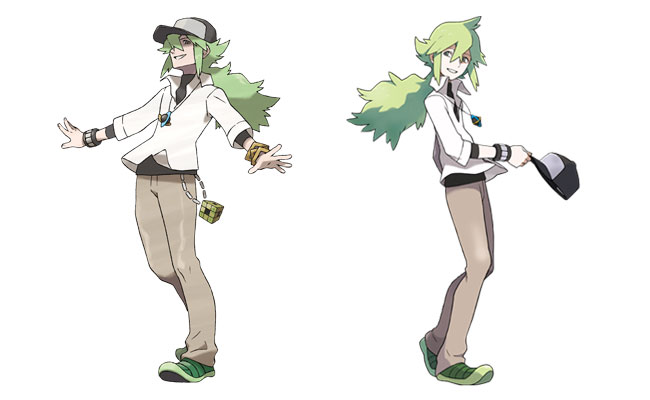
This is my attempt. I actually re-used the same base morph I used for his dad, then just tried to make it look yoinger but also kinda awkward because that's really the most accurate description of him. Also, this G8M version of him is now a cowboy because that makes him more American. Gotta make use of the Diego 8 stuff I got. I used SquarePeg3D's Bowsette hair with SloshWerk's Colorwerks (the original one). Once again, the hair color doesn't quite match and tempts me to make my own custom edited map. I think my problem is that I want the hair to be less solid color and have other slight shades of green in there. Perhaps even a bit mixed with blond.

This test render has some post-work done on MS Paint. To cover up some poke-thru with the hair. And I used the Sickeyield Hat Helper, which helped a lot. I don't think a fuller similar hair for G8M exists unless I did some random SBH mix and then used ColorWerks Xtreme over it. I'm undecided on the skin, I need to figure out how to make him paler than this..
"Duplicate Formulas Found" is KILLING me!Well, behind the scenes chatter said it was a certain vendor's product causing the problems, but I deleted the character in question (don't remember who) and it hasn't solved the problem.. So how do we solve this? It's just PLAIN STUPID that it hangs up your studio. You have to sit there and wait for the popup before you can X out of it and the studio continues.
The log identifies which specific characters and morphs are causing the "Duplicate Formulas" problem. If removing one character/morph package doesn't resolve the problem, it's because you have other problematic packages in your library. Clear your scene, clear your log, reload the G3/G8 base character, check your log for the next problem package. Lather, rinse, repeat until the problem disappears.
Okay Lucy...'Splain (Face Transfer Unlimited)On a fresh load of G8, save out a material preset checking off ONLY all the eye materials. For a render you can then apply that eye preset to the Face Transfer's figure. It will not save any changes made to its materials though.
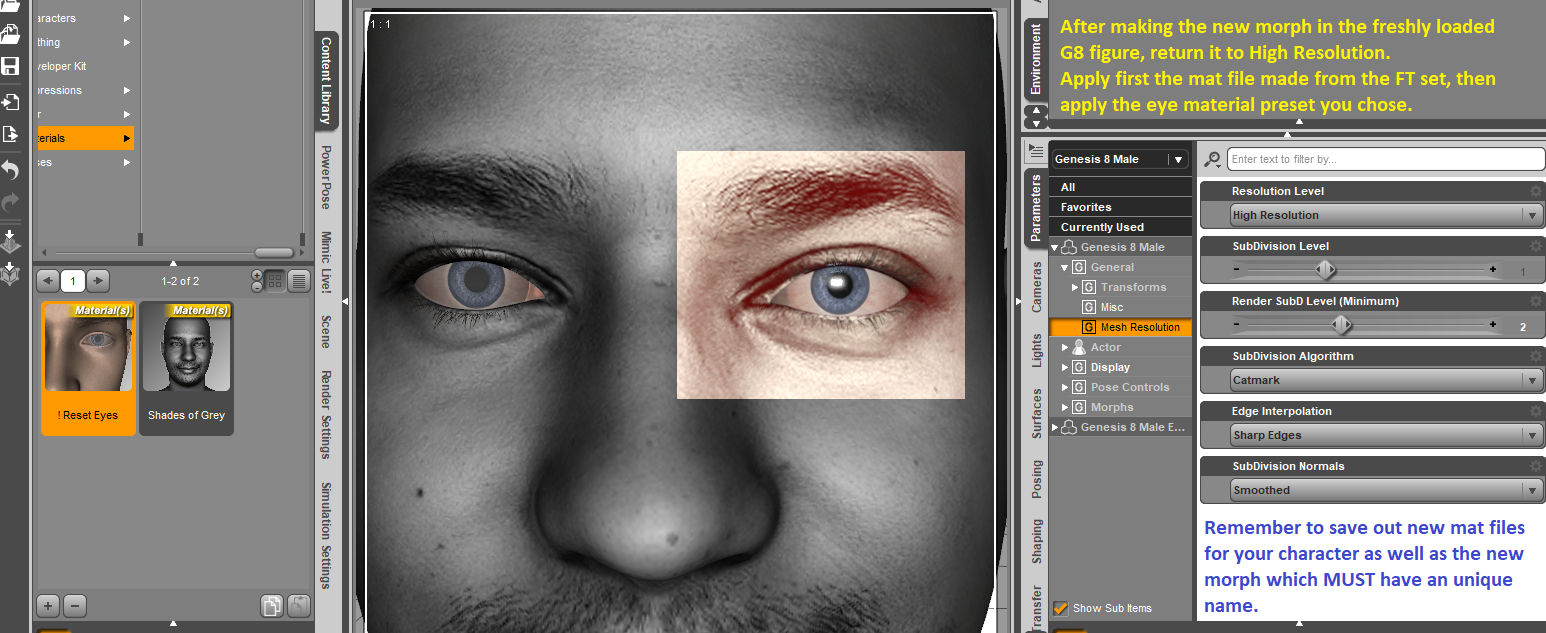
So if using the character frequently, might want to consider making a proper morph on a FRESHLY loaded G8 figure, apply a mat preset made from the FT figure, then apply the eye preset of your choice and then resave out that complete mat preset. Remember to also save the morph which MUST be named differently than whatever you have named the FT figure.
 Facegen now on sale...get it!
Love it much better then that transfer thingy
Oops looks like my original render pic was in violation so here it is redone
Does anyone know if there is a Puss n Boots for Daz Housecat?Thank you! I really want to do a tuxedo on a cat or dog. Make it look like people as animals kinda deal.
That's funny. You can do the famous dogs at a table playing poker scene.
You may need to 'unlock' limits on the joints for posing on the cat or dog to get into a T-pose like human characters. If the clothing is for Genesis 8 & is in an A-pose I recommend putting the clothing in a T-pose and not the cat or dog in a A-pose because using the dFormer is easier in a T-pose than an A-pose.
You may want to get a final nice draped fit for the cat or dog clothing use a dForce clothing simulation to drape the clothing on the cat or dog (and then do the whole export clothing as obj, import clothing as obj, and Transfer Tool to transfer rigging & weightmaps to the obj, save as prop/morph asset). You may like it better or you may not but just keep in mind if you want to try dForce for a better clothing drape.
There are several tuxedos to choose from. Just remember when the autofollow for the clothing leaves the clothing sort of crumpled (sometimes) for some poses that you can slightly change pose of the clothing itself independent of the cat or dog's pose.
Why Centaurs?donalddade said:
Can someone demystify this for me? Why are centaurs apparently a thing in Daz Studio? I mean, it seems a strange and awfully specific niche... why are centaurs so numerous and not unicorns, a pegasus, satyrs, or any other mythical beasts?
Because Satyr (human + leg morph and horn), pegasus (horse + wings) and unicorn (horse + horn) are easier to do by yourself than centaur (human body + horse body)
Just Satyr is :
- Genesis 8
- HFS Ultimate Shapes (leg morph)
- Universal Horns (goat horns)
And these products already exist :
- Horse 2 Unicorn
- Pegasus (wings for DAZ Horse 2)
- Bonus : Water Horse 2
- Bonus : Minotaur (TOR)
Pre-Made AnimationsThere is a YouTube tutorial on how to convert the animations from FBX to Genesis 8 figures, but it requires MotionBuilder, which costs nearly $2,000 per year. However it does have a free trial that runs for 30 days. I would be quite confident if it can transfer FBX to Genesis 3 figures also.
I downloaded only the FBX animations that I need (90 of them, to be exact), so I will likely be downloading the trial version of MotionBuilder tonight, and will work on at least five animations this evening. It looks like I got a lot of work ahead of me for the next several weeks.
MotionBuilder is a powerful tool, as the video's narrator boasts. It sounds very promising.
FACE TRANSFER UNLIMITED PROBLEMSI bought the Face Transfer unlimited package but I'm getting messages from Face Transfer that am using up my free transfers. Am I supposed to somehow enable the unlimited transfers?
Have you entered the serial number in Help>About Installed Plug-ins and restarted DS? https://www.daz3d.com/downloader/customer/serialnumbers
FACE TRANSFER UNLIMITED PROBLEMSI bought the Face Transfer unlimited package but I'm getting messages from Face Transfer that am using up my free transfers. Am I supposed to somehow enable the unlimited transfers?
Daz 3D is part of

Connect
DAZ Productions, Inc.
7533 S Center View Ct #4664
West Jordan, UT 84084Licensing Agreement | Terms of Service | Privacy Policy | EULA
© 2026 Daz Productions Inc. All Rights Reserved.