-
M3D Horns and Orc Piercings deform the fingernails
I just bought M3D Horns and Orc Piercings, and after dialing in some of the morphs, I noticed that they were distorting the fingernails, cumulatively so, i.e. the more different morphs I dial in the more distorted they become. I'll be filing a ticket about this, but in the meantime I'm hoping there's a solution. I've read on the forums about excluding certain points/polygons from an existing morph, but I haven't been able to find instructions for that process and couldn't figure it out on my own. Does anyone else have these products, and do you experience the same issue? Is there anything I can do short of simply filing a ticket?
Trouble with Strand Based Hair (solved)Banyan said:
Wow, you nailed it. Thank you, Crosswind, you're amazing. Who knows how much of a headache this would have been going forward. I owe @Toyen an apology. It looks like there were not one, but two products from Vo that were dialed on, somehow, as the attached file shows. I uninstalled those products and the problem with the hair ceased immediately, as you'd expect. I also have a mysterious "hide ears" dialed at .001%, and I don' t know how to figure out what is doing that, or if it is really a problem at that low of a value. I don't like it, regardless.
So... what is going on here? I want to file a ticket with support about those products, but I'm a bit confused as to what's even even happening, so I don't know how to word the problem clearly. How did just having those installed alter a completely separate figure when it loaded?
No problem ! That's the culprit... coming from some "well-known" problematic character products from that PA. You need to fill tickets ~~
But you didn't have to uninstall the product... you could fix them yourself while waiting for the updates, for example: Vo Winni Head HD Details LV3
- Select V9 or G9, type in Vo Winni Head HD Details LV3 in Parameters pane to filter it out. You should be able to see it's 100% as default ...
- Click that Gear icon on the right of the morph slider, to open Parameter Settings dialogue. Set 0 into the field of Default.
- Go to : File > Save As > Support Asset > Save Modified Assets... Only check Vo Winni Head HD Details LV3.dsf in the list, Accept. Do the same to other problematic morph properties.Clear the scene and reload V9 or G9. The issue should be gone.
Where is Mesh Grabber 4.0/ Geometry SculptorI wanna finish a morph with geometry sculptor, but every time I try to scale, the program crashes. I also thought t fix the drivers, so I brought a driver updater from norton. But I guess I would be wrong on that too, would I? So what am I doing wrong?
more....Wacky Modelling ~ In Carrara ~loop de loops... thanks

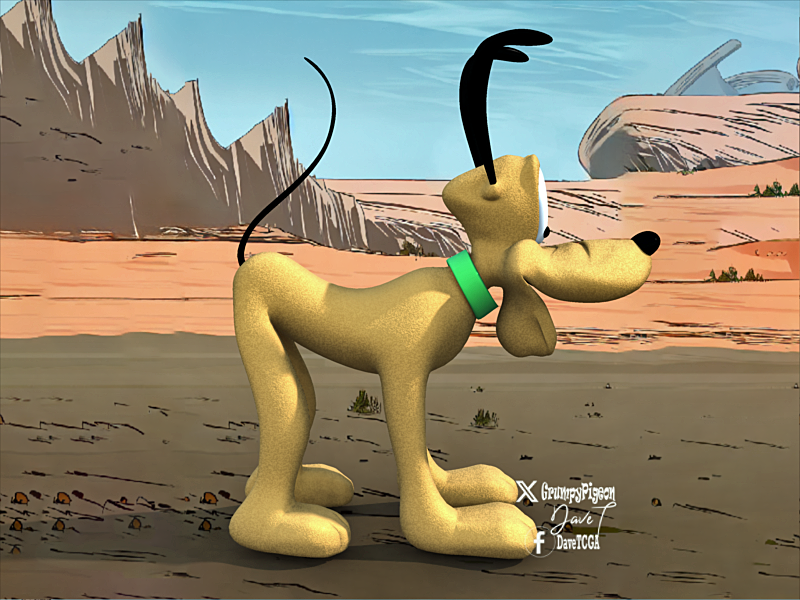
Pluto from a cube boned and morphed
You can get him in the zip file to play with, morph more and experiment on.
also added a pose file, dunno if it will work, just load it up in the NLA tab and give it a try.
enjoy
 Best way to create a new character in order to morph
Create two single dials for Head morph and Body morph for your custom character : https://youtu.be/nEFI6keXU2c?si=YJQfP53MWOub0T_P
Best way to create a new character in order to morphHello everyone,
I’m new here, and I want to thank you in advance for your help and patience with my beginner questions. I appreciate any guidance you can offer!
I’m trying to take the modifications I made to a character and save them in a way that allows me to apply these changes to a new base character without having to manually adjust every parameter again.
Here’s an image to illustrate what I mean:
Image removed
So in a way or another i hope to make appear in those parameters one with my custom character.
I hope this discussion helps not only me but also other beginners who might be looking for a similar solution.
Looking forward to your insights—thanks in advance!
dforce Double Dutch BraidsMorphs thata re not natively suported (that is, the PA hasn't made a custom morph for the hair to match the shape on the figure) get projected into the hair according to how the closest bit of the figure has changed; the more radical the chnage, the more likely that is to produce an ugly result.
Trouble with Strand Based Hair (solved)Banyan said:
One negative effect that I have noticed is that having the hair parented directly to the head breaks the application of different materials to the hair. If I want to change the hair color, I have to parent the hair to the base figure again, apply the change, and then re-parent the cap to the head. Annoying. Setting the SubD levels to maching values in viewport and render didn't help, unfortunately, but its nice to know that may work in other situations.
Can you tell me what morph are you using? If I have it in my library I can check it out on my end.
A and B and C walk into a scene.alan bard newcomer said:
Richard Haseltine said:
Turned off by turning the Visible property off, I assume, not making them transparent.
The scene still has to be loaded in full into DS, so that is going to consume some system memory - perhaps it is failing during the prepartion stage, before ti even tries to transfer to Iray for rendering. Again, what does the log say?
The log lists it as a failure to have enough gpu memory (and while I'm not sure how iray acutually uses it, it does use both cards which have a total of 23g minus the 2g or so it takes to run the monitors. But the sys ram is 64g.
Memory is not cumulative - each card has to be able to handle the scene on its own (and each crad then renders a full iteration and passes it back to the management process, which combines them to make a ful render). If a card runs out of memory it will drop out, while another card with more memory will keep going.
----
It looks like 423 has some issues with keeping track of what is "active" in a scene.
I just exported a parametric object that has one diffuse map as an object and daz wrote every surface in the scene out and quite obviously (as I watched it list g8 materials) as the parametric object would not include 4 g8 characters.
In the image below the bridge and street are one single parametric object with one diffuse map and yes I know that obj export will export everything visible in the scene which is why the only thing turned on was the bridge prop.
---
Figured this out and this may explain why all the maps for items for objects that are not visible in a scene when rendered are loaded anyway.
there is no dialogue box for the render engine load, tut there is one for the export option.
---
When you export an object you can write the surface and isn't it logical to "assume" that collecting the maps would refer to the object chosen and visible in the scene but apparently it will collect every map in the scene and perhaps that same code that collects the maps for a single item being rendered collects all the maps in the scene even when the other objects are turned off?
---
Image one, scene as rendered with the bridge and characters.
image two export of bridge item only as chosen and showing in the scene pane
image three collecting maps ... overrides the picking of only one item and it's maps but collects all maps even from turned off items
Which is what happens with the iray engine getting all the maps.
So at least for export of a single item you don't use collect maps.
But we can't control that factor on a render.
And yes, as I retired programmer, why in the heck would you default to collecting all maps in a scene as opposed to just those from an object chosen to be exported or rendered?Issue with rigging when opening animation.DrunkMonkeyProductions said:
As i understand it, adjust rigging to shape, isn't saved in DUF files(Scene, etc), it's only saved in DSF(morph, etc) files.
.The only way to get it to stick, would be to update the 'broken' asset(s) that's causing the problem.
This is done by running the command, then File>Save As>Support asset>Save Modified Assets...
I'd suggest checking the list of assets that are going to be modified, and see if you can correct the problem via the morph dials, before you commit to this update.
I say this, because if you don't konw what you're doing, you can break your genesis install, requiring a reinstall of assets.
You could also save a Scene Subset, a Character preset (if used to load a new figure) or (I think) one of the new Person presets (used to load a new figure, currently beta only) and use that to load the figure in future.
Note that if content was installed through DS saving modified assets won't help unless you then copy the modified .dsf files over the ones in the /data/cloud/1_[SKU] folder for the product.
Answered: Cost for interactive license for original Genesis figureI can find costs of interactive licenses for morph packs, clothing, textures, etc., but what is the cost to use the Genesis model itself? If I buy a license for, say, the Troll for Genesis character for $50, does that include use of Genesis itself or does that require a second license?
It's easy for, say, Aiko 3, where I can purchase a bundle that includes the character, but are there costs for using base characters in addition to character morphs?
Issue with rigging when opening animation.As i understand it, adjust rigging to shape, isn't saved in DUF files(Scene, etc), it's only saved in DSF(morph, etc) files.
.The only way to get it to stick, would be to update the 'broken' asset(s) that's causing the problem.
This is done by running the command, then File>Save As>Support asset>Save Modified Assets...
I'd suggest checking the list of assets that are going to be modified, and see if you can correct the problem via the morph dials, before you commit to this update.
I say this, because if you don't konw what you're doing, you can break your genesis install, requiring a reinstall of assets.
Bows (no not that kind)Matt_Castle said:
crosswind said:
The better way may be rigging + morphs. I ever did some. Attached is the optimized rigged Bow in dForce Elven Archer Outfit. I added a fix morph this time to make it look even better. Pls give it a try if you're interested.
Unfortunately, rigging is not separately redistributable within the DS formats; it's intertwined into the geometry data.
If you've created a scene file where you've painted weightmaps to the asset, then you've embedded a copy of that asset's geometry in the scene file and are sharing it in violation of EULA.
Right ~ I overlooked it. Editing ~
Bows (no not that kind)crosswind said:
The better way may be rigging + morphs. I ever did some. Attached is the optimized rigged Bow in dForce Elven Archer Outfit. I added a fix morph this time to make it look even better. Pls give it a try if you're interested.
Unfortunately, rigging is not separately redistributable within the DS formats; it's intertwined into the geometry data.
If you've created a scene file where you've painted weightmaps to the asset, then you've embedded a copy of that asset's geometry in the scene file and are sharing it in violation of EULA.
A and B and C walk into a scene.Richard Haseltine said:
Turned off by turning the Visible property off, I assume, not making them transparent.
The scene still has to be loaded in full into DS, so that is going to consume some system memory - perhaps it is failing during the prepartion stage, before ti even tries to transfer to Iray for rendering. Again, what does the log say?
The log lists it as a failure to have enough gpu memory (and while I'm not sure how iray acutually uses it, it does use both cards which have a total of 23g minus the 2g or so it takes to run the monitors. But the sys ram is 64g.
----
It looks like 423 has some issues with keeping track of what is "active" in a scene.
I just exported a parametric object that has one diffuse map as an object and daz wrote every surface in the scene out and quite obviously (as I watched it list g8 materials) as the parametric object would not include 4 g8 characters.
In the image below the bridge and street are one single parametric object with one diffuse map and yes I know that obj export will export everything visible in the scene which is why the only thing turned on was the bridge prop.
---
Figured this out and this may explain why all the maps for items for objects that are not visible in a scene when rendered are loaded anyway.
there is no dialogue box for the render engine load, tut there is one for the export option.
---
When you export an object you can write the surface and isn't it logical to "assume" that collecting the maps would refer to the object chosen and visible in the scene but apparently it will collect every map in the scene and perhaps that same code that collects the maps for a single item being rendered collects all the maps in the scene even when the other objects are turned off?
---
Image one, scene as rendered with the bridge and characters.
image two export of bridge item only as chosen and showing in the scene pane
image three collecting maps ... overrides the picking of only one item and it's maps but collects all maps even from turned off items
Which is what happens with the iray engine getting all the maps.
So at least for export of a single item you don't use collect maps.
But we can't control that factor on a render.
And yes, as I retired programmer, why in the heck would you default to collecting all maps in a scene as opposed to just those from an object chosen to be exported or rendered?Invicta Couture Lingerie [Commercial]The roadmap to my destruction? Nice.
Bet you won't throw in a thong pressure morph while no one is looking.

Won't change my appreciation for this series because it's so top notch and has all the bells & whistles...but would be so sick.
 Let's appreciate/discuss today's new releases - more ongoinger thread
Lucas G9 1 Click Animed. I set the main morph dials for Lucas at 100% but the HD dials to 50%. I did try to see what would happen if I increased the anime head morph above 50% but his eyes bugged out pretty quickly. The skin texture is from the G9 Toon Heros. This is a nice set of tools and will be using it a lot :) It would be nice to see a tool like this for Cartoonized for G8 and G9.
Invicta Couture Lingerie [Commercial]The support is much appreciated and love the render!
Coming Soon: Midnight Gold for Invicta Couture Lingerie Set [Commercial]
Midnight Gold expands upon the Invicta Couture lingerie set with many newly added accessories and expanded material library for the original set.
New accessories include a gothic veil, decorative face chain, nose ring, lip ring, hoop earrings, a large choker band with a hooked O ring accompanied by a rigged chain leash, nipple dangler jewelry, and ankle straps also accompanied by a rigged chain that you can pose however you like. The lip ring also comes with a HD Micro Pressure morph for added realism.
The expanded material library adds many new sexy latex, lace, and satin options for the original set. All material options added can be seen in the promo images.
Elevate your Invicta Couture lingerie set to a new level and the newly added accessories can be used without the need of the base set.
- - -
Disclaimer: I can only preview a small amount of the product here in the forums (due to no mature filter) so you'll have to wait and see the full reveal when the product launches...


Roadmap updated.
 Bows (no not that kind)
wickedprince3d_fd273b40ac said:
Ok, so here's my thing. I'm into fantasy and alternate history type stuff that's also basically fantasy but borrowing elements from the real world.
So the thing is, I love making characters with bow and arrows. But what I find about 90% of the time that if the creator included a draw morph so you can do a pose with a character drawing an arrow and aiming at a target - only the string changes. It elongates in basically a triangular shape with the bow as the third side. But the bow itself doesn't bend. So you look at the pose, and it looks neat, but then you look closer and realize that now the string is twice the size that the bow could handle. Twice the length it is at rest. Yeah I can get that getting the bow to curve properly takes a bit of work, I don't make 3D items but I watch vids on it every so often. Don't most of those tools including a setting that would make the bow bend properly? Crossbows of course you get the same thing most of the time. I'm currently working on a scene using the bow from this costume: https://www.daz3d.com/dforce-elven-archer-outfit-for-genesis-8-females ; I am totally glad the artist gave the costume a quiver filled with arrows (imagine trying to pose a dozen arrows into the quiver, I'm sure anyone that's done an archer scene enough times has seen this). That's not as common as it should be. I'm also glad that they even included a set of poses - very very neat. But if you use the full draw morph only the string changes and it becomes twice it's normal length, give or take a few "inches". It's a great costume and I find myself coming back to it over and over to kitbash pieces from it. It has one other problem in that each piece has only one texture group which is bothersome - but I can figure out work-arounds there. But it snags on that bow.
There's another one: https://www.daz3d.com/dforce-ember-skies-outfit-for-genesis-8-and-81-females ; this one has a bigger problem - look at the poses with the drawn bow, and take a close look at the string. It curves inward from the tip of the bow out to the draw corner point. AND there is no curve in the bow during draw. I can't even imagine how the creator missed that string thing and let it go.
If you are a content creator, you have my admiration, I wish I had the courage to try that stuff but my brain has limits. But please, the next time you are creating an archer set, do these three things. 1) make sure the bow bends along with the string when drawn. 2) make sure the string is straight. 3: PLEASE include a quiver filled with arrows as a preset.
100% second the above points ~
The better way may be rigging + morphs. I ever did some. Attached is the optimized rigged Bow in dForce Elven Archer Outfit. I added a fix morph this time to make it look even better. Pls give it a try if you're interested.
Edit: You can save it as a scene subset or wearable preset, or a figure asset with your vendor name ~~ (modified with deltas only...)
How accurate is Measure Metrics?paulawp (marahzen) said:
Back in my G8 days when I last used Measure Metrics with my characters (I haven't gotten that far in character creation in a very long time), I swear I remember a morph - I think one that affected height - that was not reflected by Measure Metrics. I started getting some weird results when comparing characters next to each other. But that was a long time ago.
That was my experience.
Daz 3D is part of

Connect
DAZ Productions, Inc.
7533 S Center View Ct #4664
West Jordan, UT 84084Licensing Agreement | Terms of Service | Privacy Policy | EULA
© 2026 Daz Productions Inc. All Rights Reserved.