-
Mountains and Hills
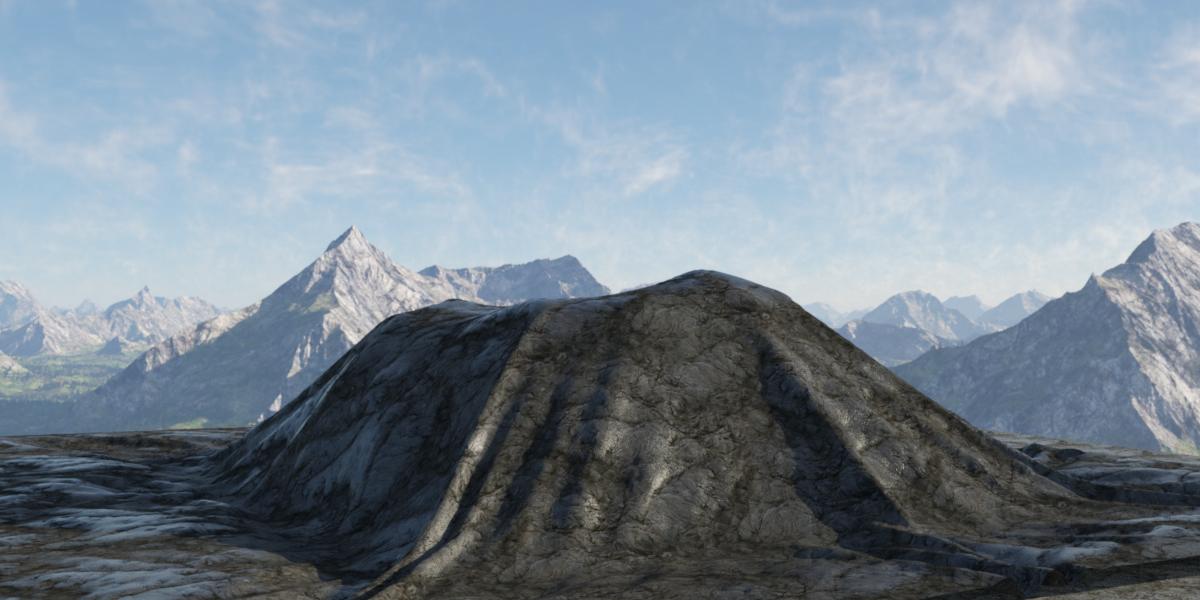
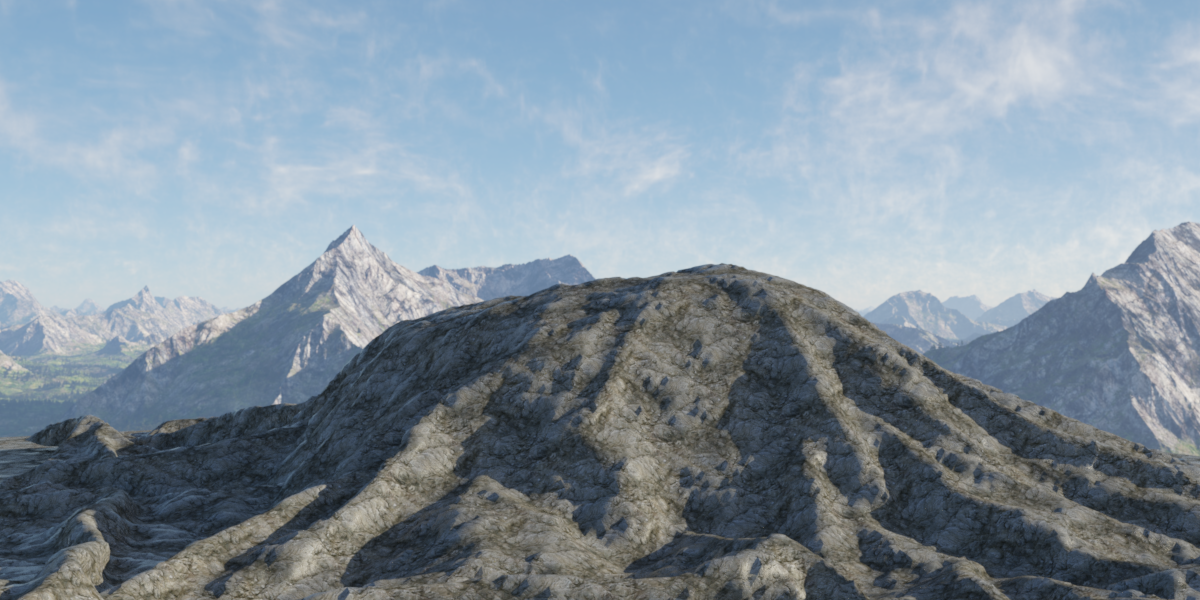
Today's mountain uses a double simulation around a cone. The first scatter with larger spheres created the basic shape. That was saved out as a morph. Then a second scatter with smaller spheres scattered on the morphed plane gave more variation to the mountain form.
After 1st scatter and simulation:
After 2nd scatter and simulation:
 Fit Control Add-On (Commercial)Hi. I am a bit confused here. No G3 scripts work on G8. What Fit Control products do you have? And what figure are you trying to use it on? Can I see a screenshot?
Sorry if my post was not clear, I'm still new to DazStudio. I bought two separate FitControl Bundles: (1) Fit Control for Genesis and Genesis 2 Female(s) and Male(s) as well as (2) Fit Control Add-On for Genesis 3 and 8 Female and Male.
I think that's probably your problem right there. You bought the "base product" "Fit Control for G and G2", and the "add-on expansion" for the "Fit Control for G3 and G8" version. You don't have the "base product" "Fit Control for G3 and G8" that is required to use the add-on you bought.
The Add-On - Expansion adds more morph sets to the base product for certain generations. It does not extend functionality to other generations of figures.
In other words, look at this product page: https://www.daz3d.com/fit-control-add-on-for-genesis-3-and-8-bundle
Under "Required Products" are all of them marked "(owned)" ?
What features would you like to see appear in dazstudio 5?When saving poses it is annoying to constantly uncheck the same things, I would like to be able to create a preference do that those same settings are constantly unchecked.
Have a look at the first few entreis under http://docs.daz3d.com/doku.php/public/software/dazstudio/4/referenceguide/scripting/api_reference/samples/start#save_filters
Also an easier way to disable content saved as poses when it is not or to remove morphs improperly saved by the pa. For example there have been recently about 6 products with content saved as body morphs or pose sets which were done wrong. It would be great to get rid of that since for example I do not need raw arts orc tusks to load at zero with my figures. Nor do I need hell ambassadors head morph to be saved with poses.
Communicating these bugs to tech support is very difficult and they don't get fixed so I end up uninstalling them. I would like a better way to disable morphs which are saved wrong to all my characters using the software since bug reports do not work well and I would like to use my purchases.
MacOS Catalina & Daz StudioLooks like GoZ doesn't work. Morph Loader is gray out as well.
What is their status n Help>About Installed Plug-ins?
What features would you like to see appear in dazstudio 5?When saving poses it is annoying to constantly uncheck the same things, I would like to be able to create a preference do that those same settings are constantly unchecked.
Also an easier way to disable content saved as poses when it is not or to remove morphs improperly saved by the pa. For example there have been recently about 6 products with content saved as body morphs or pose sets which were done wrong. It would be great to get rid of that since for example I do not need raw arts orc tusks to load at zero with my figures. Nor do I need hell ambassadors head morph to be saved with poses.
Communicating these bugs to tech support is very difficult and they don't get fixed so I end up uninstalling them. I would like a better way to disable morphs which are saved wrong to all my characters using the software since bug reports do not work well and I would like to use my purchases.
4-Armed Alien!Attached is my version of G8F 4-arms, static props ready to be geographed again. I deleted the ones I had already geographed because the rigging didn't work and thought that I needed to rig before making it a geograph, but that didn't work either.
My rigging consisted of attempting to transfer the rigging from G8F to the arms in various ways, but all ended in failure due to the arms being in a new location I think.
I can't share the actual arm geometry since they are actual G8F arms with a couple added polys to connect the arms to the new location on the G8 figure for geographing.
Strange Hair deformationI followed the standard tutorial to transfer the Selena hair from G3 to G6
Who or what is "G6"? What do you consider to be the "standard tutorial"? It's hard to help when we don't know exactly what you've done or are trying to do.
If Richard is right and you're converting from G3F to G8F, try following this tutorial (there's a bit halfway down about hair): http://sickleyield.deviantart.com/journal/Tutorial-Convert-Clothing-G3-to-G8-G8-to-G3-686682065
MacOS Catalina & Daz StudioLooks like GoZ doesn't work. Morph Loader is gray out as well.
Fit Control Add-On (Commercial)Hi. I am a bit confused here. No G3 scripts work on G8. What Fit Control products do you have? And what figure are you trying to use it on? Can I see a screenshot?Sorry if my post was not clear, I'm still new to DazStudio. I bought two separate FitControl Bundles: (1) Fit Control for Genesis and Genesis 2 Female(s) and Male(s) as well as (2) Fit Control Add-On for Genesis 3 and 8 Female and Male.
There is no problem whatsoever using Fit Control on G/G2/G3 figures, since there are icons named "Fit Control Activate Genesis Morphs" / "Fit Control Activate G2M Morphs" / "Fit Control Activate Female Morphs" available in the "Smart Control" tab. I also found a "Fit Control UI" folder in my Content Library under People>Genesis 3 Female (Male)>Clothing, where several "Add Morphs To Item" scripts can be found. But these unfortunately do not turn up in the "Smart Control" tab.
For G8 figures I am still trying to find any scripts/morphs that I can apply. There's a folder named "Fit Control" in my Content Library under People>Genesis 8 Female (Male)>Clothing, but it only contains one script "Add-On Product Support" that contains a link to this forum. That's why I desperately tried to use the G3 scripts on G8 figures.
So basically my question is: Where do I find the "Activate G8 Morphs" or "Add Morph to G8" shapes/scripts that I need to use your product on G8M and G8F figures? I naïvely expected them to turn up in my "Smart Control" tab whenever a G8 figure is active and "Filter by Context" is marked.
Strange Hair deformationIs the character shorter? It may be failing to project the morph into the hair areas thata re more distant from the base sahpe. In general it's often better not to AutoFit - you can either use Edit>SceneID to make the hair directly compatible with Genesis 8 Female (I assume the 6 was a typo) or you can simply parent the hair to the head.
Wierd Error after update (Resolved)It is fixed for me also except for the current iteration of the model I was working on. Luckily I save often (usually between every major change or morph) and I was able to load a previous model and duplicate the changes I had made.
Thank you.
Save a face transfer character for export to Mac (from Windows)You need the maps (see my reply to your query on clothes) and the scene file, or Character preset, which will have the morph enbedded in it.
Beak geographThere's a few models out there that morph the figure's mouth into a bird beak, such as RawArt's Ancient Horus and JoeQuick's Mr. Turtle (not a bird beak, but it gets there). I've had pretty decent results mixing those two together (after porting Mr. Turtle up to Gen8), but it never looks quite right or captures the beak style I'm looking for. But it would be really nice if there were more characters with feathery skin textures and a bird beak that wasn't just a morph. Ideally such a beak would have its own morphs to mimic different birds, so you could get something like a parrot beak, a crow beak, a falcon beak, and so forth.
Sadly the closest thing we've got to that now for a full bird character is Genesis 2 Raven by The AntFarm. It would be great to have something for the 3/8.
Installing dedicated content hard drive from old pc (windows 8.1) into new pc (windows 10)?Your biggest problem will be if you use the smart content feature. I'm not sure there is a way to simply transfer that DB from one computer to another.
With DS, DIM, Carrara, and anything else that sues the CMS closed copy the ContentCluster directory (in %appData%/daz 3d/cms/ by default) from the old machine to the new. The database uses relative paths so it will cope with the content directories being in different places.
Other than that, moving the HDD is pretty simple. It has a power and data connection. So both need to be disconnected and then the matching connectors hooked up in the new system, conveniently both are SATA and are usually labeled as such. As a matter of fact you should, if at all possible, disconnect the SATA data cable from the motherboard end not from the drive so you can simply plug it into the new motherboard. Those cables are not connected without a drive attached so you'll need that cable.
Windows should just see it the next time you boot and will assign it the next lowest available drive letter.
Installing dedicated content hard drive from old pc (windows 8.1) into new pc (windows 10)?Have you set up custom groups or categories? How do you install, and do you plan to use the same method in future?
I have many custom categories set up in my original system, so I believe that is saved to the new pc by exporting/ importing user data.
The hard drive will be connected via Sata. The new pc will be with me next week so if this method works, yes it will be my chosen method!
Your biggest problem will be if you use the smart content feature. I'm not sure there is a way to simply transfer that DB from one computer to another.
Other than that, moving the HDD is pretty simple. It has a power and data connection. So both need to be disconnected and then the matching connectors hooked up in the new system, conveniently both are SATA and are usually labeled as such. As a matter of fact you should, if at all possible, disconnect the SATA data cable from the motherboard end not from the drive so you can simply plug it into the new motherboard. Those cables are not connected without a drive attached so you'll need that cable.
Windows should just see it the next time you boot and will assign it the next lowest available drive letter.
I'm not seeing the problem. If it is just a Data drive then just remove it from one computer and put it into the other one and start up and it should be recognised by Windows as just another drive. If it shows up as a different drive letter, e.g. E: instead of D:, then open the disc management console and change the drive letter, no need to do anything else.
I haven't ventured very far into smart content and rely more on custom categories, which will hopefully help! So long as I import user data from old pc. Is this correct?
I have installed hard drives in my current system but that was without changing from an earlier version of windows, so I understand the basics, but the question is compatibility between Windows 10 and 8.1.
So to be clear, if I just install the data drive in a Windows 10 pc from a Windows 8.1, there should be no issues with it reading the data? Sounds easier than I anticipated, that can't be right!
Thank you all for your responses
It really is that easy.
Save a face transfer character for export to Mac (from Windows)how do you save a character created from face transfer, to export to another computer or operating system that doesn't support face transfer
Installing dedicated content hard drive from old pc (windows 8.1) into new pc (windows 10)?Have you set up custom groups or categories? How do you install, and do you plan to use the same method in future?
I have many custom categories set up in my original system, so I believe that is saved to the new pc by exporting/ importing user data.
The hard drive will be connected via Sata. The new pc will be with me next week so if this method works, yes it will be my chosen method!
Your biggest problem will be if you use the smart content feature. I'm not sure there is a way to simply transfer that DB from one computer to another.
Other than that, moving the HDD is pretty simple. It has a power and data connection. So both need to be disconnected and then the matching connectors hooked up in the new system, conveniently both are SATA and are usually labeled as such. As a matter of fact you should, if at all possible, disconnect the SATA data cable from the motherboard end not from the drive so you can simply plug it into the new motherboard. Those cables are not connected without a drive attached so you'll need that cable.
Windows should just see it the next time you boot and will assign it the next lowest available drive letter.
I'm not seeing the problem. If it is just a Data drive then just remove it from one computer and put it into the other one and start up and it should be recognised by Windows as just another drive. If it shows up as a different drive letter, e.g. E: instead of D:, then open the disc management console and change the drive letter, no need to do anything else.
I haven't ventured very far into smart content and rely more on custom categories, which will hopefully help! So long as I import user data from old pc. Is this correct?
I have installed hard drives in my current system but that was without changing from an earlier version of windows, so I understand the basics, but the question is compatibility between Windows 10 and 8.1.
So to be clear, if I just install the data drive in a Windows 10 pc from a Windows 8.1, there should be no issues with it reading the data? Sounds easier than I anticipated, that can't be right!
Thank you all for your responses
"Duplicate Formulas Found" is KILLING me!Had the duplicate formulas issue loading G8F in DS4.12 as well. It wasnt hitting load time extremely much, but was still a nusiance. Log file was only showing alot of unsupported Iray optix warning lines. I orginally thought it was a GPU issue as I had another instance of G8F Manequin loaded in Blender at the time.
After I saw this thread. I went to the DATA/DAZ 3D/GEN 8/FEMALE/MORPHS, (not having Sad Sue) I file sorted by modified date, and started with non DAZ Store products.
I luckily found it on the first one (a freebie morph from Deviant Art). Or this was a morph load bug in 4.12.
I deleted that artist's Data File and didnt get a duplicate formula message.
I reinstalled the Artists Data file and restarted DS to see if it would bug it, to report the bug to him, and oddly still got no Duplicate Formula Error.
A few DS restarts and still no issue.
So IDK.
I went hunting for the actual morph dial in Shapes Tab and Parameters Tab and did notice the morph was a simple dial morph under G8F Morphs (not under actor, body, bodyparts, shapes) as if was fresh off Morph Loader.
Maybe this helps find the bug or others locate their morph. Going through all the morphs could have been like a needle in a haystack.
Just tested with 2nd instance open and no error.
Fingers crossed DF Error doesnt return after computer restart. If it does ill post an addendum here.
4-Armed Alien!There did used to be a product availble, Four Arms For Genesis, but it doesn't appear to be availble anymore.
http://docs.daz3d.com/doku.php/public/read_me/index/14259/start
I bought it when It came out. It was fun to play with, but there was almost no support, except for a few of RawArt's figures. They don't seem to be in the store anymore either.
http://docs.daz3d.com/doku.php/public/read_me/index/14695/start
http://docs.daz3d.com/doku.php/public/read_me/index/14261/start
I realize it's impossible to support every morph that was made for Genesis, but it would have been nice to have supported the morphs from Creature Creator that affected the arms and hands. I'm sure this was a niche product.
The big problem with RawArt's 4 armed character were the UV's; you could only use the skin that came with it and there was no easy way to manually edit a texture for it since vendors of textures don't add extra arms.
I managed to do a fourarmed version of my character JaguarElla with it so I think you could reuse the arm textures, is on my other PC so I cannot look immeadiately what I did but moot as no longer available
4-Armed Alien!There did used to be a product availble, Four Arms For Genesis, but it doesn't appear to be availble anymore.
http://docs.daz3d.com/doku.php/public/read_me/index/14259/start
I bought it when It came out. It was fun to play with, but there was almost no support, except for a few of RawArt's figures. They don't seem to be in the store anymore either.
http://docs.daz3d.com/doku.php/public/read_me/index/14695/start
http://docs.daz3d.com/doku.php/public/read_me/index/14261/start
I realize it's impossible to support every morph that was made for Genesis, but it would have been nice to have supported the morphs from Creature Creator that affected the arms and hands. I'm sure this was a niche product.
The big problem with RawArt's 4 armed character were the UV's; you could only use the skin that came with it and there was no easy way to manually edit a texture for it since vendors of textures don't add extra arms.
Daz 3D is part of

Connect
DAZ Productions, Inc.
7533 S Center View Ct #4664
West Jordan, UT 84084Licensing Agreement | Terms of Service | Privacy Policy | EULA
© 2026 Daz Productions Inc. All Rights Reserved.