-
AoA Advanced Lights in 4.14
Funny you ask that. I re-installed them today to see if they'd work in filament, they don't, but they worked fine in 3DL.
Probably to be expected. At the code level, the AoA lights are shaders, which are almost always specific to the render engine they're built for. 3Delight and Filament are different render engines; the shader code would need to be translated to work in Filament. And they don't show up properly in the Viewport because that uses yet another render engine, OpenGL.
Thanks. I completely forgot AoA lights were shader based. Been away a while. lol
Anyone ever seen skin do this?Are you by chance using iray textures with filament?
DELETEincredible that we need to fix data from bought products when is the least thing I want to do, I've detected recent products with missing thumbnails like Skin Filament, Servant Animations for Khemsit 8 and Pharaoh Animations for Twosret 8 and they are not cheap products!!


the insert png or jpeg image does not always work, I fixed (not being my job to do) dForce Blue Nile Outfit for Genesis 8 Females with that method, the others two don't detect my thumbnails inserted (again, and not being my job fiddling to do and wasting my time looking the forums for a solution.
Is like fiddling inside System32 folder from Windows and looking something with zero knowledge but with the dream to make windows faster...gimme a break!
Do you have any other items that don't detect you adding a thumbnail image? I'm curious whether we have any products in common that do that. If so, I'd like to go have a look at them and see if I can figure out why they're misbehaving and how to make them behave, so that I know how to make things work in the future. I don't have anywhere near all of my purchased content installed and haven't finished repairing the disaster that what is installed ended up as, so I'm sure there must be something buried in there doing it.
You're right, it's absolutely ridiculous that we (as paying customers) have to do this.
I have copied in the thumbnails for any number of products! The only one that has consistently thwarted me is the dForce Tepes Outfit for G8M(s) (also in Zilvergrafix's list) - I have no idea why. I've tried several times but that one just refuses to display.
It gets so annoying after a while, doesn't it? Especially now that DAZ has forced WebP on us, which means we either need extensions to save as PNG or to spend time converting WebP images after saving them. Better for their bandwidth, so much more annoying for us when we have to clean up their constant messes.
Unfortunately I don't have the Tepes outfit. I wish I did, because I'm terribly curious now!
FilamentWindow Panes (Tabs) Jumping Off Secondary Monitors(??)I have used multimonitors for years.. but with daz.. I think I solved it by getting the windows all ranged the way I want... content to left scene list and work window on the middle and on the right a window with para/suface/shape/render and then the tools palette
I then saved that as my workplace theme and then saved it has "startfile" and have daz open the "startfile" upon opening and it seems to have the pallettes locked in place.
---
But I don't move them much ... maybe to temp drag one into the center to read the fine print.
---
sorry daz.. I don't want filament or better iray..
I want a type size I can adjust in all the menus
I got this 43 in 4k so I can see the darm little blue dots when I'm modeling ... but the type isn't much bigger.FilamentCan you link me to the Filament thread?
DELETEincredible that we need to fix data from bought products when is the least thing I want to do, I've detected recent products with missing thumbnails like Skin Filament, Servant Animations for Khemsit 8 and Pharaoh Animations for Twosret 8 and they are not cheap products!!
the insert png or jpeg image does not always work, I fixed (not being my job to do) dForce Blue Nile Outfit for Genesis 8 Females with that method, the others two don't detect my thumbnails inserted (again, and not being my job fiddling to do and wasting my time looking the forums for a solution.
Is like fiddling inside System32 folder from Windows and looking something with zero knowledge but with the dream to make windows faster...gimme a break!
Do you have any other items that don't detect you adding a thumbnail image? I'm curious whether we have any products in common that do that. If so, I'd like to go have a look at them and see if I can figure out why they're misbehaving and how to make them behave, so that I know how to make things work in the future. I don't have anywhere near all of my purchased content installed and haven't finished repairing the disaster that what is installed ended up as, so I'm sure there must be something buried in there doing it.
You're right, it's absolutely ridiculous that we (as paying customers) have to do this.
I have copied in the thumbnails for any number of products! The only one that has consistently thwarted me is the dForce Tepes Outfit for G8M(s) (also in Zilvergrafix's list) - I have no idea why. I've tried several times but that one just refuses to display.
DELETEincredible that we need to fix data from bought products when is the least thing I want to do, I've detected recent products with missing thumbnails like Skin Filament, Servant Animations for Khemsit 8 and Pharaoh Animations for Twosret 8 and they are not cheap products!!
the insert png or jpeg image does not always work, I fixed (not being my job to do) dForce Blue Nile Outfit for Genesis 8 Females with that method, the others two don't detect my thumbnails inserted (again, and not being my job fiddling to do and wasting my time looking the forums for a solution.
Is like fiddling inside System32 folder from Windows and looking something with zero knowledge but with the dream to make windows faster...gimme a break!
Do you have any other items that don't detect you adding a thumbnail image? I'm curious whether we have any products in common that do that. If so, I'd like to go have a look at them and see if I can figure out why they're misbehaving and how to make them behave, so that I know how to make things work in the future. I don't have anywhere near all of my purchased content installed and haven't finished repairing the disaster that what is installed ended up as, so I'm sure there must be something buried in there doing it.
You're right, it's absolutely ridiculous that we (as paying customers) have to do this.
DELETEincredible that we need to fix data from bought products when is the least thing I want to do, I've detected recent products with missing thumbnails like Skin Filament, Servant Animations for Khemsit 8 and Pharaoh Animations for Twosret 8 and they are not cheap products!!
the insert png or jpeg image does not always work, I fixed (not being my job to do) dForce Blue Nile Outfit for Genesis 8 Females with that method, the others two don't detect my thumbnails inserted (again, and not being my job fiddling to do and wasting my time looking the forums for a solution.
Is like fiddling inside System32 folder from Windows and looking something with zero knowledge but with the dream to make windows faster...gimme a break!
Iray Preview PC Reboot?I was directed here from another thread. I have been experiencing shut downs when rendering with Iray or sometimes just in preview mode with filament.
I've had it to the repair shop, ran every command line, reformatted my whole system and bought a new video card. Still, as soon as the process started to render in the window, I would hear a small click
the screen would go black, fans off and the system would require a power down with the switch on the power supply in back. Quite often, the mouse would not power on when restarting, and I had to pull and plug it back in. I also found corrupted C++ files several times.
I tried OCCT suggested above and it made it to the test where both the cpu and gpu are under load and suddenly there was that instant black out. Hopefully I was right in ordering a 700 watt ps to replace my 8 year old 500w. Video card is new and everything from Poser to Doom runs great so I hope this fixes the problem, I've been feeling like my computer is possesed.
FilamentCheck the filament thread, I think you can change the mipmap setting under your filament node.
FilamentHello Everyone,
Just a question, is anyone else having issues with how characters and clothes are displayed in filament? As you can see there are lines on the character
Knittingmommy's LaboratoryUsing Genesis 3 & 8 Face Controls on Stylized Characters with Bigger Heads
So here's what I've learned while using the Genesis 3 & 8 Face Control from @Faux2D and Daz3d on stylized characters. There are a few extra steps a person needs to take to get the Face Control in the right place. As you can see from the first screenshot, the controls load where it thinks the figure's head should be. With a stylized figure, this isn't always the case. You would treat it the same as if you were loading the Face Control on a figure you've already posed.
Load the Face Control with the figure selected.

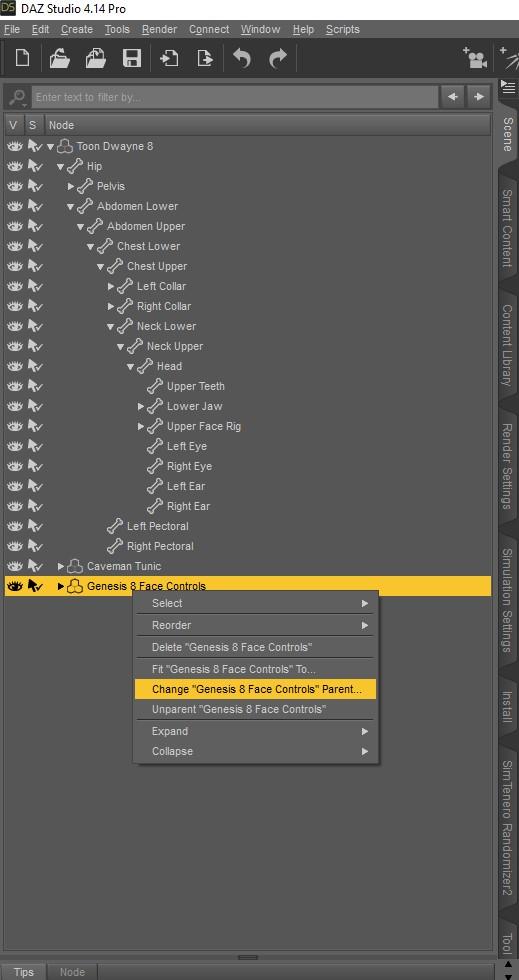
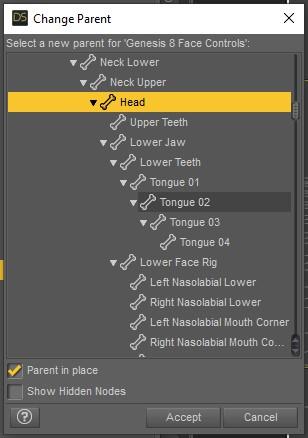
Right-click on the Face Control and Change Parent to your figure's head with Parent in Place selected.
With the Face Control still selected, go to Edit>Figure>Zero>Zero Figure Pose
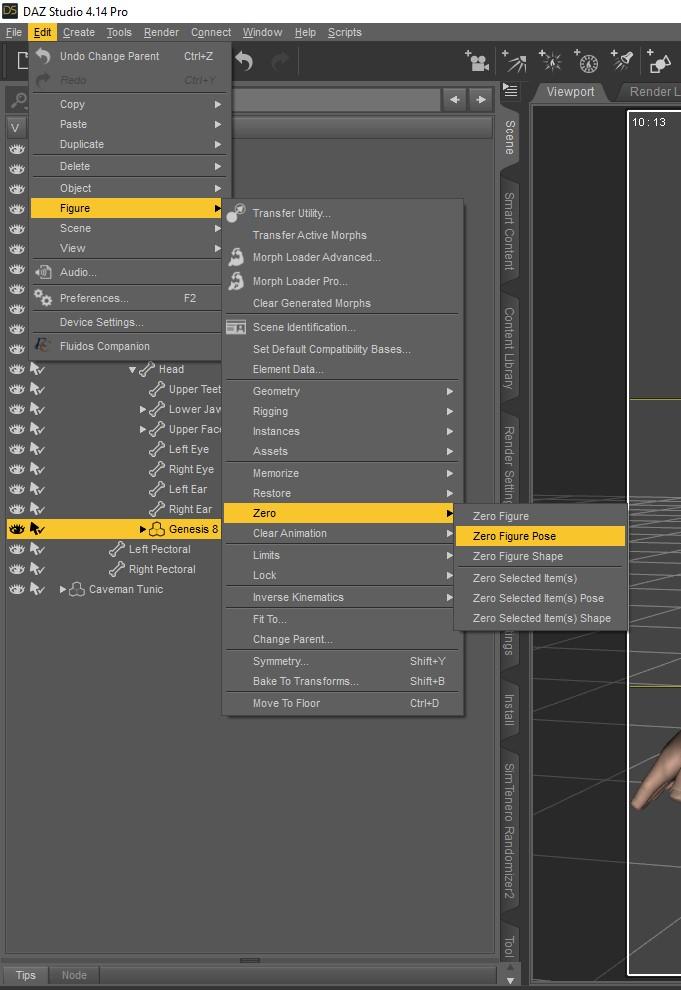
As you can see, the Face Control is in the right position, but we have a problem. It's buried inside the head.

To fix this, you need to pull the Face Control out of the head on the Z Translate until you can see the control in front of the head.
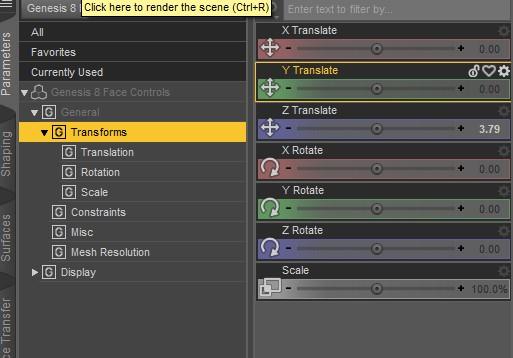
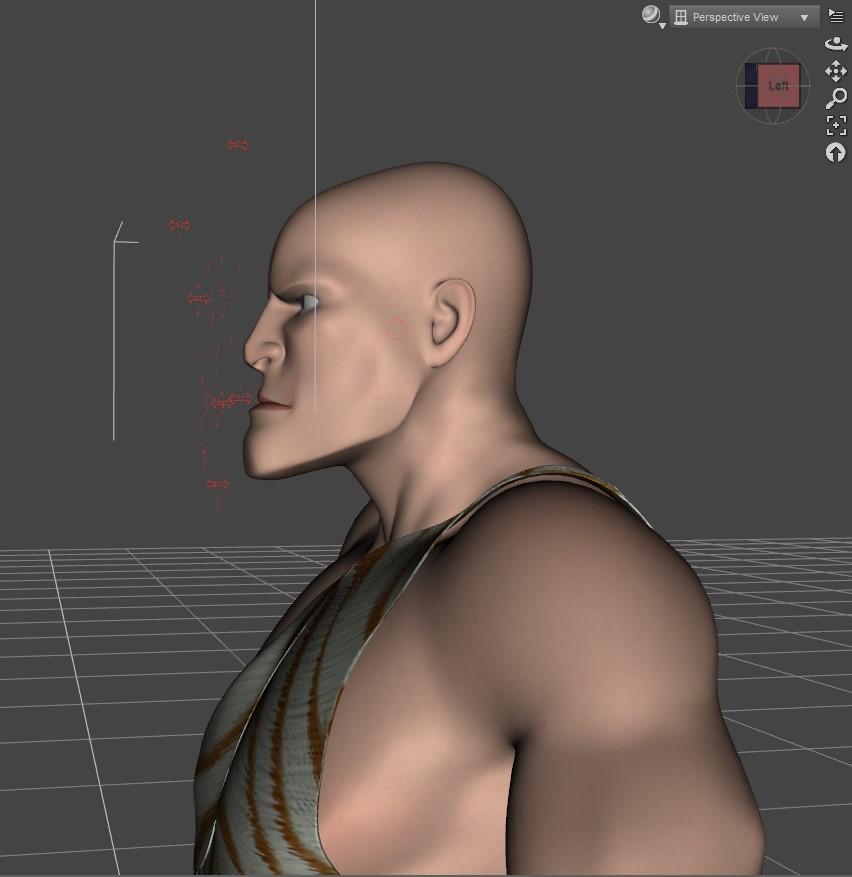
After that, you can control the facial movements as you would with any other characters.
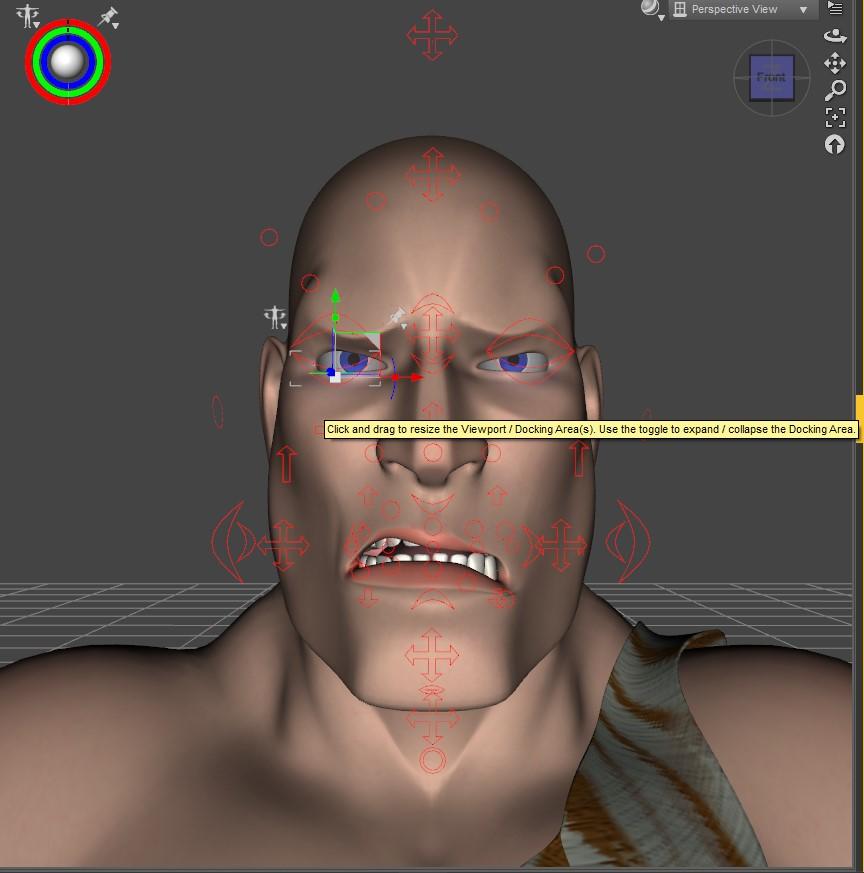
Here's a quick render showing the expression. It's my first render with Filament which I just started playing around with this evening.
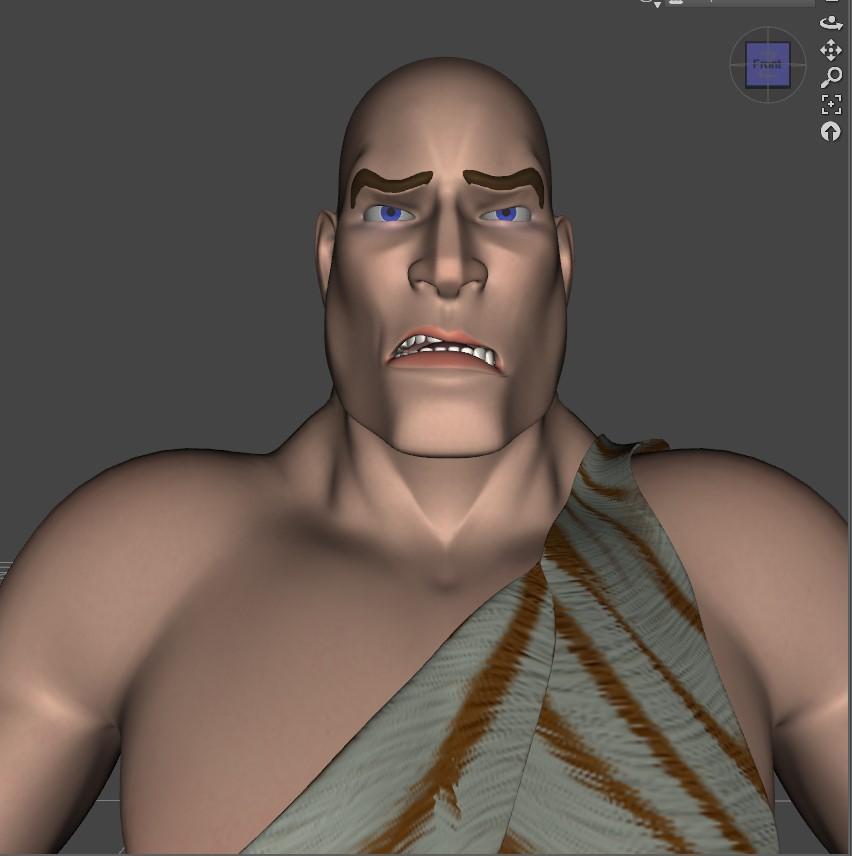
This is very helpful thank you! Ugh, I have so much catching up to do!
New DS Filament Render EngineOkay so I haven't been paying much attention to this thread, so maybe this has already been mentioned, but Filament hadles instanced geometry soooooooooooooooooo much better than old textured mode
as in I can actually navigate my viewport with a hundred instances visible where its a stuttering catastrophe in textured view.
I actually wish there were the ctrl-L equivalent because then I could use it to fully replace textured view.
Hmmm. Filament will not work well for me with UltraScenery, which contains thousands of instances. If I make too many instances visible in viewport, DS will crash to the desktop.
Weird. Ultrascenery is based on ultrascatter so maybe that might be handled differently - I have Ultra scatter so I could test that, but just manually adding a bunch of instances works way better in filament I placed about a hundred instances of this https://www.daz3d.com/simply-grass-the-rough-stuff and could wheel about with all visible in filament but not in textured mode
It's probably an order of magnitude thing. UltraScenery is very dense with instances.
it works with Ultrascatter pro, I have used it but you have to be careful how many instances
Spring Dynamics! AWESOME!I discovered that with jiggle (not using dFormers though), there needs to be enough frames to show the effect. I tried with a short loop of a dozen frames (24 FPS) and the dynamic movement was hardly noticeable, even with the settings on full strength. I guess that's obvious if you think about it but I can get a better effect if I pose the bones by hand.
I still use IRay because Filament is just not good enough for render quality so a dozen frames still takes quite a while to render. I would never attempt to render some of these aniblocks with hunreds of frames.
Daz Studio 4.14 Pro, General Release!Is anyone else experiencing an issue with 4.14 where after exiting Studio, a background process keeps running and needs to be killed via Task Manager?
It is a known issue, which is currently being investigated. That said, wait a few mins or so for it to closes gracefully.
I am afraid not. Hours after closing with the "X" button, DAZ 4.14 won't restart, the only way to close it is the task manager or restarting the computer. I wanted to try Filament too, but i can't find a single tab that allows me to actually launch a render with it aside for the preview. I tad confusing. Looks interesting, but confusing.
With your working window set to Filament, go to Render settings and set the Render Engine to Viewport. Note: Transparencies don't work. You'll also need to increase your exposure level. Actually, just watch this short video. It explains it pretty well:
 New DS Filament Render Engine
Okay so I haven't been paying much attention to this thread, so maybe this has already been mentioned, but Filament hadles instanced geometry soooooooooooooooooo much better than old textured mode
as in I can actually navigate my viewport with a hundred instances visible where its a stuttering catastrophe in textured view.
I actually wish there were the ctrl-L equivalent because then I could use it to fully replace textured view.
Hmmm. Filament will not work well for me with UltraScenery, which contains thousands of instances. If I make too many instances visible in viewport, DS will crash to the desktop.
Weird. Ultrascenery is based on ultrascatter so maybe that might be handled differently - I have Ultra scatter so I could test that, but just manually adding a bunch of instances works way better in filament I placed about a hundred instances of this https://www.daz3d.com/simply-grass-the-rough-stuff and could wheel about with all visible in filament but not in textured mode
It's probably an order of magnitude thing. UltraScenery is very dense with instances.
AoA Advanced Lights in 4.14Funny you ask that. I re-installed them today to see if they'd work in filament, they don't, but they worked fine in 3DL.
Probably to be expected. At the code level, the AoA lights are shaders, which are almost always specific to the render engine they're built for. 3Delight and Filament are different render engines; the shader code would need to be translated to work in Filament. And they don't show up properly in the Viewport because that uses yet another render engine, OpenGL.
New DS Filament Render EngineOkay so I haven't been paying much attention to this thread, so maybe this has already been mentioned, but Filament hadles instanced geometry soooooooooooooooooo much better than old textured mode
as in I can actually navigate my viewport with a hundred instances visible where its a stuttering catastrophe in textured view.
I actually wish there were the ctrl-L equivalent because then I could use it to fully replace textured view.
Hmmm. Filament will not work well for me with UltraScenery, which contains thousands of instances. If I make too many instances visible in viewport, DS will crash to the desktop.
Weird. Ultrascenery is based on ultrascatter so maybe that might be handled differently - I have Ultra scatter so I could test that, but just manually adding a bunch of instances works way better in filament I placed about a hundred instances of this https://www.daz3d.com/simply-grass-the-rough-stuff and could wheel about with all visible in filament but not in textured mode
New DS Filament Render EngineOkay so I haven't been paying much attention to this thread, so maybe this has already been mentioned, but Filament hadles instanced geometry soooooooooooooooooo much better than old textured mode
as in I can actually navigate my viewport with a hundred instances visible where its a stuttering catastrophe in textured view.
I actually wish there were the ctrl-L equivalent because then I could use it to fully replace textured view.
Hmmm. Filament will not work well for me with UltraScenery, which contains thousands of instances. If I make too many instances visible in viewport, DS will crash to the desktop.
Daz 3D is part of

Connect
DAZ Productions, Inc.
7533 S Center View Ct #4664
West Jordan, UT 84084Licensing Agreement | Terms of Service | Privacy Policy | EULA
© 2026 Daz Productions Inc. All Rights Reserved.