-
Looking for bird person, esp legs - solved
I want to make a bird person, the wings part is easy, what I'm looking for are taloned bird like legs
Krow's legs by Raw art is a good start https://www.daz3d.com/krow-for-genesis-81-male
The question there would be if I can use the legs alone on a genesis 8.1 male without the upper body and head?
Or maybe there are morph packs (preferrably genesis 3 to 8.1 male or female) that include that option?
thanks for the help in advance!
Premier Membership FAQ (Questions Only Please)I opened DIM today showing an order date of 23 Apr 2016 and found 4 files each for:
Premiere - dForce Manager for DAZ Studio 4.23+ (Win 64-bit) and Private Build +BETA and Public Build +BETA+ and Publishing Build +BETA+
Premiere - Geometry Sculpture for DAZ Studio 4.23+ (Win 64-bit) and Private Build +BETA and Public Build +BETA+ and Publishing Build +BETA+
Premiere - Pose Converter for DAZ Studio 4.23+ (Win 64-bit) and Private Build +BETA and Public Build +BETA+ and Publishing Build +BETA+
Premiere - Render Queue for DAZ Studio 4.23+ (Win 64-bit) and Private Build +BETA and Public Build +BETA+ and Publishing Build +BETA+
Premiere - Shape Transfer for DAZ Studio 4.23+ (Win 64-bit) and Private Build +BETA and Public Build +BETA+ and Publishing Build +BETA+
While I have updated to D|S 4.23.0.1 and 4.23.0.4 on my computers (except the MacBook Pro M1) I did not change my DAZ+ membership to Premiere. So why do I have these available downloads? My current DAZ+ membership is good till Sept 2025.
And for what is worth, I do own the plug-ins except Render Queue as I found I couldn't use it on my machines. I was planning to buy Mesh Grabber 4 though to update my current version.
So, what are these for and what is the impact on my versions of Daz Studio if I either install or do not install?
Mary
(I just realized that 'order date' was when I first joined Daz.)
Need to hook up a blink morphNeed to hook up a blink morph.
I created an Asian head morph and need to remember how to properly hook up a blink morph to get the new eye shape to look right. I created the blink morph in ZBrush and it's only ONE morph so I know there needs to be a way to split that morph for each eye as well as hook up the full on blink.
HELP?
Thank you
Richard
Question about Bend values in Parameters tabBecause you didn't create the body morph on a G9 Base with zeroed pose ~ You have to re-create the body morph based on the gesture on the 2nd screenshot.
- export the figure in ss2 to OBJ
- load a G9 Base, and import OBJ via MLP to create Head Morph and Body Morph by using G9 HeadSplit DFormer
- Adjust rigging to shape and ERC Freezehttps://youtu.be/nEFI6keXU2c?si=h83g84fKFxvqhXak
Anime Toons and Filatoon Shader Q&Adan_thomas said:
Filatoon looks promising. But how can I move character's floating eyes? It seems floating eyes always focus camera or perspective view. I am not sure if it is optical illusion as someone suggested because renders showed her eyes looking back at the view. If I can't move her eyes, this is a deal breaker for making visual stories with Filatoon.
First post :)
Q: The eyes create an optical illusion of always looking at the viewer
A: If you load a Toon figure and zero out the anime morph to get the default Genesis and that happens, you can use Toon Iris Depth Left and Right to fix it :)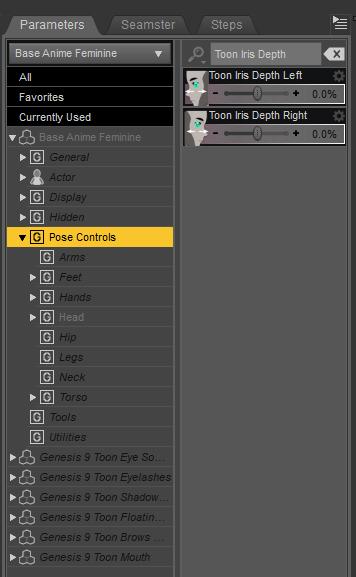 Genesis 9 Eyes Pivot Point Issue
crosswind said:
Your screenshots tell that two issue might need to be fixed: eyes rigging as well as the corrective morphs on your G9's head when dialing eyes expression properties.
Does your character have a single head morph ?
She does have a single, full body morph.
Where can you find an artisan who can create a unique character to order ?my hunch is anyone who would take up this offer would not do a great job, so check the quality of their portfolio first...
If you just want something passable, you could look at ChatAvatar for the face morph: https://hyperhuman.deemos.com/chatavatar
Premier Membership FAQ (Questions Only Please)automaticcolors said:
I have a question about Pose Converter and Shape Transfer.
1. I sign up DAZ Premier Membership.
2. I convert pose.
3. I transfer shape.
4. I stop DAZ Premier Membership.
After stopping DAZ Premier Membership, can I use converted pose or transfered shapw?The end results are not tied to the subscription, so you can use the transferred shapes or poses even if the membership lapses. Geometry Sculptor can leave a modifier in place, and if so that modifier does depend on ana ctive subscription (but if you bake the results to a morph that wouldn't be the case); similarly a stored render queue (if they can be stored) would work only while the subscription lasted, but any rendersalready done with it would not and you could still render the scenes normally or using another queue script or plug-in.
How to convert a custom genesis 8 morph to genesis 9I've seen a lot of discussions about converting an original Genesis morph using tools like RSSY Character Converter and ManFriday's converter tool (which is no longer available). Unfortunately, I've only seen ManFriday's converter for Genesis 9 used in a tutorial to convert a Genesis 8 custom-made morph. As for the RSSY converter, all the tutorials show original morphs, which makes me concerned that RSSY won't work with custom morphs. If that's not the case, please let me know.
Celebrity Look-a-Likes for 3D figures Part 4Finally - Kirsten Dunst agd kristy 9 character morph for g9
HH Scarlett for G9 [Commercial]Herschel Hoffmeyer said:
Jakamoto said:
Hi HH,
first of all I have to say that you did an amazing work on Scarletts legs, they are adorable.
Thanks!
I have two questions about her that may be related to wrong usage, or I simply didn't find the correct option:
- The product page talks about "HH Scarlett Genitals HD Apply/Remove", but I don't dind the options in the morphs. Is it listed somewhere else?There was originally an HD morph, that was sculpted all the way to SubD4 for a gentials HD morph, instead of adding on the geoshell default one from G9 essentials. I think it looked 10 times better than the geshell since you are not constricted to the geoshell borders. However when it went through testing I was informed that Daz doesn't allow this and had to be restricted to their geoshell if it is implemented. The Daz store page was suppose to be updated with this change but I guess it never was.
- Doesn't matter which of the Scarlett skin material I use, there're always many veins visible as in the vampire skin. Is there a way to hide kind of a layer?
She has veins baked into her textures. Only way to completely hide them would be to remove them from the textures.
And finally I have one question about a promo picture:
Which chair did you use in this picture?I used this but with my own custom made mats.
Many thanks for your answers! I really didn't recognize the chair with the different texture
 Premier Membership FAQ (Questions Only Please)
I have a question about Pose Converter and Shape Transfer.
1. I sign up DAZ Premier Membership.
2. I convert pose.
3. I transfer shape.
4. I stop DAZ Premier Membership.
After stopping DAZ Premier Membership, can I use converted pose or transfered shapw?Doberman Strand Fur for Dog Nubis *Refuses* to fit the dog.Well, i managed to get it to work by just saving the pose, and deleting the dog, and loading in the *Doberman* character, (not base nubis) ... seems it just won't attach to base nubis, but attaches to the doberman just fine (which was the case on the one time i got it to work, i just didn't notice it)... it's odd, because doberman isn't a standalone character, it's a morph >.<
Genesis 9 Eyes Pivot Point IssueYour screenshots tell that two issue might need to be fixed: eyes rigging as well as the corrective morphs on your G9's head when dialing eyes expression properties.
Does your character have a single head morph ?
Anyone else having trouble with the new Pug?WindTrancer said:
I too am having trouble with the pug. Not only are the eyes wonky, but no respectable pug would have a straight tale. The default pose for this dog should have the correct standard curly pug tail. I see no reason why the purchaser should spend time correcting the errors--Alessandro_AM should be the one to make the corrections since the pug morph is his creation.
@WindTrancer, I've submitted a ticket, but I'd urge you to submit one, too, for the eye issues.
Installing, activating, and accessing Daz Studio Premier featurescrosswind said:
melanie said:
crosswind said:
melanie said:
crosswind said:
melanie said:
I am also not seeing Pose Converter and Shape Transfer in my Edit-Figure menu. No matter what I do, they don't show up.
So, your Premier subscription has been verified and activated online, then you still couldn't see them from the menus ? Can you see Premier logo on DS splash screen when it's launched ?
Can you find the plugins are enabled in About Installed Plugins... dialogue, with green plugs ? (screenshot 1)
And press F3 in DS, can you see the plugins in the action list ? (screenshot 2)
F3 only brings up a volume control in mine. I don't get anything about custominzing. Is there another way to get that screen?
Yes, I do have Premier in my splash page and I got the other plugins. The only two that don't show up are the Pose Converter and Shape Transfer. I saw that some other people were having the same issue. When I installed them, I never got the prompt to restart DAZ Studio. I tried the D3 key, but that did nothing but bring up a volume control for my computer, not the Customize screen. I had even tried uninstalling the Pose and Shape plugins and reinstalling them, but nothing worked. All the other plugins seem to be where they're supposed to be. Is there another way to get the Customize screen besides F3?
from DS menu : Window > Workspace > Customize ...
Okay, I found those lists and I see both of the missing plugins shoiwing in it. But they don't show in the Edit-Figure menu.
That's a good news. Then just as usual when you customize your DS menu items, simply drag them to the menu items under Figure (screenshot 1)
Then save the Layout via Window > Workspace > Save Layout As...
Okay, I found the lists, but when I try to drag ithe items it hey won't dragover to the other column. Do I need to click something else first? I've never customized these lists before. I've been using DAZ Studio for over 20 years and I've never had a reason to do this until now. What am I doing wrong? This is a learning experience. LOL
Properly saving CBS morphs for Genesis 9 character modelCheck this screenshot to understand how to drag a character morph to 2nd Stage controller in Property Hierarchy.
https://www.daz3d.com/forums/discussion/comment/8915156/#Comment_8915156
Problem of Fitting Genesis 9 Clothes to Genesis 8.1...You don't have to have experience of creating garments in this case but you better learn how to fix the corrective morphs on the jackets if you do need to fix them... (as they're dForce ready... actually you don't have to fix them but just go for Simulation with Start Bones from Memorized Pose or tinmeline...)
Here's a tutorial I recorded one year ago to show a workflow of bringing corrective morphs from G9's garment to the auto-fitted garment on G8 (by using ERC Freezed G9 Clone on G8). https://youtu.be/kh2iaN1WyyY?si=rrM8kwTyfyo1bpiN
With this way, you don't need to physically fix anything but just adopt the corrective morph from G9's garment to G8's converted garment, by importing / exporting OBJ files, as well as using Attenuate By function to fix the corrective morpsh on both arms (and all the symmetrical joints...)
But first of all, you need to ERC Freeze G9 Clone on G8M / G8F, and this is a once and for all step from which you'll benefit lot of things from the ERC Freezed clones. Follow this tutorial to do it: https://www.daz3d.com/forums/discussion/comment/8818461/#Comment_8818461 This screenshot tutorial shows how to ERC Freeze G8F clone on G9, but for your case, you just go for ERC Freezing G9 clone on G8M / G8F.
Then go for watching the above video tutorial to give it a try....
For the jacket in your first screenshot, it took 2 minutes for me to fix the pJCMs on both arms of the jacket by using the existinbg corrective morphs from its G9's version.
Edit: If you know some modeling / sculpting software like Blender, you also can directly go for fixing the corrective morphs in Blender with Symmetry turned on... also pretty quick. It's up to your choice ~~
Problem of Fitting Genesis 9 Clothes to Genesis 8.1...The rigging part is essentially just Transfer Utility, which works by proximity of the item being rigged to the source of the rigging (which may be a special template rather than the base figure). When clothing is loose that may lead to unexpected or unhelpful results, for this kind of thing you are always going to have to do soem editing with the Node Weightmap Brush tool and/or add JCMs (morphs that are controlled by the bone bends rathr than being directly set by the user - Joint Controlled Morphs
Properly saving CBS morphs for Genesis 9 character modelYou need to multiply them by the value of your morph - most easily by, with the Parameters pane in Edit mode, dragging the mirph slider into the Second Stage controllers for your morph in the Property hiearchy pane or - if you haven't yet done the ERC Freezing - by selecting your morph in the Atenuate section of the ERC Freeze dialogue. Make sure the links are set to save with your morphs, not the end that is driving them (in the link's attrintes in the Property Hiearchy).
Daz 3D is part of

Connect
DAZ Productions, Inc.
7533 S Center View Ct #4664
West Jordan, UT 84084Licensing Agreement | Terms of Service | Privacy Policy | EULA
© 2026 Daz Productions Inc. All Rights Reserved.