-
HeadShop OneClick Submitted to DAZ - Best in Class! (Commercial)
asian_treasure said:
i have tried the following:
I would try two things:
1. Pls. reset the Preferences to default as shown in the picture
2. If that does not work, create a folder on C;Users/My Documents/My DAZ 3D Library/Runtime/People
and copy Gen 3 or some other in that folder. Launch Studio by double clicking on Gen 3 Female DSON file.
and still get Headshop Directory "fs" could not be created because the selected figure does not have a valid runtime folder."
Headshop13 works with Genesis 3,but not Genesis 8. Help!
P.s. I did add a runtime with genesis 8 male and genesis 8 female, still no success.
HeadShop OneClick Submitted to DAZ - Best in Class! (Commercial)i have tried the following:
I would try two things:
1. Pls. reset the Preferences to default as shown in the picture
2. If that does not work, create a folder on C;Users/My Documents/My DAZ 3D Library/Runtime/People
and copy Gen 3 or some other in that folder. Launch Studio by double clicking on Gen 3 Female DSON file.
and still get Headshop Directory "fs" could not be created because the selected figure does not have a valid runtime folder."
Headshop13 works with Genesis 3,but not Genesis 8. Help!
DELETEMark_e593e0a5 said:
No, some products don't. But usually, they are stand-alone products that install as seperate programs on your computer, e.g. like Headshop. If the product contains 3D contents, it should appear in DIM.
Note that Headshop shows up in Daz Install Manager even though it won't properly install that way.
DELETENo, some products don't. But usually, they are stand-alone products that install as seperate programs on your computer, e.g. like Headshop. If the product contains 3D contents, it should appear in DIM.
"There's Always Another Sale™" Sales thread: Report Issues HereThis is one example with no DIM downloads. https://www.daz3d.com/headshop-13-with-lovechild-macintosh. The product has a macOS installer and requires manual download from the product page.
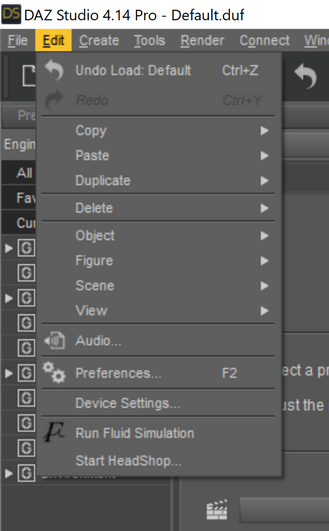
HeadShop 13 Genesis 8I think you click on "Start Headshop" which should be at the bottom of the Edit menu.
 Headshop 11 Questions
I am trying to do a Donna D'errico face on a default G8F figure but without much luck so far, can anyone experienced with Faceshop (I guess any edition as I'm sure the process is the same in all) tell me what I am doing wrong here? you can see in the final image it does not look like her facially much at all (lol). I'm not expecting anything perfect but at least to resemble her at all would be nice at this point.
From left to right in the pics are the stages of how I selected the options so pls someone familiar with the process point out what I'm doing wrong.
did you press the export button at the end of headshop session? it seems like it created a new face object on your scene. usually at the end of headshop sesssion, press export and it will merge with your genesis figure gensis 3 or 8 only
Headshop 11 QuestionsSo, what is the objet test donnnnn?
see the eyeball next to that object? Try clicking that eyeball (to make that object invisible)... is the figure beneath it JUST a Genesis 8 Female character?
It has been so long since I used Head Shop - and the version I used wasn't for G8F. But, what you need to do is take a G8F character, apply the Headshop Morph you created to THAT character, and then apply the skin created by Headshop to that character. There wasn't an object. that was attached to the figure.Still can't delete a keyframe in timeline in 4.14 >_< Daz's animation tool rantPeople get directed to various places to get answers about DAZ things. For instance, if I asked about new features in some version of DAZ I'd get directed to a forum post about the latest version of the software; if I asked about a Filament product I'd get directed to a PDF file, and if I asked about animation or HeadShop I'd get directed to a YouTube video. Whether it's an irrational thought or not, I'm starting to think if you ask how to do something, people get downright offended that you didn't know exactly where to look for the answer. It would go very far if DAZ had a consistent place that they put information about how to do things. Or at the very least, it would be nice if the description of everything would tell you whether you're supposed to be hunting for a forum post, a PDF file, or a YouTube video.
AIUTO...CHI CONOSCE L’ITALIANO? PARTE DODICIcioeSalve spero qualcuno possa aiutarmi ...ho installato headshop 11 per mac, tutto ok...ma volevo sapere come si fa ad uniformare i colori del viso col resto del corpo. voglio dire il risultato non è così esaltante...vorrei eliminare l effetto mascheraCredo che quella sia la texture presa drettamente dalla foto, devi usare una skin del character che stai usando
cioè devo mantenere la skin originale del character mi stai dicendo? per esempio se uso genesi 3 female dovrei mantenere quella skin?Io usavo una versione ottaugenario dello stesso, e con l'unico character che creai all'epoca, usai una skin di base. In pratica creai un character con un morph per V4, da una foto di mia moglie, però la foto naturalmente non combaciava con l resto della texture, e usai una skin per V4. Non l'avessi mai fatto, mia moglie inizio a provarsi tutti i vestiti di V4 che avevo, trane naturalmente quelli troppo eccessivi.
E magari ti ha chiesto di comprarle nel mondo reale uno dei modelli DAZ per andare al cinema!
 Mi immaguiono già a entrare in una boutique e domandare "Vorrei Blinded by the Light per V4, insieme agli UniMesh Fit per mia moglie. Ah, e non dimentichi la Interactive License, non si sa mai..."
Parlando di "casa nostra", assolutamente impensabile fare acquisti i questi giorni... Perderò anche queste offerte.
 Ci sono un paio di nuove uscite per Filament e alcuni plugin che meritano, peccato!AIUTO...CHI CONOSCE L’ITALIANO? PARTE DODICIcioeSalve spero qualcuno possa aiutarmi ...ho installato headshop 11 per mac, tutto ok...ma volevo sapere come si fa ad uniformare i colori del viso col resto del corpo. voglio dire il risultato non è così esaltante...vorrei eliminare l effetto maschera
Credo che quella sia la texture presa drettamente dalla foto, devi usare una skin del character che stai usando
cioè devo mantenere la skin originale del character mi stai dicendo? per esempio se uso genesi 3 female dovrei mantenere quella skin?Io usavo una versione ottaugenario dello stesso, e con l'unico character che creai all'epoca, usai una skin di base. In pratica creai un character con un morph per V4, da una foto di mia moglie, però la foto naturalmente non combaciava con l resto della texture, e usai una skin per V4. Non l'avessi mai fatto, mia moglie inizio a provarsi tutti i vestiti di V4 che avevo, trane naturalmente quelli troppo eccessivi.
AIUTO...CHI CONOSCE L’ITALIANO? PARTE DODICISalve spero qualcuno possa aiutarmi ...ho installato headshop 11 per mac, tutto ok...ma volevo sapere come si fa ad uniformare i colori del viso col resto del corpo. voglio dire il risultato non è così esaltante...vorrei eliminare l effetto mascheraIl risultato finale dovrebbe darti anche un texture per corpo e arti con un tono identico alla base del volto, estratto e applicato in automatico.
Io ne ho una versione precedente, non so se hanno cambiato qualcosa.
Purtroppo è anche un software rotto... Per cui non so se dipenda da altro... Prova a usare una base "fresca" e ripetere l'operazione.
AIUTO...CHI CONOSCE L’ITALIANO? PARTE DODICIcioe
cioè devo mantenere la skin originale del character mi stai dicendo? per esempio se uso genesi 3 female dovrei mantenere quella skin?Salve spero qualcuno possa aiutarmi ...ho installato headshop 11 per mac, tutto ok...ma volevo sapere come si fa ad uniformare i colori del viso col resto del corpo. voglio dire il risultato non è così esaltante...vorrei eliminare l effetto mascheraCredo che quella sia la texture presa drettamente dalla foto, devi usare una skin del character che stai usando
AIUTO...CHI CONOSCE L’ITALIANO? PARTE DODICISalve spero qualcuno possa aiutarmi ...ho installato headshop 11 per mac, tutto ok...ma volevo sapere come si fa ad uniformare i colori del viso col resto del corpo. voglio dire il risultato non è così esaltante...vorrei eliminare l effetto mascheraCredo che quella sia la texture presa drettamente dalla foto, devi usare una skin del character che stai usando
AIUTO...CHI CONOSCE L’ITALIANO? PARTE DODICISalve spero qualcuno possa aiutarmi ...ho installato headshop 11 per mac, tutto ok...ma volevo sapere come si fa ad uniformare i colori del viso col resto del corpo. voglio dire il risultato non è così esaltante...vorrei eliminare l effetto mascheraHead Shop 11Hello,
I could fix it and want to post the solution in case others encounter the same problem.
I uses Windows 10 Pro N with a manually installed media feature pack. This pack was automatically unistalled with the major windows update. The missing files caused the problems in headshop, so a reinstall of the media feature pack fixed the problem.
The tech support seems to be very helpful by the way.
Head Shop 11Here is the full error:
************** Ausnahmetext **************
System.TypeInitializationException: Der Typeninitialisierer für "Emgu.CV.CvInvoke" hat eine Ausnahme verursacht. ---> System.DllNotFoundException: Die DLL "cvextern": Das angegebene Modul wurde nicht gefunden. (Ausnahme von HRESULT: 0x8007007E) kann nicht geladen werden.
bei Emgu.CV.CvInvoke.RedirectError(CvErrorCallback errorHandler, IntPtr userdata, IntPtr prevUserdata)
bei Emgu.CV.CvInvoke..cctor()
--- Ende der internen Ausnahmestapelüberwachung ---
bei Emgu.CV.CvInvoke.Imread(String filename, ImreadModes loadType)
bei RH.MeshUtils.Data.RenderMesh.DetectFaceRotationEmgu(String filePath, Image templateImage, List`1 imagePointsInVector, List`1 realPoints) in D:\Develop\Freelance\Laslo\LLC\RH.MeshUtils\Data\RenderMesh.cs:Zeile 470.
bei RH.Core.Render.ctrlRenderControl.PhotoLoaded() in D:\Develop\Freelance\Laslo\LLC\RH.Core\Render\ctrlRenderControl.cs:Zeile 359.
bei RH.Core.frmMain.UpdateProjectControls(Boolean newProject, RectangleAABB aabb) in D:\Develop\Freelance\Laslo\LLC\RH.Core\frmMain.cs:Zeile 2480.
bei RH.Core.Controls.frmNewProject4PrintAhead.CreateProject() in D:\Develop\Freelance\Laslo\LLC\RH.Core\Controls\frmNewProject4PrintAhead.cs:Zeile 581.
bei RH.Core.frmMain.frmMain_Load(Object sender, EventArgs e) in D:\Develop\Freelance\Laslo\LLC\RH.Core\frmMain.cs:Zeile 339.
bei System.Windows.Forms.Form.OnLoad(EventArgs e)
bei System.Windows.Forms.Form.OnCreateControl()
bei System.Windows.Forms.Control.CreateControl(Boolean fIgnoreVisible)
bei System.Windows.Forms.Control.CreateControl()
bei System.Windows.Forms.Control.WmShowWindow(Message& m)
bei System.Windows.Forms.Control.WndProc(Message& m)
bei System.Windows.Forms.ScrollableControl.WndProc(Message& m)
bei System.Windows.Forms.ContainerControl.WndProc(Message& m)
bei System.Windows.Forms.Form.WmShowWindow(Message& m)
bei System.Windows.Forms.Form.WndProc(Message& m)
bei System.Windows.Forms.Control.ControlNativeWindow.OnMessage(Message& m)
bei System.Windows.Forms.Control.ControlNativeWindow.WndProc(Message& m)
bei System.Windows.Forms.NativeWindow.Callback(IntPtr hWnd, Int32 msg, IntPtr wparam, IntPtr lparam)
************** Geladene Assemblys **************
mscorlib
Assembly-Version: 4.0.0.0.
Win32-Version: 4.8.4250.0 built by: NET48REL1LAST_C.
CodeBase: file:///C:/Windows/Microsoft.NET/Framework/v4.0.30319/mscorlib.dll.
----------------------------------------
Rh.HeadShop
Assembly-Version: 1.0.0.0.
Win32-Version: 1.0.0.0.
CodeBase: file:///F:/Daz/DAZ%203D/HeadShop%20plugin/Rh.HeadShop.exe.
----------------------------------------
System.Windows.Forms
Assembly-Version: 4.0.0.0.
Win32-Version: 4.8.4270.0 built by: NET48REL1LAST_C.
CodeBase: file:///C:/WINDOWS/Microsoft.Net/assembly/GAC_MSIL/System.Windows.Forms/v4.0_4.0.0.0__b77a5c561934e089/System.Windows.Forms.dll.
----------------------------------------
RH.Core
Assembly-Version: 1.0.0.0.
Win32-Version: 1.0.0.0.
CodeBase: file:///F:/Daz/DAZ%203D/HeadShop%20plugin/RH.Core.DLL.
----------------------------------------
System
Assembly-Version: 4.0.0.0.
Win32-Version: 4.8.4200.0 built by: NET48REL1LAST_C.
CodeBase: file:///C:/WINDOWS/Microsoft.Net/assembly/GAC_MSIL/System/v4.0_4.0.0.0__b77a5c561934e089/System.dll.
----------------------------------------
System.Drawing
Assembly-Version: 4.0.0.0.
Win32-Version: 4.8.4084.0 built by: NET48REL1.
CodeBase: file:///C:/WINDOWS/Microsoft.Net/assembly/GAC_MSIL/System.Drawing/v4.0_4.0.0.0__b03f5f7f11d50a3a/System.Drawing.dll.
----------------------------------------
System.Configuration
Assembly-Version: 4.0.0.0.
Win32-Version: 4.8.4190.0 built by: NET48REL1LAST_B.
CodeBase: file:///C:/WINDOWS/Microsoft.Net/assembly/GAC_MSIL/System.Configuration/v4.0_4.0.0.0__b03f5f7f11d50a3a/System.Configuration.dll.
----------------------------------------
System.Xml
Assembly-Version: 4.0.0.0.
Win32-Version: 4.8.4084.0 built by: NET48REL1.
CodeBase: file:///C:/WINDOWS/Microsoft.Net/assembly/GAC_MSIL/System.Xml/v4.0_4.0.0.0__b77a5c561934e089/System.Xml.dll.
----------------------------------------
Accessibility
Assembly-Version: 4.0.0.0.
Win32-Version: 4.8.4084.0 built by: NET48REL1.
CodeBase: file:///C:/WINDOWS/Microsoft.Net/assembly/GAC_MSIL/Accessibility/v4.0_4.0.0.0__b03f5f7f11d50a3a/Accessibility.dll.
----------------------------------------
FaceSDK.NET
Assembly-Version: 6.2.0.0.
Win32-Version: 6, 2, 0, 0.
CodeBase: file:///F:/Daz/DAZ%203D/HeadShop%20plugin/FaceSDK.NET.DLL.
----------------------------------------
msvcm90
Assembly-Version: 9.0.30729.9625.
Win32-Version: 9.00.30729.9625.
CodeBase: file:///C:/WINDOWS/WinSxS/x86_microsoft.vc90.crt_1fc8b3b9a1e18e3b_9.0.30729.9625_none_508ef7e4bcbbe589/msvcm90.dll.
----------------------------------------
System.Core
Assembly-Version: 4.0.0.0.
Win32-Version: 4.8.4270.0 built by: NET48REL1LAST_C.
CodeBase: file:///C:/WINDOWS/Microsoft.Net/assembly/GAC_MSIL/System.Core/v4.0_4.0.0.0__b77a5c561934e089/System.Core.dll.
----------------------------------------
OpenTK
Assembly-Version: 1.1.0.0.
Win32-Version: 1.1.1536.5788.
CodeBase: file:///F:/Daz/DAZ%203D/HeadShop%20plugin/OpenTK.DLL.
----------------------------------------
RH.MeshUtils
Assembly-Version: 1.0.0.0.
Win32-Version: 1.0.0.0.
CodeBase: file:///F:/Daz/DAZ%203D/HeadShop%20plugin/RH.MeshUtils.DLL.
----------------------------------------
RH.AssimpNet
Assembly-Version: 3.2.0.0.
Win32-Version: 3.2.
CodeBase: file:///F:/Daz/DAZ%203D/HeadShop%20plugin/RH.AssimpNet.DLL.
----------------------------------------
OpenTK.GLControl
Assembly-Version: 1.1.0.0.
Win32-Version: 1.1.1536.5788.
CodeBase: file:///F:/Daz/DAZ%203D/HeadShop%20plugin/OpenTK.GLControl.DLL.
----------------------------------------
PresentationCore
Assembly-Version: 4.0.0.0.
Win32-Version: 4.8.4270.0 built by: NET48REL1LAST_C.
CodeBase: file:///C:/WINDOWS/Microsoft.Net/assembly/GAC_32/PresentationCore/v4.0_4.0.0.0__31bf3856ad364e35/PresentationCore.dll.
----------------------------------------
WindowsBase
Assembly-Version: 4.0.0.0.
Win32-Version: 4.8.4270.0 built by: NET48REL1LAST_C.
CodeBase: file:///C:/WINDOWS/Microsoft.Net/assembly/GAC_MSIL/WindowsBase/v4.0_4.0.0.0__31bf3856ad364e35/WindowsBase.dll.
----------------------------------------
mscorlib.resources
Assembly-Version: 4.0.0.0.
Win32-Version: 4.8.4084.0 built by: NET48REL1.
CodeBase: file:///C:/WINDOWS/Microsoft.Net/assembly/GAC_MSIL/mscorlib.resources/v4.0_4.0.0.0_de_b77a5c561934e089/mscorlib.resources.dll.
----------------------------------------
System.Windows.Forms.resources
Assembly-Version: 4.0.0.0.
Win32-Version: 4.8.4084.0 built by: NET48REL1.
CodeBase: file:///C:/WINDOWS/Microsoft.Net/assembly/GAC_MSIL/System.Windows.Forms.resources/v4.0_4.0.0.0_de_b77a5c561934e089/System.Windows.Forms.resources.dll.
----------------------------------------
Emgu.CV.World
Assembly-Version: 3.3.0.2824.
Win32-Version: 3.3.0.2824.
CodeBase: file:///F:/Daz/DAZ%203D/HeadShop%20plugin/Emgu.CV.World.DLL.
----------------------------------------************** JIT-Debuggen **************
Um das JIT-Debuggen (Just-In-Time) zu aktivieren, muss in der
Konfigurationsdatei der Anwendung oder des Computers
(machine.config) der jitDebugging-Wert im Abschnitt system.windows.forms festgelegt werden.
Die Anwendung muss mit aktiviertem Debuggen kompiliert werden.Zum Beispiel:
<configuration>
<system.windows.forms jitDebugging="true" />
</configuration>Wenn das JIT-Debuggen aktiviert ist, werden alle nicht behandelten
Ausnahmen an den JIT-Debugger gesendet, der auf dem
Computer registriert ist, und nicht in diesem Dialogfeld behandelt.Head Shop 11Hey everyone,
after a recent major Update of Windows 10 Headshop does not run proper on my mashine anymore. Does anyone have similar issues?
- It starts completly normal.
- Then I select an image, which is correctly detected
- When I hit apply, an error occurs. Its german, so I try to translate "The type initialiser for "Emgu.CV.CvInvoke" has caused an exeption."
- I can hit "continue" or "exit". Exit closes headshop. When I click "Continue", it kind of works, but there are lots of unintended behaviour, which makes it useless.
I tried it with genesis 2 and genesis 8 figures and of course I reinstalled headshop. The error remains the same. Does anyone have an idea why this happens?
HeadShop 13 Genesis 8NylonGirl, I wish to help you to get better use out of HeadShop. Let's do a skype call and I can show you a few tricks. PM me pls.
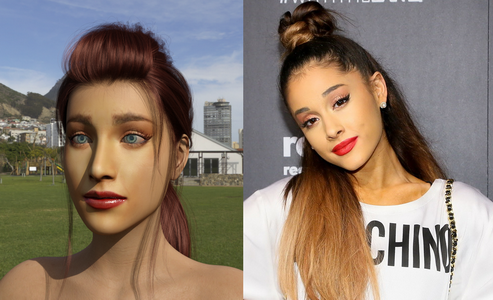
HeadShop 13 Genesis 8I think this picture of Ariana came out better. Maybe after another five months or so, I'll know how everything works.
Daz 3D is part of

Connect
DAZ Productions, Inc.
7533 S Center View Ct #4664
West Jordan, UT 84084Licensing Agreement | Terms of Service | Privacy Policy | EULA
© 2026 Daz Productions Inc. All Rights Reserved.










