-
[Released] Character Converter from Genesis 3 Female to Genesis 8 Female(Now Conv JCMs) [Commercial]
Message to RiverSoftArt
For some reason I am unable to access my messages, I'm also unable to create a new message?!? Will file a support issie with Daz when this comment is sent.
The answer to the question "Did you convert things twice without deleting morphs? " is that I deleted all morphs in the data folder manually before I comverted the character agan.
The /data/ morph directory chreated when converting Victoria 7 was "DAZ 3D,Heysun Oh,Yannek", converting Victoria 7 HD created the /data/ folder "DAZ 3D,Heysun Oh".
Looking into the original Victoria 7 files, the "pJCMVictoria7ShoulderBndFwd_110_L.dsf" file formulas look like this;
"formulas" : [
{
"output" : "Genesis3Female:#pJCMVictoria7ShoulderBndFwdR?value",
"operations" : [
{ "op" : "push", "url" : "lShldr:/data/DAZ%203D/Genesis%203/Female/Genesis3Female.dsf#lShldr?rotation/y" },
{ "op" : "push", "val" : [ -110, 1, 0, 0, 0 ] },
{ "op" : "push", "val" : [ -85.5, 0, 0, 0, 0 ] },
{ "op" : "push", "val" : 2 },
{ "op" : "spline_tcb" }
]
},
{
"output" : "Genesis3Female:#pJCMVictoria7ShoulderBndFwdR?value",
"stage" : "mult",
"operations" : [
{ "op" : "push", "url" : "Genesis3Female:/data/DAZ%203D/Genesis%203/Female/Morphs/DAZ%203D/Victoria%207/FBMVictoria7.dsf#FBMVictoria7_v1?value" }
]
}
],And the formulas in "pJCMVictoria7ShoulderBndFwd85_L.dsf" look like this:
"formulas" : [
{
"output" : "Genesis3Female:#pJCMVictoria7ShoulderBndFwd85L?value",
"operations" : [
{ "op" : "push", "url" : "lShldr:/data/DAZ%203D/Genesis%203/Female/Genesis3Female.dsf#lShldr?rotation/y" },
{ "op" : "push", "val" : -0.01176471 },
{ "op" : "mult" }
]
},
{
"output" : "Genesis3Female:#pJCMVictoria7ShoulderBndFwd85L?value",
"stage" : "mult",
"operations" : [
{ "op" : "push", "url" : "Genesis3Female:/data/DAZ%203D/Genesis%203/Female/Morphs/DAZ%203D/Victoria%207/FBMVictoria7.dsf#FBMVictoria7_v1?value" }
]
}
],As stated earlier I don't know enought about dsa files to know whar the formula does but it is the only difference in the original files so that may indicate the reason for the:
WARNING: ..\..\..\..\..\src\sdksource\fileinput\dzassetdaz.cpp(5978): Unsupported formula: /data/DAZ%203D/Genesis%208/Female/Morphs/DAZ%203D%2CHeysun%20Oh%2CYannek/Victoria%207/pJCM_RS_Victoria7ShoulderBndFwd_110_R.dsf"Cheerio for now.
What program do you use rig and weight paint outfit for DAZ model?After using transfer utility for my imported model, there are still some clipping issues for my pose, so I decided to manually edit the skin weight. However, I soon found out the weight painting tool in DAZ is pretty unhandy, and there are not many tutorials or tips about how to use the tool effectively.
Do you weight paint inside DAZ, or there are other wokflow that would make weight painting a little bit less frustrating?
Importing/using Blender character models in Daz StudioIf you want to use blender to create daz assets then the best you can do is to use obj to transfer the geometry and textures, then make the rig and materials inside daz studio. You also need a PA account to create hd maps and dforce hair.
There's also some success importing fbx rigs via poser, that is, blender > fbx > poser > cr2 > daz studio.
Muscle-Based Deformation take 2Link to facial movement: https://imgur.com/a/lIaNqeD
Everything is bone-baased so no blendshapes/morphtargets. The face has 150+ bones and can easily be controlled through the PowerPose tool. The movement is FACS based with added fine-control for each individual element.
The PowerPose was incredibly difficult to customize. I made another thread about it asking for help but eventually I got it working with no hick-ups. Very useful tool though clearly not meant for custom figures.
Features like eyebrows (and facial hair for the male version) will be added after I complete the figure and they will attach like a conforming garment. Everything is created with the intention of it being higly customizable afterwards, which is why a bone-driven facial system is imperative. Changing the face through a morph will also cause the facial previous expression-morphs to look wonky. But if it's bone-driven, using a face-morph + the "adjust rigging to shape" feature will transfer the facial control properly to a new character.
Welcome to Hatsune Miku Anime Manga Cafe ☕Not trying to push Genesis, mind you... I'm just excited to have my figures animating (with dynamic hair and great shapes) as well as they are.
I just built a new Ryzen computer that renders Carrara animations really well (Rosie 5 mid shot @ 16 seconds per frame), so I decided to start a whole new workflow. Feels good. Finally getting somewhere!
I love Genesis 1, using Genesis Generation X2!
I have The Girl 4, and she has all those wacky/awesome expressions - Aiko 4 does too, so I put those on this character too, along with all of the expressions I bought for V4 and Genesis 2 - and that's now added to all of them that I bought for Genesis 1 - so this girl (Stylized Superhero character of my wife!) is Very Emotive!
GenX2 also allowed me to give Genesis 1 the more detailed female shapes from Genesis 2 Female, since I got the Genesis 2 addon for it.
Now it doesn't matter, Male, Female... if there's a morph I need to use, I give it to my character.
In Carrara, when we save a Genesis figure as a Carrara file, we can no longer add morphs to that particular figure. We can cop all of the shape dial setting over to a fresh Genesis that has more morphs, but the one we save becomes locked. I use this to my advantage. I have a master copy of all of my Genesis morphs on my desktop, and I update that any time I buy new morphs. When I make a character, like Rosiie 5 here, I go into the data > DAZ3D > Genesis > Base > Morphs folder, and delete all of the morphs I don't want polluting her dials selection - like monsters, male stuff, whatever.
So this character only has dials that I want her to have. Yeah... there's a LOT of them, but they're just whatI want! :)
Meh I have to do something on Genesis is part of my bucketlist this year. Thanks for sharing that info Dartabeck and a happy new year !
You too! Wonderful thread! I have a LOT of reading to do in here! :)
I see you are a Carrara user, Im one too but I dont hang at the Carrara Forum parts. I'd like to see your anime character once feel free to place her here.
Importing/using Blender character models in Daz Studiothat is an understatement
as totally different meshes
the most you could do is fit and use the transfer utility on the clothes
maybe rig the original figures
and if you are really skilled in blender use the sculpting and shrinkwrap tools and modifiers to create a shape on the base G3 and 8 meshes for morphloader maybe bake and transfer textures
not imposssible I have done it using iClone CC figures and Zbrush Zprojection as well as Blender but was a hell of a lot of work, game meshes being low poly would be much messier
XTransfer Module 1- Genesis 3 to Genesis 8 Morph Converter (Commercial)Well, on the odd shot that more information can help: I've tried this with a few characters, both G3M originals and some GenX transfers. Haven't had any issues with any of them.
I don't know if this part matters: When Singular Blues had his first script out, it worked more or less on a directory basis -- once a favorite was identified, it would transfer everything in that directory. Since GenX just puts everything into the D3D Gen X directory, divided by character source, this caused a few issues. What I started doing, both to keep the transfer time reasonable and to more easily identify any issues that might come up, was going into the data directory and putting the character morphs into their own subdirectory inside the D3D Gen X/source directory. Given the issues people were reporting, it seemed reasonable to just keep to that workflow. Two characters I've done that are moderately extreme shape transfers were Citizen X (Genesis to G3 via GenX originally) and Smay's Boris (G2 to G3). Both of them came through without any issues.
The only thing it seems to be having any kind of issue with is deleting objects after the transfer is completed, which seems to take about five minutes per character. The actual transfer, depending on the character, takes 2-3 minutes.
Batch rendering (Render queue)I managed (luckily) to find the problem. I deinstalled. Now i need to open and resave all me scenes as it seems to have stored a morph. This is strange as i am 200% sure i did not use it.
Anyways in my first scene test resaving the scene seems to work. It also gives me a chance to fix the camera as it had the headlamp on and i dont use "real" lighting in the scene. Though im planning on adding a point light in the top center of the scene as its prety dark and to save some render time i rather light it up and if need darkenit a pit in postwork.
Thanks for all the advice.
The Mac FAQIf you were going to buy a new Mac Pro, what would be a good choice for what to load it up with, in order to get really fast rendering in DAZ Studio?
As much as it pains me to say this as somebody who much prefers MacOS to Windows or Linux, for the money you spend on a Mac Pro, you'd get much faster rendering with a Windows machine because AMD graphics cards don't speed Iray renders. However, if you want to stick with MacOS and don't want to build a hackintosh with uncertain Nvidia support (both of which would be true for me), then max the CPU—get as many cores as you can afford. At that price point, though, you might think about using another program to render, something that can use the AMD cards for GPU rendering. In my lotto-winning fantasy, I'd use V-Ray and Modo to render on my maxed out Mac Pro. You'll face a lot of initial work setting up shaders, but with PBR Iray materials, it shouldn't be too steep. You'll also get additional options that Iray in DS does't have. I'm pretty sure Arnold/Maya will give you AMD-based GPU rendering as well, and Cinema4D has plug-ins for both Arnold and V-Ray (as well as other render engines). Blender also offers an array of external renders as well as Cycles, which I think uses GPU acceleration.
Thanks for your info and opinions. You are sticking with the Mac OS, then? Regarding your comments about the other applicattions: V-Ray and Modo, Arnold/Maya will give you AMD-based GPU rendering as well, Cinema4D has plug-ins for both Arnold and V-Ray, Blender also offers an array of external renders as well as Cycles, which I think uses GPU acceleration.
What I'd like to know is (1) Can I go from DAZ Studio on a Mac, via a plug in, into any one of these applications? Or, (2) do any of these have direct imports for a DAZ Scene ready to be rendered and created on a Mac?
You can look into using Blender to render, it has 2 GPU based engines (cycles and EVEE or EEVE which is a near realtime render) i believe, there is an addon listed a few posts above done by mcasuals. If you currently have a mac try that our there are some nice free learning places for blender and some inexpensive ones out there (udemy etc). Test out the mcasuals transfer utility to see if you like it. (non lottery win scenerio) I am moving to this myself.
Wow...Black WidowI did things the manual way in photoshop. I wanted to see what the body would look like on a preexisting character. It required me to edit the torso skin (have it set to darker blend mode over top your skin worked for me) and copy / paste the surfaces to the existing character then add in the proper torso / face, but I'm really happy with how it turned out! Just a simple render for testing.
She's gorgeous! I love that skin texture with the spider body.
This is a very special lady and I love her!! Holy wow there are all kinds of things I can get up to easily because of how her body and materials work.
For this I used a geoshell and repurposed the torso metallicity map as a cutout opacity mask. I'm gonna make so many spiders.
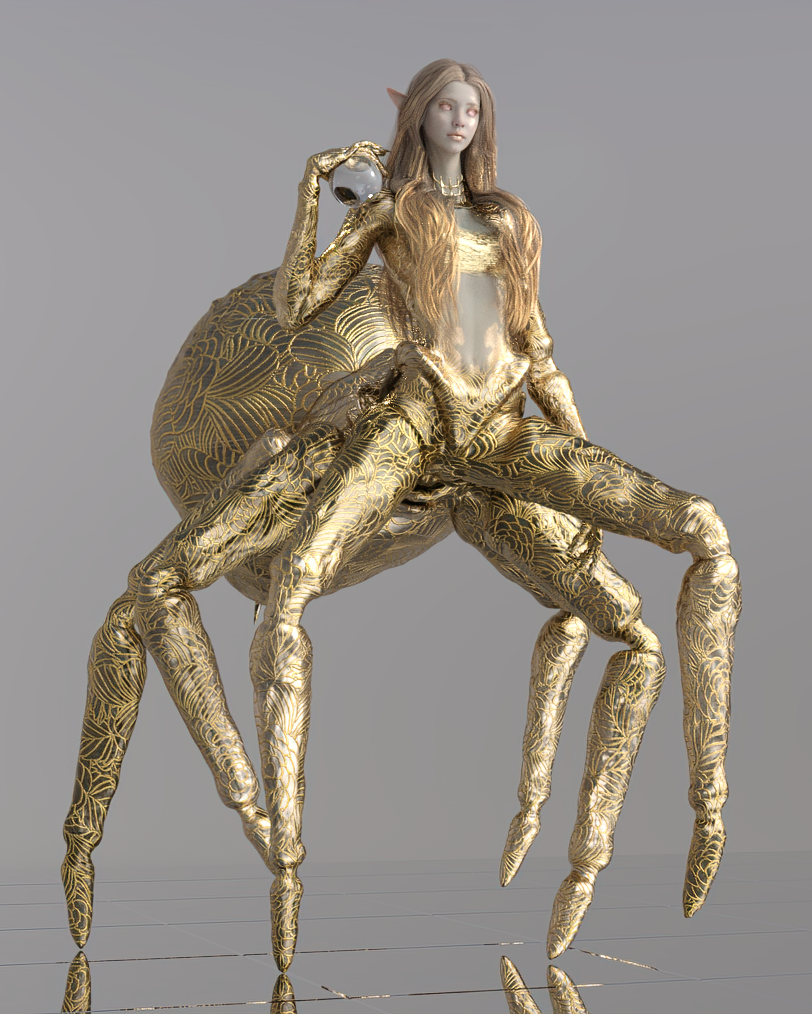

Astonishing!
I'm so glad you like it and thank you for all your hard work on this! If you ever make different spider body morphs for her or other drider-like creatures I will happily buy all of them. :D
Thanks all, I'm glad you like what I did with her! :D
If you want to use another human skin with the regular spider textures, you can do the same thing but put the Black Widow texture on the geoshell. Then I just changed the base color slightly to blend it with her skin.

She's got some of Lali's shape dialed in here too. I was able to change the body shape quite a bit without affecting the legs too much.
Great job! Do you have a tutorial on how to do this? I just bought BW last night and I do want to try the spider body on some of existing G8 women.
Geo
Sure! Here's a step by step of how I did it.
- Load Black Widow.
- With the character herself selected, use Create > New Geometry Shell.
- By default your geoshell will be named "Black Widow Shell." Select it in both the scene and Surfaces tab and apply the Iray Uber Base shader from the default Daz Studio resources pack.
- Select Black Widow in the Surfaces tab again, right click and choose "Copy Selected Surfaces."
- Select Black Widow Shell in the Surfaces tab, right click and choose "Paste Selected Surfaces." Your shell should now have the Black Widow texture on it.
- Select the Black Widow Shell torso surface. The first map shown, Metallicity, is what I use for the torso cutout.
- Scroll down until you find the torso's Cutout Opacity, right under Emission Color. Click the little arrow box next to it and choose "Browse" to open the Black Widow textures folder.
- Find and open the "Black Widow Torso G" map in the folder (note: I edited the leg transition area out for my spiders in Photoshop and saved a custom version of that map because otherwise some human skin shows through at the thigh joints. It looks kind of cool but also disrupts the illusion a bit).
- Select the Black Widow Shell surfaces Cornea, Ears, EyeMoisture, EyeSocket, Face, Irises, Lips, Mouth, Pupils, Sclera, and Teeth and reduce Cutout Opacity on all of them to zero using the slider.
- Select the Black Widow character and apply your desired texture to her! This time I used Xeloria. You'll now be able to see the different human texture below the spider skin.
- Most skins will probably need this adjustment, but the pink transition area between the spider and human torso is especially visible on characters with medium to dark skin tones. I adjust this by going to Black Widow Shell > Torso and changing the base color property just slightly to match her skin tone better. You may have to experiment to get the right tone.
- Yay!
It's a giant spider invasion of savings at Menards!
Thank you for the tutorial, but sadly it didn't work fully for me. This is what I got:

Yeah, it seems the body limbs are that of the character and not the Black Widow Spider. Also the body seems too small.
Any ideas as to what I did wrong here?
Thanks, Geo
Heya! The process I outlined only covers the textures because as you noted, the body shape is an integral part of making her look like a spider. The Black Widow head morph has a separate dial, so you can zero that out and dial in another character's head morph to make her face look different.
You can change the body a tiny bit without impacting the overall spiderness, but your best bet is to use morphs that change individual parts of the upper body.
This is a very special lady and I love her!! Holy wow there are all kinds of things I can get up to easily because of how her body and materials work.
For this I used a geoshell and repurposed the torso metallicity map as a cutout opacity mask. I'm gonna make so many spiders.
Excellent. I did not considered to purchase this set from the beginning, but your image has convinced me. Well done.
I'm really happy you decided to pick her up! I love her original look a lot and I feel a little bad for derailing into cute spiders all over, but kitbashing and customizing is a huge part of my interest in DS and it's unusual to find monster figures that are this flexible. :D
Anatomical elements Not Staying in their PositionWhen you save a morph asset you are saving both the property set up and links (I imagine you had to adjust rigging to shape for your morph to pose correctly), all of which are loaded immediately with the figure, and the actual changes in vertex position from your sculpt (the deltas), which are loaded only when the morph is given a non-zero value. You want to select just the moprh itself there, then the other options are the content dirctory to use - not the Connect diectory, which may be the default if that's how you installed the figure, and the Author and product names, which are used to set the subfolders of /Data/Daz 3D/Genesis 8/Female/Morphs/ to which the files ar written. I always recommend having an otherwise empty content directory for things like this, then it's easy to see your files and back them up without getting them mixed with the installed content (DS has no trouble in combining morphs from any and all of the content directories when loading a figure).
Anatomical elements Not Staying in their PositionThis does sound like a known issue if the morph is embedded in the scene, not saved as ana sset. Do your testing after importing the morph, and if the results work try File>Save As>Support Assets>Morph Asset. Make sure before saving that the default value is 0 or every time you load the figure, or a character for the figure, the morph will be applied (assuming that isn't what you want, of course).
Hi again Richard,
I'm a little uncertain here regarding this process. I loaded a fresh base G8F character, then in Zbrush I hit the GoZ button on my heavily modified G8F model. Back in Daz I used the new morph slider and it does indeed do the morph perfectly, now the part i am confused about is when I go to save the moorph asset if it is at zero, what exactly wouyld be saved and also in the pop up dialogue (as I have screenshoted below appears) and I am not sure what to do.
Thank You in Advance
ChristinaAnatomical elements Not Staying in their PositionThis does sound like a known issue if the morph is embedded in the scene, not saved as ana sset. Do your testing after importing the morph, and if the results work try File>Save As>Support Assets>Morph Asset. Make sure before saving that the default value is 0 or every time you load the figure, or a character for the figure, the morph will be applied (assuming that isn't what you want, of course).
Thank you very much richard for your thoughtful and useful response - I will give this a try right now.
Best
ChristinaAnatomical elements Not Staying in their PositionI am well aware what he was trying to tell me because I can read. But as I said this occurs with hair and the hair was from Daz not the erotica site so this is a general question which is more appropriate to this site and NOT the other site.
Basically when G8F is modified via the sliders in Daz3d and then the final daz modification is exported to Zbrush as a GoZ export and then further modified in Zbrush and then the original model in Daz is deleted and a new base version of the G8F loaded and the modified Zbrush model is then reimported and applied to the new BASE G8F which has not been modified - one has essentially created a single morph slider control to morph the new, completely unmorphed, base G8F to the entirely new shape that has been created by the combination of the previous modifications in Daz3d + the Zbrush modifications. All is well and the slider does indeed perform its morph admirably - EXCEPT that all things such as hair and genitals jump to the positions they woudl occupy if the G8F figure was full size. (In other words the hair is in the position of a full sized G8F character as is the genitals.
Anatomical elements Not Staying in their PositionThis does sound like a known issue if the morph is embedded in the scene, not saved as ana sset. Do your testing after importing the morph, and if the results work try File>Save As>Support Assets>Morph Asset. Make sure before saving that the default value is 0 or every time you load the figure, or a character for the figure, the morph will be applied (assuming that isn't what you want, of course).
Hylas' corner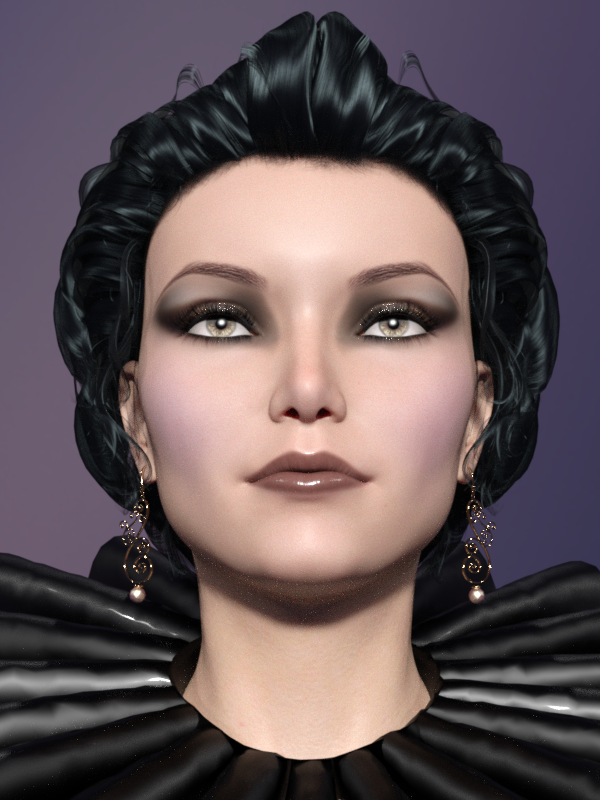
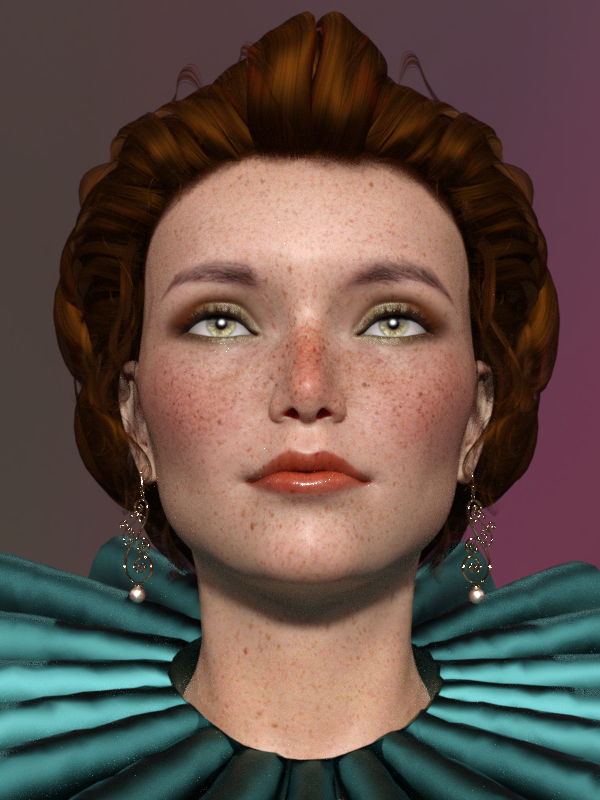
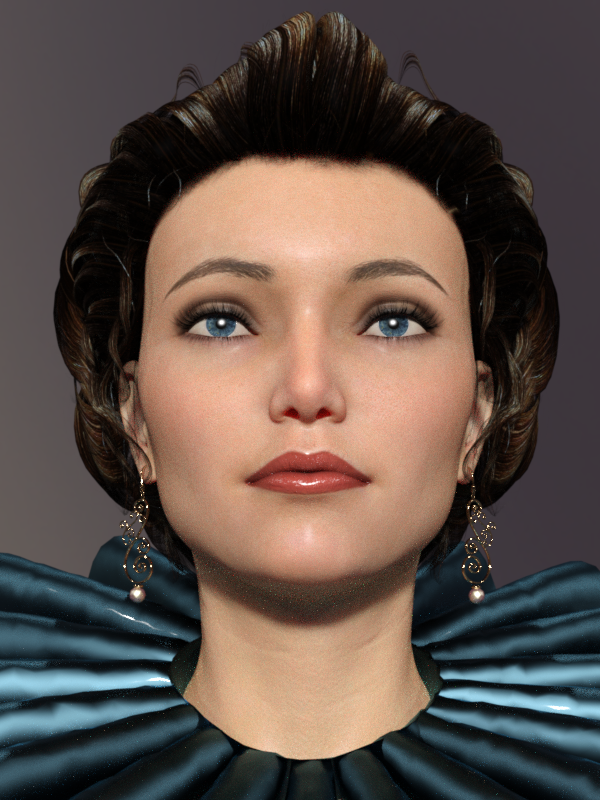
Meredith was one of the characters I was going back and forth about during the most recent sales season. 2.99 is not a lot at all for a G8 character but it does add up and one has to draw the line somewhere. I ended up not getting her... she's beautiful, but I already have a lovely pale/gothic skin in Salem, so I decided she wouldn't really add that much to my library.
Here's my attempt to approximate Meredith's head morph, with Olympia 7 as a starting point. Not an exact match of course, but I'd like to believe I managed to capture her essence. In any case, I'm quite happy.
Skins of Salem, Riza, and V8.
Welcome to Hatsune Miku Anime Manga Cafe ☕Not trying to push Genesis, mind you... I'm just excited to have my figures animating (with dynamic hair and great shapes) as well as they are.
I just built a new Ryzen computer that renders Carrara animations really well (Rosie 5 mid shot @ 16 seconds per frame), so I decided to start a whole new workflow. Feels good. Finally getting somewhere!
I love Genesis 1, using Genesis Generation X2!
I have The Girl 4, and she has all those wacky/awesome expressions - Aiko 4 does too, so I put those on this character too, along with all of the expressions I bought for V4 and Genesis 2 - and that's now added to all of them that I bought for Genesis 1 - so this girl (Stylized Superhero character of my wife!) is Very Emotive!
GenX2 also allowed me to give Genesis 1 the more detailed female shapes from Genesis 2 Female, since I got the Genesis 2 addon for it.
Now it doesn't matter, Male, Female... if there's a morph I need to use, I give it to my character.
In Carrara, when we save a Genesis figure as a Carrara file, we can no longer add morphs to that particular figure. We can cop all of the shape dial setting over to a fresh Genesis that has more morphs, but the one we save becomes locked. I use this to my advantage. I have a master copy of all of my Genesis morphs on my desktop, and I update that any time I buy new morphs. When I make a character, like Rosiie 5 here, I go into the data > DAZ3D > Genesis > Base > Morphs folder, and delete all of the morphs I don't want polluting her dials selection - like monsters, male stuff, whatever.
So this character only has dials that I want her to have. Yeah... there's a LOT of them, but they're just whatI want! :)
Meh I have to do something on Genesis is part of my bucketlist this year. Thanks for sharing that info Dartabeck and a happy new year !
You too! Wonderful thread! I have a LOT of reading to do in here! :)
Welcome to Hatsune Miku Anime Manga Cafe ☕I love Genesis 1, using Genesis Generation X2!
I have The Girl 4, and she has all those wacky/awesome expressions - Aiko 4 does too, so I put those on this character too, along with all of the expressions I bought for V4 and Genesis 2 - and that's now added to all of them that I bought for Genesis 1 - so this girl (Stylized Superhero character of my wife!) is Very Emotive!
GenX2 also allowed me to give Genesis 1 the more detailed female shapes from Genesis 2 Female, since I got the Genesis 2 addon for it.
Now it doesn't matter, Male, Female... if there's a morph I need to use, I give it to my character.
In Carrara, when we save a Genesis figure as a Carrara file, we can no longer add morphs to that particular figure. We can cop all of the shape dial setting over to a fresh Genesis that has more morphs, but the one we save becomes locked. I use this to my advantage. I have a master copy of all of my Genesis morphs on my desktop, and I update that any time I buy new morphs. When I make a character, like Rosiie 5 here, I go into the data > DAZ3D > Genesis > Base > Morphs folder, and delete all of the morphs I don't want polluting her dials selection - like monsters, male stuff, whatever.
So this character only has dials that I want her to have. Yeah... there's a LOT of them, but they're just whatI want! :)
Meh I have to do something on Genesis is part of my bucketlist this year. Thanks for sharing that info Dartabeck and a happy new year !
Thanks Zev0I was disappointed with the way Zev0 handled the Growing Up Morphs for Gen 8 Female with a quick release of them for Gen 8 Male and no discount for early adopters - and since then, it seems like Zev0 products have realized they can command a premium price over the competition. While my experience is that Zev0 products justify the price - it means all of Zev0's new products go onto my wishlist until they come down to a discount I can live with.
Riversoft's Gen3 to Gen8 morph transfer has similar problems with transferring custom characters, especially characters built on previous morph transfers using Gen X - to what seem to be described here - but I'm not surprised to find Zev0 aggressively working to fix the issue and have no doubt that will happen if it hasn't already.
There is always another sale. I'll bide my time.
I need V4...the original, not 4.1 or 4.2The original V4 is on the CD included in Les Pardew's book Figures, Characters, and Avatars.
Warning: It uses the old Bitrock installers.
As Aiko 4 is on there I think it's safe to say that it's either going to be V4.1 or V4.2, afaik A4 has always used the EXP morph system and V4.0 didn't use that system.
I have the book so I know it's V4.2 that's on my disc.
You are correct. I rechecked my disc and it is V4.2. When I checked originally the file name just said V4 so I thought it was the original. But this time I started the Bitrock ibstaller and it did reference it as V4.2. I have corrected my post above.
Daz 3D is part of

Connect
DAZ Productions, Inc.
7533 S Center View Ct #4664
West Jordan, UT 84084Licensing Agreement | Terms of Service | Privacy Policy | EULA
© 2026 Daz Productions Inc. All Rights Reserved.