-
My recently purchased "Face Transfer" won't install
As you can see I tried to install the seriel number, it won't take it. I'm using Daz 4.12.86.pro Windows 64 bit.
Bluejuante Nadya HD
Agree, a Male character would be very nice. I've read bluejaunte comment on this a while back that they weren't sure if its economically feasible and they have to consider what sells. Understandable, and I woke up this morning to see that Nadya tops the best selling character lists right now, so glad that she's doing well here.yeah... I really don't get why no PA is doing some feet hd morphs... would be probably a cash cow ...
Look in the art gallery and check out the renders. Its not going to be worth it if the extra level of detail doesn't really show in the render or if the characters are wearing shoes. Could we use more higher detailed morphs for feet & hands? Sure! Are there enough users here that would need/want them? I can't say that I've noticed an overwhelming demand for them.
It's one of those things where there is an overwhelming demand....from the same two or three people.
I wouldn't be so sure. If I post a pic that focuses a bit on bare feet it can get 2 or 3 times as many views and faves as other pics. Don't underestimate the foot fans out there! I'm not saying it would be a best seller, but BJ already has an established fan base that enjoys what his characters bring to the table. So of all the people who could make a hand-feet morph pack, one from BJ would probably have the best chance of selling well.But what I would really like to see is a blauejaunte boy! I know guys don't always sell great, but I think a BJ boy would be a big hit. The Daz ladies would not be able to resist him! And neither would a lot a men.In the meanwhile without an official BJ Male character, you can try to use the BJ maps on G8M as well. We discussed this in another thread - Bj maps are quite versatile, they do not only look good on their original characters they were designed for. I've had some good results with BJ maps on Male characters. I only use the skin maps, combine them with other eye maps and a set of eyebrows designed for males, and a morph for G8M. It works surprisingly well.
21 New Wonders added to my Freebies site in 2019 ( Now 432 Items !!! )https://sites.google.com/site/mcasualsdazscripts/
Clothesmcjg3croptop 
A slightly skimpy top for Genesis 3 but Okay for Genesis 8
Music Audio Visualmcjfiddle 
A Beautiful Violin and Bow!
Furniture Architecture
Script
Can DAZ operate Stand Alone and Can the current version DAZ Studio open Poser models?As an example, this is G8F; a morph transferred from G3 (Mia); textures from V4 (Paloma); Freebie dress and Leggings (G8 iirc); the hair is dforce for G8.
Pretty neat that all that can be done!
I think first pass will be to get my initial poser files working and get daz to recognize my library tree. In the past I've preferred to maually install files so I know where they are and what is going on. It takes longer, but when there is a problem I have a better feel for things to diagnose a problem. Besides, if my machine is offline I tranSfer manually anyway.
Right now my Poser Game Developer is still working, but if/when it comes up with an upgrade or die ultimatum, I think i'm out. I'm just getting a first feel on what it will take to keep my (now rather extensive? expensive?) library of 3D models useful. It is a HUGE relief that DAZ studio will keep on working, like the EverReady Bunny, when my Poser Game Developer eventually decides to self terminate.
If you add your Poser Runtimes as Poser content directories in DS preferences then it should appear in the "poser formats" section of the "content library" tab (not the "Smart Content" tab, that requires metadata).
Bluejuante Nadya HD
I wouldn't be so sure. If I post a pic that focuses a bit on bare feet it can get 2 or 3 times as many views and faves as other pics. Don't underestimate the foot fans out there! I'm not saying it would be a best seller, but BJ already has an established fan base that enjoys what his characters bring to the table. So of all the people who could make a hand-feet morph pack, one from BJ would probably have the best chance of selling well. But what I would really like to see is a blauejaunte boy! I know guys don't always sell great, but I think a BJ boy would be a big hit. The Daz ladies would not be able to resist him! And neither would a lot a men.yeah... I really don't get why no PA is doing some feet hd morphs... would be probably a cash cow ...
Look in the art gallery and check out the renders. Its not going to be worth it if the extra level of detail doesn't really show in the render or if the characters are wearing shoes. Could we use more higher detailed morphs for feet & hands? Sure! Are there enough users here that would need/want them? I can't say that I've noticed an overwhelming demand for them.
It's one of those things where there is an overwhelming demand....from the same two or three people.
Novica & Forum Members Tips & Product Reviews Pt 12: ) I bought the chimpanzee by AM that I've been wanting but resisting since I didn't really need it and it was a bit expensive for a novelty, but it looks sooo good... so, with the sale(s), I finally broke! Cuz, hey, monkees make everything better! Also thought I shouldn't pass up chance to get Daz Face transfer unlimited at a very good price while I could.
~GenXTransfer Module 1- Genesis 3 to Genesis 8 Morph Converter (Commercial)
my issue is now to get GenX working properly again ... I dont know why it suddenly wont work"it won't seem to pick up all the morphs to tranfer"
We found the issue..Busy testing it...The problem was that XGen wasn't saving a full path that includes author and product, it just had an author folder. Hense why it could select some morphs. So ye older morphs seemed to work, but new ones no..Don't know if its studio related..But we made a fix so it works on new GenX ones...
I am glad you found a solution, but my issue isn't with Xtransfer, it is with GenX now that doesn't seem to be working to transfer from G2 to G3 and I am not sure if it is an issue with GenX or user input that is in error but when I am transferring a character morph from Gen 2 and then try it on Gen3 it may only have worked on the head or body but not both even tho I am doing create single morph.
XTransfer Module 1- Genesis 3 to Genesis 8 Morph Converter (Commercial)I had a chance to use this for the first time today, and so far the results look good, although I have not used it too much so far.
Regarding the GenX issues, my observation was that whilst the morphs created by GenX were transferred, the base shapes were not, and rather bizzarely these base morphs were placed in the Genesis 3 morph section instead (which explains why some people experienced issues with the source figure). The problem with GenX morphs is that they are just a delta of the base morph, not a full body morph by themselves, which is something I have always found to be a pain with GenX. If it is not too difficult then maybe a worthwhile enhancement of this app would be to combine GenX morphs with their base.
My advice to anyone thinking of returning this would be to hang on, you have 30 days after all. There are two very competent PAs working on sorting out the issues, and as can be seen in this thread, there are now plenty of testers to look for potential problems.
I prefer if the base morph is controlled seperate actually. You can get some unique results by dialing in the base shape at lower percentages combined with other genx morphs. If combined that option is removed. In a nutshell all you have to do is select the base once, transfer that and then all genx morphs will work on it as they should, granted you dial it up first. It's not too much of an effort to just dial up the base before using genx morphs. Yes GenX should have done this for you where base morph auto dials with genx morphs, but that is not something we can overwrite. This script can only emulate what is linked together, and not designed to create new ones.
XTransfer Module 1- Genesis 3 to Genesis 8 Morph Converter (Commercial)Will this transfer morphs from G8M to G8F? If not, is there something else that does?
It does not, and the only thing I know of that can is Singular Blues free script, which is discussed in this thread: https://www.daz3d.com/forums/discussion/176271/morphs-from-g3-to-g8
The free script is not as easy to use as this product, and from my initial observations does not do as good a job on more extreme morphs, but it is the only thing that gives you a direct transfer from G8M to G8F and vice versa.
XTransfer Module 1- Genesis 3 to Genesis 8 Morph Converter (Commercial)I had a chance to use this for the first time today, and so far the results look good, although I have not used it too much so far.
Regarding the GenX issues, my observation was that whilst the morphs created by GenX were transferred, the base shapes were not, and rather bizzarely these base shapes were placed in the Genesis 3 morph section instead (which explains why some people experienced issues with the source figure). The problem with GenX morphs is that they are just a delta of the base shape, not a full body morph by themselves, which is something I have always found to be a pain with GenX. If it is not too difficult then maybe a worthwhile enhancement of this app would be to combine GenX morphs with their base.
My advice to anyone thinking of returning this would be to hang on, you have 30 days after all. There are two very competent PAs working on sorting out the issues, and as can be seen in this thread, there are now plenty of testers to look for potential problems.
More Issues With Measure MetricsI'm on 4.12 and nothing like that shows up on the list for me. All plugs are green and the only place for serial numbers are under aniMate 2 and Face Transfer.
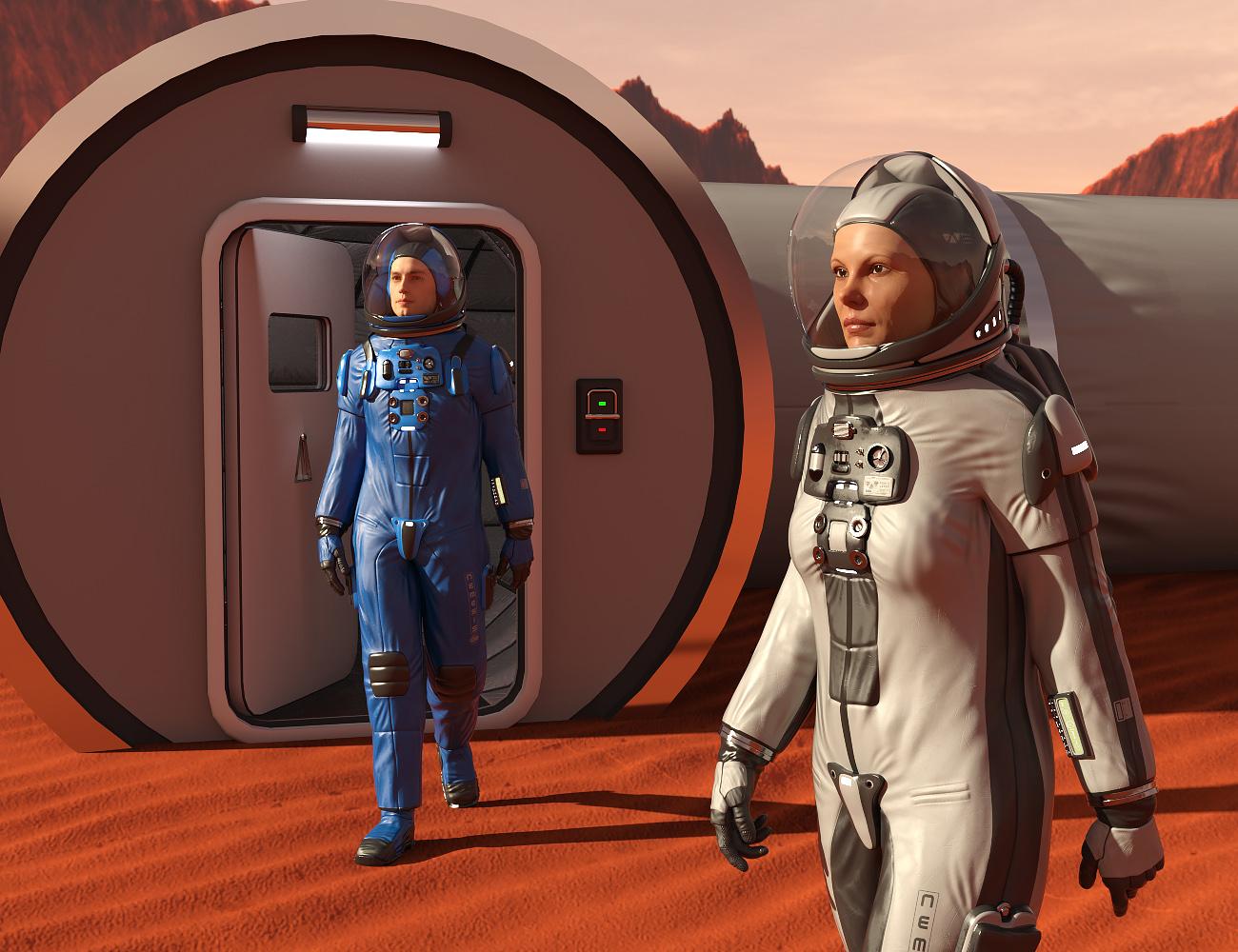
[Released]Universe Explorer for G8Females[Commercial]OK before anyone asks yes the female is a bit different with the backpack straps.
I really didn't want to do the female and the straps on the male was a huge pain in the butt.
Plus every female morph totally destroys the chest plate so it took forever to do them.
But I guess it's better than not doing it !
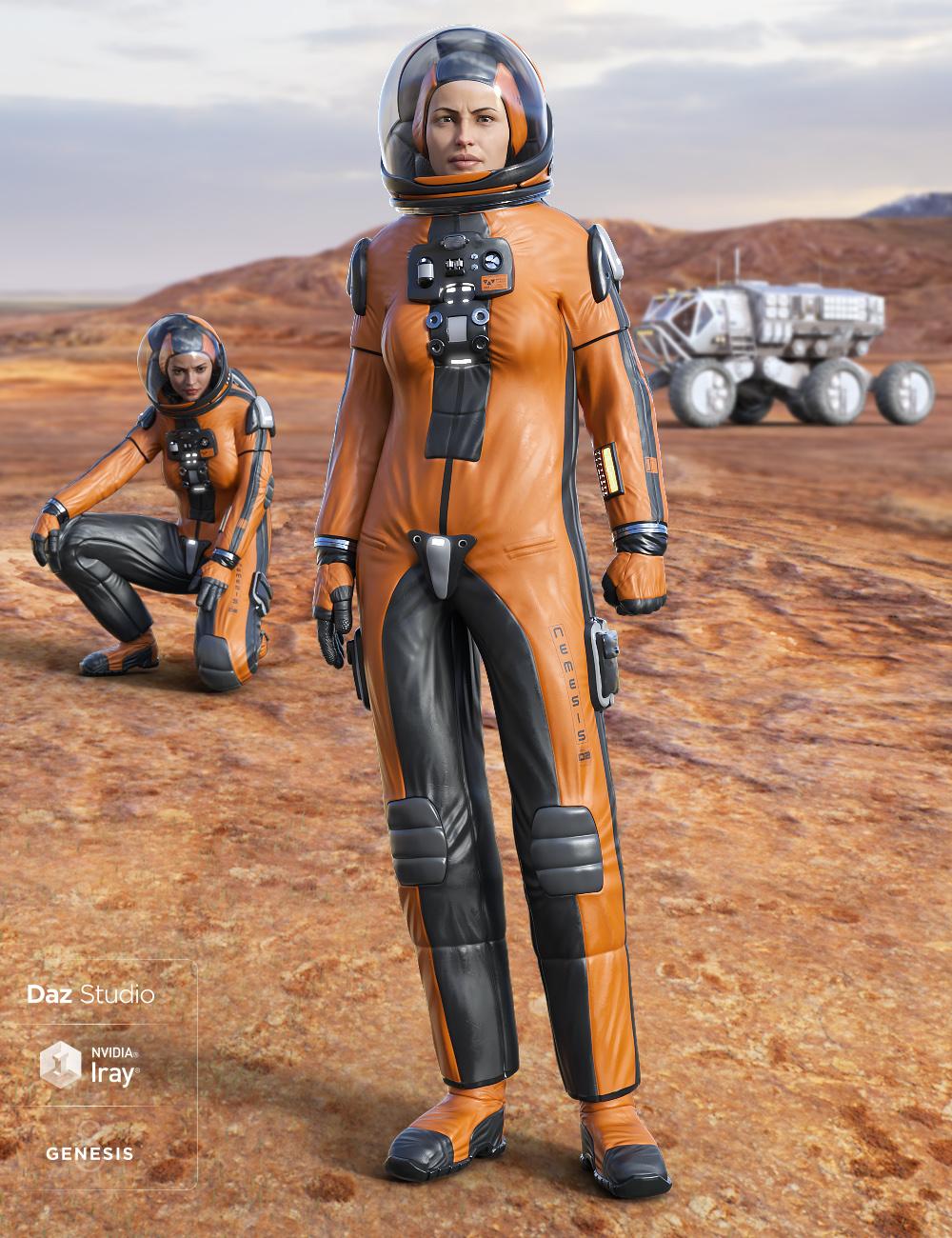
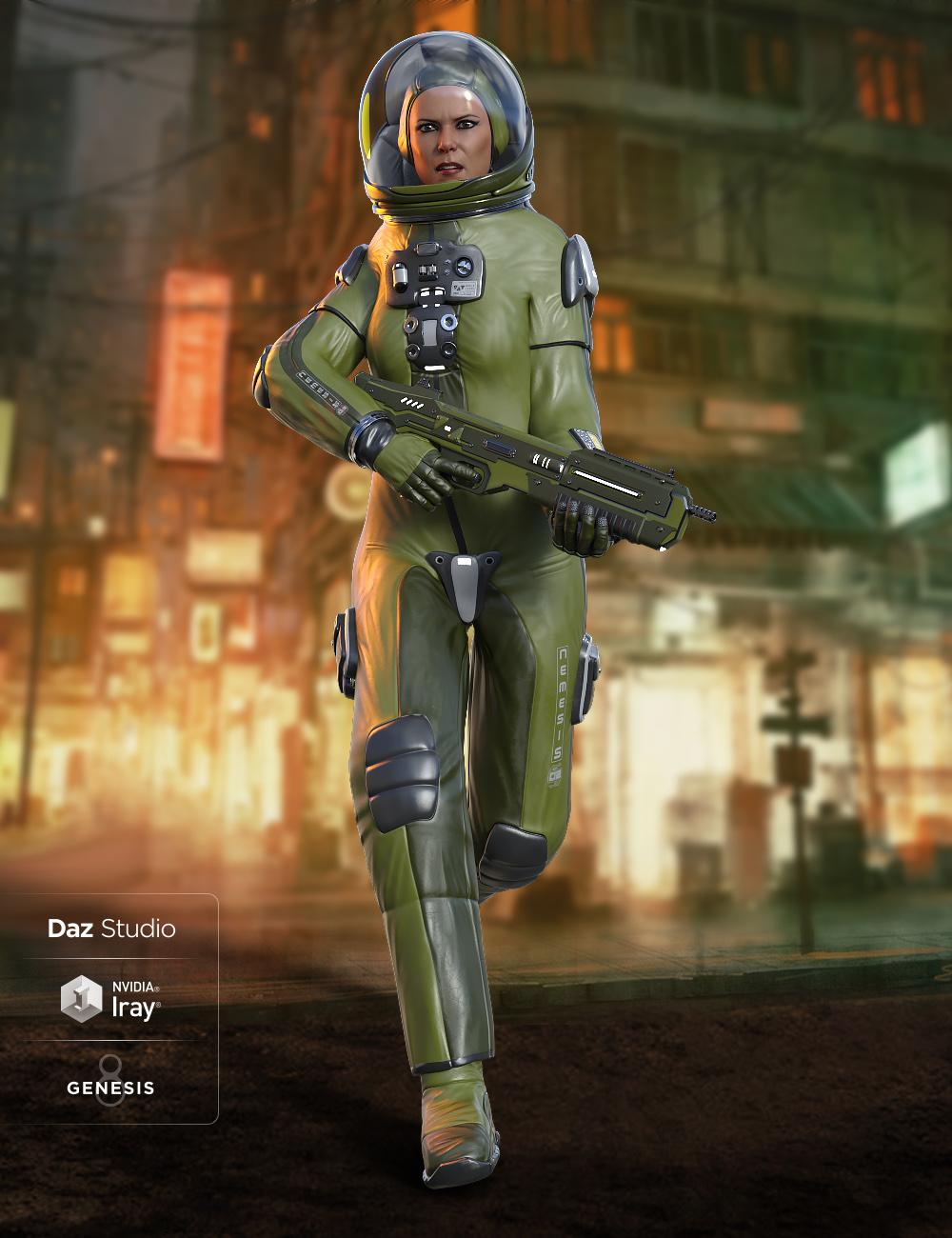
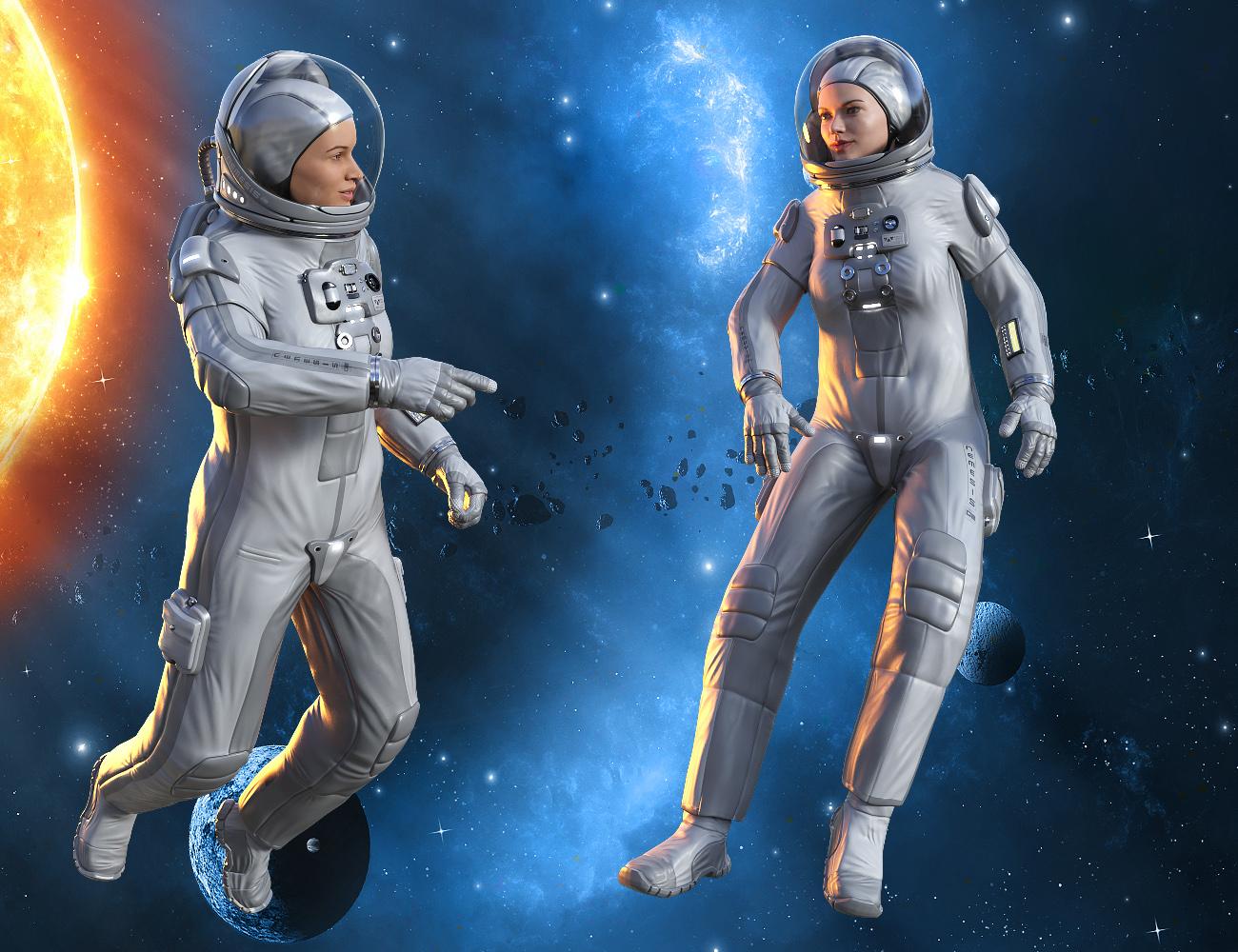
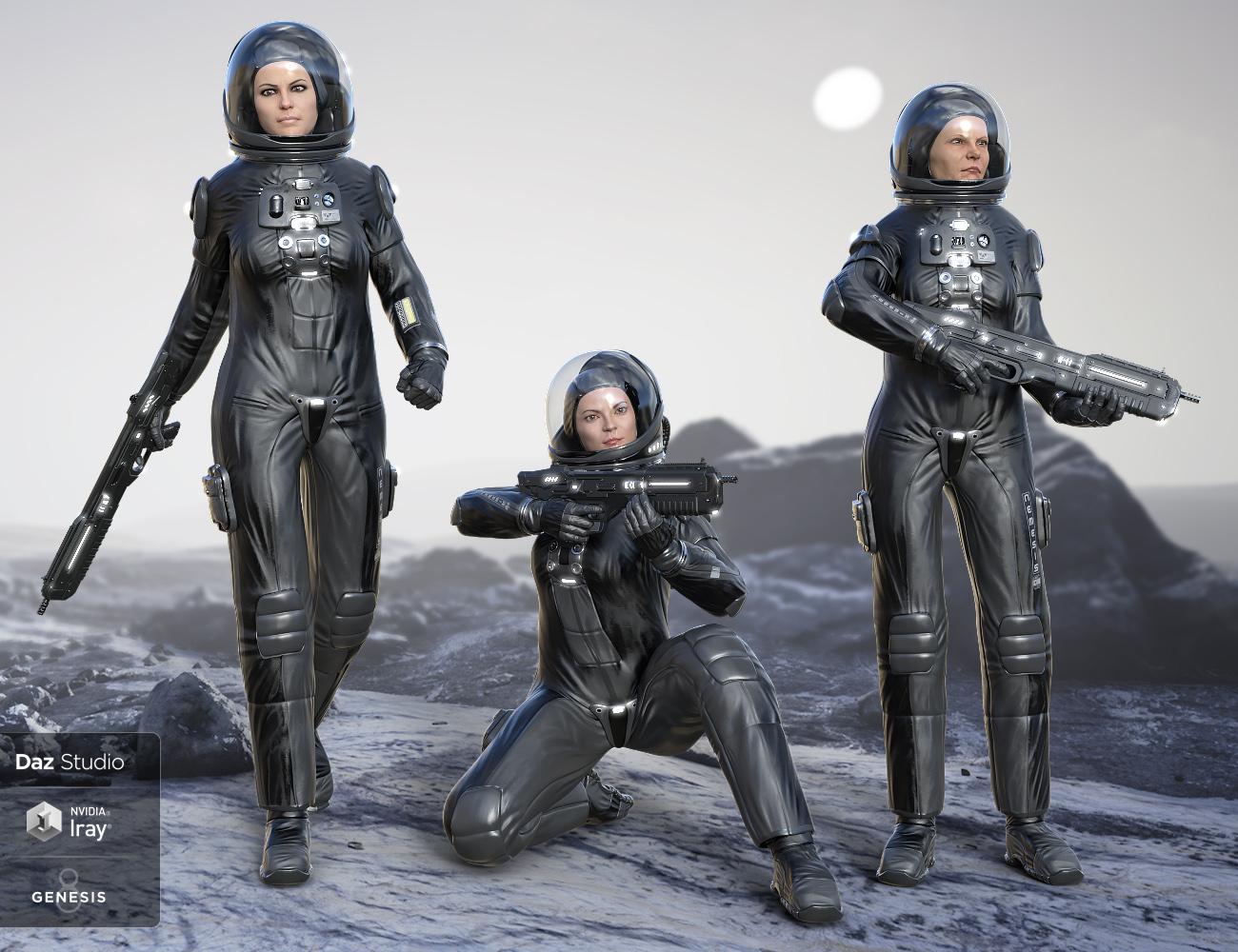
[Released]Universe Explorer for G8Females[Commercial]“Universe Explorer for Genesis 8 Females” is the latest space suit for Midnight_stories. It has the feel of the next generator astronauts who are heading out to Mars and the outer solar system. This pack includes Full body suit, Gloves, Boots, Helmet, Cap and Backpack. Plus 9 material presets and 10 body shapes. Also a premade subset with limits on it so you can apply standard poses to it. Gloves have an expand morph to get that spacesuit look. Be on the lookout for the matching Genesis 8 Males version and the Universal Habitat. Great for all your space exploration scene.

 Transferring Clothing Rig and Smoothing Causes Lockup
Yes the concept is to model to, and make the clothing on the unmorphed basic Genesis figure. After the clothing is made and saved, then load a fresh copy of the clothing to the basic Genesis 8 shape. Make sure "fit to" is applied. THEN morph the Genesis 8 figure. The clothing item should follow along taking the shape of the morphed figure. For extreme shapes additional morphs may be required, or hide certain body parts, whatever works.
XTransfer Module 1- Genesis 3 to Genesis 8 Morph Converter (Commercial)Will this transfer morphs from G8M to G8F? If not, is there something else that does?
3D Art Freebie Challenge-November 2019-WINNERS ANNOUNCED"Playing Doctor" -Entries Thread Only3D Art Freebie Challenge November 2019 "Playing Doctor"
Well I even found the time to work out a third idea, so here's my third entry for this month! (Yes, it certainly is addictive! :D)
[Best watched at full size for details.]
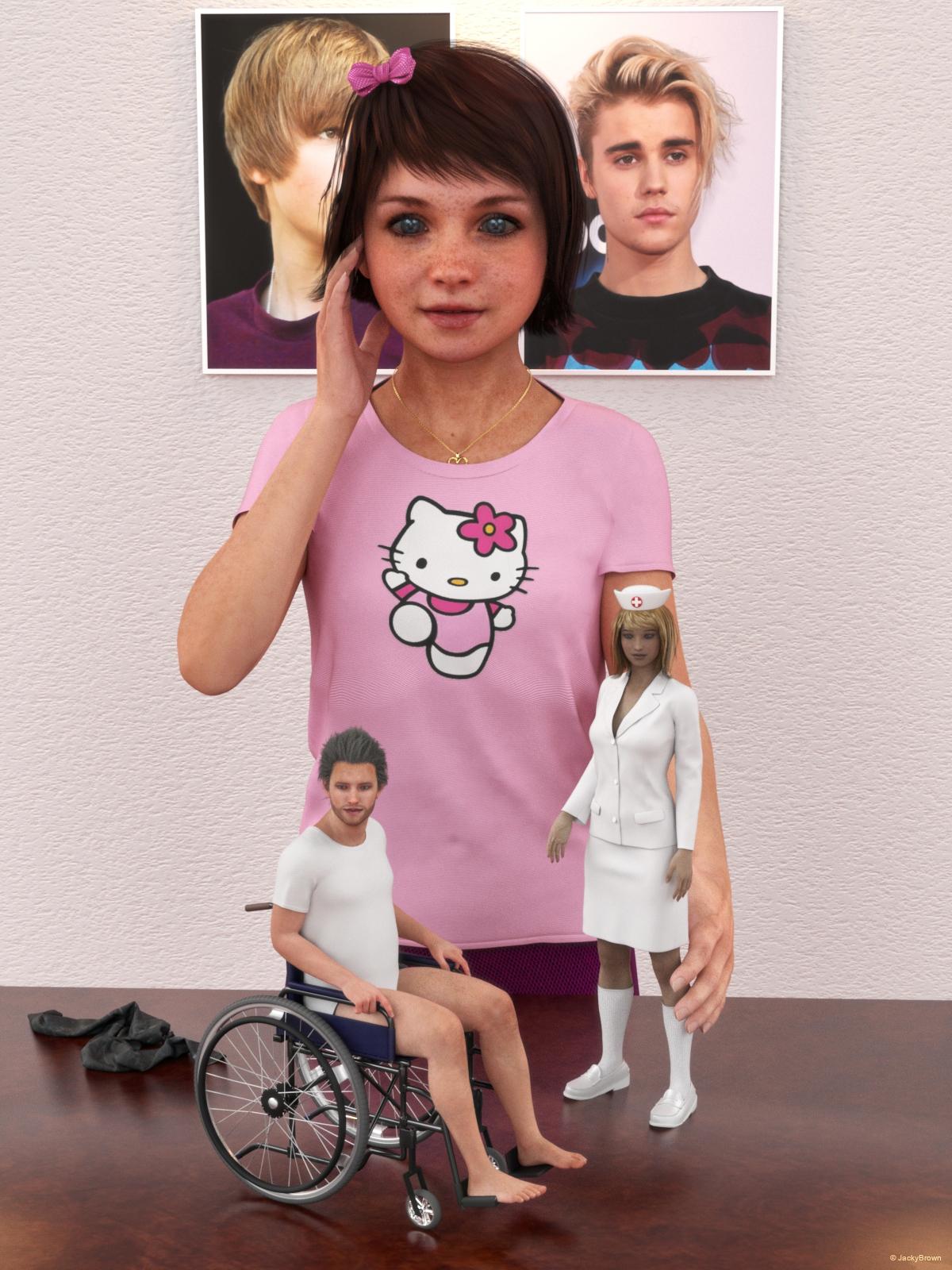
"Playing Nurse & Patient"
Starring: Chloe, Linda and Walther
The tale:
"Mr. Bieber! How often do I have to tell you not to go outside with your wheelchair in your underwear? You will probably catch a cold this way!" Linda (11 years old, almost 12) is all alone playing nurse and patient with her Barbie™ dolls. She is a big fan of Justin Bieber (as you can see) and in her mind she of course is the nurse and Justin the patient and her imagination is running away with her...
Soundtrack:
Justin Bieber - One Less Lonely Girl (© 2009)
https://www.youtube.com/watch?v=LXUSaVw3Mvk
COUNTABLE FREEBIES: (Alphabetic order)#01! Adriana for Genesis 8 Female by Zia3d
https://www.renderosity.com/mod/freestuff/adriana-for-genesis-8-female/82827 **
[Eyes used]#02! Amy AiMei for Genesis 8 Female (morphs only) by Amy AiMei
https://www.deviantart.com/amyaimei/art/Amy-AiMei-for-Genesis-8-Female-morphs-only-687709757
[Head morph used]#03! Blazer Uniform Set for G8F by yomiuri
https://sharecg.com/v/94694/browse/21/DAZ-Studio/Blazer-Uniform-Set-for-G8F **#04! Bonsai Stand by 3Zi
http://sanzisannzi.blog83.fc2.com/category6-11.html (Scroll down to '3Zi_BonsaiStand.zipDownload')#05! Channing's Button Prop re-posted by Seacanyon
https://www.sharecg.com/v/56691/related/21/DAZ-Studio/Channings-Button-Prop **
[On the Nurse Cap]#06! Cooking Stage Dress for A4 by Redviper2012
https://sharecg.com/v/62212/gallery/11/Poser/Cooking-Stage-Dress-for-A4 **
[Ribbon]#07! Dante DMC5 Free Eyebrows for Genesis 8 Male by InTheFlesh
https://sharecg.com/v/94753/gallery/21/DAZ-Studio/Dante-DMC5-Free-Eyebrows-for-Genesis-8-Male **#08! Dante DMC5 Free Stubble for Genesis 8 Male by InTheFlesh
https://sharecg.com/v/94752/gallery/21/DAZ-Studio/Dante-DMC5-Free-Stubble-for-Genesis-8-Male **#09! DOA 5 Kasumi's Head Morph for G8F by TritiumCG
https://www.deviantart.com/tritiumcg/art/DOA-5-Kasumi-s-Head-Morph-for-G8F-Daz-Studio-813503190#10! Ellie Cosplay set for G2F by Beat578
https://www.sharecg.com/v/83479/gallery/21/DAZ-Studio/G2_Ellie_Cosplay **
[Jeans used]#11! Everyday Outfit Genesis 8 by Teknology3D
https://www.renderosity.com/mod/freestuff/everyday-outfit-genesis-8/83138 **
[Pants used, customized texture]#12! Evil Nurse Suit by Ravenous
https://www.renderosity.com/mod/freestuff/evil-nurse-suit/57290 **
[Nurse Cap used]#13! Eyes Dilate for Genesis 8 Female by felldude
https://www.renderosity.com/mod/freestuff/eyes-dilate-for-genesis-8-female/82869 **#14! Fabric-white-1.png and Fabric-bmp.png by RedEyeCat
https://redeyecat.wordpress.com/2014/06/07/its-a-tile-lollapalooza/ (item 5 and 6)
[Used on Nurse Cap, Skirt & Jacket and T-Shirt]#15! Frame DIN-A by klausdbg
https://www.sharecg.com/v/66868/gallery/5/3D-Model/Frame-DIN-A **#16! G3F 6 Gored Skirt & TShirt by Wilmap's Digital Creations
https://www.wilmapsdigitalcreations.co.uk/view_product.php?id=469 **
[T-Shirt used, customized texture, Geometry Shell for the print]#17! Lights for Daz Studio w/ Iray by DrBoots
https://www.deviantart.com/drboots/art/Freebie-Lights-for-Daz-Studio-w-Iray-579993105
[Only the reflections are visible]#18! Linda - Character for G3F with texture maps by Edelzwicker
https://www.sharecg.com/v/89731/related/21/DAZ-Studio/Linda-Character-for-G3F-with-texture-maps **#19! Long Morph for Toulouse hair for G8F by DireWorks
https://www.renderosity.com/mod/freestuff/sometimes-they-come-back-long-morph-for-toulouse-hair-for-g8f/83745 **#20! mcjHatsAreTheFashionOfTheDay (Script) by mCasual/Jacques
https://sites.google.com/site/mcasualsdazscripts9/mcjhatsarethefashionoftheday#21! Morphalynn 127 Genesis 3 Female Face & Head Morphs by ModernWizard
https://sharecg.com/v/83498/related/21/DAZ-Studio/Morphalynn-127-Genesis-3-Female-Face-Head-Morphs **#22! My Heart Necklace for Genesis 8 Female by amyaimei
https://www.deviantart.com/amyaimei/art/My-Heart-Necklace-for-Genesis-8-Female-729010047#23! Pd-Soft Leather Daz Studio Shaders for Iray by Parrotdolphin (Janet)
https://sharecg.com/v/80223/gallery/7/Material-and-Shader/Pd-Soft-Leather-Daz-Studio-Shaders-for-Iray **#24! RGB HDRi Soft Lights for Daz Studio - Iray by VAlzheimer *1
https://gumroad.com/valzheimer (1st item)#25! Skirt & Jacket for Genesis 8 Female by Wilmap's Digital Creations
https://www.wilmapsdigitalcreations.co.uk/view_product.php?id=465 **#26! Soul Calibur 6 Seong Mina's Head Morph for G8F by TritiumCG
https://www.deviantart.com/tritiumcg/art/Soul-Calibur-6-Seong-Mina-s-Head-Morph-for-G8F-813924805#27! "STRONG" for G8M Character Morph & Pose by Mar3D
https://www.renderosity.com/mod/freestuff/strong-for-g8m-character-morph-amp-pose/82833 **
[Head morph used 25%]#28! SY 200 Morphs for Genesis 8 Head and Body by SickleYield
https://sharecg.com/v/91888/view/21/DAZ-Studio/SY-200-Morphs-for-Genesis-8-Head-and-Body **#29! Vergil Devil May Cry 5 Hair for G8M by InTheFlesh
https://sharecg.com/v/93892/view/21/DAZ-Studio/Vergil-Devil-May-Cry-5-Hair-for-G8M **#30! Walther for G8M by Ruslanomar
https://sharecg.com/v/92848/browse/21/DAZ-Studio/G8M-Walther **#31! Wheelchair for Daz Studio by Pithaeus
https://sharecg.com/v/94819/browse/21/DAZ-Studio/Wheelchair-for-Daz-Studio **
NO-COUNT ITEMS:--- AA Satin Dot Shaders for Daz Studio - Iray by AllenArt
--- AllenArt Iray Jewelry Shaders by AllenArt
++ Basic Wear for G8M by Daz Originals
--- Chloe for G8F by Musings by Moonlight
++ Stucco shader NVIDIA MDL Examples [Wall]
++ Toulouse Hair for Genesis 8 Female by Daz Originals
PURCHASED/PAID FOR ITEMS:$1. Growing Up for Genesis 3 Female(s) by Zev0
https://www.daz3d.com/growing-up-for-genesis-3-female-s
*1 E-mail address required
** Registration required
#x! Countable Items (Bold ones are used by me for the first time I think.)
--- No longer available freebies
++ Free with DAZ Studio (or the Essentials)
$x. Purchased/Paid For Item
Rendered with DAZ Studio 4.10.0.123 (nVidia Iray)Other free software used: GIMP v2.10.8 and Irfanview 4.52
Postwork: used the AltaLux Image Enhancement Filter (Effect) by Stefano Tommesani that comes with Irfanview and some filters (oa) that come with GIMP.
"Playing Nurse & Patient"
3D Art Freebie Challenge-November 2019-"Playing Doctor" -Main Thread Only3D Art Freebie Challenge November 2019 "Playing Doctor"
Well I even found the time to work out a third idea, so here's my third entry for this month! (Yes, it certainly is addictive! :D)
[Best watched at full size for details.]
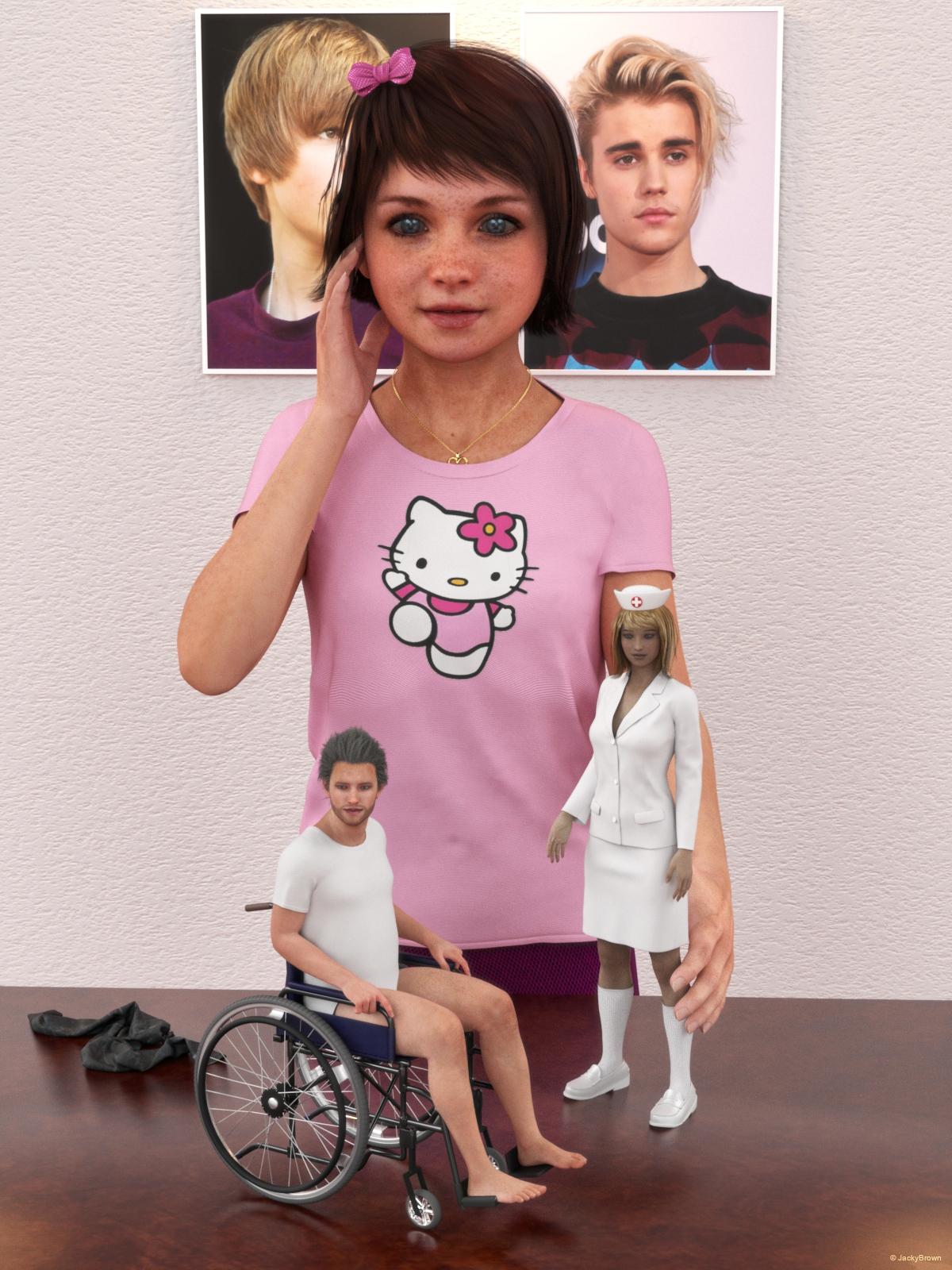
"Playing Nurse & Patient"
Starring: Chloe, Linda and Walther
The tale:
"Mr. Bieber! How often do I have to tell you not to go outside with your wheelchair in your underwear? You will probably catch a cold this way!" Linda (11 years old, almost 12) is all alone playing nurse and patient with her Barbie™ dolls. She is a big fan of Justin Bieber (as you can see) and in her mind she of course is the nurse and Justin the patient and her imagination is running away with her...
Soundtrack:
Justin Bieber - One Less Lonely Girl (© 2009)
https://www.youtube.com/watch?v=LXUSaVw3Mvk
COUNTABLE FREEBIES: (Alphabetic order)#01! Adriana for Genesis 8 Female by Zia3d
https://www.renderosity.com/mod/freestuff/adriana-for-genesis-8-female/82827 **
[Eyes used]#02! Amy AiMei for Genesis 8 Female (morphs only) by Amy AiMei
https://www.deviantart.com/amyaimei/art/Amy-AiMei-for-Genesis-8-Female-morphs-only-687709757
[Head morph used]#03! Blazer Uniform Set for G8F by yomiuri
https://sharecg.com/v/94694/browse/21/DAZ-Studio/Blazer-Uniform-Set-for-G8F **#04! Bonsai Stand by 3Zi
http://sanzisannzi.blog83.fc2.com/category6-11.html (Scroll down to '3Zi_BonsaiStand.zipDownload')#05! Channing's Button Prop re-posted by Seacanyon
https://www.sharecg.com/v/56691/related/21/DAZ-Studio/Channings-Button-Prop **
[On the Nurse Cap]#06! Cooking Stage Dress for A4 by Redviper2012
https://sharecg.com/v/62212/gallery/11/Poser/Cooking-Stage-Dress-for-A4 **
[Ribbon]#07! Dante DMC5 Free Eyebrows for Genesis 8 Male by InTheFlesh
https://sharecg.com/v/94753/gallery/21/DAZ-Studio/Dante-DMC5-Free-Eyebrows-for-Genesis-8-Male **#08! Dante DMC5 Free Stubble for Genesis 8 Male by InTheFlesh
https://sharecg.com/v/94752/gallery/21/DAZ-Studio/Dante-DMC5-Free-Stubble-for-Genesis-8-Male **#09! DOA 5 Kasumi's Head Morph for G8F by TritiumCG
https://www.deviantart.com/tritiumcg/art/DOA-5-Kasumi-s-Head-Morph-for-G8F-Daz-Studio-813503190#10! Ellie Cosplay set for G2F by Beat578
https://www.sharecg.com/v/83479/gallery/21/DAZ-Studio/G2_Ellie_Cosplay **
[Jeans used]#11! Everyday Outfit Genesis 8 by Teknology3D
https://www.renderosity.com/mod/freestuff/everyday-outfit-genesis-8/83138 **
[Pants used, customized texture]#12! Evil Nurse Suit by Ravenous
https://www.renderosity.com/mod/freestuff/evil-nurse-suit/57290 **
[Nurse Cap used]#13! Eyes Dilate for Genesis 8 Female by felldude
https://www.renderosity.com/mod/freestuff/eyes-dilate-for-genesis-8-female/82869 **#14! Fabric-white-1.png and Fabric-bmp.png by RedEyeCat
https://redeyecat.wordpress.com/2014/06/07/its-a-tile-lollapalooza/ (item 5 and 6)
[Used on Nurse Cap, Skirt & Jacket and T-Shirt]#15! Frame DIN-A by klausdbg
https://www.sharecg.com/v/66868/gallery/5/3D-Model/Frame-DIN-A **#16! G3F 6 Gored Skirt & TShirt by Wilmap's Digital Creations
https://www.wilmapsdigitalcreations.co.uk/view_product.php?id=469 **
[T-Shirt used, customized texture, Geometry Shell for the print]#17! Lights for Daz Studio w/ Iray by DrBoots
https://www.deviantart.com/drboots/art/Freebie-Lights-for-Daz-Studio-w-Iray-579993105
[Only the reflections are visible]#18! Linda - Character for G3F with texture maps by Edelzwicker
https://www.sharecg.com/v/89731/related/21/DAZ-Studio/Linda-Character-for-G3F-with-texture-maps **#19! Long Morph for Toulouse hair for G8F by DireWorks
https://www.renderosity.com/mod/freestuff/sometimes-they-come-back-long-morph-for-toulouse-hair-for-g8f/83745 **#20! mcjHatsAreTheFashionOfTheDay (Script) by mCasual/Jacques
https://sites.google.com/site/mcasualsdazscripts9/mcjhatsarethefashionoftheday#21! Morphalynn 127 Genesis 3 Female Face & Head Morphs by ModernWizard
https://sharecg.com/v/83498/related/21/DAZ-Studio/Morphalynn-127-Genesis-3-Female-Face-Head-Morphs **#22! My Heart Necklace for Genesis 8 Female by amyaimei
https://www.deviantart.com/amyaimei/art/My-Heart-Necklace-for-Genesis-8-Female-729010047#23! Pd-Soft Leather Daz Studio Shaders for Iray by Parrotdolphin (Janet)
https://sharecg.com/v/80223/gallery/7/Material-and-Shader/Pd-Soft-Leather-Daz-Studio-Shaders-for-Iray **#24! RGB HDRi Soft Lights for Daz Studio - Iray by VAlzheimer *1
https://gumroad.com/valzheimer (1st item)#25! Skirt & Jacket for Genesis 8 Female by Wilmap's Digital Creations
https://www.wilmapsdigitalcreations.co.uk/view_product.php?id=465 **#26! Soul Calibur 6 Seong Mina's Head Morph for G8F by TritiumCG
https://www.deviantart.com/tritiumcg/art/Soul-Calibur-6-Seong-Mina-s-Head-Morph-for-G8F-813924805#27! "STRONG" for G8M Character Morph & Pose by Mar3D
https://www.renderosity.com/mod/freestuff/strong-for-g8m-character-morph-amp-pose/82833 **
[Head morph used 25%]#28! SY 200 Morphs for Genesis 8 Head and Body by SickleYield
https://sharecg.com/v/91888/view/21/DAZ-Studio/SY-200-Morphs-for-Genesis-8-Head-and-Body **#29! Vergil Devil May Cry 5 Hair for G8M by InTheFlesh
https://sharecg.com/v/93892/view/21/DAZ-Studio/Vergil-Devil-May-Cry-5-Hair-for-G8M **#30! Walther for G8M by Ruslanomar
https://sharecg.com/v/92848/browse/21/DAZ-Studio/G8M-Walther **#31! Wheelchair for Daz Studio by Pithaeus
https://sharecg.com/v/94819/browse/21/DAZ-Studio/Wheelchair-for-Daz-Studio **
NO-COUNT ITEMS:--- AA Satin Dot Shaders for Daz Studio - Iray by AllenArt
--- AllenArt Iray Jewelry Shaders by AllenArt
++ Basic Wear for G8M by Daz Originals
--- Chloe for G8F by Musings by Moonlight
++ Stucco shader NVIDIA MDL Examples [Wall]
++ Toulouse Hair for Genesis 8 Female by Daz Originals
PURCHASED/PAID FOR ITEMS:$1. Growing Up for Genesis 3 Female(s) by Zev0
https://www.daz3d.com/growing-up-for-genesis-3-female-s
*1 E-mail address required
** Registration required
#x! Countable Items (Bold ones are used by me for the first time I think.)
--- No longer available freebies
++ Free with DAZ Studio (or the Essentials)
$x. Purchased/Paid For Item
Rendered with DAZ Studio 4.10.0.123 (nVidia Iray)Other free software used: GIMP v2.10.8 and Irfanview 4.52
Postwork: used the AltaLux Image Enhancement Filter (Effect) by Stefano Tommesani that comes with Irfanview and some filters (oa) that come with GIMP.
"Playing Nurse & Patient"
All Links Check Out Plz Move To Entries Thread
3D Art Freebie Challenge-November 2019-"Playing Doctor" -Main Thread OnlyA Paladin's Work Is Never Done
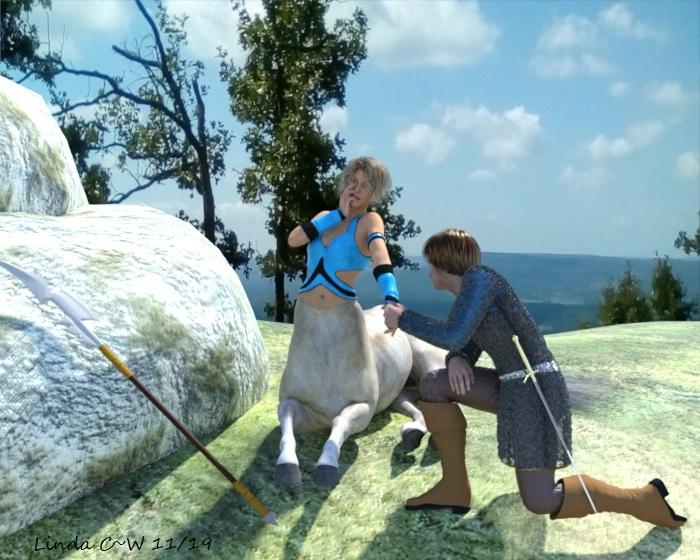
I did this in record time for me--2 days from concept to render. Not much of a story here, just a standard fantasy game trope--the Paladin laying on hands to heal a fellow warrior after they are done smiting (presumably) evil opponents. Sir Thomas and Lyssana have found a peaceful mountain overlook to rest and recover after their victory over a band of brigands.
The backdrop photo is an overlook at Petit Jean Mountain in Arkansas which I took when we went to see the eclipse.
Only postwork is signature
FREE
Sir Thomas
*G2M Bodysuit https://www.wilmapsdigitalcreations.co.uk/view_product.php?id=437
*G2M Medeval Set https://www.wilmapsdigitalcreations.co.uk/view_product.php?id=258
*Sword & Sheath https://www.sharecg.com/v/34332/related/11/Poser/Elfwine-Special
*Toulouse Hair G8F (G8 Starter Essentials) https://www.daz3d.com/genesis-8-starter-essentials & Dire Works long morph https://www.renderosity.com/mod/freestuff/sometimes-they-come-back-long-morph-for-toulouse-hair-for-g8f/83745Lyssana
*Estal Hair (Stephanie 6 Starter Bundle) https://www.daz3d.com/stephanie-6-starter-bundle
*Mage Armor for G2F https://www.renderosity.com/mod/freestuff/genesis-2-female---mage-armor/73297
*Polearm https://www.renderosity.com/mod/freestuff/2-polearms/64492*Rocks/ground (Hope Islands) https://www.renderosity.com/mod/freestuff/hope-islands---ground-rocks-and-3-backdrops-/41952
PAID
*Centaur 7F https://www.daz3d.com/centaur-7-for-genesis-3-female-s
*Chainmail (Metal Abounds Iray Shaders) https://www.daz3d.com/metal-abounds-iray-shadersNOT COUNTED
2D Backdrop--Petit Jean (Arkansas) State Park - photo by me 8/2017
G2M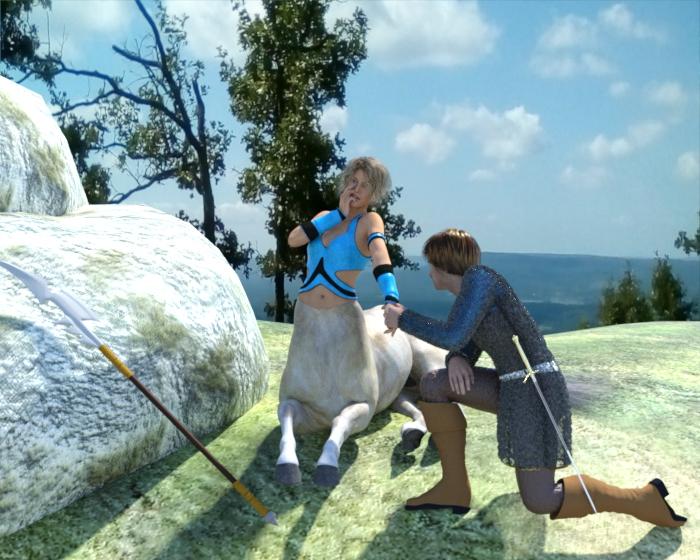
All Links Check Out Plz Move To Entries Thread
XTransfer Module 1- Genesis 3 to Genesis 8 Morph Converter (Commercial)To get Jade across all you have to do is favourite this morph.
XTransfer Module 1- Genesis 3 to Genesis 8 Morph Converter (Commercial)Is this character controlled by a character slider? Or is it just a mix of dialed morphs?
Base model is FWSA Jade HD for Teen Josie 7. I don't even recall setting most of the dials, so not sure where they came from. Though I created this character 3 years ago so I may have forgotten the process. Looking at the XTransfer folder I see a ton of characters being pulled in.
Getting a Duplicate error now when I load the scene with the G3F character in it:
019-12-01 19:21:39.740 WARNING: ..\..\..\..\..\src\sdksource\fileinput\dzassetdaz.cpp(5995): Duplicate formula found linking CMMClariceNavel & FBMClarice in /data/DAZ 3D/Genesis 3/Female/Morphs/Thorneworks/Clarice/MCMClariceNavel.dsf.
Finally found all the XT creatad files. For anyone curious, in Windows 10 search, to find files starting with XT_ use this:
System.FileName:~XT_*As a refresher, the conversion was running at over 4 hours and seemed to be on the same morph for most of that four hours.
I started with a clean scene and loaded FWSA Jade JD for Teen Josie 7. Here's what is currently in use:
- Scale 94.0%
- Render SubD Level (Minimum) 3
- Breasts Downward Slope 35.34%
- Breasts Implants -5.26%
- Breasts Natural -7.14%
- Breasts Perk Side 35.34%
- Breasts Shape 01 10.53%
- Jade Body 100% (default)
- Teen Josie 7 Body 50%
- Teen Josie 7 Body Slim 70.0%
- FW_Nails 70.0% (default)
- Teen Josie 7 Iris (hidden) 50.0%
- Teen Josie 7 Lashes (hidden) 50.0%
- FW_Lashes 25% (default)
- Mouth Realism HD 100% (default)
- Jade Head 100% (default)
- Teen Josie 7 Face Slim 75%
- Teen Josie 7 Head 50%
- Glutes Upper Depth 35.21%
- Legs Length 4.23%
- Thighs Tone 25.35%
- Navel 100% (default)
- Stomach Soften 10.21%
- MCM Josie7Navel (hidden) 50%
My character based on Jade differs from above as follows:
- Scale 100% (default)
- A bunch of hidden pJCMs that are set to 0%
The G3F XT_ files I found (oldest first):
- XT_FW_PHMLashes.dsf
- XT_FW_PBMNails.dsf
- XT_FW_PBMNails.dhdm
- XT_CMMClariceNavel.dsf
And for G8F, I moved and renamed the whole folder. Here's a list of all of the files:
S:\XTransfer_G8F>dir /s/b
S:\XTransfer_G8F\3D Universe
S:\XTransfer_G8F\DAZ 3D
S:\XTransfer_G8F\Digital Touch
S:\XTransfer_G8F\FWSA
S:\XTransfer_G8F\KayleyssAD
S:\XTransfer_G8F\Linday
S:\XTransfer_G8F\RareStone
S:\XTransfer_G8F\Silver
S:\XTransfer_G8F\Thorneworks
S:\XTransfer_G8F\Zev0
S:\XTransfer_G8F\3D Universe\G3FAmber
S:\XTransfer_G8F\3D Universe\G3FHaley
S:\XTransfer_G8F\3D Universe\G3FMegan
S:\XTransfer_G8F\3D Universe\G3FAmber\XT_MCM3duG3FAmberNavel.dsf
S:\XTransfer_G8F\3D Universe\G3FHaley\XT_MCM3duHaleyNavel.dsf
S:\XTransfer_G8F\3D Universe\G3FMegan\XT_MCM3duMeganStylizedNavel.dsf
S:\XTransfer_G8F\DAZ 3D\Arabella 7
S:\XTransfer_G8F\DAZ 3D\Base
S:\XTransfer_G8F\DAZ 3D\Base Correctives
S:\XTransfer_G8F\DAZ 3D\Base Pose
S:\XTransfer_G8F\DAZ 3D\Body
S:\XTransfer_G8F\DAZ 3D\Izabella 7
S:\XTransfer_G8F\DAZ 3D\Olympia 7
S:\XTransfer_G8F\DAZ 3D\Rune 7
S:\XTransfer_G8F\DAZ 3D\Sunny 7
S:\XTransfer_G8F\DAZ 3D\Teen Josie 7
S:\XTransfer_G8F\DAZ 3D\Tween Julie 7
S:\XTransfer_G8F\DAZ 3D\Arabella 7\XT_eJCMArabella7BreastsDownwardSlope.dsf
S:\XTransfer_G8F\DAZ 3D\Base\XT_PBMNavel.dsf
S:\XTransfer_G8F\DAZ 3D\Base\XT_PHMMouthRealismHD.dsf
S:\XTransfer_G8F\DAZ 3D\Base Correctives\XT_pJCMAbdomenLowerFwd_Navel.dsf
S:\XTransfer_G8F\DAZ 3D\Base Correctives\XT_pJCMAbdomenUpperFwd_Navel.dsf
S:\XTransfer_G8F\DAZ 3D\Base Pose\XT_eCTRLMouthOpen.dsf
S:\XTransfer_G8F\DAZ 3D\Body\XT_CTRLBreastsImplants.dsf
S:\XTransfer_G8F\DAZ 3D\Body\XT_CTRLBreastsNatural.dsf
S:\XTransfer_G8F\DAZ 3D\Body\XT_PBMBreastsDownwardSlope.dsf
S:\XTransfer_G8F\DAZ 3D\Body\XT_PBMBreastsPerkSide.dsf
S:\XTransfer_G8F\DAZ 3D\Body\XT_PBMBreastsShape01.dsf
S:\XTransfer_G8F\DAZ 3D\Body\XT_PBMGlutesUpperDepth.dsf
S:\XTransfer_G8F\DAZ 3D\Body\XT_PBMLegsLength.dsf
S:\XTransfer_G8F\DAZ 3D\Body\XT_PBMStomachSoften.dsf
S:\XTransfer_G8F\DAZ 3D\Body\XT_PBMThighsTone.dsf
S:\XTransfer_G8F\DAZ 3D\Izabella 7\XT_MCMIzabella7Navel.dsf
S:\XTransfer_G8F\DAZ 3D\Olympia 7\XT_pJCMOlympia7BreastsDownwardSlope.dsf
S:\XTransfer_G8F\DAZ 3D\Olympia 7\XT_pJCMOlympia7BreastsShape01.dsf
S:\XTransfer_G8F\DAZ 3D\Rune 7\XT_MCMRune7Navel.dsf
S:\XTransfer_G8F\DAZ 3D\Rune 7\XT_MCMRune7NavelHD.dsf
S:\XTransfer_G8F\DAZ 3D\Sunny 7\XT_MCMSunny7Navel.dsf
S:\XTransfer_G8F\DAZ 3D\Teen Josie 7\FBMJosie7Body.png
S:\XTransfer_G8F\DAZ 3D\Teen Josie 7\FBMJosie7BodySlim.png
S:\XTransfer_G8F\DAZ 3D\Teen Josie 7\FHMJosie7Head.png
S:\XTransfer_G8F\DAZ 3D\Teen Josie 7\XT_eCTRLJosie7Pouty.dsf
S:\XTransfer_G8F\DAZ 3D\Teen Josie 7\XT_eJCMJosie7EyelidsUpperDownUpL.dsf
S:\XTransfer_G8F\DAZ 3D\Teen Josie 7\XT_eJCMJosie7EyelidsUpperDownUpR.dsf
S:\XTransfer_G8F\DAZ 3D\Teen Josie 7\XT_eJCMJosie7Rage.dsf
S:\XTransfer_G8F\DAZ 3D\Teen Josie 7\XT_FBMJosie7Body.dsf
S:\XTransfer_G8F\DAZ 3D\Teen Josie 7\XT_FBMJosie7BodySlim.dsf
S:\XTransfer_G8F\DAZ 3D\Teen Josie 7\XT_FHMJosie7Head.dsf
S:\XTransfer_G8F\DAZ 3D\Teen Josie 7\XT_MCMJosie7EyesClosedL.dsf
S:\XTransfer_G8F\DAZ 3D\Teen Josie 7\XT_MCMJosie7EyesClosedR.dsf
S:\XTransfer_G8F\DAZ 3D\Teen Josie 7\XT_MCMJosie7Navel.dsf
S:\XTransfer_G8F\DAZ 3D\Teen Josie 7\XT_PHMJosie7FaceSlim.dsf
S:\XTransfer_G8F\DAZ 3D\Teen Josie 7\XT_PHMJosie7Iris.dsf
S:\XTransfer_G8F\DAZ 3D\Teen Josie 7\XT_PHMJosie7Lashes.dsf
S:\XTransfer_G8F\DAZ 3D\Teen Josie 7\XT_pJCMJosie7NeckBendBack.dsf
S:\XTransfer_G8F\DAZ 3D\Tween Julie 7\XT_MCMTweenJulie7Navel.dsf
S:\XTransfer_G8F\Digital Touch\DT-Jill
S:\XTransfer_G8F\Digital Touch\DT-Jill\XT_DTJillNavel.dsf
S:\XTransfer_G8F\FWSA\Dayna
S:\XTransfer_G8F\FWSA\Jade
S:\XTransfer_G8F\FWSA\Dayna\XT_MCM_FWSADaynaNavel.dsf
S:\XTransfer_G8F\FWSA\Jade\FBM-FWSAJade.png
S:\XTransfer_G8F\FWSA\Jade\FHM-FWSAJade.png
S:\XTransfer_G8F\FWSA\Jade\XT_FBM-FWSAJade.dsf
S:\XTransfer_G8F\FWSA\Jade\XT_FHM-FWSAJade.dsf
S:\XTransfer_G8F\KayleyssAD\Aurore
S:\XTransfer_G8F\KayleyssAD\Aurore\XT_PBMAuroreNavelHDlv4.dsf
S:\XTransfer_G8F\Linday\Satine
S:\XTransfer_G8F\Linday\Satine\XT_MCMSatineNavel.dsf
S:\XTransfer_G8F\RareStone\Kyla
S:\XTransfer_G8F\RareStone\Kyla\XT_MCMKyla Navel.dsf
S:\XTransfer_G8F\Silver\Ruby
S:\XTransfer_G8F\Silver\Ruby\XT_MCMRubyNavel.dsf
S:\XTransfer_G8F\Thorneworks\Clarice
S:\XTransfer_G8F\Thorneworks\Karly
S:\XTransfer_G8F\Thorneworks\Ktarya
S:\XTransfer_G8F\Thorneworks\Karly\XT_PBMKarlyNavel.dsf
S:\XTransfer_G8F\Thorneworks\Ktarya\XT_PBM Ktarya Navel.dsf
S:\XTransfer_G8F\Zev0\Bend Control
S:\XTransfer_G8F\Zev0\Bend Control\XT_Smoother Teen Josie 7 L.dsf
S:\XTransfer_G8F\Zev0\Bend Control\XT_Smoother Teen Josie 7 R.dsfDaz 3D is part of

Connect
DAZ Productions, Inc.
7533 S Center View Ct #4664
West Jordan, UT 84084Licensing Agreement | Terms of Service | Privacy Policy | EULA
© 2026 Daz Productions Inc. All Rights Reserved.