-
Yellow Prompts Discussion
Serene Night said:
Its not following the prompts. I asked it to make a superman, clark kent figure, with a cleft chin, bulging muscles, etc. It came up with a rather middle-of-the-road heavy-lifter guy.
It wasn't really able to interpret facial features to the extent that common words didn't seem to be interpreted well
I'm thinking why, and they state this,the models data is said to be "ethically sourced from only DAZ models" and so, the data for variance isn't even available for the AI to choose from. I think the only solution for Yellow is to get a caricature scultpting specialist and methodically morph DAZ models through a comprehensive set of caricatures and feed the data to their AIs without regard to whether they find the caricatures attractive or realistic. Then that data will be available to their AI. That's a lot of time and money to do that though.
Also, I think Yellow AI cannot do HD morphs, hindering it's ability to differentiate it's generations of morphs.
Map Transfer doesn't transfer the tilingsOh, [bother]! In this case, how do you create a texture add-on for a special cloth from a shader? Isn't any way to transfer the maps from the shader, with the tilings, to an UV map?

Edit: I also tried to send it to Blender by using the Daz to Blender Bridge, but the bridge ignore tilings too...
how to copy/paste a morph between left and right(mirror morphs)?crosswind said:
Sure thing. Pls follow the steps as below:
1) Go to the folder: your Daz Library\data\DAZ 3D\Genesis 8\Male\Morphs\RawArt\Reject, there's a file Raw_Reject-HD.dsf.(You can back it up to another place...) Open Raw_Reject-HD.dsf with Notepad++. Go to the line 24594, delete the code of HD morph link (ss 1~2). Ctrl + S to save.
2) Load a G8M or G8.1M Dev Load. Dial Raw Reject HD morph. Now you have a non-HD Reject character. (ss 3) But suggest you directly open the attached Reject.duf in which I've already created Selection Sets. If you want to know how to create Selection Sets for this case, refer to this video: https://mega.nz/file/CbRTELiA#Oy6SCPLB4-c7dWA9C23vuEnq_rDDkoMKOUP5MR19w4M
3) Select the figure, set its Resolution Level to Base, export the figure to OBJ file (name it as Reject.obj) via: File > Export....(ss4)
4) Import OBJ file with Morph Loader Pro with the settings in (ss5) Or, refer to this video: https://mega.nz/file/nD5RkKoD#ThMsX5dVKMABNCGfdWehhoY1TBF8Cm4eya4hXaLGE6A
5) As usual, Adjust Rigging to Shape, ERC Freeze, then Save Morph assets. Done ~Edit: Be noted, Adjust Rigging and ERC Freeze for the morphs have been done in the attached Reject.duf.
WOW!, this is amazing such a detailed and easy to understand explanation and you even shared already made duf file for me!.
thank you so very much i now understand how to do it again myself and the videos you made are great i saved them and your instructions just in case. again thank you so much :)
Yellow plug-in general discussionI tried this plug-in, but I have some doubts about how it works that I share here with you.
I also had the same experience as others: I wrote the text, nothing appeared, I rewrote it and so I (maybe) wasted a token. I created two characters with the same prompt. I also did not find the button that allows changes, before applying and saving. The result that I attach seems rather disappointing to me, compared to expectations and the prompt.
In image 1 the basic result, to which I then applied texture, hair and clothes. In the other images the result after resizing, since it was supposed to be a 6-year-old girl.
The character on the left is the first attempt, the one on the right the second. In the middle G9 base. In the first character you can see the deformation of the hands by posing, which is not there in the second.* In both the thigh muscles deform with the pose, but in the first more than in the second. (maybe the second token is not so wasted)
It is not possible to enlarge just the head a little (for the proportions of a child), because it deforms horribly.
They are too muscular, with adult proportions, especially the hands. Also there is something strange in the eyes. The addition of the term "chibi" was supposed to give cartoon proportions, with a big head, big eyes, a tender appearance. The result is instead a character that can be pleasant, but it looks more like a dwarf or a gnome than a cartoon-style child.
I probably need to learn to write the prompt better, maybe I didn't write it correctly now, but if I have to make a thousand attempts to get something that comes close to what I'm trying to get, maybe I can save money if I buy the characters and addons I need in the store, where I can have the support of the authors if something doesn't work. I leave this tool to more experienced people. Attached are the files of the attempts.* (I will try to follow the advice found in the forum. To save as a morph should I save as a character preset or as a shape preset?)
Map Transfer doesn't transfer the tilingsMap Transfer is used for converting texture maps across different UV sets... and it has nothing to do with Tile settings. I'm afraid you misused the function of Map Transfer ~~
Map Transfer doesn't transfer the tilingsHi! I used diffuse and normal maps on a cloth with a surface tiling of 3x3 and a normal map instance tiling of 4x4; then I used the Map Transfer, hoping that the tiling would be "saved" in the tranfered maps. I mean I tought that the pattern on the final diffuse map would be repeated 3x3 times, since I used a surface tiling of 3x3 before transferring, and the "detail" on the normal map would be repeated 12x12 times, since I used a 4x4 instance tiling for the normal map...
Then, I loaded the same cloth but without tiling, and applied my transferred maps, thinking to obtain exactly the same thing as on the cloth from which i transferred, but everything appear like if I used a 1x1 tiling before the transfer. So, it seems that tiling was ignored by the Map Transfer... Is there a way to make Map Tranfer transferring the tiling effects too?
I used these settings for the transfer:
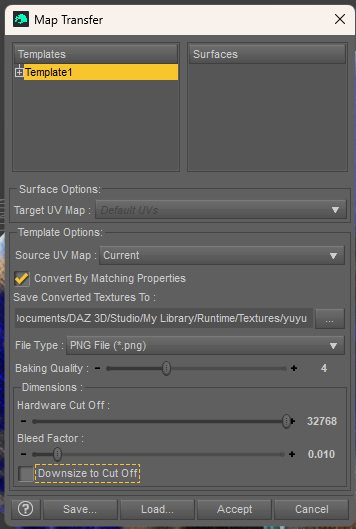
I am trying to create a texture add-on for a cloth by using a pattern shader that I created, that is why I would like to use the Map Transfer, to get maps specificly for this cloth...
Thank you in advance for your help!
Yellow Prompts DiscussionWonderland said:
What would be cool is if we could take images from Midjourney or any photo, upload it and have Daz Studio create a 3D Daz character, hair, clothes and lighting based on the image we upload.
I've used the DA site's generative AI to take photos of people and generate portraits of them, often as a 3d version or some such, Then I take the best of the portraits into Facegen and from that create a face morph. That's worked for me with some success if I can get a relatively good pic. I also have an AI that will take a photo that isn't full front and correct it to be facing front and that's helped too. So AI "can" be useful, in a roundabout way.
how to copy/paste a morph between left and right(mirror morphs)?Sure thing. Pls follow the steps as below:
1) Go to the folder: your Daz Library\data\DAZ 3D\Genesis 8\Male\Morphs\RawArt\Reject, there's a file Raw_Reject-HD.dsf.(You can back it up to another place...) Open Raw_Reject-HD.dsf with Notepad++. Go to the line 24594, delete the code of HD morph link (ss 1~2). Ctrl + S to save.
2) Load a G8M or G8.1M Dev Load. Dial Raw Reject HD morph. Now you have a non-HD Reject character. (ss 3) But suggest you directly open the attached Reject.duf in which I've already created Selection Sets. If you want to know how to create Selection Sets for this case, refer to this video: https://mega.nz/file/CbRTELiA#Oy6SCPLB4-c7dWA9C23vuEnq_rDDkoMKOUP5MR19w4M
3) Select the figure, set its Resolution Level to Base, export the figure to OBJ file (name it as Reject.obj) via: File > Export....(ss4)
4) Import OBJ file with Morph Loader Pro with the settings in (ss5) Or, refer to this video: https://mega.nz/file/nD5RkKoD#ThMsX5dVKMABNCGfdWehhoY1TBF8Cm4eya4hXaLGE6A
5) As usual, Adjust Rigging to Shape, ERC Freeze, then Save Morph assets. Done ~Edit: Be noted, Adjust Rigging and ERC Freeze for the morphs have been done in the attached Reject.duf.
how to copy/paste a morph between left and right(mirror morphs)?I think he created his own vertex selection set called "Right-Arm" in Tool Settings -> Geometry Editor.
Then in Morph Loader Pro, he set these options:
Morph Mirroring -> X: Swap
Reverse Deformations: Yes
Overwrite Existing: Deltas Only
Atenuate By: Genesis8_1Male:facelist::selectionset::Right-ArmWell, he loaded them from his own custom Preset "Delta Fixing", but that looks like it. To change those options, like "X:Swap" and "Deltas Only", you must use the right-click mouse button. They don't show up any other way.
Share your Yellow resultsGot this from a simple prompt. Then added the Base Mascline morph. Then Matts textures. I wouldn't us this "as is" in my work but as a baseline to create a more detailed character I think it makes a pretty good start. The fact that Yellow only uses G9 makes it quite restrictive so unless G8 & G3 are added then I don't think that many people would use it. Something like this built inside Studio I think makes more sense.
 how to copy/paste a morph between left and right(mirror morphs)?
can i ask how to do all that? i don't mind no HD morphs.
i really want to know how did you do it like in the images you posted.
can you maybe explain it more details? like what is ss 1 ~ 2?
in Morph Loader Pro i need to load a morph do i need to load the original morph?
i would really appreciate your help!!
Charlie 9leemoon_c43b45a114 said:
My usual mixing of characters...
Mostly Charlie, but also a bit of Harlow, Fibo, and a few shaping morph packs were involved. He's using an adjusted version of Thimor's skin, probably another product's eye materials, and my eye reflection settings (for subtle highlights.)
Also, this is the first render I've shown using Pixelmator Pro (Mac) for post-work image processing. Still playing with general stylistic settings as the tools are a bit different from Photoshop Elements.
Lee
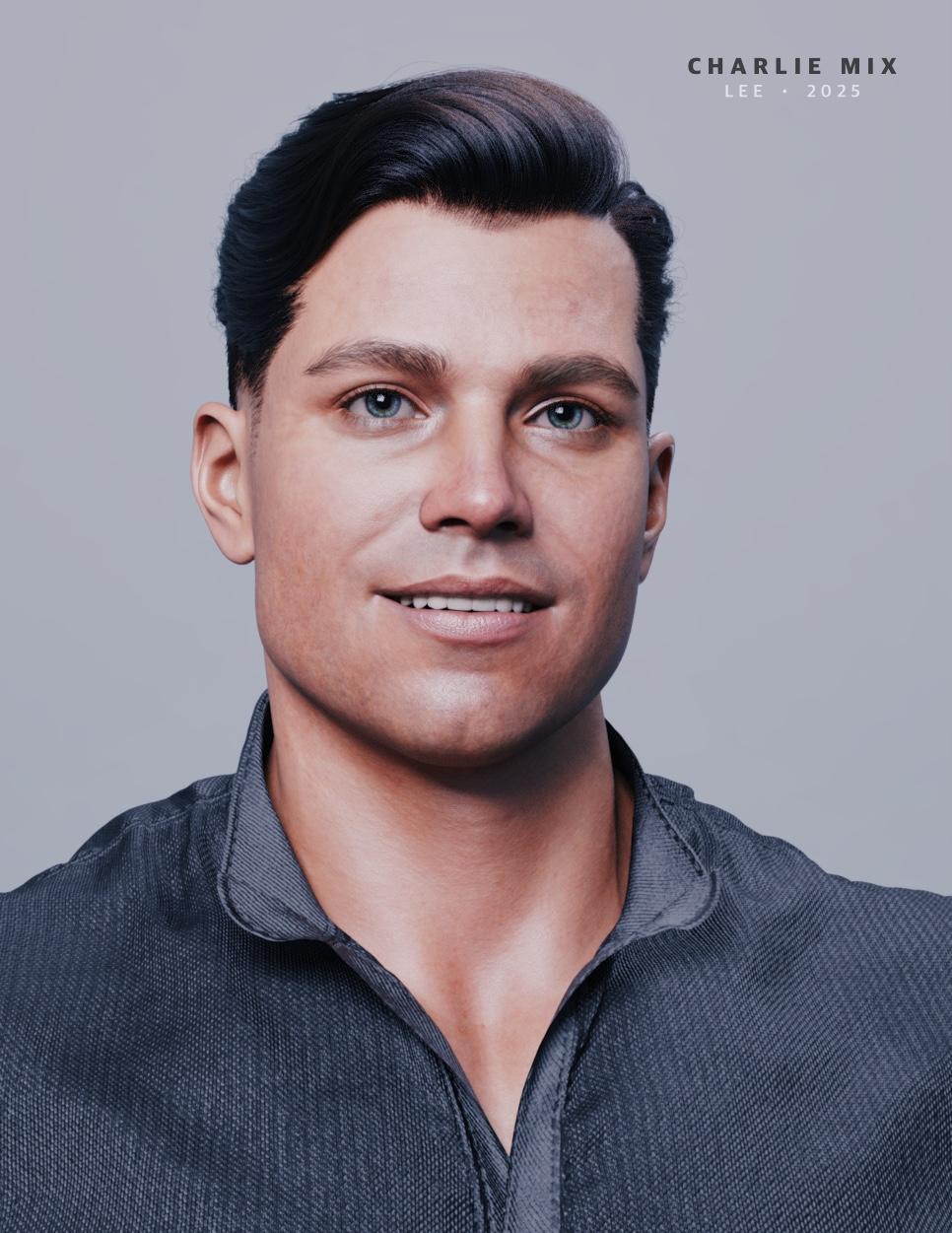
This is a great mix. I remember Thimor's skin been great
how to copy/paste a morph between left and right(mirror morphs)?You can easily make it by using Morph Loader Pro with Mirroring + Attenuate By options. (ss 1 ~ 2).
However, unfortunately Daz doesn't provide HD addon for Morph Loader Pro to the users (to PAs only), so you won't get the HD result but just Base mesh. You may have to turn this HD character into non-HD if you want to go for the above way. (ss3) ... and need to mirror Corrective morphs as well.
For flipping pose, you can use Symmetry function by pressing Shift + Y.
how to copy/paste a morph between left and right(mirror morphs)?Seven193 said:
You can symmetrically flip poses, as poses are bone-based, but morphs are different.
Morphs are vertex-based, so you would need a special tool that knows which vertex belongs to its symmetry pair. I don't think Daz Studio has any built-in tools to do that.
thank you for replying!
can you elaborate about flip poses? what do you mean by that?
what i want is to save it as a new morph so i can convert it to a another genesis version. is there a tool that can do that? even paid one would be ok
how to copy/paste a morph between left and right(mirror morphs)?hi, so i have the morph RAW REJECT HD from RAWART and i want to change it a bit.
in the original morph the left arm and right leg are mutated, i want both arms and legs to be mutated, how can i do that?
i would really appreciate the help!
Content to new computer- transfer or reinstall?SteveM17 said:
Mattymanx said:
If you are transfering over USB 2, then yes. If you have USB 3.0 or 3.1, then not so much. But all devices must support the faster transfer speed if you wnat to take adavantage of it
Are those the type of cable or the usb port of the machines?The ports, cables and devices must all support the same USB standard. So if they all support USB 3.2, then everything will tranfer at USB 3.2 speeds. But if one item only support USB 2.0, then you are stuck at USB 2.0 speeds no matter what.
product requestHi product makers,
I was wonderingn if someone could make a HD lip morph that has the vertical groove in the centre of the lower lip and the two bulges on each side but without all those tiny llittle lumpy bits over the whole lip, that no doubt the vendor feels make the character look realistic. I'm going for a toon look anyway but even if i wasn't, lipstick makes those lumps disappear and honestly, in my opinion, those little tiny lumps and lines all over the lips just make the characters look older than i want, and don't add a lot to realism. Whilst i do appreciate that the look does have a place, i would love it if there were some more HD characters that just had the main lip shape with the central groove. i find that beebite look is hard to reproduce with just dials because of the lack of polys in the base figure. But all the characters that have the look i'm after with the central line/groove, also have the other little grooves and lines all over the whole lip which i don't want.
Love esther
Charlie 9nemesis10 said:
leemoon_c43b45a114 said:
My usual mixing of characters...
Mostly Charlie, but also a bit of Harlow, Fibo, and a few shaping morph packs were involved. He's using an adjusted version of Thimor's skin, probably another product's eye materials, and my eye reflection settings (for subtle highlights.)
Also, this is the first render I've shown using Pixelmator Pro (Mac) for post-work image processing. Still playing with general stylistic settings as the tools are a bit different from Photoshop Elements.
Lee
I am a big fan of Pixelmator Pro; I had to use Photoshop for 30 odd years professionally and I hope that Apple goes good things with now that they purchased irt.
I picked up Photoshop in the 1990s while living in Tampa, Florida. Used it until it went subscription then started using Photoshop Elements when that was available. PSE 2020 no longer runs on my new M4 iMac and I had Pixelmator Pro already, but had barely used it until today. I like it a lot and believe that I can get the same sort of streamlined workflow that I was using in PE 2020 for post work. I also hope Apple gives it some good love as the new owners. :)
*EDIT*
Just looked in my old tech stuff and found the Photoshop 2.5 installer floppy disks. Looks like thhose were from 1989. I also have the floppies for Illustrator and Dimensions, My next door neighbor in Tampa was a major graphic designer in the area. He saw me come home with the Adobe suite one day and asked if I was a pro graphic designer. Told him I was just a hobbyist. He said that's over $1000 for a hobby right there. Yep, but I enjoy my hobbies. I used Photoshop and other tools to create assets for my Apple Newton apps back in the day. Wrote a bunch of tech demos including a video player, 3D vector flight game, multimedia viewer/player, text to speech app, a couple of VR style demos with instructions on how to zoom between different 360 bubbles when navigating between various 360 images - Google Street View does the same thing now that I described back then. Apple's lead manager/engineer for the Newton team had me create a special version of an Apple ad in my video player. They showed it to Steve Jobs after he returned to Apple in the hopes they could keep the Newton project alive. Which it eventually did as the iPhone and iPad.
Lee
Charlie 9leemoon_c43b45a114 said:
My usual mixing of characters...
Mostly Charlie, but also a bit of Harlow, Fibo, and a few shaping morph packs were involved. He's using an adjusted version of Thimor's skin, probably another product's eye materials, and my eye reflection settings (for subtle highlights.)
Also, this is the first render I've shown using Pixelmator Pro (Mac) for post-work image processing. Still playing with general stylistic settings as the tools are a bit different from Photoshop Elements.
Lee
I am a big fan of Pixelmator Pro; I had to use Photoshop for 30 odd years professionally and I hope that Apple goes good things with now that they purchased irt.
Content to new computer- transfer or reinstall?Masterstroke said:
If you don't, you can just reinstall, but if you have modified content you need to back up it and transfer it to your new computer. (Takes almost half of the day for me)
I'm usually saving the morphs I'm creating in an empty library called morphs, so it's easier to keep track of them.
Of course, I forgot to do it for some of them but a Bash script solved the problem nicely (~30 lines, likely 30 minutes to write and test them, after spending some time trying to copy them with the Finder before remembering I know my way around Bash
 ).
).If you know your way around a shell langage (I don't know if Bash can be used directly on Windows, it should be possible to do so through the Windows Linux Subsystem, but it's a bit of a heavy handed approach to have a full Linux distribution running to run a 30 lines script
 ), it's easy.
SteveM17 said:
Are those the type of cable or the usb port of the machines?You need both: USB 3 ports on your computer (it should be a given if your computer was bought this last 10 years) and an USB 3 cable to take advantage of the speed offered by USB 3. And of course, you need an USB 3 hard drive.
Regarding the speed, a 3.5" external hard drive will be faster than a 2.5" external hard drive and an external SSD will be faster than both.
Daz 3D is part of

Connect
DAZ Productions, Inc.
7533 S Center View Ct #4664
West Jordan, UT 84084Licensing Agreement | Terms of Service | Privacy Policy | EULA
© 2026 Daz Productions Inc. All Rights Reserved.