-
AIUTO...CHI CONOSCE L’ITALIANO? PARTE DODICI
Ciao a tutti!
stavo cercando info su filament e ho trovato finalmente una pagina in italiano su Daz! ne approfitto! Che voi sappiate su Mac Filament non funziona? I renderizzo solo in Iray ma faccio rendering base poi edito in photoshop.
A proposito del discorso di fare props e character o morph ma con tutti i morph che ci sono nello store si possono personalizzare pressochè all'infinito i personaggi quindi penso che o fai qualcosa di particolare davvero oppure non valga la pena.
Per i props invece avete mai guardato turbosquid e sketchfab? basta scaricare l'obj e poi importi facilemente in Daz c'e davvvero una marea di roba!
Se si va di conoscermi cercatemi su Instagram @danielegay_arts (gay è il mio cognome e so che causa equivoci ma è solo un cognome)
Buon weekend!
Auto Muscle Enhancer HD [Commercial]Sigurd, WOW that is a lot of combinations of skins! I am finding that lighting choices also matter a lot. Picked up some portrait lighting presets I am playing with now. I definitely like the Filament speed, and it has led me into more animations. Also been trying to simplify my setup and working on some soft body dynamics. It's those pesky breasts when working with the G8F clone that I use. Some early promising results, but nothing I am willing to post yet. TD
Workarounds to Allow For Emissive Light and Shadows FilamentIf you want to see some nice examples of filament just visit my insta page https://www.instagram.com/ted_werdolfs_photoart/
My WIPS, renders and animations :)I rendered an old animation with Filament, it turned out not too bad.
2020-12-12 10:41:28.542 Total Rendering Time: 42.50 seconds

127
Novica & Forum Members Tips & Product Reviews Pt 13I rendered an old animation with Filament, it turned out not too bad.
2020-12-12 10:41:28.542 Total Rendering Time: 42.50 seconds
Show Us Your Iray Renders. Part VIII rendered an old animation with Filament, it turned out not too bad.
2020-12-12 10:41:28.542 Total Rendering Time: 42.50 seconds
Filament tutorials/shaders/lights?I rendered an old animation with Filament, it turned out not too bad.
2020-12-12 10:41:28.542 Total Rendering Time: 42.50 seconds
Filament tutorials/shaders/lights?joramabbas said:
I think Filament has potential to become a monster engine....the negative comments are understandable, but they don't help the developers to push it to new heights. The thing I've liked so far apart from the render speed, is the ability to use iray PBS shaders by first converting them to 3delight. With lighting, most Iray lights -None HDRI will work and a few. I mean a few 3delight works. The thing I would request the developers to work on are shadows..a plane that catches shadows when using HDRis. I tried using IBL master control- ground panel, but no luck.
Thanks for this great engine!!
Agreed. Filament is an excellent new tool and I hope to see it improved upon greatly in the near future. What I would love to see is a means by which to add emissive lights to the mix. There are ways of creating lights, so there has to be a means to add emissive lights as well.
Art & Animations By Ivy SummersI seen some pretty cool stuff done with filament on the Internet . it was all the rage on google when it first came out . i have played with it in daz 4.14 Bata few times , the renders remind me of something from a game engine. the way it works reminded me a lot of the 3dl set up specially the lighting. But I had to save my scene like every step I made because 4.14 studio would crash so much I was turning the air blue in my house. so i stopped messing with it,.
The prep & set up times for filament is about the same as Iray. thought using points of light for dramatic back lighting behind props was something I liked in 3delight and with filament you can to do stuff like that a lot to make your scenes look right.so if your use to scene set up and rendering in 3delight then the switch to filament should not be a hard leap for most people.
right now I have my iray render times down to around 12 to 15 second a keyframe for complex scenes which is not to bad but a lot of prep time. Plus its my personal opinion that iray looks better. but as the bugs get worked out for filament and better shader are other improvements are develop i may start using filament. but for now iray is working out pretty good for me .
On Another Subject dealing with animation.
I am a bit pissed off. I was one of the first people to submit a entry into the renderosity dreams animations contest I went all out on it. But over 2 months time later the Renderosity dev,s could not get my h.264 mp4 video which they said was required format to upload to their website. when everyone else could so my Animation submission could not be embedded into the contest & only downloaded as a link...Forget that noise letting a HD high-end animation be downloaded with out water marks.
So needless to say I was told my animation did not get submitted because I was told their website was so screwed up.WTF , pisses me off to no end.. A month of animation work for a 1.37 minute 3d animation to meet all the requirements made specially for a contest that it can't now be uploaded to for submission... Boy that sure feels like the fix is in . does not give much confidence on buying things there for sure,.
I'll upload the animation I made for the contest to YouTube later this weekend after i get done pouting and pissing and moaning about this bulls****t
it makes me want to scream.
Art & Animations By Ivy SummersIvy said:
Knittingmommy said:
Hi @Ivy. I'm curious have you done any animations in Daz Studio 4.14 yet? I've been playing around with it and using Animate2 has been super slow and buggy even after sending everything over to keyframes. If I skip Animate2 and do everything in keyframes, everything seems to work fine. I'm just curious if you've tried using it and what your thoughts are. Or any tips or suggestions.
No I'm sorry I have not. I have the beta 4.14 but like you said its so buggy it frustrated me to death..lol So I am still using iray
Yeah, it's a shame because I accidentally figured out you can render with the 3Delight system from the viewport, I think. I'm still experimenting with that. It's looks like 3Delight, but it's much faster than rendering using the 3Delight render engine. I'm not exactly sure what's going on there. But I'm having to do all the animation stuff in DS 4.12 and then open my saved files in DS 4.14 to see what the heck it's doing. It's frustrating. At any rate, I'm working on a project in DS 4.12 that I hope to render in the viewport in DS 4.14 but not in Filament to see what happens. I think it will be faster, but without the hair transperancy issues that Filament has. Or it could all be a big waist of time.
Auto Muscle Enhancer HD [Commercial]Ok, I am still playing with the filament skins. I am currently rendering ever permutation of the skins, unthinkable without the filament insta-render, and have found one that is the closest for what I am looking for (so far). Keep in mind this character is from a wintery high-grav planet. Let me know what you think. I appreciate your comments and or critiques.
Can't find my "Environment" and "Tone Mapping" tab under render settingsAdd the nodes, with whatever non-default values you want, and save as a scene. You can then use the Start up and/or Scene tabs of Preferences (Edit menu for Windows, Daz Studio menu fior Mac) to have DS load that scene on start up/File>New.
The immediate reason for the change, I believe, was the addition of Filament with its own, similar settings in the Draw Settings pane. However, having them as nodes does open up other possibilities for future development, such as making properties animatable.
New DS Filament Render EngineSevrin said:
nonesuch00 said:
onix said:
Looks like this filament introduced a lot of new crashes into Daz.
Most of them happen when you try o switch rendering engines, and typically attempt to use iray and filament at the same time will need badly so if you are trying to do final rendering or want to use iRay viewport preview you can have a filament running or open at the same time
although it is quite strange that filament manages to run faster than opengl for some reason
The advanced openGL is slower to render on my PC than an iRay render.
I am getting my Filament crashes just switching from whatever viewstyle in the ViewPort to Filament. It also doesn't matter what I have the actual renderer set to either: 'Viewport', iRay. 3DL, switching to Filament in the Viewport crashes DAZ Studio PB 4.14.1.22
This isn't universal. I've no issues switching to the Filament draw-style in the latest public build, at least with the simple scenes I've tried it with. My DS is pretty vanilla, though. No Octane, or anything.
So much for that. Lost about an hour's setup when I forgot that this was a thing. Disabled the Filament plugin until I hear it's safe to go back to it.
Daz Studio Pro BETA - version 4.15.0.30! (*UPDATED*)I have much to discuss and want to know about the 4.14 beta especially in regards to Filament so was actually considering starting a new thread as this one unusable, I don't want to just post in the Filament thread either as it really is to do with the beta as a whole.
getting onto page 5 does indeed seemed to have fixed it, any information on 4 if any is however lost to us. I had refrained since my other post as was asked not to try and fix it by the mods. Now we can post here however discussion back on topic on the beta would be a great idea.3D Print Questions - Differences in slicer software, cost of printer.30 cm is probably right on the top limit of being practical on a resin printer, though 20cm is more like it. If you think 15 seconds a layer, and a layer thickness of .025mm, stacking up to make a 300mm model.. that's up to 50 hours of printing at best resolution, you can cut it down by increasing layer thickness at the cost of reduced vertical resolution. 30 cm is also higher than the build height most resin printers will go, and will need breaking down to smaller parts. Then think of the volume of resin. The amount may need to be topped up during a build, which is not easy with a big part, if it runs out in the middle of the night it will blithely carry on and the part will need scrapping as you will never get it to align again.
With a 30 cm build, you're probably best served by a filament printer, but I hope you are not disappointed by some of the low Res details.
The office where I work has a filament printer next to the paper printers (a Sindoh 3DWOX) - was a freebie when we changed to SolidWorks 2019. In comparison to my home resin printer, it's pleasant to live with, marginally noisier during operation, and much, much faster. The post processing is small and in comparison the parts are good, but vaguely disappointing on the quality side, they feel rough, a bit flimsy and very light. The slicer puts on a skin and builds up a low percentage fill inside the model. On a resin printer the slicer will often have the capacity to do a void inside, but go for a 2mm thick skin or even thicker - unlike a filament printer there is no time penalty to making the model solid - just a resin usage penalty.
If possible, it sounds as if you need to see one in use, that'll be the best way of deciding.
Regards,
Richard
3D Print Questions - Differences in slicer software, cost of printer.There are printers with self leveling print beds, my filament printer has one. My first one didn't and it was a PITA so when I got a second one I made sure of it.
Printing things bigger than your print bed is reasonably easy. You cut the model up, in something like Netfabb, so the pieces are each small enough to fit in the build volume and then add in clips/pins etc. to hold the pieces together (if you've ever build a traditional plastic model or done any woodworking you'll have an idea of what is needed). Then you print each one and put them together. It takes a while but it's certainly doable and a lot cheaper than getting a large format 3d printer.
3D Print Questions - Differences in slicer software, cost of printer.richardandtracy said:
What are you trying to do? Small figures with fine detail will be better in the photo-cure printer. It will probably be slower. Most resins will be utterly vile smelling in comparison to the filament printer. You will need to wash the excess resin off afterwards too, probably in a container of Isopropyl alcohol, then you may need some post cure with sunlight or under a UV LED lamp. So, what you gain in resolution you pay for in a much less pleasant printing process.
Acetone is used on filament printer models, it slightly dissolves the surface so as to smooth it off and make it more difficult to see the different layers. It doesn't cure the filament plastic at all. The layers can be 0.25mm, while the resin printer gets layers down to 0.025mm at fine resolution, so it's almost impossible to see the layers. Do not use acetone on resin printer models if you want to keep detail.
The liquid resin printer will make a much smaller object than the filament printer and do it more slowly. The resin probably costs more too. It's all down to how much detail you want. The filament printer can't compete on high detail and fine resolution, but can make bigger and faster.
As for the final question, can you use different resins? Yes. But they need to be resins with the same UV frequency cure, and designed for this LED UV cure method. Some cure too slowly for the DLA method used in the printer. You will need to try out each different resin in the printer before doing a big job. And I do mean each different resin - it could be the same chemistry from the same manufacturer but a different translucency and colour so the cure may be a bit different, and get different overcure level depending on how far the resin transmits/absorbs the UV.
I won't recommend either printer as I don't know what you want them for, or whether you have somewhere away from your immediate living rooms for the resin printer. But, printing 35mm figures for my daughter's Warhammer type figures, HO figures for my railway and 90mm high models of V3, I got an Anycubic Photon, and used it in my garden workshop. A filament printer would have been totally unsuitable for the detail wanted.
Regards,
Richard
Thank you for taking the time to reply.
I would like to print figures. I have my own Daz Studio character that I would love to have 3d prints of (just for display). In regards to figure size, my ideal size would probably have to be printed by an industrial printer ^^'. But I'd settle from miniature to 30cm (if possible).
I'd like to think we had the space to accomodate a resin printer (mainly by the back door. But I can't see anyone appreciating that in Winter). And the only thing that bothers me with a filament printer, is leveling the bed. Most reviews that I've read, make that bit sound very difficulty (or almost impossible). Oh, and I'm scared of breaking the printer during assembly.
!! Store Issues - Known Problems - Please Read !!Artini said:
On the positive side, I finally got all parts of https://www.daz3d.com/tinkerers-workshop so thanks for it.
It is a bit heavy on resources, but looks very nice. 8GB of video memory was not enough to render it, though.
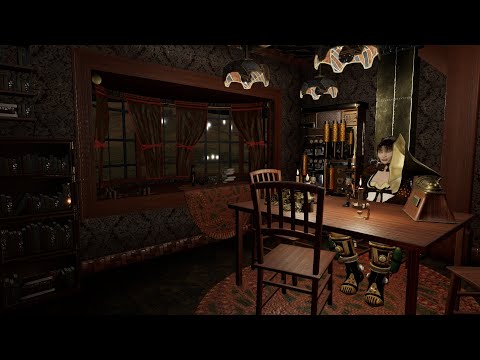
yeah my 980ti didn't stand a chance but it fit on Filament
video
 3D Print Questions - Differences in slicer software, cost of printer.
What are you trying to do? Small figures with fine detail will be better in the photo-cure printer. It will probably be slower. Most resins will be utterly vile smelling in comparison to the filament printer. You will need to wash the excess resin off afterwards too, probably in a container of Isopropyl alcohol, then you may need some post cure with sunlight or under a UV LED lamp. So, what you gain in resolution you pay for in a much less pleasant printing process.
Acetone is used on filament printer models, it slightly dissolves the surface so as to smooth it off and make it more difficult to see the different layers. It doesn't cure the filament plastic at all. The layers can be 0.25mm, while the resin printer gets layers down to 0.025mm at fine resolution, so it's almost impossible to see the layers. Do not use acetone on resin printer models if you want to keep detail.
The liquid resin printer will make a much smaller object than the filament printer and do it more slowly. The resin probably costs more too. It's all down to how much detail you want. The filament printer can't compete on high detail and fine resolution, but can make bigger and faster.
As for the final question, can you use different resins? Yes. But they need to be resins with the same UV frequency cure, and designed for this LED UV cure method. Some cure too slowly for the DLA method used in the printer. You will need to try out each different resin in the printer before doing a big job. And I do mean each different resin - it could be the same chemistry from the same manufacturer but a different translucency and colour so the cure may be a bit different, and get different overcure level depending on how far the resin transmits/absorbs the UV.
I won't recommend either printer as I don't know what you want them for, or whether you have somewhere away from your immediate living rooms for the resin printer. But, printing 35mm figures for my daughter's Warhammer type figures, HO figures for my railway and 90mm high models of V3, I got an Anycubic Photon, and used it in my garden workshop. A filament printer would have been totally unsuitable for the detail wanted.
Regards,
Richard
Daz Studio Pro BETA - version 4.12.2.60! (*UPDATED*)Dazzleme said:
Just installed a 3090 today..working with Daz 4.12 (dont want to go to filament yet) and I can confirm that even with the latest Nvidia studio drivers (or game ready) 456.71 daz will render NOTHING in Iray preview or Render mode..I have tested my gpu ad nauseum today for hours, the card is working fine and all systems check out well, its definitely Daz..two days ago I could render splendidly with my 1080TI, quite quickly even but wanted the new card for gaming and especially to use the higher Vram to render more complex scenes in daz..as even the 11 vram is a limiting cap with the 1080ti, so..nothing to do but wait until Daz figures this out, anyone else had ANY Luck with the 3080/3090 series cards? Im not trying to whine, Im grateful to have the card as I built a new system in November and just today got my hands on the new card.
Try using a clean install of the driver version that is listed as the minimum in the Highlights/Iray threads. Note that Ampere support requires or 4.12.2.31 later http://docs.daz3d.com/doku.php/public/software/dazstudio/4/change_log_4_14_0_10#4_12_2_31
Daz 3D is part of

Connect
DAZ Productions, Inc.
7533 S Center View Ct #4664
West Jordan, UT 84084Licensing Agreement | Terms of Service | Privacy Policy | EULA
© 2026 Daz Productions Inc. All Rights Reserved.