-
Daz Studio Pro BETA - version 4.15.0.30! (*UPDATED*)
IceCrMn said:
-
Source maintenance
-
Update to NVIDIA Iray 2020.1.2 (334300.5582)
-
Added pbr_skin.mdl shader
DAZ Studio : Incremented build number to 4.14.1.12
Where do I find this new shader, I can't seem to find it.
I'd like to know too. It sounds like something made for use in Filament though.
Auto Muscle Enhancer HD [Commercial]Sigurd said:
Ok, I am still playing with the filament skins. I am currently rendering ever permutation of the skins, unthinkable without the filament insta-render, and have found one that is the closest for what I am looking for (so far). Keep in mind this character is from a wintery high-grav planet. Let me know what you think. I appreciate your comments and or critiques.
I think without subsurface scattering that's about as good as you can get. Maybe reduce glossiness by 50% to help hide lack of subsurface scattering.
3D Print Questions - Differences in slicer software, cost of printer.Marcus Severus said:
Just to add two things:
1 The printer arrived at my address in the UK less than a week after ordering - I guess it was shipped from somewhere in the UK. Looking inside it is beautifully packed in foam compartments and without taking anything out, it seems to be of very good quality. I ordered and paid for a reel of filament at the same time. The printer comes with a small quantity - not much apparently. Anyway, the reel I ordered came separately from China and had travelled a good deal from place to place before even leaving that country. It finally arrived sometime in January, I think it was. Maybe COVID was to blame at that time in China.
2 I haven't been able to figure out whether 3d Coat going subscription means that permanent licences will no longer be available to buy. The various interpretations of their plans are a bit confusing.
if it is the same as most, the filament is enough to maybe set the unit up and test it. IMPORTANT: There are tons of videos on setting the Ender up. Check out CHEP and Luke Hatfield. Luke is the Ender 3 guru for sure. He wrote the "bible" on setting up the Ender 3. There is a series of videos based on his work that are very good and understandable.
https://www.youtube.com/channel/UCsdc_0ZTXikARFEn2dRDJhg
another thats good and covers many subjects. https://www.youtube.com/channel/UC5Lbnd97HV3rU98gcwHklzQ
Why does Ulrike render time is so fast?WendyLuvsCatz said:
compression?
I have actually discovered the trick of resaving some jpgs in MSpaint under a new name and getting them to render faster, some actually need it done to show up in Filament, jpg is a lossy format so it is reducing the quality but if only a copy not the original useful for things that are too heavy otherwise rather than reducing the dimensions.
I honestly have no idea, Iam quite a noob if you ask me, but one thing I know for sure is, Ulrike's textures or shading option is what make her render time so fast.
If you have her, go and try it out friend.
Why does Ulrike render time is so fast?compression?
I have actually discovered the trick of resaving some jpgs in MSpaint under a new name and getting them to render faster, some actually need it done to show up in Filament, jpg is a lossy format so it is reducing the quality but if only a copy not the original useful for things that are too heavy otherwise rather than reducing the dimensions.
Filament bring out the RendersThe adorable Bebe High rendered with Filament.
 3D Print Questions - Differences in slicer software, cost of printer.
Just to add two things:
1 The printer arrived at my address in the UK less than a week after ordering - I guess it was shipped from somewhere in the UK. Looking inside it is beautifully packed in foam compartments and without taking anything out, it seems to be of very good quality. I ordered and paid for a reel of filament at the same time. The printer comes with a small quantity - not much apparently. Anyway, the reel I ordered came separately from China and had travelled a good deal from place to place before even leaving that country. It finally arrived sometime in January, I think it was. Maybe COVID was to blame at that time in China.
2 I haven't been able to figure out whether 3d Coat going subscription means that permanent licences will no longer be available to buy. The various interpretations of their plans are a bit confusing.
3D Print Questions - Differences in slicer software, cost of printer.This is an interesting thread for me at the moment because I am going to be starting 3d printing fairly soon. Many people might be aghast to hear that I bought my 3d printer on Black Friday ---LAST YEAR's Black Friday and apart from opening the box to look inside, I haven't even unpacked it yet. Yes, I've had too many other things which took priority this year.
The printer I bought was the Creality Ender3 Pro and I'm hoping it will make adequate prints of figures in historical costumes and robes.
I recently upgraded to the professional version of 3d Coat in order to sculpt my own work. 3d Coat is soon going to go to a subscription payment scheme and I rushed to buy the upgrade only to find a few weeks later that I could have saved $99 if I'd waited for Black Friday. That hurt, I can tell you.
Anyway, 3d Coat has 3d printing tools built in now and these are sold as a stand-alone product for those who might want these but not the full-blown software.
I don't regret going down the filament path because one reason I haven't started using my printer yet was lack of space - I built a large shed during lockdown and now have a lot of clutter stored there. Even so, I wasn't willing to dedicate a safe space for a resin printer. They are superb, of course but seem to need a lot of caution in order to use the chemicals safely. Something I don't hear mentioned often is the need to ensure that the print doesn't become an enclosed container full of of un-cured resin. But I'm sure they will come with plenty of safety advice.
Daveso, thanks for the video, it is encouraging me to get moving on the build (soon!)
Also, thanks for the Creality web link. When I bought mine I had trouble deciding which of the web-search results pointed me to the genuine manufacturer. In the end I chose the correct one but joined PayPal to pay for it hoping I would have an extra level of security.
I've lost some basic options in Render SettingsCreate>New Tonemapper Options Node..., or render, or use the Iray/Filament drawstyle.
If yiou regularly want to adjust the settings before performing the actions that would create them consider saving a scene with the options nodes already created, then in Preferences (Edit menu under Windows, Daz Studio menu under MacOS) set DS to load that on Start up or New scene.
Extreme lag- tried every possible solution I can findkenshaw011267 said:
badar80 said:
kenshaw011267 said:
Your graphics are just woefully bad. You should try the filament view in the viewport and if/when that doesn't help try wireframe. You need to cut down the load on your graphics card to something it can handle. But realistically that machine is always going to struggle with DS.
Thanks, the filament view is the only option that is greyed out and wireframe is just as bad as the rest of them, maybe I should get a desktop that can handle the job, or is there any way I can externally connect a decent graphics card?
An external GPU is an option if you have a USB C port but the box itself will cost you several hundred dollars on top of the GPU. That's a significant investment to improve that sort of laptop.
OTOH building a desktop at this time is really not an option. GPU's are really hard to come by and CPU's aren't much easier. If you can just muddle through for a few months, or look into a laptop with a better GPU.
Thanks kenshaw011267
AIUTO...CHI CONOSCE L’ITALIANO? PARTE DODICIImago said:
Benvenuto, Daniele!
 Vedrai che ti divertirai e imparerai un sacco qui con noi!
Quanto al mec, Filament non è ancora stato implementato in quelle versioni da quel che so. Programmare sul mec richiede dodici volte le risorse che programmare su Windows (non lo dico io, è un dato di fatto, leggi un pò in giro!
 ) per cui ci vuole sempre un sacco perchè esca una versione apposita.
Grazie mille! ci conto di imparare! uso Daz da due anni e mi diverto un sacco! Si ho notato che Daz central ci hanno messi mesi a renderlo disponibile anche per mac cmq per ora aspetto perchè vado di iperralismo e filament non va bene quindi con Iray mi diverto molto!
Help with backdrop inside Filament modeHi, does anyone know how to get my backdrop back to filament mode?
or anyway to add a photo background inside filament to get work? thank you so much
Filament bring out the RendersI rendered an old animation with Filament, it turned out not too bad.
2020-12-12 10:41:28.542 Total Rendering Time: 42.50 seconds
 3D Print Questions - Differences in slicer software, cost of printer.
Filament printer, PLA needs no cure.
Filament printer PLA may need some post work to smooth off. It could be sanding or it could be wiping down with acetone.
No post cure. (Did say this in a previous post but it obviously got missed in my other verbal incontinence.)
Regards,
Richard
Extreme lag- tried every possible solution I can findbadar80 said:
kenshaw011267 said:
Your graphics are just woefully bad. You should try the filament view in the viewport and if/when that doesn't help try wireframe. You need to cut down the load on your graphics card to something it can handle. But realistically that machine is always going to struggle with DS.
Thanks, the filament view is the only option that is greyed out and wireframe is just as bad as the rest of them, maybe I should get a desktop that can handle the job, or is there any way I can externally connect a decent graphics card?
An external GPU is an option if you have a USB C port but the box itself will cost you several hundred dollars on top of the GPU. That's a significant investment to improve that sort of laptop.
OTOH building a desktop at this time is really not an option. GPU's are really hard to come by and CPU's aren't much easier. If you can just muddle through for a few months, or look into a laptop with a better GPU.
Daz Studio 4.14 Pro, General Release!Yeah, I'm not using Filament in its current state.
Thanks for telling me about the keyframe delete thing. I'll try it. If that still doesn't work, I at least found that I can right-click > Expand > All, which still has to be done in measured chunks, it seems, but at least I can fairly easily (yet a huge PITA compared to Carrara) go through and get them all.
Nope. This one is Daz Studio - the exact hair you mentioned by Linday. I love it!
The hair comes with four very distinct layers - the curls do not uncurl during simulation. The length differences you're noting is the way I started the hair for simulation. For this the options are entirely endless - truly. Eack layer has its own set of many morphs - color coding makes it super simple to see where to go to adjust the hair.
The above test isn't quite what I'm after, but it's close. The way her hair is will make more sense during the story, but it is supposed to be a bit different than ordinary hair.
KeyMate is no longer available as standalone because Daz bought it and is putting parts of it into Studio. I still find it very time-consuming to tweak animations in Daz Studio. Perhaps I just don't know enough key commands yet? In Carrara I can select some keys and:
- Hold Alt + Drag to copy the group of keys to where I end the drad
- Hold Ctrl + Drag to stretch the time between the keys to make them take more time to complete along the timeline
I use both of those as if I was breathing when I'm in Carrara, yet I haven't found any means of doing #2 in Studio except to move the keys by hand - which is what I just got done spending two hours doing. I really like this hair though, as well as the fact that I can now use Genesis 3 and 8 Aeon Soul costumes!!! (and others, of course!)
Daz Studio 4.14 Pro, General Release!Dartanbeck said:
jbowler said:
barbult said:
Dartanbeck said:
Hmmm... I didn't see this mentioned here yet.
After installing the new update (Daz Studio), no matter how I set the render settings, I get fireflies.
To be fair, I'm using a new (to me) product: Classic Long Hair With dForce for Genesis 8 Female(s)
dForce with this product is fantastic! My little GTX 1660 (6GB) ran it pretty darned well - can't wait to upgrade the card and do this more!
The viewport Iray, after turning on all of the Post Denoise Filter options turns out fine. But when I try to render it out to file, even when I set Quality to 5, which takes a bit longer than before, I still get fireflies all over the hair.
I know it's me... what am I doing wrong?
I don't thing the problem is you.The problem may be with Classic Long Hair materials. I have always had the same problem with that product. There are some glossy presets in the product that you could try.
I have a love-hate relationship with that Hair. There was a time when I couldn't get a dForce simulation to complete in a million years (well, a day or so). Nevertheless the thing comes with fireflies attached; I believe they are specular reflections off strands of the hair. They really are there! They probably disappear in lower resolution renders because then they become single pixels which, I'm guessing here...., the FF filter will eliminate. I insist on doing 4K renders so the specular reflections span more than one pixel; Hair renders take hours, days if I'm patient. I'm not sure they look any better for all that time, I should probably just render at 640x480 then scale it up with PhotoPlop, but I'm much more of an engineer than I am an artist...
I really like this hair! It's perfect for the character I use. Since Rosie 5 uses Carara Dynamic Hair, I really never had an option for DS for this character - my main hero.
That's a Carara animation, right? I can't tell; the hair is close to:
https://www.daz3d.com/classic-long-curly-hair-with-dforce-for-genesis-8-females
and the animation seems to be uncurling with time; the hair starts at elbow length and descends to the navel. Curious.
Really starting to like Daz Studio. The latest update really improved 4.14 IMHO - but I'm still a very new DS user as far as anim/rendering, so I'm not sure how well I'd have done before 4.14.
Animations sucked, well, waiting for animations sucked. Filament makes a lot of difference but 4.14 Filament has teething problems; bad falloff of DS lights and bad handling of transmit/refracted light under some, yet to be determined, circumstances.
Like another animation-related post, I find it quite inconvenient that I can't simply select a main key and delete the whole thing. I have to twirl through the hierarchy - but I've gotten much more efficient at that now too. Also getting used to how to adjust position, rotation and scale without using working screen widgets.
That should not be a problem; we can select the whole node heirarchy by closing everything at the top level in the timeline and dragging over the entire scene (box selection) to select all the keys at a given frame (or, indeed, multiple frames) then using the "key-" icon to delete them all. It used to work in 4.12, it seems to be broken, works only intermittently, now. You have to change the "type" field to TRSOVHIWABCDE" to make it delet everything. I have KeyMate:
https://www.daz3d.com/downloader/customer/files#prod_15390
But it seems to have disappeared from the Products actually sold (that's why I posted a customer product link; it probably won't work for you.) KeyMate just makes things easier; I don't think it actually adds any functionality, it is just so much easier to use.
It still takes forever and a day to render. I just saw a post where someone eleiminates the CPU in the render settings to get faster renders because it then relies soley on the GPU. I'm going to try that next.
You may be annoyed by the result ;-) Removing the CPU as a fallback means that the render fails if the GPU runs out of memory. The shall we say, "traditional" bug in Iray rendering is that every other frame fails because Daz somehow doesn't manage to free up all the GPU memory before starting to render the next frame. This may not be true at all with Filament, is there any GPU support? Using the CPU integrated GPU with Filament might be an enormous perf benefit. If it is we will probably all be going out to buy Apple M1 based systems when Daz actually runs on them.
3D Print Questions - Differences in slicer software, cost of printer.another place to buy less expensive but decent filament printers is Creality. They're having Christmas specials starting on the 17th. They have kits or some that you just have to assemble a couple of things.
I guess it OK to put link here?
There are a couple of sites that call themselves Creality ... the one you want is the "official" one. There is aslo a site that is mainly their company site.
https://www.creality3dofficial.com/
I have a Creality Ender 3 which is OK ..it is a kit and demands exact build. You can buy an auto leveler for it... under $200. They have others that are in the $500 range. Much larger build volume.
If you want to see what a Creality printer can do, check this out.... miniatures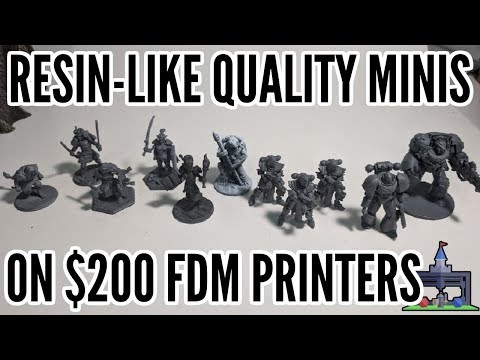 Auto Muscle Enhancer HD [Commercial]
Sigurd, your heavy gravity character in Filament looks terrific! He fits the world that you have created him for. The pale skin tone, physique, and vascularity fit perfectly. The more you show and tell us of your achievements with Filament, the more impatient I get for the Mac DAZ Studio update. I really want to use Filament and try some simple animation out. The render speeds and render quality that you're showing have made me want to try it even more. Thank you!
Terry, as always, a wealth of information and generosity for sharing your knowledge! Your soft body/dForce mini-tutorial is awesome. Thank you so much for sharing that. :)
Lee
3D Print Questions - Differences in slicer software, cost of printer.N_R Arts said:
I've been looking into both types of printer in the past couple of days, and I think the Filament printer is the way to go for me. Printers that make certain things (i.e. self-leveling bed) more easier are nice, but are out of my price range.
One question that I can't seem to find an answer to is, does PLA need curing (or any other postwork). If so, what do I use? Plus, would it need special preparation if I wanted to paint it using acrylics?
Monoprice makes a line of printers including a very low price one that has a self leveling print bed. It doesn't have the largest print volume but it is what I have and I quite like it.
Monoprice MP Select Mini 3D Printer V2, White - Monoprice.com
PLA doesn't need to cure. You can use acrylics with out any issue. You will likely want to sand down the piece at least a little before painting as paiting will tend to bring out the lines produced in the printing process. There are plenty of detailed guides on prepping 3d printed miniatures/models for painting which will show you the what this entails.
Daz 3D is part of

Connect
DAZ Productions, Inc.
7533 S Center View Ct #4664
West Jordan, UT 84084Licensing Agreement | Terms of Service | Privacy Policy | EULA
© 2026 Daz Productions Inc. All Rights Reserved. -