-
Buy Something That Doesn't Work in Carrara? Post your Questions and Workarounds here. (please)
does collada work?
I tried exporting as All versions of export that studio and Carrara support..
If I try to export it the best I can do is to get it out with all morphs working except the back ramp. It just distorts the geometry as if it is attached.
it acts like the back ramp is attached to the areas that the are beside it. not sure why.
I have exported it with the ramp down and it is identical to when it is closed.
I can use every other morph no problem.
Genesis 8 Female base and other characters loading in UGLY.And yet I have several hundred G8F characters and have used DIM for years. Troubles with either arre not the software (DIM) or the base model (G8F). DIM issues are invariably because paths don't match between DIM and Studio or people's AV software. Soem G8F characters get released with morphs that overwrite base G8F values. When those characters are identified via a ticket, the issues get resolved.
And I don't save any morph over my base characters- i create brand new files with each character i create or just trash the entire instance. I've also reinstalled the basic model repeatedly- so any accidental save would have been overwritten with fresh data. my money is on the updates that i'm likely missing. Is there a way to get DIM to recognize manual installs?I have had the EXACT same issues with G8F and I avoid it like the plague for the same reasons you do! Unfortunately, I have no idea how to fix any of it - I suspect every 8GF is loading with some kind of morph as well, but where do I look to fix it, and how? I'm VERY anxious to hear how you solve your issues!!
Genesis 8 Female base and other characters loading in UGLY.Well, some gibberish files may be encrypted as well as compressed to be fair, but there is no good reason to do that with morph files. That would more likely be used to protect vendor's tricks in fancy scripts. I think the extension for encrypted files might be different, maybe different icon too.
Genesis 8 Female base and other characters loading in UGLY.You can go into the offending morph inside the data file, using a text editor(i use notepad++ but I think any will do), scroll down, look for any "value" : 1 lines, change that to 0. Everytime I had to fix it, I have found the offending "value" : 1 always under the channel section, so it has never been a long scroll lol. After you change the to 0, save the file and it should load without the morph dialed in. I find the tex editor method a lot easier than the do it inside DS method personally.
If the morph file opened in text file is straight up jibberish, it means it's compressed. Inside DS go to window > panes > batch convert, then choose the file you want to edit and apply.
THIS! I've repeatedly read that the jibberish files are incomprehensible- no matter what. Seems that a particular moderator is mistaken (as with a lot of stuff they're ignorant about). Sometimes I wonder how some people here can be considered "Elite" users when they know less than the other users 'below' them in knowledge hierarchy.
The file i modified had only 1 "value : 1". hopefully that solves the issue. If it does, then i can willy-nilly modify all the others and fix them all.
You need to decompress the DASON file first before you can edit it. You can do so inside of Daz Studio using Batch Convert (Windows > Panes > Batch Convert).
That's fine and dandy, but there is a particular "Elite" Daz user here who is also a moderator who doesn't exactly acknowledge this or denies it's possible. That's what i was illuding to.
@TheKD, Thank you so much for indicating WHERE the fix was in the dsf file. I changed the value: 1 to value: 0 and the morph now works 100% correctly.
@Khryon555: i opened the dsf file with notepad and did a search for "value". It was literally the only one in there without being at the end of some pathway jibberish.
I've never seen anyone "deny the possibility" of a file's needing to be uncompressed, via the Batch Convert pane or an archive tool (I tend to suggest the latter as it's simplest if you have an suitable tool on the right-click menu).
Genesis 8 Female base and other characters loading in UGLY.You can go into the offending morph inside the data file, using a text editor(i use notepad++ but I think any will do), scroll down, look for any "value" : 1 lines, change that to 0. Everytime I had to fix it, I have found the offending "value" : 1 always under the channel section, so it has never been a long scroll lol. After you change the to 0, save the file and it should load without the morph dialed in. I find the tex editor method a lot easier than the do it inside DS method personally.
If the morph file opened in text file is straight up jibberish, it means it's compressed. Inside DS go to window > panes > batch convert, then choose the file you want to edit and apply.
THIS! I've repeatedly read that the jibberish files are incomprehensible- no matter what. Seems that a particular moderator is mistaken (as with a lot of stuff they're ignorant about). Sometimes I wonder how some people here can be considered "Elite" users when they know less than the other users 'below' them in knowledge hierarchy.
The file i modified had only 1 "value : 1". hopefully that solves the issue. If it does, then i can willy-nilly modify all the others and fix them all.
You need to decompress the DASON file first before you can edit it. You can do so inside of Daz Studio using Batch Convert (Windows > Panes > Batch Convert).
That's fine and dandy, but there is a particular "Elite" Daz user here who is also a moderator who doesn't exactly acknowledge this or denies it's possible. That's what i was illuding to.
@TheKD, Thank you so much for indicating WHERE the fix was in the dsf file. I changed the value: 1 to value: 0 and the morph now works 100% correctly.
@Khryon555: i opened the dsf file with notepad and did a search for "value". It was literally the only one in there without being at the end of some pathway jibberish.
IRM2019 Storytelling Feedback [Completed!]This is fun, so I may as well keep going here (if 3Ddreamer or anybody else wishes to post, don't worry - I'll slam the brakes on !)
I had to reload the scene I used for the entry a few times in order to find allthe missing files, but I got there. It was easier to start again from that than from the modified scene in my previous post. No depth-of-field focus blur or clouds yet, because I'm trying to get the positioning of the figures correct first.
As well as avoiding the halo and the edges of the render cutting hands and feet (and trotters and tyres),I'm wondering if it's possible to avoid cutting the wings, and I'm also trying to make it so that none of the figures are obscured. But every time I adjust one I get a new problem - the obvious ones here are wing poke-through and a left leg appearing to be part of the top right fellow's chest.
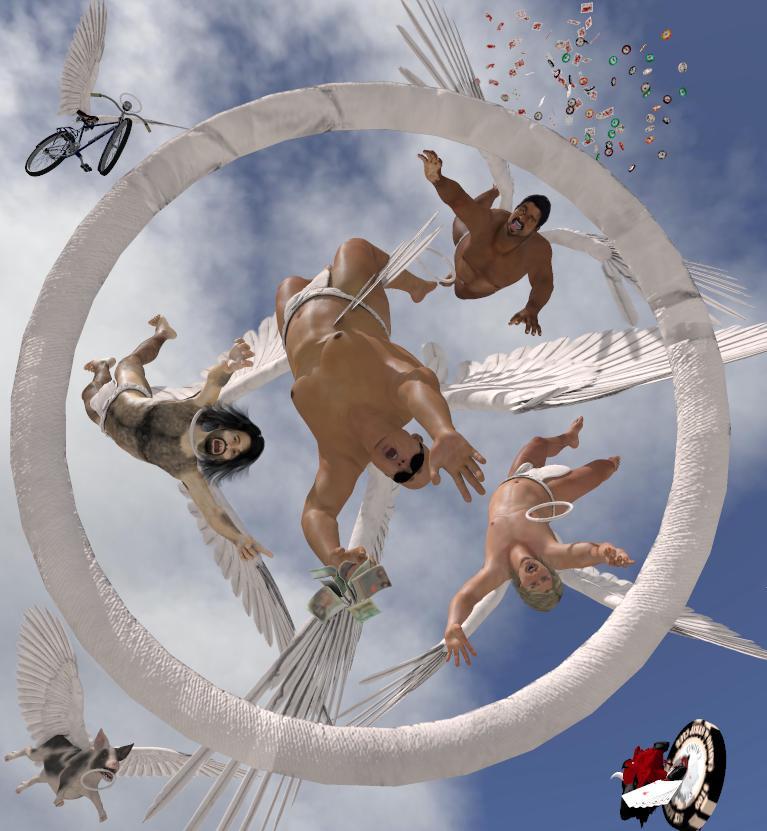
Speaking of chest's,the main chap's caved-in chest look is a combination of lighting, morph and pose. The main infinite light is way up high, and while his stomach is lit, the bottom of his ribcage/sternum is casting a shadow onhis chest. A slight movement of the light should fix that- still to be done.
And you'll be pleased to see from this new version that, after some consideration, I've decided that Cheeseburger (that's the pig's name apparently) was actually saved.
Looking at the picture here I think the top right guy'shalo is difficult to see because it's in shadow,somaybe I need to move that. And the hairy guy's halo is around his neck which, using Cheeseburger logic, would imply that he's saved too - which he isn't. So I think his halo shouldgo into free-fall too
And I've just thought - the devilish guy should have the face of the TV presenter who had the catchphrase "Come on down,the price is right!"
Genesis 8 Female base and other characters loading in UGLY.You can go into the offending morph inside the data file, using a text editor(i use notepad++ but I think any will do), scroll down, look for any "value" : 1 lines, change that to 0. Everytime I had to fix it, I have found the offending "value" : 1 always under the channel section, so it has never been a long scroll lol. After you change the to 0, save the file and it should load without the morph dialed in. I find the tex editor method a lot easier than the do it inside DS method personally.
If the morph file opened in text file is straight up jibberish, it means it's compressed. Inside DS go to window > panes > batch convert, then choose the file you want to edit and apply.
THIS! I've repeatedly read that the jibberish files are incomprehensible- no matter what. Seems that a particular moderator is mistaken (as with a lot of stuff they're ignorant about). Sometimes I wonder how some people here can be considered "Elite" users when they know less than the other users 'below' them in knowledge hierarchy.
The file i modified had only 1 "value : 1". hopefully that solves the issue. If it does, then i can willy-nilly modify all the others and fix them all.
You need to decompress the DASON file first before you can edit it. You can do so inside of Daz Studio using Batch Convert (Windows > Panes > Batch Convert).
Genesis 8 Female base and other characters loading in UGLY.Okay, you lost me here; "find your mishaving morph in parameters - using the search feature. drop off any three letter prefix. it's gonna read 0.0 in bold white." Otherwise, literally everything is going the way you describe it!
Unfortunately I haven't managed to actually change the model in any way (yet) after reducing all the eyelash values to zero..
Can't believe a lashes morph is buggering up the entire G8F head like this though..
Just to see what would happen, I deleted the FHM Demona folder completely, and somehow, it's STILL LOADING when I load any G8F character! HOW?!
Did you delete the data folder for FHM Demona as well?
Hmm, I think that's all I deleted..
If the data relating to the character has been deleted, then the morph shouldn't load (wouldn't be there). This means that either a) your G8F is being corrupted by another character or b) there's still a data folder from this character somewhere on your system linked with DAZ. If this was a character you bought here, I would ask if you installed via connect (those files take precedence and install in a different library to your content library). But since it's a rendo character, deleting the data file should've worked.
Genesis 8 Female base and other characters loading in UGLY.Everyone here is missing this:
Go to your Parameters Tab (may want to check the Shaping Tab later as well) and select "Currently Used". This should display the offending morphs.
On my system, they did NOT show up in the Currently Used section. I had to manually find them with a white 0.0.
Can't believe a lashes morph is buggering up the entire G8F head like this though..
I explicitly said to ignore the lashes.dsf files. They don't do anything.
You can go into the offending morph inside the data file, using a text editor(i use notepad++ but I think any will do), scroll down, look for any "value" : 1 lines, change that to 0. Everytime I had to fix it, I have found the offending "value" : 1 always under the channel section, so it has never been a long scroll lol. After you change the to 0, save the file and it should load without the morph dialed in. I find the tex editor method a lot easier than the do it inside DS method personally.
If the morph file opened in text file is straight up jibberish, it means it's compressed. Inside DS go to window > panes > batch convert, then choose the file you want to edit and apply.
THIS! I've repeatedly read that the jibberish files are incomprehensible- no matter what. Seems that a particular moderator is mistaken (as with a lot of stuff they're ignorant about). Sometimes I wonder how some people here can be considered "Elite" users when they know less than the other users 'below' them in knowledge hierarchy.
The file i modified had only 1 "value : 1". hopefully that solves the issue. If it does, then i can willy-nilly modify all the others and fix them all.
Okay, you lost me here; "find your mishaving morph in parameters - using the search feature. drop off any three letter prefix. it's gonna read 0.0 in bold white." Otherwise, literally everything is going the way you describe it!
From the log file when you first loaded in the Genesis 8 Female figure, it's going to indicate what dsf file it loaded; for mine it loaded the FHM Demona dsf file. So I took 'demona' and entered that into the search parameters under the edit tab in the Parameter tab. It gave me Demona Head, Demona Body, Demona. I saw that the Demona Head morph had a 0.0 in bold White. White indicates that it's being used. black indicates no change. That white 0.0 is the misbehaving morph: If a morph is being used, it should be higher than 0. So then i dug into the morphs folder and found FHM Demona- Full Head Morph and removed that file. Now that TheKD has stated what to change in the dsf, i can alter that file and stick it back into the morphs folder, hoping that it doesn't autoload. Armed with this knowledge, no morph file can every screw with my Female figures again. And if they do- they get fixed and the author contacted.
How to Modify Hair shapeHi all,
I am using Lyall Hair for a guy in my project but unfortunately it has 2 bangs that are kind of aloof. While this works for younger characters it doesn't really work for mine.
I would love it if I could modify I think the joints, to make them separate joints so I can pose them how I want and so put them closer to the rest of the hair.
Another option I think is create a morph for the hair where I do that?
A third option, which I managed to do easily but not the best is to hide them from the geometry editor.
A morph I already know how to make, I was hoping to learn something new as well, by making them separate joints. This would also give me more freedom in the long run if I want to pose them differently.
Any advice on that?
I attached a pic of the main promo image with the 2 bangs highlighted.
i am no pro. but sending the whole mesh with the hair to zbrush via GoZ in DAz studio i can manipulate it to a degree, making it longer, move the hair separate parts etc....
I don't use Zbrush, only Blender as I would not want to purchase Zbrush at this moment. Any idea if it would be the same process? How do you make the hair longer without adding geometry or stretching the textures? Also, do these manipulations finally translate into morphs?
Just export as OBJ, adjust (without adding or deleting) in Blender, export as OBJ (ensuring you maintain the vertex order) and import as a morph through Morph Loader pro, making sure the import/export prsets match both ways.
How to Modify Hair shapeHi all,
I am using Lyall Hair for a guy in my project but unfortunately it has 2 bangs that are kind of aloof. While this works for younger characters it doesn't really work for mine.
I would love it if I could modify I think the joints, to make them separate joints so I can pose them how I want and so put them closer to the rest of the hair.
Another option I think is create a morph for the hair where I do that?
A third option, which I managed to do easily but not the best is to hide them from the geometry editor.
A morph I already know how to make, I was hoping to learn something new as well, by making them separate joints. This would also give me more freedom in the long run if I want to pose them differently.
Any advice on that?
I attached a pic of the main promo image with the 2 bangs highlighted.
i am no pro. but sending the whole mesh with the hair to zbrush via GoZ in DAz studio i can manipulate it to a degree, making it longer, move the hair separate parts etc....
I don't use Zbrush, only Blender as I would not want to purchase Zbrush at this moment. Any idea if it would be the same process? How do you make the hair longer without adding geometry or stretching the textures? Also, do these manipulations finally translate into morphs?
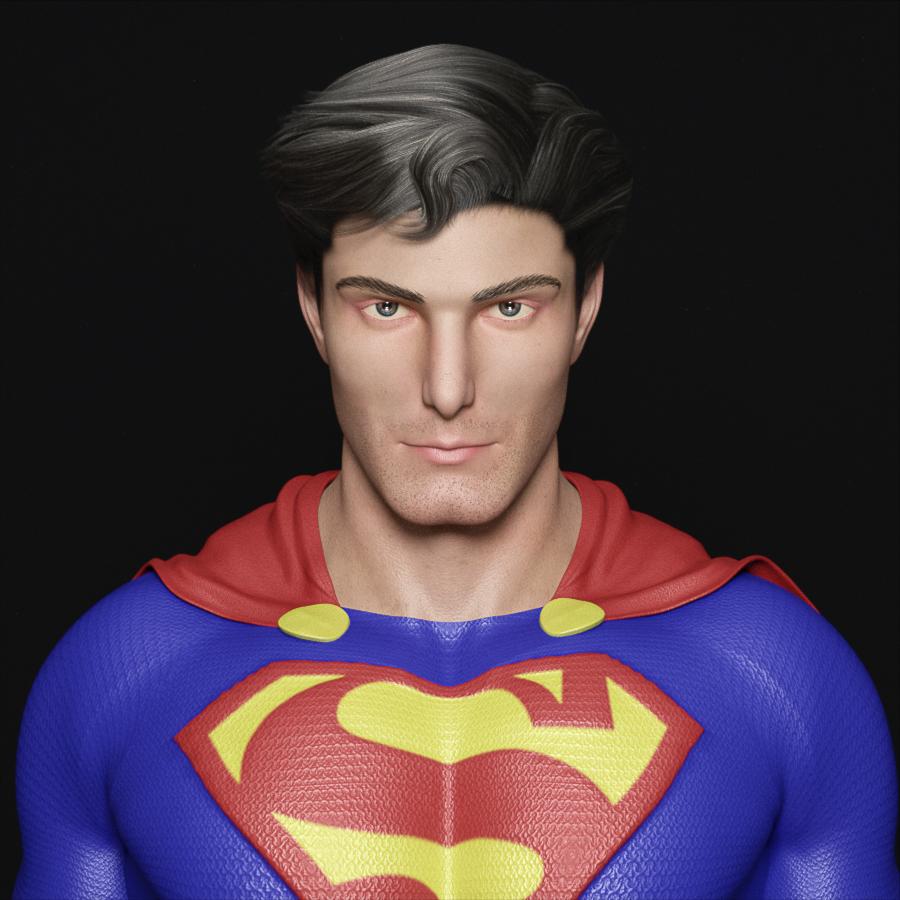
Celebrity Look-a-Likes for 3D figures Part 2For anyone who's interested, version 2.0 of my Christopher Reeve morph for G8M is now available!
super! or is that too corny?
Genesis 8 Female base and other characters loading in UGLY.I had the same issue with a few freebie morphs that were not zero when they were saved so it effected the load of the figure (G3F I Believe). Easy enough fix though.
Sorry if it was previously mentioned:
Start Daz.
Load the Genesis 8 Base Figure.
Go to your Parameters Tab (may want to check the Shaping Tab later as well) and select "Currently Used". This should display the offending morphs.
For those unwanted morphs click the "Gear Cog" on the upper right of the "Morph Dial" and select "Parameter Settings"
In the lower half of the next menu box theres a "Default" setting. Change it to " 0 " (zero) and click "Accept".
To save this, you'll need to go to the Menu, File, Save As, Support Asset, "Save Modified Assets"
You should get a message box saying G8F and those morphs will be permently modified, Click "Accept".
Next time you load G8F it should be all good zero'd out.
How to Modify Hair shapeHi all,
I am using Lyall Hair for a guy in my project but unfortunately it has 2 bangs that are kind of aloof. While this works for younger characters it doesn't really work for mine.
I would love it if I could modify I think the joints, to make them separate joints so I can pose them how I want and so put them closer to the rest of the hair.
Another option I think is create a morph for the hair where I do that?
A third option, which I managed to do easily but not the best is to hide them from the geometry editor.
A morph I already know how to make, I was hoping to learn something new as well, by making them separate joints. This would also give me more freedom in the long run if I want to pose them differently.
Any advice on that?
I attached a pic of the main promo image with the 2 bangs highlighted.
i am no pro. but sending the whole mesh with the hair to zbrush via GoZ in DAz studio i can manipulate it to a degree, making it longer, move the hair separate parts etc....
How to Modify Hair shapeHi all,
I am using Lyall Hair for a guy in my project but unfortunately it has 2 bangs that are kind of aloof. While this works for younger characters it doesn't really work for mine.
I would love it if I could modify I think the joints, to make them separate joints so I can pose them how I want and so put them closer to the rest of the hair.
Another option I think is create a morph for the hair where I do that?
A third option, which I managed to do easily but not the best is to hide them from the geometry editor.
A morph I already know how to make, I was hoping to learn something new as well, by making them separate joints. This would also give me more freedom in the long run if I want to pose them differently.
Any advice on that?
I attached a pic of the main promo image with the 2 bangs highlighted.
Extracting a single animation frame from a timeline to its own scene?I can take a look to see if it's doable from a scitpt or you need deeper access and need to go through a plugin.
When I saw what SnowSultan wanted to do, I thought of all the times I would have loved to have a simple solution. I don't do animations, but I do use the Timeline for dForce simulations.
I frequently set up figure and pose in a separate file to work on the simulation. Once I've got what I want, I create a morph so I can't lose it. Later, I'll merge all the files together for the final scene. The thing is, some simulations work fine with 30-60 frames, but occasionally I run into something more stubborn, and end up with a lot more frames. If I could run a script, or use a plugin, and turn my selected frame into a scene at Frame 0 for each of those files, it would make merging them easier.
Maybe I'm the only one who wants such a product. Maybe not. If you're reading this thread and have wished for this ability in Daz Studio, please leave a comment, if only to add a "+1" to the list… Thanks.
Celebrity Look-a-Likes for 3D figures Part 2For anyone who's interested, version 2.0 of my Christopher Reeve morph for G8M is now available!
Christopher Reeve 2.0 for G8MAfter going back and forth for quite a while, I finally decided to see if I could improve upon my Christopher Reeve look-alike morph for G8M, and this new version is the result! I still welcome critique and/or suggestions for further revision, though. In any case, I hope you all like it!
 Genesis 8 Female base and other characters loading in UGLY.
You can go into the offending morph inside the data file, using a text editor(i use notepad++ but I think any will do), scroll down, look for any "value" : 1 lines, change that to 0. Everytime I had to fix it, I have found the offending "value" : 1 always under the channel section, so it has never been a long scroll lol. After you change the to 0, save the file and it should load without the morph dialed in. I find the tex editor method a lot easier than the do it inside DS method personally.
If the morph file opened in text file is straight up jibberish, it means it's compressed. Inside DS go to window > panes > batch convert, then choose the file you want to edit and apply.
Genesis 8 Female base and other characters loading in UGLY.Okay, you lost me here; "find your mishaving morph in parameters - using the search feature. drop off any three letter prefix. it's gonna read 0.0 in bold white." Otherwise, literally everything is going the way you describe it!
Unfortunately I haven't managed to actually change the model in any way (yet) after reducing all the eyelash values to zero..
Can't believe a lashes morph is buggering up the entire G8F head like this though..
Just to see what would happen, I deleted the FHM Demona folder completely, and somehow, it's STILL LOADING when I load any G8F character! HOW?!
Did you delete the data folder for FHM Demona as well?
Hmm, I think that's all I deleted..
Daz 3D is part of

Connect
DAZ Productions, Inc.
7533 S Center View Ct #4664
West Jordan, UT 84084Licensing Agreement | Terms of Service | Privacy Policy | EULA
© 2026 Daz Productions Inc. All Rights Reserved.