-
3D Art Freebie Challenge-February 2020-"Natural Love" -Main Thread Only
The Tree Hugger
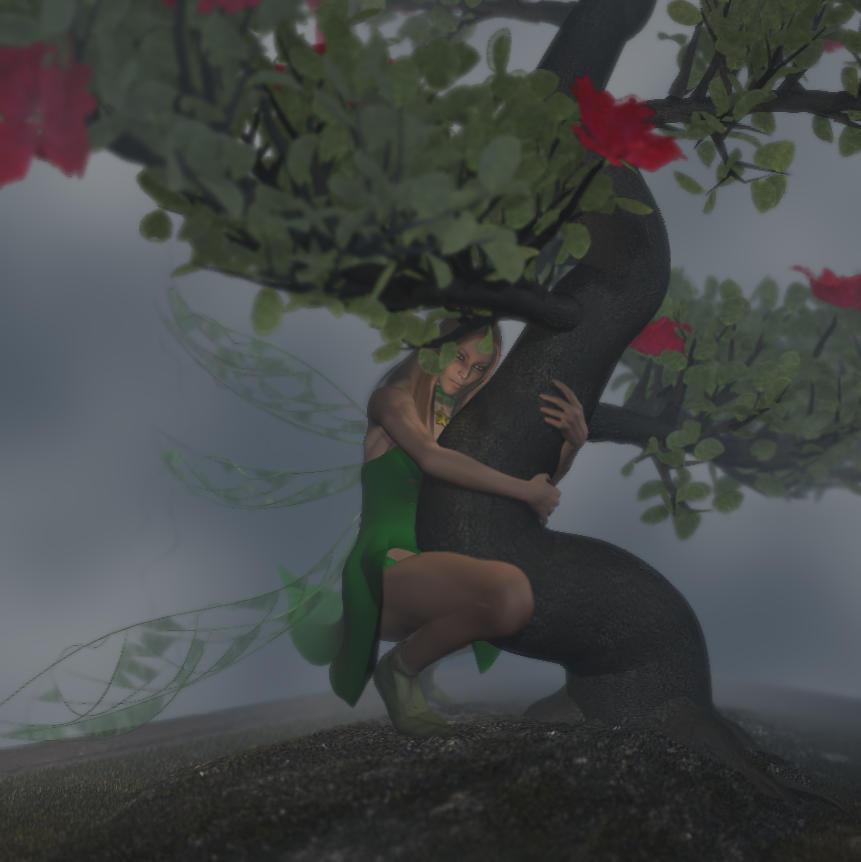
Freebies:
1) Tink Dress for V4 (FaerieDreams/Mada3D) - http://www.mada3d.com/Freebies1.html row 8, first item
2) Leafy Boots For V4 (FaerieDreams/Mada3D) - http://www.mada3d.com/Freebies1.html row 2, middle (2nd) item
3) Broken Wings (AprilYSH) - http://shop.aprilsvanity.com/free-items/broken-wings-model-textures.html
4) Choker from The Magical Dress Platinum for A4 (redviper2012) - http://www.sharecg.com/v/59422/View/11/Poser/The-Magical-Dress-Platinum-for-A4 (+ redviper's platinum cloth morph++ (Anymatter) - https://sharecg.com/v/60149/browse/11/Poser/redvipers-platinum-cloth-morph++ )
5) Valens Hair For V4/A4 (dyald) - https://www.sharecg.com/v/36166/favorite/21/DAZ-Studio/Valens-Hair-For-V4-A4Paid:
The bonsai was a freebie from XFrog in the past, but not any more. So I'm listing it as paid.(This is a rework of an old picture - but in order to appear on the DAZ forums Bonnie had to put some clothes on ! Luckily I found some free ones
 )[Released] 50 Advanced Seated Poses [Commercial]
A little off-topic, but could you release a female version of the fight lab?
I could do that, but I think it would make me insane, ha ha. Fight Lab was the largest and most extensive project I ever undertook, and by the time it was done, I couldn't even look at my computer any more (we've since made up). I will say that the poses will transfer onto female meshes quite nicely, with only a few minor adjustments, if you load them from your content library.
This is not to say it's entirely off the table of possibilities, just that it's not in the immediate pipeline.
Endlessly ongoing... playing cards/casino chips/coins/banknotes scatter... hiatus time (still)I think I'd seen some photos of the chip racks trays they use at casinos, so just imagine a few of those stacks lying horizontally.
I've got a bit bogged down with the stack, mainly due to the bump at the bottom edge of the top chip (and top edge of the bottom chip). Simple to resolve when the morph is set to 100%, and V-scaling for the side texture is set to 1.0, giving 10 (or 11 - still not decided on that) intermediate chips. But at most other morph values (don't forget that the stack height must only change in steps matching the chip thickness, and that the V-scale must be modified in concert with the morph) the problem reappears. A picture wouldprobably explain this better, but I don't want to get bogged down creating a picture to explain how I've got bogged down...
 So I've put that to one side to ferment for a while...
Anyway, I now have my first pre-release of the 54 casino chips flung in the air prop almost* ready. It's currently in Poser prop version only, but it imports (almost**) without a problem into DAZ Studio 4.11. I've also created $2.50, $10, $50 and $500 Casino Douteux textures, the last three using arbitrary (and not particularly good) colour choices on my part. Four different textures are used by the prop, so you can mix and match the chip values you want.
Anyway, iray and 3delight renders attached - 216 chips as before. Hopefully not long*** now before I upload something...


* ''almost' is nearer than my previous 'close'
**except that DAZ Studio doesn't like the ¢ symbol in two of the texture file names,which means that I have tomanually locate the file every timeI load it (Poser Pro 2014 doesn't have any problem with it). Maybe I'll change the 50¢ in the filename to $0.50 or 50c ...
***'not long' is relative too
Basic Genisis figure controlmorph in paint program. it isn't pretty, but
Sci-Fi Retro Space Suit [Commercial]So I am having trouble getting a sizing morph to work on the helmet. it seams every time I create a size morph the helmet resizes down to the floor, instead of resizing in place the way it should work. so I'll have to work that out if it is possoble. Anyone here know what I might be doing wrong?
Anyhow, the helmet is a seperate object and therefore can be scaled and rotated down any way you like just using the regular scale tools in Daz3D.
I need to make a Veins HD Morph for Genesis 8 Female.The current HD vascularity options on DAZ's store are of poor quality, because they don't even have a translucency map for the veins, that means there is no green color for the veins which looks terrible. The vascularity systems currently available have too many god damn veins all over the place.
I need to make my own HD Vein Morph for G8F, but DAZ seems to only let me work with the base resolution in Zbrush, but I need higher subd level in order to make nice rounded veins.
I already made veins using displacement maps which looks fantastic, BUT at certain angles IRAY doesn't render displacement maps properly. The best solution is to make my own HD veins morph. UNLESS one of the PA's steps up and makes a proper vascularity system and doesn't neglect the creation of translucency maps with the green color for the veins, and you can't just spam the body with random veins, you need to follow an actual vein diagram chart of human physiology.
I find it a little odd that a PA would put all that effort in making HD vascularity morphs and not bother to make any kind of texture maps to go with it that can be edited in Photoshop or something like that to match the base skin with it, nothing fancy. Like some of the other stuff they sell here & other places, its "half-done" where you're required to finish making the complete product.
What features would you like to see appear in dazstudio 5?The ability to make our own HD morphs. DAZ can't possibly think they can do everything. For example, there isn't a proper HD Vein morph for Genesis 8. The existing vasulcarity solutions have no geren translucuency map to make the veins green, and the veins don't follow proper human physiology.
What features would you like to see appear in dazstudio 5?I would like version 5 to include all the tools available for PAs.
The few tools that they get that we don't have are ones that are, from what has been said, extremely finicky to work with and DAZ3D probably doesn't want to deal with the average person potentially breaking their model installation if they don't follow the steps exactly as needed. This is why they aren't available.
We already have a bunch of tools that can easily break model installations (save functions, morph loader, etc). So denying on that reasoning alone would seem a bit arbitrary.
It seems more based on the supposed (and more than likely unfounded) idea suggested by some that "if people can make their own they wont buy ours". Which was suggested as the reasoning for allowing us to make strand based hair, but locking dforce application to paid content producers. Because we all know that people being able to make their own poses stopped all sales of pose packs, and dforce clothing, and shaders, and figures, and props...
Dog Visemesyou can edit the default DMC file in notepad to create a configuration file for Dog 8
just substitute the morphs you want for the visemes
probably mostly mouth open and closed
Yeah... I know... I'm hoping to be a bit more articulate than that. For example, the letter O. O requires that the mouth be narrowed left to right. If you happen to have a face morph that says 'mouth narrow' you're fine. If not, it's not as good. If the critter has a beak that's one thing (cluck, quack). But if the mouth is flesh, closeups are impacted. I wish the devs had just left the visemes in there, they weren't hurting anything.
Dog VisemesI thought visemes were poses, not morphs.
I don't know, myself. I think of them as morphs because I see them show up in the Parameters morph list. I'm not going to guess before I look into it.
Sci-Fi Retro Space Suit [Commercial]Two things here I really appreciate - a large enough opening at the base of the helmet to put the head through, and the provision of something for the poor girl to breathe (I'm not fond of the all-enclosing helmet/suit with no apparent thought about breathing).
I would suggest a helmet size morph for a smaller size when using a short, tight hair style as an option.
I need to make a Veins HD Morph for Genesis 8 Female.The current HD vascularity options on DAZ's store are of poor quality, because they don't even have a translucency map for the veins, that means there is no green color for the veins which looks terrible. The vascularity systems currently available have too many god damn veins all over the place.
I need to make my own HD Vein Morph for G8F, but DAZ seems to only let me work with the base resolution in Zbrush, but I need higher subd level in order to make nice rounded veins.
I already made veins using displacement maps which looks fantastic, BUT at certain angles IRAY doesn't render displacement maps properly. The best solution is to make my own HD veins morph. UNLESS one of the PA's steps up and makes a proper vascularity system and doesn't neglect the creation of translucency maps with the green color for the veins, and you can't just spam the body with random veins, you need to follow an actual vein diagram chart of human physiology.
While I have no idea how you could do it yourself, I've often lamented the fact that the Vascularity HD add-on doesn't come with the translucency map as you suggest. Perhaps Zev0 might see this and become inspired.
I think the reason/issue with it is that it would end up overwriting whatever SSS maps are already being used...unless they were able to be properly blended in via LIE.
Good point. I do use vein maps on G8F and I have to put them in place of the existing translucency maps. Pity there's no way of blending two maps in the surfaces panel.
Yeah, that's why I've never been a fan of LIE. I much prefer to blend stuff into skin via PS and most often it looks better in the long run. LIE is pretty much only used for eye makeup...and even then I'll always vote for diffuse overlay.
February, 2020 - DAZ 3D New User Challenge - Lighting and Light EffectsVersion D here, doing some tweeks to the table that my first two characters are seated at, (at least turning the chair that was blocking the view of the one that I added last time so that they're easier to see.) and adding a character walking away from said table. (I'm exparamented with face transfer to put myself in this one, though my hair isn't as thin as my digital counterpart it has started to thin out.)
Dog VisemesOK All, here's a stupid question.
A viseme is just a morph, right? and we can create morphs? Would it be possible to create a set of viseme morphs and install them on a character like any other morph package?
Yes
Thank you Richard. I've wondered about this for quite a while. I am encouraged. When I get some time I'm going to take a shot at it.
Dog VisemesOK All, here's a stupid question.
A viseme is just a morph, right? and we can create morphs? Would it be possible to create a set of viseme morphs and install them on a character like any other morph package?
Yes
I need to make a Veins HD Morph for Genesis 8 Female.The current HD vascularity options on DAZ's store are of poor quality, because they don't even have a translucency map for the veins, that means there is no green color for the veins which looks terrible. The vascularity systems currently available have too many god damn veins all over the place.
I need to make my own HD Vein Morph for G8F, but DAZ seems to only let me work with the base resolution in Zbrush, but I need higher subd level in order to make nice rounded veins.
I already made veins using displacement maps which looks fantastic, BUT at certain angles IRAY doesn't render displacement maps properly. The best solution is to make my own HD veins morph. UNLESS one of the PA's steps up and makes a proper vascularity system and doesn't neglect the creation of translucency maps with the green color for the veins, and you can't just spam the body with random veins, you need to follow an actual vein diagram chart of human physiology.
While I have no idea how you could do it yourself, I've often lamented the fact that the Vascularity HD add-on doesn't come with the translucency map as you suggest. Perhaps Zev0 might see this and become inspired.
I think the reason/issue with it is that it would end up overwriting whatever SSS maps are already being used...unless they were able to be properly blended in via LIE.
Good point. I do use vein maps on G8F and I have to put them in place of the existing translucency maps. Pity there's no way of blending two maps in the surfaces panel.
I need to make a Veins HD Morph for Genesis 8 Female.The current HD vascularity options on DAZ's store are of poor quality, because they don't even have a translucency map for the veins, that means there is no green color for the veins which looks terrible. The vascularity systems currently available have too many god damn veins all over the place.
I need to make my own HD Vein Morph for G8F, but DAZ seems to only let me work with the base resolution in Zbrush, but I need higher subd level in order to make nice rounded veins.
I already made veins using displacement maps which looks fantastic, BUT at certain angles IRAY doesn't render displacement maps properly. The best solution is to make my own HD veins morph. UNLESS one of the PA's steps up and makes a proper vascularity system and doesn't neglect the creation of translucency maps with the green color for the veins, and you can't just spam the body with random veins, you need to follow an actual vein diagram chart of human physiology.
While I have no idea how you could do it yourself, I've often lamented the fact that the Vascularity HD add-on doesn't come with the translucency map as you suggest. Perhaps Zev0 might see this and become inspired.
I think the reason/issue with it is that it would end up overwriting whatever SSS maps are already being used...unless they were able to be properly blended in via LIE.
I need to make a Veins HD Morph for Genesis 8 Female.The current HD vascularity options on DAZ's store are of poor quality, because they don't even have a translucency map for the veins, that means there is no green color for the veins which looks terrible. The vascularity systems currently available have too many god damn veins all over the place.
I need to make my own HD Vein Morph for G8F, but DAZ seems to only let me work with the base resolution in Zbrush, but I need higher subd level in order to make nice rounded veins.
I already made veins using displacement maps which looks fantastic, BUT at certain angles IRAY doesn't render displacement maps properly. The best solution is to make my own HD veins morph. UNLESS one of the PA's steps up and makes a proper vascularity system and doesn't neglect the creation of translucency maps with the green color for the veins, and you can't just spam the body with random veins, you need to follow an actual vein diagram chart of human physiology.
While I have no idea how you could do it yourself, I've often lamented the fact that the Vascularity HD add-on doesn't come with the translucency map as you suggest. Perhaps Zev0 might see this and become inspired.
Sci-Fi Retro Space Suit [Commercial]It looks really nice except... it looks like you've got an issue with the shoulders poking through the base of the helmet. To avoid stuff like how the girl in the white in retro Scene 2 has her arm completely bisected by the helmet rim, can there be a morph to shrink the helmet or a helping morph that indents the bubble base to fix that?
Thats a good point about the helmet. I will make some morphs to help with it. However the helmets are prop objects and so you can rotate them any way you like ajusting them so there is no pokethrough. I just did not see it in that render. Thanks for pointing it out. :)
FaceGen - any tips to get better results?1. Try with both a portrait and profile image, and with just an portrait.
2. Don't dial in the morph to the full extent; dial in what seems best, then adjust with morphs. You can then ERC freeze and create your own morph slider if you wish.
3. Scap it and start again with new imges.
4 Edit the images to get a better base image before running Facegen; such as fixing shading, and hair that obscures features.
5. Accept that it's as good as you can get due to limitations of the software and/or the available images.
Edit:
I can't remember the last time I used the morphs anyway..
Daz 3D is part of

Connect
DAZ Productions, Inc.
7533 S Center View Ct #4664
West Jordan, UT 84084Licensing Agreement | Terms of Service | Privacy Policy | EULA
© 2026 Daz Productions Inc. All Rights Reserved.