-
What features would you like to see appear in dazstudio 5?
True. You will never be able to do anything of that in Studio and I didn't mean to imply this. You can create dynamic hair outside of DAZ and either use it there where you created it and together with your DAZ assets, or you could re-import the mesh and use the mesh in DAZ. None of it is the same as having dforce strand based hair in Studio.I would like version 5 to include all the tools available for PAs.
I would like about 20 more canvasses. See Carrara's list of multipasses for specifics
I would also like many of the plugins to be incorporated as regular features. Some of these include
- Ultrascatter Pro
- all plugins that add functionality or convenience to the geometry editor
How much are you prepared to pay for PA only features?
I think this is a good question for many users. It's not that many users wouldn't pay anything at all. I think the true question is how much compared to other software packages and/or solutions that can do the same what the PA tools can do.I don't know of all PA-only tools, let's take dynamic stuff. (Fotmer dynamic clothing pre-dforce wasnt a PA-tool, was it?) Dforce hair. You can get these features with other packages, and these other packages offer a lot more than what the PA-only tool offers. So if DAZ offered the dforce hair tool for money, it depends how much customers would pay for it compared to other solutions that allows them to do roughly the same. That depends on so many parameters. What kind of DAZ Studio users would be interested in such a tool and how many of them are there. How much are those willing to spend. What does the competition offer. How many copies does DAZ have to sell. And so on.
And of course, there is Blender which is free and you can do a lot in Blender what you can't do in DAZ. If a user is comfortable with using Blender I can imagine that this user would not bother with PA-only tools if these come with a heavy price-tag.
Something that you couldn't do, with any software no matter how competent you are is make HD morphs.
Unfortunately only PAs get access to the subD mesh that allows you to do that.
That mesh would also allow artists that create characters that resembles celebrities to create better likenesses.
I agree with you it's probably not the same with HD morphs. You can export Genesis mesh, subdivide and sculpt. You won't be able to re-import your sculpt to DAZ and set it up as an HD morph. That's only for PAs. But the pricing argument stands nonetheless. Since PA-tools are pro-tools I see no reason why DAZ wouldn't charge them as such if they make these available to everyone for sale. That's in the original range of 300-500 USD. How many non-content creators would buy it? Some users will do, no doubt. Would it be profitable for DAZ? Depends, probably.
I don't sculpt myself for figures so I wouldn't buy an HD tool whatever the price. I do create my own clothing and am passionate about it. If dforce clothing were PA-only I wouldn't bother with it because I have other solutions. I was very passionate about dforce hair and strand based hair but now I moved on and if DAZ made dforce hair available for 250 USD I wouldn't bother. Not sure how others feel but I don't perceive a huge interest in dforce hair compared to transmapped ones judging by the bestseller status if the store. It may be very different for HD tools.
problem with arm morphhello guys....i have this arm issue when i compine brute with another character...
any idea what it could be?
thanks in advance
February, 2020 - DAZ 3D New User Challenge - Lighting and Light EffectsVersion D here, doing some tweeks to the table that my first two characters are seated at, (at least turning the chair that was blocking the view of the one that I added last time so that they're easier to see.) and adding a character walking away from said table. (I'm exparamented with face transfer to put myself in this one, though my hair isn't as thin as my digital counterpart it has started to thin out.)
You have some good reflections on the floor and the characters are looking good. Poses look natural. Is the only source of light coming from the outside? Are interior lights turned on?
I am missing pools of light coming from light sources inside the facility.
The lights are on, but they're currently using 40 watt bulbs.
Feedback on Newly Modeled Sci-fi Suit DesignLooks pretty cool! Personally I would wish for the heels to be a wedge instead of actual heels, but not flat, keep the height. I would also like the ability to lose the headgear, like a helmet to be on or off. Also lots of material zones so you can play with different materials and opacities for more versatility.
+ kill the heels! Or, add morph to allow conversion to normal combat boot sole, or shorter solid wedge heels.
Auto Face Enhancer [Commercial]I did as clean an uninstall as I can (deleted every file and folder from \My DAZ 3D Library that says "enhancer" or "D.Master")
DIM is now showing the 790MB file which downloads and installs without apparent issue, but then I end up right back where I was before, with only one AFE slider under Parameters/[figurename]/Head/Expressions and the same smoothing issues.
Also, as an aside, AFE doesn't seem to like fibermesh brows much. Am I doing something wrong here? With the geoshell on, the brow follows the geometry exactly, but without the geoshell the brows clip.
the workaround is to turn the display off on the AFE mesh. See attach image.
note: all attachments like brows and eyelashes will follow the base shape, not the HD shape.
if you want the attachment to follow the HD shape then you have to create a morph on the attachment.
The HD Expression moves the Additional vertex further away from the base shape to get the details. Thus the clip.
Figure shaping and morph thinning question/idea (esp. Genesis1)What a gold mine of tips. I gotta sit down with a new DS/Carrara session, some form of caffeine, and a mouse - and actually run through what I just read to really appreciate the time-saving experience being shared. Thanks for 'rambling'!
FWIW, the part where you talk about backing-up and deleting the morphs and morph-folders, if you didn't catch my comments on GenX2 being able to disable single or group morphs, you might want to re-read that. To my thinking, its greatest workflow value is that it might allow you to use handy check-boxes and GUI-lists in the DS GenX2 tab to quickly sort out the morphs you want, then use scripts or the file-manager to tuck all of the *.dsf.OFF morph files that have been disabled, leaving only the desired ones for the custom project/runtime.
And while I haven't verified it, his tools are good enough that I bet when you 'enable' a morph with dependencies, that his tool 'does the right thing' and leaves the dependencies enabled too, so we don't have to analyze the dsf files for external references before we 'toss' them. I believe we can trust that if it's got an 'OFF' suffix, we don't need it for our project. And while this may relate to the normal GenX2 conversions workflow, it is definitely NOT the only use/value for the function. It could almost be a product on its own as far as I'm concerned. Maybe you knew this, but it bears repeating if not.
My reasons for 'thinning' a figure are partially for space and reducing complexity, but the loading and bogging time for my animation workflows have gotten pretty long and stuttery. It's gotten even worse with DS 4.12, in spite of its great new animation features. That time and program response is what I'm trying to get back in the long-term.
(and thining things like this satisfies my suppressed OCD-like tendencies :)
Cheers!
--ms
Figure shaping and morph thinning question/idea (esp. Genesis1)With such little time to play with all of this, I kind of adopted a "Screw It!" attitude and only work with stuff that just works out of the box now - well... along with the corrective morph goodies I've acquired since then, like SickleYield's awesome breast clothing fixer for Genesis 2, which I added to Rosie 5 via GenX2! LOL I also prefer PokeAway for Genesis 2 over the Genesis 1 version. I have both, but I loaded the G2F version onto Rosie via GenX2 as well.
To elaborate on this aspect a bit, I must admit that I love how the tools work in Daz Studio to help us create clothing for Daz figures that work really, really well. I kinda wish more of the Genesis clothing had more of this stuff built into it, but that requires a lot of time for the creator. Back in the days of Generation 3 and 4 (and 2) many of the products did come with hours and hours of these kinds of tweaks for them - because they had to to make them work without the new auto-follow that we have since Genesis. Generation 4 had that, but it was much different due to still using the pre-Poser 9 way of rigging.
Okay Dart, you're babbling.
I've been having all sorts of success with using Generation 3 and 4 clothing on my new Genesis 1 characters. I use the Bodysuit > Loose preset during auto-fit which gives me the General Volume morph slider, which works to enlarge or shrink the results.
SickleYield's Breast/Clothing fixer morphs help to relax the clothing after being shrink wrapped to Genesis, and Xenic101's PokeAway is just an essential part of my game at animation.
Another thing I love about previous generation clothing in Carrara is that I can add all the custom morphs I want directly in Carrara as long as I do so before I fit it to Genesis. So lets say that I have something fit to my Genesis character and I realize that I need some new morphs for it. First thing I do is to make a list of what morphs I need, even take a few notes about which direction I need specific polygons to go if I need to. Then I go through my process of loading the original clothing into Daz Studio and sending it to Hexagon to make my first morph - or at least the start of what I want the morph to do. I'm not so great in Hexagon, so I often just make a small enough change that Morph Loader Pro kicks in when I send it back to Studio. This all gives me my new Full Body morph zone to work with (as opposed to having to adjust chest, abs, and hip, etc., individually), so I then save the new CR2 to my library under a new name.
Now in Carrara, I load in that CR2 and make all of the morphs I noted down - and often a few extras. If I need to get something fairly specific I'll make several morphs that push and pull in various directions to help me get what I need in the end, as well as to tweak the shape during the extreme poses of animations.
Once I have the new item ready, I can now auto-fit that to my character and my new morphs are there and ready to use. I just swap the shaders from the copy I was using and, voila!
It feels like forever since I've gone through the process mentioned directly above. Lately the Aiko 3, Vicky and Mike 3, etc., stuff I've been buying has been coming fully equipped with plenty of Open/Close and movement morph options. One thing I did notice, however, is that I cannot just add a morph on the fly (as I did with Gen 4 clothing) once it's been made into an Actor for Genesis. I know I can model new morphs in Carrara and apply them to Actor clothing in Daz Studio, however, so there's that.
I think my next step for all of this will be to try getting Genesis 3 clothing to work for Genesis 1. In doing so, I plan to start again with just an OBJ of the original mesh and make it into a Genesis item right from the start. I lose any premade morphs this way, but at least I can make new ones on my own.
On that note, I've done quite a bit with opening an OBJ into Daz Studio (even though DS is still very much greek to me in nearly every other way) and getting it to conform to the intended figure, and then modeling morphs (in Carrara) and adding those to the item. Daz 3D development team sure have made a fine set of tools for all of this stuff!
Figure shaping and morph thinning question/idea (esp. Genesis1)As for the Custom Figure thing, I did dabble with that before using the method I'm using now. I didn't take it too far, however, because there were more problems than just JCMs (joint controlled morphs).
However, if you're really into trying, I suggest checking out all of the incredible video tutorials by Josh Darling. He has tutorials for all of that kind of thing - he's how I found out about the Genesis 2 Cross Figure script, which allows us to make Male clothing compatible with Females and vica versa. He didn't make it, but has a tutorial on how to use it. So I use that to convert Genesis 2 Female clothing to fit the Male, then open that in Carrara to fit to Genesis, so that I can make a Genesis 1 version of the clothing. That makes it a lot easier for me since Genesis' base shape is male. I know we can also just fit the clothing to Genesis Basic Female and subtract that during the creation process in DS, but I'm not that savvy with all of that.
With such little time to play with all of this, I kind of adopted a "Screw It!" attitude and only work with stuff that just works out of the box now - well... along with the corrective morph goodies I've acquired since then, like SickleYield's awesome breast clothing fixer for Genesis 2, which I added to Rosie 5 via GenX2! LOL I also prefer PokeAway for Genesis 2 over the Genesis 1 version. I have both, but I loaded the G2F version onto Rosie via GenX2 as well.
Okay, back to the subject at hand.
I think you know how I slim mine down, right? Just in case, it goes like this:
I open the Data folder and navigate to DAZ 3D > genesis > morphs or however that lays out. I have a bazillion morphs and I want to use them all, but I wanted a way to keep them from loading onto every Genesis figure I create, when all I need are a few for each. So I start by making a backup of my main morphs folder that has everything installed on it. I keep this backup on my desktop for safe keeping, but anywhere that works for you.
After that I systematically go through and literally delete everything I don't want on my figure. I've also recently adopted the idea of then making a backup of the morphs folder for each of my custom setups like this to save time for future projects - just in case. For example, I just recently added new morphs to Rosie 5. But to do that, I needed to start from scratch in Carrara again. That's the caveat about working this way. If we don't mind having ALL of the morphs (dials) on our actor, transferring the character to a fresh Genesis is as simple as making an NLA pose of the shape morphs and applying that to the fresh copy of Genesis. The last time I tried that, however, I didn't have all of the morphs on the new Genesis that made up the old one, and instead of just ignoring the missing morph shapes, applying the NLA pose didn't work at all, resulting in an error. So I've actually become very proficient at making Rosie characters! LOL
Now, back to the Custom Figure idea. Here's a wonderful tutorial showing how elegant Daz Studio developers made it to tweak their figures using JCMs. It's just amazing how much work they put into making the job easier for their PAs (and themselves), which makes it no surprise why they are truly on top of the industry for this sort of thing.
So without further ado, Ladies and Gentlemen I give you Mr, Josh Darling on creating and hooking up new JCMs onto a figure in Daz Studio
 Remove Pose from Custom Character Preset
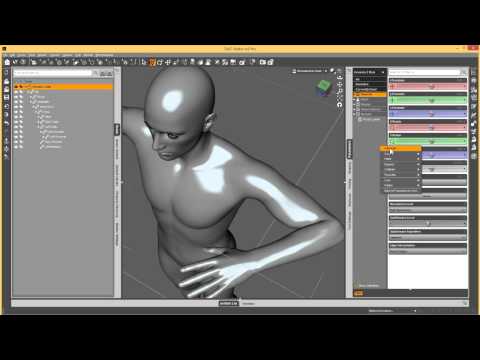
Try Edit>Figure>Zero>Zero Figure Pose. If that doesn't work, and it's the esult of ERC Freeze, another option is to undo the freezing - find the new controller slider in the Property Hierarchy pane, right-clck on its link, and select ERC Bake, then try zeroing the pose. Generally you shouldn't use Adjust Rigging to Shape unless you are using a true custom morph - one you have sculpted yourself, not a combination of existing morphs.
Remove Pose from Custom Character PresetThanks for the quick response. The problem though is that I used the EJ face morph product and a body morph product (pardon me if "morph" isn't the right term here) to modify a G8F rather than kit bashing pre-fab character morphs (eg Michael, the brute, etc) so there are probably dozens of dials if not more to adjust, none of which show a non-zero value within the character preset I created - the values seem to be written into the preset. I'm pretty certain I did an ERC Freeze and adjusted the rigging to fit the customization without realizing the pose was still in effect but can't remember the exact process as I did this many months ago.
February, 2020 - DAZ 3D New User Challenge - Lighting and Light EffectsVersion D here, doing some tweeks to the table that my first two characters are seated at, (at least turning the chair that was blocking the view of the one that I added last time so that they're easier to see.) and adding a character walking away from said table. (I'm exparamented with face transfer to put myself in this one, though my hair isn't as thin as my digital counterpart it has started to thin out.)
You have some good reflections on the floor and the characters are looking good. Poses look natural. Is the only source of light coming from the outside? Are interior lights turned on?
I am missing pools of light coming from light sources inside the facility.
Photography course.I have a background in photography, and I would most certainly advise anyone serious about their daz craft to learn about it. There are a lot of settings in Daz / Iray that come directly from photography. There is also the myriad skills like finding a motive, framing, compositing, setting up lights, blocking lights, posing your subject, etc, etc, etc.
Try a basic course, and you should have quite a gain in experience to directly transfer that experience to Daz (and back! You can setup a few scenes to try out before photographing)
Remove Pose from Custom Character PresetLoad a fresh G8F and dial in the desired morphs one by one. Then resave the character preset. None of the morphs should have a foot pose in them. If one does then that is the morph that needs redoing.
Reposing clothing with a different starting A-poseHi all, I'm having the following issue:
I have some (non-Daz) clothing .objs made for a slightly different A-pose (legs a bit closer, arms a bit more T) that I would like to get to work with genesis 8. I lack the artistic eye to sculpt those from zero (for now anyway), but am not averse to learning rigging etc. I'm a relative noob and I've tried some of the seemingly applicable tutorials etc, but to no avail for the moment. In addition to Daz, I currently have access to Blender (which seems designed by aliens, but I'm learning) and Marvelous Designer (free trial ftw.). Will consider other software, if necessary for this project. Only limitation is am a mac user.
Current solutions attempted:
1. Marvelous designer (imported obj and genesis 8 at correct size): clothing blows to shreds (apparently the seams are not connected)
2. Using Blender to automatically connect parts (remove double vertexes was the command, I think) and then simulate in marvelous designer: buttons and zippers still pop off
3. In Daz studio, posing a genesis 8 figure to match, baking transformations, transfer rigging, then reversing the pose in the item and again baking transformations: already at rig transfer stage double thickness, crazily deformed sleeves
While I was assuming I'd have to really start learning stuff to fix deformation when posing, I'm already falling flat on my face at the first hurdle. Should I just give up and start knitting, try again in a year or three or is there an actual tutorial for this somewhere? :)
N
Basic Genisis figure controlCan someone direct me to a tutorial how to morph the face without buying added plugins. I am trying to do some character modifications.
I remenber a time about 20 yrs ago when Poser and Daz did a great job of this fairly easy but with what I'm looking at now everything needs a special plugin.
The attached picts are from 2002 when I use to mess around with this stuff.
Thanks
Remove Pose from Custom Character PresetHowdy!
I’ve searched high and low for an answer in the forums and elsewhere, but can’t quite find an answer that either works for me or that I understand (probably mostly the latter XD). This is the closest I've come to finding a similar problem but I didn't fully understand the instructions for the solution. I'm still pretty new to DS so bear with me...
I created a custom character using a bunch of morphs for the body and face which I saved as a character preset. Unfortunately, I evidently saved the character with a pose "built-in" to her feet as part of the character preset and only as a morph slider (Not really sure how to describe this). When I zero, clear, or reset the figure or reset the selected pose(s) of her feet, or do any sort of “return to default values” process, the pose comes back rather than returning to the genesis 8 A-pose. I looked at the bone editor and the feet (which is the only area that I can see was affected by the pose due to saving a “wearing a shoe” type pose), when compared to the g8f default A-pose, are way outta place. See attached screenshot for the misalignment of the bone. I've looked into the Edit Mode of the morph and the Properties Hierarchy and know how to "align bones" but I'm not really sure what I'm doing or how to correct this.
I’m wondering if there is a way to remove that foot pose from the character preset without losing the facial/body structure?
Thanks!
Creating deformations for animationI have an animation of 2 characters interacting. I'd like it to feel more real so I want to add skin deformation. If the "force" is perpendicular it's quite simple: let's say it's finger pushing, get the furthest pose, morph the model, then just apply it and adjust the slider to less than 100% for other frames.
So here's the question. What about wave-like movement? Non-perpendicular push. An alien crawling under the skin, for example.
https://i.imgur.com/a3GJrSQ.png - visual aid...well, sort of. xD
Creating one singe morph won't work here so how does one do something like that? Can't google anything related to that. Maybe someone could point me to some place where I can read about it? Or, perhaps, give an advice? Techniques, software?
Thanks for the help!
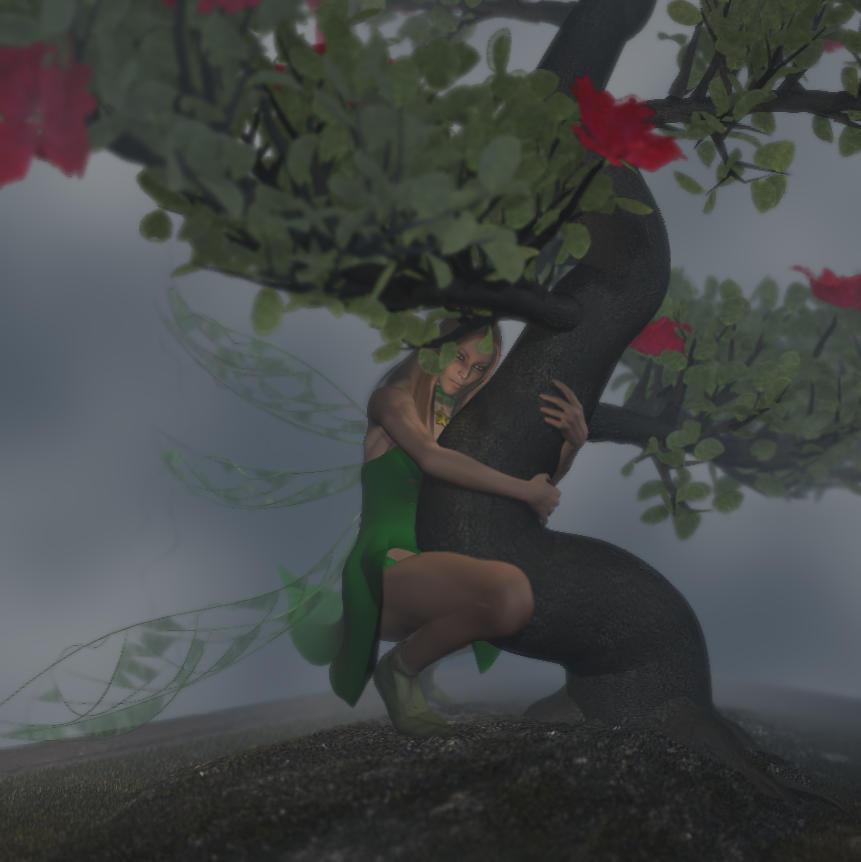
3D Art Freebie Challenge-February 2020-"Natural Love" -Main Thread OnlyThe Tree Hugger
Freebies:
1) Tink Dress for V4 (FaerieDreams/Mada3D) - http://www.mada3d.com/Freebies1.html row 8, first item
2) Leafy Boots For V4 (FaerieDreams/Mada3D) - http://www.mada3d.com/Freebies1.html row 2, middle (2nd) item
3) Broken Wings (AprilYSH) - http://shop.aprilsvanity.com/free-items/broken-wings-model-textures.html
4) Choker from The Magical Dress Platinum for A4 (redviper2012) - http://www.sharecg.com/v/59422/View/11/Poser/The-Magical-Dress-Platinum-for-A4 (+ redviper's platinum cloth morph++ (Anymatter) - https://sharecg.com/v/60149/browse/11/Poser/redvipers-platinum-cloth-morph++ )
5) Valens Hair For V4/A4 (dyald) - https://www.sharecg.com/v/36166/favorite/21/DAZ-Studio/Valens-Hair-For-V4-A4Paid:
The bonsai was a freebie from XFrog in the past, but not any more. So I'm listing it as paid.(This is a rework of an old picture - but in order to appear on the DAZ forums Bonnie had to put some clothes on ! Luckily I found some free ones
 )[Released] 50 Advanced Seated Poses [Commercial]
A little off-topic, but could you release a female version of the fight lab?
I could do that, but I think it would make me insane, ha ha. Fight Lab was the largest and most extensive project I ever undertook, and by the time it was done, I couldn't even look at my computer any more (we've since made up). I will say that the poses will transfer onto female meshes quite nicely, with only a few minor adjustments, if you load them from your content library.
This is not to say it's entirely off the table of possibilities, just that it's not in the immediate pipeline.
Endlessly ongoing... playing cards/casino chips/coins/banknotes scatter... hiatus time (still)I think I'd seen some photos of the chip racks trays they use at casinos, so just imagine a few of those stacks lying horizontally.
I've got a bit bogged down with the stack, mainly due to the bump at the bottom edge of the top chip (and top edge of the bottom chip). Simple to resolve when the morph is set to 100%, and V-scaling for the side texture is set to 1.0, giving 10 (or 11 - still not decided on that) intermediate chips. But at most other morph values (don't forget that the stack height must only change in steps matching the chip thickness, and that the V-scale must be modified in concert with the morph) the problem reappears. A picture wouldprobably explain this better, but I don't want to get bogged down creating a picture to explain how I've got bogged down...
 So I've put that to one side to ferment for a while...
Anyway, I now have my first pre-release of the 54 casino chips flung in the air prop almost* ready. It's currently in Poser prop version only, but it imports (almost**) without a problem into DAZ Studio 4.11. I've also created $2.50, $10, $50 and $500 Casino Douteux textures, the last three using arbitrary (and not particularly good) colour choices on my part. Four different textures are used by the prop, so you can mix and match the chip values you want.
Anyway, iray and 3delight renders attached - 216 chips as before. Hopefully not long*** now before I upload something...
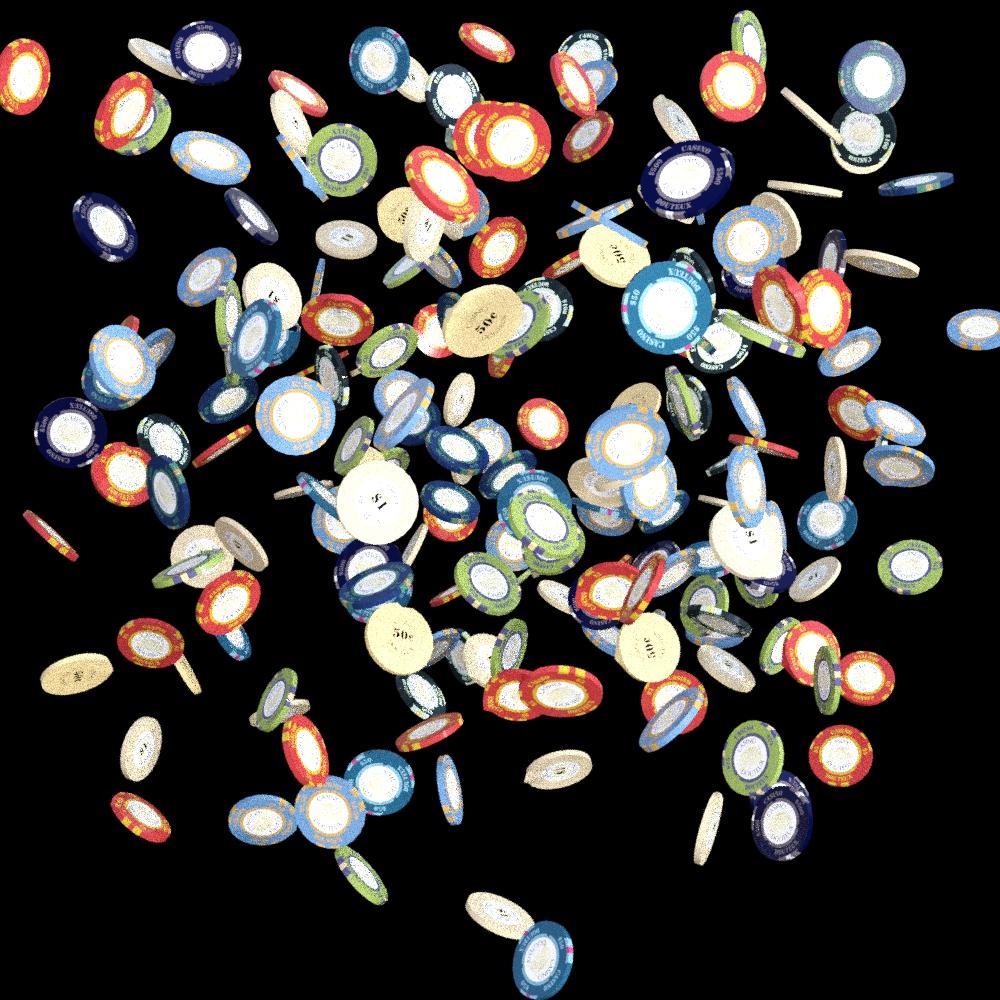

* ''almost' is nearer than my previous 'close'
**except that DAZ Studio doesn't like the ¢ symbol in two of the texture file names,which means that I have tomanually locate the file every timeI load it (Poser Pro 2014 doesn't have any problem with it). Maybe I'll change the 50¢ in the filename to $0.50 or 50c ...
***'not long' is relative too
Daz 3D is part of

Connect
DAZ Productions, Inc.
7533 S Center View Ct #4664
West Jordan, UT 84084Licensing Agreement | Terms of Service | Privacy Policy | EULA
© 2026 Daz Productions Inc. All Rights Reserved.