-
Daz Studio Not Opening After Splash Art
Yeah I have 2 monitors, It's not appearing on either, I just quickly made a new account to login to on my pc, tried to login to my daz account on daz studio there, it did the same thing, as soon as I opened it in offline mode, it opened all the way, so it appears that whenever my daz account logs in, it crashes and closes studio or install manager down, but doesn't affect central
Daz Studio Not Opening After Splash ArtDaz Studio Not Opening After Splash Art
I've recently been trying to open up Daz Studio, but the splash art appears for a brief moment then goes away again, with this included gif from using my gyazo software https://gyazo.com/c66876e4cf8521f96576cf25aa332fdb this is an example of what happens, what kind of fix can I do for this?I've tried
- uninstalling and reinstalling
- removing my files (gonna hate to reinstall all again)
- Uninstalling daz central and install manager
- I've made sure graphics card drivers are fully up to date
Also to note, When I try to sign into my Install Manager, it does the exact same thing, I press sign in and it just closes itself. Daz Central will load, that's about the limits of it allProgram closing on login in.Hi
I've submitted a support ticked, but it says it might take 4-6 weeks for them to respond. So hopefully someone here can help.
A few months ago I set up Daz Studio on my laptop. But it's not really got the punch I need. Setup was fine no issues.
However, I've brought a new desktop:
This is a new PC (by new I mean 2 days old!) -
Running Windows 10, i5-11400 (2.6GHz processor), 40GB ram, NIVIDIA GeForce GTX 1650 Super, 256GB SSD drive, 1TB External drive.
I've downloaded Daz Central, and installed just the Studio (4.15.0.2) and Genisis 8 Essentials. Nothing else yet.
Program loads fine. I then enter my login details and click connect. Then it shuts down. No error messages or anything. This happened every time. So I re-installed. Yep same thing again.
So I selected the offline option. I managed to import a model, and then after a few minutes it shut down again.
I then tried using the Daz Install Manager, with my login details when I press "Start" it just dissappears.
I'm at a complete loss. My laptop only had 8GB ram, and an on board graphics card and it was generally OK. Although I'd rather not have to use my laptop when I've brought a shiny new PC.
I've attached the log file.
Any advice welcome.
DazCentral won't install Daz studiolauraminiel_c2ab5717f9 said:
Hi I have tried installing, uninstalling, reinstalling Daz Studio 4 times now and it keeps crashing.
Installing it through Daz Central, is there another way?
This is a brand new laptop, is Intel Iris Xe graphics the problem?
-It crashes at the login screen, if I enter my Daz name and password, crashes and shuts itself down
-If I don't login, and I add a figure and try to pose it, it crashes on the pose and shuts down.
Has anyone been able to get this program running?
considering taking this laptop back and getting one with an Nvidia GPU, but not sure that's the problem.
These are very basic tasks and if it can't handle these not sure the GPU is the issue
Thanks
Running Win10, i7 10th gen, 16GB ram, Intel IrisXe graphics
Yes, this is happening to me too
New plugin : HDR light DomesMystiarra said:
if there was a car file and cbr file looking for the same hdr, a central textures folder would be more practical.
Exactly. So if you did do the change, you'r also want to redo the presets with the new HDRI location. PITA!
New plugin : HDR light Domesif there was a car file and cbr file looking for the same hdr, a central textures folder would be more practical.
but i'm shuffling scene inventory between 2 machines. i don't want to have to hunt down the textures folder when copying between the machines. the external ssd is fast, and quiet, the hdr are a longer load, especially the 16k, is worth it to put it on the system drive for now.
what i need is a flux capacitor fast NAS
 Need help: G8 head preset not working with G8.1 [solved]
PerttiA said:
What does your log say after you have loaded G8.1 Female? (Help->Troubleshooting->View Logfile)
I got hundreds of warnings of 6843 and 6777 but those warnings appear when I loaded G8 as well so I don't think it's the problem. Althought I don't remember having those hundreds of errors before I installed G8.1 which incidently was the same time I also installed and uninstalled Daz Central, aka the BIG MISTAKE that screwed up my DIM installation paths. How do I debug 6843 and 6777?
After those warnings I got:
2021-05-06 19:33:18.980 Begin Loading Character Addons...
2021-05-06 19:33:19.107 Loaded Morph Deltas in 0 min 0.0 sec.
2021-05-06 19:33:19.107 Loaded file: bs_EyelashesCollapsed.dsf
2021-05-06 19:33:19.118 File loaded in 0 min 0.1 sec.
2021-05-06 19:33:19.120 Loaded file: Genesis 8.1 Female Eyelashes.duf
2021-05-06 19:33:19.125 Loaded Morph Deltas in 0 min 0.0 sec.
2021-05-06 19:33:19.130 Loaded file: PHMMouthRealism_HD_div2.dsf
2021-05-06 19:33:19.137 Loaded Morph Deltas in 0 min 0.0 sec.
2021-05-06 19:33:19.138 Loaded file: PHMMouthRealism8_1_HD_div4.dsf
2021-05-06 19:33:19.370 Loaded Morph Deltas in 0 min 0.0 sec.
2021-05-06 19:33:19.371 Loaded file: bs_TearProjectionShape.dsf
2021-05-06 19:33:19.378 File loaded in 0 min 0.1 sec.
2021-05-06 19:33:19.380 Loaded file: Genesis 8.1 Female Tear.duf
2021-05-06 19:33:19.471 File loaded in 0 min 0.0 sec.
2021-05-06 19:33:19.472 Loaded file: G8_1FAddOnMaps.duf
2021-05-06 19:33:19.474 Finished Loading Character Addons
2021-05-06 19:33:19.494 File loaded in 0 min 12.6 sec.
2021-05-06 19:33:19.497 Loaded file: Genesis 8.1 Basic Female.duf
2021-05-06 19:33:20.831 Loaded image G8_1FBaseHeadMapD_1002.jpg
2021-05-06 19:33:21.025 Loaded image G8FBaseLegsMapD_1003.jpg
2021-05-06 19:33:21.093 Loaded image G8_1FBaseEyes01_1007.jpg
2021-05-06 19:33:21.282 Loaded image G8FBaseArmsMapD_1004.jpg
2021-05-06 19:33:21.348 Loaded image G8_1FBaseMouthMapD_1006.jpg
2021-05-06 19:33:21.541 Loaded image G8_1FBaseFaceMapD_1001.jpg
2021-05-06 19:33:21.726 Loaded image G8_1FBaseBodyMapD_1003.jpg
2021-05-06 19:33:21.774 Loaded image G8_1FEyelashesO.jpg
2021-05-06 19:33:21.811 Loaded image G8_1TearOpacity.jpgEDIT:
I tried it with other purchased characters such as Sangriart's Emmeline and the shape is the same for both G8 and G8.1. Goanna's Saya is the only one that won't work with G8.1. Saya is a HD character so I don't know if that's an issue. I can't try others since Saya is the only HD G8F character I owned.
The My Bucket's Got a Hole In It Complaint threadcertaintree38 said:
starionwolf said:
I should download the new version of Daz Install manager. I need to find the download link first.
edit: I guess I need to install Daz Central instead.
Nooooo! There is a way to get DIM!! I think you can go to your product library and click on a DIM ready file. If DIM isn't installed (so uninstall your old one first-hopefully you have an old backup installer for it though, just in case), then it should bring up a prompt asking if you want to install DIM. It should install the latest one.
Personally, I wouldn't touch Daz Central with a 10ft pole.
Or use this link: https://www.daz3d.com/install-manager-info
The My Bucket's Got a Hole In It Complaint threadstarionwolf said:
I should download the new version of Daz Install manager. I need to find the download link first.
edit: I guess I need to install Daz Central instead.
Nooooo! There is a way to get DIM!! I think you can go to your product library and click on a DIM ready file. If DIM isn't installed (so uninstall your old one first-hopefully you have an old backup installer for it though, just in case), then it should bring up a prompt asking if you want to install DIM. It should install the latest one.
Personally, I wouldn't touch Daz Central with a 10ft pole.
The My Bucket's Got a Hole In It Complaint threadI should download the new version of Daz Install manager. I need to find the download link first.
edit: I guess I need to install Daz Central instead.
New Problem Characters Left Eye Not Normal ???That is an error caued by this character: https://www.daz3d.com/renshaw-for-valentino-8. It has been fixed, all you need to do is uninstall him however you installed him (DIM, Central, Connect or Manual) and then RE-DOWNLOAD and reinstall the updated file.
And please stop shouting.
3d Bridge for Photoshop?Lindsey said:
The Photoshop plugin needs to be installed via Install Manager or manually because plugin files are installed in both Daz Studio and Photoshop application plugin folders.
Sample pic shows files installed, in this case Beta. GA release plugin files should be the same.
I only have 'DAZ Central' on my machine (no Install Manager), and it's not showing 'DAZ Bridge to Photoshop' available.
Suggestions on where I can freshly download those?
Thx.
Install manager crashes on log-inI am having the same problem, same system, new install of windows 10, 16gm ram, i7 processor....
What do I do, was this resolved? Do I need to go into windows to allow certain folders? I can't even log in, I'd gotten Install Manager after Daz Central kept crashing hoping this was away around it, but I can't even log in.
I need to do some small animations for a work project and it is important to get this software running. Has anyone been able to fix it or find a workaround?
DazCentral won't install Daz studioHi I have tried installing, uninstalling, reinstalling Daz Studio 4 times now and it keeps crashing.
Installing it through Daz Central, is there another way?
This is a brand new laptop, is Intel Iris Xe graphics the problem?
-It crashes at the login screen, if I enter my Daz name and password, crashes and shuts itself down
-If I don't login, and I add a figure and try to pose it, it crashes on the pose and shuts down.
Has anyone been able to get this program running?
considering taking this laptop back and getting one with an Nvidia GPU, but not sure that's the problem.
These are very basic tasks and if it can't handle these not sure the GPU is the issue
Thanks
Running Win10, i7 10th gen, 16GB ram, Intel IrisXe graphics
All gonekept getting crashes while attempting to render so did this per instruction on DAZ Central
If you can not see your AppData folder, type %appdata% in the Start menu and Windows will open the hidden folder.
Simply delete the files in these foldersnow all of my 3 tbs of content is uninstalled...Please help
Installing Daz on D DriveAlewis478 said:
Wait...so you're saying I could put everything in the My Daz Library (runtime, people, environments, etc, etc) on a different drive than the app itself?
Yes, It appears so! this is how I have it setup now, following a similar route as above. It seems to be running fine though opening previous files means doing one time searches for content that has moved from where it was when the file was originally created.
My only question is, does the Daz Connect Library need to be in a particular place and called out for Install Manager and Daz Central?
The Newest Evolution Is Here: The Daz Season Pass!9 PM central time and the SP freebie still not in my product library
All of my content is uninstalled [RESOLVED - sort of]Richard Haseltine said:
Drogo Nazhur said:
barbult said:
Drogo Nazhur said:
and how do i get it to NOT install in that "data" folder?
Answer:
- DO NOT install from inside Daz Studio (that uses Daz Connect and puts the files in the "cloud" folder on your computer).
- If you have already installed product from inside Daz Studio, UNINSTALL it from inside Daz Studio. then reinstall it from DIM or Daz Central (whichever you use, but not both).
- NEVER install a product two different ways (Daz Connect and DIM or Daz Central). Doing so will cause your product files to be installed in two places (duplicated files) and Daz Studio will always use the Daz Connect version. Any updates you install with DIM or Daz Central will be ignored.
I purchased a band new product and installed it via Daz Central and this is what I'm getting ...
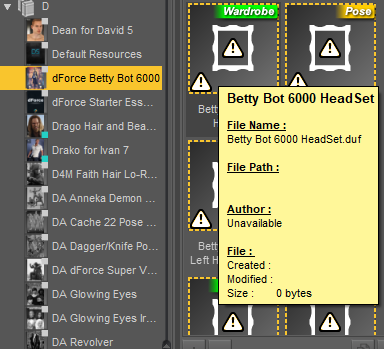
Where exactly are the installed files, and whata re your content directories?
The files are physically in E:\DAZ\Public Documents\My DAZ 3D Library\
That is where they have been for years but yesterday all of my products were greyed out and the thumbnails were no longer showing up.
The example that I showed above is a brand new product that I just purchased today and installed it with DAZ Central and as you can see it does not show any path or creation date and the file size shows zero.
I've been using DAZ for years and nearly a hundred pages of product content in my library. Not a hundred products but a hundred pages of product.
Installing Daz on D DriveIm switching to a new computer and the new computer has:
a 200 gb ssd for drive c where windows installed
a 1 tb drive for data
I'd like to install Daz and all content on the D: where there's space
Daz seems determined to install on the C: drive. Daz Central doesn't seem to be the solution, but though closer with install manager, I'm still winding up with files on the c drive.
Someone out there has to have installed daz on a second drive. What's the best way to go about this?
Thanks,
All of my content is uninstalled [RESOLVED - sort of]Drogo Nazhur said:
barbult said:
Drogo Nazhur said:
and how do i get it to NOT install in that "data" folder?
Answer:
- DO NOT install from inside Daz Studio (that uses Daz Connect and puts the files in the "cloud" folder on your computer).
- If you have already installed product from inside Daz Studio, UNINSTALL it from inside Daz Studio. then reinstall it from DIM or Daz Central (whichever you use, but not both).
- NEVER install a product two different ways (Daz Connect and DIM or Daz Central). Doing so will cause your product files to be installed in two places (duplicated files) and Daz Studio will always use the Daz Connect version. Any updates you install with DIM or Daz Central will be ignored.
I purchased a band new product and installed it via Daz Central and this is what I'm getting ...
Where exactly are the installed files, and whata re your content directories?
Daz 3D is part of

Connect
DAZ Productions, Inc.
7533 S Center View Ct #4664
West Jordan, UT 84084Licensing Agreement | Terms of Service | Privacy Policy | EULA
© 2026 Daz Productions Inc. All Rights Reserved.