-
Carrara Challenge # 51 - Here There Be Dragons! Folk/Fairy Tales WIP thread - Brilliant Images
Only going back one page. Sorry if I missed anyone.
… Misty – Indoor dragon, I always forget about native scenes. Great way to get a start on a scene. Way to tweak the lighting.
… Bunyip - Dragon and Damsel, watch it mister, modern women do not need Prince Valiant to come to their rescue. You will be banned from the internet for suggesting such a thing. LOL. Maybe the dragon is her pet?
… Misty – Rat, great use of the shape light, and I like the camera angle as well. Dramatic.
…Bunyip – Frog Prince, really cool concept. Like the colors. Maybe add some lipstick? Just kidding.
…Bunyip – Off with the Faeries. Another wonderful camera angle. Everyone clap if you believe!
…CBird – the tail on the fox looks excellent. Nice job with the Carrara hair. And, yet another great camera angle. I’m getting too obsessed with camera angles, I think. Sorry about work, except it is probably a good thing to be busy.
…Stezza – Tin soldier. Wow, pushing all my whimsical childlike buttons (a very good thing). Very polished, as always.
…HeadWax – Rabbit. So this is a K4 morph? Really excellent. I would never have guessed. The kitbashing with noggins head is seamless. Great work.
Novica & Forum Members Tips & Product Reviews Pt 12I really liked the renders. The discussion in the PC+ thread has had me thinking about pulling out the Dream House set and doing a shader update piece by piece and treat it as if I was modernizing a real home from the 1980s to the 21st Century.
I have Adria and since I used Smart Content and rarely look at the non-human part of a character, I never ran into your issues. Otherwise I would have put a big red note in my character chart in Google to alert me to her, after sending in a ticket. One ticket I sent in for a morph package that had no way to 'dial-out' the morph and move to the next character morph was in for almost five or six months when Daz came back and said that is how it was and would stay. When it takes almost 5 - 7 minutes for me to load a G8F, that is an impact. So now, I am cautious buying that PA's products. I go into the Read Me and check the file listing to make sure of what is included now.
I am being converted to using Content Library for Shader Sets though. It seems many of the sets get messed up in Smart Content, while in Content Library they are sorted out how the PA planned them.
Mary
hi please can someone help me with this in daz studioIf the figure is in a different pose or shape than default when you do an asset transfer, you'll have to change the "Item Shape" dropdown under G3F to "current". Then under options choose "Reverse Source Shape From Target"
Maximum number of Runtimesthe morph pack issue
---
only load the ones that the duf file calls for
---
the rest should be in the content library ready to be loaded if you call them.. ie "all those no user interface files"
but I've noticed all the morph files for characters seem to be in the shaping menu .. so I don't really have to load a character but can just use a slider
would be nice if they stayed in the content library
----
plus, since I haven't counted morphs for different characters to figure out the part that plays
but genesis is a minute, gen2 a couple and 3 - 8 pushing 3 minutes to load.Many people do want the sliders available, and in nay event DS has to read them all in to establish the relationships so it knows whether Morph X triggers Y, Z and W - if morphs were litellay loaded on demand then DS would have to go through checking for relationships by rading every single fle every single time a morph was added, which would make morph application as slow as figure loading. The bulk of the data, the dletas recording how the shape changes, is not kept in memory initially but loaded only at need.
AIUTO...CHI CONOSCE L’ITALIANO? PARTE DODICISi lo so, neanch'io l'avevo mai usata, ma avevo bisogno di un morph particolare, cosi o usavo lei o V4, ma per una questione di capelli ho usato G8F. Ora mi rammarico di averlo fatto, sinceramente.
ZDG random Daz Studio discoveries and questions.Fun week, fun week. spent most of it vegetating to YT vids, and putzing around in GIMP trying and failing to get a skin tone color masked onto diffuse maps.
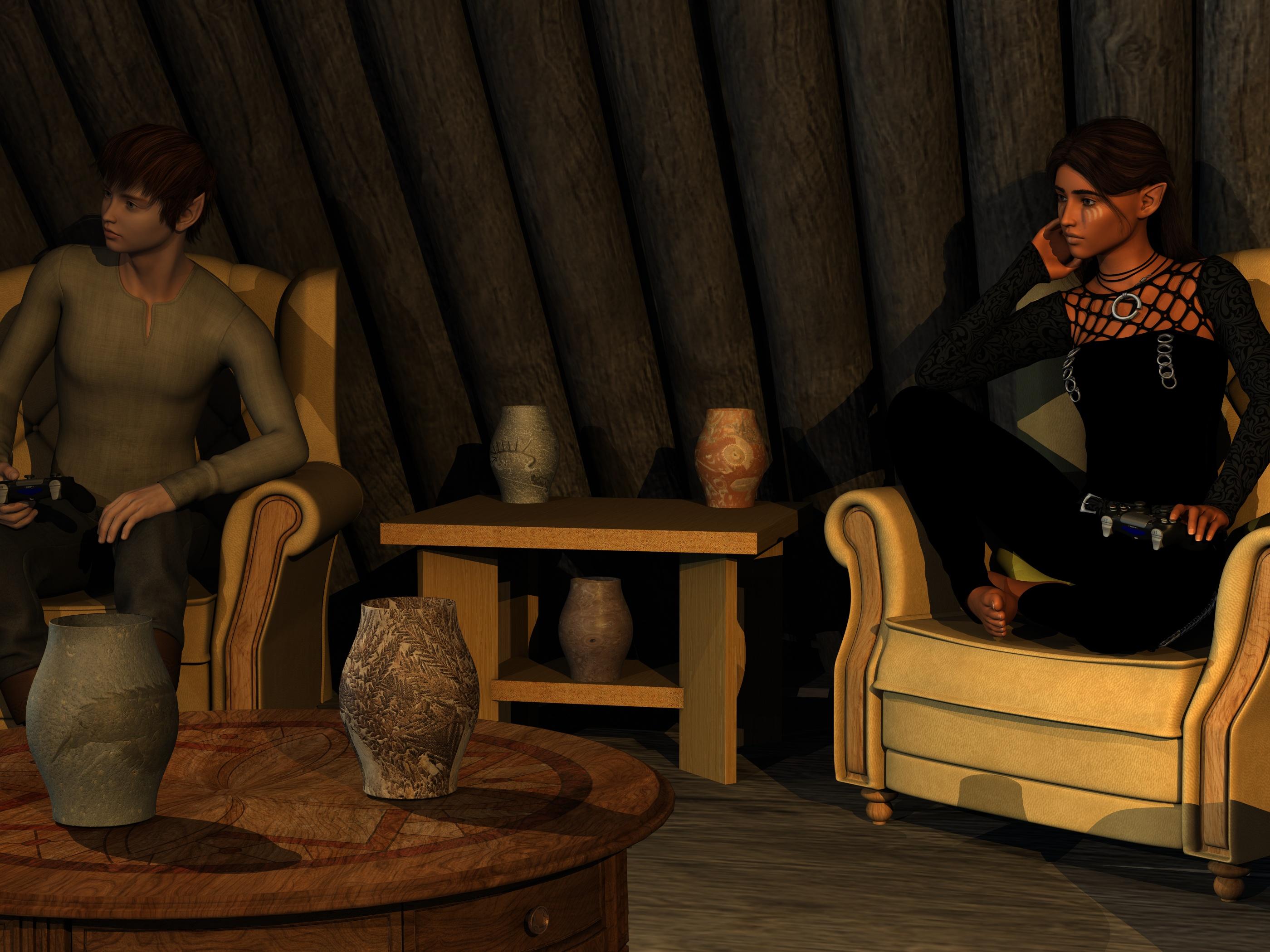
left was Peppermint (G2F) with Alfred's Finery outfit and Kung Fu Hair, right is the not quite anything close Gen6 Aiyana migrated to G8F fumbling ERC-freeze/Transfer-utility attempt ump-teen-million. The Rowana Hair did work out rather well with the TJ8 ears, and the Goth outfit is looking rather nice. The converted figure needs a hell of a lot more work, ugh.
So, other things going on, hmmm. well, intel finally reduced prices on the xeons, not so much the old ones, just the old Haswell and sandy bridge xeons rebranded with a lower MSRP. At least the mythic 28 core unicorn, water chiller not included, is no longer out in the ort cloud of 15 thousand dollars (2018 GN flashback vid). it also is a bit meh compared to what is on the market today, hamstrung by 14nm stagnation and wafer supply limitations aside, along with debatable 10nm viability if you consider the single laptop part floating around somewhere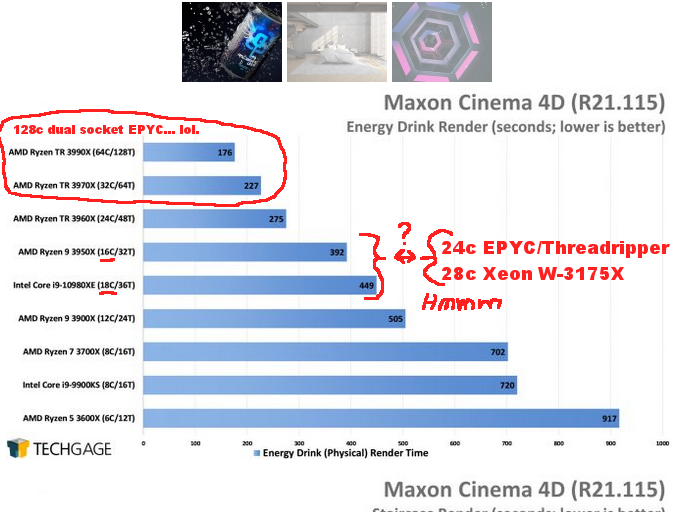
I look at this chart, yes, TechGage did some more C4D testing (website link), well. That 16 core low-end-socket consumer part verses the 18 core High-End-Desktop part, and I seriously am starting to doubt if that 28 core unicorn has a chance against even a lowly 24 core Threadripper 3960x. And that is not even considering the 32 core, 64 core, and 128 core EPYC options. it's not just intel that needs to get off rebranding antique Haswell/sandy bridge architectures with minor microcode rehashes.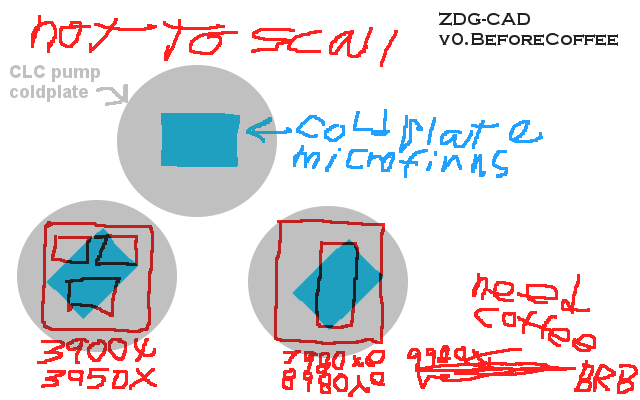
Ask has a monopoly, and it's detrimental to anything beyond single die 7700k CPUs. Apparently, Asetek has a new pump out that has an even smaller microfine area, and that's just not cool (GamersNexus YT vid). Ok, my chicken scratches are not the best before coffee, I know there is no 8780xe CPU, yet there is an 8700k, that's how confusing the intel part numbers are these days, lol. In any case, Most people are not into dellidding their multi-thousand dollar CPUs, let alone gutting brand new CLCs for the fun of it. so they won't know where the CPU die is under the CPUs IHS, let alone what orientation the micro fins are in the round CLC block that can be mounted in just about any orientation arbitrarily on the CPU. They will slap on the bracket, mount it to the motherboard, and rotate the pump cover to be upright if they even care to adjust the logo cover thing. On larger chips like the 7980xe line or multi chiplet Ryzens, most of the chip extremities will be beyond the 29.5mm x 21.4mm micro fin area due to the new pump's fin area being smaller than the dies.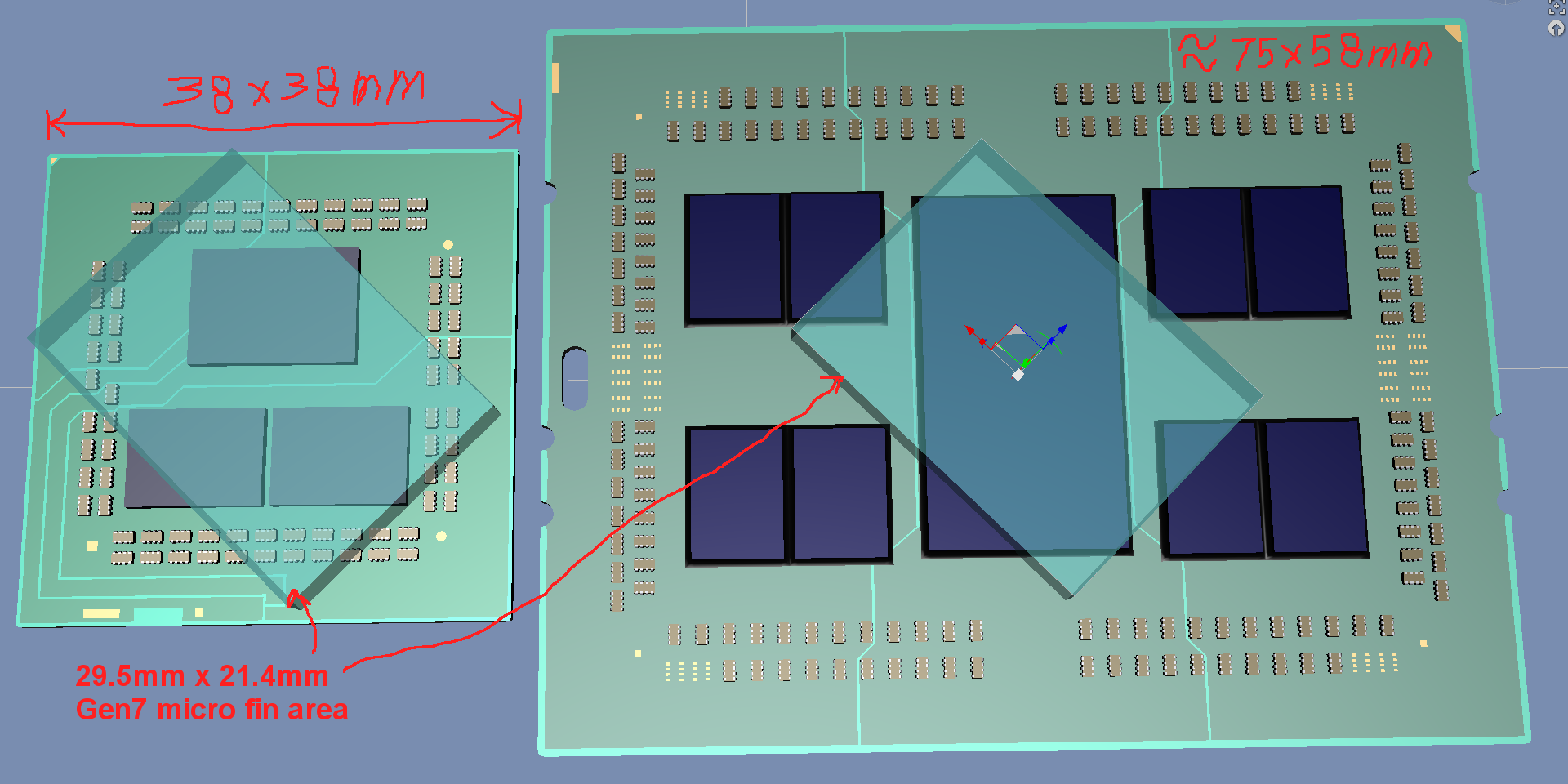
TR will be even worse with the IO die being directly cooled and the CPU core chiplets off in the corners to fend for themselves for whatever scraps of cold plate they can get. Oh, and it gets better, lol. the Enermax Threadripper/xeon CLC apparently has some coolant aging issues (GamersNexus YT vid), hmmmm.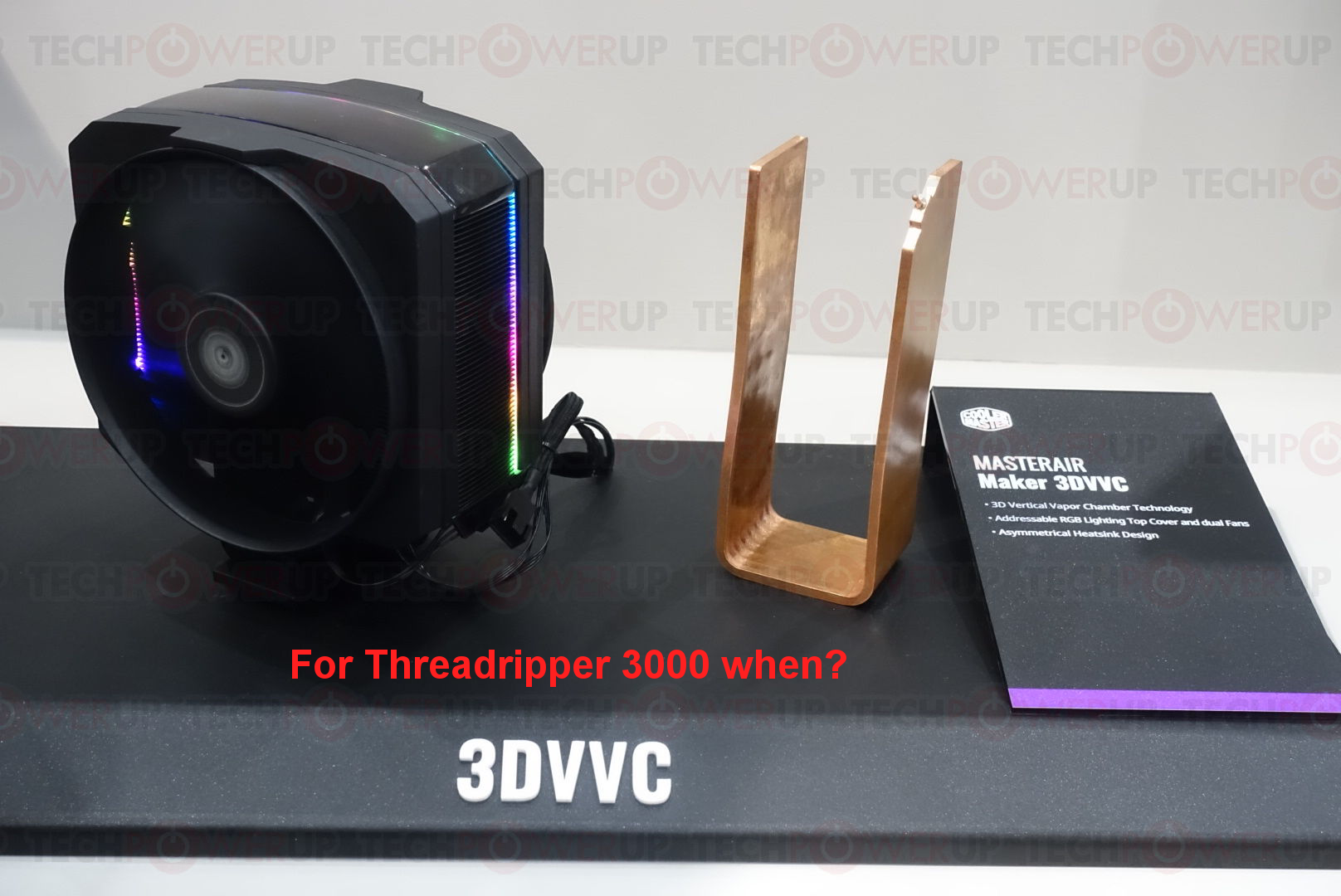
Props to TechPowerup for the nice photo of that cooler, if only there was a TR/EPYC version and it was available during the Zen2 launch. GN also just put out a Yeston Cute Case YT vid, looks super nice if you like the Cute Pet or Wife GPU cards from them. Oh, and a sober note, Freeman Dyson's achievements shall not be forgotten, RIP great one (SFIA YT vid).
Edit.
I had no clue this was in the works, the above and former months of ripping out my hair with the transfer utility was not related to RiverSoft's new Gen6 to Gen8 thing. I have had ok luck with the Gen7 to Gen8 thing with Paloma, Dewi, Akimisu, and a few others. So maybe there is a chance the crosseyed wrong eye location or jaw poking through the chin can be worked around. the not round pupils, that may require Z-brush to fix for some. I need to run to the store to get some coffee additive, so I've yet to even read the Gen6-to-gen8 thing description yet.
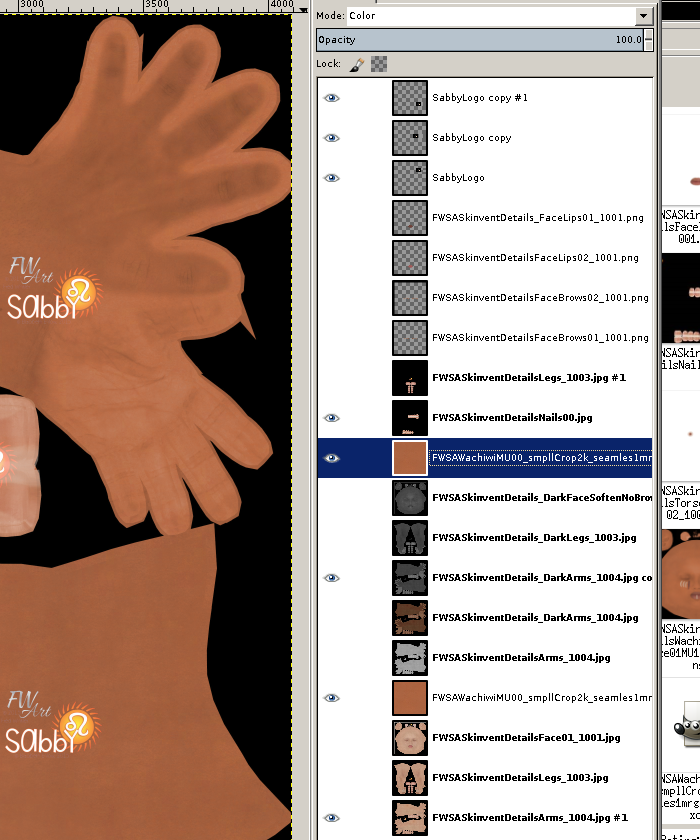
The skin maps, that's a sticky issue due to not having a mask to separate out the hand palms, I'll need to get the 3D paint things (blacksmith 3d) and just make the maps from scratch. coffee first, then I'll just plant my head on the desk and sob on the keyboard in dismay, lol.
Celebrity Look-a-Likes for 3D figures Part 2I purchased the Vixen hair for Genesis 3 pretty recently, and it looks reminiscent of Cher. I am wondering if there is a face morph depicting or bearing close resemblence to Cher?
I have two listed in the directory.
https://www.beammeup.net/blog/3d-celebrities/poser-celebrities.php?keywords=cher&active=1
AIUTO...CHI CONOSCE L’ITALIANO? PARTE DODICIFinora no, ma la uso poco al momento. Inizierò ad usarla un pò di più nel caso XTransfer o Character Transfer vengano fixati.
L'unico guaio che ho avuto era a causa del aggiornamento per il face transfer, non appena caricavo G8 nella scena tutto diventava scattoso e totalmente inutilizzabile. Risolto con un vecchio backup.
Comunque non stupirti troppo, Genesis8 è la figura più rotterrima.
 Malika HD and the wily tactics of Bluejaunt
I went ahead and picked her up. I really like the skin and the face morph!
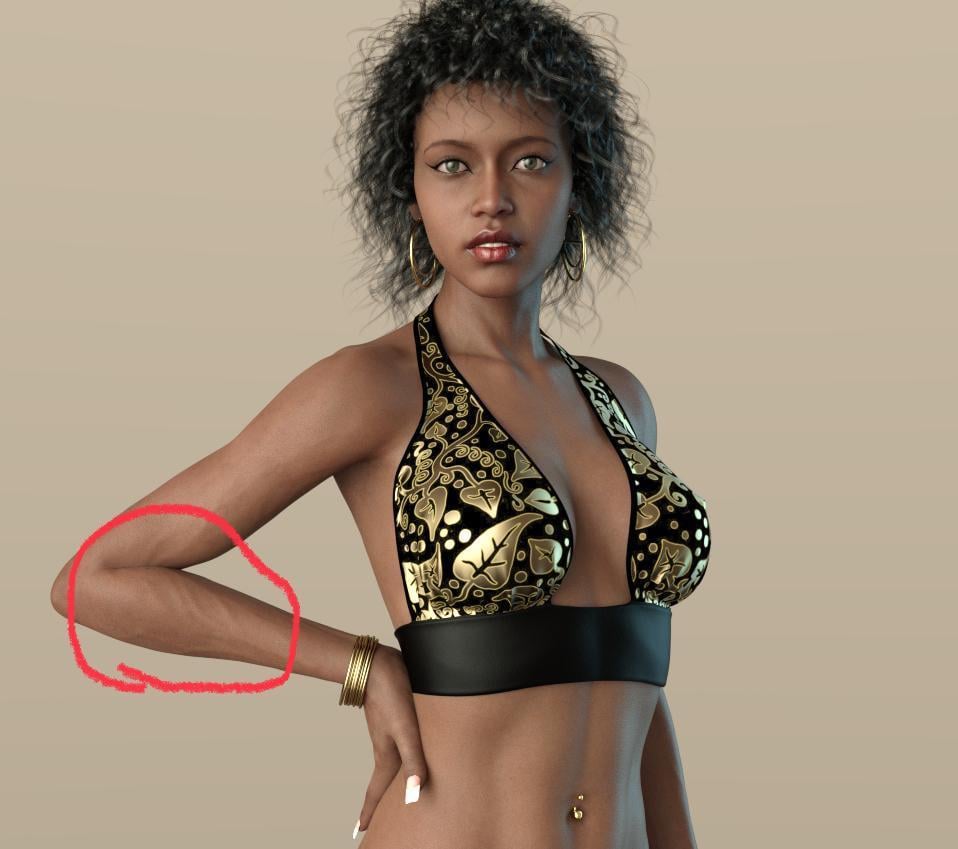
Quick image. I never use the body morph on any character I purchase, opting for my own and the nose fix (personal taste) was pretty simple. Another fine addition to the gene pool!

I love what you did with the nose, she's gorgeous! It looks like you made some other improvements to the face, like the bottom lip? The whole face looks different to me, really beautiful! But what are those wrinkles on the arm?
 Pick a Daz Character to be your significant other. + Questions
wow, this was tough.
I'm going to go with Bianca
https://www.daz3d.com/lr-s-bianca-for-v4

Bonus Points:
a) WHY? She is the head morph I have used for years and still do on G8.
b) What do we do? Arm candy, best friend, other fun stuff!
c) Hobby that you get them into? VR and other gaming
d) Thing they are better than you at/with? Organization
How do you stop morphs from changing EVERY key-frame in an animation?I am trying to setup the animation timeline so I can essentially save characters with various morphs, instead of having to save them all as individual files, for easy modification and rendering. (As well as posing).
However, when I change ANY morph, it applies to the whole chain of keys, as if there is no keys, and I can clearly see various morph keys in each frame. (They are all selected. I want EVERYTHING to change, in EVERY key-frame I save, not EVERY key-frame that exists, which isn't selected.)
Since morphs ALSO control things like muscle-flex, this is sort of an important thing to have. So when you bend an arm, the muscles can flex correctly, instead of looking like a maniquin doll with nothing more than a soft skin joint.
I tried changing every value for creating keys, but everything is still just altering every keyframe, with ANY morph change.
EG, Setting "Key frames", that should be saving ALL values, and "Locking them", is basicly not doing what it should be doing. Thus the term, Key-frame. To record ALL keys and LOCK them from being altered.
DELETEDid you apply the Simulation-Settings included with the product? You can also use the morph sliders in the Faye Hair dForce object to help.
Malika HD and the wily tactics of BluejauntI went ahead and picked her up. I really like the skin and the face morph!
Quick image. I never use the body morph on any character I purchase, opting for my own and the nose fix (personal taste) was pretty simple. Another fine addition to the gene pool!
very nice.

 new computer
You do need to reinstall Daz Studio. Just copying the files won't be enough. As to your content you can just point Daz at the right spots, assuming you don't use smart content. If you use smart content you need to run a transfer script, there's one around here somewhere.
So I should download a new copy of Daz $.12 from the site... Could I then go to the new copy in cdrive and copy data, people, daz Ect from the old drive ? would that work ?
Endlessly ongoing... playing cards/casino chips/coins/banknotes scatter... hiatus time (still)...btw - would there be any possibilities of being able to swap out the chips for say, little asteroids and stuff like that?
Not as things stand. Remember that the base mesh for the 54-chip scatter prop consists of 54 separate chips. Each morph target was created manually from that base mesh. The base mesh OBJ was imported into Poser, and then each morph target in turn was incorporated into the Poser prop using the 'Load Morph Target' with the appropriate OBJ.
To do the same for other objects (banknotes, playing cards,asteroids, whatever) would require creation of a completely new base mesh) plus versions of each MT derived from that new mesh. Which is why I commented back in this post, "But do I really want to go through all this morph target creation again for a pack of cards and a wad of bank notes ?"Creating an MT to convert the meshes of each individual chip to playing cards, asteroids, whatever is possible.The X/Y/Z translation morphs would still work correctly. However,the rotation morphs wouldtotally screw things up. Also you'd want different UV-mapping. So I can'tsee that approach working.
However, an alternative that I started playing with back when I was doing the multiple-rows-of-books Poser prop was using old-school geometry swapping, as used way back (I'm talking V1/2 time) in Anton's Victoria's Changing Fantasy Suit , Sixus1's Bunch O'Props for Behemoth, etc). Basically each separate item (row of books, casino chip, playing card, asteroid, whatever...) is a mesh attached to a separate bone in the figure. Lots of big advantages doing it that way, but also lots of problems (both expected and unexpected). A few clever tricks and a bit of lateral thinking and I had the basic concept working. And then I got bored and went onto something else. Maybe time to look at it again ?
Maximum number of Runtimesthe morph pack issue
---
only load the ones that the duf file calls for
---
the rest should be in the content library ready to be loaded if you call them.. ie "all those no user interface files"
but I've noticed all the morph files for characters seem to be in the shaping menu .. so I don't really have to load a character but can just use a slider
would be nice if they stayed in the content library
----
plus, since I haven't counted morphs for different characters to figure out the part that plays
but genesis is a minute, gen2 a couple and 3 - 8 pushing 3 minutes to load.
Malika HD and the wily tactics of BluejauntNot intentionally but as things turn out I do have a number of figures by the same artists so when Malika first loaded I was quite happy to see a 'different' figure shape. Here's another render, the um, ground cover shader didn't turn out as expected but oh well. About the knee bends, as with any character with some certain morphs, tweaking of poses is necessary to not have the leg bending into itself. For close-up on knees one could always dial out some of the morph, it's a resizing matter I think. In this image I used one of the poses that came with the piano untouched save for the feet, and adding an expression which also came with the piano set. Nice piano from the 2.20 bin :-)
 How to Create a Mirror Morph for Mesh Grabber
Mesh Grabber is under active development by ManFriday and at this point does not have a symmetry tool. If you want to create the same modifications on two sides of a figure, you can try to recreate it by hand which is difficult or you can use the method described below.
a. Load a figure (I used G8 male).
b. Go to the Tool Setting Pane and from the drop down box at the top choose Mesh Grabber. Make your Mesh Grabber changes to the figure.
i. Choose either face, edge, or vertex selection type. I used polygon selection and chose polygons above the eyebrow. Since this is on the face, I set Falloff Radius to its lowest level. I then dragged the mesh forward along the z-axis to create an eyebrow ridge.
ii. I repeated the polygon selection on the side of the head and dragged them to the right along the x-axis.
iii .I switched to edge selection type and chose an edge near the junction of the two separate grabs that had a small kink and pulled it forward. This completed the mesh modifications.
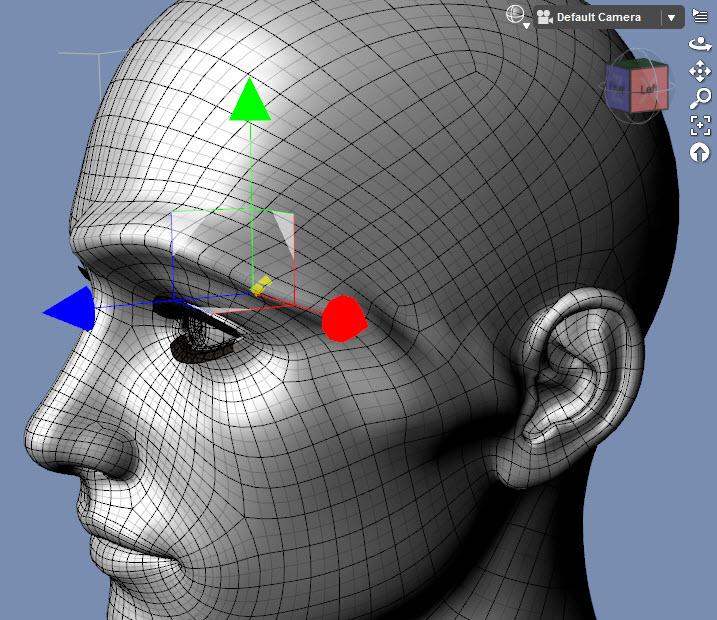
c. Next we need to export the changed mesh. Before exporting, go to the Parameters pane and set Mesh Resolution to Base. This step is critical otherwise your morph loading will fail.
d. Hide everything in the Scene pane except the base figure (cameras, eyelashes, other objects, etc.).
e. From the main menu, choose File/Export and give it a name with an indication of which side was modified (in this case, I used eyebrowridgeL.obj as the file name).
f. Reset the mesh to its default shape. With the mesh grabber tool active, click on the figure so a polygon, edge or vertex is selected. Right click in the viewport and choose Reset Mesh Grabber to clear all the changes. Now we can add back in the changes as morphs that you can dial in and out. (Note: you can skip this step and steps g - l if you want to just use the Mesh Grabber deformation without making it into a morph on that side. In that case, jump to step m.)
g. Select the base figure in the Scene pane. From the main menu, choose Edit/Object/Morph Loader Pro.
h. Click on the button Choose Morph Files… Select the file you exported previously.
i. Click on the small arrow to the left of the file name. That will expand to a selection of parameters.
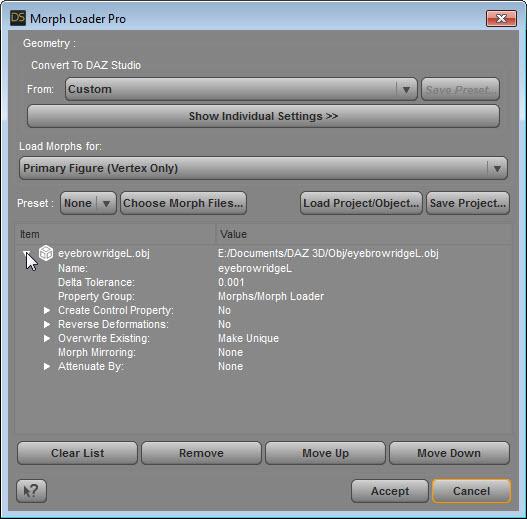
j. Go to the line saying Reverse Transformations and right click on the No and choose Yes instead.
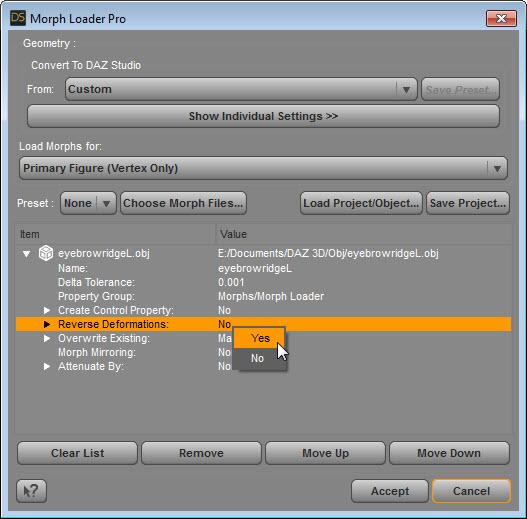
k. Click on the Accept button and you should see a dialog box showing Created morph successfully. If you get a fail notice instead, the most likely cause is you saved the obj files while the figure was set to high resolution.
l. Go to the Parameters pane and they’ll be a new parameter field called morphs. Set the newly created morph to 100%. This image below shows the original Mesh Grabber transformations now being used as a morph.
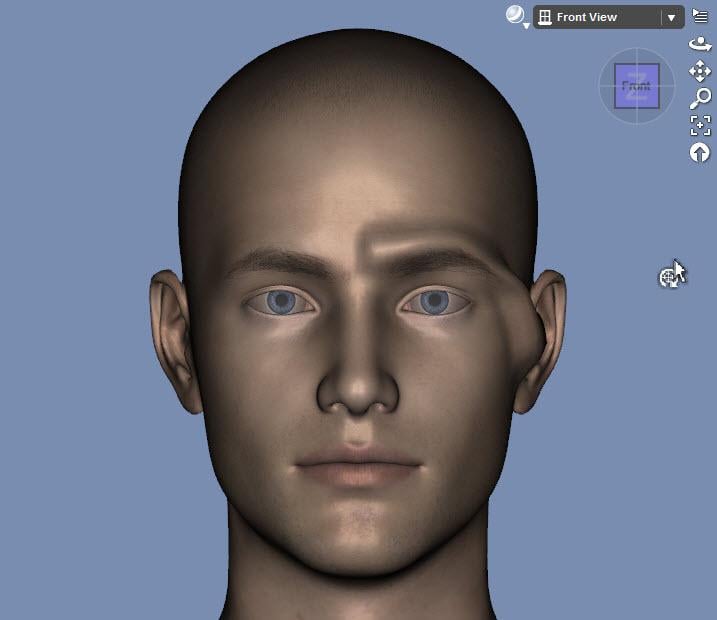
m. Repeat steps h through j for the same exported file. This time, you need to do two additional steps.
i. Double click on the name and change the ending L to an R
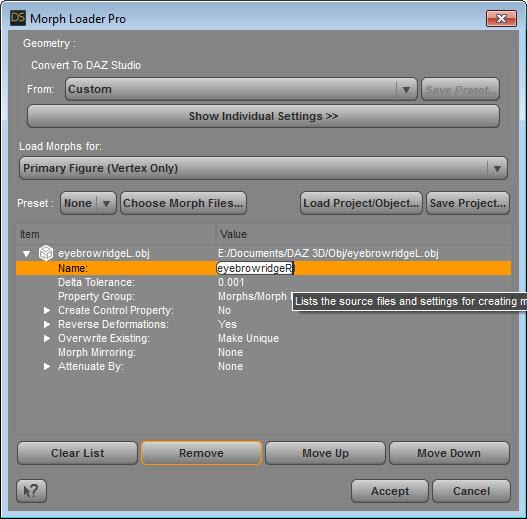
ii. Go to the line that says Morph Mirroring and right click on None. Choose X-Swap to move the mesh changes to the right side of the face. (Thanks to barbult for pointing out this feature of Morph Loader Pro).
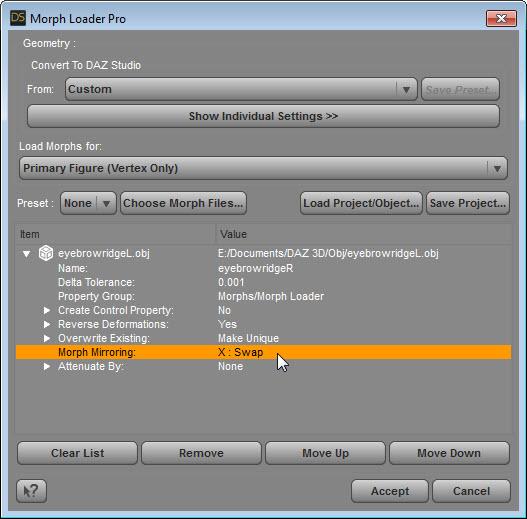
n. Click on the Accept button. Now the figure will have two morph dials. When both are set to 100% you’ll have right and left side morphs displayed.
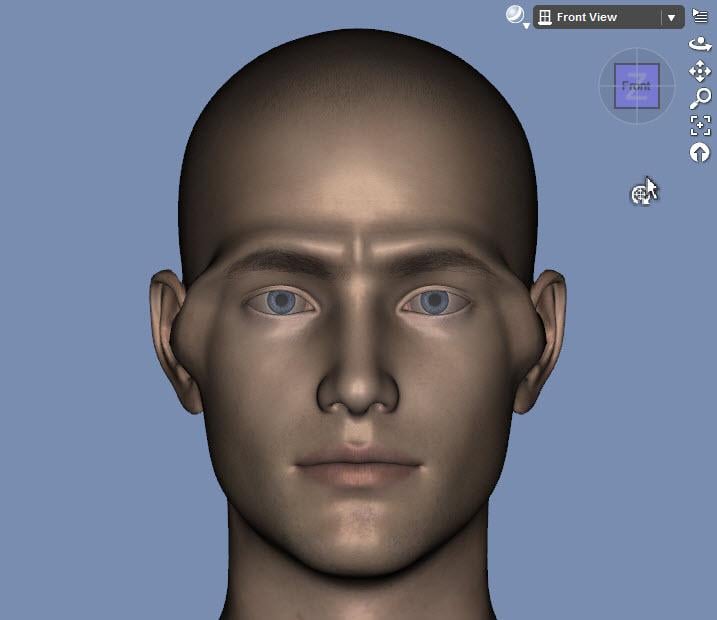
o. Before rendering, be sure to restore the figure to be a High Resolution mesh.
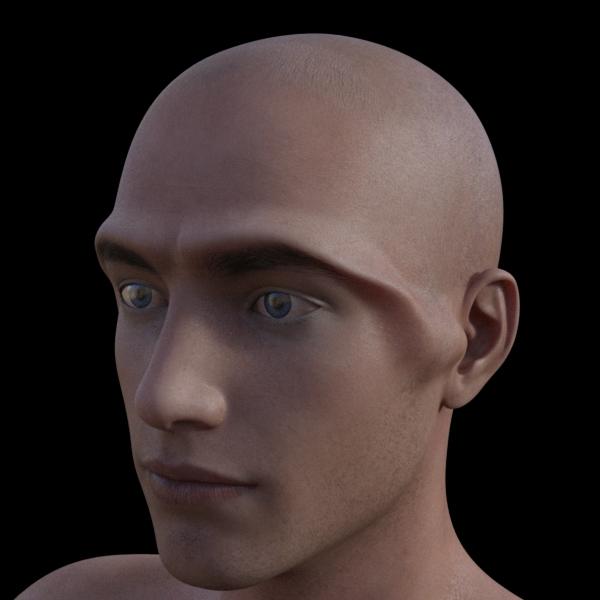
Render of Eyebrow Ridge:
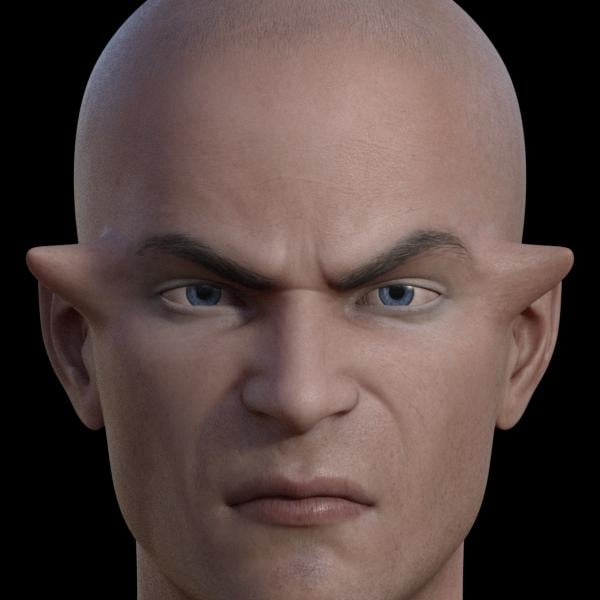
Render of another Mesh Grabber transformation (temple protrusions) that was made into a mirror morph:
 [Released] ManFriday's Mesh Grabber [Commercial]
It used a different method that requires an outside program, so Josh Darling's method is better. I'll write it up using his approach but include the prepartory steps and have it in a written form.
ETA: here is the tutorial
Maximum number of RuntimesDoes the order listed in the Content Library play a Factor?Have no problem deleting, all, then readding in reverse order.
Not the Content Library, the Content Directory Manager dialog. There are buttons to move items up and down the list, no need to delete/re-add/get it wrong/start again (yes, I did do that... once...)
As for speed of loading, another factor might be how many characters and morph packs you have installed for that Genesis figure. The actual morph data doesn't load for zeroed morphs when you load the character, but the placeholders for the parameter channels do, and if you have a lot of them, it can take more than a few seconds to churn through the list.
Daz 3D is part of

Connect
DAZ Productions, Inc.
7533 S Center View Ct #4664
West Jordan, UT 84084Licensing Agreement | Terms of Service | Privacy Policy | EULA
© 2026 Daz Productions Inc. All Rights Reserved.