-
[Released] Character Converter from Genesis 2 Female to Genesis 8 Female [Commercial]
@Riversoft - I tried converting Aiko 6 using both the 2019 and 2020 methods, and both times the final form is just the Genesis 8 base female. As you can see above, Ninive and Belle had no issues. I'll try another character now to see if there are any other issues.
I have a feeling the log will show that the script was unable to update the character file. If you load Ninive/Belle for G8F and look for the morphs, are they there and can be dialed up?
Yes - I can see the Belle and Ninive morphs and can dial them in.
Ok, so it worked, just not the fixing of the files after the conversion. If you want to convert again and post the log, I can try and figure out why that step failed.
Thanks again for all your help with this (and my many questions on the Content Wizard thread) :)
EDIT: It looks like the body morph works (and has the little Aiko 6 image next to the morph dial) but the head morph doesn't work (and is only a generic grey morph dial). Here's the log
16:56:42 GMT-0500 (Eastern Standard Time): Adding Files...
16:56:42 GMT-0500 (Eastern Standard Time): Adding "Actor/Character" file: S:/My DAZ 3D Library/People/Genesis 2 Female/Characters/Aiko 6.duf
16:57:21 GMT-0500 (Eastern Standard Time): WARNING: Forcing Conversion of Characters
16:57:25 GMT-0500 (Eastern Standard Time): Executing Script
16:57:25 GMT-0500 (Eastern Standard Time): Execution Complete.
16:58:12 GMT-0500 (Eastern Standard Time): Executing Script
16:58:12 GMT-0500 (Eastern Standard Time): Selecting Preset: S:/My DAZ 3D Library/People/Genesis 2 Female/Characters/Aiko 6.duf
16:58:12 GMT-0500 (Eastern Standard Time): Converting character from S:/My DAZ 3D Library/People/Genesis 2 Female/Characters/Aiko 6.duf to S:/My DAZ 3D Library/People/Genesis 8 Female/Characters/Genesis 2/Aiko 6.duf
16:58:24 GMT-0500 (Eastern Standard Time): Aiko 6 is of type Actor/Character
18:09:21 GMT-0500 (Eastern Standard Time): Copy Icons from S:/My DAZ 3D Library/People/Genesis 2 Female/Characters/Aiko 6.duf to S:/My DAZ 3D Library/People/Genesis 8 Female/Characters/Genesis 2/Aiko 6 Genesis 8.duf
18:09:21 GMT-0500 (Eastern Standard Time): Copy Categories from S:/My DAZ 3D Library/People/Genesis 2 Female/Characters/Aiko 6.duf to S:/My DAZ 3D Library/People/Genesis 8 Female/Characters/Genesis 2/Aiko 6 Genesis 8.duf
18:09:22 GMT-0500 (Eastern Standard Time): Execution Complete.No problem.
I need the full Daz log of the conversion please.
Thanks! I'll just sent you the log.
Morph does not updateMorph does not updateYou mention that you've been keeping the old one as backup, did you give the updated morph a new name? If not that could be the problem. All morphs have to have individual names.
[Released] Character Converter from Genesis 2 Female to Genesis 8 Female [Commercial]@Riversoft - I tried converting Aiko 6 using both the 2019 and 2020 methods, and both times the final form is just the Genesis 8 base female. As you can see above, Ninive and Belle had no issues. I'll try another character now to see if there are any other issues.
I have a feeling the log will show that the script was unable to update the character file. If you load Ninive/Belle for G8F and look for the morphs, are they there and can be dialed up?
Yes - I can see the Belle and Ninive morphs and can dial them in.
Ok, so it worked, just not the fixing of the files after the conversion. If you want to convert again and post the log, I can try and figure out why that step failed.
Thanks again for all your help with this (and my many questions on the Content Wizard thread) :)
EDIT: It looks like the body morph works (and has the little Aiko 6 image next to the morph dial) but the head morph doesn't work (and is only a generic grey morph dial). Here's the log
16:56:42 GMT-0500 (Eastern Standard Time): Adding Files...
16:56:42 GMT-0500 (Eastern Standard Time): Adding "Actor/Character" file: S:/My DAZ 3D Library/People/Genesis 2 Female/Characters/Aiko 6.duf
16:57:21 GMT-0500 (Eastern Standard Time): WARNING: Forcing Conversion of Characters
16:57:25 GMT-0500 (Eastern Standard Time): Executing Script
16:57:25 GMT-0500 (Eastern Standard Time): Execution Complete.
16:58:12 GMT-0500 (Eastern Standard Time): Executing Script
16:58:12 GMT-0500 (Eastern Standard Time): Selecting Preset: S:/My DAZ 3D Library/People/Genesis 2 Female/Characters/Aiko 6.duf
16:58:12 GMT-0500 (Eastern Standard Time): Converting character from S:/My DAZ 3D Library/People/Genesis 2 Female/Characters/Aiko 6.duf to S:/My DAZ 3D Library/People/Genesis 8 Female/Characters/Genesis 2/Aiko 6.duf
16:58:24 GMT-0500 (Eastern Standard Time): Aiko 6 is of type Actor/Character
18:09:21 GMT-0500 (Eastern Standard Time): Copy Icons from S:/My DAZ 3D Library/People/Genesis 2 Female/Characters/Aiko 6.duf to S:/My DAZ 3D Library/People/Genesis 8 Female/Characters/Genesis 2/Aiko 6 Genesis 8.duf
18:09:21 GMT-0500 (Eastern Standard Time): Copy Categories from S:/My DAZ 3D Library/People/Genesis 2 Female/Characters/Aiko 6.duf to S:/My DAZ 3D Library/People/Genesis 8 Female/Characters/Genesis 2/Aiko 6 Genesis 8.duf
18:09:22 GMT-0500 (Eastern Standard Time): Execution Complete.No problem.
I need the full Daz log of the conversion please.
Morph does not updateI have been trying to update a character. I modify the morph, then update the character in the usual way (set rigging, freeze, then save as a new morph asset). I usually delete the previous morph character (or, actually, save it as a "backup", since this never works). The character that I use to make these modifications looks great - just what I want. But when I export then load as described above, the character that I apply the updated morph to does not change - it remains exactly the same as before I made the changes. I know I must be making some obvious mistakes that everyone knows how to avoid but in all my search of the forums (DAZ forum search feature isn't very good) and Google, I haven't found anything. Please help!
Morph does not update[Morph does not update] usual way (set rigging, freeze, then save as a new morph asset). I usually delete the previous morph character (or, actually, save it as a "backup", since this never works). The character that I use to make these modifications looks great - just what I want. But when I export then load as described above, the character that I apply the updated morph to does not change - it remains exactly the same as before I made the changes. I know I must be making some obvious mistakes that everyone knows how to avoid but in all my search of the forums (DAZ forum search feature isn't very good) and Google, I haven't found anything. Please help!
Genesis 8 Male; Changing facial/head proportions using scales on the rig?I wouldn't recommend this unless you're going to export the result and then reimport it as a proper morph. My suspicion is that a lot of pose and expression presets will reset those controls.
Anyone have Face Transfer Unlimited - Need helpHi All,
I purchased Face Transfer Unlimited to create just one render from a photo. I didn't read the fineprint and I have a Mac... Face Transfer is only for Windows.
Does some here have Face Transfer Unlimited that would help transfer one photo for me, please? I just need the character from the photo. I can do the rendering myself.
Many thanks,
Jimmy
Same query is posted here: https://www.daz3d.com/forums/discussion/390131/anyone-have-face-transfer-unlimited-need-help
Daz to MayaI found this digital artist online to create custom full-body morph for me for Genesis figure. She said she is using Maya for her 3D work, so I was wonderi g what is the best and easiest way to export the correct file. Is there anything I have to be careful about except base resolution, removing brows and setting up right scale for export? It's just annoying that most people I hired couldn't get the job done, I could not re-import the morph back into Daz. If anyone recommends a good and affordable artist/site that does custom Daz models, feel free to PM meFree Software that Makes Life EasierWendy, thank you, for the heads-up on the Quixel Mixer stand-alone -- I have been waiting for this - still haven't gotten around to download UE yet...
Imago :
Came here for my Cararra needs, but since you posted that link, I should point out that I already updated it to 2.8x (there is a thread about it here in 'The Commons') and am making continual improvements for usability. So far, I am the only user, as no one has stepped up for beta testing (though, claims it's so sad that it is only for 2.79). Also, I am not the original author - just took up the mantle for porting, and making it a little more user friendly (such as no hand editing the files to make work, error-checking, and some setup automation).
However, it is not the 'long awaited' Blender/DS Bridge that everyone is clamoring for -- It is only a Morph Target/Shape Key bridge for easier IN/OUT between the two programs like others that have come before it.
* EDIT: Thank you, Catherine, for the heads-up on the Q.M. download file size -- That makes a difference for me for where I can download it - I have to rebuild my broken FatDog64 Linux USB that allowed me to download files up to 7G - For now I am stuck on only allowed up to 1.6G while loaded in memory. Thanks again!
3D Art Freebie Challenge-March 2020-Winners Announced "March Winds" -Entries Thread Only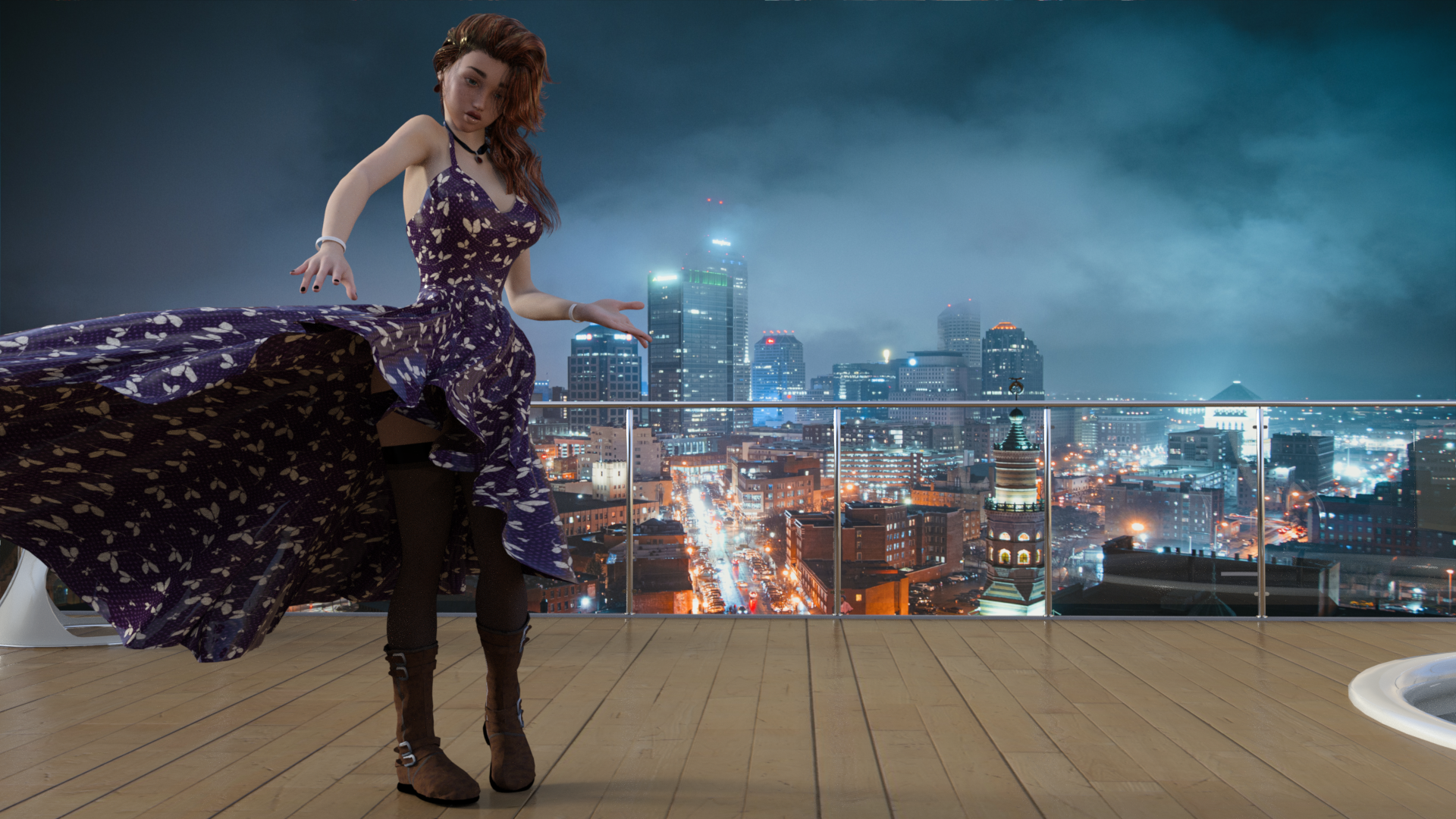
March Winds cause Evelyn's wardrobe to malfunction
Free
The Girl 6 (February Daz Freebie)
Party Girl (February Daz Freebie) - Dress and wind morph
Tamesis Bundle (Lipstick) (February Daz Freebie)
Free Stockings for Genesis 2 Female
CElegance Jewelry (Necklace and Earring)
Bird's Eye View of Lighted CIty (Backdrop)
Paid:
Utopia Living
Molly HD Eyebrows and Freckles
End of Summer Hair
Tarian HD for Genesis 8 and 3 Females (fingernails)
Teen Josie 6 Face Morph (this was actually free when I got it last year).
[Released] Character Converter from Genesis 2 Female to Genesis 8 Female [Commercial]@Riversoft - I tried converting Aiko 6 using both the 2019 and 2020 methods, and both times the final form is just the Genesis 8 base female. As you can see above, Ninive and Belle had no issues. I'll try another character now to see if there are any other issues.
I have a feeling the log will show that the script was unable to update the character file. If you load Ninive/Belle for G8F and look for the morphs, are they there and can be dialed up?
Yes - I can see the Belle and Ninive morphs and can dial them in.
Ok, so it worked, just not the fixing of the files after the conversion. If you want to convert again and post the log, I can try and figure out why that step failed.
Thanks again for all your help with this (and my many questions on the Content Wizard thread) :)
EDIT: It looks like the body morph works (and has the little Aiko 6 image next to the morph dial) but the head morph doesn't work (and is only a generic grey morph dial). Here's the log
16:56:42 GMT-0500 (Eastern Standard Time): Adding Files...
16:56:42 GMT-0500 (Eastern Standard Time): Adding "Actor/Character" file: S:/My DAZ 3D Library/People/Genesis 2 Female/Characters/Aiko 6.duf
16:57:21 GMT-0500 (Eastern Standard Time): WARNING: Forcing Conversion of Characters
16:57:25 GMT-0500 (Eastern Standard Time): Executing Script
16:57:25 GMT-0500 (Eastern Standard Time): Execution Complete.
16:58:12 GMT-0500 (Eastern Standard Time): Executing Script
16:58:12 GMT-0500 (Eastern Standard Time): Selecting Preset: S:/My DAZ 3D Library/People/Genesis 2 Female/Characters/Aiko 6.duf
16:58:12 GMT-0500 (Eastern Standard Time): Converting character from S:/My DAZ 3D Library/People/Genesis 2 Female/Characters/Aiko 6.duf to S:/My DAZ 3D Library/People/Genesis 8 Female/Characters/Genesis 2/Aiko 6.duf
16:58:24 GMT-0500 (Eastern Standard Time): Aiko 6 is of type Actor/Character
18:09:21 GMT-0500 (Eastern Standard Time): Copy Icons from S:/My DAZ 3D Library/People/Genesis 2 Female/Characters/Aiko 6.duf to S:/My DAZ 3D Library/People/Genesis 8 Female/Characters/Genesis 2/Aiko 6 Genesis 8.duf
18:09:21 GMT-0500 (Eastern Standard Time): Copy Categories from S:/My DAZ 3D Library/People/Genesis 2 Female/Characters/Aiko 6.duf to S:/My DAZ 3D Library/People/Genesis 8 Female/Characters/Genesis 2/Aiko 6 Genesis 8.duf
18:09:22 GMT-0500 (Eastern Standard Time): Execution Complete.dear Hairmakers..I hadn't remembered that Hana included hair shaders as well as 3DL skin settings. I'll be making use of that. Thank you for the reminder.
I do have Mec4D's unshaven, and both the others. I've used them, too. They are a help, but nowhere near as comprehensive as the shader packages that have been released for Iray. I rather suspect that 3DL just doesn't offer the range of possibility that Iray does. And, these days anyone using 3DL is making a consious decision to do so rather than just accepting it as how things are done.
I suspect that I really need to sit down and experiment on using things like the Unshaven colors on other fiber hairs. I should think they *ought* to transfer withoiut a big hassle. I know I've used the colrs from Unshaven 2 (which is 3DL) on the Unshaven 3 set (which I think is Iray) without a problem. Trying to kitbash transmapped hair is more of an issue.
Novica & Forum Members Tips & Product Reviews Pt 12I can see some resemblance, and he looks ok but, at least for me, without the Jonathan morph he is not the handsome spy anymore.
On another note, I noticed that even not the best of morphs, can look awesome combined with others at different percentages.
So I think Kai + someone with a strong jaw could look really good even without Jonathan.
I have had a lot of fun combining characters made for one figure with other figures. If I can find it, I'll get you the link of a post I did a while back doing just that. (But I will have to remember which character it was. I think it was a male…)
ETA: Okay, @alex86fire, here are two posts Google found for me:
Critique my new computer build specs!For $2k in the US that is way less than you could have gotten. $235 for a 2Tb PCIE gen 4 drive when you are buying a gen 3 only CPU. I get the idea of upgrading but till then ow. Also where are those prices from? Those are just painful.
I just put this together (US prices)
CPU: AMD Ryzen 5 3600 3.6 GHz 6-Core Processor ($174.99 @ Amazon)
Motherboard: Asus PRIME X570-P ATX AM4 Motherboard ($144.99 @ Amazon)
Memory: G.Skill Ripjaws V Series 32 GB (4 x 8 GB) DDR4-3200 Memory ($149.99 @ Newegg)
Storage: Intel 660p Series 1.02 TB M.2-2280 NVME Solid State Drive ($124.00 @ Adorama)
Storage: Western Digital Black 4 TB 3.5" 7200RPM Internal Hard Drive ($173.89 @ Amazon)
Video Card: EVGA GeForce RTX 2080 SUPER 8 GB BLACK GAMING Video Card ($653.98 @ Newegg)
Case: Cooler Master MasterCase H500P Mesh ATX Mid Tower Case ($169.99 @ Amazon)
Power Supply: EVGA 1000 W 80+ Gold Certified Semi-modular ATX Power Supply ($126.98 @ Newegg)
Total: $1718.81
These prices are the current ones at Newegg. Note : you didn't include an operating system ( $200 ) which brings it up to approximately $2000. My system does 3DL much better and yours excells at Iray. I wanted a 2TB drive for my runtime for expansion puposes and I know it doesn't get the full benifits with a gen2 CPU but, I plan to upgrade it eventually. Also Newegg has 0% interest for a year for that kind of thing.
Gus
Those are not the newegg prices either.
You're buying an anniversary edition CPU for no reason, much less buying the 2700X at all instead of the 2700. 2700 is $212.
As to a Windows license? Why? Don't you currently have a win 10 box? Licenses transfer. Also Win 10 pro is not $200 its $150 (you pay an extra $50 if you want a USB stick because you can't buy a cheap stick and make one yourself).
Putting a 3d asset library on an NVME drive is just plain dumb. You might only have enough assets to fit in 1Tb now but trust me that won't last. Also booting from the slower drive is just bizarre. Get a 1Tb boot and software drive and then a big storage HDD.
64Gb of RAM makes little sense either. Even in a 3Delight system, which your build is objectively worse than mine at.
If you really want a $2000 3Delight system this is superior in pretty much every way:
CPU: AMD Ryzen 9 3900X 3.8 GHz 12-Core Processor ($418.95 @ B&H)
Motherboard: Asus TUF GAMING X570-PLUS (WI-FI) ATX AM4 Motherboard ($183.99 @ Best Buy)
Memory: Corsair Vengeance RGB Pro 32 GB (2 x 16 GB) DDR4-3200 Memory ($164.99 @ Amazon)
Storage: Intel 660p Series 1.02 TB M.2-2280 NVME Solid State Drive ($124.99 @ B&H)
Storage: Western Digital Black 4 TB 3.5" 7200RPM Internal Hard Drive ($173.89 @ Walmart)
Video Card: EVGA GeForce RTX 2060 6 GB KO GAMING Video Card ($303.98 @ Newegg)
Case: Cooler Master MasterCase H500P Mesh ATX Mid Tower Case ($169.99 @ Amazon)
Power Supply: EVGA G5 850 W 80+ Gold Certified Fully Modular ATX Power Supply ($116.98 @ Newegg)
Total: $1657.76Even if you source everything from Newegg, which is not the best idea but whatever, you'll still come out cheaper with superor performance.
[Released] 50 Advanced Seated Poses [Commercial]I tried using one of the seated poses with an extreme morph. This is 50% Girl 7 (transferred to G8F) and 50% Girl 8. I found the best way to adjust the pose was to do it incrementally from the Base G8F shape, about 20% at a time. That let me see how it was supposed to be posed and make small changes to bring it back into position. I also used various morphs to squeeze in the breasts so they didn't intersect the arms so much. The pose is ASP Pose 041. I adjusted the head and eyes to look at the camera.
The list of products used is here in my Gallery.

Adorable! And all the little details are spot on.
[Released] 50 Advanced Seated Poses [Commercial]I tried using one of the seated poses with an extreme morph. This is 50% Girl 7 (transferred to G8F) and 50% Girl 8. I found the best way to adjust the pose was to do it incrementally from the Base G8F shape, about 20% at a time. That let me see how it was supposed to be posed and make small changes to bring it back into position. I also used various morphs to squeeze in the breasts so they didn't intersect the arms so much. The pose is ASP Pose 041. I adjusted the head and eyes to look at the camera.
The list of products used is here in my Gallery.
She's so cute! Love the scene.
Show Us Your Iray Renders. Part VIISo many amazing renders here. This is the most recent render I've done. I did some simple post work adjustments for color and lighting.

really nice! Mind if I ask what character/skin you used?
Thank you Michael. She is mostly Phoebe with just a few morph tweaks. She's one of my favorite characters.
Your newest image here looks great btw.
GnollsWe need gnolls. Well, I need gnolls, anyway. My life simply will not be complete without gnolls.
I'd take a crack at creating a gnoll based on G8 myself, but I'm not sure how exactly to go about that. For example, would it be possible to graft the head of https://www.daz3d.com/hyena onto G8 in a program like mudbox? I would make lots of modifications, of course, but that would give me a good starting point.
I created this character using products available on this site, but I'm not entirely satisfied with her:
I don't know about mudbox, but you can certainly do it in Blender. There is a modifier: shrinkwrap where one object will try to take the form of the other object.
So if you overlap the heads and define it properly, you could do it.
I would create the basic morph for you, as it isn't complicated but I don't have the hyena :(.
Another option would be to play around with HFS fantasy morphs (https://www.daz3d.com/hfs-ultimate-shapes-bundle, he also has some for G3).
This is a quick gnoll-like shape I did in like 10 minutes:
Novica & Forum Members Tips & Product Reviews Pt 12I can see some resemblance, and he looks ok but, at least for me, without the Jonathan morph he is not the handsome spy anymore.
On another note, I noticed that even not the best of morphs, can look awesome combined with others at different percentages.
So I think Kai + someone with a strong jaw could look really good even without Jonathan.
Daz 3D is part of

Connect
DAZ Productions, Inc.
7533 S Center View Ct #4664
West Jordan, UT 84084Licensing Agreement | Terms of Service | Privacy Policy | EULA
© 2026 Daz Productions Inc. All Rights Reserved.