-
Too Many G8 Characters?
It puzzles me, too, because to me tinkering with combinations and kitbashing is at the soul of the hobby. But I understand people want and do different things... just... seems so foreign to me, heh.
Like, even taking two figures and just mixing them; X at 40%, Y at 60%. Woo. Maybe some youth or aging dials. 5 mins, tops.
After that, experimenting with morph packs. I often find noses too small in most figures. Thankfully, 'nose flesh size' dial fixes that in seconds. Maybe a little more fiddling with nose height, mouth width... ooo, nasolabial folds...
That's miles way from actually diving into a modeling program to make a unique face, and gives you so much freedom to achieve a unique look.
Heck, how about the shape randomizer?
But I also agree there was a slew of female middle aged characters that came out like Jenni, Leisa, Babina and more that I can't remember the names of that added nothing to the gene pool.
You consider Leisa and Babina "middle aged"?
Leisa looks about 40 but not Babina. I was thinking of CJ or Ellithia I guess. They all look so similar, I get confused.
Too Many G8 Characters?It puzzles me, too, because to me tinkering with combinations and kitbashing is at the soul of the hobby. But I understand people want and do different things... just... seems so foreign to me, heh.
Like, even taking two figures and just mixing them; X at 40%, Y at 60%. Woo. Maybe some youth or aging dials. 5 mins, tops.
After that, experimenting with morph packs. I often find noses too small in most figures. Thankfully, 'nose flesh size' dial fixes that in seconds. Maybe a little more fiddling with nose height, mouth width... ooo, nasolabial folds...
That's miles way from actually diving into a modeling program to make a unique face, and gives you so much freedom to achieve a unique look.
Heck, how about the shape randomizer?
But I also agree there was a slew of female middle aged characters that came out like Jenni, Leisa, Babina and more that I can't remember the names of that added nothing to the gene pool.
You consider Leisa and Babina "middle aged"?
For me, yes for Leisa, but Babina is not there yet IMO. Even though the old (pre 94) standard was from 40-60, I consider 35-55 middle aged,
Too Many G8 Characters?It puzzles me, too, because to me tinkering with combinations and kitbashing is at the soul of the hobby. But I understand people want and do different things... just... seems so foreign to me, heh.
Like, even taking two figures and just mixing them; X at 40%, Y at 60%. Woo. Maybe some youth or aging dials. 5 mins, tops.
After that, experimenting with morph packs. I often find noses too small in most figures. Thankfully, 'nose flesh size' dial fixes that in seconds. Maybe a little more fiddling with nose height, mouth width... ooo, nasolabial folds...
That's miles way from actually diving into a modeling program to make a unique face, and gives you so much freedom to achieve a unique look.
Heck, how about the shape randomizer?
I so feel the same way, creating is what this experience with DS and 3D is all about to me. I would guess that those that posted that they just install and render would not be doing digital imagery if there wasn't a DAZ3D and they had to do it the old fashion way of actually being creative and using a modeling app and such. Makes me wonder the ratio of users that are this way since I keep seeing more forum posts along the same lines.
Serious question about men's clothingThe way the shirt is UV mapped divides the front right down the middle. The normal maps have that "explosion" of colors that you often see on textures beyond the visible "seams". The minute you place the shirt on anything other than a default G8 and have the figure posed even slightly, the shirt stretches and exposes those edges. I know I'm not explaning this well, but poke around in the texture folder and you'll see what I mean.
The first is the shirt on Tristan's morph with a slight twist to the waist.
The second is with the normal map set to 0. Because some of the add-on textures use that same normal map, the problem exists with it, too.
Yeah, my example was on a G3 (manually converted with SY's method). I have since converted that character to G8.
You'd just think the seam would have been put down the side or something...
Serious question about men's clothingThe way the shirt is UV mapped divides the front right down the middle. The normal maps have that "explosion" of colors that you often see on textures beyond the visible "seams". The minute you place the shirt on anything other than a default G8 and have the figure posed even slightly, the shirt stretches and exposes those edges. I know I'm not explaning this well, but poke around in the texture folder and you'll see what I mean.
The first is the shirt on Tristan's morph with a slight twist to the waist.
The second is with the normal map set to 0. Because some of the add-on textures use that same normal map, the problem exists with it, too.
[Released] ManFriday's Mesh Grabber [Commercial]hey Manfriday will you also update your Turbocontent for custom content in the future? sadl atm, you only look in this thread :(
I replied in the Turbo Content thread. Please don't mix topics, this only confuses everyone.
I just asked here, because you didnt commented there anymore ;(... since december.
Uhh rotating beta cool!
Update: my first experience was kinda... dissapointing, maybe I do it wrong...
And yes I made it wrong :D now I managed it, so it just need a bit learning! and FINALLY, without Zbrush or anything, I can open that diaper ^^
before:
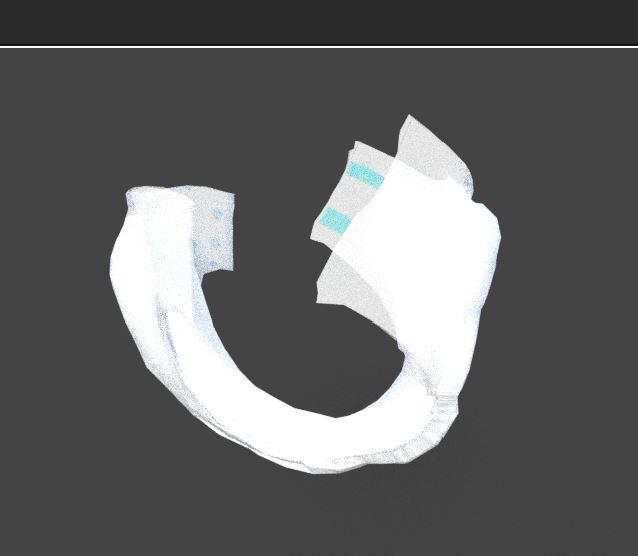
After:
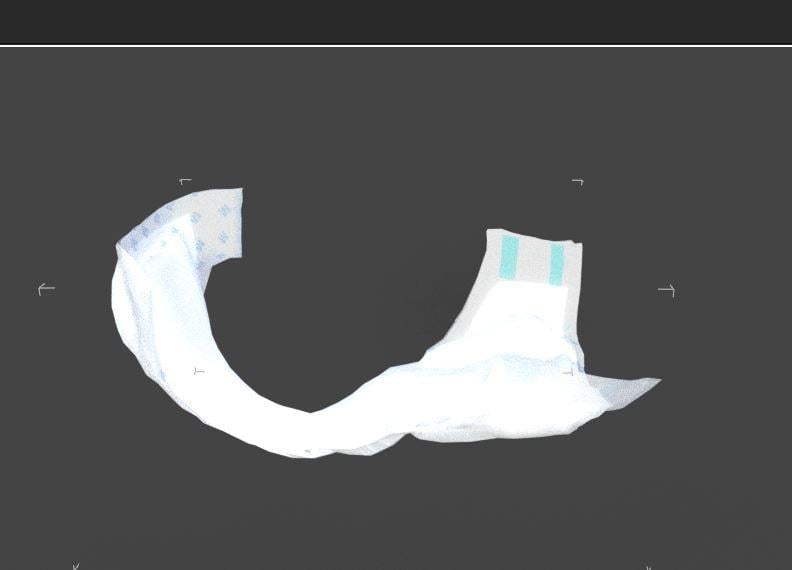
Absolute what i wanted :)
and I'm sure it will be much more ^_^
(Now I just need to learn/understand, how I can make this "opening" into a morph...)
you said it in your PDF.
"It is however possible to convert the Mesh Grabber deltas into a morph. To create such a morph, export the object with deltas as an OBJ file using Daz Studio’s “File” → “Export” and re-import that OBJ with Morph Loader Pro (“Edit” → “Object” → “Morph Loader Pro”)."
let's see if I understand it.... xD....
Update, in the export window did I not see any "delta settings" I guess, delta is just how you call the movement from mesh grabberß I think I saw that word in the resetting mesh grabber windows.
I did export it as .obj as you said but... with morph loard pro can I not load a .obj O_o....
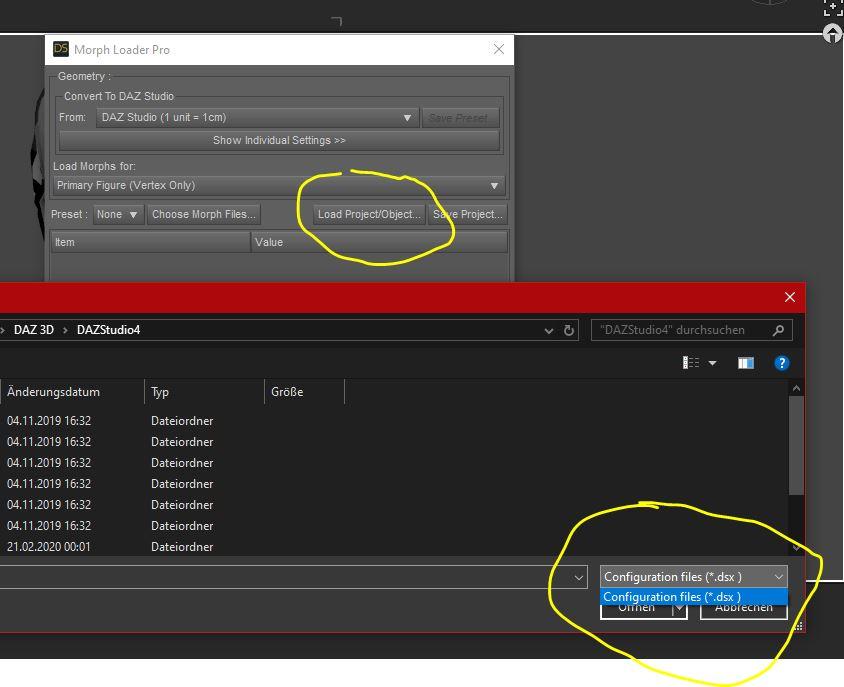
so.... I assume you should be more clear with the tutorial if I dont understand it :P
Edit: I just saw left form it the other loading button....^^....
worked, thanks!!
BJ Misumi HD questionIn the Parameters tab, I'm finding it under Head/Pose Controls/Expressions, which seems like the right placement for the morph.
Genesis 8 eye lashes and hair doesn't following the body (after Merge Fitted Figures option)It's a little hard to follow the video, images are usually clearer with a video as a supplement if needed. I assume from the attachment that this is happening in DS too. Is this a custom morph, spawned from dForms or imported through one of the Morph Loaders? If so, has it been saved as a morph asset? If you click the gear icon on the morph's slider and open Parameter Settings is AutoFollow checked?
This human body and hair is 3rd party content I found. Yes I tried AutoFollow thing like this video (https://www.youtube.com/watch?v=92aGAkPVwbc) I'm not sure this is true I tried on basic character with all parameters selected this is right place right ?
Too Many G8 Characters?It puzzles me, too, because to me tinkering with combinations and kitbashing is at the soul of the hobby. But I understand people want and do different things... just... seems so foreign to me, heh.
Like, even taking two figures and just mixing them; X at 40%, Y at 60%. Woo. Maybe some youth or aging dials. 5 mins, tops.
After that, experimenting with morph packs. I often find noses too small in most figures. Thankfully, 'nose flesh size' dial fixes that in seconds. Maybe a little more fiddling with nose height, mouth width... ooo, nasolabial folds...
That's miles way from actually diving into a modeling program to make a unique face, and gives you so much freedom to achieve a unique look.
Heck, how about the shape randomizer?
But I also agree there was a slew of female middle aged characters that came out like Jenni, Leisa, Babina and more that I can't remember the names of that added nothing to the gene pool.
You consider Leisa and Babina "middle aged"?
Too Many G8 Characters?It puzzles me, too, because to me tinkering with combinations and kitbashing is at the soul of the hobby. But I understand people want and do different things... just... seems so foreign to me, heh.
Like, even taking two figures and just mixing them; X at 40%, Y at 60%. Woo. Maybe some youth or aging dials. 5 mins, tops.
After that, experimenting with morph packs. I often find noses too small in most figures. Thankfully, 'nose flesh size' dial fixes that in seconds. Maybe a little more fiddling with nose height, mouth width... ooo, nasolabial folds...
That's miles way from actually diving into a modeling program to make a unique face, and gives you so much freedom to achieve a unique look.
Heck, how about the shape randomizer?
I agree. The whole fun of DS for me is creating characters. I might do test renders of core characters for the forum but the part I like most is playing with the zillion morph packs and skins I have and making something my own. Even when I post pseudo out-of-the-box characters, I often make small tweaks and play with skin settings, expressions, eyelashes and more.
But I also agree there was a slew of female middle aged characters that came out like Jenni, Leisa, Babina and more that I can't remember the names of that added nothing to the gene pool. I don't think Nida adds anything to the gene pool that I can't do myself with all my morphs. So I only pay for character bundles with a character that adds to the gene pool or one with clothes and hair I like (or ones that come with tons of freebies.) The rest I wait till I get for free with another bundle that I do like. I usually prefer the PA addons more than the base character anyway and sometimes it's those addons that convince me to buy the base. I still haven't rendered about 80% of the base characters I own, but I do dial in small amounts to other characters on occasion. Many I have not yet used at all!
Genesis 8 eye lashes and hair doesn't following the body (after Merge Fitted Figures option)It's a little hard to follow the video, images are usually clearer with a video as a supplement if needed. I assume from the attachment that this is happening in DS too. Is this a custom morph, spawned from dForms or imported through one of the Morph Loaders? If so, has it been saved as a morph asset? If you click the gear icon on the morph's slider and open Parameter Settings is AutoFollow checked?
Genesis 8 eye lashes and hair doesn't following the body (after Merge Fitted Figures option)Hi I'm new in daz there is a problem I can't deal with it as in the title hair and lashes not following the body after merging I found a similar thing in this link (https://www.daz3d.com/forums/discussion/207166/genesis-8-eye-lashes-do-not-follow-face-morph) but it didn't help or I am too stupid to I can't to do it how can I solve this ? There is a video of my model on unity (
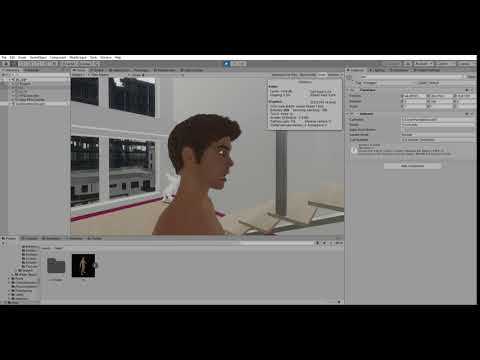 )XTransfer Module 1- Genesis 3 to Genesis 8 Morph Converter (Commercial)
I bought the script... Very deluded by the results...

The shapes I transferred from Genesis1 to Genesis3 (which works fine in G3) are totally distorted once transferred from 3 to 8.
 Wavy arms, arched legs, bumped neck...
There will be an addon to make a direct transfer? Or perhaps I'm doing something wrong, even if the script is really simple and I followed step by step all the phases?
The update should fix this...And no there will be no direct transfer from G1 to G8.
I hope the update can help me...
However, I think you should make a "G1 to G8" plugin, Im sure lots of people will buy it. There are many special chars in Genesis1!
 Nida 8 new gal
Thank you Mollytabby, xyer0 and barbuit!
..... Yep, something is coming ......
Yippee! You have given me a United Nations of U.N.ique types that cover a LOT of bases: Nikolina, Sisters Tammie and Rachelle, Arti, Zhirong, East Asian Men and Women, Good Guys, Elsa, Andrea---and that's just Genesis 8! I don't know if it would be commercially viable, but a remix of I Am and Man in the Mirror for Genesis 8 would be products unlike anything currently available, just like those were in their day, and I could use the help on non-toon regular people.
I love the diversity also. Some great characters. Man in the Mirror was one of my favorite morph sets. These morphs from Fuesling and Sickleyield are similar and pretty good:
https://www.daz3d.com/sf-people-that-you-meet-character-shapes
https://www.daz3d.com/fsl-genepool-dialed-shapes-for-genesis-8-male
https://www.daz3d.com/fsl-genepool-dialed-shapes-for-genesis-8-femaleXTransfer Module 1- Genesis 3 to Genesis 8 Morph Converter (Commercial)I bought the script... Very deluded by the results...
The shapes I transferred from Genesis1 to Genesis3 (which works fine in G3) are totally distorted once transferred from 3 to 8.
Wavy arms, arched legs, bumped neck...There will be an addon to make a direct transfer? Or perhaps I'm doing something wrong, even if the script is really simple and I followed step by step all the phases?
And no there will be no direct transfer from G1 to G8.
That's disappointing to hear.
Too Many G8 Characters?It puzzles me, too, because to me tinkering with combinations and kitbashing is at the soul of the hobby. But I understand people want and do different things... just... seems so foreign to me, heh.
Like, even taking two figures and just mixing them; X at 40%, Y at 60%. Woo. Maybe some youth or aging dials. 5 mins, tops.
After that, experimenting with morph packs. I often find noses too small in most figures. Thankfully, 'nose flesh size' dial fixes that in seconds. Maybe a little more fiddling with nose height, mouth width... ooo, nasolabial folds...
That's miles way from actually diving into a modeling program to make a unique face, and gives you so much freedom to achieve a unique look.
Heck, how about the shape randomizer?
Making renders but using other people's assets....I'll put my favorite Wikipedia quotation here again:
Art is a diverse range of human activities in creating visual, auditory or performing artifacts (artworks), expressing the author's imaginative, conceptual ideas, or technical skill, intended to be appreciated for their beauty or emotional power.
It's not about what you use, it's about how you use it. Do you render the assets in default pose and plain lighting? Then you're really just showing other people's work, there's no "imaginative, conceptual ideas, or technical skill" in that and nobody will appreciate your renders "for their beauty or emotional power". But if you morph and pose and tweak the assets, combine them in new ways, play with lighting and camera angles until you get the image you want, that does have artistic merit, it is a render only you, with your own artistic imagination, could make in precisely this way. Others may use the same assets, but their renders will look different because they use the assets in a different way.
Imagine two photos of a beautiful woman, one is a passport photo and the other one is an elaborate portrait shot, with a special hairdo, great makeup, accessories, a special setting etc. One just shows what she looks like, the other one shows her personality and, if done well, even captures her feelings and creates an emotional response in those who see the photo. Both images show the same woman, the same "asset", both were done with the same technical equipment, but only one will be "appreciated for its beauty and emotional power".
That said, it's always nice to give credit for the products you used. A photographer will also mention the model's name and perhaps also the makeup experts and hairdressers etc. who worked together to make the photo happen. It will still be the photographer's photo, though, in his/her personal style.
OT, Mornington Crescent: Round 8 :- (Tudor Court Rules)Two Zone 3 stations in a row at this stage of the game? Interesting move.
Well, off the back of that, that permits me to make a multiple interchange move to get us to:
Baker Street
So she looks at the map ... realizes that these folk are taking the scenic tour as some place names not on map however a few stops from Goodge is indeed .... that place I can't say that would end the game.
Rule 17 doesn't permit that move during off-peak hours; a move north from Goodge Street would cross the Circle Line, so you'd be forced to make a change at Euston. The best option would be a foot transfer at Euston Square, but that would still force you to make a double shunt in your next two moves.
Broken morphs.Open the .duf file where you saved that character in a text editor, and look for the settings for the old morph. You may need to uncompress the file first (you can do this with a program like 7zip, or IIRC there's an option to do it included n DS).
XTransfer Module 1- Genesis 3 to Genesis 8 Morph Converter (Commercial)I bought the script... Very deluded by the results...
The shapes I transferred from Genesis1 to Genesis3 (which works fine in G3) are totally distorted once transferred from 3 to 8.
Wavy arms, arched legs, bumped neck...There will be an addon to make a direct transfer? Or perhaps I'm doing something wrong, even if the script is really simple and I followed step by step all the phases?
The update should fix this...And no there will be no direct transfer from G1 to G8.
Daz 3D is part of

Connect
DAZ Productions, Inc.
7533 S Center View Ct #4664
West Jordan, UT 84084Licensing Agreement | Terms of Service | Privacy Policy | EULA
© 2026 Daz Productions Inc. All Rights Reserved.