-
How to make morphs for clothes with simulation object type
Nope... the culprit is the Button on the the back and the knot in the middle of the Dress on which there're tris/n-gons that GoZ cannot correctly handle.
If you delete the geometry of the button and the knot, GoZ will work but that'll break the dress ~~
So, you may either Triangulate the Dress geometry in DS before GoZ or directly Export the subtool of Dress to OBJ in ZB rather than GoZ back to DS ~~ Then import OBJ as a morph to the Dress with Morph Loader Pro.
Willow 9I enlarged her pupils and made a custom morph for her mouth, to fit her head better than the autogenerated mouth morph (at least in my opinion.)

 How do I make clothing not follow figure when I have a morph activated?
Hi crosswind. Yes I reposed the figure to the pose I used for the sim and then morph. I want to be able to load the figure, load the clothing, pose the figure, then activate the morph associated with the pose. I have several purchased items in my runtime that do this without problems and I'd like to do the same with my morphs.
How to make morphs for clothes with simulation object typePreviously, I've been using ZBrush to adjust morphs for some clothing items.
After importing the clothing into ZBrush, editing it, and then using GoZ to bring it back into Daz, I could generate a morph parameter.
However, for some newer clothing products, such as "dForce Evening Dress Outfit for Genesis 9," I've noticed that after editing it in ZBrush and importing it back, I get a prompt saying, "The topology of the object has changed."
As a result, I can only "Create a new object" and cannot add the morph to the original clothing item. I've observed that one possible reason might be that the new clothing has a "Simulation Object Type" attribute. So, I'd like to know if this is the cause, and if I want to use ZBrush to edit the morphs of such newer clothing items, how should I proceed?
Thank you very much!
Willow 9I'm having a weird problem and I'm not sure if it's the hair, Willow, or all FilaToon characters, still trying to figure it out. When I load Willow then add a non-FilaToon hair, the hair will not accept any FilaToon shaders OR even the iRay uber shader! I had to start a new empty scene, load just the hair, use the FilaToon shader then save the hair as a scene subset. I've never seen anything like this before! Can anyone else try loading Willow and any older hair and see if they can use FilaToon shaders?
This is the pop up I keep getting:

And finally after too much work to get this hair to work and it would still require a lot of postwork... Willow mixed morph with added makeup/brows, Tesha hair by Wolfie which I thought for sure would look great Filatooned but it didn't come out as I'd hoped.
 How do I make clothing not follow figure when I have a morph activated?
The figure has to be at world center before using dForce to Morph script... otherwise you'll have the above issue.
Edit: Wait a min... you reposed the figure ? The saved morph is only for the pose before you run dForce2Morph.... What did you want to be exactly ?
How do I make clothing not follow figure when I have a morph activated?i'm not sure my title made sense, it's hard to put into words. But here goes. I have Dforce to Morph and after I have posed and run the sim I save the sim as a morph. However, when I repose and activate the morph, the clothing follows the figure and buggers the fit. How do I stop that happening?
ReinstallingAfter a couple days of trying to transfer my DAZ library to my secondary D: drive, due to my C: drive getting too full, I ended up deciding to go the nuclear method and uninstalled DAZ and deleted all DAZ system files from my computer, and reinstalling from scratch.
I reinstalled DAZ and specified in the Installation Settings that the "My DAZ 3D Library" folder should be directed to my D: drive, but when I try to install any packages, they won't install and I just get a "Retry" error button (DAZ Studio and Postgre SQL both installed fine):
This is the error message that's appearing in the log:
2025-03-20 15:13:18.339 [WARNING] :: Extract File Failed - : D:/Program Files/DAZ 3D/My DAZ 3D Library/data/Daz 3D/Genesis 9/Base/Tools/Script Loads/SnowQueen 9 Makeup/MakeupRoughnessUtility.dse
2025-03-20 15:13:18.418 [WARNING] :: Install Failed: Snow Queen LIE Makeup Collection for Genesis 9
2025-03-20 15:13:18.514 [INFO] :: Install Queue Finished: 0 min 0.2 secI've tried switching the My Daz 3D Library directory back to my C: drive, just to see if that would get the packages to install, but that just yielded the same error seen above.
I've tried the nuclear approach a few times now, and I'm still not making any headway. Any advice would be greatly appreciated.
Willow 9wsterdan said:
Rod Wise Driggo said:
As a Mac user I could buy stuff which is only available with Filament shaders.
I could also buy Iray addon textures just to be able to use the stuff on Mac.
Or I could just empty my cart and call it a day.Yeah, that's pretty much what I did. At first, I thought I'd invest in them now and use them when the DAZ Studio Whatever comes out, but even with the need to keep new nVidia card users engaged there's still no clue as to when that will lhappen. I did do that back in August, 2021 when we were told that Filament did work on the Mac with the pre-beta; I purchasde a number of Filament products and scripts but those purchases have sat for almost four years untouched.
I haven't used Genesis 9 very much;I don't see a male version of Willow, can Willow be morphed to "William" to have a male version or do we need to wait for an actual male?
There are mats for male nipples and anatomical elements so if you just add your own male morph, I'm sure you can. I'll try right now.
Daz Studio 4.23[.0.x], General Release!I am not certain of the system requirements for this particular version - OpenImageIO is a widely used standard, but the way in which it is compiled for iray may introduce limitations.
I am not saying there is a compatibility issue with Face Transfer 2, though it cannot be ruled out - as far as I am aware it does use third-party libraries so they may have requirements.
Do bear in mind that Windows 7 is several years past its end of life - and while I am still refusing to update to Windows 11, and so have little room to lecture, holding on to an old version of the OS is inevitably going to become increasingly problematic.
Transfer Utility problem with nose and mouthI meant take it into your modeller, exported from the base/zeroed state, and smooth that out to remove the damage (if it shows without the morph) or as crosswind says create a new morph - though if it is multiple morphs applied you ideally want to match all separately, othrwise you have to block them and apply your compound shape as a morph.
Transfer Utility problem with nose and mouthYes, an object with too high density mesh can bring you that sort of issue after rigging with Reverse Source Shape from Target option. Well, the true culprit is not the mesh density per se but the options of "Current + Reverse Source Shape from Target".
That's why we always suggest: Use Base figure rather than morphed figure to make wearables as well as for rigging. The way you did may bring you imperfection to various extent... high-density mesh makes it worse.
Edit: If you DO need this high-density mask for rigging on a morphed Genesis, technically, just load the original OBJ file with Morph Loader Pro to the mask as a Delta Fix morph, and dial it.
Daz Studio 4.23[.0.x], General Release!Richard Haseltine said:
If you go to https://www.daz3d.com/forums/discussion/666011/daz-studio-4-23-0-x-nvidia-iray and search for freeimage you shoild find an explaantion - though I think still being on Windows 7 may limit your options.
Ok, thanks for the answer. So what are minimal system requrements for this OpenImageIO plugin? Should I have Windows 8 or 10, and what CPU does it need at all? (I mean, can it work with AMD CPU with updated OS, or it works with Nvidia cards only?). As I remember, Freeimage was slow as a turtle and noisy, but less capricious, it worked even with limited RAM.
What for Face Transfer 2, how can it depend on a specific OS? If FT 1 works with Win 7 and Genesis 8, maybe there is some bug in the FT2 plugin itself? I hope the author will update this tool further, maybe I will see any solutions of this problem.
Transfer Utility problem with nose and mouthThat ios probably the conequence of the reversed shape (and possibly the morph projection if that is on the morphed figure) - when mesh brodges across distinct parts the algorithms have trouble assigning influences, ideally you should smooth it out and then reimport it as a new model and rig that.
Transfer Utility problem with nose and mouthHi ! I'm trying to make a kind of face mask for my Genesis9 figure. I made the mask model on blender and know I'm trying to use Transfer utility to create a G9 clothe. My G9 figure has morphs, so I set Item shape to "current" and checked the "reverse source shape from target" option, but I always end up with weird deformation on mouth and nose area. On the two images you can see the before/after transfer utility.
converting v4 items to v8I've used SY's V3/M3 clones for G8F/M (https://www.daz3d.com/sy-victoria-3-and-michael-3-clones-for-genesis-8) and they work well. It must be said that clothing has improved over the last 20 years or so and the old clothing itself tends not to look so great if there are any Generation 8/9 clothes in the scene too. To counteract the frequent lower mesh detail in the old clothes, a fair bit of texture work is often needed. However, it can be worth it.
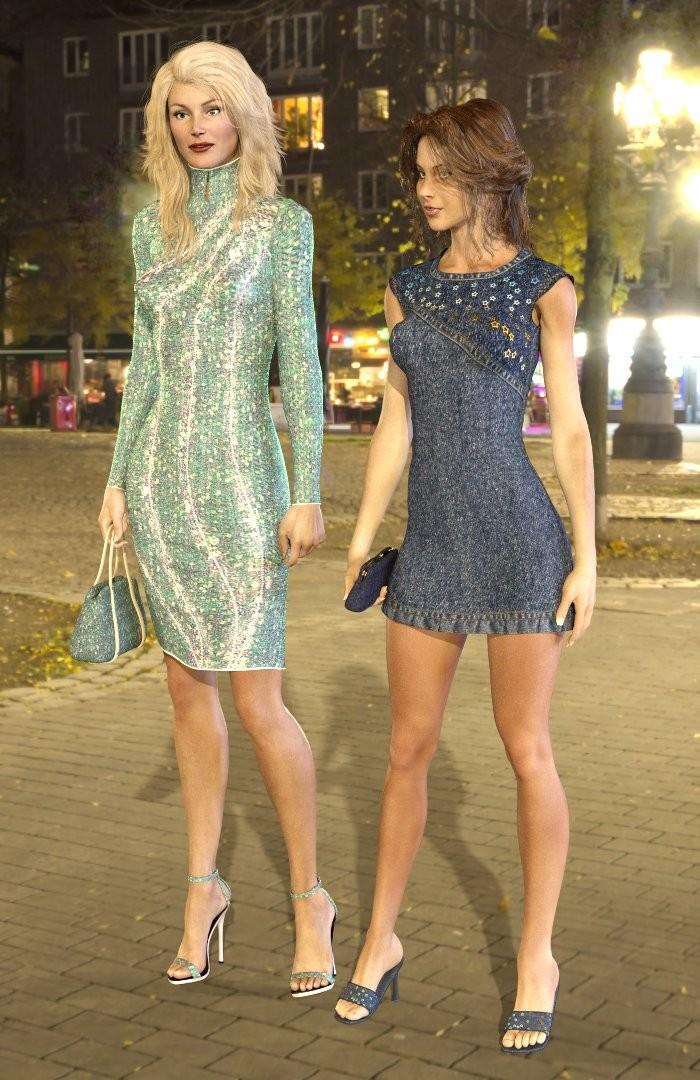
Sometimes, too, it's worth using the old characters with updated shaders wearing their original (but updated) clothes. These are two V3 characters rendered in Iray (Glamorous Vicky 3 and GND2). The hair is G8F and G3F, but the clothing & shoes are all V3. The results could have been a lot worse.
It is also possible (but hard work and pretty complex) to create a TriAx version of V3, V4 etc that can wear clothes from the other generations (eg G3,G8 or G9). What is necessary to do is detailed in a tutorial here: Making a TriAx A3 character tutorial . Possibly not to be tried until you're happy with DS again, but may be useful to bear in mind for when you feel comfortable. It's actually only something I tried experimenting with because I wanted to keep my Favourite V3 character (GV3) in use & have a wider range of clothes, as not many clothes exist for her morph.
Regards,
Richard
Is 3060ti a bottleneck?The GPU VRAM does not affect the final image quality - you'll get the same image via CPU as you get from the fastest GPU. It simply affects how long it takes to get to that point.
The 3060Ti has 8Gb VRAM, so is more likely to fill up than many others. Windows reserves around 2Gb VRAM, then each base res character takes around 2Gb (ish), and a background can take a similar amount. So.. an 8Gb GPU will cope with (Windows reserved bit) + 2 characters and a background, and not a huge amount more.
So... changing what you have is a decision you have to make. A 12Gb RTX3060 without Ti will work on bigger scenes (say 4 base res characters + background or maybe 2 off Sub-D'3' characters), but more slowly than the 3060Ti when the Ti is in capacity - but much faster than the Ti when it drops out. It's down to the VRAM, more=more useful. Similar limitations act on other RTX cards. I have an i5-13600K processor, and it uses 25% cpu feeding my 12Gb RTX3060. As you have an i5-12xxx cpu, it should be able to keep an RTX4060 fed with data, but I suspect a much faster GPU (say RTX4090) and the CPU data transfer to the GPU would act as a throttle to performance. (I had a 2014 Xeon in my last machine, and it slightly throttled my 6Gb GTX1060 GPU because it couldn't keep up with the data rate). You pays your money & takes your choice.
My advice would be to consider a 16Gb RTX 4060 TI first, and if too expensive, look at an RTX 3060 12Gb. But, it's not my money I'm suggesting is spent. When it was my money, I went for the 12Gb RTX3060.
Regards,
Richard
Breast Utilities for Genesis 9 - where did they go upon install?SOLVED partially)daveso said:
CES3D said:
Shaping Morphs can be found under Parameters > Actor > Chest > Feminine (or Masculine) > Breast Utilities.
thanks..I'll check there. I know the other morph package that went lost is not in there...
Most morphs can usually be found under Parameters > Actor, but could you tell me which specific products you're having trouble locating? If I or someone else owns those products, we might be able to help you find their locations.
No one asked me - Diomede screenshots on whatever - Warning AI Discussion OKHope you enjoy. The intent was to share the main terrain shader. Drag and drop the terrain shader to your shader browser. Then drag it to any terrain with cliffs or similar. It is procedural so you can apply it to any terrain, not really intended for the terrains I included. They are low res for easier transfer and just place holders so I could share the shader. As an optional bonus, the use of slope from environment in the blender is the same for both the main shader and the included black/white shader on the second invisible terrain. You can copy this black/white shader into a replicator distribution channel and it will replicate whatever you want onto the more flat areas of whatever terrain you want. The white areas of the distribution shader should match the 'grassy'flat areas of a terrain.
This is a starter pack to get better mapping on cliffs. You can swap out anything you want for my procedural stripes to get better results. The key is that the flat mapping is coming from the side instead of from the top so gets better results on steep surfaces. But I found it was a good idea to use two 'flat maps' in the layer list from opposite sides (left/right, or front/back) to cover the whole terrain.
It may be more trouble than it is worth, but hey, I gave it a shot.
Daz Studio 4.23[.0.x], General Release!wargis said:
Hello to all! Recently I updated DS to 4.23.0.1 and encountered a couple of issues with rendering and Genesis 9. The one with IRAY render is the famous pink or purple renders problem, which was reported several times at the forum. When I try to run render in IRAY with my CPU, I get pink textures instead of regular image (I have not any Nvidia GPU, but formerly my CPU was workable for simple Iray renders, when I used DS 4.20 beta). But the solution was to find missing freeimage.dll and put it into DAZ 3D>DAZStudio64>libs>iray. I haven't found any freeimage.dll in the setup package of the general DS 4.23.0.1. How to fix it?
If you go to https://www.daz3d.com/forums/discussion/666011/daz-studio-4-23-0-x-nvidia-iray and search for freeimage you shoild find an explaantion - though I think still being on Windows 7 may limit your options.
The other unusual problem appeared when I tested Face Transfer 2 with Genesis 9 figures. Formerly in DS 4.20 it worked flawlessly with Genesis 8, but in DS 4.23, when I run this plugin on G9, I get constant crashes with an error message like "DAZStudio.exe caused ILLEGAL_INSTRUCTION in module "C:\Program Files\DAZ 3D\DAZStudio4\avatar_sdk_metaperson_daz3d.dll". I have the latest update of Genesis 9, with all clothes and necessary presets. The crash happens when this plugin reaches the stage of generating shapes and textures. What's the issue? Maybe it requires a larger photo to generate a compatible texture with Genesis 9 base head image? The last one I used was about 1500x2000 px and I got a crash all the same. I can attach the last log, here is it. When I use Genesis 8, I don't see such a problem, and I wonder why old Genesis 8 does not require any clothing for the plugin to work.
Genesis 9 is supported by FaceTransfer 2, on which you get three free goes and then are limnited to previews (with a watermark on the maps) - again, I have a feeling being on Windows 7 still may be part of the issue.
My system is Windows 7 x64, with AMD CPU and double AMD GPUs, about 6 GB of RAM, it it's important. Can it be linked to my hardware?
Daz 3D is part of

Connect
DAZ Productions, Inc.
7533 S Center View Ct #4664
West Jordan, UT 84084Licensing Agreement | Terms of Service | Privacy Policy | EULA
© 2026 Daz Productions Inc. All Rights Reserved.