-
SOLVED! Morph for a clothing item
If the OBJ was exported with the DS-generated morphs in place did you import the morph with the morphs still applied and then in the options seleted Reverse Defortmations?
[Released] Character Converter from Genesis 2 Female to Genesis 8 Female [Commercial]This product looks great!
Does it work with custom G2F characters?
I have a G2F character, made with some G1/V5 morph (already using a morph converter), and I wonder if it can work with that. My character use V5 textures set for the skin.
Thanks for your future answer!
Yes, it can work with custom G2F characters, though the textures will not work.
Erase a morph preset...I want to uninstall some morphs that I bought in renderosity. I didn't like them, and after deleting the folders, it's still there. It affects genesis 8 Male only. Where are those unwanted morphs hidden? Every time I open a G8Male, I get a hyper-muscular man, not the normal one !!! I do not understand why! Any help about this?
[In store now] Felidae by AM - Smilodon PopulatorBoth Catalyzer and dForce versions are working for me. Totally in love and have been waiting for this critter! Do you have plans to release the cub as a morph?
I've also attached a comparison between LAMH (Catalyzer) and dForce...dForce is much floofier and I think my preference for this guy.
Cool renders! About the cub, you bet... and it's about done...
Critique my new computer build specs!Those are not the newegg prices either.
You're buying an anniversary edition CPU for no reason, much less buying the 2700X at all instead of the 2700. 2700 is $212.
As to a Windows license? Why? Don't you currently have a win 10 box? Licenses transfer. Also Win 10 pro is not $200 its $150 (you pay an extra $50 if you want a USB stick because you can't buy a cheap stick and make one yourself).
Putting a 3d asset library on an NVME drive is just plain dumb. You might only have enough assets to fit in 1Tb now but trust me that won't last. Also booting from the slower drive is just bizarre. Get a 1Tb boot and software drive and then a big storage HDD.
64Gb of RAM makes little sense either. Even in a 3Delight system, which your build is objectively worse than mine at.
If you really want a $2000 3Delight system this is superior in pretty much every way:
CPU: AMD Ryzen 9 3900X 3.8 GHz 12-Core Processor ($418.95 @ B&H)
Motherboard: Asus TUF GAMING X570-PLUS (WI-FI) ATX AM4 Motherboard ($183.99 @ Best Buy)
Memory: Corsair Vengeance RGB Pro 32 GB (2 x 16 GB) DDR4-3200 Memory ($164.99 @ Amazon)
Storage: Intel 660p Series 1.02 TB M.2-2280 NVME Solid State Drive ($124.99 @ B&H)
Storage: Western Digital Black 4 TB 3.5" 7200RPM Internal Hard Drive ($173.89 @ Walmart)
Video Card: EVGA GeForce RTX 2060 6 GB KO GAMING Video Card ($303.98 @ Newegg)
Case: Cooler Master MasterCase H500P Mesh ATX Mid Tower Case ($169.99 @ Amazon)
Power Supply: EVGA G5 850 W 80+ Gold Certified Fully Modular ATX Power Supply ($116.98 @ Newegg)
Total: $1657.76Even if you source everything from Newegg, which is not the best idea but whatever, you'll still come out cheaper with superor performance.
Those were prices directly from Newegg website that day. No I don't have a Win 10 box, I preferred Win 7, and the OP didn't either. He was transferring from a MAC. The $150 you quoted is for the OEM version of Windows, which I am a little leary of because of something I read at the time I bought it. " The main difference between OEM and Retail is that the OEM license does not allow moving the OS to a different computer, once it is installed. Other than this, they are the same OS. " Please note that Windows decides what classifies as a 'different computer'. I also have a 2TB NVME for the library for that reason. Haven't you noticed how long characters take to load? The System is on a SSD also, just a SATA3 drive. So... it takes 30 seconds to load or less, once.
Gus
The upgrade from Win7 is still free. So you do have a win 10 license. I upgraded a Win 7 OEM to Win 10, built a new machine, moved the license, I just logged in with my MS account and it was automatic. I have changed the CPU, drives and added a GPU since and had no problems after any of them. As long as you're not swapping hardware on a daily basis you won't have an issue. I do that on my testbenches at work and Windows does complain eventually but it is almost random. But why spend money when you don't need to? You can always install win 10 without a license and if your old one doesn't transfer then you can buy a license.
2020 "There's Always Another Sale™" (Report sales errors here.)I am also getting only 62% on the Bonus item. So I am getting the key item discount but not the new item discount.
I think that the bonus items are not counted as new items as those are the only new items I bought in the last 3 days.
Do you own one of the key items? What items do you have in your cart? (screenshot please)
In the meantime I added some other items to the cart, but I got the same price when the bonus item was alone as well.
I do own one of the key items: the face transfer.
I have bought the bonus item daily, so in theory I should be ok with the new item in the last 3 days.
My theory is, that somehow the bonus items don't count as new items so it think I bought no new items in the last 3 days.
We're reporting.
2020 "There's Always Another Sale™" (Report sales errors here.)I am also getting only 62% on the Bonus item. So I am getting the key item discount but not the new item discount.
I think that the bonus items are not counted as new items as those are the only new items I bought in the last 3 days.
Do you own one of the key items? What items do you have in your cart? (screenshot please)
In the meantime I added some other items to the cart, but I got the same price when the bonus item was alone as well.
I do own one of the key items: the face transfer.
I have bought the bonus item daily, so in theory I should be ok with the new item in the last 3 days.
My theory is, that somehow the bonus items don't count as new items so it think I bought no new items in the last 3 days.
[Released] Character Converter from Genesis 2 Female to Genesis 8 Female [Commercial]This product looks great!
Does it work with custom G2F characters?
I have a G2F character, made with some G1/V5 morph (already using a morph converter), and I wonder if it can work with that. My character use V5 textures set for the skin.
Thanks for your future answer!
SOLVED! Morph for a clothing itemWhy not just add a dforce modifier to it and drape it
Not sure how I forgot about it :). I guess I haven't done it in a while. I'll give it a try.
Even if it works, I would still like to know how I can import my morph successfully.
As it can be seen from the 3rd render, it looks pretty decent.
GnollsThat's not too bad. It would be passable as a gnoll with the right skin/fur textures. How did you do that in just 10 minutes?
The morph pack I linked contains creature morphs like dog, ogre, troll and so on. I made a combination with mostly dog and a little of the others.
I didn't use any reference to model it and haven't seen Gnolls since Heroes 3 so I am sure you could be a lot more accurate with the morphing.
SOLVED! Morph for a clothing itemHi all,
I was trying to convert a Tshirt from a V4 item to a G8 item.
It doesn't fit terrible but it also doesn't fit exactly how I wanted. It has the characteristic too for fitting way.
I decided to create a morph in Blender so that it fits the way I wanted. I imported the morph from Blender but it doesn't look the way I made it when applied.
I then imported the object from Blender directly as an object, not a morph, that looking the way I modeled it. Unfortunately that clothing item, even convertng to figure, won't follow the figure. If I use autofit on it, it again deforms to the other shape.
Any advice how to proceed?
Thanks
[In store now] Felidae by AM - Smilodon PopulatorBoth Catalyzer and dForce versions are working for me. Totally in love and have been waiting for this critter! Do you have plans to release the cub as a morph?

I've also attached a comparison between LAMH (Catalyzer) and dForce...dForce is much floofier and I think my preference for this guy.
Seeking Advice: How to make Yeti HD for Genesis 8 male look more like Yeti from Metal Slug 3I don't have the yeti, but i am thinking just use the morphs for GM8, lower height all the way, make him fat/portly/big. Increase the size of the head, the hands and the feet with the morph for each. By using the morphs instead of the XYZ scaling, you don't screw up the rigging.
Seeking Advice: How to make Yeti HD for Genesis 8 male look more like Yeti from Metal Slug 3So, for reference: https://metalslug.fandom.com/wiki/Sasquatch
Anyway, what I'm trying to do is alter the proportions of the Yeti HD for Genesis 8 male to have proportions similar to the Sasquatch/Yeti from the game Metal Slug.
Would I be able to get pretty close with just xyz/scale for the limbs and Torso?
Also, for the head, I could easily make the upper part of the cranium relatively lower/smaller by just making a morph in Maya but for the proportions of the mouth relative to the rest of the head, how could I most efficiently accomplish that while still maintaining as much of the facial rig as possible?Critique my new computer build specs!Those are not the newegg prices either.
You're buying an anniversary edition CPU for no reason, much less buying the 2700X at all instead of the 2700. 2700 is $212.
As to a Windows license? Why? Don't you currently have a win 10 box? Licenses transfer. Also Win 10 pro is not $200 its $150 (you pay an extra $50 if you want a USB stick because you can't buy a cheap stick and make one yourself).
Putting a 3d asset library on an NVME drive is just plain dumb. You might only have enough assets to fit in 1Tb now but trust me that won't last. Also booting from the slower drive is just bizarre. Get a 1Tb boot and software drive and then a big storage HDD.
64Gb of RAM makes little sense either. Even in a 3Delight system, which your build is objectively worse than mine at.
If you really want a $2000 3Delight system this is superior in pretty much every way:
CPU: AMD Ryzen 9 3900X 3.8 GHz 12-Core Processor ($418.95 @ B&H)
Motherboard: Asus TUF GAMING X570-PLUS (WI-FI) ATX AM4 Motherboard ($183.99 @ Best Buy)
Memory: Corsair Vengeance RGB Pro 32 GB (2 x 16 GB) DDR4-3200 Memory ($164.99 @ Amazon)
Storage: Intel 660p Series 1.02 TB M.2-2280 NVME Solid State Drive ($124.99 @ B&H)
Storage: Western Digital Black 4 TB 3.5" 7200RPM Internal Hard Drive ($173.89 @ Walmart)
Video Card: EVGA GeForce RTX 2060 6 GB KO GAMING Video Card ($303.98 @ Newegg)
Case: Cooler Master MasterCase H500P Mesh ATX Mid Tower Case ($169.99 @ Amazon)
Power Supply: EVGA G5 850 W 80+ Gold Certified Fully Modular ATX Power Supply ($116.98 @ Newegg)
Total: $1657.76Even if you source everything from Newegg, which is not the best idea but whatever, you'll still come out cheaper with superor performance.
Those were prices directly from Newegg website that day. No I don't have a Win 10 box, I preferred Win 7, and the OP didn't either. He was transferring from a MAC. The $150 you quoted is for the OEM version of Windows, which I am a little leary of because of something I read at the time I bought it. " The main difference between OEM and Retail is that the OEM license does not allow moving the OS to a different computer, once it is installed. Other than this, they are the same OS. " Please note that Windows decides what classifies as a 'different computer'. I also have a 2TB NVME for the library for that reason. Haven't you noticed how long characters take to load? The System is on a SSD also, just a SATA3 drive. So... it takes 30 seconds to load or less, once.
Gus
Morph does not updateWhen you are attempting to load your new/updated morph and failing, have you had the same instance of DAZ Studio running throughout the process? (i.e. same scene open). If so, the problem may be that DS is using information stored in the temp folder that has not been updated - this is purely a guess, but can be easily verified by simply closing DS and then re-opening it. Do your updated morphs work correctly then?
Also, when you export your new/updated morph (presumably to an object file?), then load it (presumably using Morph Loader Pro?) on a new figure, does the window indicate that the morph was created succesfully? If yes, did you go to the Parameters tab and locate the morph, moving the slider to 100%. If not, that is why the morph is not showing on your figure - it will create a slider for the morph set at 0% by default. Of course, you must then save the morph as you describe.
Morph parameter shows keys, what are they controlling?Im trying to dissect how some of these parameters are constructed and I see in the Parameters Settings window under the Keys tab on the bottom half there are some keyframes set. How do I see what other properties these keys are linked to? Thank you for any help!
 Morph does not update
Well for the ones you didn't, one closes D/S and digs through the data folders to remove the outdated morph. Then the new morph should load.
[Released] Character Converter from Genesis 2 Female to Genesis 8 Female [Commercial]@Riversoft - I tried converting Aiko 6 using both the 2019 and 2020 methods, and both times the final form is just the Genesis 8 base female. As you can see above, Ninive and Belle had no issues. I'll try another character now to see if there are any other issues.
I have a feeling the log will show that the script was unable to update the character file. If you load Ninive/Belle for G8F and look for the morphs, are they there and can be dialed up?
Yes - I can see the Belle and Ninive morphs and can dial them in.
Ok, so it worked, just not the fixing of the files after the conversion. If you want to convert again and post the log, I can try and figure out why that step failed.
Thanks again for all your help with this (and my many questions on the Content Wizard thread) :)
EDIT: It looks like the body morph works (and has the little Aiko 6 image next to the morph dial) but the head morph doesn't work (and is only a generic grey morph dial). Here's the log
16:56:42 GMT-0500 (Eastern Standard Time): Adding Files...
16:56:42 GMT-0500 (Eastern Standard Time): Adding "Actor/Character" file: S:/My DAZ 3D Library/People/Genesis 2 Female/Characters/Aiko 6.duf
16:57:21 GMT-0500 (Eastern Standard Time): WARNING: Forcing Conversion of Characters
16:57:25 GMT-0500 (Eastern Standard Time): Executing Script
16:57:25 GMT-0500 (Eastern Standard Time): Execution Complete.
16:58:12 GMT-0500 (Eastern Standard Time): Executing Script
16:58:12 GMT-0500 (Eastern Standard Time): Selecting Preset: S:/My DAZ 3D Library/People/Genesis 2 Female/Characters/Aiko 6.duf
16:58:12 GMT-0500 (Eastern Standard Time): Converting character from S:/My DAZ 3D Library/People/Genesis 2 Female/Characters/Aiko 6.duf to S:/My DAZ 3D Library/People/Genesis 8 Female/Characters/Genesis 2/Aiko 6.duf
16:58:24 GMT-0500 (Eastern Standard Time): Aiko 6 is of type Actor/Character
18:09:21 GMT-0500 (Eastern Standard Time): Copy Icons from S:/My DAZ 3D Library/People/Genesis 2 Female/Characters/Aiko 6.duf to S:/My DAZ 3D Library/People/Genesis 8 Female/Characters/Genesis 2/Aiko 6 Genesis 8.duf
18:09:21 GMT-0500 (Eastern Standard Time): Copy Categories from S:/My DAZ 3D Library/People/Genesis 2 Female/Characters/Aiko 6.duf to S:/My DAZ 3D Library/People/Genesis 8 Female/Characters/Genesis 2/Aiko 6 Genesis 8.duf
18:09:22 GMT-0500 (Eastern Standard Time): Execution Complete.No problem.
I need the full Daz log of the conversion please.
Thanks! I'll just sent you the log.
As I expected, fixing the files is failing. It is failing because the script builds a bad path to the file because the vendor name is missing for Aiko 6. On my system, I get "-Yannek-,DAZ 3D,Heysun Oh". You need to fix that. The simplest way would be to save the Aiko 6 character yourself and convert that (as long as you have defined your Authorship information)
Darwins' Schtuff Pt DeuxThank you!
So- two new preview window renders of the tweaks. I had a profile as well, but didn't notice that I accidentally caught another window over the clipped screen shot until after I closed Studio.
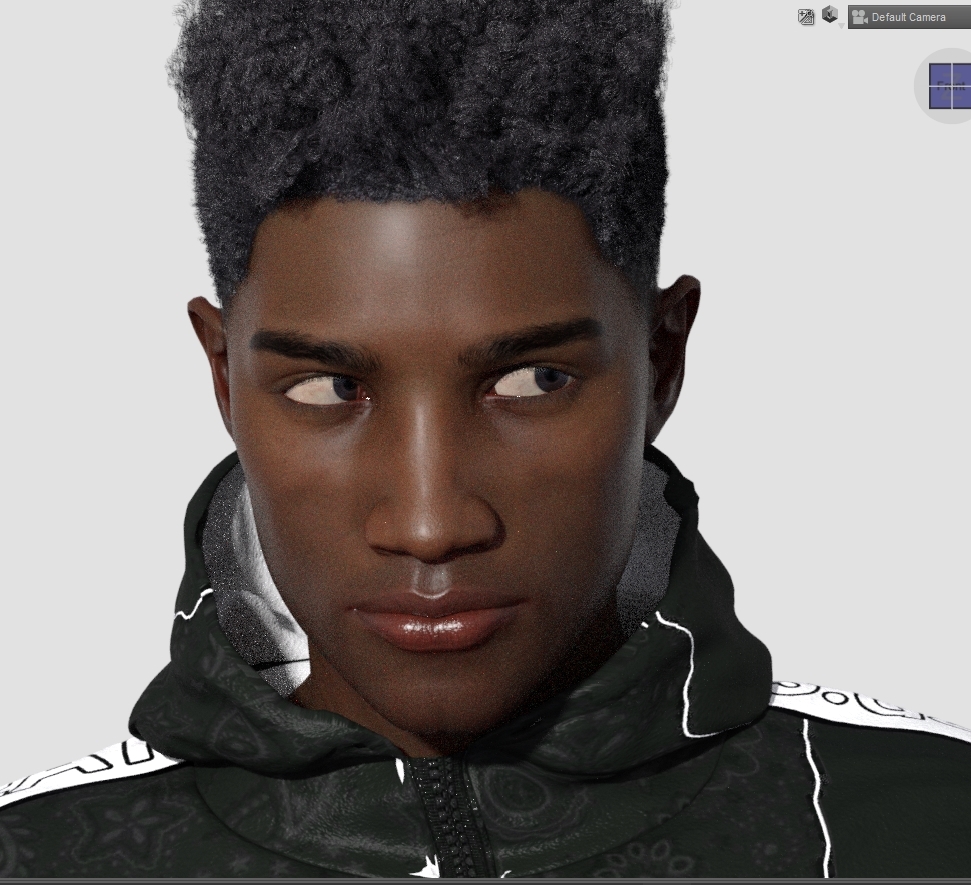
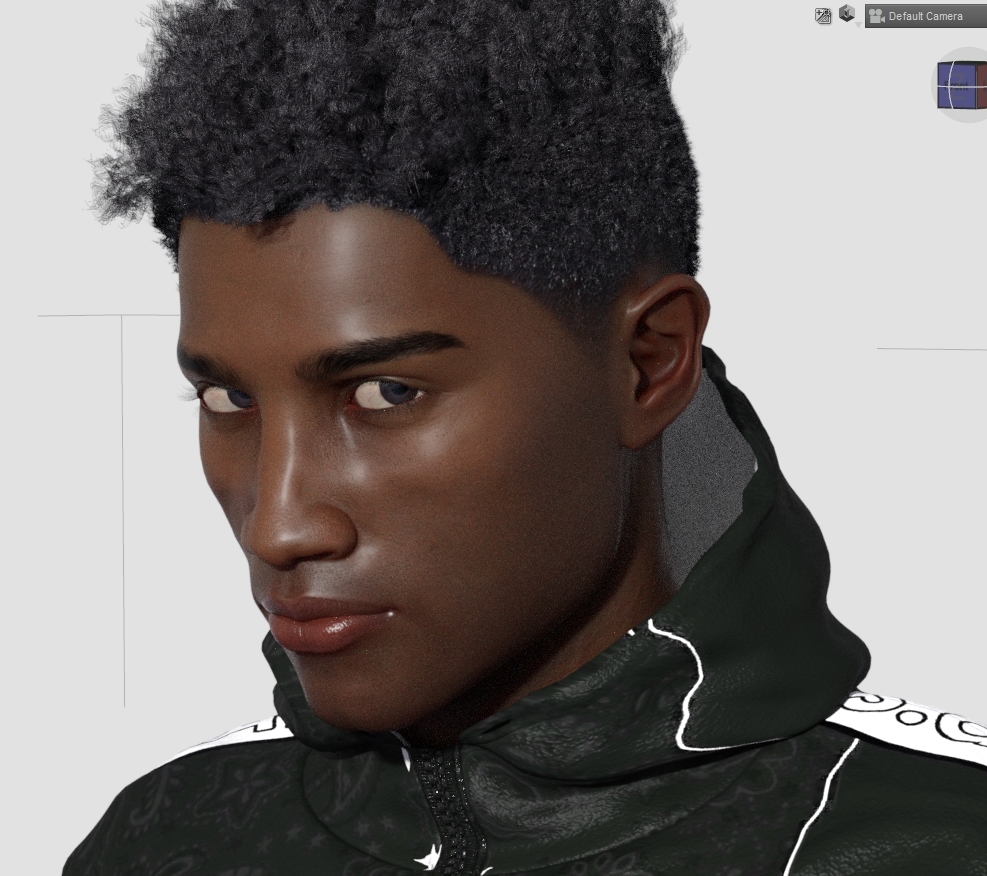
So, just have to go in and make sure the head morph saved correctly without any additional areas affected and re-save the preset before moving onto the body morph.
Daz 3D is part of

Connect
DAZ Productions, Inc.
7533 S Center View Ct #4664
West Jordan, UT 84084Licensing Agreement | Terms of Service | Privacy Policy | EULA
© 2026 Daz Productions Inc. All Rights Reserved.