-
Dynamic clothing wont move on figure
Pretty sure I was 100% wrong on my gravity theory (maybe even 110%, I dunno.You'd have to ask a professional athlete they're the experts on that).
Yeah just figured out I have an issue with the skirt as well, it just looked like it was simulating when the legs moved against it. I was trying to get an effect with the floor length skirt slid up the leg above the knee. I set up my figure in the Mrs. Robinson pose from the "I think your trying to seduce me" scene in the graduate with her thigh horizontal knee bent 90 degrees foot on a chair. Then to get the skirt to drape over the thigh with her shin sticking out I flipped the character to a steep enough angle to get the skirt to slide upwards then animated her around till into the right pose to let the skirt drape over the thigh.
It worked beautifully with an old save file of the same scene, so I had to have changed something (it's not in the simulation surface settings is the one thing I know for certain) that caused the problem. I'd like to know what it is rather then just revert.
Aaand typing that out gave it to me I think. Pretty sure it's a morph I created in blender and added in to help with the attempt I was making to get the strap to slide down the arm.
Yup that was it, set morph to 0 and blamo no problem.
"So, what is wrong with my morph?" is the actual question I wanted to ask in my first post. Man you guys suck at helping. Learn to read minds or GTFO of trying to help with tech support stuff.
OT, Mornington Crescent: Round 8 :- (Tudor Court Rules)Bugger! bloody autocorrect - that should have been
Blackhorse Lane..
We need a restart!
So does one jump off that track then from Blackstone Lane and transfer over to:
Lebreton Flats
OT, Mornington Crescent: Round 8 :- (Tudor Court Rules)So does one jump off that track then from Blackstone Lane and transfer over to:
Lebreton Flats
3D Art Freebie Challenge-February 2020-"Natural Love" -Main Thread OnlyP.S. Here's a list of the first few morphs from V4 Shapes++ (I think?):
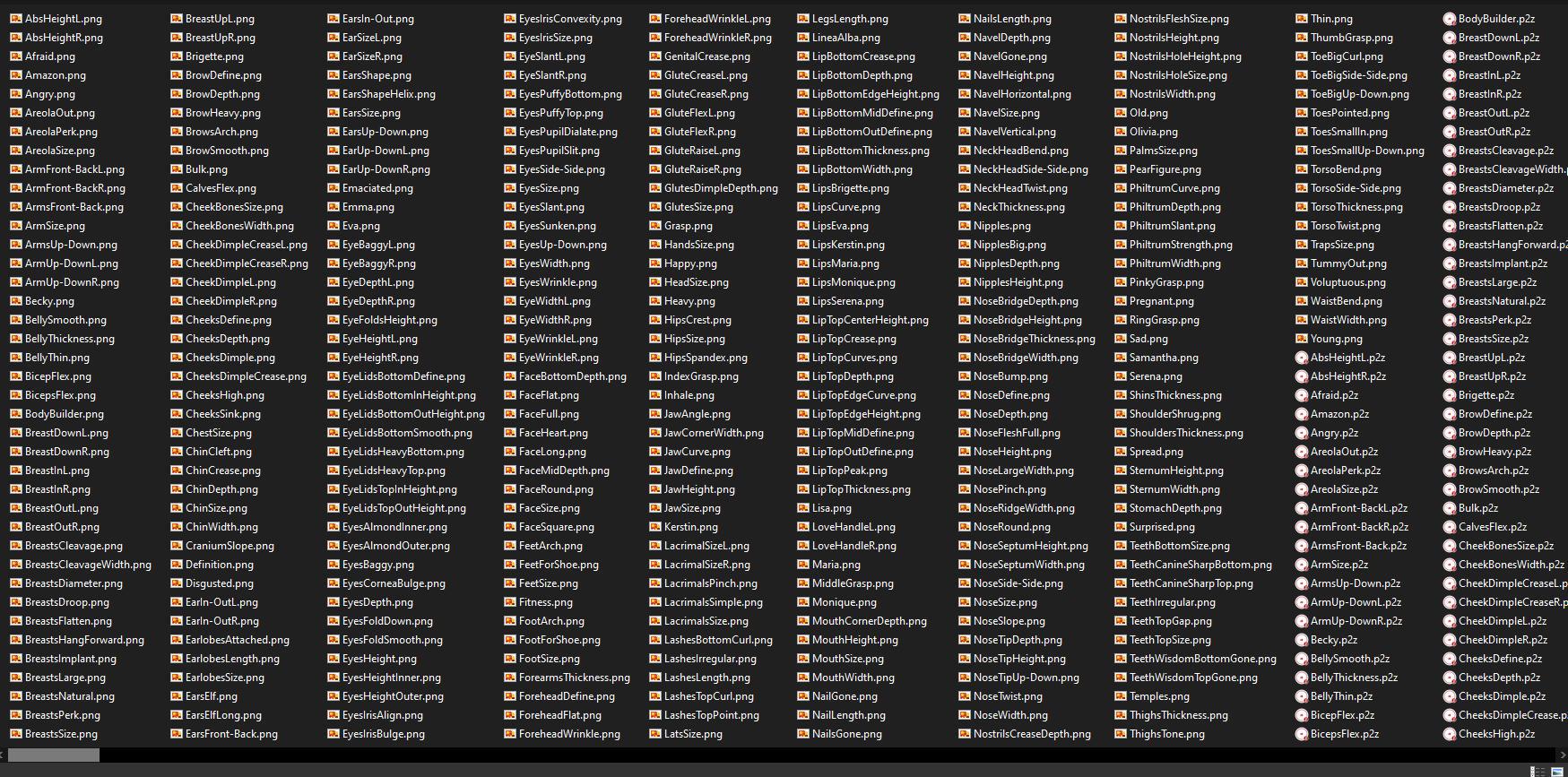
Peronally, if the Genesis 1, 3, and 8 head and body morphs that Hylas linked to aren't considered 'similar' to these, then I think the dictionary definition of 'similar' needs changing*.

Sir Smuggley Smuggins: "Cheapskate ! Who invited you here, you ugly troll ! I said 'sit down and have a nice cup of tea', not 'come in all you ugly trolls'. And how many times have I told you, you need to leave the tea to brew. You don't stir..."
*I wonder if that can be done seemlessly...
Rule three specifically says
3. Base figures (All Gen 2,3,4, and Genesis 1,2,3) as well as their general morphs packs (Morphs++ and similar) do not count as a purchased item or a freebie and may be used as needed
Morphs ++ are the general Morphs packs for V4,M4, and other Generation 4 figures. The Genesis Evolution Head and Body Morphs packs are the general morph packs for Genesis, and the general morphs packs for later figures are just called the "Head and Body Morphs" for each respective figure (Genesis 2 M/F, Genesis3 M/F, Genesis 8 M/F). Each set of morphs packs (Morphs ++, Genesis Evolution Head and Body, Genesis 2 M/F Head and Body, Genesis3 M/F Head and Body, Genesis 8 M/F Head and Body) are the respective "general morph packs" for that figure.
I was personally involved in the original discussion that resulted in that rules change. In fact, it was one of my specfic suggestions to the new rules. The other being an increase in the maximum Paid-for items from 3 to 5.
I think this solves the issue of Morphs, don't you all think?
What does the evolution of daz "Realism" look like?There are many details that still aren't possible or easy to implement. Like the folds on the wrist here or the indentation on the cheek. It would be great if there was a way to just click a body party and then have a scalable indent slider and click on a body part and have a morphable wrinkle creator slider. I'm not techie, so not sure if this is possible. But several years ago at the Smith Micro booth at Siggraph I met a new employee who was supposedly creating a new Poser figure. I described the ideal figure I would like and he told me it was impossible. And then G3 came out at Daz and it was exactly what I described (minus a few things that were mostly covered by PA addons.) But rather than a new G9 figure, I'd love it if they could add this to G8. I know there are things like the push modifier which seems complicated and I do have mesh grabber which I haven't tried yet, but I'd love a simple way of doing these things so I can create art rather than deal with time spent learning complicated undocumented aspects of the software. I know Zevo has some skin wrinkle morphs which I will get when on sale but I didn't see wrinkles for wrists or ankles/feet listed and there are so many other tiny wrinkle morphs that happen with bends even on young people and children and some of the wrinkle morphs in the promos look too pronounced for younger people.
Also, the hand and wrist bends on G8 are still awful, really hard to make something as simple as holding a glass realistic. The skin I think is very close and can look good with the right shaders, but bends are still bad. I do have some PA addons that help but it's still not possible to truly get poses to look realistic in some positions. So many people use Instagram filters or whatever so skin has not been a big problem with the uncanny valley, it's the poses that give it away, especially hand and feet poses. (And hair of course.)
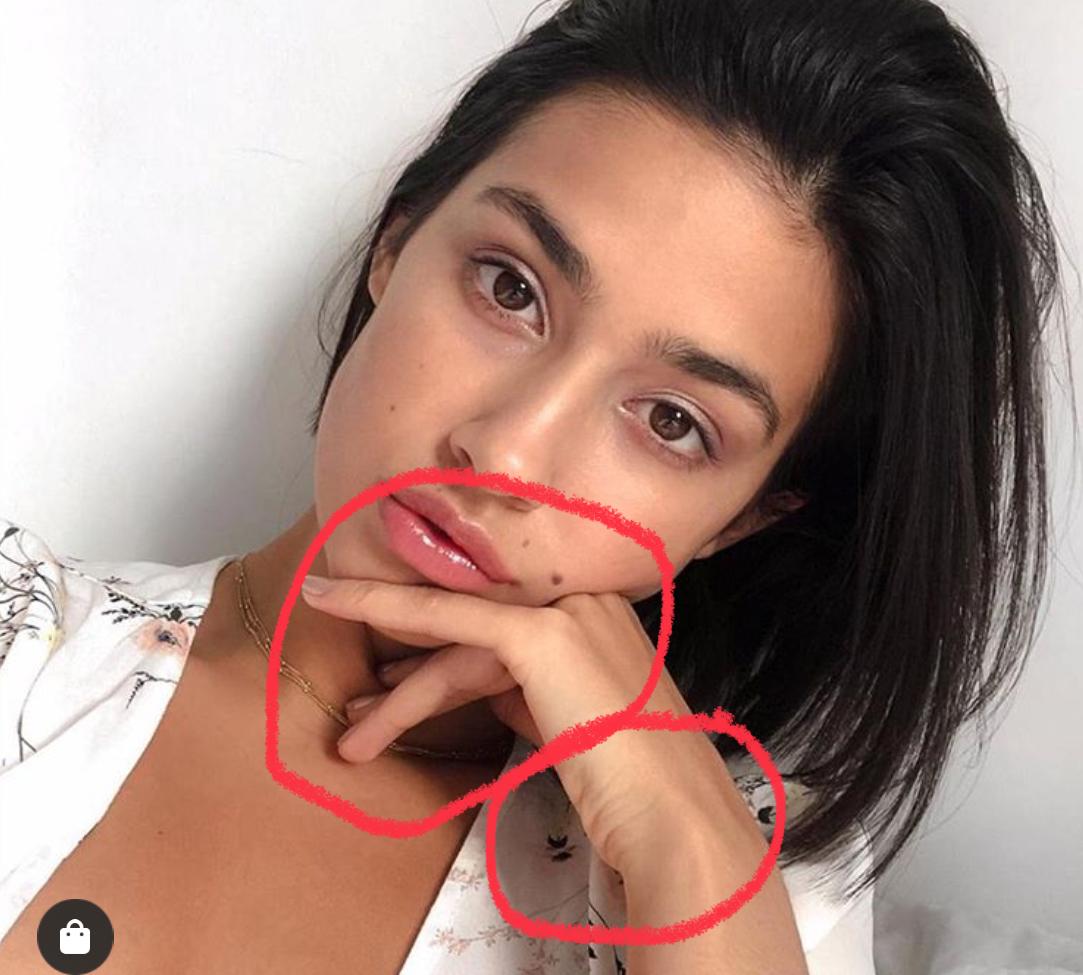
I rendered this foot from mei lin 8 (with hd morph on)

the wrinkles pretty good looking to me so i have confidence they can apply this to hands too.
WinterMoon Wants Attention.Which hair is that? That looks really good.
Casual Spikes with Sloshwerks' hair shaders.
Overall, this is the most lifelike render I've seen from you, aside from the waxiness of the character's skin.
Thanks! Both the morph and the textures are by Angel Wings (on Rendo), who does amazing child characters.
Why does setting a white (255,255,255) grayscale cutout opacity map cause G8Fs skin to darken a bit?Out of curiosity, what were you trying to accomplish by doing that?
I'm in the painful process of coming up with various ways to reduce texture stretching in a private area of G8F, in which anatomical elements are present.
I've figured out how to change G8F's UV's reliably, but the anatomical elements use G8F's original UV's. I can't transfer the new UV's to the anatomical elements, so now I'm coming up with ways to eliminate as much of the outer areas of the anatomical elements as possible. Sadly, the cutout opacity doesn't work with these anatomical elements when a map is set, it literally ignores the channel. I have no idea why. I've tried deleting the geometry, but that seems to break the anatomical element and the base mesh no longer has that certain area hidden. Sorry for being cryptic. I don't want to say anything that might get me in trouble! :)
I've now abandoned this transparency idea, especially since using cutout opacity messes with the appearance of the skin.
I've now figured out another way to eliminate texture stretching, but it's a tedious process, but the results are great.
Making part of the skin transparent turns on the Thin Walled property, as I recall (something like that, anyway) as it is no longer a closed volume.
I see, good to know.
JCM terrible at 50%Thanks Richard I did make a separate morph for the +ve and -ve values. It was only after hooking some of the them that I thought about how I would do it. The movement back didn't actually need correcting at first so didn't worry about it until I added in the Delta Add values you suggested. Sorry I'm not pointing the fingure just trying to be clear. :) I'll think about it tomorrow. Thanks again.
JCM terrible at 50%1st Stage , ERC DeltaAdd is probably the one you want. That gives a multiplier (to turn bend angle into morph values) and a constant (to handle delayed start).
Ah, I've got it now. The bend is a minus figure so I need to add. Cool. Thanks, Richard, that work great. :)
JCM terrible at 50%Oh, I tried that one, I probably didn't put the right values in but, I just tried it again and it is doing something. It addedd the morph to 100% at 50% bend so I'm sure I can work it out. Thanks Richard
What does the evolution of daz "Realism" look like?This product has cheek squish morphs.
https://www.daz3d.com/z-high-impact--morphs-poses-and-expressions-for-genesis-8
That doesn’t look very realistic to me and it’s only in certain places. I would like to click on a spot and be able to easily morph it without having to go into modeling software or undocumented aspects of Studio software.That's where it becomes impossible, because at the very least, you would need to communicate to the model what needs to be squished and by how much and in what shape was the object doing the squishing? Collision objects can achieve this somewhat in very specific situations...but so far we can only have one collision per object, and objects cannot be set to collide with each other...and an object can't collide with itself. These are all things I hope we can see in the future.
What does the evolution of daz "Realism" look like?
That doesn’t look very realistic to me and it’s only in certain places. I would like to click on a spot and be able to easily morph it without having to go into modeling software or undocumented aspects of Studio software.This product has cheek squish morphs.
https://www.daz3d.com/z-high-impact--morphs-poses-and-expressions-for-genesis-8
Making renders but using other people's assets....If you're doing what others and myself have already said, and not just dropping stuff out of a box and hitting "go", then yes, you can take 100% of the credit on that piece of art. It is your art. You are the artist. If you've purchased assets here or on Rendo, or pretty much anywhere unless otherwise stipulated, you don't have to give a list of what you've used. You certainly can, and I do if I'm posting here or to an audience who would care, but I don't on Tumblr or Flickr or anyplace where the viewership is only interested in viewing. I try to list things out here because I know people would ask otherwise. But many times, I've editing an asset up the wazoo, and while I can say "yes, it's this blah-bitty-blah-blah", chances are it's been retextured and covered in enough geoshells to sink the Titanic all over again. Not to mention any outfits I use are almost always kitbashed. But the assets are only part of putting a scene together that becomess a piece of art. Telling a story, or inciting an emotion...getting the light just the right way...your postwork process...all of that is what makes it yours. Don't let anybody tell you it's not...and don't feel guilty if people are willing to give you money for your time and your artistic eye.
I fully agree with your points regarding Amy's original question (below for reference, so others who have missed it can read it).
I'm confused if I am allowed to call a render my own work if I am using a skin from a premade character, hair that someone else made, clothes that someone else made. Even the Genesis 8 Figure belongs to DAZ. When I show people some renders they are impressed but I also feel like a sham because I didn't make the assets used in it (though I sometimes make custom morphs, but I still end up using skin textures, eye textures from premade characters).
Yes, I put this all together and rendered it, but this skin is from a Mousso Character, the eyes from a Merchants' resource, clothes from this bundle, even the HDRI lighting is from a bundle.
I feel like I am deceiving people. I don't even know how to feel. Am I allowed to call myself an artist if this is what I do? Forget about whether or not something has artistic value. At the very base of it, can one call their renders their own art if they use premade assets?
I have people now asking for commissions and I can do them. When I advertise my service for commissions, people can be impressed with my portfolio, but I wonder, am I deceiving them? Sometimes people want custom characters that I can make with the aid of Face Transfer. But I wonder if this can be considered my own work too.
Now when I advertise my commission work I'm always afraid someone will call me out and say that I'm not making any art, that I'm just "putting stuff together". I guess that's why I made this post in the first place.PS: Of course I do not mean taking other people's characters and creations and passing them off as my own. For example, I'd never claim I made an OOT hair. But I would use it in a render that I have uniquely made. The render is mine, the assets are not.
So where do we draw the line here?
Based on the statement in bold, I would say that you can definitely take credit for the work. If you still have doubts, I would just make it clear somewhere on you website/page (while thinking about it, could you share a link to you work, via PM is fine if your hesitant to have "the masses" go there) that you use premade assets for your work, but that you modify/combine them in ways that insure every image is unique and can't be duplicated by anyone else with the same resources. For anyone purchasing a commission, I would think the important things would be 1) do they find your work interesting, beautiful, high quality, etc. and 2) Are they purchasing something unique (something they won't see several other similar images from other people).
There are some outfits, characters, and scenes that you do see a lot of, and that are very recognizable. Potential customers might be worried they would get yet another cookie cutter image, or that the assets in the image they commissioned would show up in a hundred similar images on the net.. what you might want to do is give an example of an "out of the box" render of a common character/outfit/scene (something anyone could put together), and your image using those same base assets, only with your modifications (morphs, materials, arrangements, additions, etc.). Then, everyone knows exactly what they are getting. You aren't trying ot hide anything, and showing that your work is a cut above what others might do with the same assets. This way you are both showcasing and selling your skills to take the "ordinary" and make it unique or extraordinary???
Too Many G8 Characters?Even though many feel that there's too many pretty young to medium aged white females, the single one I've been waiting for since Genesis 8 first released still didn't make her appearance.
Where's our too-hot-for-the-catwalk super-vamp Lilith 8? (with accompanying Lilith 6 and Lilith 7 for Lilith 8)Transfered her morph over a while ago...
i don't understand why 2 female teens?
Four actually...
Though I think Josie and Kaylee are uncanny Valley as heck.
lorraineopua said:
The only time I buy a base character is to get a pro bundle as cheap as I can to get the dangly bits. Though I bought the Brute 8 just so I could use Maxx. G8M has no dangly bits yet, poor boy, prices haven't come down enough to get a pro bundle when I factor in a 60% exchange rate difference.
Well, he has a whole bunch of dangly bits if you know where to look...
3D Art Freebie Challenge-February 2020-"Natural Love" -Main Thread OnlyP.S. Here's a list of the first few morphs from V4 Shapes++ (I think?):
Peronally, if the Genesis 1, 3, and 8 head and body morphs that Hylas linked to aren't considered 'similar' to these, then I think the dictionary definition of 'similar' needs changing*.
Sir Smuggley Smuggins: "Cheapskate ! Who invited you here, you ugly troll ! I said 'sit down and have a nice cup of tea', not 'come in all you ugly trolls'. And how many times have I told you, you need to leave the tea to brew. You don't stir..."
*I wonder if that can be done seemlessly...
Rule three specifically says
3. Base figures (All Gen 2,3,4, and Genesis 1,2,3) as well as their general morphs packs (Morphs++ and similar) do not count as a purchased item or a freebie and may be used as needed
Morphs ++ are the general Morphs packs for V4,M4, and other Generation 4 figures. The Genesis Evolution Head and Body Morphs packs are the general morph packs for Genesis, and the general morphs packs for later figures are just called the "Head and Body Morphs" for each respective figure (Genesis 2 M/F, Genesis3 M/F, Genesis 8 M/F). Each set of morphs packs (Morphs ++, Genesis Evolution Head and Body, Genesis 2 M/F Head and Body, Genesis3 M/F Head and Body, Genesis 8 M/F Head and Body) are the respective "general morph packs" for that figure.
I was personally involved in the original discussion that resulted in that rules change. In fact, it was one of my specfic suggestions to the new rules. The other being an increase in the maximum Paid-for items from 3 to 5.
What does the evolution of daz "Realism" look like?This product has cheek squish morphs.
https://www.daz3d.com/z-high-impact--morphs-poses-and-expressions-for-genesis-8
For the most part, it looks like it could be done with deformers, but totally understand the convenience of the product. I've used a quick deformer to throw in something like an inner arm squish when a character has their arms down, etc. Also, for more detailed "squish" you could create a morph in an editing program like ZBrush...I'm also assuming Blender and maybe Hexagon? I'm only familiar with ZBrush (w00t GoZ).
JCM terrible at 50%1st Stage , ERC DeltaAdd is probably the one you want. That gives a multiplier (to turn bend angle into morph values) and a constant (to handle delayed start).
More Non-photorealisitic Renders (NPR II)I used to be a die hard Poser user, but once Daz3D reeled me in with Genesis, I found it incredibly hard to go back to Poser. Mainly for two reasons: Lack of flagship figures that content creators supported, and the fact that while Daz3D is free, Poser stayed on the expensive side. Honestly, the one major feature I miss from Poser, was its easy-to-use material room. I could cook up crazy custom shaders much easier with it.
I didn't care at all for Daz Studio until version 4 came along. I remember looking at DS2 and asking people, "What's so great about it that I should invest the time to learn it?" And I just kept getting the same answer: "It's free!" I remember that I finally snapped and said, "Look, I'm an adult with a JOB. I can afford to buy Poser. What the heck is in DS that would make it worth my while?" Finally, one guy said, "Nothing. If you have Poser just stick with it. DS2 isn't a mature program."
And that was true, until Daz Studio 4. That was when it finally had the tools and power to make it worthwhile. And that's when I jumped ship and went over to Daz Studio. Things I really liked:
- The Download Manager. One click and everything comes down and goes where it's supposed to.
- Smart wardrobes: Again, click on the figure and the library filters the view to show you stuff that works with that figure.
- Easier figure manipulation.
- Iray (Poser's Superfly is a poor, VERY distant runner up to Iray).
But... As much as I liked DS and the pretty Iray pictures I could make, it wasn't fulfilling my desires to create line art out of 3D. Workarounds like Toon shaders and geoshells were (not to be rude): rubbish. Yes, with a LOT of work you could make something that worked. But the look wasn't all that good. The same is true for using Filter Forge and other image manipulation tricks. Yeah, you could get something that looked okay... but it really wasn't anything that knocked my socks off. Even in the hands of an expert it usually looks like someone did some Filter magic on a standard render.
And then in January 2016 I attended a Webinar hosted by professional comic artist Brian Haberlin and he showed a feature I had never seen before: "The Live Comic Book Preview" (he added the word "Live" to its name). Brian showed the tricks to setting up lights and adjusting the geometric edge settings, and suddenly I was off and running because I had actually won a free copy of Poser 11 and had it installed on my computer. For about a year I tried to duplicate his workflow (even bought Blacksmith 7 so I could work on my texture maps the way he did in Z-Brush), but soon tired of copying him and developed my own style. And I finally have a style and workflow that I like.
BUT... even though I'm happy with the art I create, I'm a bit frustrated by exactly the issue you cited: a flagship figure that content creators supported.
Yeah, that's still a problem. I see lots of great content out there, but mostly I pass on it because I can't use it in Poser. I know Renderosity has high hopes for La Femme, but I just don't see the market support for her, yet. The new products are tickling out, and frankly they're not that interesting. Yeah, I know "slut wear" sells, but not to me. I need clothes, characters and POSES. So far, there just isn't enough support for her to make me consider using her for any project. Which is too bad: I think she has potential.
If Daz incorprated a Real-Time-Comic-Renderer like Poser has, I'd never touch Poser again.
I can't say that would happen to me, but it might. I like so many things in the Daz Studio library and interface that it would be very tempting to dump Poser and go over to Daz Studio if it had a Comic Book Preview on par with the one in Poser 11. There are a few things in Poser I like more:
- Poser's lighting interface: That ball which controls lights is MUCH easier to use than the lighting in DS. This is a tricky tool, but once you master its nuances it's hard to go back to DS.
- Poser's Morph Tool: Got strands of hair sticking through a hat? Poke 'em in. Need to loosen a belt, no problem.
- The Fitting Room: Fast and easy to reconfigure clothes from one figure to another, or to fix problems. HOWEVER, I think DS does a better job with conforming clothes, so it really doesn't need this type of adjustment as often.
- The "Favorite's Tab" in the Library.
- The ease of adding new figures and props to your Library.
BTW: I have heard a rumor that Daz Studio might be working on some sort of comic book preview thingie. Time will tell.
I agree with you about the global lighting. I do like that a lot. However I perfer Daz's emissive lighting when it comes to lighting windows or starship engines. I don't know Poser as well as you do, so maybe I don't know how to do it properly. I recently baught a Blad
I used to be a die hard Poser user, but once Daz3D reeled me in with Genesis, I found it incredibly hard to go back to Poser. Mainly for two reasons: Lack of flagship figures that content creators supported, and the fact that while Daz3D is free, Poser stayed on the expensive side. Honestly, the one major feature I miss from Poser, was its easy-to-use material room. I could cook up crazy custom shaders much easier with it.
I didn't care at all for Daz Studio until version 4 came along. I remember looking at DS2 and asking people, "What's so great about it that I should invest the time to learn it?" And I just kept getting the same answer: "It's free!" I remember that I finally snapped and said, "Look, I'm an adult with a JOB. I can afford to buy Poser. What the heck is in DS that would make it worth my while?" Finally, one guy said, "Nothing. If you have Poser just stick with it. DS2 isn't a mature program."
And that was true, until Daz Studio 4. That was when it finally had the tools and power to make it worthwhile. And that's when I jumped ship and went over to Daz Studio. Things I really liked:
- The Download Manager. One click and everything comes down and goes where it's supposed to.
- Smart wardrobes: Again, click on the figure and the library filters the view to show you stuff that works with that figure.
- Easier figure manipulation.
- Iray (Poser's Superfly is a poor, VERY distant runner up to Iray).
But... As much as I liked DS and the pretty Iray pictures I could make, it wasn't fulfilling my desires to create line art out of 3D. Workarounds like Toon shaders and geoshells were (not to be rude): rubbish. Yes, with a LOT of work you could make something that worked. But the look wasn't all that good. The same is true for using Filter Forge and other image manipulation tricks. Yeah, you could get something that looked okay... but it really wasn't anything that knocked my socks off. Even in the hands of an expert it usually looks like someone did some Filter magic on a standard render.
And then in January 2016 I attended a Webinar hosted by professional comic artist Brian Haberlin and he showed a feature I had never seen before: "The Live Comic Book Preview" (he added the word "Live" to its name). Brian showed the tricks to setting up lights and adjusting the geometric edge settings, and suddenly I was off and running because I had actually won a free copy of Poser 11 and had it installed on my computer. For about a year I tried to duplicate his workflow (even bought Blacksmith 7 so I could work on my texture maps the way he did in Z-Brush), but soon tired of copying him and developed my own style. And I finally have a style and workflow that I like.
BUT... even though I'm happy with the art I create, I'm a bit frustrated by exactly the issue you cited: a flagship figure that content creators supported.
Yeah, that's still a problem. I see lots of great content out there, but mostly I pass on it because I can't use it in Poser. I know Renderosity has high hopes for La Femme, but I just don't see the market support for her, yet. The new products are tickling out, and frankly they're not that interesting. Yeah, I know "slut wear" sells, but not to me. I need clothes, characters and POSES. So far, there just isn't enough support for her to make me consider using her for any project. Which is too bad: I think she has potential.
If Daz incorprated a Real-Time-Comic-Renderer like Poser has, I'd never touch Poser again.
I can't say that would happen to me, but it might. I like so many things in the Daz Studio library and interface that it would be very tempting to dump Poser and go over to Daz Studio if it had a Comic Book Preview on par with the one in Poser 11. There are a few things in Poser I like more:
- Poser's lighting interface: That ball which controls lights is MUCH easier to use than the lighting in DS. This is a tricky tool, but once you master its nuances it's hard to go back to DS.
- Poser's Morph Tool: Got strands of hair sticking through a hat? Poke 'em in. Need to loosen a belt, no problem.
- The Fitting Room: Fast and easy to reconfigure clothes from one figure to another, or to fix problems. HOWEVER, I think DS does a better job with conforming clothes, so it really doesn't need this type of adjustment as often.
- The "Favorite's Tab" in the Library.
- The ease of adding new figures and props to your Library.
BTW: I have heard a rumor that Daz Studio might be working on some sort of comic book preview thingie. Time will tell.
I agree with you about the global lighting. I do like that a lot. However I perfer Daz's emissive lighting (IRAY) when it comes to lighting windows or starship engines. I don't know Poser as well as you do, so maybe I don't know how to do it properly. I baught a Blade Runner car (with my $10 reward coupon) made for Poser, thinking it would work for Daz. It doesn't. It doesn't have seperate surfaces for the lights, so I can't make them emissive. I might use it at some point in Poser, but it's rubbish for Daz IRAY. I might be able to use it in a toon render (3Delight). It was very disappointing using that coupon on a dude like that. Now, I won't get Poser products unless it specifically says it will work for Daz3D. The car did not, so lesson learned.
One other thing I like about Poser is that you can zoom in and out on an object with ease, no matter where it is in the scene. I find it's hard to zoom in on things in Daz when it's far off from the central loading point.
I have not heard that rumor. I hope it's true and I hope it's good.
More Non-photorealisitic Renders (NPR II)I used to be a die hard Poser user, but once Daz3D reeled me in with Genesis, I found it incredibly hard to go back to Poser. Mainly for two reasons: Lack of flagship figures that content creators supported, and the fact that while Daz3D is free, Poser stayed on the expensive side. Honestly, the one major feature I miss from Poser, was its easy-to-use material room. I could cook up crazy custom shaders much easier with it.
I didn't care at all for Daz Studio until version 4 came along. I remember looking at DS2 and asking people, "What's so great about it that I should invest the time to learn it?" And I just kept getting the same answer: "It's free!" I remember that I finally snapped and said, "Look, I'm an adult with a JOB. I can afford to buy Poser. What the heck is in DS that would make it worth my while?" Finally, one guy said, "Nothing. If you have Poser just stick with it. DS2 isn't a mature program."
And that was true, until Daz Studio 4. That was when it finally had the tools and power to make it worthwhile. And that's when I jumped ship and went over to Daz Studio. Things I really liked:
- The Download Manager. One click and everything comes down and goes where it's supposed to.
- Smart wardrobes: Again, click on the figure and the library filters the view to show you stuff that works with that figure.
- Easier figure manipulation.
- Iray (Poser's Superfly is a poor, VERY distant runner up to Iray).
But... As much as I liked DS and the pretty Iray pictures I could make, it wasn't fulfilling my desires to create line art out of 3D. Workarounds like Toon shaders and geoshells were (not to be rude): rubbish. Yes, with a LOT of work you could make something that worked. But the look wasn't all that good. The same is true for using Filter Forge and other image manipulation tricks. Yeah, you could get something that looked okay... but it really wasn't anything that knocked my socks off. Even in the hands of an expert it usually looks like someone did some Filter magic on a standard render.
And then in January 2016 I attended a Webinar hosted by professional comic artist Brian Haberlin and he showed a feature I had never seen before: "The Live Comic Book Preview" (he added the word "Live" to its name). Brian showed the tricks to setting up lights and adjusting the geometric edge settings, and suddenly I was off and running because I had actually won a free copy of Poser 11 and had it installed on my computer. For about a year I tried to duplicate his workflow (even bought Blacksmith 7 so I could work on my texture maps the way he did in Z-Brush), but soon tired of copying him and developed my own style. And I finally have a style and workflow that I like.
BUT... even though I'm happy with the art I create, I'm a bit frustrated by exactly the issue you cited: a flagship figure that content creators supported.
Yeah, that's still a problem. I see lots of great content out there, but mostly I pass on it because I can't use it in Poser. I know Renderosity has high hopes for La Femme, but I just don't see the market support for her, yet. The new products are tickling out, and frankly they're not that interesting. Yeah, I know "slut wear" sells, but not to me. I need clothes, characters and POSES. So far, there just isn't enough support for her to make me consider using her for any project. Which is too bad: I think she has potential.
If Daz incorprated a Real-Time-Comic-Renderer like Poser has, I'd never touch Poser again.
I can't say that would happen to me, but it might. I like so many things in the Daz Studio library and interface that it would be very tempting to dump Poser and go over to Daz Studio if it had a Comic Book Preview on par with the one in Poser 11. There are a few things in Poser I like more:
- Poser's lighting interface: That ball which controls lights is MUCH easier to use than the lighting in DS. This is a tricky tool, but once you master its nuances it's hard to go back to DS.
- Poser's Morph Tool: Got strands of hair sticking through a hat? Poke 'em in. Need to loosen a belt, no problem.
- The Fitting Room: Fast and easy to reconfigure clothes from one figure to another, or to fix problems. HOWEVER, I think DS does a better job with conforming clothes, so it really doesn't need this type of adjustment as often.
- The "Favorite's Tab" in the Library.
- The ease of adding new figures and props to your Library.
BTW: I have heard a rumor that Daz Studio might be working on some sort of comic book preview thingie. Time will tell.
Simulate a second time a objectHere's a good tutorial I have had success with;
https://thinkdrawart.com/how-to-save-a-daz-studio-dforce-frame-as-a-morph
funny, I have this bookmarked but... forgot it xD...
Daz 3D is part of

Connect
DAZ Productions, Inc.
7533 S Center View Ct #4664
West Jordan, UT 84084Licensing Agreement | Terms of Service | Privacy Policy | EULA
© 2026 Daz Productions Inc. All Rights Reserved.