-
Insights Please: Designing my own Character
kyoto kid said:
G8.1 uses a different UV map structure than G1 - G8 so you are pretty much limited to using 8.1 skins.
Except what you're saying here is wrong (emphasis mine): you can apply most Genesis 3 and Genesis 8 skins on Genesis 8.1 by default.
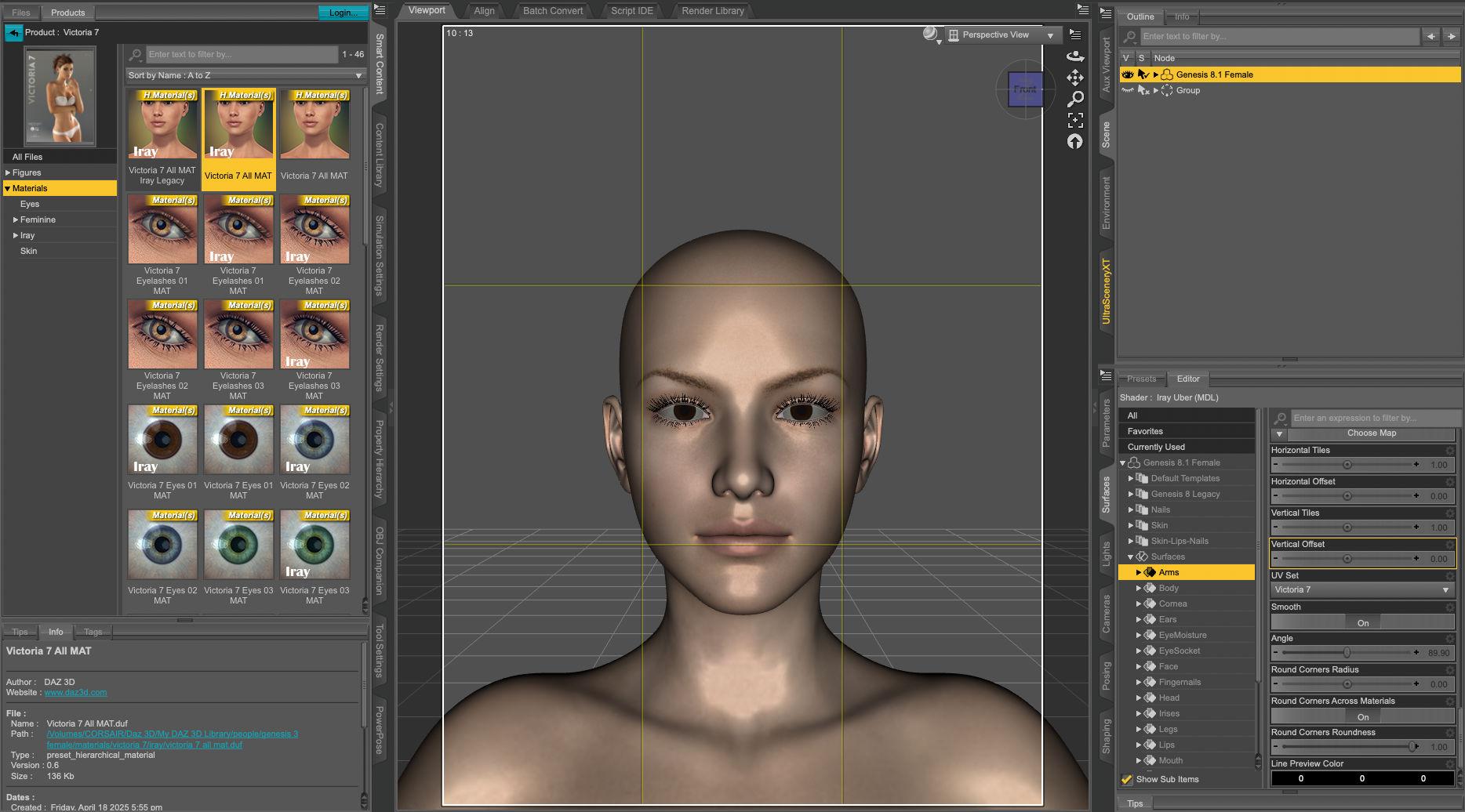
Only characters using a special UV maps like Genesis 3 Core Figures won't work without either remapping their textures to the default UV of their base figure or using a product providing their UV maps for Genesis 8, like this one or this one, but if you have them, you can apply a Core figure H.mats (let's say Victoria 7) on a Genesis 8.1 figure:
 Kozaburo is gone
DollyGirl said:
ItsAaron, here is the wiki page for Long Hair Evolution - Poser and Daz Studio Free Resources Wiki. The page has the current link.
Yeah I know, but long hair evolution Universal and others require Long Hair Evolution for DAZ's Victoria V1-3
However, it's not archived yet
By the way thanks for information
Kozaburo is goneThank you for the Kozaburo's hairs
Some Hairs (all back hair, Long Hair Evolution for DAZ's Victoria V1-3, and others) are not archived yet, We are hoping someone will be archived someday, for refit for newer Genesis 8 and Genesis 9
WHEN... will DAZ3D learn...You create a figure from scratch, you get the basic morphs. You want to use a morph you purchased called "heads vol 2", you go to the library and "attach" the morphs within it to the figure. Now the figure is "base morphs" plus "heads vol 2" (and whatever else heads v2 loads). Later you save and reload this figure. When it reloads, it load "Heads vol 2" automatically because the scene/character file tells it to.
Which is, to an extent, what the ExP system used with Victoria/Michael 4 did - it added its own data files to /Runtime/Libraries/!DAZ/Figurename and in order to use them we had to run a script that added those files to the master list of files to load that the figure read in. People hated this, hence the Genesis system.
TheMysteryIsThePoint said:
A design that creates "very important practical reasons" why it must be inefficient is not a very good design. There is no degree of rationalization or explanation that is more important than the user experience, which is the reason why the design exists in the first place. Knowing why it is inefficient is no consolation while I'm twiddling my thumbs while waiting for the scene to load; I'd vastly prefer to simply be ignorant and not know why it can load a scene so quickly rather than knowing all the exact design decisions, as you've carefully explained, that make it painfully slow.
Hating the experience of the current system doesn't mean that an alternative system's experience would be better. There are always trade-offs, as I noted in reference to ExP above, and Daz chose what they thought would be the lesser evil. It is possible that history has shown a different approach would have been a lesser evil, but it can't be assumed that that is the case. It is possible that DS 6 will try to adjust the system, but there will probably be downsides to that too.
WHEN... will DAZ3D learn...Matt_Castle said:
TheMysteryIsThePoint said:
Why force the user to wait for dials that the user has expressed no interest in, instead of initializing them into some kind of inactive state and only loading them if/when they are actually used?
Because, for very important practical reasons, control links have to be able to be defined in either direction.
That is to say that if you have a Controller A, with child morphs B, C & D, then the code can be in A to say "when A is dialled in, dial in B, C & D". Or the code can be in each of B, C & D to say "Go and look at A. If it's dialled in, dial me in too, thanks". Or various combinations.
Being able to link in either direction is very important, both practically and legally.
Let's say someone creates some new expressions, but *also* wants to have correctives for those expressions to make them look their absolute best on Victoria 9. So, they need to link the correctives to Victoria 9's morph so those correctives only activate on her shape. But they cannot update Victoria 9's morph because a) if everyone who needed to link to Victoria 9's morph had to alter it, then only one person could ever link to it, b) it would stupidly bloat everything if you needed to send around updated morphs for everything you wanted to link to, and c) they do not have the copyright to alter and redistribute Victoria 9's morph. So the link to Victoria 9's morph needs to be saved in the expression corrective file, not Victoria 9's.
As such, an on-demand top-down indexing of the morph library of "only look in the files once you know you need them" is impossible, because a lot of morph links are defined bottom-up and thus you don't know for sure whether you do or don't need a file until you've looked in it.
Now, possibly there are better ways to handle this infrastructure. Maybe the links could exist as files themselves, and their file names are encoded such that DS can tell for sure "Hey, that link file has a name that matches this morph file's name, so I know that it tells me about a link I will need to use if I ever dial this morph in, but I don't need to look in it right now", but it would not be possible to migrate an existing figure base to a new system like that.
For now, Daz Studio is forced to work the way it does, opening and checking every morph file it can find in the library folders for that base figure to find all possible links before proceeding.
One way to handle that is each file has a header with all of the metadata about dependences. That can be read without having to process the entire file. The rest can be posponed untill the file is required or as a background task. Wating until a dial is used can trigger 50 or more dependences being loaded, which can cause the app to freeze while that's being processed.
That of course can be sped up if loading and decoding files was done in paralellel. For example, which file can be processed by a separate thread. The best way to do that depends on where the bottlenecks in the pipeline are.
* CLOSED * RRRR - It was a great idea, but... Render ContestTag:Fae3D#1
Pull :
4038 Millennium Puppy,
1794 The Alchemist Workshop Props - Cook Set
2329 Edwardian Hair for Genesis 3 Female
1859 Urban Battle Outfit Shirts for Genesis 8.1 Females
Unexpected Surprises
When Marcy and Zach had seen the abandoned dog wandering aimlessly around the park, it had seemed like a great idea to take her home. She needed somewhere to live, and they had always wanted a dog, but didn’t want to deal with a rambunctious puppy. So this calm, sweet adult dog was perfect! However, it turned out that she had a little surprise for them. Or actually, six little surprises! Well, there went their peace and quiet…
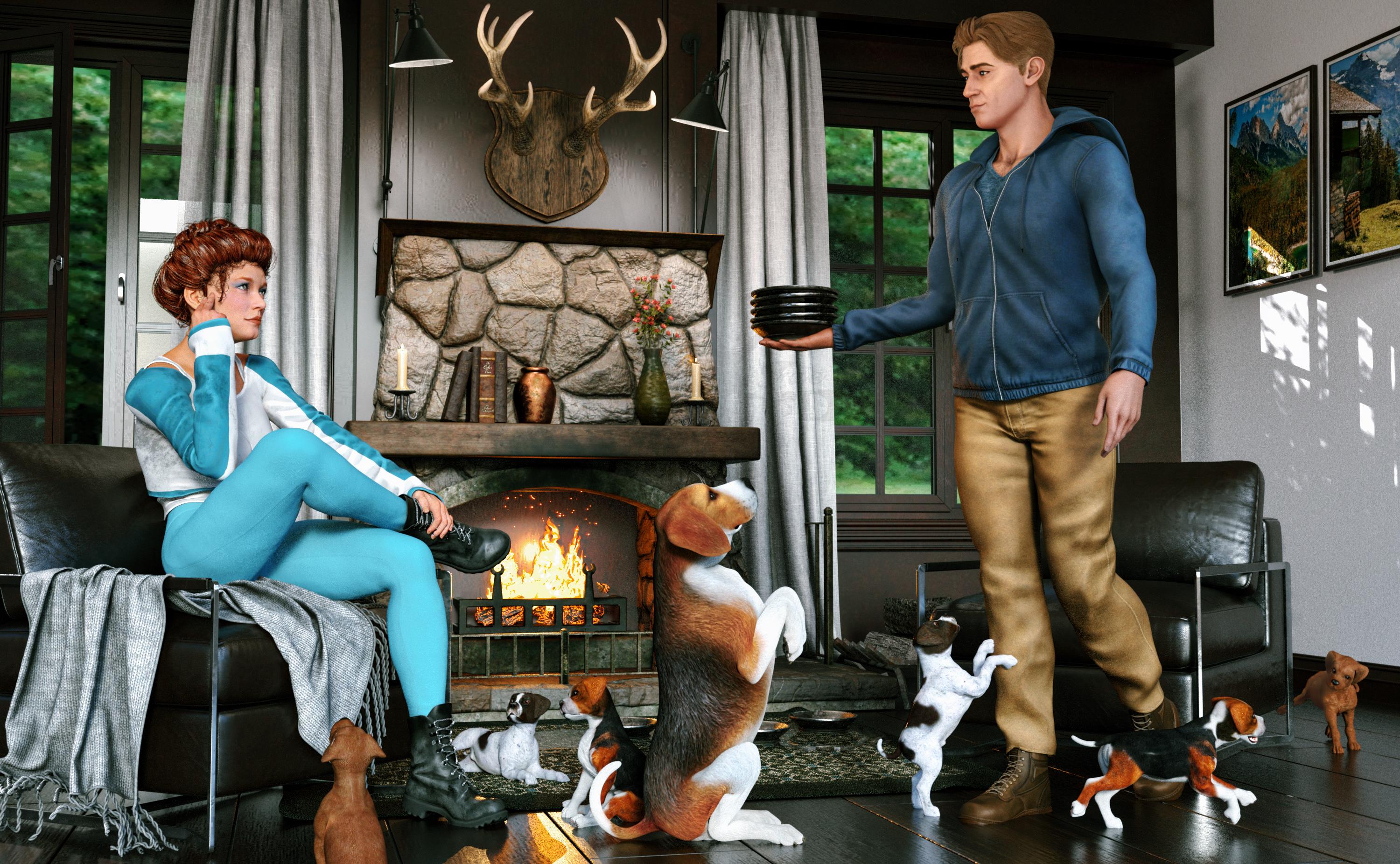
Rendered in Daz Studio Iray.
Postwork in Pixelmator Pro.
No AI used.
Other Items Used:
Autumnal Outfit for Genesis 8 Females
Bounty Huntress Outfit for Genesis 8 Females
Zelara 8
Arch Details Vol 1
Hog and Barrel Pub Interior
Z Luxury Morphing Office Chair and Poses for Genesis 8 and 8.1
Treescapes Backdrops
Marius HD for Genesis 9
Bristol Ridge Outfit for Genesis 9
Federico Hair for Genesis 9
Easter Egg Hunt Poses for Genesis 9 Base
Texture Booster and Shader Converter
Margot for Victoria 8
Look At Me II Pose Control
Daz Dog 8
Beagle for Daz Dog 8
Iray Rain
SY Invisilights Iray
PS Bachelor Living
Mexican Girl Expressions for Genesis 8.1 Female and Rosa Maria 8.1
WHEN... will DAZ3D learn...TheMysteryIsThePoint said:
Why force the user to wait for dials that the user has expressed no interest in, instead of initializing them into some kind of inactive state and only loading them if/when they are actually used?
Because, for very important practical reasons, control links have to be able to be defined in either direction.
That is to say that if you have a Controller A, with child morphs B, C & D, then the code can be in A to say "when A is dialled in, dial in B, C & D". Or the code can be in each of B, C & D to say "Go and look at A. If it's dialled in, dial me in too, thanks". Or various combinations.
Being able to link in either direction is very important, both practically and legally.
Let's say someone creates some new expressions, but *also* wants to have correctives for those expressions to make them look their absolute best on Victoria 9. So, they need to link the correctives to Victoria 9's morph so those correctives only activate on her shape. But they cannot update Victoria 9's morph because a) if everyone who needed to link to Victoria 9's morph had to alter it, then only one person could ever link to it, b) it would stupidly bloat everything if you needed to send around updated morphs for everything you wanted to link to, and c) they do not have the copyright to alter and redistribute Victoria 9's morph. So the link to Victoria 9's morph needs to be saved in the expression corrective file, not Victoria 9's.
As such, an on-demand top-down indexing of the morph library of "only look in the files once you know you need them" is impossible, because a lot of morph links are defined bottom-up and thus you don't know for sure whether you do or don't need a file until you've looked in it.
Now, possibly there are better ways to handle this infrastructure. Maybe the links could exist as files themselves, and their file names are encoded such that DS can tell for sure "Hey, that link file has a name that matches this morph file's name, so I know that it tells me about a link I will need to use if I ever dial this morph in, but I don't need to look in it right now", but it would not be possible to migrate an existing figure base to a new system like that.
For now, Daz Studio is forced to work the way it does, opening and checking every morph file it can find in the library folders for that base figure to find all possible links before proceeding.
New Year, New Sales Thread: Report Issues Here 3 "Reporting Only"Richard Haseltine said:
I'm still not sure what it is that is broken, which makes it hard to report. It isn't a Daz Deals feature?
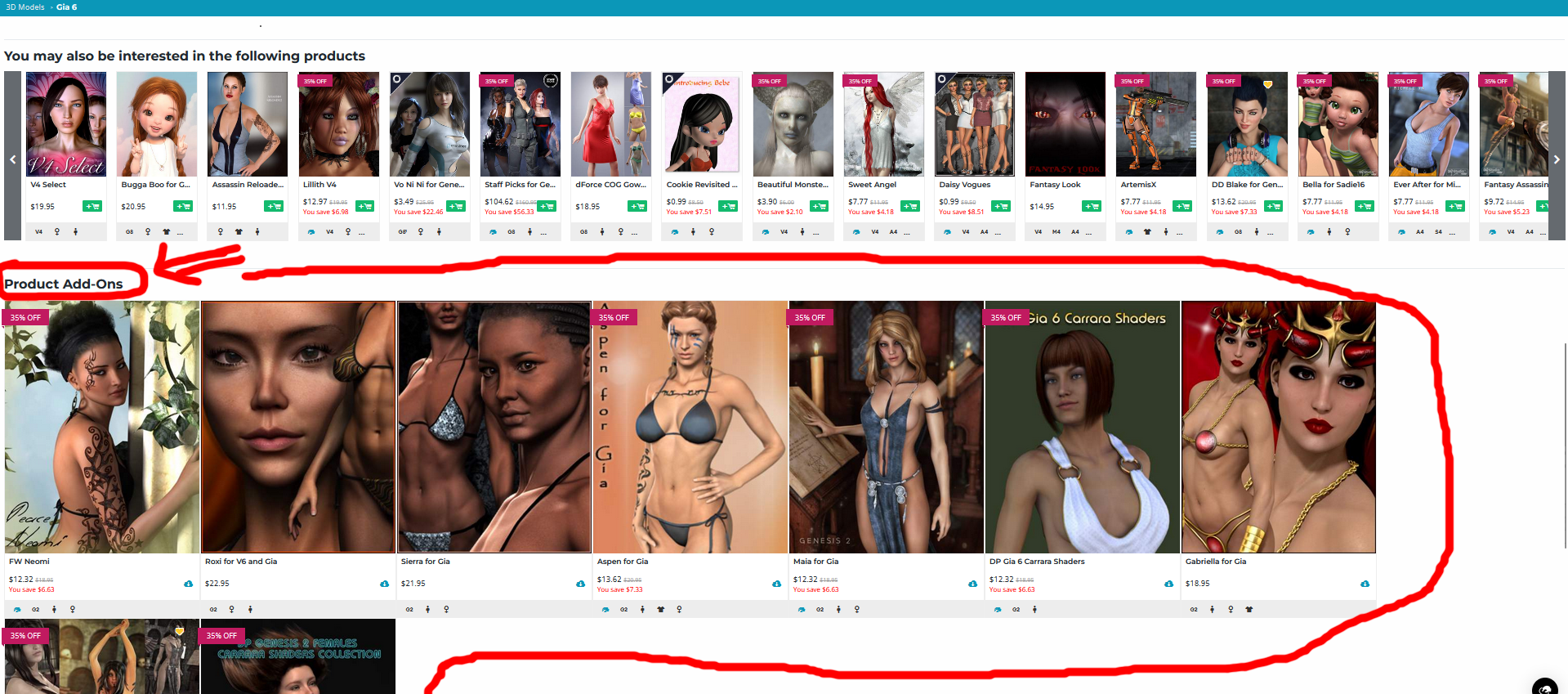
They're talking about the "Product Add-Ons" at the bottom of the page, below "you may also be interested in..." Sigrid 9, for example, has them. Victoria 8 does not.
New Year, New Sales Thread: Report Issues Here 3 "Reporting Only"MelanieL said:
paulawp (marahzen) said:
Togire said:
Elor said:
mding said:
In case this hasn't been reported yet: Several core figures lost their "Product Add-ons" sections:
Victoria 4.2 Base, Michael 4 Base, Stephanie 4 Elite Base, Aiko 4 Base, Hiro 4 Base
Genesis: Michael 5, Victoria 5,
Genesis 2: Victoria 6, Michael 6, Josie 6, Stephanie 6, Gianni 6, Mei Lin 6, Aiko 6, Lilith 6
Genesis 3: Michael 7, Aiko 7, Victoria 7
Genesis 8: Here I only checked and found: Victoria 8, Michael 8, didn't look any further.
Could that be please reported, please, as I find these sections are very helpful?
Daz Dog 8 also lost the product add-ons section:
https://www.daz3d.com/daz-dog-8
If it's mainly for figures with a lot of add-ons, maybe it's a performance saving change? But I hope they'll revert back to the previous situation or offer a way to browse add-on for a figure.
Actually, they also suppressed the add-on section of Genesis 9 Starter Essentials, but this is a *very very very good* thing.
Making any G9 figure/outfit an addon of Genesis 9 Starter Essentials was extremely stupid. First, loading the G9 starter essential page with its addon section composed of 20k+ elements was (how can I say) ... an interesting experience... If you have tried recently, you know what I mean. But, this is now fixed
But, if any G9 item is already an addon, it completely breaks the search of real dependencies. For instance, with "daz deals" you can find in a big list of assets which ones are addons of items that you already own. Very useful, indeed. But if all G9 items are already addons of G9 essentials, this is a useless information that masks real addon dependencies as all G9 assets will appear in the list. And this problem is not fixed...
This prompted me to look and confirm that this feature is also lost for Daz Horse 2 and 3, the original Ultrascenery, and likely many other comparable products. That, IMHO, is a bad thing that needs to be fixed. I own pretty much all of the add-ons for items like these, but when I was building my Daz collection, I made a lot of use of picking up add-ons when on sale. As a newbie, I wouldn't even have known about all the cool add-ons that were available for some things without this feature.
Oh I really hope this is some kind of temporary glitch or a reversible mistake. I've used the feature several times to pick up extras for a base figure like the horse or the dog.
Please Daz change your mind!
I'm still not sure what it is that is broken, which makes it hard to report. It isn't a Daz Deals feature?
New Year, New Sales Thread: Report Issues Here 3 "Reporting Only"paulawp (marahzen) said:
Togire said:
Elor said:
mding said:
In case this hasn't been reported yet: Several core figures lost their "Product Add-ons" sections:
Victoria 4.2 Base, Michael 4 Base, Stephanie 4 Elite Base, Aiko 4 Base, Hiro 4 Base
Genesis: Michael 5, Victoria 5,
Genesis 2: Victoria 6, Michael 6, Josie 6, Stephanie 6, Gianni 6, Mei Lin 6, Aiko 6, Lilith 6
Genesis 3: Michael 7, Aiko 7, Victoria 7
Genesis 8: Here I only checked and found: Victoria 8, Michael 8, didn't look any further.
Could that be please reported, please, as I find these sections are very helpful?
Daz Dog 8 also lost the product add-ons section:
https://www.daz3d.com/daz-dog-8
If it's mainly for figures with a lot of add-ons, maybe it's a performance saving change? But I hope they'll revert back to the previous situation or offer a way to browse add-on for a figure.
Actually, they also suppressed the add-on section of Genesis 9 Starter Essentials, but this is a *very very very good* thing.
Making any G9 figure/outfit an addon of Genesis 9 Starter Essentials was extremely stupid. First, loading the G9 starter essential page with its addon section composed of 20k+ elements was (how can I say) ... an interesting experience... If you have tried recently, you know what I mean. But, this is now fixed
But, if any G9 item is already an addon, it completely breaks the search of real dependencies. For instance, with "daz deals" you can find in a big list of assets which ones are addons of items that you already own. Very useful, indeed. But if all G9 items are already addons of G9 essentials, this is a useless information that masks real addon dependencies as all G9 assets will appear in the list. And this problem is not fixed...
This prompted me to look and confirm that this feature is also lost for Daz Horse 2 and 3, the original Ultrascenery, and likely many other comparable products. That, IMHO, is a bad thing that needs to be fixed. I own pretty much all of the add-ons for items like these, but when I was building my Daz collection, I made a lot of use of picking up add-ons when on sale. As a newbie, I wouldn't even have known about all the cool add-ons that were available for some things without this feature.
Oh I really hope this is some kind of temporary glitch or a reversible mistake. I've used the feature several times to pick up extras for a base figure like the horse or the dog.
Please Daz change your mind!
New Year, New Sales Thread: Report Issues Here 3 "Reporting Only"paulawp (marahzen) said:
Togire said:
Elor said:
mding said:
In case this hasn't been reported yet: Several core figures lost their "Product Add-ons" sections:
Victoria 4.2 Base, Michael 4 Base, Stephanie 4 Elite Base, Aiko 4 Base, Hiro 4 Base
Genesis: Michael 5, Victoria 5,
Genesis 2: Victoria 6, Michael 6, Josie 6, Stephanie 6, Gianni 6, Mei Lin 6, Aiko 6, Lilith 6
Genesis 3: Michael 7, Aiko 7, Victoria 7
Genesis 8: Here I only checked and found: Victoria 8, Michael 8, didn't look any further.
Could that be please reported, please, as I find these sections are very helpful?
Daz Dog 8 also lost the product add-ons section:
https://www.daz3d.com/daz-dog-8
If it's mainly for figures with a lot of add-ons, maybe it's a performance saving change? But I hope they'll revert back to the previous situation or offer a way to browse add-on for a figure.
Actually, they also suppressed the add-on section of Genesis 9 Starter Essentials, but this is a *very very very good* thing.
Making any G9 figure/outfit an addon of Genesis 9 Starter Essentials was extremely stupid. First, loading the G9 starter essential page with its addon section composed of 20k+ elements was (how can I say) ... an interesting experience... If you have tried recently, you know what I mean. But, this is now fixed
But, if any G9 item is already an addon, it completely breaks the search of real dependencies. For instance, with "daz deals" you can find in a big list of assets which ones are addons of items that you already own. Very useful, indeed. But if all G9 items are already addons of G9 essentials, this is a useless information that masks real addon dependencies as all G9 assets will appear in the list. And this problem is not fixed...
This prompted me to look and confirm that this feature is also lost for Daz Horse 2 and 3, the original Ultrascenery, and likely many other comparable products. That, IMHO, is a bad thing that needs to be fixed. I own pretty much all of the add-ons for items like these, but when I was building my Daz collection, I made a lot of use of picking up add-ons when on sale. As a newbie, I wouldn't even have known about all the cool add-ons that were available for some things without this feature.
And how could one have ever known or found out, unless one came to this forum and asked the super-helpful people here who would gladly and quickly furnish one with a comprehensive list of links? Superior people, these forumites.
New Year, New Sales Thread: Report Issues Here 3 "Reporting Only"Togire said:
Elor said:
mding said:
In case this hasn't been reported yet: Several core figures lost their "Product Add-ons" sections:
Victoria 4.2 Base, Michael 4 Base, Stephanie 4 Elite Base, Aiko 4 Base, Hiro 4 Base
Genesis: Michael 5, Victoria 5,
Genesis 2: Victoria 6, Michael 6, Josie 6, Stephanie 6, Gianni 6, Mei Lin 6, Aiko 6, Lilith 6
Genesis 3: Michael 7, Aiko 7, Victoria 7
Genesis 8: Here I only checked and found: Victoria 8, Michael 8, didn't look any further.
Could that be please reported, please, as I find these sections are very helpful?
Daz Dog 8 also lost the product add-ons section:
https://www.daz3d.com/daz-dog-8
If it's mainly for figures with a lot of add-ons, maybe it's a performance saving change? But I hope they'll revert back to the previous situation or offer a way to browse add-on for a figure.
Actually, they also suppressed the add-on section of Genesis 9 Starter Essentials, but this is a *very very very good* thing.
Making any G9 figure/outfit an addon of Genesis 9 Starter Essentials was extremely stupid. First, loading the G9 starter essential page with its addon section composed of 20k+ elements was (how can I say) ... an interesting experience... If you have tried recently, you know what I mean. But, this is now fixed
But, if any G9 item is already an addon, it completely breaks the search of real dependencies. For instance, with "daz deals" you can find in a big list of assets which ones are addons of items that you already own. Very useful, indeed. But if all G9 items are already addons of G9 essentials, this is a useless information that masks real addon dependencies as all G9 assets will appear in the list. And this problem is not fixed...
This prompted me to look and confirm that this feature is also lost for Daz Horse 2 and 3, the original Ultrascenery, and likely many other comparable products. That, IMHO, is a bad thing that needs to be fixed. I own pretty much all of the add-ons for items like these, but when I was building my Daz collection, I made a lot of use of picking up add-ons when on sale. As a newbie, I wouldn't even have known about all the cool add-ons that were available for some things without this feature.
New Year, New Sales Thread: Report Issues Here 3 "Reporting Only"Elor said:
mding said:
In case this hasn't been reported yet: Several core figures lost their "Product Add-ons" sections:
Victoria 4.2 Base, Michael 4 Base, Stephanie 4 Elite Base, Aiko 4 Base, Hiro 4 Base
Genesis: Michael 5, Victoria 5,
Genesis 2: Victoria 6, Michael 6, Josie 6, Stephanie 6, Gianni 6, Mei Lin 6, Aiko 6, Lilith 6
Genesis 3: Michael 7, Aiko 7, Victoria 7
Genesis 8: Here I only checked and found: Victoria 8, Michael 8, didn't look any further.
Could that be please reported, please, as I find these sections are very helpful?
Daz Dog 8 also lost the product add-ons section:
https://www.daz3d.com/daz-dog-8
If it's mainly for figures with a lot of add-ons, maybe it's a performance saving change? But I hope they'll revert back to the previous situation or offer a way to browse add-on for a figure.
Actually, they also suppressed the add-on section of Genesis 9 Starter Essentials, but this is a *very very very good* thing.
Making any G9 figure/outfit an addon of Genesis 9 Starter Essentials was extremely stupid. First, loading the G9 starter essential page with its addon section composed of 20k+ elements was (how can I say) ... an interesting experience... If you have tried recently, you know what I mean. But, this is now fixed
But, if any G9 item is already an addon, it completely breaks the search of real dependencies. For instance, with "daz deals" you can find in a big list of assets which ones are addons of items that you already own. Very useful, indeed. But if all G9 items are already addons of G9 essentials, this is a useless information that masks real addon dependencies as all G9 assets will appear in the list. And this problem is not fixed...
New Year, New Sales Thread: Report Issues Here 3 "Reporting Only"mding said:
In case this hasn't been reported yet: Several core figures lost their "Product Add-ons" sections:
Victoria 4.2 Base, Michael 4 Base, Stephanie 4 Elite Base, Aiko 4 Base, Hiro 4 Base
Genesis: Michael 5, Victoria 5,
Genesis 2: Victoria 6, Michael 6, Josie 6, Stephanie 6, Gianni 6, Mei Lin 6, Aiko 6, Lilith 6
Genesis 3: Michael 7, Aiko 7, Victoria 7
Genesis 8: Here I only checked and found: Victoria 8, Michael 8, didn't look any further.
Could that be please reported, please, as I find these sections are very helpful?
Daz Dog 8 also lost the product add-ons section:
https://www.daz3d.com/daz-dog-8
If it's mainly for figures with a lot of add-ons, maybe it's a performance saving change? But I hope they'll revert back to the previous situation or offer a way to browse add-on for a figure.
New Year, New Sales Thread: Report Issues Here 3 "Reporting Only"Richard Haseltine said:
mding said:
In case this hasn't been reported yet: Several core figures lost their "Product Add-ons" sections:
Victoria 4.2 Base, Michael 4 Base, Stephanie 4 Elite Base, Aiko 4 Base, Hiro 4 Base
Genesis: Michael 5, Victoria 5,
Genesis 2: Victoria 6, Michael 6, Josie 6, Stephanie 6, Gianni 6, Mei Lin 6, Aiko 6, Lilith 6
Genesis 3: Michael 7, Aiko 7, Victoria 7
Genesis 8: Here I only checked and found: Victoria 8, Michael 8, didn't look any further.
Could that be please reported, please, as I find these sections are very helpful?
Where is this?
Sorry Richard, just now saw your question. Please compare for example https://www.daz3d.com/gia-6 at the bottom of the page with https://www.daz3d.com/victoria-6. Although the Product Add-on section at the bottom of Victoria 6 is actually much larger, it misses altogether, while Gia 6 still has it. This is quite new, as I used it already often during March madness.
 New Year, New Sales Thread: Report Issues Here 3 "Reporting Only"
mding said:
In case this hasn't been reported yet: Several core figures lost their "Product Add-ons" sections:
Victoria 4.2 Base, Michael 4 Base, Stephanie 4 Elite Base, Aiko 4 Base, Hiro 4 Base
Genesis: Michael 5, Victoria 5,
Genesis 2: Victoria 6, Michael 6, Josie 6, Stephanie 6, Gianni 6, Mei Lin 6, Aiko 6, Lilith 6
Genesis 3: Michael 7, Aiko 7, Victoria 7
Genesis 8: Here I only checked and found: Victoria 8, Michael 8, didn't look any further.
Could that be please reported, please, as I find these sections are very helpful?
Where is this?
New Year, New Sales Thread: Report Issues Here 3 "Reporting Only"In case this hasn't been reported yet: Several core figures lost their "Product Add-ons" sections:
Victoria 4.2 Base, Michael 4 Base, Stephanie 4 Elite Base, Aiko 4 Base, Hiro 4 Base
Genesis: Michael 5, Victoria 5,
Genesis 2: Victoria 6, Michael 6, Josie 6, Stephanie 6, Gianni 6, Mei Lin 6, Aiko 6, Lilith 6
Genesis 3: Michael 7, Aiko 7, Victoria 7
Genesis 8: Here I only checked and found: Victoria 8, Michael 8, didn't look any further.
Could that be please reported, please, as I find these sections are very helpful?
New Shop 'Feature' : 'Product Owned'barbult said:
chevybabe25 said:
Im sure a lot of us have Victoria 9 .. go rate her and see if the dang thing works lol!
OK, I gave her a thumbs up. The result is still "User Rating: Not enough ratings yet. Be the first to rate this product"
I just gave her a thumbs up, and it says "very positive" based on 11 ratings.
New Shop 'Feature' : 'Product Owned'chevybabe25 said:
Im sure a lot of us have Victoria 9 .. go rate her and see if the dang thing works lol!
OK, I gave her a thumbs up. The result is still "User Rating: Not enough ratings yet. Be the first to rate this product"
New Shop 'Feature' : 'Product Owned'chevybabe25 said:
Im sure a lot of us have Victoria 9 .. go rate her and see if the dang thing works lol!
Done (upvoted).
Daz 3D is part of

Connect
DAZ Productions, Inc.
7533 S Center View Ct #4664
West Jordan, UT 84084Licensing Agreement | Terms of Service | Privacy Policy | EULA
© 2026 Daz Productions Inc. All Rights Reserved.