-
New Year, New Sales Thread: Report Issues Here 3 "Reporting Only"
jmucchiello said:
MAD-METRO has outlet items in it that cost $0.99 in outlet but $1.99 with coupon. (Actually, some of them aren't even in the outlet. They're just discounted to $0.99 before applying the coupon.)
https://www.daz3d.com/mikaela-for-victoria-7
https://www.daz3d.com/de-michelle-for-genesis-3-female
https://www.daz3d.com/tresne-for-genesis-3-female-s
https://www.daz3d.com/dt-karen-for-genesis-3-female-s
https://www.daz3d.com/nora-for-genesis-3-female-s
https://www.daz3d.com/elsa-for-genesis-3-female-s
https://www.daz3d.com/razor-cut-bob-hair-for-genesis-3-female-s
https://www.daz3d.com/desiree-for-victoria-7
https://www.daz3d.com/the-common-man-poses-for-genesis-3-male
https://www.daz3d.com/music-and-jewelry-boxes
And a bunch more. I had to dump most of my cart to get the one thing I wanted to use the coupon on to the top of the list.
It's not just Outlet items that are an issue, although the inclusion of those is beyond sloppy at this point. Since MM began, I've found that a large percentage of the items in many of the recent ancilliary sales have ended up being significantly cheaper without the coupon than with it, and it's especially common in sales that discount to a fixed price point.
New Year, New Sales Thread: Report Issues Here 3 "Reporting Only"MAD-METRO has outlet items in it that cost $0.99 in outlet but $1.99 with coupon. (Actually, some of them aren't even in the outlet. They're just discounted to $0.99 before applying the coupon.)
https://www.daz3d.com/mikaela-for-victoria-7
https://www.daz3d.com/de-michelle-for-genesis-3-female
https://www.daz3d.com/tresne-for-genesis-3-female-s
https://www.daz3d.com/dt-karen-for-genesis-3-female-s
https://www.daz3d.com/nora-for-genesis-3-female-s
https://www.daz3d.com/elsa-for-genesis-3-female-s
https://www.daz3d.com/razor-cut-bob-hair-for-genesis-3-female-s
https://www.daz3d.com/desiree-for-victoria-7
https://www.daz3d.com/the-common-man-poses-for-genesis-3-male
https://www.daz3d.com/music-and-jewelry-boxes
And a bunch more. I had to dump most of my cart to get the one thing I wanted to use the coupon on to the top of the list.
Let's appreciate/discuss today's new releases - more ongoinger threadCybersox said:
WendyLuvsCatz said:
Elor said:
memcneil70 said:
I loaded the outfit on Victoria 9 and then started switching out skirts. Except for the dForce Pulp Safari Outfit skirt, so far the skirts have the same little gap the included skirt has. So I tried using Mesh Grabber to pull the blouse down to the top of the skirt edge. I didn't try to be finiky but it worked for a rough job. That might be the best solution in this case.
Creating a morph to get a top longer is usually not too hard (at least with Blender: it's been a while since I used Mesh Grabber), but there is a caveat: as far as I can tell, a length morph will not adjust to a different body shape than the one used to create it.
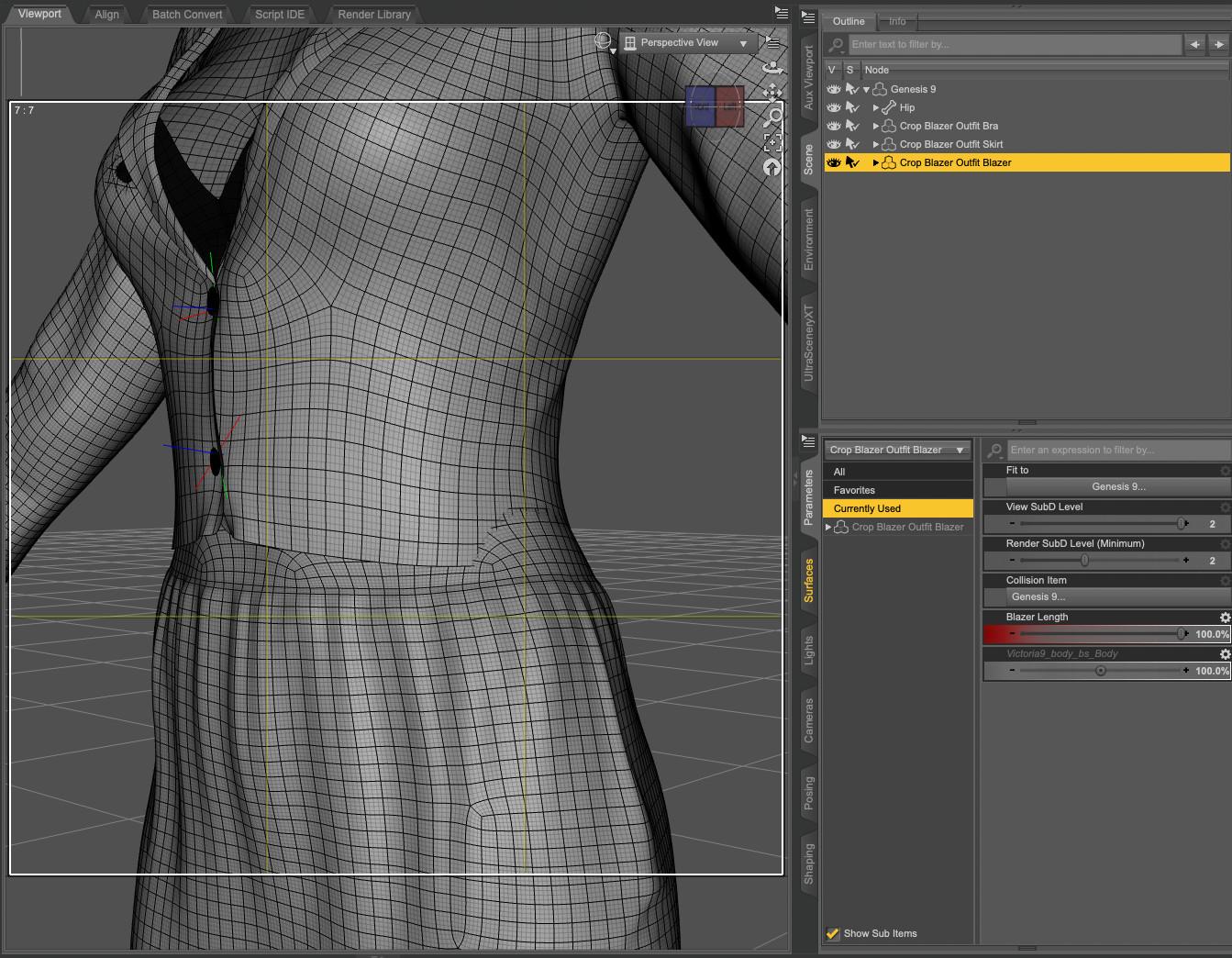
As an example, I created such morph for the blazer from 'dForce Crop Blazer Outfit Outfit for Genesis 9' and created it on Genesis 9 Base. Sadly, once I dialed another shape, let's say Victoria 9, the blazer clipped through her waist
 :
:
I didn't check if changing the smoothing modifier target to the skirt worked, and while it's likely possible to create morphs to change the width and depth of the top (I did try but wasnt successful), the solution I'm using is creating a corrective morph taking care of the difference between the base shape and the current one, with a controller property to automatically dial it when both the body morph and the lenght morph are active on the clothes. Here the result on Mira:
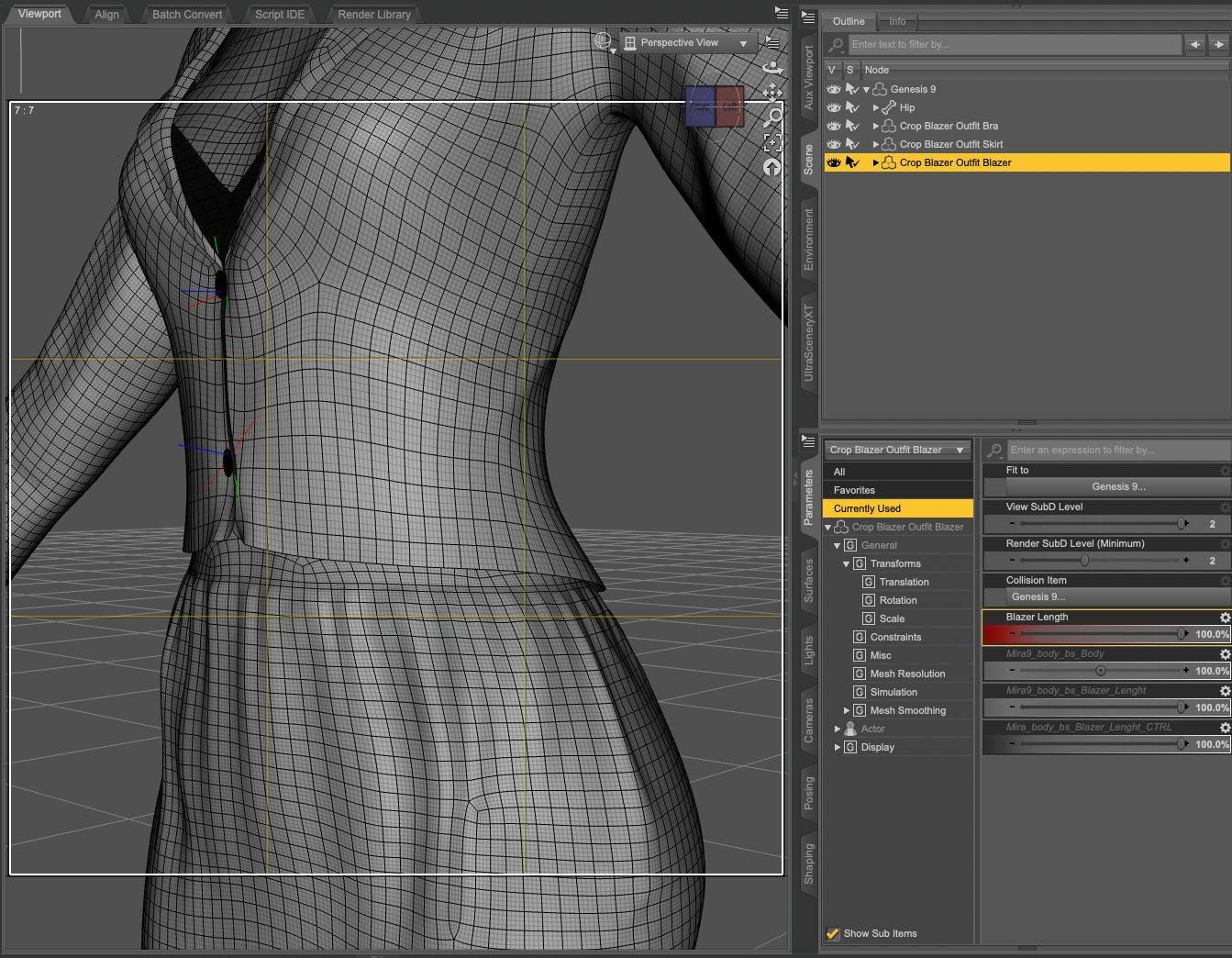
Back then, I thought it was because I did something wrong while creating the lenght morph, but the problem also happens with morphs created by PAs, so either it's a problem between a lot of chairs and keyboards, or it's not possible or hard to do. Maybe crosswind / barbult / Richard Haseltine know a super trick, but in the meantime, I'll continue to use the same approach (a controller to automatically dial the morph adjusting the lenght morph to a body shape).
The process of creating the controller property (and some of its pitfalls) is summarised, with a link to the video I watched to learn how to do it, in the wall of text of my last render: Morning stroll in New York.
could also do what I do in real life with such tops, layer another one under it
or use a geoshell camisole on the character that covers the tummy
Or a bodysuit with the top part hidden by an opacity map. Or a stylishly wide belt. As a photographer, filmaker, and tech theater major, I've had to deal a lot of last minute costume issues, but generally, as long as it looks good to the eye, you can get away with murder.
Also even more excellent suggestions! Thanks
Let's appreciate/discuss today's new releases - more ongoinger threadWendyLuvsCatz said:
Elor said:
memcneil70 said:
I loaded the outfit on Victoria 9 and then started switching out skirts. Except for the dForce Pulp Safari Outfit skirt, so far the skirts have the same little gap the included skirt has. So I tried using Mesh Grabber to pull the blouse down to the top of the skirt edge. I didn't try to be finiky but it worked for a rough job. That might be the best solution in this case.
Creating a morph to get a top longer is usually not too hard (at least with Blender: it's been a while since I used Mesh Grabber), but there is a caveat: as far as I can tell, a length morph will not adjust to a different body shape than the one used to create it.
As an example, I created such morph for the blazer from 'dForce Crop Blazer Outfit Outfit for Genesis 9' and created it on Genesis 9 Base. Sadly, once I dialed another shape, let's say Victoria 9, the blazer clipped through her waist
:I didn't check if changing the smoothing modifier target to the skirt worked, and while it's likely possible to create morphs to change the width and depth of the top (I did try but wasnt successful), the solution I'm using is creating a corrective morph taking care of the difference between the base shape and the current one, with a controller property to automatically dial it when both the body morph and the lenght morph are active on the clothes. Here the result on Mira:
Back then, I thought it was because I did something wrong while creating the lenght morph, but the problem also happens with morphs created by PAs, so either it's a problem between a lot of chairs and keyboards, or it's not possible or hard to do. Maybe crosswind / barbult / Richard Haseltine know a super trick, but in the meantime, I'll continue to use the same approach (a controller to automatically dial the morph adjusting the lenght morph to a body shape).
The process of creating the controller property (and some of its pitfalls) is summarised, with a link to the video I watched to learn how to do it, in the wall of text of my last render: Morning stroll in New York.
could also do what I do in real life with such tops, layer another one under it
or use a geoshell camisole on the character that covers the tummy
Or a bodysuit with the top part hidden by an opacity map. Or a stylishly wide belt. As a photographer, filmaker, and tech theater major, I've had to deal a lot of last minute costume issues, but generally, as long as it looks good to the eye, you can get away with murder.
Let's appreciate/discuss today's new releases - more ongoinger threadElor said:
memcneil70 said:
I loaded the outfit on Victoria 9 and then started switching out skirts. Except for the dForce Pulp Safari Outfit skirt, so far the skirts have the same little gap the included skirt has. So I tried using Mesh Grabber to pull the blouse down to the top of the skirt edge. I didn't try to be finiky but it worked for a rough job. That might be the best solution in this case.
Creating a morph to get a top longer is usually not too hard (at least with Blender: it's been a while since I used Mesh Grabber), but there is a caveat: as far as I can tell, a length morph will not adjust to a different body shape than the one used to create it.
As an example, I created such morph for the blazer from 'dForce Crop Blazer Outfit Outfit for Genesis 9' and created it on Genesis 9 Base. Sadly, once I dialed another shape, let's say Victoria 9, the blazer clipped through her waist
:I didn't check if changing the smoothing modifier target to the skirt worked, and while it's likely possible to create morphs to change the width and depth of the top (I did try but wasnt successful), the solution I'm using is creating a corrective morph taking care of the difference between the base shape and the current one, with a controller property to automatically dial it when both the body morph and the lenght morph are active on the clothes. Here the result on Mira:
Back then, I thought it was because I did something wrong while creating the lenght morph, but the problem also happens with morphs created by PAs, so either it's a problem between a lot of chairs and keyboards, or it's not possible or hard to do. Maybe crosswind / barbult / Richard Haseltine know a super trick, but in the meantime, I'll continue to use the same approach (a controller to automatically dial the morph adjusting the lenght morph to a body shape).
The process of creating the controller property (and some of its pitfalls) is summarised, with a link to the video I watched to learn how to do it, in the wall of text of my last render: Morning stroll in New York.
could also do what I do in real life with such tops, layer another one under it
or use a geoshell camisole on the character that covers the tummy
Render your buys! Use buys from the current month and the previous month of salesSapphireBlue said:
Elor Morning stroll in New York - Soft and lovely render! Sighting your Lacey and Victoria is so pleasantly familiar.

Thank you :)
SapphireBlue said:
Thank you for this breakdown. I'll definitely also be putting this to use!

Lorraine said:
Thank you so much for that info, I shall deal to them tomorrow. Just odd that only the pants are H.Mats, that's weird.
You're both welcome
SapphireBlue said:
Fabiana's Umbrelli Girls poses and prop set doing some of that work as well.
It's a great product and your video showcases it wonderfully.
Let's appreciate/discuss today's new releases - more ongoinger threadmemcneil70 said:
I loaded the outfit on Victoria 9 and then started switching out skirts. Except for the dForce Pulp Safari Outfit skirt, so far the skirts have the same little gap the included skirt has. So I tried using Mesh Grabber to pull the blouse down to the top of the skirt edge. I didn't try to be finiky but it worked for a rough job. That might be the best solution in this case.
Creating a morph to get a top longer is usually not too hard (at least with Blender: it's been a while since I used Mesh Grabber), but there is a caveat: as far as I can tell, a length morph will not adjust to a different body shape than the one used to create it.
As an example, I created such morph for the blazer from 'dForce Crop Blazer Outfit Outfit for Genesis 9' and created it on Genesis 9 Base. Sadly, once I dialed another shape, let's say Victoria 9, the blazer clipped through her waist
:I didn't check if changing the smoothing modifier target to the skirt worked, and while it's likely possible to create morphs to change the width and depth of the top (I did try but wasnt successful), the solution I'm using is creating a corrective morph taking care of the difference between the base shape and the current one, with a controller property to automatically dial it when both the body morph and the lenght morph are active on the clothes. Here the result on Mira:
Back then, I thought it was because I did something wrong while creating the lenght morph, but the problem also happens with morphs created by PAs, so either it's a problem between a lot of chairs and keyboards, or it's not possible or hard to do. Maybe crosswind / barbult / Richard Haseltine know a super trick, but in the meantime, I'll continue to use the same approach (a controller to automatically dial the morph adjusting the lenght morph to a body shape).
The process of creating the controller property (and some of its pitfalls) is summarised, with a link to the video I watched to learn how to do it, in the wall of text of my last render: Morning stroll in New York.
Let's appreciate/discuss today's new releases - more ongoinger threadmemcneil70 said:
Cybersox said:
Lorraine said:
memcneil70 said:
Richard Haseltine said:
Does anyone have https://www.daz3d.com/dforce-classy-date-outfit-for-genesis-9 ? I am wondering if the top could be used with other skirts or pants without showing the strip of skin - it looks pretty high so I fear not.
I didn't buy it because of that bare spot. At least not yet. While we are not freezing here, it is cold enough that the idea of exposing skin at that spot is 'chilling'. It is an interesting outfit though. I think I have some pants/skirts with high waistlines, but wouldn't you know I am in the middle of a backup of my content right now.
One of the reasons I like Sveva clothing is there's almost always a make longer morph on her shirts. Would so appreciate other PAs doing this.
I also appreciate that, while Sveva does make a lot of relatively skimpy outfits, they tend to be a lot more realistic in terms of design, fit, and draping than a lot of skimpwear, with most pieces having natural fabric options and looking like something that would be comfortble to wear around the house in real life as opposed to just trying to look sexy. I also really appreciate the synergy she has with her frequent collaborator Lilflame, as I'm often convinced to buy a Lilflame outfit just to use Sveva's textures, and it's normally pretty rare for that to happen with me.
Well the outfit is in my cart today. As a woman who appreciates separates that can mix-and-match with other items in my wardrobe throughout the year, I look for that in my 3D runtime too. It is one reason I buy from esha, outoftouch, and Aeon Soul to name just three of my most purchased.
I loaded the outfit on Victoria 9 and then started switching out skirts. Except for the dForce Pulp Safari Outfit skirt, so far the skirts have the same little gap the included skirt has. So I tried using Mesh Grabber to pull the blouse down to the top of the skirt edge. I didn't try to be finiky but it worked for a rough job. That might be the best solution in this case.
There was an outfit where the blouse was connected at top and bottom with a gap between in the front. That might be a solution for my issue I had with it. Nice outfit except for that.
Mary
Remixing your art with AIWhile I have a gazillion newer figures and assets, I have to admit I'm enjoying reusing things from over 20 years ago, especially things that I loved back then but couldn't use as much as I'd have liked due to software limitations.
For example, here's one of my all-time favourites, the Dragonfolk. First, a Victoria 2 Sci-Fi outfit (I paid a whopping $1.99 back then, but, you can get it for 99¢), then a combintation of G3 clothing assets by MightyMite and Sloshworks, and finally a Dragonfolk wearing each outfit in different environments.
Seeking an old ModelWendyLuvsCatz said:
it was by Roberto Melo and hosted on ShareCG which is gone
you could try sending him a site message
Thank you I will.
Let's appreciate/discuss today's new releases - more ongoinger threadmemcneil70 said:
If you buy it, there is a chance you might find you have a high waisted skirt. I checked each skirt I have against Victoria 9 and I had 14 outfits which had a waistline that might meet up with the blouse. Some of them also had a short blouse/sweater the same length shown in the promos. It surprised me how many skirts and pants had low waists dropping an estimated 1 - 2 inches below the natural waistline, some much lower.
https://www.daz3d.com/dforce-hnc25-belted-skirt-outfits-for-genesis-9
https://www.daz3d.com/dforce-hnc-basic-jacket-outfit-for-genesis-81-females
https://www.daz3d.com/dforce-hnc24-casual-jacket-outfit-for-genesis-9
https://www.daz3d.com/dforce-hnc24-shawl-collar-suit-outfit-for-genesis-9
https://www.daz3d.com/dforce-su-summer-day-clothes-for-genesis-9-81-and-8-female
https://www.daz3d.com/dforce-elegant-office-outfit-for-genesis-9
https://www.daz3d.com/lantressa-outfit-for-genesis-9
https://www.daz3d.com/dforce-pulp-safari-outfit-for-genesis-9-and-8-female
https://www.daz3d.com/dforce-50s-daisy-outfit-for-genesis-9-and-8-female
https://www.daz3d.com/frontier-grace-outfit-and-props-for-genesis-9
https://www.daz3d.com/dforce-autumn-sunny-street-outfit-for-genesis-9
https://www.daz3d.com/dforce-librariancore-outfit-for-genesis-9
https://www.daz3d.com/dforce-florence-outfit-for-genesis-9-8-and-81
https://www.daz3d.com/dforce-brz-shirt-dress-for-genesis-9
https://www.daz3d.com/dforce-8-in-1-winter-fashion-wardrobe-collection
And this is before I looked for pants by themselves.
Richard I hope this helps you decide if the blouse is potentially useful. I also looked at the morphs, and while I am not an expert at reading the Read Me, it looks like there is something there. You might want to look at that.
On a separate note, I found a few of the 'skirts' that were coded as 'footwear', 'shirts', and 'pants'. Sigh. At least I was able to fix my files.
Mary
I found a G8.1F while I was pulling my promos for G9.
Thanks, I have all but three of those so I will probably get the outfit and give it a go.
Let's appreciate/discuss today's new releases - more ongoinger threadIf you buy it, there is a chance you might find you have a high waisted skirt. I checked each skirt I have against Victoria 9 and I had 14 outfits which had a waistline that might meet up with the blouse. Some of them also had a short blouse/sweater the same length shown in the promos. It surprised me how many skirts and pants had low waists dropping an estimated 1 - 2 inches below the natural waistline, some much lower.
https://www.daz3d.com/dforce-hnc25-belted-skirt-outfits-for-genesis-9
https://www.daz3d.com/dforce-hnc-basic-jacket-outfit-for-genesis-81-females
https://www.daz3d.com/dforce-hnc24-casual-jacket-outfit-for-genesis-9
https://www.daz3d.com/dforce-hnc24-shawl-collar-suit-outfit-for-genesis-9
https://www.daz3d.com/dforce-su-summer-day-clothes-for-genesis-9-81-and-8-female
https://www.daz3d.com/dforce-elegant-office-outfit-for-genesis-9
https://www.daz3d.com/lantressa-outfit-for-genesis-9
https://www.daz3d.com/dforce-pulp-safari-outfit-for-genesis-9-and-8-female
https://www.daz3d.com/dforce-50s-daisy-outfit-for-genesis-9-and-8-female
https://www.daz3d.com/frontier-grace-outfit-and-props-for-genesis-9
https://www.daz3d.com/dforce-autumn-sunny-street-outfit-for-genesis-9
https://www.daz3d.com/dforce-librariancore-outfit-for-genesis-9
https://www.daz3d.com/dforce-florence-outfit-for-genesis-9-8-and-81
https://www.daz3d.com/dforce-brz-shirt-dress-for-genesis-9
https://www.daz3d.com/dforce-8-in-1-winter-fashion-wardrobe-collection
And this is before I looked for pants by themselves.
Richard I hope this helps you decide if the blouse is potentially useful. I also looked at the morphs, and while I am not an expert at reading the Read Me, it looks like there is something there. You might want to look at that.
On a separate note, I found a few of the 'skirts' that were coded as 'footwear', 'shirts', and 'pants'. Sigh. At least I was able to fix my files.
Mary
I found a G8.1F while I was pulling my promos for G9.
Render your buys! Use buys from the current month and the previous month of salesElor Morning stroll in New York - Soft and lovely render! Sighting your Lacey and Victoria is so pleasantly familiar.
Elor said:
They are H.Materials presets and the fastest way to to make them compatible with another figure is by editing directly a copy of the files themselves.
In case you never did it:
- Make a copy of all H.mats presets related to the pants
- Open these copy in a text editor (like Notepad++)
- Search Genesis 9 and you should see 5 results per file from what I saw opening the base H.mats for the pants.
- Replace Genesis9 by Genesis8Female (some text editors are able to do a serch and replace in all files opened).
- Save these changes, and enjoy your newly G8 compatible H.mats.
You may have to uncompress the .duf files (which can be done using Batch Convert in Daz Studio).
Thank you for this breakdown. I'll definitely also be putting this to use!
Seeking an old Modelit was by Roberto Melo and hosted on ShareCG which is gone
you could try sending him a site message
Why doesn't Daz do updates of old actors?Matt_Castle said:
Cybersox said:
Richard Haseltine said:
Even when they reuse a name (e.g. Victoria or Michael) they do new characters with - at most - a similar vibe.
They have done tried doing exact remakes on occasion, with releases like teen josie 7for teen josie8 and Michael 7 for Michael 8 , being good examples.
Those are, to the best of my understanding, conversions done by Gravity Studios, but which have to be sold as Daz Originals given they are fundamentally derivative.
and in any event Teen Josie/Michael 7 and Teen Josie/Michael 8 are different, hence the need for add-ons that modifiy them to match the older generation character with the same name.
Why doesn't Daz do updates of old actors?richardandtracy said:
@omvendt, I have taken a fair bit of time to 'update' a Victoria 3 character. This was to convert to Iray and TriAx rigging along with adding some clothing clones. The rigging after the process was no better because I didn't update the joint correctives. Take a look at the process in the 68 page tutorial I wrote to allow others to do it for themselves: https://www.daz3d.com/forums/discussion/655676/tutorial-making-triax-figures-from-old-parametric-characters/p1
The tutorial covers probably under half of the total updating process you're asking for. If you read the tutorial, you'll see why it takes a long time. It's also error prone and easy enough to get wrong. It is possible, but you are really creating a new figure from scratch, only re-using the mesh and out of date textures. It's almost certainly easier to start again unless you have an emotional tie to the character you're updating.
Regards,
Richard
I dont know about converting to various kinds of rigging, but the process for converting old shapes and textures to G9 is like only 1 page of instructions covering:
1. Convert shape to new figure (i.e., us Faceform Wrap or use a Clone)- morph loader
- adjust rigging to shape
- ERC freeze
2. Convert texture to new UVs (i.e., use Faceform Wrap texture transfer, or baking process)
3. Export correctives
4. Load correctives
5. Set up correctives
The real question is is there anything in older generations worth converting anyway?
Usually it is only the shape that is worth converting, which means step 2 can be skipped.
Most characters do not have 100s of correctives to fix. They only have like 5-20 max. Also they are symmetrical, so it's not like those are all "unique" and require much thought to set up after doing it for other side.
The value in having Daz or Daz vendors do this is that they can bring over HD morphs from previous generations.
Why doesn't Daz do updates of old actors?@omvendt, I have taken a fair bit of time to 'update' a Victoria 3 character. This was to convert to Iray and TriAx rigging along with adding some clothing clones. The rigging after the process was no better because I didn't update the joint correctives. Take a look at the process in the 68 page tutorial I wrote to allow others to do it for themselves: https://www.daz3d.com/forums/discussion/655676/tutorial-making-triax-figures-from-old-parametric-characters/p1
The tutorial covers probably under half of the total updating process you're asking for. If you read the tutorial, you'll see why it takes a long time. It's also error prone and easy enough to get wrong. It is possible, but you are really creating a new figure from scratch, only re-using the mesh and out of date textures. It's almost certainly easier to start again unless you have an emotional tie to the character you're updating.
Regards,
Richard
Why doesn't Daz do updates of old actors?omvendt said:
Daz is issuing new models on an ongoing basis. I wonder why they don't update all their existing models first. Wouldn't that be easier than making brand new models?
In short, no.
Doing a basic conversion of the shape and textures is one thing, but there's a lot more to the model than that; any number of corrective bend shapes and the like that take a large portion of the time, and those are specific to each figure base.
And each time a shape or texture is transferred, it loses quality, and you would then have to repair that.
And then you've got to go beyond that to actually make the figure an upgrade rather than a straight copy that few would see the point in grabbing.
Generally, it's not much effort saved to just start on something new and it'll have a larger market than something you already sold to people five years ago.
Cybersox said:
Richard Haseltine said:
Even when they reuse a name (e.g. Victoria or Michael) they do new characters with - at most - a similar vibe.
They have done tried doing exact remakes on occasion, with releases like teen josie 7for teen josie8 and Michael 7 for Michael 8 , being good examples.
Those are, to the best of my understanding, conversions done by Gravity Studios, but which have to be sold as Daz Originals given they are fundamentally derivative.
Why doesn't Daz do updates of old actors?Richard Haseltine said:
Even when they reuse a name (e.g. Victoria or Michael) they do new characters with - at most - a similar vibe.
They have done tried doing exact remakes on occasion, with releases like teen josie 7for teen josie8 and Michael 7 for Michael 8 , being good examples, while I remember that Freak 5 was actually criticized by some for being too close to a near perfect clone of Freak 4. Ultimately, though, I would imagine that the fact that there are noiw a number of ways to port characters to other generations probably cannibalizes a good portion of the market of those who just want a newer versions of the exact same character, and. finally, there are alot of us who never use the commercially made characters "as is" anyway. .
Why doesn't Daz do updates of old actors?Part of it is a tech issue - Genesis 9 has new features that aren't available/compatible with Genesis 8/8.1. As for characters like Alexandra 8 or Victoria 8, these are add ons; they aren't new models, they're modified versions of the base G8 figure with new textures.
Daz 3D is part of

Connect
DAZ Productions, Inc.
7533 S Center View Ct #4664
West Jordan, UT 84084Licensing Agreement | Terms of Service | Privacy Policy | EULA
© 2026 Daz Productions Inc. All Rights Reserved.