-
Novica & Forum Members Tips & Product Reviews Pt 12
My studio (the 4.11 beta) is still crashing, so I'm switching back to 4.10. As stated with previous posts and data, my computer is not overheating, it's not a RAM issue. I have no problem with 4.10 I'll see if I get time to do a few renders in the upcoming days. I'm busy working on files from another store, getting them all packaged and installed, and it's going to take a long time to do that :(
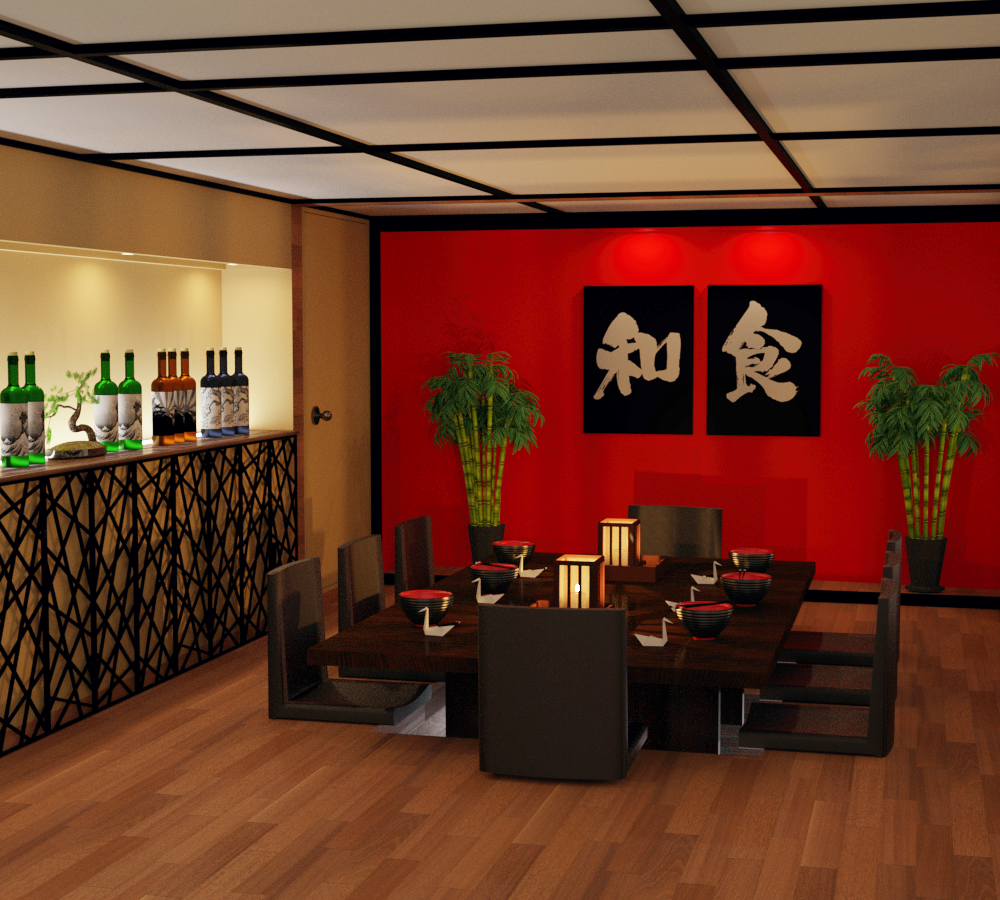
Japanese Restaurant Orestes Iray HDRI Environment Virgil Creek Falls
However, there was a question on another thread about the Japanese Restaurant, regarding walls being separate. The one end is open, the "partition" is paper thin and will let in a lot of light, but it IS separate and can be turned off. The other two walls can't, but you don't need to do that for lighting purposes. For cameras, perhaps. There is no door, you can slide Partition to cover it, but that leaves a gap at the other end. Simply X scale to make the partition longer/cover the door opening. But there is no door that I've found.
TIP: For even room lighting to avoid the obvious "the end of this room is open and too much light is pouring in from there" problem- here's the dome settings to try with HDRI products. I used Virgil Creek and turned Draw Dome off. Settings:
For X/Y/Z Dome ORIENTATION: 250/270/220 (First time I've played with all three!) Gives you great, even diffused lighting. I turned the overall Dome Rotation to zero. Try it and see how it works for you to get even lighting in a room with one end open. That end should FACE FRONT.
All lights in the room are the vendor's default for lanterns, etc.
In Tone Settings, as usual the Film ISO is 135 and then Exposure Value 11.76
As usual: Mitchell, not Gaussian, in Render Settings/Filtering. While there, Pixel Filter Radius 1.30 (remember the lower you go, the crisper the image.) Turn Noise Filter on, Noise Degrain Filtering is 4 and the Radius is 3.
See the even lighting? Not pouring in from the end. Yessss!!!!
Click to enlarge.
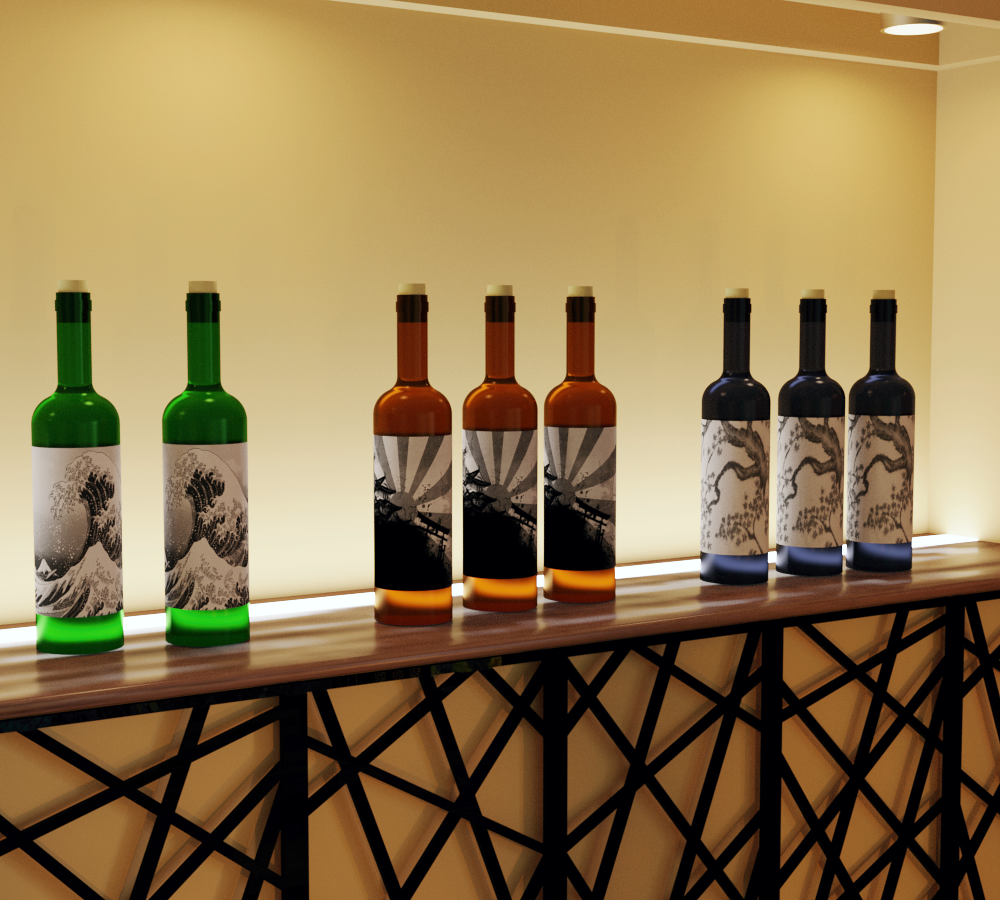 a smashing pumpkins add on for epic pumpkins
https://www.daz3d.com/orestes-epic-pumpkins-bundle
i need pumpkins looks like a dragon stepped on it
Background image not renderingA scene I just purchased contains a background plane with an image on it. The image does not appear in my iRay renders.
The product is: Peaceful Corners – BASE ( https://www.daz3d.com/peaceful-corners-base )
How do I get that background image to render?
That is a very old product for Poser!
I'd suggest you to not buy background planes, but HDRI domes in their stead!
Here are some examples: https://www.daz3d.com/orestes-graphics
How to Show Iray Sky Domes@Richard Haseltine
One of the products I recently bought is Orestes Iray HDRI Skydomes - Winter Moon by Orestes. which I used one of the HDRI's in my posted example Iray render, but such as the Enchanted Forest, all I can do is turn off the visibilty of that 3Delight skydome ---which you had helped me with a while back!
@Fishtales, thank you for the info about the Visualize Finite Dome. Apparently, one uses this tool with the Iray View. Haven't tried that yet, but if that makes the positioning of the HDRI image within the View easier, that will save guessing time.
Are yopu saying it loaded a modelled dome, or just that there was a dome in the scene to start with?
How to Show Iray Sky Domes@Richard Haseltine
One of the products I recently bought is Orestes Iray HDRI Skydomes - Winter Moon by Orestes. which I used one of the HDRI's in my posted example Iray render, but such as the Enchanted Forest, all I can do is turn off the visibilty of that 3Delight skydome ---which you had helped me with a while back!
@Fishtales, thank you for the info about the Visualize Finite Dome. Apparently, one uses this tool with the Iray View. Haven't tried that yet, but if that makes the positioning of the HDRI image within the View easier, that will save guessing time.
How to Show Iray Sky DomesIray sky domes seems like a contradiction. I bought some 3rd party Iray HDRI night skies. But they just rendered black. I had to turn off Sky Dome visibilty in Parameters to have the Iray lighting acess my scene, which makes the Iray sky dome useless. After you have chosen say a night sky SkyBox or Skydome Iray HDRI 3rd party product for your Environmental Map
Chose "Dome and Scene"
However, I began to realize the Sky Dome (or Sky Box) of third party products were "finite" as contrasted with the Daz Infinite sphere. Aha!
So make Dome mode "Finite"
Choose On "Draw Dome" (I didnt need ground)
Now the option I have never seen mentioned anywhere, in searchs, or tutorial that makes it work: "Visualize Finite Dome" which of course you don't see if you haven't selected Dome Mode:Finite!
Attached is the Render Setting menu as I set it up for a quick example.
I have finally been able to render a moody night sky! Ok, it's not awesome, but this is a straight render using an Orestes product. I can add other lighting features. The important thing is I now have the ambience and tunable background. Hope that helps!
Promo image settingsHi everyone,
I was wondering through this promo image: https://www.daz3d.com/media/catalog/product/cache/1/image/9df78eab33525d08d6e5fb8d27136e95/e/v/every-girl-hd-kit-for-genesis-8--3-female-09-daz3d.jpg
from "Every girl kit HD" which is the character morph, make-up, hair... used. The final result is very gorgeous and I can't find anywhere what's has been use for this promo image. If you guys have an idea or the now the exact settings, feel free to answer. (If my post is not in the good section, displace it :) )
See you !
https://www.daz3d.com/paris-room
https://www.daz3d.com/ainsley-hair-for-genesis-3--8-females
Delicate Nightie by Lilflame @Rendo
Every Girl Cheryl Head 100%
Every Girl Patty Body 100%
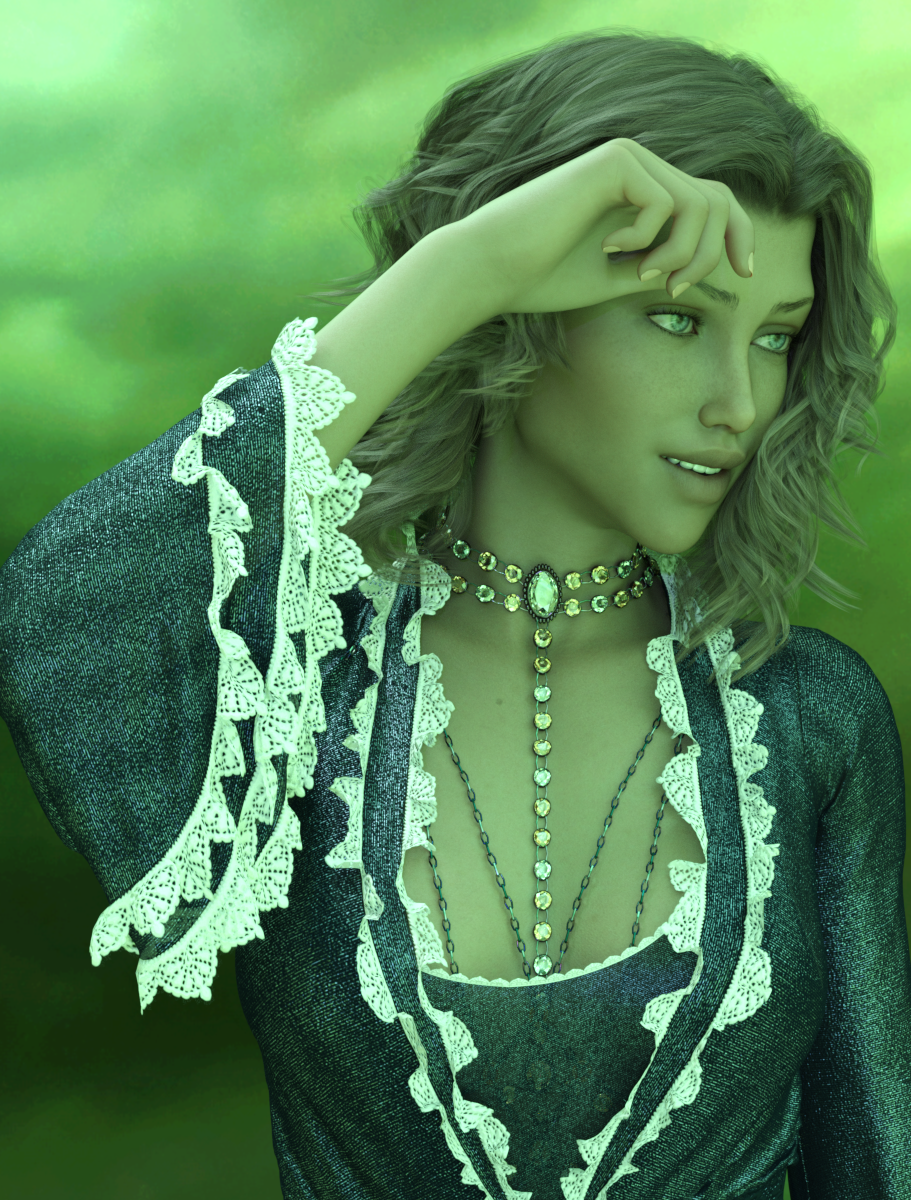
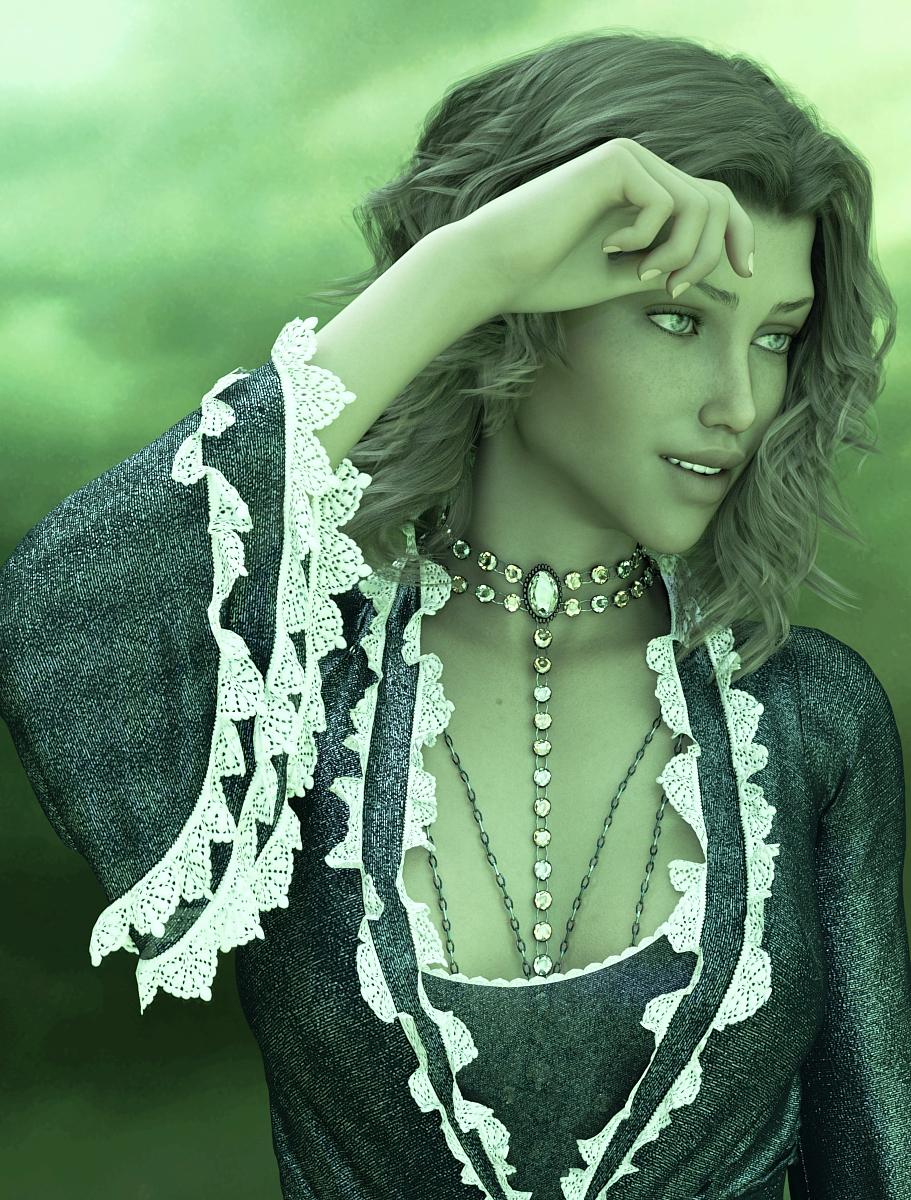
https://www.daz3d.com/orestes-iray-hdri-skydomes-vol-4-sunsetNovica & Forum Members Tips & Product Reviews Pt 12Ugh, we have tornadoes and severe weather coming in fast. In case we lose internet, I want to get these uploaded. It's Saoirse HD (Gen8F) again, and this is the lighting I really didn't like the hair. So what you can do to see the various postwork-
The first image is the default lighting from Orestes Iray HDRI Skydomes- Radiathane and the second is postwork, removing saturation so the green is dimmer. TIP: That HDRI Skydome gives you a really nice portrait background if you were to just render it and then insert it as a backdrop.
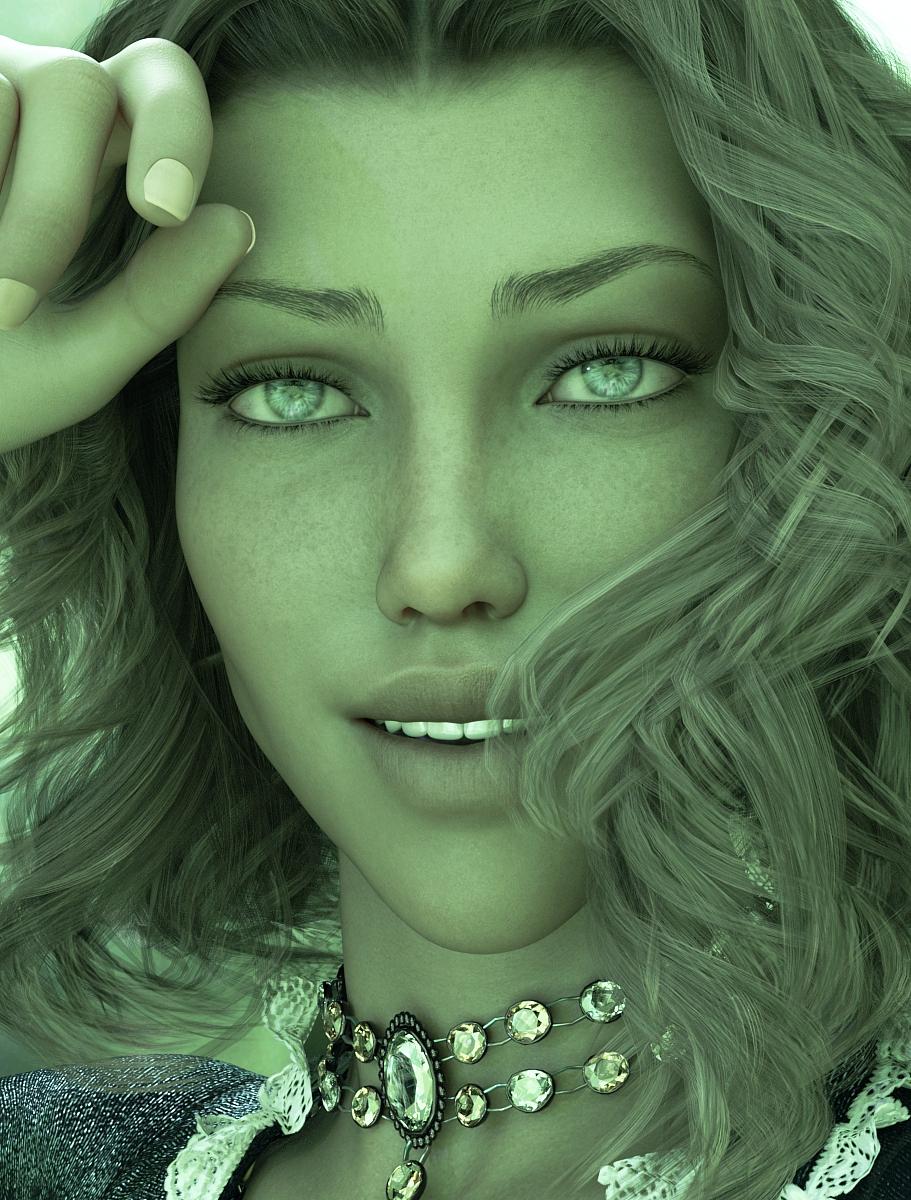
Next you have the face, then note the postwork on the eyes to remove the lighting glare. Last, I then added hair strands, as I said, I didn't like the transparency but wanted to show it out of the box.
And note again the body chains, as I mentioned previously- there was NO POKETHROUGH. Just applied them and done.
Stay safe Mississippi, more tornadoes spinning up now in the upper part of the state. It's also now right at Mobile, AL but no tornadoes yet.
Click to enlarge, then click those back and forth to see the changes.


 Novica & Forum Members Tips & Product Reviews Pt 11
Well, those thunderstorms are getting ready to hit here. While we usually don't lose internet, thought I'd mention if I seem to go POOF, I may be offline due to the lightning and/or no internet. I can use my phone but I usually just render :) I have already bought for today, and downloaded, and installed. I picked up India HD, Spandex Shaders, the Radiathane HDRI Skydome by Orestes, and Body Chains 2 for my 4 items and $30 off giftcard (so got a $30 one, of course.) It's a bummer though that with a gift card in the cart, you can't use a gift card to pay for it. :) That's the way it should be, but I had quite a few things in the cart due to the extra 30% for buying 4 new things.
I picked up Saoirie , the Dutchess Dress and textures, Cowgirl Leather Boots , a bunch of the leg and body chains, (just pop into the store to see them, that's the link to one.) as I like the lit option. Bet it would look neat in the dark! Also got three of the Orestes HDRI Skydomes, including Winter Moon.
Okay, gotta go, it's going to storm shortly. I've fixed a box that is covered on my front porch, one of the strays is here and I've got to see if I can get him/her to get in it before this hits. It's already rumbling in the close distance. TTYL
Does the Duchess dress drape properly for you? I was going to return it, but let myself be convinced to file a help call instead.
It didn't quite fit properly, and I had weird spikes in the arms and the train.
Novica & Forum Members Tips & Product Reviews Pt 11Well, those thunderstorms are getting ready to hit here. While we usually don't lose internet, thought I'd mention if I seem to go POOF, I may be offline due to the lightning and/or no internet. I can use my phone but I usually just render :) I have already bought for today, and downloaded, and installed. I picked up India HD, Spandex Shaders, the Radiathane HDRI Skydome by Orestes, and Body Chains 2 for my 4 items and $30 off giftcard (so got a $30 one, of course.) It's a bummer though that with a gift card in the cart, you can't use a gift card to pay for it. :) That's the way it should be, but I had quite a few things in the cart due to the extra 30% for buying 4 new things.
I picked up Saoirie , the Dutchess Dress and textures, Cowgirl Leather Boots , a bunch of the leg and body chains, (just pop into the store to see them, that's the link to one.) as I like the lit option. Bet it would look neat in the dark! Also got three of the Orestes HDRI Skydomes, including Winter Moon.
Okay, gotta go, it's going to storm shortly. I've fixed a box that is covered on my front porch, one of the strays is here and I've got to see if I can get him/her to get in it before this hits. It's already rumbling in the close distance. TTYL
Easy Environments: Winter Bridge (Daz Studio) [Commercial]lmao.. i love clear and explicative answers! very detailed, guys


EDIT: well i wishlisted a bunch of'm... now, one precise question about the newer ones with HDRI - how heavy are the HDRI? like, i love those made by Orestes, i bought Harvest Moon... but i can't really use it, the HDR are so huge they crash or lag my system big time. i even tried a converter somewhere but then the quality was awful, pixelated and the colors to cry. so if those from the EE are also that big, i'll have the same issue..
Hi manekiNeko!
Glad to see the series caught your interest. :)The Easy Environments HDRIs (.exr) are in the 40 to 60 MB range.
The non-HDRI 3Delight versions (.jpg) vary wildly from set to set, from about 20 to 50 MB.Differences to Terradome 3 ... I`d say quite a lot, from handling to purpose.
-Terradome has a relatively big geometry plane, with morphs and shaders. Hills/mountains are to be dialed in on that plane, and usually surround your character. The HDRI skies cover the upper half of your scene.
-Easy Environments usually cover a comparatively small, fixed area with geometry. I think "less flexible, more focussed" would be fair to say here. The HDRIs always cover the whole scene, sky in the upper half, landscape in the lower half.In general Terradome 3 renders are likely to display more geometry, Easy Environment renders are likely to display more of the HDRI/Skysphere.
Terragen 3 tends to put your figures in a valley, Easy Environments tend to put your figures in a high position overlooking a wide landscape (the HDRI).I hope I managed to keep this informal, but of course I am biased on the topic.
hey a word from the creator is always welcome! ^^ and not biased since what you wrote was informative and to the point. i think i see it now. and my primary idea with terradome 3 was to render my own background pics instead of buying them from others - and i suck with terragen, so.. but yeah, the geometry is enormous and using it as a scene with figures wasn't so easy. so your series might fit in better for this. i love the tree of life a lot btw, as well as the hell and the road to hell ^^. also a few others.
another thing: i tried to use a few of terradome 3's hdr in other scenes, and there's always a problem with the sky not going "down to the horizon" i.e. showing terrain, since as you said the concept is more about mountains/valleys (that would hide this). i guess it's not the case with EE so i can use the hdrs for anything...
as to the size of the hdri, Oreste's (in harvest moon) are wayyyy bigger, like 200MB. and when i use the outdoor for iray hdr which are around 100mb, no problem - so yours will be ok ^^Easy Environments: Winter Bridge (Daz Studio) [Commercial]lmao.. i love clear and explicative answers! very detailed, guys
EDIT: well i wishlisted a bunch of'm... now, one precise question about the newer ones with HDRI - how heavy are the HDRI? like, i love those made by Orestes, i bought Harvest Moon... but i can't really use it, the HDR are so huge they crash or lag my system big time. i even tried a converter somewhere but then the quality was awful, pixelated and the colors to cry. so if those from the EE are also that big, i'll have the same issue..
Hi manekiNeko!
Glad to see the series caught your interest. :)The Easy Environments HDRIs (.exr) are in the 40 to 60 MB range.
The non-HDRI 3Delight versions (.jpg) vary wildly from set to set, from about 20 to 50 MB.Differences to Terradome 3 ... I`d say quite a lot, from handling to purpose.
-Terradome has a relatively big geometry plane, with morphs and shaders. Hills/mountains are to be dialed in on that plane, and usually surround your character. The HDRI skies cover the upper half of your scene.
-Easy Environments usually cover a comparatively small, fixed area with geometry. I think "less flexible, more focussed" would be fair to say here. The HDRIs always cover the whole scene, sky in the upper half, landscape in the lower half.In general Terradome 3 renders are likely to display more geometry, Easy Environment renders are likely to display more of the HDRI/Skysphere.
Terragen 3 tends to put your figures in a valley, Easy Environments tend to put your figures in a high position overlooking a wide landscape (the HDRI).I hope I managed to keep this informal, but of course I am biased on the topic.
Easy Environments: Winter Bridge (Daz Studio) [Commercial]EE is super ... you know ... easy to use. In seconds I have great sky and lighting for almost all of my scenes. Plays really well with other stuff. Almost all of my book covers have SOMETHING, even if just the lights, from an EE product.
I have and like both:
Easy is easy and looks really good. Terradome has way more options and flexibility, maybe not quite as good for any specific scene.
lmao.. i love clear and explicative answers! very detailed, guys
EDIT: well i wishlisted a bunch of'm... now, one precise question about the newer ones with HDRI - how heavy are the HDRI? like, i love those made by Orestes, i bought Harvest Moon... but i can't really use it, the HDR are so huge they crash or lag my system big time. i even tried a converter somewhere but then the quality was awful, pixelated and the colors to cry. so if those from the EE are also that big, i'll have the same issue..
Orestes Fantasy MoonHi Folks. Quick question. Is it possible to rotate the position of the moon in this product?
I love alchemy chasm, recommendations for similar sets?Orestes Graphics has a lot of cool things in the underground/dungeon genre - check out https://www.daz3d.com/the-underdocks-bundle
Jack Tomalin's store is full of great stuff - https://www.daz3d.com/cista-sanctus is an underground watery dungeon type place.
First Bastion has a cool cave product - https://www.daz3d.com/spiral-descent-cave-entrance
Announcing: Daz Deals Browser Add-onView All Artists link does show up, but the URL I get is https://www.daz3d.com/shop/#filter_vendor=^^^^^^^^^^^^^^^^^^^^^^^^^^^^^^^^^^^^^^^^^^^^^^^^^^^^^^^^^^^^^^^^^^^^^^^^^^^^^^^^^^^^^^^^^^^^^^^^^^^^^^^^^^^^^^^^^^^^^^^^^^^^^^^^^^^^^^^^^^^^^^^^^^^^^^^^^^^^^^^^^^^^^^^^^^^^^^^^^^^^^^^^^^^^^^^^^^^^^^^^^^^^^^^^^^^^^^^^^^^^^^^^^^^^^^^^^^^^^^&filter_new=0&filtered=1
which doesn't work, of course.
Try this:
I did it in TextPad using a bunch of search, replace, copy, etc.
Man, I gotta learn Javascript.
Edit: Nevermind, my link still doesn't show all the items that should be available.
 Query about a product promo
This one I think
I don't think it's cassini as in the promo the ground is different and light is more intense and yellowish than the cassini
I think you are right, the planet itself isn't quite the same.
Query about a product promoThis one I think
I don't think it's cassini as in the promo the ground is different and light is more intense and yellowish than the cassini
Hell Creek Modules [Commercial]This is a fantastic set, and it renders fast given compared to ther jungle sets. In the attached picture I used Hell Creek modules 03 and 05 with the backdrop from Mesozoic Badlands, Orestes HDRI Summer Day 05 and Terradome 3 atmosphere with forest haze.
Continued issues with lighting - skydomesNo, I have no connection to Lyoness or any of her products.
To change the HDRI in the Render Settings->Environment, you need to locate the presets. Daz Studio provides more than one way to do just about anything. The following is just what I think would be easiest for you to find at this point.
- Go to Smart Content and select the Products tab.
- In the right column, type "HDR" in the filter field. This will isolate all the products with HDR in the title. You may find you have more than one.
- For the moment, looking for the included HDRIs, scroll down and find Daz Studio Iray HDR Outdoor Environments.
- Double-click to open.
- You will see a folder entitled Render-Settings. Select that and the presets will show.
Each HDRI has two presets. The presets labeled "Background" load only the HDRI. The other presets load both the HDRI and Cameras. The HDRIs load with Draw Dome set to On.
I have noticed that when I have an Iray Worlds Skydome in place that the Enviroment controls do not work.
Please open a new, blank scene in DS.
Open the Render Settings pane. This is probably docked to one side or the other, dependent on the layout you are using.
- There are three tabs across the top of the Render Settings pane: Presets, Editor, and Advanced. Please select Editor.
- You should now see a drop-down labeled Engine and set to NVIDIA Iray by default. Below that are two columns.
- In the left colum you will see folders for the various render settings. (I believe you are familiar with this page.)
- Please click on "Environment" in the left column.
- Now in the right column, you see the relevant settings for the currently selected Environment Mode.
- Change the Environmt Mode and the relevent settings will also change.
I believe these are the Environment controls you refer to. These settings only control the Iray environment. You cannot rotate an object with these controls. Dome Rotation settings only affect the position of the environment lighting in relation to World Center, (xyz axes of 0, 0, 0.)
It doesn't matter how large the object, to rotate it, you will need to select it in the scene. You probably have a Scene pane (tab) docked to one side of the viewport. You can select items in this tab, as well as in the viewport, but often have better control of what you're selecting in the Scene tab.
I believe you are getting frustrated with the Iray Worlds because you see it as an Environment and it only seems natural it should be controlled by the Environment settings. However, it is an object. It has a mesh. And it is moved with either a tool or settings in the Parameters pane.
To create a Group, go to the Main Menu and click on Create. Scroll down to New Group… and select. A dialog window will open where you can name your new group. The default name is Group # where # is an actual number which increments. Click on Accept. As I mentioned before, you can select items to group first, or you can create the groups and then move items into it. Items in the group are considered children, with the group as the parent.
I'm pretty sure Ghost Lights were Kindred Arts' brainchild. That said, stick with whichever tutorial teaches the way you learn.
One reason why ghost lights work is they use a single poly to light an area. You can actually use any mesh. The difference between "mesh lights" and "ghost lights" is the latter are all but invisible. But… Iray will have to compute the effect of the light on every polygon of the mesh light. The more polygons used, the longer it will take to render the scene. The sphere you are thinking of using between your characters may add more time to the render than you expect. You can use a single poly plane between your characters and turn on Two Sided Light in the material settings, (Surfaces tab)
You don't need to spend money to get a nice backdrop for your renders. You can turn Draw Dome to Off, render the scene, save the render as a PNG image and the background will be transparent. Now you can add any background you want in any image editor that uses layers. I use Photoshop CS6. Gimp is open-source and somewhat like Photoshop, (though I've never spent much time with it.) There are others, I'm sure. You can create simple backgrounds in your image editor, or use one of many free backgrounds available in this Art Studio thread.
Better yet, would be if there is a skydome that had that cyclorama look on one side and a light source on the otherside AND I can control it with the environment controls to position the light where I need it. Is there something like that?
You have just described HDRIs. Not all HDRIs are like that. But the HDR product that comes with Daz Studio is. And here are a couple of products in the store that meet that criteria:
- MEC4D HDRI Gardens Vol.1 - Megapack
- Orestes Iray HDRI Environment - Four Seasons Field
- Orestes Iray HDRI Environment - Winter Grove
There are also websites that have free HDRIs, although I am not familiar with them.
Daz 3D is part of

Connect
DAZ Productions, Inc.
7533 S Center View Ct #4664
West Jordan, UT 84084Licensing Agreement | Terms of Service | Privacy Policy | EULA
© 2026 Daz Productions Inc. All Rights Reserved.