-
How is HeadShop 13 for realism? It is Worth buying? Please help.
I have used Headshop since the beginning days of Faceshop. I have never liked the way the eyes look. Has it fixed the eyes, so they don't appear like holes or just plain off?
I am also curious if there's other 3D face modelers that are better from pictures, or is Headshop 13 the way to go and worth it?
Headshop 13 w Lovechildthomasritzler said:
Hi I'm having serious trouble with headshop 13 with lovechild plugin.
The program works fine, it exports the .obj-file and texture content aswell. However, when I open DAZ, load a Genesis 8 Basic Female character, remove eyelashes (I also tried NOT removing the eyelashes) because I read somewhere that the eyelashes sometimes causes problems, and start Morph Loader Pro and find my .obj-file from the Headshop 13 software and try loading the morph - a popup appears saying "Geometry did not match, failed to create morph." I should also mention that I haven't been able to integrate the Headshop plugin into Daz Studio, I am forced to use Headshop as a stand alone program for exporting the .obj-file. I use Windows 10 Pro, Daz Studio 4.15.0.2.
Can anyone help med out?
Thanks
1. It sounds like you may have missed putting the figure to base resolution. And yes for the G8 figures, no eyelashes.
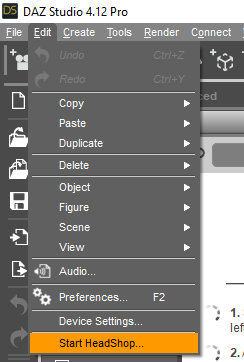
For the Windows edition, yes when you open D/S, under Edit there should be the option to start Headshop. Check through the provided readme instructions for installation.
 Headshop 13 w Lovechild
Hi I'm having serious trouble with headshop 13 with lovechild plugin.
The program works fine, it exports the .obj-file and texture content aswell. However, when I open DAZ, load a Genesis 8 Basic Female character, remove eyelashes (I also tried NOT removing the eyelashes) because I read somewhere that the eyelashes sometimes causes problems, and start Morph Loader Pro and find my .obj-file from the Headshop 13 software and try loading the morph - a popup appears saying "Geometry did not match, failed to create morph." I should also mention that I haven't been able to integrate the Headshop plugin into Daz Studio, I am forced to use Headshop as a stand alone program for exporting the .obj-file. I use Windows 10 Pro, Daz Studio 4.15.0.2.
Can anyone help med out?
Thanks
Are there any actually good face cloning tools out there? (E.g. not Facegen or Headshop)info_b3470fa520 said:
I have seen some information on the 'Net indicating that yes, there are some very decent methods for obtaining "clones" and the costs are well over the heads of most people on this planet. Many thousands of dollars - computers, cameras, wiring, lighting, models {people}, studio space, etc.
For the money, one can get passable results starting with the available plug-ins and software that can work with D/S using additional morphs [purchased or made] for closer matches. Having the right skins, hairstyles, etc. also go along way to providing the desired of impression of having a recognizable character.
..........
Alternatively, if one can find somebody who has all that equipment - some might be willing to make a clone. I don't know price details save for to expect at least a 3 figure amount
Lets not forget that the best custom mesh you can create will NOT work with Genesis rigging, so you need to recreate all the ellaborate rigging, the poses, etc
hi. will headshop support 8.1?
Are there any actually good face cloning tools out there? (E.g. not Facegen or Headshop)i understand its genesis female 8.1 is new, but i can get the free face transfer to work with 8.1. i wonder will headshop support genesis 8.1? so far i only use headshop and face transfer free for cloning. i think headshop is good as it gets but the textures can screw up, so i just reskin with other character mats
I'm shy. Be nice. These are Head Morphs. [retired]All right :-) After HOURS of fighting with HeadShop, got it working again. Somewhere along the line of time some files had gone awol, things happen ... sigh.
Anyways it's now working again so I was able to work on a request ... character has a nose! Yes. Now it's not perfect, far from it, however with some of all those other morph pieces we've been collecting such as morphs for aging, wrinkles, etc. those interested should be able to fashion together something of a character for their fanart.
To separate out my FanArt pieces from the regular morphs, FanArt will be starting with "FA" and in a folder called "FanArt" ... so we can all play by the rules ;-) Fanart is non-commercial use only and my fanart releases also tend to be intended for image renders only.
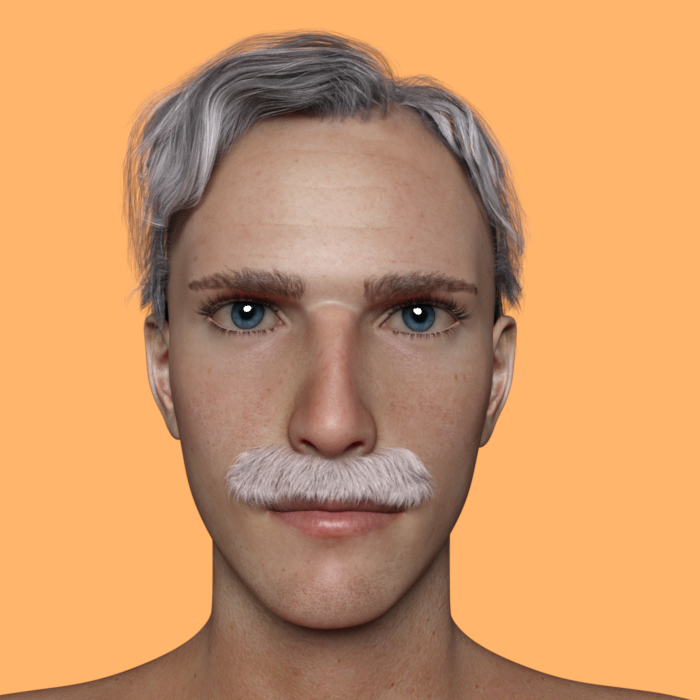
I've named this one "The Hawk" {if there be any other character by that name, sorry} because to have sight the way such a traveler must, and the way my brows came out figured hawk eyes was a good name BUT I know that name is taken. I also thought of calling him Guess, it's been one of those days.
These are the promos, hair and skin is NOT included. I expect to release the head morph tomorrow.
Hope this doesn't look too bad. {and golly, for ALL the beards in the collection there was one type MISSING ... IF all goes well, that I might make one of}.
{and oh yes, the making of the nose also was helped a little by Hexagon which decided to co-operate. If programs have insight, after seeing the dedication with which I kept deinstalling, reinstalling, plastering all over the place, etc. to get HS working, possibly Hexagon got the message and decided to behave itself lol ...}
 So who creates models for money, commissioned work?
You can make morphs of people pretty easily using either Face Transfer [already exists in D/S], Headshop and/or FaceGen. Also having Hexagon available for the bridge is very handy to help in the morph making process.
Are there any actually good face cloning tools out there? (E.g. not Facegen or Headshop)Paradigm said:
What if I have neither?
Facegen and Headshop
Are there any actually good face cloning tools out there? (E.g. not Facegen or Headshop)info_b3470fa520 said:
Problem 1: Eyelashes: it is an issue that DAZ should fix, there's no reason why they made eyelash a separate figure in Gen 8
As I understand it the lashes were made separate to help morph makers. In any event, integating them now would break existing morphs and while I iamgine Daz coudl fix store products it wouldn't help end-uers or vendors at other stores.
Problem 2: If you follow manual/tut video, you can see that at the set-up, there is a green semicircle that need to be adjusted to fit the top of the cranium.
Seems, issues had been addressed

SlimerJSpud said:
Headshop has two major problems that have not been addressed. I spent some time online with the author, and he was really trying to help, but we couldn't find a solution. When you generate a morph for the head on G8, the eyelashes are not part of the morph, therefore do not fit the finished figure. Unfit and re-fit on the eyelashes used to fix this, but in recent versions of DS, it fails. I opened a ticket on this about a year ago. Daz closed my ticket saying that all support for plugins comes from the author.
The other issue is that the default head shape it gets from the photo flattens the top of the head. It's as if all the vertices in the head get pushed up, except for the dome. It's very unnatural. You can make some adjustments early in the flow, but forget bald characters, or short hair. It won't look right.
Are there any actually good face cloning tools out there? (E.g. not Facegen or Headshop)info_b3470fa520 said:
Problem 1: Eyelashes: it is an issue that DAZ should fix, there's no reason why they made eyelash a separate figure in Gen 8
Problem 2: If you follow manual/tut video, you can see that at the set-up, there is a green semicircle that need to be adjusted to fit the top of the cranium.
Seems, issues had been addressed
SlimerJSpud said:
Headshop has two major problems that have not been addressed. I spent some time online with the author, and he was really trying to help, but we couldn't find a solution. When you generate a morph for the head on G8, the eyelashes are not part of the morph, therefore do not fit the finished figure. Unfit and re-fit on the eyelashes used to fix this, but in recent versions of DS, it fails. I opened a ticket on this about a year ago. Daz closed my ticket saying that all support for plugins comes from the author.
The other issue is that the default head shape it gets from the photo flattens the top of the head. It's as if all the vertices in the head get pushed up, except for the dome. It's very unnatural. You can make some adjustments early in the flow, but forget bald characters, or short hair. It won't look right.
Even if the semicircle is adjusted for the top of the head, the shape still won't work for a bald character. The G8 eyelashes are what they are now, so any head shaping plugin that sells in the store for G8 should support these eyelashes. The issues are *not* addressed.
Are there any actually good face cloning tools out there? (E.g. not Facegen or Headshop)Problem 1: Eyelashes: it is an issue that DAZ should fix, there's no reason why they made eyelash a separate figure in Gen 8
Problem 2: If you follow manual/tut video, you can see that at the set-up, there is a green semicircle that need to be adjusted to fit the top of the cranium.
Seems, issues had been addressed
SlimerJSpud said:
Headshop has two major problems that have not been addressed. I spent some time online with the author, and he was really trying to help, but we couldn't find a solution. When you generate a morph for the head on G8, the eyelashes are not part of the morph, therefore do not fit the finished figure. Unfit and re-fit on the eyelashes used to fix this, but in recent versions of DS, it fails. I opened a ticket on this about a year ago. Daz closed my ticket saying that all support for plugins comes from the author.
The other issue is that the default head shape it gets from the photo flattens the top of the head. It's as if all the vertices in the head get pushed up, except for the dome. It's very unnatural. You can make some adjustments early in the flow, but forget bald characters, or short hair. It won't look right.
Are there any actually good face cloning tools out there? (E.g. not Facegen or Headshop)Headshop has two major problems that have not been addressed. I spent some time online with the author, and he was really trying to help, but we couldn't find a solution. When you generate a morph for the head on G8, the eyelashes are not part of the morph, therefore do not fit the finished figure. Unfit and re-fit on the eyelashes used to fix this, but in recent versions of DS, it fails. I opened a ticket on this about a year ago. Daz closed my ticket saying that all support for plugins comes from the author.
The other issue is that the default head shape it gets from the photo flattens the top of the head. It's as if all the vertices in the head get pushed up, except for the dome. It's very unnatural. You can make some adjustments early in the flow, but forget bald characters, or short hair. It won't look right.
Are there any actually good face cloning tools out there? (E.g. not Facegen or Headshop)With some of these products, it seems like the only people who say they work are the ones selling the products.
I think the people who make these products should state that you would probably need the cooperation of the model to create a character that looks like the model. Or if that's too much, they should probably state that you need a 2000x2000 resolution photo of the person looking directly at the camera with no shadows, and hair tied back. Because if all they say is, "Create 3D heads for your characters with photographs with HeadShop 13!" then they seem to imply the software will make things easy. Then when you expect it to be easy, you get comments from people who seem to think something's wrong with you for expecting it to be at least a little bit easy. Never mind that the promo pictures show fairly low resolution images with hair covering part of the face, still getting good results.
I can understand that everything involving DAZ Studio requires a certain skill level to produce good results. But when I click on a dot meant to mark a point on the model's face and I can't just drag that dot to another location, that seems like more of a problem with the interface than the skill level of the user. If I have to run an installer that places files in a location, and then I still have to unzip files into a directory because the installer doesn't install the whole thing by itself, the installer seems like it didn't have much effort put into it. If I have to get on YouTube for instructions on how to use the product then I feel like the product is poorly documented. But I do recognize that YouTube is widely available and including a video with a product download would be problematic due to the file size. I don't see what's wrong with text files and PDF files though.
I think Face Transfer, though it has it share of problems, does seem to come the closest to the goal of being good. It seems even closer with the addition of Face Transfer Shapes.
Are there any actually good face cloning tools out there? (E.g. not Facegen or Headshop)I actually have some sets of high-res multi-angled images from models (we're talking about hundreds of images here per set), and must say I haven't been too happy with facegen/headshop results. In my opinion, the biggest problem is that facegen and headshop try to make a model based on only 1 image, which is technically near impossible. It would be better if it required at least 2 images: one from the front, another from the side to accomplish this. A third image taken from above should help finetuning even more. For really good results, We'd need about sixteen images circling around the model, even better if combined with even more images taken from different vertical angles as well (we're quickly reaching over sixty images here..) Oh, and since models do tend to move ever so slightly, it'd be better if all those images were shot at the same moment. So that's sixty+ high res cameras.
And that's why it's so hard (and usually also expensive) to find these imagesets. Some studios more publicly sell their older ones nowadays, since they lack support for even newer technology (mocap data, even higher resolution images, and some other stuff). But, as long as we're trying to make a 3D model from one single single-angle image, results will be mediocre.
Are there any actually good face cloning tools out there? (E.g. not Facegen or Headshop)Paradigm said:
With all respect to their creators, Facegen and Headshop generate results that aren't worth the time it takes to install the plugin. Is there anything that actually produces something that doesn't look like a highschool art project?
The problem with these apps is the quality of the results you get are based off the quality of reference images Low quality or missing profile images results in poor morphs.
Are there any actually good face cloning tools out there? (E.g. not Facegen or Headshop)That problem would be much improved for FaceGen/Headshop and hence the customers if Genesis 9 male and female (I guess because it's not going to happen for Genesis 8) raised significantly the number of polygons on the head/eyes/face.
Are there any actually good face cloning tools out there? (E.g. not Facegen or Headshop)With all respect to their creators, Facegen and Headshop generate results that aren't worth the time it takes to install the plugin. Is there anything that actually produces something that doesn't look like a highschool art project?
HeadShop OneClick Submitted to DAZ - Best in Class! (Commercial)asian_treasure said:
 Laslo was amazing in helping me with Headshop 13. I'm a happy customer!! Thanks again!HeadShop OneClick Submitted to DAZ - Best in Class! (Commercial)
Laslo was amazing in helping me with Headshop 13. I'm a happy customer!! Thanks again!
HeadShop OneClick Submitted to DAZ - Best in Class! (Commercial)asian_treasure said:
i have tried the following:
I would try two things:
1. Pls. reset the Preferences to default as shown in the picture
2. If that does not work, create a folder on C;Users/My Documents/My DAZ 3D Library/Runtime/People
and copy Gen 3 or some other in that folder. Launch Studio by double clicking on Gen 3 Female DSON file.
and still get Headshop Directory "fs" could not be created because the selected figure does not have a valid runtime folder."
Headshop13 works with Genesis 3,but not Genesis 8. Help!
P.s. I did add a runtime with genesis 8 male and genesis 8 female, still no success.
Skype tech support call/screen share scheduled for Tuesday
Daz 3D is part of

Connect
DAZ Productions, Inc.
7533 S Center View Ct #4664
West Jordan, UT 84084Licensing Agreement | Terms of Service | Privacy Policy | EULA
© 2026 Daz Productions Inc. All Rights Reserved.