-
Daz Studio 2026 Beta - version 6.25.2026.4408! (Updated February 18, 2026)
memcneil70 said:
@Imago, a question for you and anyone in the know, on a Mac we can't move any 'progress bar/pop-up' out of the center of the screen, so with Filament, would that mean we would always have an it added to our Filament/toon renders?
Of course I mean only when you press the "render" button, not constantly. Like for IRay, the interface is constantly "re-rendered" but you have no progress bar popup until you press the render button.
I do animations so I often render hundreds of frames and have a progress bar for Filament would help keeping track of the operations.
Daz Studio 2026 Beta - version 6.25.2026.4408! (Updated February 18, 2026)Imago said:
Quick request to the devs: It's possible to give Filament a rendering interface like the other engines, with a progress bar and a settings pane?
Right now if I start an image serie render with Filament on Viewport, it goes without any kind of "progession bar" and the only way to stop it is by pressing ESC.
Also, having a settings pane just for it would make easier set its own domensions and destination path for each engine.
@Imago, a question for you and anyone in the know, on a Mac we can't move any 'progress bar/pop-up' out of the center of the screen, so with Filament, would that mean we would always have an it added to our Filament/toon renders?
For developers, is there anyway you can get that pop-up scripted so it can be moved by Mac users? It gets in the way when we do simulations and keeps us from knowing just when an explosion is starting. Very aggravating.
Over 2,400 FREE bespoke BVH animations for Genesis 8!!these are so useful now that i'm using filament to animate, what a great treasure for animators. thank you very much!
Daz Studio 2026 Beta - version 6.25.2026.4408! (Updated February 18, 2026)Quick request to the devs: It's possible to give Filament a rendering interface like the other engines, with a progress bar and a settings pane?
Right now if I start an image serie render with Filament on Viewport, it goes without any kind of "progession bar" and the only way to stop it is by pressing ESC.
Also, having a settings pane just for it would make easier set its own domensions and destination path for each engine.
Daz Studio 2026 Beta - version 6.25.2026.4408! (Updated February 18, 2026)I tried out the alpha. Looks really good and shaping up nicely. The font is so much more readable. I have it set to city limits. The new texture shaded mode looks sweet. It's better than Filament lol. Animation playback in the timeline works well for me. it's smooth and plays quicker than current Daz. Genesis 8 figures move around so easy! It works like Genesis 2,3 and 9 now and like Genesis 8 on my M1 Mac. I'm so happy about that. It's a dream to pose with the Uni Tool and Active Pose tool. Obviously not all scripts are working. hope they transfer over, like Limbstick, Heels Control, etc., etc. So far I'm having a little trouble selecting the bend, twist, side to side guide circles when I have the universal tool active. Hope to see Animate 2 and aniblocks return for my current backlog. I'll post more feedback as I encounter any bugs, issues, and so on.
My rig is a 2022 ASUS M16 Laptop with 12th Gen Core i9 and RTX 3080Ti w/ 16GB of Vram if that info is necessary. Thanks Daz!
Daz Studio 2026 Beta - version 6.25.2026.4408! (Updated February 18, 2026)Was about to write the same, my viewport in ALPHA 2025 is very, very, very laggy, especially compared to old Daz. The difference is like night and day, same scene, same Filament mode, using 5070Ti with newest drivers installed.
Filament transparent shadow catcher ground plane. (SOLVED)I know how to make shadows in Filament traditionally, but there are times when i want to make a looped animation, of say a character running in place and I don't want to render the ground, I just want to render the figure and the shadow, and then I can add that loop over a moving environment later. But I can't figure out how to make a transparent shadow catcher. Has anyone figured this out or is it not possible yet in Filament?
Update: I solved it with a "cheat" by using flattened geoshells.
Daz Studio 2026 Beta - version 6.25.2026.4408! (Updated February 18, 2026)marksinister_0f3a44cacc said:
Can we please for the love of all that's holy get support for Intel or AMD cards. PLEASE!
AMD and Intel cards, as much as I know, works fine with Filament and 3Delight. IRay is bound to NVidia cards because it needs CUDA cores to work, that can be found only on NVidia cards.
There is some kind of special driver that emulates CUDA cores on AMD cards but IRay doesn't work on that method.
G9 Shape Preset for SWOLE Garrick mixOn the other end of the spectrum from the head portrait above...
This mix of SUPER, Astaroth Toon, and Drut came out looking nicely stylized. I decided to give the anime/toon add-ons a try to replace the brows, eyes, teeth, and textures. He's rendered with Iray, but I think I put anime and/or filatoon materials on him. Not sure, but when I have more time, I'd like to try this one out using Filament/Filatoon.
Lee
Anime Characters BrightI know it lacks detail, but the figure does eithe need croping/zooming or clothes.
What sort of game? If you need renders from DS, remember that the Genesis 9 Tons are intended for Filament not Iray.
The New Mac FAQIf I download DS 2025 to check out filament, are there enough lights and things intact in the set so that I could do that or, will I have to buy some lights and filament stuff?
Daz Studio 2026 Beta - version 6.25.2026.4408! (Updated February 18, 2026)I have downloaded and installed the new DAZ Studio 2025 Alpha version and did a very quick test. And obviously there were some problems. I think these problems are worth commenting, even if we assume that many of these problems would soon be fixed before the Alpha version is ready for distribution.
First, in the new version - at least in its current form - all my interface personalization - both in layout and style - is no longer available. It's gone! This is a big issue for me because I have created a lot of personalized actions, both in scripts and assets, which I put in the different menus and toolbars to get an easy access. If these actions are no longer available means that I would have to manually re-create them all from scratch, one by one, which is of course a very big shame.
Second problem: "Texture Shaded" mode is not working as it should. All I See are black shadows as if there was no lighting, which is not the case. The only preview option for now is Filament.
Third problem: A scene that contains assets imported directly from a Poser library may not show up correctly in the Alpha version. There seems to be a problem with some Poser textures that the new version cannot properly read. This problem appears both when working in the preview mode (using Filament) and in the final render. This failure to read all the textures may explain why it took me incredibly MUCH LONGER time to render a scene in the Alpha version than in my current 4.23 version. I don’t know whether this problem would still appear if I did not use these Poser textures. The improvement here is that when a texture failed to load, Daz Studio now tells you which is the asset that contains the texture - the likely cause of the problem.
Where there is certainly an improvement - although not as dramatic as advertised - is in the loading/ unloading times of assets and scenes. The loading time of a very complex scene - one with 11 Genesis characters and many lights and props - reduces from 4 to 5 minutes (in my current 4.23 version) to 3.5 minutes in the Alpha version. Similarly, the action of clearing the viewport by hitting the “New Scene” button took me 45 seconds to complete in the current version but just 20 seconds in the Alpha version.
So, there are undoubtedly some improvements in the new 2025 version but still many things seem to be missing. And unless I have not installed the new version correctly - a possibility which I can’t rule out - DAZ would still have a lot of work to do until the new Alpha version is ready for distribution.
G9 ToonsMimicMolly said:
I don't think Filatoon is popular because a lot of DAZ users (just like the countless IRL people I've met) seem to be of the opinion that photorealism is the superior form of art. Even when you look at the newest renders at any art/gallery site, you will still see Iray renders dominating everything. (When Iray was first introduced, it was quickly adopted for this reason.)
Personally, I like and use V3Digitimes' V3D FilaToon, Converter, Manager and Tools. Took me a few minutes to get used to, since I am a dummy when it comes to scripts. I really should try to experiment with the settings but the default/automatic output works as a base for what I want to do. In this render, I converted the character and his clothes. (Then, gave him toon eyelashes and custom toon eyebrows.) Tweaked the geoshell colors, since I feel the default black outlines look "unflattering." But it really depends on what kinds of toons you want to create. I want to make more "semi-realistic" or "rotoscope-style" toons to make use of all my morphs, so this render is an example of my goals. But most people want anime style (from roughly 1990s to 2010s) or whatever popular "western adult cartoon" style is trending.
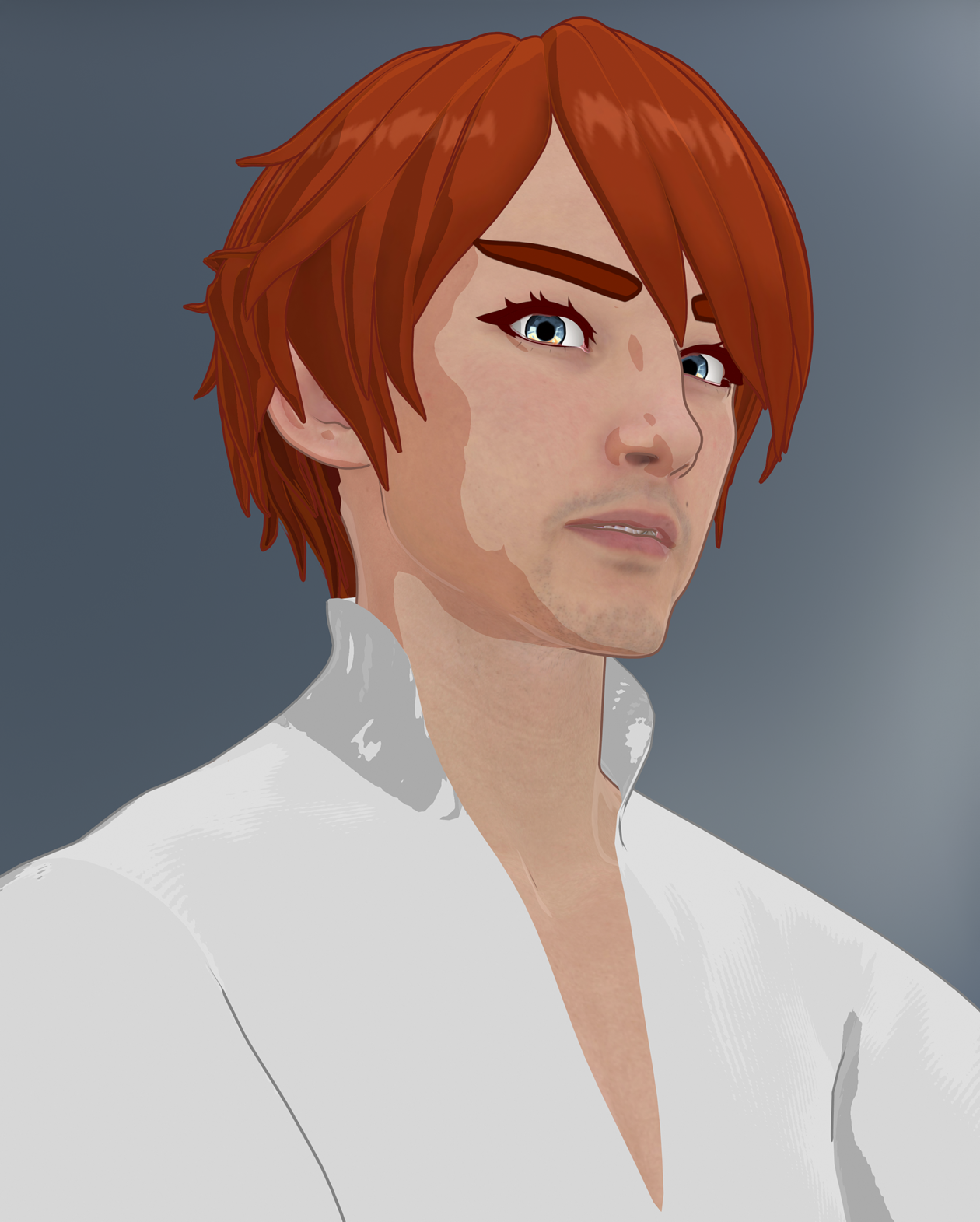
I agree with wanting more hair. The older hairs usually work decently, but they often don't look "simplistic" like this base G9 Toon Hair.
Filatoon is a lot newer than Iray despite Filament having been around for some time, so I don't think it's fair to judge it's popularity against a much more developed market space. There are always folks who give a kneejerk reaction to NPR styles, that doesn't mean there's no market for them. And I recall quite a bit of folks complaining when Iray started overtaking 3dl.
3DL option missing in 2025 alphaTesseractSpace said:
Filament
True, but there's a lot that isn't supported in it :( maybe I'll try for some less intensive Iray settings
3DL option missing in 2025 alphaFilament
The Mac FAQinquire said:
Oh, OK. Well, I found something under. I think G9 and then Toons. it has something like lights, and a Fillatune
environment. I clicked that. it set the render engine to viewport.
there was a note in there where the environment was that noted that the render engine would be set to viewport.
where is this other version of studio? I'm guessing it's a Beta.
I'm having ridiculous problems with speech to text. I have to keep going back in and changing things. Sigh!
Ah, right, sorry, I understand now. Yes, you found items that work under Filatoon, but you don't have the Filament/Filatoon rendering engine to actually use them properly.
At Totte pointed out, you have to download the Alpha (not even a Beta yet) to hvae the engine available to render the Filatoon assets. It's worth it, in my opinion, to see if Filament will give you results you like.
The Mac FAQinquire said:
Oh, OK. Well, I found something under. I think G9 and then Toons. it has something like lights, and a Fillatune
environment. I clicked that. it set the render engine to viewport.
there was a note in there where the environment was that noted that the render engine would be set to viewport.
where is this other version of studio? I'm guessing it's a Beta.
I'm having ridiculous problems with speech to text. I have to keep going back in and changing things. Sigh!
Enable DS 2025 in DIM in download filters and download it, if not just to test Filament veiewport
The Mac FAQinquire said:
So, where is Filatoon or whatever in Daz studio 4.24.0.3?
OK, I found the filatoon, and tried that. Sure didn't like it.
I'm not sure how you "found" Filatoon, as it and Filament aren't available at all in 4.24.0.3. The only became available for the first time in the DAZ Studio 2025 Alpha.
The Mac FAQSo, where is Filatoon or whatever in Daz studio 4.24.0.3?
OK, I found the filatoon, and tried that. Sure didn't like it.
And filament, or something like that, where is that?
I looked in the vendor settings and found open GL, but when I tried that on two different occasions, Daz studio just hung and would not respond and I had to force quit.
Oh one more comment: 4.24.0.3 quit far too often on Sequoia 15.4.1.
MimicMolly's Renders & WIPsThis is an example of what I want to do in DS now. The regular humans rendered in Viewport + Filament, with a colored toon outline and what looks like "drawn in" eyes and eyebrows. Mostly because I want to further edit the rendered results by hand with post work. And my more cartoony style can blend in better. (Pic shown has no hand edited parts. It is the render with an opaque, colored background.)
The character used is SOFT3D's Briana Morph for Genesis 9 at Renderhub. I think the skin is the default "Victoria 8.1" skin that G9 uses, with the Anime LIE makeup. I think these eyebrows are #7. She has 3DUniverse's Eden Hat and Hair for G9.
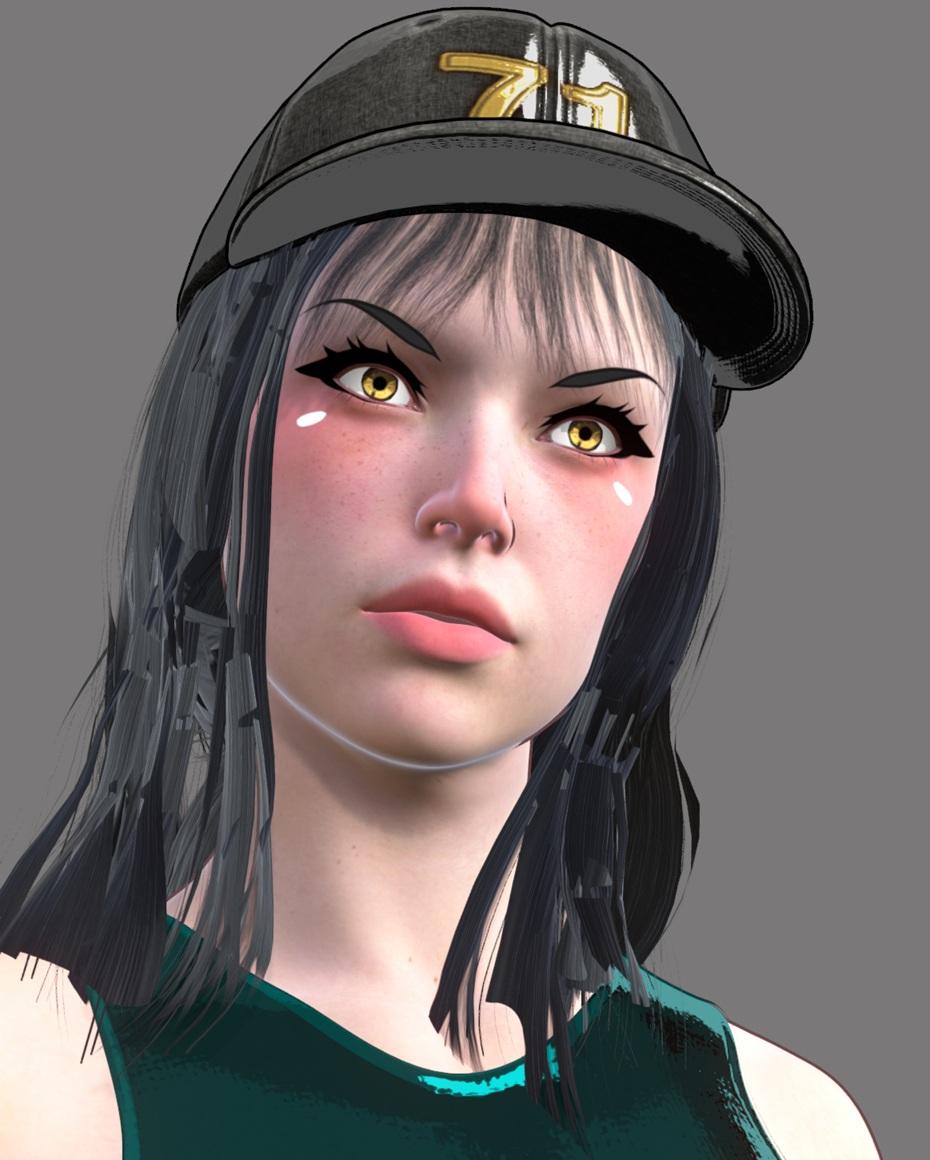
I originally made this scene with Briana to make a quick AI image edit. But I like how she looked, so now I'm trying to change it to be its own original render. I need more LIE makeups and more toon eyebrows.
Daz 3D is part of

Connect
DAZ Productions, Inc.
7533 S Center View Ct #4664
West Jordan, UT 84084Licensing Agreement | Terms of Service | Privacy Policy | EULA
© 2026 Daz Productions Inc. All Rights Reserved.














