-
Updated and white out
Daz Central was discontinued a while ago so you shouldn't have been able to do that - although I have been away from here for a few weeks so maybe it was brought back in that time?
The issue itself is normally caused by updating Daz Studio while it was still running - earlier versions still did some stuff in the background even after the window shut down. You should be able to fix this by uninstalling and then re-installing Daz Studio. And unless Central has really been resurrected then you'll need to do this via DIM.
Updated and white outHi all,
I'm not sure how this happened, I simply updated Daz through the Daz Central app and now all my windows, menus and tabs etc are one colour... White! I tried applying my workspace, tried applying a style but it all ends the same; a big white featureless bunch of text only everything. Updating has it's pitfalls but this time, I'm stumped and not a little annoyed! Opening window says it's Vers 4.22.01 pro edition but there are a lot of unreadable characters in some of my panes and I ain't feeling particularily 'pro' right now.
Thanks in advance...
Merging Daz LibrariesDeke said:
Thanks again. I did place the My Daz 3D Content Libarary (I'll call them Libraries for ease of typing) into the public/document location and added them to the Content Director Manager in Daz. I removed any links to the files on the external D; drive. Oddly enough, when loading a scene, Daz still says it can't locate some files....asking me to locate files on the D: drive. Why doesn't it simply search in the Libaries on the C: drive?
That depends whether they were in a content diectory, and so stored with a reference to the relative path, or outside any content directory, and so stored with an absolute path.
Another mystery is that no products appear in Smart Content any longer. It's blank. All Libraries do appear in the Content Library panel.
Did you change the Content Cluster (database) path? If so it can't see your previous database.
And there does seem to be some faulty file structure such as: Daz Library/applications/data/Daz 3D/My Daz 3d Library/runtime....
That looks like a Daz Central install, asking for just a single base folder and placing everything in sub-folders. DIM would initially hafe respected that (and Daz Central would have respected existing DIM folder set-ups) but you may have changed it at a later date.
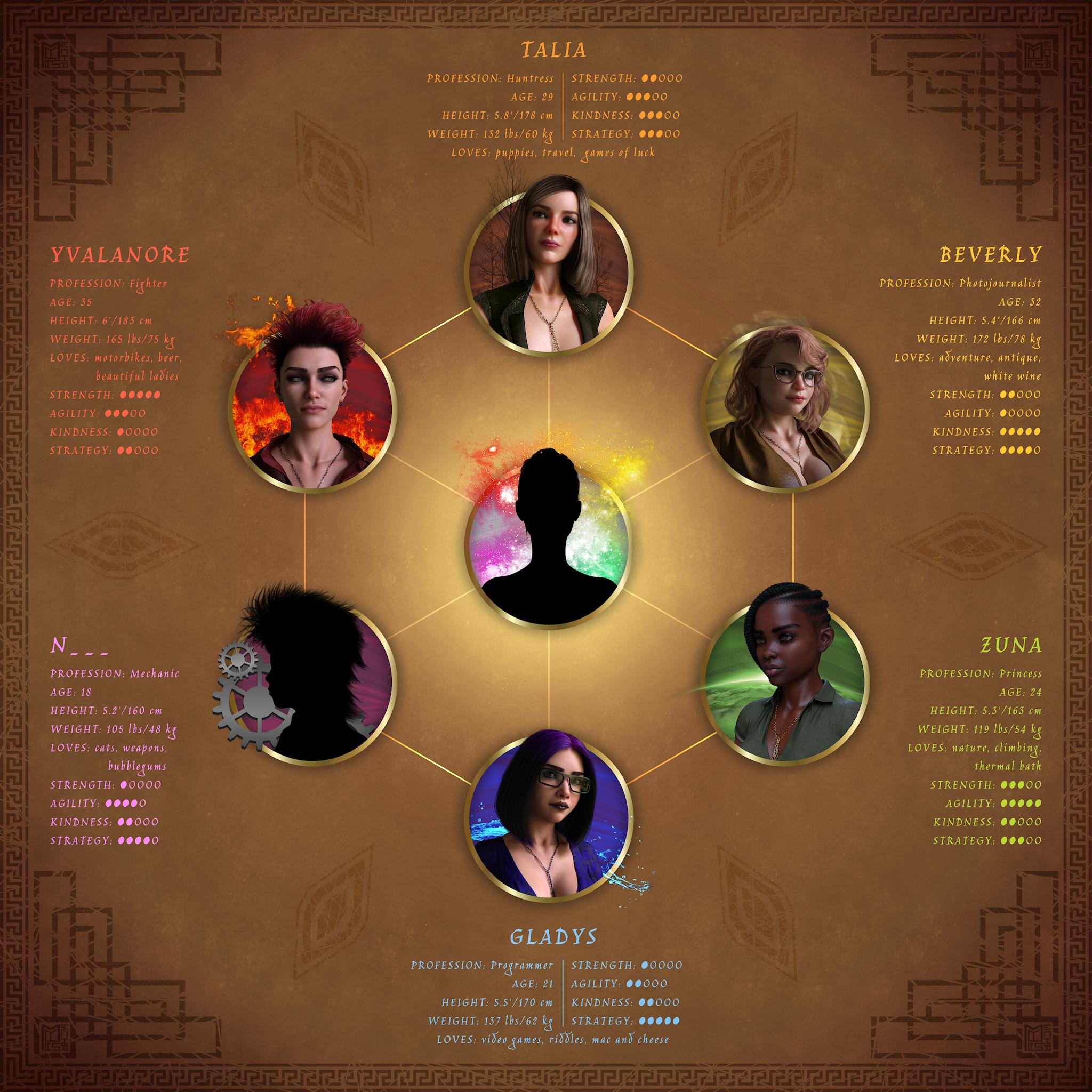
Mechasar's Characters Catalog: Who's next? (commercial)Hi there! Here’s another teaser poster I’d like to introduce here, or I should say a teaser roadmap to the 7 “Gems”. Did you ever notice the main colors assigned to each of my human female character are always different? Well… that’s not accidental. They actually compose a spectrum of light, and materials, that ends up defining the personality and the story of each character. Now, just 1 light left and the ring will be completed. Then, the central one! Human, divinity? WIP ;)
 The [Disco Chives] Misplaced Parrot Complaint Thread
LeatherGryphon said:
Non-complaint: Yay, for once I finally saw a major Oscar winner before it was picked. Oppenheimer was a surprisingly engaging story, despite its length. Deserved the award(s).
'Nother Non-complaint: My symphony buddy called up and we're scheduled for another symphony in Buffalo at Kleinhan's Music Hall. Beethoven: Piano Concerto #5 (aka: "The Emperor Concerto"), and Sibelius' second symphony. April 21st.
I've always liked the Emperor Concerto because it's Beethoven, and part of my long time familiarity cache.

...OK I'm jealous as those are two of my favourites as well, and on the same perofmance ticket.
LeatherGryphon said:
Non-complaint: Yay, my 12 cans of Diced Tomatoes from Amazon has arrived, replacing the mangos they sent the first time. Wheee..., it's spaghetti & goulash & ChilliMac time again.
 But I got 12 cans of Diced Mangos for free out of the ordeal. I just have to get used to eating Mangos again(meh).
Also received 10 Solar Eclipse glasses, and some dark filters for my cameras. The April 8th total eclipse goes right over my house. Wheee... I've waited 75 years for this.
It will of course be cloudy.
'Nother Non-complaint: Wheee..., it's that time of year again when my kitchen window prisms cast their rainbows & color spots around the room. And now that the building next door is gone, the morning sun hits the prisms more, and earlier this year. Yay!
...good they got it right the second time.
I still have my glasses from the eclipse we had here in Oregon back in 2017. Was pretty spectacular and unlike the one in 1979 it was in August instead of February (our astronomy class at the college I went to in north central Wisconsin chartered a bus to head to North Dakota to see that one).
How to navigate your products outside of Daz Central?Richard Haseltine said:
Not as a site feature, the daz deals browser plug-in does have an option to filter store pages show only products you own but that may be in the paid for feature, and the plug-in is not from Daz in any event.
Thank you for taking the time to respond. And so what do I do when they shut down Daz Central? I saw the message earlier at the bottom of it that it'll be shutting down, and I'm trying to figure out how exactly people navigate their stuff. I'm a visual person so I already know that I'm not going to remember the names of these things and associate them with what they are.
How to navigate your products outside of Daz Central?So I'm trying to find the section of the website where you can clearly see all of your products. I've made several purchases, but thus far all I can find is an area where they just show you a list of names of the products and you have to click each one individually to be able to actually see what each one is. Is there a way on the website to visually see all of your products thumbnails like on Daz Central?
Is there supposed to be a special sale page today?yes, thanks, ...same here.. I thought my browser was broken... its 6pm here central and it was fine noonish time
 Daz will not create a UserData file even though the log says it did
Richard Haseltine said:
Is there space on the drive? Can DS save a preset or scene (any old thing) to that folder? Does the folder contain the product metadata files for content isntalled through DIM or Daz Central since it was last able to write a userdata file? What security software are you using?
Plenty of space on the drive, and no problem saving a scene or preset pose.
After a bit of searching it looks like at some point DIM started installing content to a second library.
The original folder that DIM was installing to was….
C:\Users\Greg-DS\Documents\DAZ 3D\Studio\My Library
Then at some point it started installing newer purchases to…
C:\Daz 3D\Applications\Data\DAZ 3D\My DAZ 3D Library
is this what you mean by your question about product metadata? If so, should i consolidate these 2 folders and try the export then?
Daz will not create a UserData file even though the log says it didIs there space on the drive? Can DS save a preset or scene (any old thing) to that folder? Does the folder contain the product metadata files for content isntalled through DIM or Daz Central since it was last able to write a userdata file? What security software are you using?
Daz closing for no reason (not crashing)jodhan322 said:
My techie ability far exceeds my ambition to make renders. I don't know what those things mean:
increasing their virtual memory (All my drives have lot of free memeory) [I looked this up online, and did the recomended change]
"disabling all non-daz plugins" I didn't realize I had any non daz plugins. I don't use Daz Central, or whatever the new thing is that's replacing it. I just update my meta datas, then install. I do use Hexagon when I'm creating a morph, but I don't if that's a daz or non daz plug in.
Hi. :)
It's possible you don't have any non-daz plugins. In Studio, at the top on the menubar you can go to Help -> About Installed Plugins to view a list of what plugins are currently installed. Quite a few plugins ship by default with the Daz Studio application, so there should be some in there. But those would be considered daz plugins, in other words, the plugins that came preinstalled with Daz Studio are generally considered safe, but third party plugins can also be installed and those could have negative effects on Daz (such as crashing etc). When trying to figure out a solution to a problem like this, it's always a good idea to start from just the base application, and slowly reintroduce plugins back into the application so you can try to narrow down which one, if one at all, is contributing to the problem.
As far as the confusion about Virtual Memory goes, the operating system (typically Windows, and is in this case), uses several different kinds. Virtual Memory, Random Access Memory (RAM), and Video Memory (VRAM). These memory types differ from hard drive disk storage space, as your hard drive is a place to permanently store data and memory is considered a place for temporary data. Memory is usually "flushed" (cleared), with every reboot.
Virtual Memory in particular uses the hard drive disk to create extra space for Windows to store stuff temporarily, and the end-user (you), can manually set the amount of disk space Windows is allowed to use in Advanced System Settings in Windows. (Open Run and type Advanced System Settings). The place to set it is under the Advanced tab, in the Performance box, click Settings. I would advise against changing the values in there though if you do not know what they mean or what they do as you can cause wide scale issues all across Windows in certain scenerios. I think it's a little prudent to mention that the user who reported that as fixing his issue with the error you're facing is the only person who said that worked out of many other people who are facing the same issue as you, at least, at the time I posted my comment in regard to Virtual Memory.
nvAPI is nVidia's GPU API, I'm guessing you're seeing that because Studio is failing to communicate properly with it because of the other error. But that's just my best guess.
Daz closing for no reason (not crashing)suffo85 said:
The flurry seemed to die down after one of the main helpers around here suggested disabling all non-daz plugins, recommended by Richard Haseltine.
I would try that and see if it fixes the issue. Another user reported increasing their virtual memory (this would be found somewhere in Advanced Settings in Windows).
My techie ability far exceeds my ambition to make renders. I don't know what those things mean:
increasing their virtual memory (All my drives have lot of free memeory) [I looked this up online, and did the recomended change]
"disabling all non-daz plugins" I didn't realize I had any non daz plugins. I don't use Daz Central, or whatever the new thing is that's replacing it. I just update my meta datas, then install. I do use Hexagon when I'm creating a morph, but I don't if that's a daz or non daz plug in.
Just Notice DazToUnity Latest does not Support Unity 2022Do you mean Daz Central? Daz Connect is the instalaltion through Daz Studio itself.
C4D Bridge to DAZ 3D Studio InstallI think Daz Central has trouble with plugins, and is also deprecated, so it's not the recommended way to install. Give DIM (Daz Install Manager) a try and see if that successfully installs the plugin.
Daz Central Ending - New Enhanced Install Managerrichardrhinson said:
JamieM said:
I'm so grateful that Daz Central seems to be hanging on. It's still fully working - whether intentionally or by oversight, I don't know - but I'm so glad that I can keep working in my usual way.
I install everything via DIM and always have - but Central is absolutely the best way to find items or to check what I have quickly.
Just wanted to chime my 2 cents in. Haven't used Studio in about a year. Was stunned when I couldn't find Daz Central as a download. No offence dev's, but DIM blows as a user with 3000 assets. No way to search by figure, and no easy to see visual. I found a link to down load Central, and I'm thrilled I can actually SEE what I bought. If you must go backwards to DIM (the product you said you where replacing with Central) could you PLEASE put in the functionality for casual users that was in Central?
Daz Central was not billed as a repalcement fro DIM, it was the default offering as it was intended to be easier for new users (fewer choices to make) but it was always clear that DIM would continue (and would be required for some things, like the DS betas).
It has been said that a grid view, so you see larger images without having to hover for a tooltip, is on the roadmap.
If you downloaded the Default filters for DIM you should be able to click the funnel icon next to the text box at top-right>Filter By name>Daz 3D>Figures to get a list of "base characters" - it should be possible, in principle, to extend that to cover other items too (though it works on name, so may not be infallible).
Daz Central Ending - New Enhanced Install ManagerJamieM said:
I'm so grateful that Daz Central seems to be hanging on. It's still fully working - whether intentionally or by oversight, I don't know - but I'm so glad that I can keep working in my usual way.
I install everything via DIM and always have - but Central is absolutely the best way to find items or to check what I have quickly.
Just wanted to chime my 2 cents in. Haven't used Studio in about a year. Was stunned when I couldn't find Daz Central as a download. No offence dev's, but DIM blows as a user with 3000 assets. No way to search by figure, and no easy to see visual. I found a link to down load Central, and I'm thrilled I can actually SEE what I bought. If you must go backwards to DIM (the product you said you where replacing with Central) could you PLEASE put in the functionality for casual users that was in Central?
Tara 9, breaking your heart, stealing your soul.Are Tara 9's horns changeable? I like to have a variety of shapes and sizes of horns when designing a character. In the pictures I have seen so far, the horns look too recognizable (specific? unique? static?) making it hard to mix and match with other sets; is that the case?
Gordig said:
Richard Haseltine said:
This is surely far from the first daz haracter with similar horn designs, most long predating Diablo IV - it seems to me that the game design is just using a standard trope for its design, rather than that the Daz Tara 9 is following Diablo IV.
Case in point, I just stumbled on this, released in 2022, while scrolling through the store:
We first saw the appearance of Lilith in Diablo IV during the Blizzcon 2019 trailer (https://www.wowhead.com/news/all-the-diablo-announcements-at-blizzcon-2019-diablo-iv-lilith-wings-diablo-295996). While it may not have been the first time we saw the combination, it definitely popularized the appearace to the public (one central horn, flanked by two pairs of large horns that curve up, with a small pair of curly horns that wrap around the ears). Diablo 3 (RoS 2014) had a easily missable cropped headshot of Lilith which is bit different (her ear horns curve up and she appears to be missing the central horn, also being more of a hat rather than coming out of the head)
I think the lower back wing position may have been popularized by Dark Stalkers. As a side note, the wings for Diablo 3's succubi come out of the backs of their skulls via a couple of braids, which feels odd.
How do I create hdr lighting.druc said:
Lighting has always been an issue I have struggled with, now with emissive lighting it adds a whole new dimension. I can edit an existing light a little, but don't, as yet, know how to create an emissive surface. We live and learn and that's a good thing.
Creating an emissive surface is not difficult. Any surface can be turned into an emissive lighting surface that casts light into a scene. Some products come with emissive surfaces already created and turned on to cast light. You can create an emissive surface from an existing product’s surface(s) or from a primitive.
I loaded The Central District Subway (https://www.daz3d.com/the-central-district-subway) into any empty scene. It's an old item that was created before Iray came to Daz Studio. I did not load its lights. The first image is a render below street level with no additional lighting and it is rather dim. I then added a small primitive plane to the scene and positioned it on the stairway leading from the street to the level shown in the first render. As such, it will not be in the rendered view but light that it casts will be. Primitives load with emissive surfaces but turned off by default due to the fact that the emissive color is set to black; see the second image below. I changed the emissive settings of the plane by choosing a reddish color to mimic street-level neon lighting. One also needs to experiment with the other emissive parameters to get the desired lighting effect.
- Emission Color (light “temperature” expressed in in degrees Kelvin)
- Two Sided Light (whether you want the emissive surface to cast light from one face in one direction or from both sides of the face in two directions)
- Emissive Profile – I’ve never played around with this setting.
- Luminance – a numerical value that determines the brightness of the light
- Luminance Units – the default is candles per square meter (cd/m^2). Choosing a different unit from the drop-down selection menu may make your selection of luminance easier. I generally like candles per square centimeter (cd/cm^2) since it is 10,000 times the magnitude of candles per square meter (cd/m^2).
The Luminance and Luminance Units together help you to set the brightness of a scene depending on your needs.
You can see the effect of emissive surface's lighting in the third image.
Some objects may not come with the capability to create emissive surfaces because they do not have the Iray Uber Base shader applied to them. If not, when the object is selected in the Scene tab, you will not have the Emission property for any of its surfaces in the Surfaces tab. If you want it, with the object selected in the Scene tab,
- select the Surfaces tab and then click on the Preset tab at the top of the Surfaces window.
- Expand the Shaders menu and then expand the Iray menu.
- In the window of icons on the right side of Presets, double click on the !Iray Uber Base shader icon. See the fourth image below.
You will now have Emission available to you when you switch back to the Editor tab in Surfaces.
There are several short and well done videos in YouTube on this topic. Two that may be helpful are
- Daz Studio: Emissive Lighting Techniques! - https://www.youtube.com/watch?v=tbK5IKI845Y
- DAZ Studio 116: How to use Mesh Lights - https://www.youtube.com/watch?v=A0VRj2rcwJc .
sudden DS white-out!You can get DS from its product page - though it will be the same version as DIM/Daz central, not the one you have now. https://www.daz3d.com/downloader/customer/files#prod_13176 If you used a stand-alne installer you should have an unisntaller, usually in the All programs>Daz folder (or Studio 4 sub-folder - I can't recall exactly) but isntalling a new version, by any method, should update the Start menu links and associations - it won't, however, update any links/shortcuts you hae created yourself.
sudden DS white-out!GOOD NEWS!
I just located a link on Daz Central, that downloaded DS 4.22 for me!
Seems to work!!
Only question: do delete the original, corrupt version?
...or will that affect the new one? ( path for old one is in attachment attachment.) (DM and Daz Central, are in a different path)
...or did it just 'write over' the old path? (and that did it?)
Daz 3D is part of

Connect
DAZ Productions, Inc.
7533 S Center View Ct #4664
West Jordan, UT 84084Licensing Agreement | Terms of Service | Privacy Policy | EULA
© 2026 Daz Productions Inc. All Rights Reserved.