-
The *most* photorealistic skin/settings
There is no one size fits all color for SSS and other settings. And it is almost impossible to just say what will work on any given character because any given character may be totally different from another. It all depends on how the textures were created, what color the base textures are, and what the intent is with them. If you desire to have a darker skin tone, then the settings you want will differ from somebody who wants a light skin.
I personally prefer sticking to near white for the base and trans colors, which lets the texture color do the talking so to speak. I like the textures to be closer to what the intended skin is, if possible.
Having said that, I really like how bluejaunte's characters tackle skin (and clearly I am not alone). IMO, it is the gloss maps that take the starring role, they provide the important top layer of skin, and are pretty much unique to BJ characters. They give the skin the tiny cracks that real skin has. Many other characters just use noise generated maps to create bump and gloss maps, not everybody, but a lot. This can work, but they become visible in closeups. Also, many Daz models have too much shine in their skin, like the entire model has shiny skin, I don't think that is right, and it is big part of why Daz models "look like 3D models" instead of more realistic people. The BJ gloss maps are made in a way that they reflect the light more properly, with the natural ridges in our skin being highlighted more correctly because the gloss maps actually have those ridges in fine detail. If you want realism, that matters.
The great thing is these gloss maps are very versatile and will work quite well with just about any character and skin with some tweaking on the material settings If you look at the BJ color textures, they surprisingly lack a lot of baked in detail, like creases and folds. Again, that detail comes from the bump and gloss maps, and this is the way I think it should be done most of the time. Normal maps can help, too, to compliment the sculpt. But one has to be careful not to go overboard with normals or details start to look like canyons, which seems to happen to a number of Daz Originals' hands. Generally, normals are for large details, bumps are for small/fine details.
Blood vessels, are you talking about visible under the skin or about the ones that kind of pop out of the skin a bit? If you need ones that pop out, this can be done with either HD morphs or displacement maps, or both. There are vascularity HD products in the store for G3 and G8, and there is a product that uses displacement maps. I can't remember if it is for G2 or G3.
You can make under the skin blood vessels by using translucency maps. Many models use the same map for both base color and trans color, but some don't. Some do have painted vessels. You can paint in vessels on a base color and use this as a trans map if you want. You can use them in base color maps, too, but be careful as that can backfire and look fake, too. Again, it all depends on how everything else is set up. All of these things have to be balanced with each other to produce the desired effect.
I didn't mean to shift the direction of the original post; sorry if it turned out that way. This is all good information, Outrider; thanks for taking the time to share it.
With regard to the blood vessel maps, I was referring to the sub dermal kind. (I have seen the vascularity morph products in the store).
I have several BJ characters, so I will look more closely at how the skins are set up.

Oh nice. That is exactly what I did, study how those were set up. The gloss maps that BJ uses in the dual lobe specularity are pretty important to that top layer. The SSS works with the translucency for the sub dermal layers. I have blended textures together a lot to get what I want. The translucency maps can be pretty different, but certain key details need to be present on both the color and trans maps in order for them to look correct in the render. Otherwise the maps will compete with each other and will look washed out in the render.
I have seen a variety of characters with sub dermal veins. The one I remember most is actually Victoria 7, yes, Vicky 7, I'm surprised, too, LOL. If you have her, which is likely, take a look at her SSS maps. They have some pretty strong veins. There is a "Victoria 7 for Victoria 8" version, which brings her to the G8 line. As you may know, the original V7 has a unique UV map, so you cannot just pop a V7 map onto G8, that does not work. So you can grab the V7 for V8 product, or you can bake the textures for V7 to match G3. Then when you are done you can use the new textures freely on G8 characters. There is a guide for "baking" the unique UV maps to match the base UV in the forum if you need it.
Anyway, once you have the textures converted to G3/8, what you can do is use GIMP or whatever to paint the veins from the V7 SSS maps onto the SSS maps you want to use. OR you could do the reverse and blend the details of your SSS characters into the V7 SSS maps. Whichever works better. The important part is the face, you want the correct details from brows (or no brows), eye outlines, and lips, and any prominent features like large moles and marks. Then onto the body, the nipples and belly button should probably match, and so on.
Novica & Forum Members Tips & Product Reviews Pt 12Did anyone get the Demonic Evlin thing? I think it looks hideous as is but wondering what it looks like just slightly dialed in or just the skin on Evlin (or another character) without the demonic morph. I think the original Evlin is gorgeous but haven't rendered her yet,
I can't download Evlin yet so couldn't render her, but I applied it on Dior instead.
You have Just Dior, Evlin demon 25, Evlin demon 50, Evlin demon 75 and Evlin demon 100. You also have a sepparate slider for the demon ears, so you can make them human again. Last pic in the shape series is demon 50% with ears 15%.
Afterwards we have different skins. 15% demonic shape and right eye blind.
Unfortunately when trying to apply materials it gives a lot of errors for missing textures as it tries to use some for Evlin so not sure how good I can refresent them without bump maps or sss maps but last is demonic maps applied with 50% demonic evlin and 75% ears.
Overall I am satisfied with what I got, especially at this discount.
G3 Model Height Adjustment ErrorsWhat happens when just using the Height adjustment? No shoes, nothing else, just height. Does the figure move up, keeping the head in line, or does it move down, keeping the feet on the ground?
BTW, I am using 4.11, so maybe there is a quirk in the 4.12 beta.
She shirnks along the y-axis raising her feet up from 0, though the figure is still saying it is at 0,0 on the plain. I suspect you running 4.11 is the difference between why yours owrks nadmine doesn't.
I tried to reinstall morph pkg to no effect.
This is a morph dial issue, not a clothing issue.
There's a morph linked to the height adjustment that is breaking the rig.
If this is a recent thing, check what you've recently installed, and uninstall that.
If it's something else, you'll need to figure out what is causing it.
First check would be to see what "Currently used" is reporting when the Height adj is active. May need to activate "Show Hidden" for the parameters tab.
I'd also suggest going to 'All' and then checking if any morphs, other than the Height, have a value other than 0. Some morphs have a default other than 0 and won't always show up in Currently used.
Then check the 'Parameters settings', gear icon on the right of the Height morph, as well as any morphs showing a greater than 0 in all, and see if there are any morphs linked, either in Sub-components or controllers.
You'll need to uninstall what ever is causing the issue.
Another trick is to use the Support asset, Save modified asset list to track what might be doing it.
File>save as>support asset>Save modified asset.
Just be sure to click cancel and not accept, as it can change values in the DSF file of the morphs listed.
Simply max the height morph then check the list to see if anything else is there. Might want to delete that out.
Thanks. Followed you direction to the best of my ability but I do not see any other morphs on etc.
Shape preset only.. .no option to dial in the setting ?Thanks Richard! If the morph is for full body is it possible to do the steps you outlined and save out a dial for each of head and body or would that only be possible if there was already a shape preset for each separately?
Shape preset only.. .no option to dial in the setting ?What you can do is
- apply the prset to a zeroed figure
- right-click in the Parameters pane and select Edit Mode (assuming it isn't already checked).
- right-click in a suitable group - e.g. Actor>People>Real World or whatever you find other character sliders under
- select Add Property (or possibly New Proeprty, I can't recall)
- enter a name (e.g. BD Milly J6) and possibly set the minimum value to 0
- click Accept
- set the value of the new property to 100%
- right-click on the new proeprty and select ERC Freeze
- run you eye down the list of Sub-components to make sure there are no interlopers
- click Accept
- Test that the slider does allow you to vary the amount of Milly applied to the figure
- optionally File>Save As>Support Assets>Morph Asset, in the options dialogue select your new Milly slider, check that the base content directory at the top is the one you want to use (that it's one that gets backked-up for example) - the Author and Product names will be used for folder names inside /Data/Genesis 2/Female/Morphs/ if you need to find the fiels later
G3 Model Height Adjustment ErrorsWhat happens when just using the Height adjustment? No shoes, nothing else, just height. Does the figure move up, keeping the head in line, or does it move down, keeping the feet on the ground?
BTW, I am using 4.11, so maybe there is a quirk in the 4.12 beta.
She shirnks along the y-axis raising her feet up from 0, though the figure is still saying it is at 0,0 on the plain. I suspect you running 4.11 is the difference between why yours owrks nadmine doesn't.
I tried to reinstall morph pkg to no effect.
This is a morph dial issue, not a clothing issue.
There's a morph linked to the height adjustment that is breaking the rig.
If this is a recent thing, check what you've recently installed, and uninstall that.
If it's something else, you'll need to figure out what is causing it.
First check would be to see what "Currently used" is reporting when the Height adj is active. May need to activate "Show Hidden" for the parameters tab.
I'd also suggest going to 'All' and then checking if any morphs, other than the Height, have a value other than 0. Some morphs have a default other than 0 and won't always show up in Currently used.
Then check the 'Parameters settings', gear icon on the right of the Height morph, as well as any morphs showing a greater than 0 in all, and see if there are any morphs linked, either in Sub-components or controllers.
You'll need to uninstall what ever is causing the issue.
Another trick is to use the Support asset, Save modified asset list to track what might be doing it.
File>save as>support asset>Save modified asset.
Just be sure to click cancel and not accept, as it can change values in the DSF file of the morphs listed.
Simply max the height morph then check the list to see if anything else is there. Might want to delete that out.
Novica & Forum Members Tips & Product Reviews Pt 12Did anyone get the Demonic Evlin thing? I think it looks hideous as is but wondering what it looks like just slightly dialed in or just the skin on Evlin (or another character) without the demonic morph. I think the original Evlin is gorgeous but haven't rendered her yet,
Shape preset only.. .no option to dial in the setting ?I don't have her, but if I select a G2F character I have a bunch of dials for other G2F characters.
So at least it is not the norm.
Could it be that she is reusing Josies body, so it is only a head morph?
G3 Model Height Adjustment ErrorsWhat happens when just using the Height adjustment? No shoes, nothing else, just height. Does the figure move up, keeping the head in line, or does it move down, keeping the feet on the ground?
BTW, I am using 4.11, so maybe there is a quirk in the 4.12 beta.
She shirnks along the y-axis raising her feet up from 0, though the figure is still saying it is at 0,0 on the plain. I suspect you running 4.11 is the difference between why yours owrks nadmine doesn't.
I tried to reinstall morph pkg to no effect.
Kharma's Korner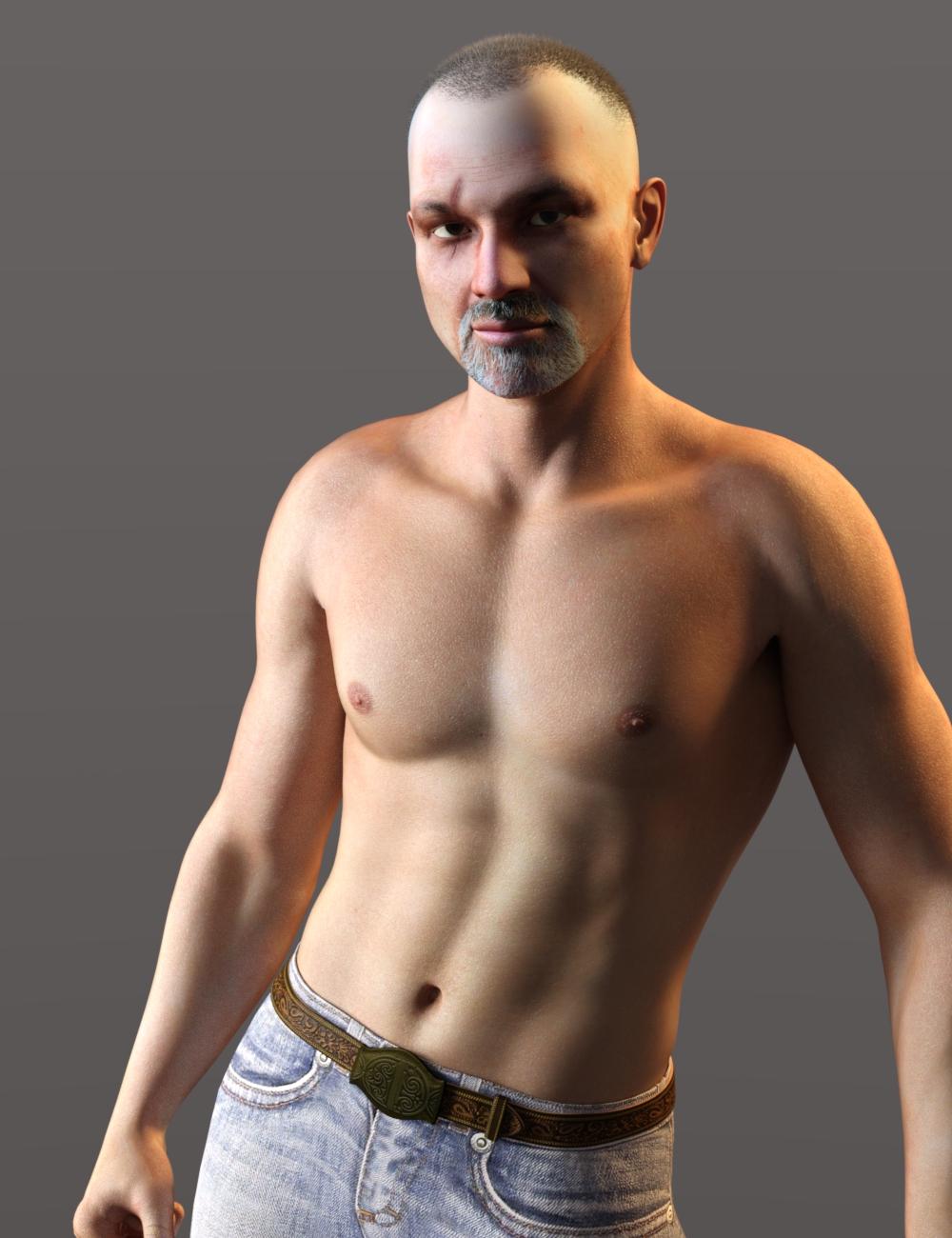
So it's been a long time since I posted anything so today's the day! This is Stolz for Genesis by @Phoenix1966 He doesn't seem to be in the store anymore tho unfortunately, and I'm not sue if he is still for sale elsewhere.
I used NGS2 on the original skin and added Buzzed hair for Genesis, the scar is an injection morph that comes with the character.
G3 Model Height Adjustment ErrorsThat heigth morph does something weird.
If you select the universal tool, so you get the gizmo, is her origin then right on the X-Y plane?
And/or have you tried to reinstall the morph package?
Cayman's Legacy UVs - M4/V4 for G8M/G8F - issue with eyes (solved)Hey, Hylas. Yes, in the Legacy UVs for Genesis 8 pdf I explain about the alterations I needed to make to deal with the eyes. I also gave instructions for using legacy eye textures with Genesis 8 textures, but not the other way around!
The solution is to hide the Sclera attachment (by selecting the Cornea Legacy and Sclera Legacy Surfaces of the geograft and setting the opacity to zero), then click the "Legacy UVs Eyes Zero Adjustment" preset in the Components subfolder, which will reset the Irises size using a hidden morph. Your preset seems to replicate the "Legacy UVs Eyes Zero Adjustment" preset, but you will still need to hide the Sclera attachment.
Can someone help me identify this character please?it's probably a custom morph he's made.
but you can ask him! just PM him via the forum here.
Chohole has already graciously provided the link.
j
[Released] ManFriday's Mesh Grabber [Commercial]
Are you using the Morph Loader Pro mirror technique (about minute 3 in the Josh Darling tutorialI have figured out a procedure to create a symmetrical morph from a one-sided mesh grabber change. I created the temple protrusion on the left, then created a mirror morph to get the same on the right. I can write up a tutorial if anyone is interested.
 ) or is there an additional way?SOLVED! Male Character Hair and Beard
http://www.daz3d.com/forums/discussion/comment/4973961/#Comment_4973961
The character is listed here http://www.daz3d.com/forums/discussion/comment/4961046/#Comment_4961046
Thanks! I already have the characters to morph him :).
For anyone else reading this, just for ease of access I'll paste the info here as well from the other threads:
His morphs are a simple mix of the following characters:
Head:
Carson - 100% - https://www.daz3d.com/fwsa-carson-hd-for-michael-7-and-li-carson-whiskers
Michael 7 - 50%
Ivan 7 Head HD Details - 100%
Hair - https://www.daz3d.com/dforce-eddie-hair-and-goatee-for-genesis-8-males
Beard - https://www.daz3d.com/whiskers-for-genesis-3-male-s
Lashes - https://www.daz3d.com/lashes-utilities-for-genesis-2-3-and-8
Armhair - https://www.daz3d.com/cc-shave-this--body-hair-for-genesis-8-males
Boots and Pants - https://www.daz3d.com/the-huntsman-outfit-for-genesis-3-male-s
Shirt - Surf's Up Outfit and Board for Genesis 2 Male(s)
Can someone help me identify this character please?Does anyone know what morph were used for this character?
Source image [NSFW]: https://www.deviantart.com/fsmcdesigns/art/Botan-HDRI-784261827
Would love to help you out, but as pointed out, I tend to add all kinds of morphs to tweak characters and this one uses lots of small parts of GenX V4 and G2 morphs along with a little bit of some custom Zbrush ones. Sorry I couldn't be more help.
XTransfer Module 1- Genesis 3 to Genesis 8 Morph Converter (Commercial)How are you transferring this custom character? Did you favourite the character slider? Is there one? Or did you favourite the individual morphs and transfer it that way. I need to see some screenshots please of what is selected before transferring took place. Also the distortion is due to a morph that hasn't been rigged..Please check if the G3 version of that morph has been rigged.
[Released] ManFriday's Mesh Grabber [Commercial]I have figured out a procedure to create a symmetrical morph from a one-sided mesh grabber change. I created the temple protrusion on the left, then created a mirror morph to get the same on the right. I can write up a tutorial if anyone is interested.
Ah yes, yes. yes.
Michael and Friends Appreciation Association [Images] Pt 2This is me experimenting with my latest textures/shaders as well as some tone-mapping and depth-of-field techniques. Morph-wise, it's essentially out-of-the-box Michael 8.

Background panoramic photo by Kaleomokuokanalu Chock (used under this license: https://creativecommons.org/licenses/by-nc-sa/2.0/).
Great picture :) What hair did you use?
Can someone help me identify this character please?That creator tends to use customized characters, so it's likely she's made from several different morphs, not just a single morph.FSMCDesigns is male AFAIK
And a single morph.
Daz 3D is part of

Connect
DAZ Productions, Inc.
7533 S Center View Ct #4664
West Jordan, UT 84084Licensing Agreement | Terms of Service | Privacy Policy | EULA
© 2026 Daz Productions Inc. All Rights Reserved.