-
Pick a Daz Character to be your significant other. + Questions
wow, this was tough.
I'm going to go with Bianca
https://www.daz3d.com/lr-s-bianca-for-v4

Bonus Points:
a) WHY? She is the head morph I have used for years and still do on G8.
b) What do we do? Arm candy, best friend, other fun stuff!
c) Hobby that you get them into? VR and other gaming
d) Thing they are better than you at/with? Organization
How do you stop morphs from changing EVERY key-frame in an animation?I am trying to setup the animation timeline so I can essentially save characters with various morphs, instead of having to save them all as individual files, for easy modification and rendering. (As well as posing).
However, when I change ANY morph, it applies to the whole chain of keys, as if there is no keys, and I can clearly see various morph keys in each frame. (They are all selected. I want EVERYTHING to change, in EVERY key-frame I save, not EVERY key-frame that exists, which isn't selected.)
Since morphs ALSO control things like muscle-flex, this is sort of an important thing to have. So when you bend an arm, the muscles can flex correctly, instead of looking like a maniquin doll with nothing more than a soft skin joint.
I tried changing every value for creating keys, but everything is still just altering every keyframe, with ANY morph change.
EG, Setting "Key frames", that should be saving ALL values, and "Locking them", is basicly not doing what it should be doing. Thus the term, Key-frame. To record ALL keys and LOCK them from being altered.
DELETEDid you apply the Simulation-Settings included with the product? You can also use the morph sliders in the Faye Hair dForce object to help.
Malika HD and the wily tactics of BluejauntI went ahead and picked her up. I really like the skin and the face morph!
Quick image. I never use the body morph on any character I purchase, opting for my own and the nose fix (personal taste) was pretty simple. Another fine addition to the gene pool!

very nice.

 new computer
You do need to reinstall Daz Studio. Just copying the files won't be enough. As to your content you can just point Daz at the right spots, assuming you don't use smart content. If you use smart content you need to run a transfer script, there's one around here somewhere.
So I should download a new copy of Daz $.12 from the site... Could I then go to the new copy in cdrive and copy data, people, daz Ect from the old drive ? would that work ?
Endlessly ongoing... playing cards/casino chips/coins/banknotes scatter... hiatus time (still)...btw - would there be any possibilities of being able to swap out the chips for say, little asteroids and stuff like that?
Not as things stand. Remember that the base mesh for the 54-chip scatter prop consists of 54 separate chips. Each morph target was created manually from that base mesh. The base mesh OBJ was imported into Poser, and then each morph target in turn was incorporated into the Poser prop using the 'Load Morph Target' with the appropriate OBJ.
To do the same for other objects (banknotes, playing cards,asteroids, whatever) would require creation of a completely new base mesh) plus versions of each MT derived from that new mesh. Which is why I commented back in this post, "But do I really want to go through all this morph target creation again for a pack of cards and a wad of bank notes ?"Creating an MT to convert the meshes of each individual chip to playing cards, asteroids, whatever is possible.The X/Y/Z translation morphs would still work correctly. However,the rotation morphs wouldtotally screw things up. Also you'd want different UV-mapping. So I can'tsee that approach working.
However, an alternative that I started playing with back when I was doing the multiple-rows-of-books Poser prop was using old-school geometry swapping, as used way back (I'm talking V1/2 time) in Anton's Victoria's Changing Fantasy Suit , Sixus1's Bunch O'Props for Behemoth, etc). Basically each separate item (row of books, casino chip, playing card, asteroid, whatever...) is a mesh attached to a separate bone in the figure. Lots of big advantages doing it that way, but also lots of problems (both expected and unexpected). A few clever tricks and a bit of lateral thinking and I had the basic concept working. And then I got bored and went onto something else. Maybe time to look at it again ?
Maximum number of Runtimesthe morph pack issue
---
only load the ones that the duf file calls for
---
the rest should be in the content library ready to be loaded if you call them.. ie "all those no user interface files"
but I've noticed all the morph files for characters seem to be in the shaping menu .. so I don't really have to load a character but can just use a slider
would be nice if they stayed in the content library
----
plus, since I haven't counted morphs for different characters to figure out the part that plays
but genesis is a minute, gen2 a couple and 3 - 8 pushing 3 minutes to load.
Malika HD and the wily tactics of BluejauntNot intentionally but as things turn out I do have a number of figures by the same artists so when Malika first loaded I was quite happy to see a 'different' figure shape. Here's another render, the um, ground cover shader didn't turn out as expected but oh well. About the knee bends, as with any character with some certain morphs, tweaking of poses is necessary to not have the leg bending into itself. For close-up on knees one could always dial out some of the morph, it's a resizing matter I think. In this image I used one of the poses that came with the piano untouched save for the feet, and adding an expression which also came with the piano set. Nice piano from the 2.20 bin :-)
 How to Create a Mirror Morph for Mesh Grabber
Mesh Grabber is under active development by ManFriday and at this point does not have a symmetry tool. If you want to create the same modifications on two sides of a figure, you can try to recreate it by hand which is difficult or you can use the method described below.
a. Load a figure (I used G8 male).
b. Go to the Tool Setting Pane and from the drop down box at the top choose Mesh Grabber. Make your Mesh Grabber changes to the figure.
i. Choose either face, edge, or vertex selection type. I used polygon selection and chose polygons above the eyebrow. Since this is on the face, I set Falloff Radius to its lowest level. I then dragged the mesh forward along the z-axis to create an eyebrow ridge.
ii. I repeated the polygon selection on the side of the head and dragged them to the right along the x-axis.
iii .I switched to edge selection type and chose an edge near the junction of the two separate grabs that had a small kink and pulled it forward. This completed the mesh modifications.
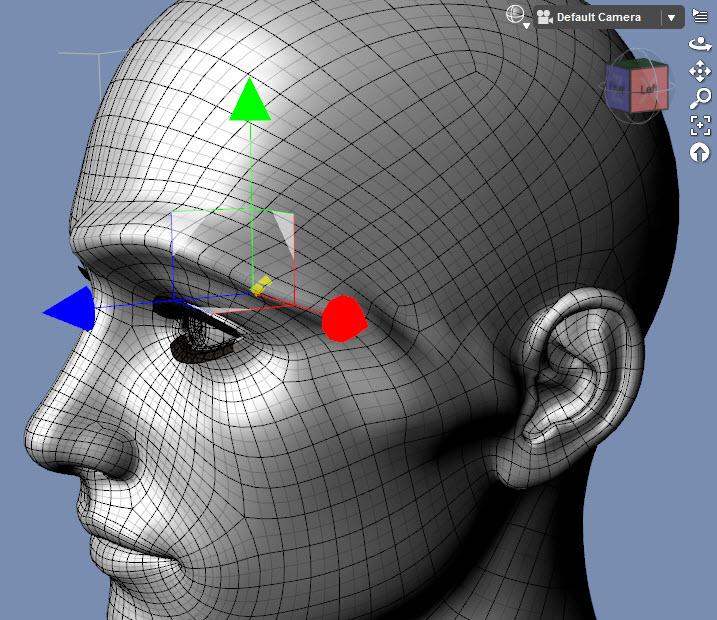
c. Next we need to export the changed mesh. Before exporting, go to the Parameters pane and set Mesh Resolution to Base. This step is critical otherwise your morph loading will fail.
d. Hide everything in the Scene pane except the base figure (cameras, eyelashes, other objects, etc.).
e. From the main menu, choose File/Export and give it a name with an indication of which side was modified (in this case, I used eyebrowridgeL.obj as the file name).
f. Reset the mesh to its default shape. With the mesh grabber tool active, click on the figure so a polygon, edge or vertex is selected. Right click in the viewport and choose Reset Mesh Grabber to clear all the changes. Now we can add back in the changes as morphs that you can dial in and out. (Note: you can skip this step and steps g - l if you want to just use the Mesh Grabber deformation without making it into a morph on that side. In that case, jump to step m.)
g. Select the base figure in the Scene pane. From the main menu, choose Edit/Object/Morph Loader Pro.
h. Click on the button Choose Morph Files… Select the file you exported previously.
i. Click on the small arrow to the left of the file name. That will expand to a selection of parameters.
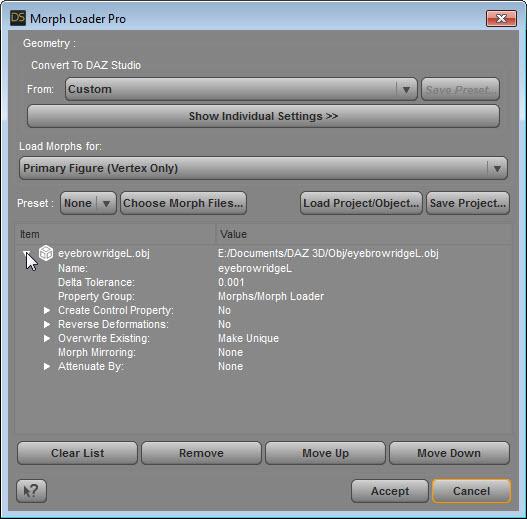
j. Go to the line saying Reverse Transformations and right click on the No and choose Yes instead.
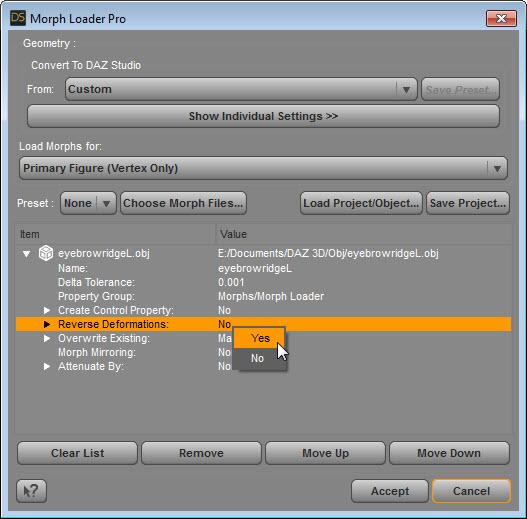
k. Click on the Accept button and you should see a dialog box showing Created morph successfully. If you get a fail notice instead, the most likely cause is you saved the obj files while the figure was set to high resolution.
l. Go to the Parameters pane and they’ll be a new parameter field called morphs. Set the newly created morph to 100%. This image below shows the original Mesh Grabber transformations now being used as a morph.
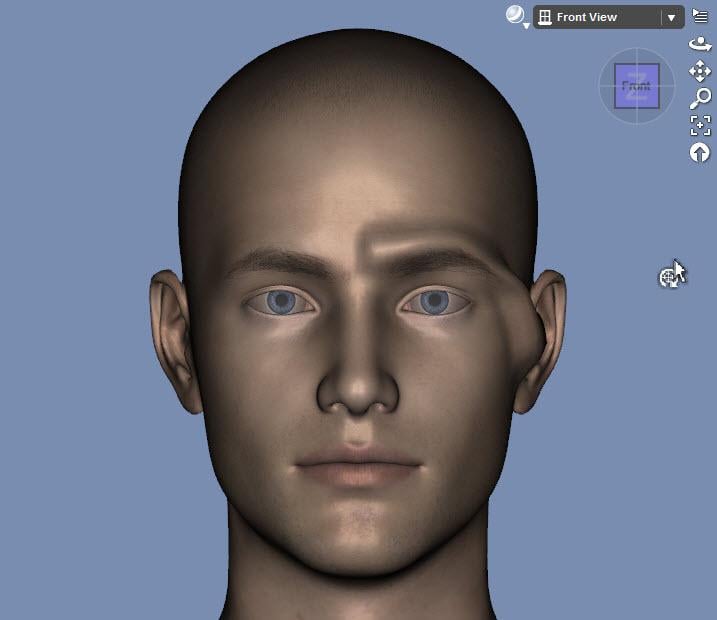
m. Repeat steps h through j for the same exported file. This time, you need to do two additional steps.
i. Double click on the name and change the ending L to an R
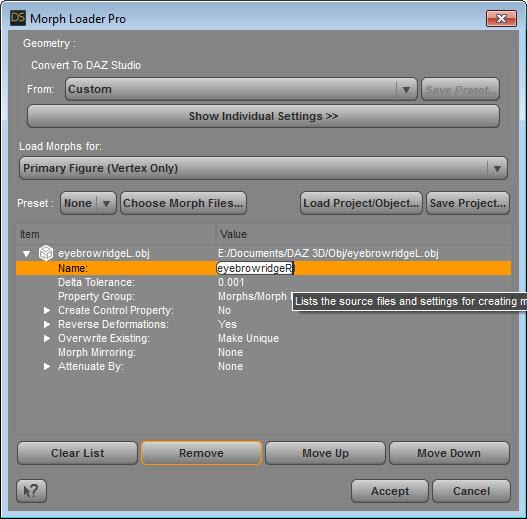
ii. Go to the line that says Morph Mirroring and right click on None. Choose X-Swap to move the mesh changes to the right side of the face. (Thanks to barbult for pointing out this feature of Morph Loader Pro).
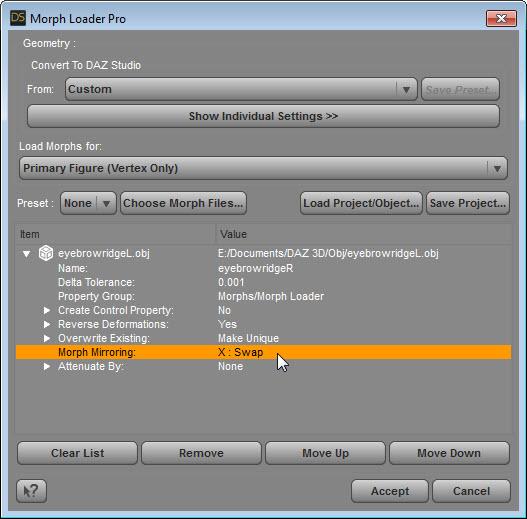
n. Click on the Accept button. Now the figure will have two morph dials. When both are set to 100% you’ll have right and left side morphs displayed.
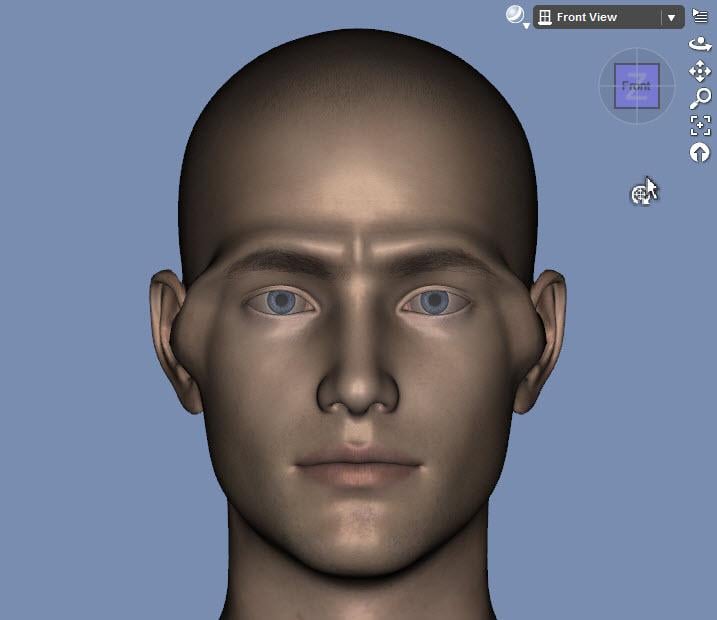
o. Before rendering, be sure to restore the figure to be a High Resolution mesh.
Render of Eyebrow Ridge:
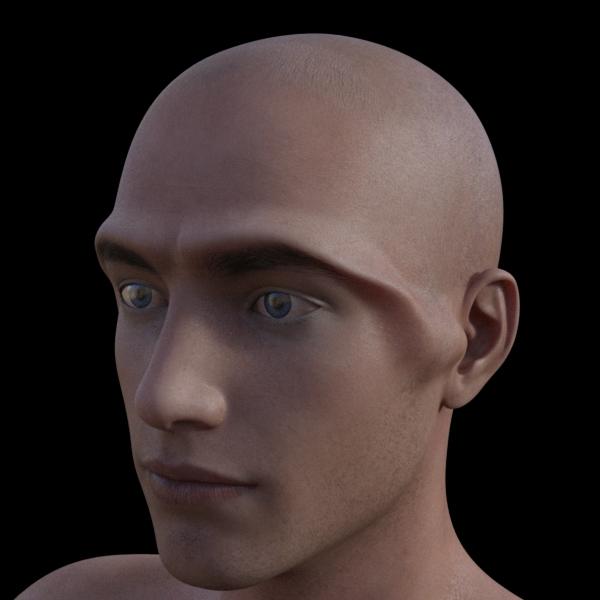
Render of another Mesh Grabber transformation (temple protrusions) that was made into a mirror morph:
 [Released] ManFriday's Mesh Grabber [Commercial]
It used a different method that requires an outside program, so Josh Darling's method is better. I'll write it up using his approach but include the prepartory steps and have it in a written form.
ETA: here is the tutorial
Maximum number of RuntimesDoes the order listed in the Content Library play a Factor?Have no problem deleting, all, then readding in reverse order.
Not the Content Library, the Content Directory Manager dialog. There are buttons to move items up and down the list, no need to delete/re-add/get it wrong/start again (yes, I did do that... once...)
As for speed of loading, another factor might be how many characters and morph packs you have installed for that Genesis figure. The actual morph data doesn't load for zeroed morphs when you load the character, but the placeholders for the parameter channels do, and if you have a lot of them, it can take more than a few seconds to churn through the list.
Looking for the most realistic nipple morphs/materials for Genesis 8 female.https://www.daz3d.com/breast-utilities-for-genesis-8-female-s
I second this if you're looking for shapes. It's got HD morph dials for the nipples and a lot of excellent customization options. In my opinion, any good texture should look fine with any of those morphs. (For example, I'd probably go with something like Zelara 8or any of the recent Daz Original 8's skins or one from bluejaute's characters.)
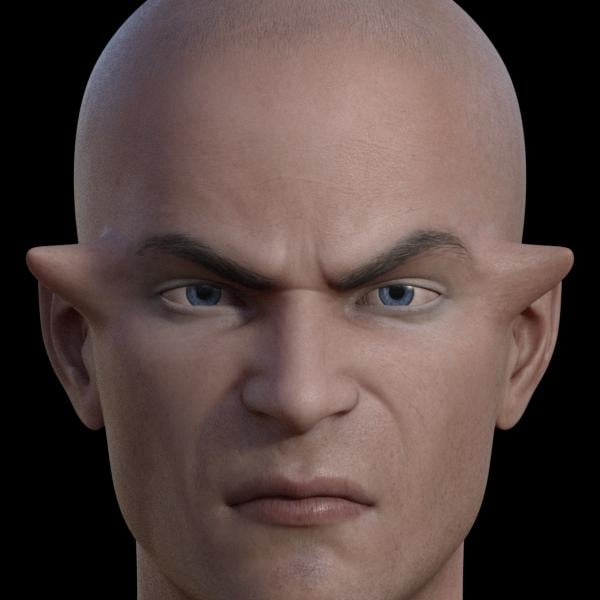
Novica & Forum Members Tips & Product Reviews Pt 12Did anyone get the Demonic Evlin thing? I think it looks hideous as is but wondering what it looks like just slightly dialed in or just the skin on Evlin (or another character) without the demonic morph. I think the original Evlin is gorgeous but haven't rendered her yet,
I can't download Evlin yet so couldn't render her, but I applied it on Dior instead.
You have Just Dior, Evlin demon 25, Evlin demon 50, Evlin demon 75 and Evlin demon 100. You also have a sepparate slider for the demon ears, so you can make them human again. Last pic in the shape series is demon 50% with ears 15%.
Afterwards we have different skins. 15% demonic shape and right eye blind.
Unfortunately when trying to apply materials it gives a lot of errors for missing textures as it tries to use some for Evlin so not sure how good I can refresent them without bump maps or sss maps but last is demonic maps applied with 50% demonic evlin and 75% ears.
Overall I am satisfied with what I got, especially at this discount.
Thanks! Just realized Elvin isn't installed for me either. I thought everything downloaded but then saw in the forums there's a problem with it. I got Dior too (for free because I realized at the last moment I hadn't used my PC+ coupon! ) So it's interesting to see what the morph does on other characters. I don't like the demon as a whole, but can see using partial morphs for creating an alien probably with a different skin and using just the skin to make a beautiful "demon." But do I really need this? No. Still on the fence for a couple of bucks lol.
Yea, I would never use this as a demon, isn't realistic enough.
But as an alien could look good, kind of like a klingon of sorts.
Also the blind eye and demon eyes are interesting.
Couldn't say if it's worth the 2 bucks or not. For me it was ok although I'm starting to spend a little too much on this MM. Especially since this weekend I only bought the bonus items butt I've used the 50,40,30% coupons to their fullest to get some of the items I had in my wishlist as must buys.
LOL @alex86fire! One way or another, Daz will get all your monies! (Take it from one who knows first hand…)
Novica & Forum Members Tips & Product Reviews Pt 12Did anyone get the Demonic Evlin thing? I think it looks hideous as is but wondering what it looks like just slightly dialed in or just the skin on Evlin (or another character) without the demonic morph. I think the original Evlin is gorgeous but haven't rendered her yet,
I can't download Evlin yet so couldn't render her, but I applied it on Dior instead.
You have Just Dior, Evlin demon 25, Evlin demon 50, Evlin demon 75 and Evlin demon 100. You also have a sepparate slider for the demon ears, so you can make them human again. Last pic in the shape series is demon 50% with ears 15%.
Afterwards we have different skins. 15% demonic shape and right eye blind.
Unfortunately when trying to apply materials it gives a lot of errors for missing textures as it tries to use some for Evlin so not sure how good I can refresent them without bump maps or sss maps but last is demonic maps applied with 50% demonic evlin and 75% ears.
Overall I am satisfied with what I got, especially at this discount.
Thanks! Just realized Elvin isn't installed for me either. I thought everything downloaded but then saw in the forums there's a problem with it. I got Dior too (for free because I realized at the last moment I hadn't used my PC+ coupon! ) So it's interesting to see what the morph does on other characters. I don't like the demon as a whole, but can see using partial morphs for creating an alien probably with a different skin and using just the skin to make a beautiful "demon." But do I really need this? No. Still on the fence for a couple of bucks lol.
Yea, I would never use this as a demon, isn't realistic enough.
But as an alien could look good, kind of like a klingon of sorts.
Also the blind eye and demon eyes are interesting.
Couldn't say if it's worth the 2 bucks or not. For me it was ok although I'm starting to spend a little too much on this MM. Especially since this weekend I only bought the bonus items butt I've used the 50,40,30% coupons to their fullest to get some of the items I had in my wishlist as must buys.
So.... March Madness?Does MM last the entire month or is it limited to a certain point then ends?
I'm trying to plan out how I can buy Mei Lin 8's HD moprh (already have ML's base, Gabriela 8's base and HD morphs then maybe Kala's Base and HD morphs and if the sale would last long enough if it's not all month. I'm on a veeeeeeeeeeeeeeeeeeeeeeeery tight budget so I need to be sure to maximize coupons while minimizing the amount of money I spend. I'm actually hoping Gabriala and Kala would end up in the Fast grab as I've seen one HD morph and one of the males in there already and that price point is really all I can afford.
new computerYou do need to reinstall Daz Studio. Just copying the files won't be enough. As to your content you can just point Daz at the right spots, assuming you don't use smart content. If you use smart content you need to run a transfer script, there's one around here somewhere.
Looking for the most realistic nipple morphs/materials for Genesis 8 female.If you want to pull out the nipples, you can download "Vika - Beautiful Character for Genesis 8", it's a really nice toon character and one of the provided morphs "5 Vika Nipples on" actually helps a lot to get something nicer.
The "Nipples Morph Pack for Genesis 8" give way more control. But it's bugged as hell, or I didn't figure everything out ? , but most of the time nipples display a proper texture but what's around is white, so... Vika is a very nice option in my opinion.
Novica & Forum Members Tips & Product Reviews Pt 12Did anyone get the Demonic Evlin thing? I think it looks hideous as is but wondering what it looks like just slightly dialed in or just the skin on Evlin (or another character) without the demonic morph. I think the original Evlin is gorgeous but haven't rendered her yet,
I can't download Evlin yet so couldn't render her, but I applied it on Dior instead.
You have Just Dior, Evlin demon 25, Evlin demon 50, Evlin demon 75 and Evlin demon 100. You also have a sepparate slider for the demon ears, so you can make them human again. Last pic in the shape series is demon 50% with ears 15%.
Afterwards we have different skins. 15% demonic shape and right eye blind.
Unfortunately when trying to apply materials it gives a lot of errors for missing textures as it tries to use some for Evlin so not sure how good I can refresent them without bump maps or sss maps but last is demonic maps applied with 50% demonic evlin and 75% ears.
Overall I am satisfied with what I got, especially at this discount.
Thanks! Just realized Elvin isn't installed for me either. I thought everything downloaded but then saw in the forums there's a problem with it. I got Dior too (for free because I realized at the last moment I hadn't used my PC+ coupon! ) So it's interesting to see what the morph does on other characters. I don't like the demon as a whole, but can see using partial morphs for creating an alien probably with a different skin and using just the skin to make a beautiful "demon." But do I really need this? No. Still on the fence for a couple of bucks lol.
Malika HD and the wily tactics of BluejauntI went ahead and picked her up. I really like the skin and the face morph!
Quick image. I never use the body morph on any character I purchase, opting for my own and the nose fix (personal taste) was pretty simple. Another fine addition to the gene pool!
G3 Model Height Adjustment ErrorsWhat about the hip? You can move the hip bone without changing the base figure's coordinates, even if the figure has actually moved.
If the rigging is being affected, you can check to see where the center points are with the Joint Editor tool and the Tool Settings tab pane. The default mode is to show Center/End Points, which show as green and red axis systems at either end of the bone. Playing with the Height morph, I see the hip bone center and end points moving down (both y-values decreasing) as the dial is moved to 100%. (Set Show Bones ON for G3F in the parameters tab, you can't see the bone with the Joint Editor tool and adjust the morph at the same time). Toggling the Bone Ghosting check box will show where it was (the last memorized position, in red, which is as loaded, by default) compared to where it is now (in yellow). It is clearer if you select Visible Bones to Selected Only (this will highlight only the selected bone).
Now, if yours is moving up, something is interfering. In the Property Hierarchy, you can see which controllers are driving the hip bone's Center and End points, but there could be literally hundreds of them. Every character and morph package could have a line in there. And it might not be limited top the hip bone. Those shoes load and stay where they should, so they are getting different information.
If it can't be tracked down that way, you might have to do it by process of elimination. Uninstall any morph add-ons or characters until the problem goes away. A little trick to find the culprit quickly, instead of doing one at a time, is to remove half of them, and see if the problem is still there. If not, it is in one of those removed. Re-install half of those and check again. If the problem is back, it is obviously one of those, so repeat the process by removing half of the re-installed ones. If not, it is in one of the remaining ones, so install half of those. Repeat untill you find the one. Even with 256 packages to sort through, this method will require 8 sets of uninstall/re-install to narrow down to 1, since each step eliminates half the rest.
Daz 3D is part of

Connect
DAZ Productions, Inc.
7533 S Center View Ct #4664
West Jordan, UT 84084Licensing Agreement | Terms of Service | Privacy Policy | EULA
© 2026 Daz Productions Inc. All Rights Reserved.