-
Bake Geoshells onto Materials?
You could use Map Transfer to put the images on the same UVs, then composite them.
February, 2020 - DAZ 3D New User Challenge - Lighting and Light Effects
Thank you very much. IT's very long time ago that I used C4D or any other 3D program. I can't remember if I used a special render engine. I wasn't very effective with modeling too. But was quite ok for my study stuff. XD Since 2007 I work in a specialised shop for alcohol. So no 3D art, but whisky solutions.:D Since I use DAZ I reactivated my old cinema just for morph and obj/fbx adjustments. At this render I tested photozoom for a larger material at the crown. I used the original material and made some bump and displacement maps online. (Found that link somewhere here.) At the moment I'm fine with the iray-render engine, I'm also to lazy for redo the materials. And ... some years ago I bought a Radeon card (I'm not at my computer now,but I guess it's something with ..480). As long there isn't a engine that support this I have no reason to change it (engine). I think to get a Nvidia card now, but the costs are twice to a Radeon.That's a really nice looking render you posted. I'm very curious as I use Cinema 4D for modeling as well (and Zbrush), but have only been doing it for a short time. I've been doing 3D art for about 1.5 years and modeling/texturing for about half that time... Do you model in C4D, and which render engine do you use with it? Also I was wondering what kind of work are you referring to when you say you work in a ;"lean" 3D art area... do you work with autoCAD or something? I too find that I get better renders with DAZ than I can get with Cinema's native engines. (I don't know if I'd say that about everything when using Octane or Redshift though). ..Octane for Daz is now free for full version also though btw.
How the heck does the dForce Raiding Cloak work?That is too bad, guess it's time to take it off my wishlist. Does look great in the promos though.
Honestly, I have no idea what wizardry the creator used to get the simulations in those promos...the sitting one and the one with the vampire touching her face. I can't see how it's possible with the different morphs that are provided, not even taking clothing into account...not lunless there were dformers and/or multiple simulations at play (where you simulate, save as a morph, simulate again from that saved morph, etc).
Can DAZ 3D Export to C4DWelcome to my world.
I analyzed that for 2 years now and the answer is yes and no.
You can transfer a rigged character via FBX. Since G3 the characters use quaternion weighting, which is the same as the spherical weighting in Cinema 4D.
The issues are:
- Cinema 4D cannot process the default orientation of the joints. It will simply be set parallel to the Y or Z-axis. E.g. this is not correct for the knee joint.
- It is possible to export the JCMs, but the ERC links that control the joints based on the joint rotation are missing, You can manually add them in Xpresso, but as the default orientation of the joint is wrong, you have to correct the joint orientation first.
- Unfortunately Daz decided to connect joint rotations. So the rotation of one joint controls another joint via ERC link. This can be added in Xpresso.
- The weight map fits only for the base resolution. to export a hires FBX is possible, but you have to adjust the weighting.Many things can be automated by Daz and C4D scripts. So in general a lot is possible, but a huge amount of work as well. I've written a huge PDF to document a possible workflow, but RL takes too much time.
I also think about switching from C4D (since R11.5 up to R21) and Vray to Blender 2.8x, as there is a Daz plugin available and Cycles is a nice render engine as well.
If you are interested in this PDF, let me know. Unfortunately I may not be able to share it with you before next week.
Growing Up for Genesis 8 + AccessoriesAre the accessories figures or props (in the Scene pane do they have a node with bones as its children, or just a single node)?
Just replicated the problem. It's on both. Seems to be an issue with the prop being parented to the head bone and not being designed to morph with geomotry - likely to avoid distortion. A child's head is proprotionally twice the size of an adults so of course items will look half the size.
Best fix I've found is to simply equip the items as props and scale manually.
XTransfer Module 1- Genesis 3 to Genesis 8 Morph Converter (Commercial)
Thx for your reply. I think I favorited the dial under full body but i will try under people next time.Sometimes the height dial is seperate to the body morph in a character slider, If a character makes use of both. In order for it to scale correctly you will Favourite the character dial in people and transfer that.
XTransfer Module 1- Genesis 3 to Genesis 8 Morph Converter (Commercial)Sometimes the height dial is seperate to the body morph in a character slider, If a character makes use of both. In order for it to scale correctly you will Favourite the character dial in people and transfer that.
What happened to the zebra?With the recent release of AM's Gnu, might we see a future zebra morph for Horse 2?Looking for the most realistic nipple morphs/materials for Genesis 8 female.Forget what I said about Vika, get this : Breast Utilities for Genesis 8 Female(s) instead.
Previews on the webpage are far from showing what this morph pack can actually do. You get quiet an insane amount of controls over the breast and nipples.
Purely for medical purposes of course.
 What happened to the zebra?
I see in this product there is a zebra https://www.daz3d.com/safari-animals and here are poses for the zebra https://www.daz3d.com/alpha-male-combat-old-world but no zebra in the store and it should be a Daz Original.
I think it is the one included in this: https://www.daz3d.com/millennium-horse
It looks like there was originally a stand-alone Daz zebra though and in the description of the Millenial horse it doesn't say there's a zebra texture, just morph... Anyway,I'm not at my computer now but I'll check the horse product to see if there's a zebra texture.
[Released] RSSY Cross Gender Clothes for Genesis 8 [Commercial]Any chance of a Cross Gender Morph Transfer for Genesis 8 as well? :)
Probably not. The current procedure for converting probably wouldn't work too well for this, which would require lots of trial and error work that might not give me anything. And then, I don't think there is a big market for this justifying all the work.
Needing an unusual "Iray Shader"... Just an ALPHA.I exported his eyeballs and reimported as an obj
(hid all bones except left and right eye, obj export no hidden)
used transfer utility to conform them
applied script to them
in parameters display clicked the matte option
then hid the figure's eyeballs
this works
Found a problem with posing when turning off limits for all body parts of G8F.Can you guys please confirm the problem?
First, let's demonstrate normal, proper hand translation movement behavior.
1. Start a new DAZ scene.
2. Load G8F.
3. Turn IK off with CTRL K.
4. Select the Translation tool.
5. Select G8F's hand and begin moving it along X, Y, or Z axis.You should notice everything is smooth and working fine.
Now try this:
1. Select the hip of G8F and choose select children, which selects all G8F's body parts.
2. Cick Edit-> Figure -> Limits -> Limits Off , there will be a delay of a few seconds.
3. With all the body parts still selected, click Edit-> Figure -> Limits -> Limits On, once again a few seconds delay.
4. Note: All we've done is turn limits off then on, no big deal right?
5. Select the hand and try to move it via the translation tool, you're going to notice it's completely messed up now and doesn't work nearly as properly prior to messing with the limits.Why does this happen and how can I restore G8F to it's original limit settings? Restore Figure, Pose or Shape doesn't work. Restoring original rigging doesn't work either. I was forced to load a new G8F and transfer all my work to this new G8F, because the G8F I was working on is broken because of messing with the limits, so finding a solution to this would be great just in case it happens again. I'm worried if I turn limits off when applying poses, it's going to eventually break my ability to move the hand properly with the translaton tool, foricng me to transfer all clothing, surfaces, mats to a new G8F, which is extremely annoying.
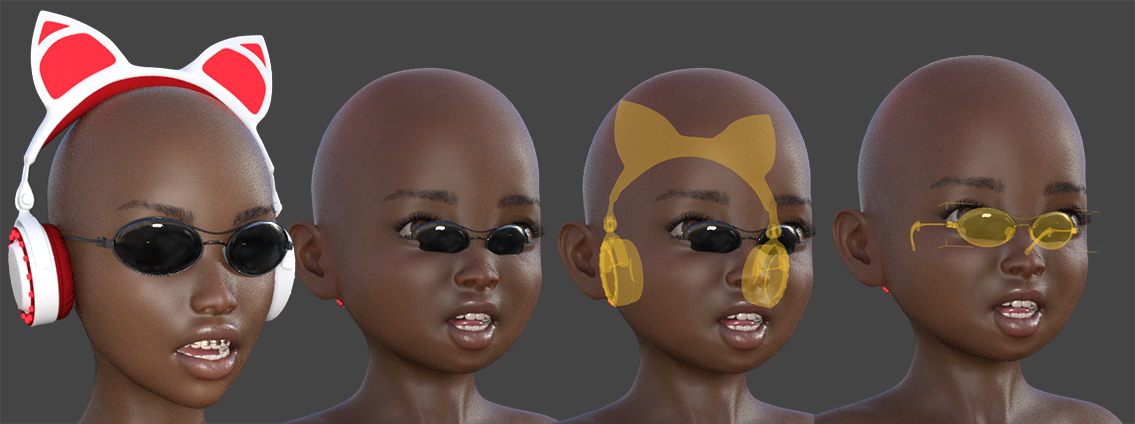
Growing Up for Genesis 8 + AccessoriesHi,
I have issues with mostly all accessories, except clothes and hair that tend to behave properly when taking an adult mesh down to a child mesh.
If you try to set up an adult character at frame 0 with hair, braces, glasses, etc. And then on another frame, you take him/her down in age, accessories go crazy. And doing a "Fit" to G8 Character doesn't help.
Growing up is a damn great morph package. But it generates some annoying issues. Could someone who faced that problem please give me some insight ?
Or is it just normal and we have to scale/translate objects in order to make them fit manually to the morphed mesh ?
Thanks.
 Anyone have Face Transfer Unlimited - Need help
Hi All,
I purchased Face Transfer Unlimited to create just one render from a photo. I didn't read the fineprint and I have a Mac... Face Transfer is only for Windows.
Does some here have Face Transfer Unlimited that would help transfer one photo for me, please? I just need the character from the photo. I can do the rendering myself.
Many thanks,
Jimmy
Jonathan 8His skin looks pretty good. I would've preferred a more distinct head morph. I'm happy to get a male, but he looks like G8M with a minimum of dial morphing. He's like a SIMS. He will definitely need his HD Add-On, but a man with an HD face that wrinkled should have smooth featureless HD hands? With a choice of Sean Connery, Roger Moore, Pierce Brosnan, and Daniel Craig---all great character faces---why give us Vanilla McBean? But Redz and HinkyPunk's characters look good. And Redz' hair is a useful addition. Secret Service Hair continues the male Pro Bundle tradition of hair with maximum ear clearance (and no ear height morph).
Although the tuxedo's shoulders seem to keep their shape and points (unlike most other male suits), I wish Mada had been asked to make the tuxedo because the included one exhibits the same "I don't know how to make a collar or a lapel or a crease in trousers" issue that has plagued several Daz Originals suits. Like others have said, dForce makes men's suits look like they're made out of polyester. I don't have much use for a retro spy or retro spacesuit. So, the 60's private eye outfit will be the only one I can see using.
AIUTO...CHI CONOSCE L’ITALIANO? PARTE DODICIAllora, il morph che avevo installato era un total body, e dava un errore in fase di loading, però chi lo aveva pubblicato assicurava che oltre a quello non dava problemi. Il problema ce l'ha nella mano, e non ho usato pose preset, ma ho usato il tab Posing di Genesis 8 Female per farla chiudera. Nel week end faccio una pulizia generale di G8 e reinstallo tutto.
Remove/Disable Unused MorphsThis would be a handy tool, but I'm not sure with the current set-up how it would work. Currently, Daz Studio seems to load every morph in the folders in order to get the names, even if they're zeroed out. I've taken to zipping up ones I know I don't use or uninstalling the content. The problem with both these 'solutions' is that it removes the dial from the parameters tab, so I sometimes forget they even exist until I wonder and go looking.
No current channel for value0p on line 18["No current channel for value0p on line 18"] what does this mean? I am trying to use a body morph I bought for my v4.2 base and I am getting this message.
How do I transfer custom morphs from one G8F to another G8F? (solved)Now I know from your posts that you have the morphs embedded in a scene file, what you can try is to load that scene, select G8F, and save her out as a character preset, that "should" cause the morphs to be copied and embedded into the character preset, that character preset now becomes your "new G8F".
really? Hmm, I'll try that, thanks ;)
Sadly, this didn't work. When I saved a character preset and applied it to a fresh G8F, it didn't add my custom zbrush morphs from my original character.
Does anyone know a way to transfer custom Zbrush morphs from one G8F to another, without making the morphs global to all G8F? These custom morphs that I made only work with a certain body type, they wouldnt' work with other G8F, so having them universal to all G8F doesn't make any sense.
edit: I decided to go with the save morph asset solution, thus the custom morphs are available to all G8F.
Just fyi, if you don't want to 'see' them all the time, you can check them to be 'hidden' -- and then enable 'show hidden' when you want to see them.
Daz 3D is part of

Connect
DAZ Productions, Inc.
7533 S Center View Ct #4664
West Jordan, UT 84084Licensing Agreement | Terms of Service | Privacy Policy | EULA
© 2026 Daz Productions Inc. All Rights Reserved.