-
Importing facial animation from iClone 8 to Daz3D
Hello guys, for those of you who have IClone 8 - can it export facial animation data recorded via "iPhone Live Face Profile” (or some other plugin) into Daz 3D Genesis 2 (possibly also Genesis 8, but it’s not a priority) as a timeline of morph keyframes?
I am interested in their programs exclusively for capturing facial animation with subsequent export to Daz3D. Maybe someone has already dealt with them.
Looking for an ExpressionIf you still have the morph installed, click on the gear on the slider and go to Parameter Settings. You'll see the full file path, which should provide at least some indication of where it came from.
I want to return the "New" Scene menu item to the old behavior. How?Richard Haseltine said:
ctrl n, followed by enter, is only two key press actions.
This currently hangs and crashes daz. I don't know why, but this new menu is busted.
Have you considered telling the programmers to look up the advertising information out of context and not just when I press 'new'? Also, if there's no ads there, then dont hang and crash? This is really substandard work. You know people will press new, so why not just preload? (This is how I do things with firmware that I develop. I preload communications messages that I know are coming in order to speed up message transfer.)
The Mac FAQWhat about the regular Content Library? Do the tip images show up there?
What if you had used Migration Assistat to transfer your files and ap over? Was it possible for you to have used M A?
weird effect on hair renderingLooks like the eyebrows rise to so it might be a morph that is being added during the length of the animation which is also affecting the hair. Another thought is it might be a Dforce simulation running on the hair.
[Released] Turbo Loader for Genesis 8 and 8.1 [Commercial]Stretch65 said:
Hi,
There's something I'm clearly not understanding about Turbo Loader. Here's what I've done:
1. I loaded just one of my favourite G8.1 females into a new, empty scene.
2. I ran the "Turbo Loader Scene Configuration" script, and scanned the scene. It gave me a small list of just the properties/morphs used by my G8.1 female. I saved this list as a configuration called 'subset.txt'.
Turbo Loader Scene Configuration saves a configuration containing all the non-zero morphs and properties in the current scene. Use this configuration to quickly enable all the morphs before loading the scene again using the Turbo Loader Configurations script. After you have saved that configuration, you can save the scene, and then use the Turbo Loader Configurations script BEFORE loading the scene again to ensure that the morphs needed for the scene are turned on.
3. Then I ran the "Turbo Loader G8 Manager for G8 Female" script. It displayed every property/morph that was currently available. I un-checked all of them.
At this point, you then click "Execute" to disable all morphs for G8F and the dialog disappears.
4. I loaded 'subset.txt' as a configuration but nothing happened. What I was expecting was for the properties/morphs in 'subset.txt' to be checked on.
BEFORE loading that scene you saved earlier, Start the Turbo Loader Configurations script, select the subset.txt, and click the Load Configuration. Now you can safely load the scene without getting any missing products errors.
What am I doing wrong?
[Released] Turbo Loader for Genesis 8 and 8.1 [Commercial]Hi,
There's something I'm clearly not understanding about Turbo Loader. Here's what I've done:
1. I loaded just one of my favourite G8.1 females into a new, empty scene.
2. I ran the "Turbo Loader Scene Configuration" script, and scanned the scene. It gave me a small list of just the properties/morphs used by my G8.1 female. I saved this list as a configuration called 'subset.txt'.
3. Then I ran the "Turbo Loader G8 Manager for G8 Female" script. It displayed every property/morph that was currently available. I un-checked all of them.
4. I loaded 'subset.txt' as a configuration but nothing happened. What I was expecting was for the properties/morphs in 'subset.txt' to be checked on.
What am I doing wrong?
My Favorite Script (Commercial)This product still has a bug... when applying Shaping Preset.
If there're exsiting values on the morph properties, when applying the saved Preset, the values will be added (stacked) to the properties even if I check the option Zero Shape before Applying...
https://mega.nz/file/nbwxGSqC#H12kP3kg54ZobPWqzBU0TBOd1Au1GUeAvzDjaMxN5D4
Edit: However, some morphs have this issue (from some vendors in this store...), some don't (from Daz Originals)... and I check the settings in Parameter Settings, there's no difference. Strange.
I want to lighten the scene, I am not sure how to do it properlyI most of time just use Spotlights but it's up to your preferences.... Better avoid the lights being reflected on specular surfaces by tweaking the lights' postions, or you can use ghost lights if there're too many specular surfaces in the scene. But this scene is simple...
As for the long sleeves on that jacket, it's by design... Do you have Mesh Grabber... or know some modeling software like Blender ? For example, push the sleeves up by using Mesh Grabber... or tweak it in Blender and import the shape as a morph.
Body MorphDoes anyone know where can i find this or a similar body morph of this model?
https://gcdn.daz3d.com/p/106086/i/underwearcollectionbyte03daz3d.jpg
How to get V4 skirt to auto follow V4lululee1 said:
Hi Wendy,
Are you saying you are converting V4 to weightmapping,
Make a V4 weightmapped morph,
Then using the transfer utility you can transfer
That weightmapped V4 weightmapped morph to the clothing
Set the V4 weightmapped morph to autofollow
Is that the correct sequence?
Thank you so much for taking your valuable time to help me with this.
Cheerio lululee
no, nothing to do with morphs
bone rigging
there is a more lot to it and I cannot explain it all
unless you only use dforce, clothing needs to be rigged to follow a figure's bones with it's own matching bones
if you have never used Genesis+ I none of what I said about using the transfer utility will even make sense as it's an entirely different rigging system to V4
the best I can do is point you to tutorials or threads about rigging
sadly most the ones I use by Catherine were pulled by the Author so this could take a while...
all the Google results point to her tutorials
How to get V4 skirt to auto follow V4Hi Wendy,
Are you saying you are converting V4 to weightmapping,
Make a V4 weightmapped morph,
Then using the transfer utility you can transfer
That weightmapped V4 weightmapped morph to the clothing
Set the V4 weightmapped morph to autofollow
Is that the correct sequence?
Thank you so much for taking your valuable time to help me with this.
Cheerio lululee
How to get V4 skirt to auto follow V4it needs to be rigged to V4
since she is is a legacy figure you need to use the old Poser type rigging with the content creation tools
there are a number of workarounds some of us use like converting V4 to weightmapping then using the transfer utility
(don't save or use her weightmapped version just save the clothing)
How to get V4 skirt to auto follow V4Theer isn't eally a way to auto-follow leg poses, if that is what you mean. If you want to match the morphs on the character, right-click>Transfer Active Morphs (though if your imported morphs have amtching names, not just labels, they should follow automatically).
I couldn't find all the morphs[I couldn't find all the morphs using]
var node = Scene.getPrimarySelection();
if (node) {
var obj = node.getObject();
if (obj !== null) {
var numModifiers = obj.getNumModifiers();
for (var i = 0; i < numModifiers; i++) {
var modifier = obj.getModifier(i);
print("Morph Name (Internal): " + modifier.name + ", Label: " + modifier.getLabel());
}
}
}
but it seems I found the sub-component only
and
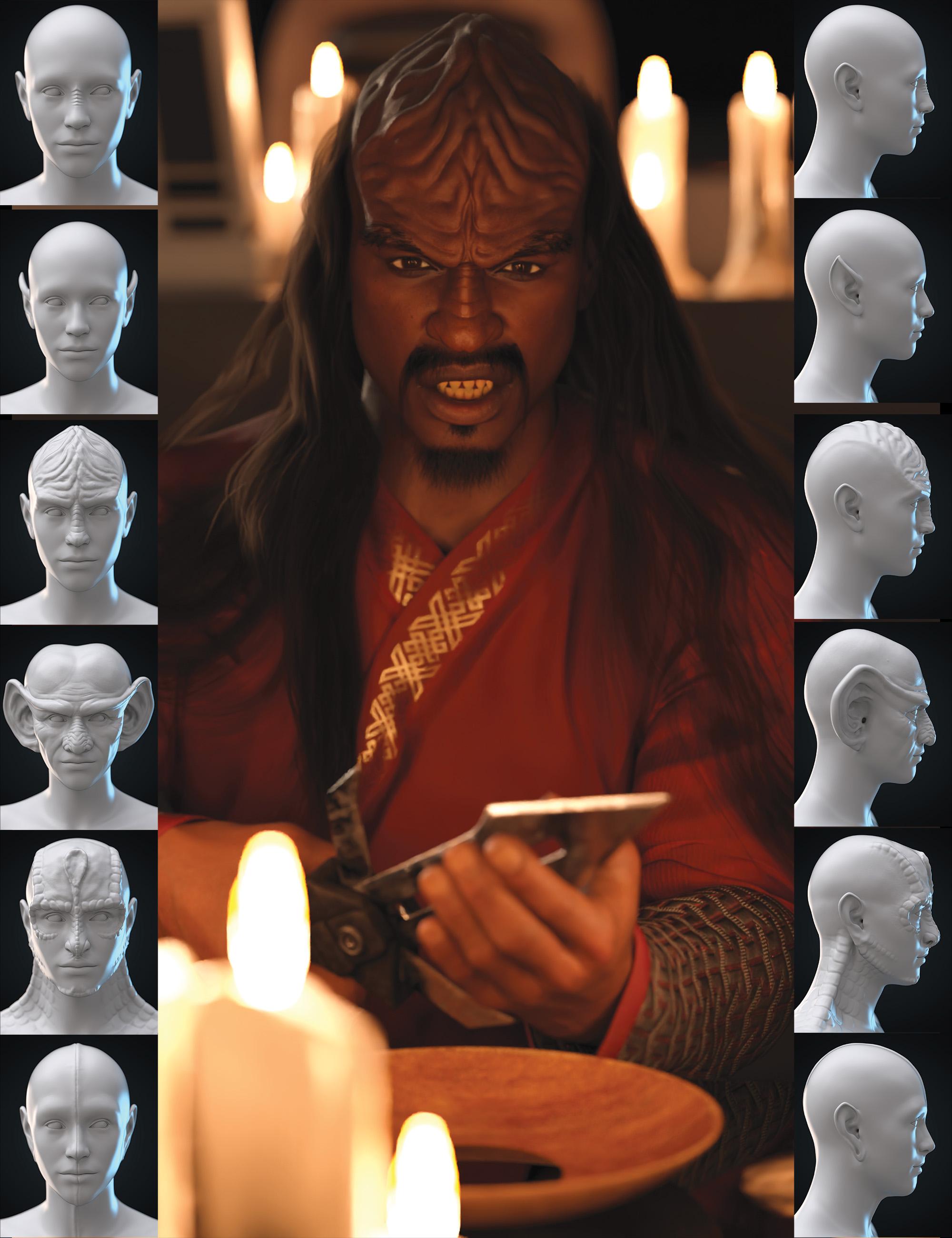
It seems like DazScript isn't designed to search for all morphs. I probably need to check the morph data in the assets, find the sub-component connections, and adjust them myself, right?Klingon foreheadTraceSL said:
If you are looking for G9, there is a morph pack in the store that does all the Star Trek races. I can't remember ther name but will look for it.
Technically, there used to be: Science Fiction Head Shapes for Genesis 9 which is no longer in the store
 hi, I'm Don, a newbie
Moved this to New users (the area you had posted in was for writing scripts in Daz Studio to automate or extend tasks).
Using Time machine will not interfere with any other morphs you have, though when the base shape has changed greatly it is a good idea not to push the additional morph settings too high.
Klingon foreheadIf you are looking for G9, there is a morph pack in the store that does all the Star Trek races. I can't remember ther name but will look for it.
Registering Plugins - not working!Hi all!
I have several Plugins that I am unable to register.
Basically entering the serial (which I have in my account in Daz3d) into the "About Installed Plugins" does not do anything.
Restarting does not help.
I have been able to register other plugins before - but haven't done so in a while.
I am using DAZ Version:Alvin Bemar Typi3D: fonts to 3D - Windows version
Alvin Bemar FLUIDOS II for Daz Studio
Alvin Bemar FLUIDOS for Daz Studio
Rob Whisenant Measure Metrics for DAZ Studio
itSeez3D Face Transfer 2
e.g.
Any clues on what steps I should take?
How can I contact any of these authors for help?
Thanks
Chris
Question about saving a prop from an outfit autofittedHello, I'm not sure if what I am observing is an issue or if it is just normal, but I prefer to ask to understand what happen. Since I am not sure exactly how it works, I will explain everything from the biginning, sorry if it's a bit long...
I got recently the Cheyenne for M4 (https://www.daz3d.com/cheyenne-for-m4), and I want to use its outfits on G8M. To do that, I created a clone of M4 by following this tutorial (https://www.youtube.com/watch?v=og6YYWasj74), and I saved this clone as a modifier asset. I checked at how the Cheyenne's War Bonnet looks like on my G8M, and I had some issues on the back tie that I fixed in blender and by using Morph Loadder Pro:
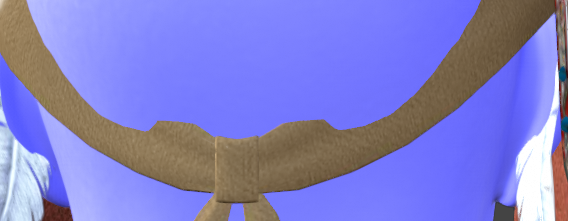
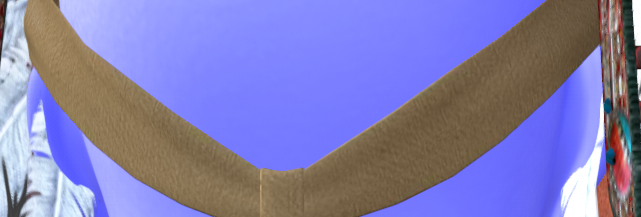
Now I fixed it, I would like to save the morph that I created, in order to use it every time I need, but when I tried, I received this error message:

So, I saved the War Bonnet as a new prop, by doing Save As -> figure/Prop Asset, but I observe something that I don't understand : when I load the new prop with G8M selected, it is automatically placed correctly, on the head of the character. When I load the prop without having G8M selected, I thought that it will be placed as the same position that the original War Bonnet from which I saved it. I mean, the original War Bonnet is placed a bit too high above the G8M, when I load it without having selected the character. But the new prop is placed on the ground.
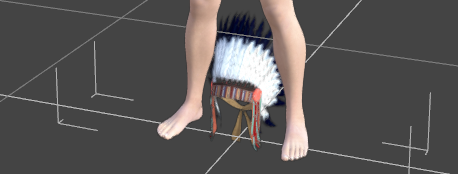
I made a short video to compare it: https://workupload.com/file/6epqjF3tnT2
I guess that it is not a problem, since the prop is correctly placed when I load it whith the G8M selected, but yet, I would like to understand how it works... Why, when the character is not selected, the new prop is not placed as the same position that the original one? Could you explain me how it works, please?
Thank you in advance!
Daz 3D is part of

Connect
DAZ Productions, Inc.
7533 S Center View Ct #4664
West Jordan, UT 84084Licensing Agreement | Terms of Service | Privacy Policy | EULA
© 2026 Daz Productions Inc. All Rights Reserved.