-
Thanks for the things DAZ and the developers have done right!
Yeah, thanks. I, on occasion, have messed with morph transfers, importing objects, the geometry editor, surfaces, the dFormer, and rigging/weightmapping clothing via the DAZ Studio transfer tools and they really do make it pretty easy. If one were to put an effort at all into it one could really do some nice work with such tools.
Is Texture Converter 2 dead?Map Transfer can convert the Millennium 4 textures, just the ability to convert the maps from Millennium 3, Miki 2.0 and Skye is lost.
and who might this Sprite (vendor) character beShe's quite lovely. I agree that face is possibly using a bit of a Amira's morph.
And just to add to Matt's list:
It's not that PAs are being deliberately stingy with that sort of information. :) If I use a character out of the box, I'll list it. If it's 50% Babina 8 and 25% BJ Amira and the rest just a bunch of tiny bits of other characters along with Zelara 8's skin, for example, it makes no sense to try and list all that. The customers probably wouldn't have a clue why all those characters were listed when you can't really see them in the artwork and all you'd get is confusion. If it was just, say, Babina wearing Zelara's textures, that might make sense to list, as people could probably tell that the morph was obviously Babina, and the skin is Zelara's if they looked at both product pages. As far as custom character morphs go, there really isn't anywhere to put a note like "Character used is a custom morph" or "Character not available for sale" on the forms when we submit our products. And yes, for outsourced promos we may not even know what was used. Plus there's the fact that not every custom-dialed character used for a promo is going to be so fabuluos that customers all want to know who she is. The few that do get that kind of attention (the Goldtassel promo girl, Alice, etc.) are presumably unavailable because they essentially serve as a form of branding for their creators' products.
ZDG random Daz Studio discoveries and questions.ok, after many cups of coffee, having a small chat with RiverSoft about some 'glitches' and considering how the script does not save the mistaken conversions for some reason, I have decided to stick with mu original thought of "zero out EVERYTHING" between conversions of figure sections.
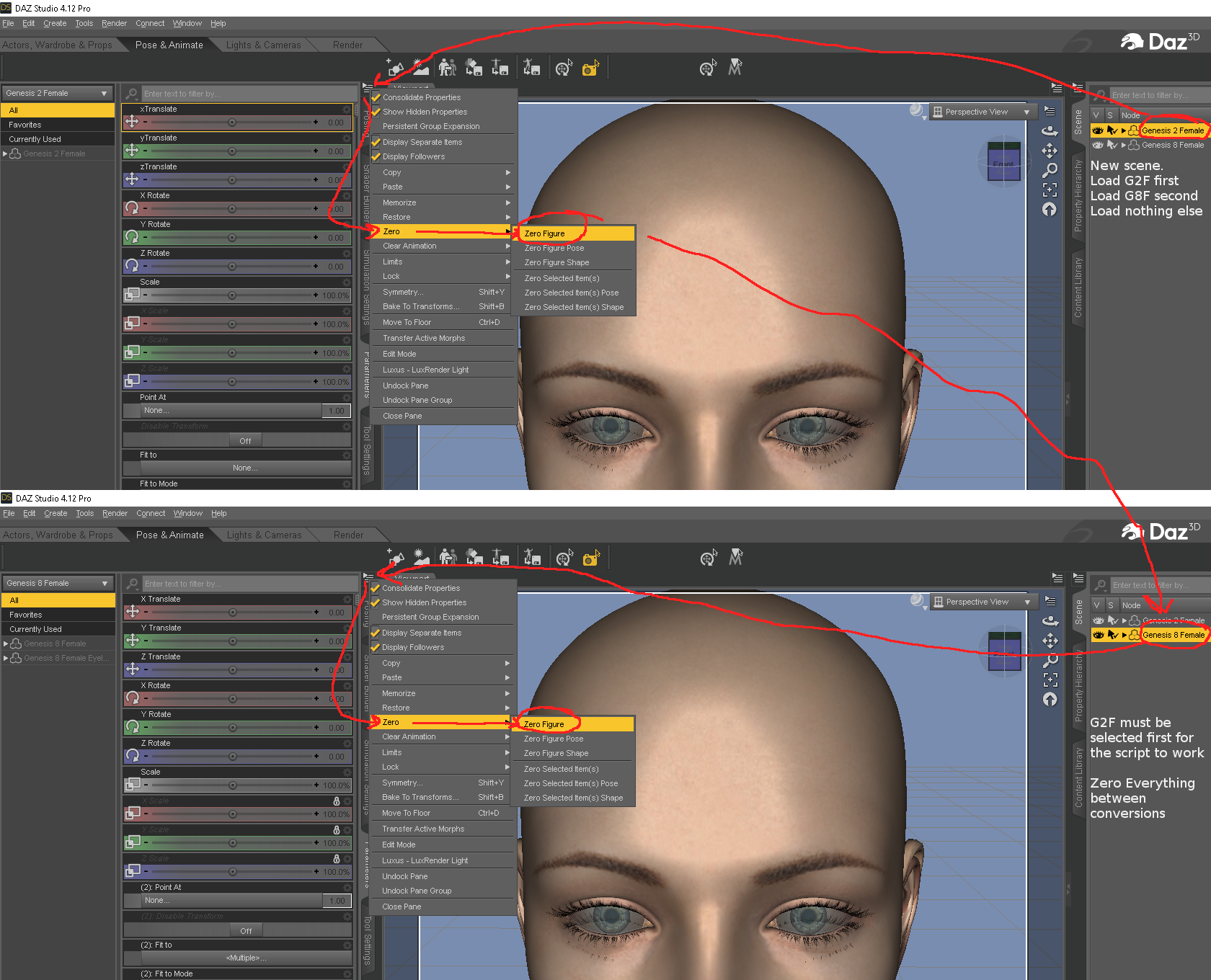
again, bone opacity apparently isn't saved, cuz clearing the scene is all it takes for the bone opacity dials to go back to normal.
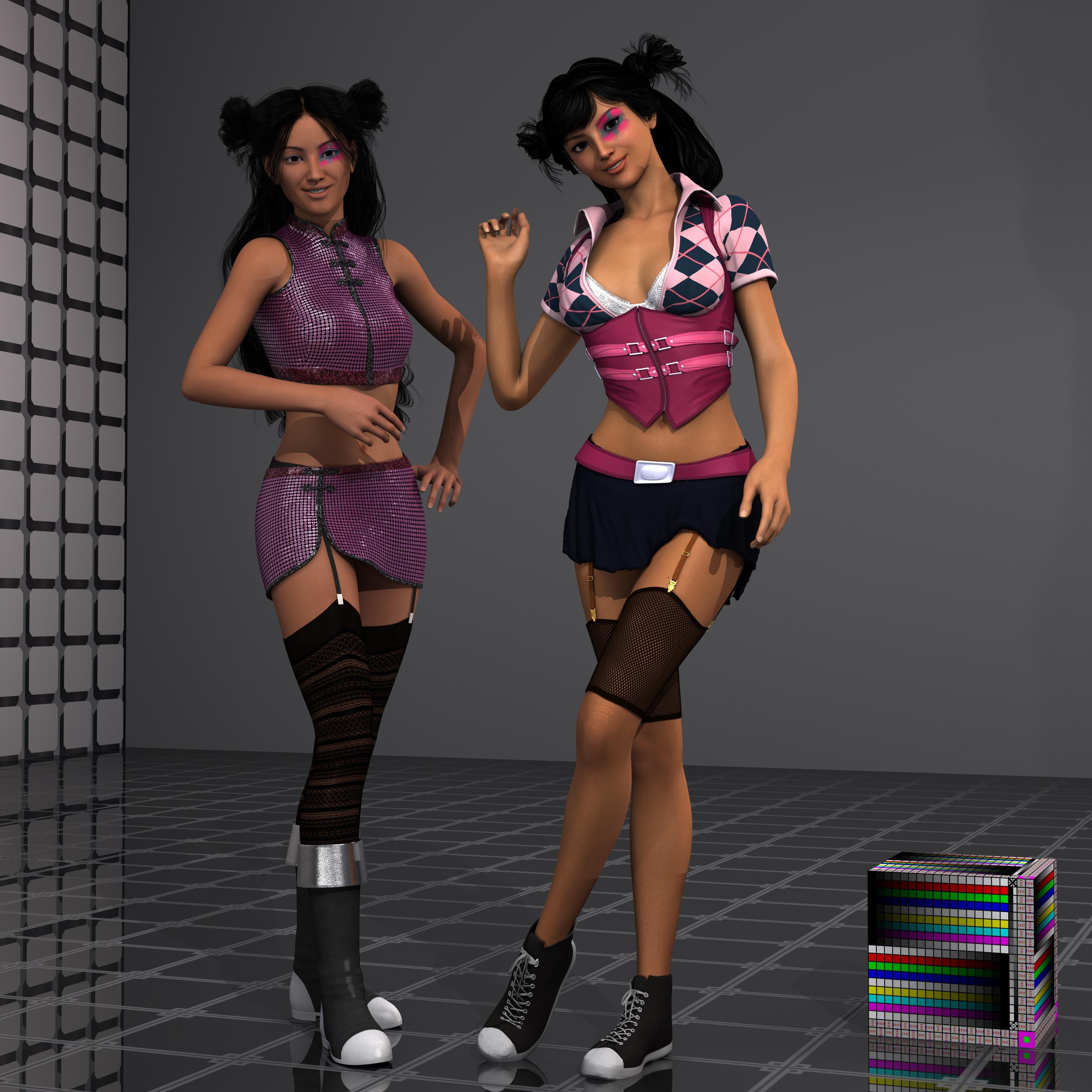
Right is the original GoGo for Mei Lin6 (Mei Lin swapped out with Aiko6 and Aiko8 respectively) wearing After School 2 with Discipline for After School 2 textures (I attempted to d-force the skirt, that went kind of eh), and The Jogger sneakers. Left is Gogo converted to gen8 using that Gen6-to-gen8 script, wearing the Pearl outfit from FWSA Mable auto flopped on Gen8 with the shinies shaders, Frolic stockings, and cool Amazing Morphing Boots.
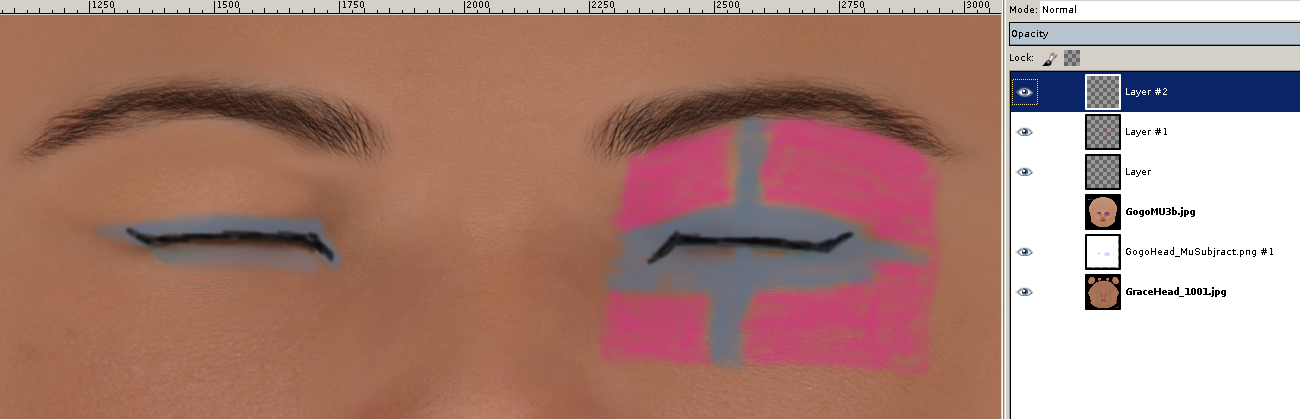
I will admit my attempt of mimicking Gogo's makeup in Gimp using CS Grace's maps wasn't the best given my chicken scratches skills, lol.
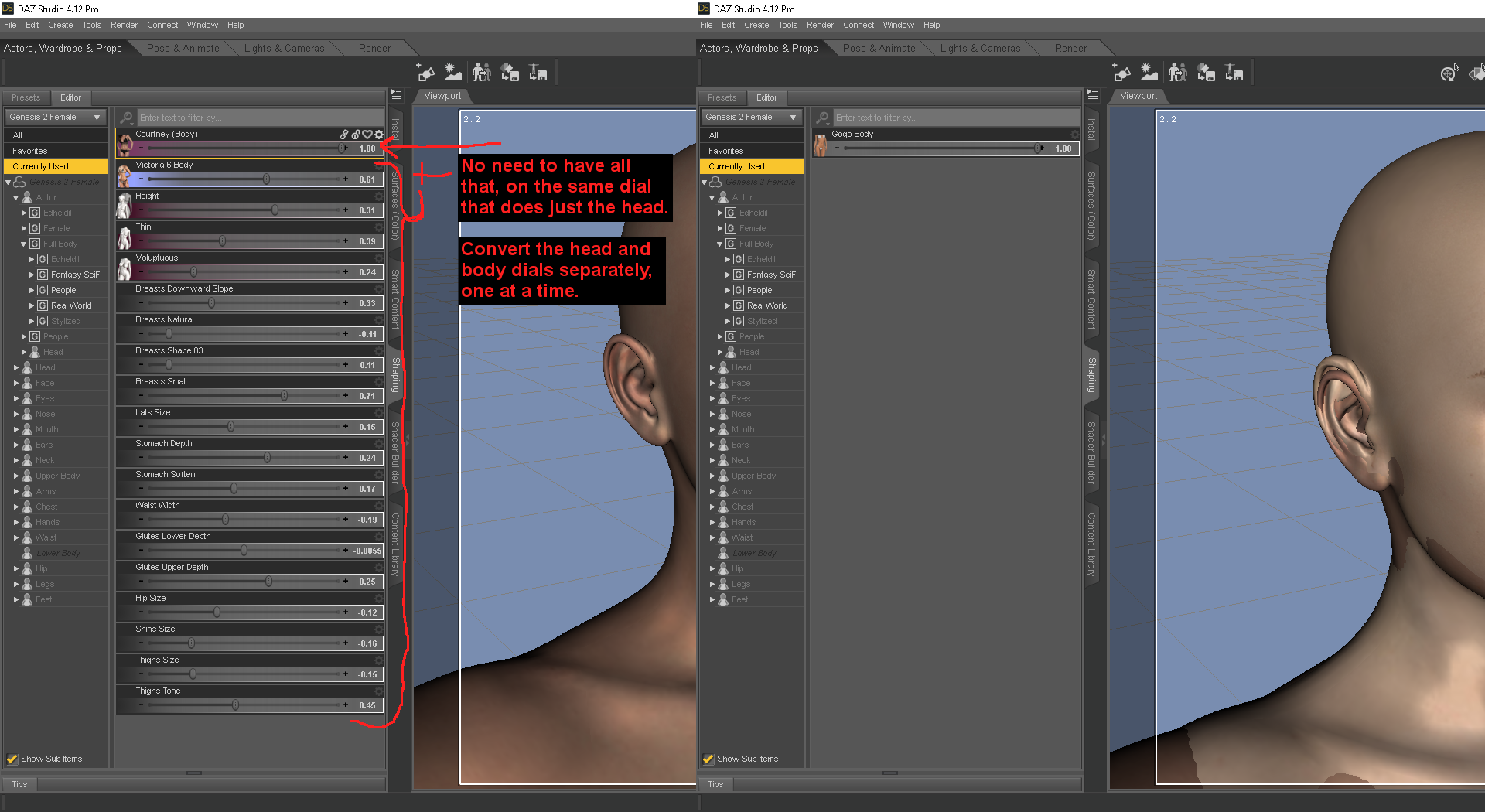
so, maps aside, I find it best to convert just the head dial, then zero EVERYTHING out and then convert the body. because often a head or body shape will use another dial, and the script ends up lumping that in with the control dial for the full figure rather than just the head or body, if its all converted at once. I also find it best to do the ear separately as well for elves/fae, with the understanding it will need some work in hexagon.
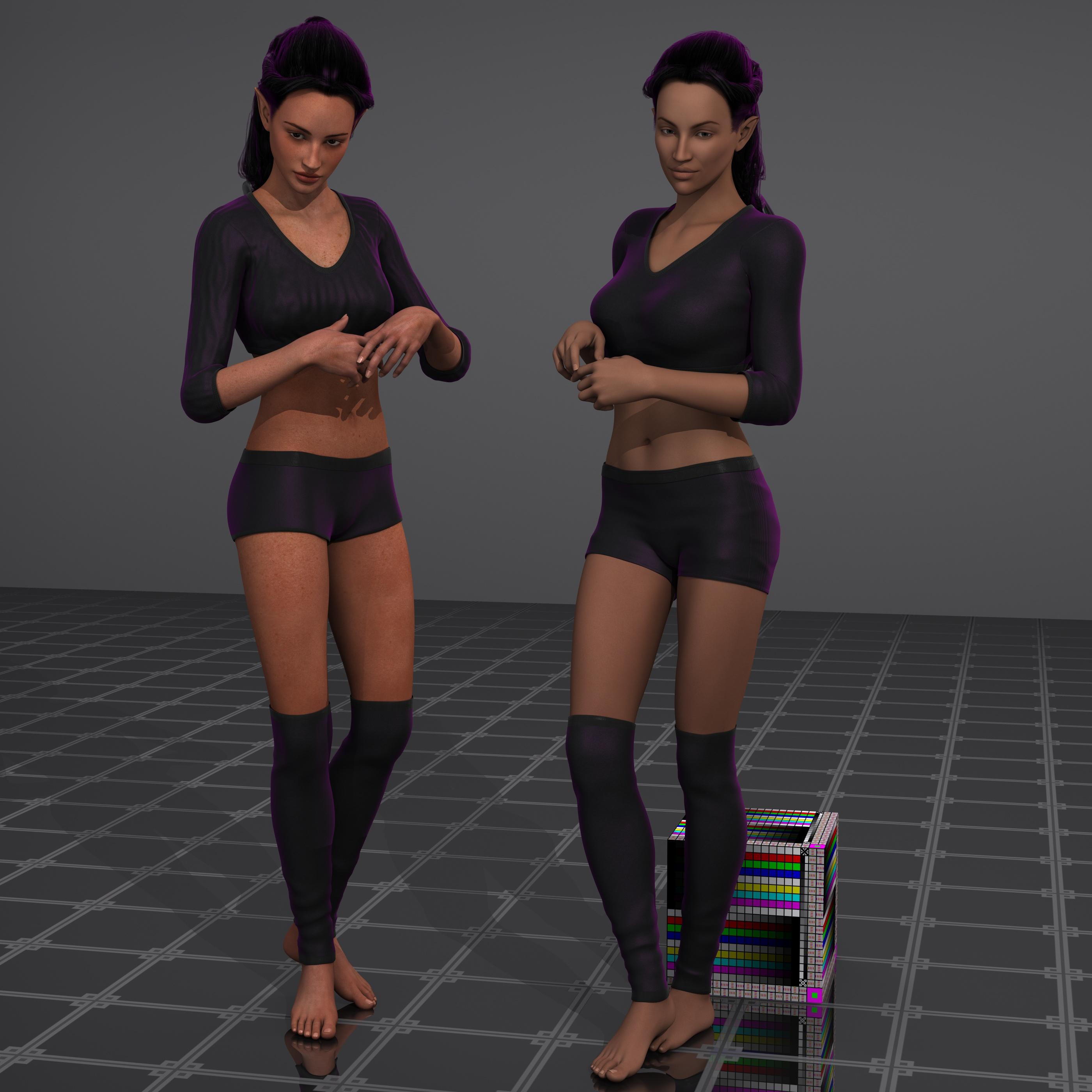
Left is the original FW Eve, right is the conversion using ADSI Sewa's maps. Not quite as similar to Eve's freckles I will admit, maybe some other maps would do better like Madeline or Autumn, maybe.
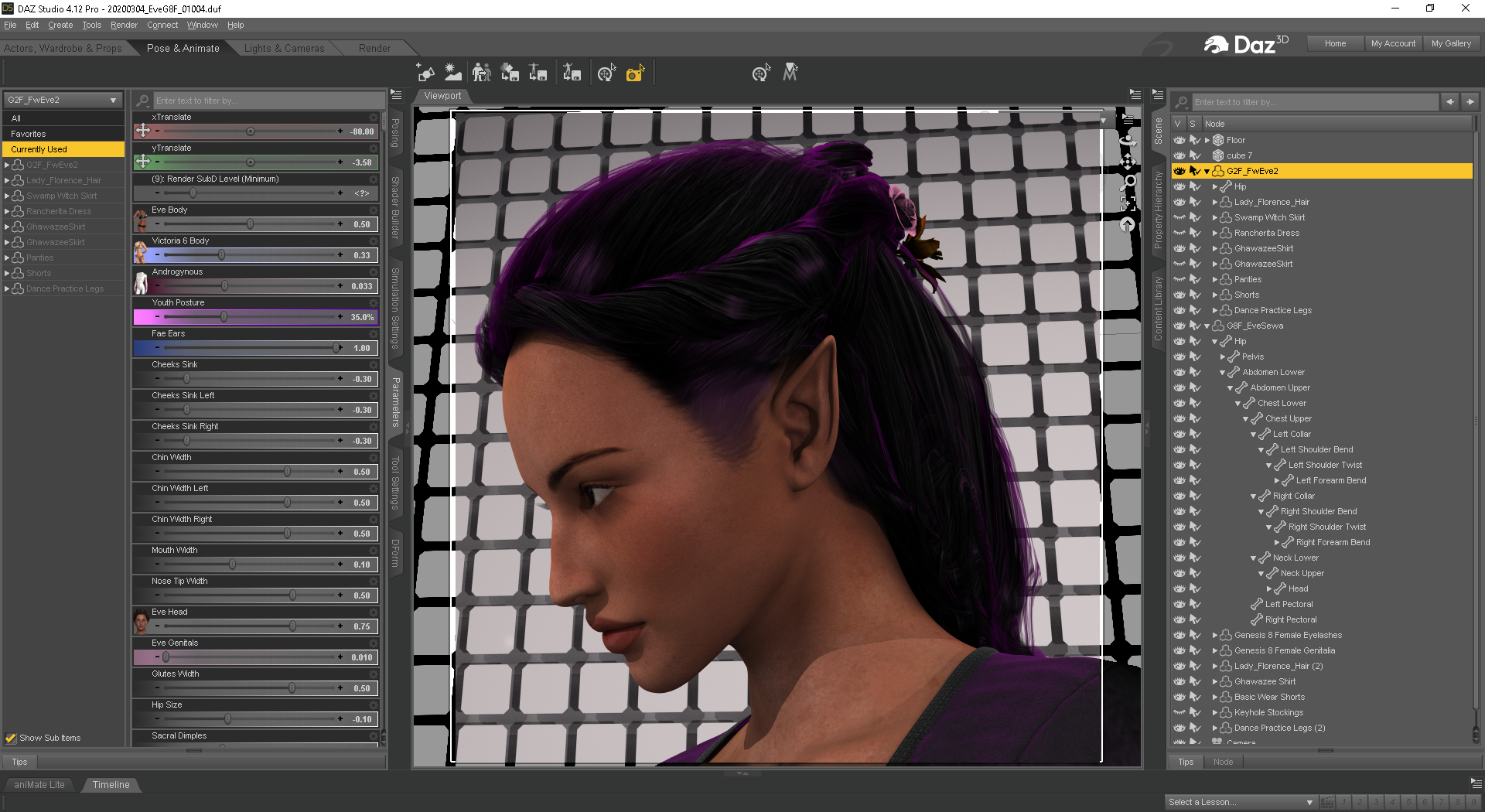
I kind of expected the ears to fail the instant I had seen just how defined the point was on them for FW Eve.
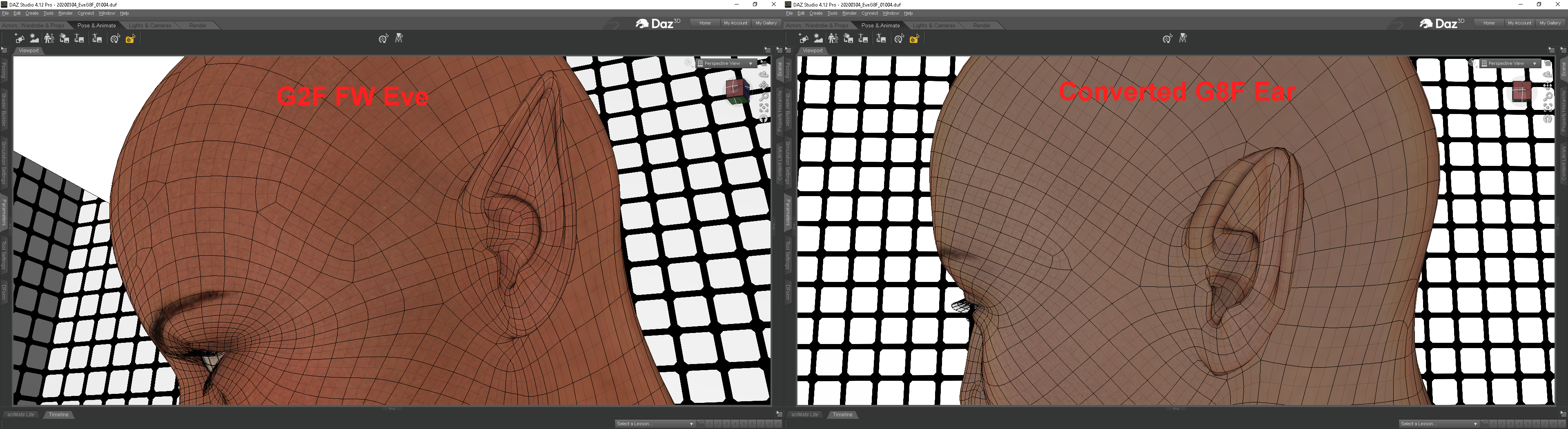
I could probably smooth that over in hex with an hour or so of poking at mesh points. Some time ago I had attempted the transfer utility thing to migrate the ear shape I had made from G3F over to G3M, and even that needed major work on effectively identical mesh, so I'm not surprised at all with elf ears transferring rather poorly. The rest of the conversion went really well I think.
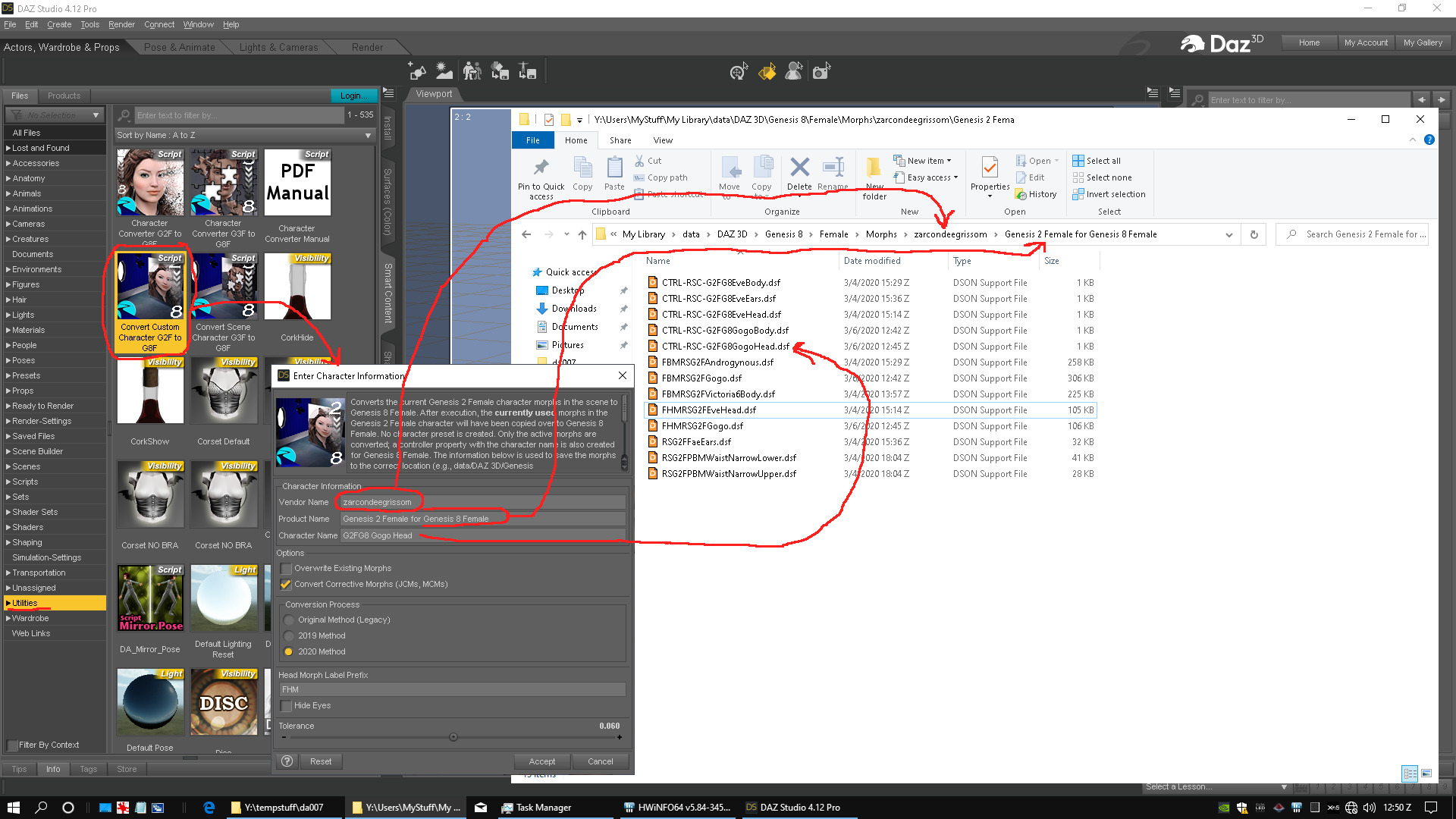
So in closing as I look for a cool outfit combo for DES Cassia. Watch RiverSoft's YT vid a couple of times, make backups of and be prepared to delete the converted DSF files and try a couple of times before running with a converted character for scenes and stuff.
and who might this Sprite (vendor) character beShe look like a BlueJaunte (vendor) character https://www.daz3d.com/bluejaunte
Could be a light morph of Amira https://www.daz3d.com/amira-hd--expressions-hd-for-genesis-8-female
Glitches with Aiko 3 characterLooks like it's not with character itself, but with Aiko morphs.
I loaded Aiko and started dial up same setting in paramaters tab instead of loading from character morph preset, and same distortions appear.
Most notable ones appear when i change these:
hipsmall
waitnarrow
tummyout 1
Though there are slight distortions around breasts/chest area too.So.... March Madness?Me, I've been taking advantage of the deep discounts on Zev0 and others to pick up morph resources
 . Same of the odd bits necessary to do promos and such. Of course, I went from 2 Pro bundles to (now) seven, but I've been picky-- If there's not at least half (and preferably more) of the kit I use (characters and poses excluded), I'm not going to bother.
Then again, I do a lot of sci-fi, with a some fantasy stuff as cosplay-type stuffs. The thing I'm forever short on is decent clothing and hair for the men. Most of the Pro bundles are mostly garbage in the clothing department, and hair is seriously hit-or-miss.
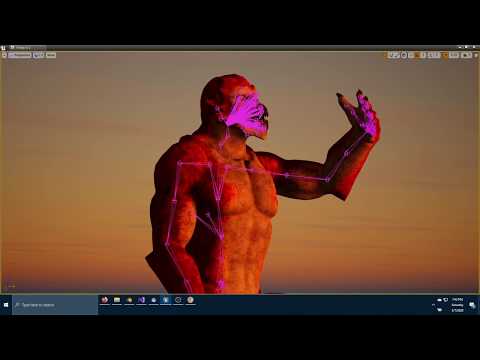
a using DAZ content in UE4 threadI've been experimenting with transitioning between two characters using morph targets, skeletal animations, and basic materials.
I also wanted to add my own animations on top of the animations handling character changes.
Here are my results so far going from Genesis 8 Basic Male to Genesis 8 Archdemon (Horns were removed for testing, I hope to animate them in later)
 SereneNight's Sci-Fi Fun Thread 2
I don't know if you've had a chance to take the rest of the Jonathan 8 bundle out for a test drive yet, but I have some time this weekend and I'm going through everything since I got burned on the Landon 8 bundle.
The Iron Wasp suit looked like fun, but when I place it on a default Michael 8 (a supported shape) and his arms are near his torso, the material on the inner arms and the torso sinks into the figure. I had to raise his arms almost to the point of being horizontal to the ground to get it to disappear. Morphs don't really address this issue. Yes, I can fix it in post. Yes, I can try to use morph grabber to fix it. But I wish this simply worked out of the box.
Now the promos with the weird arm/chest poses make sense.
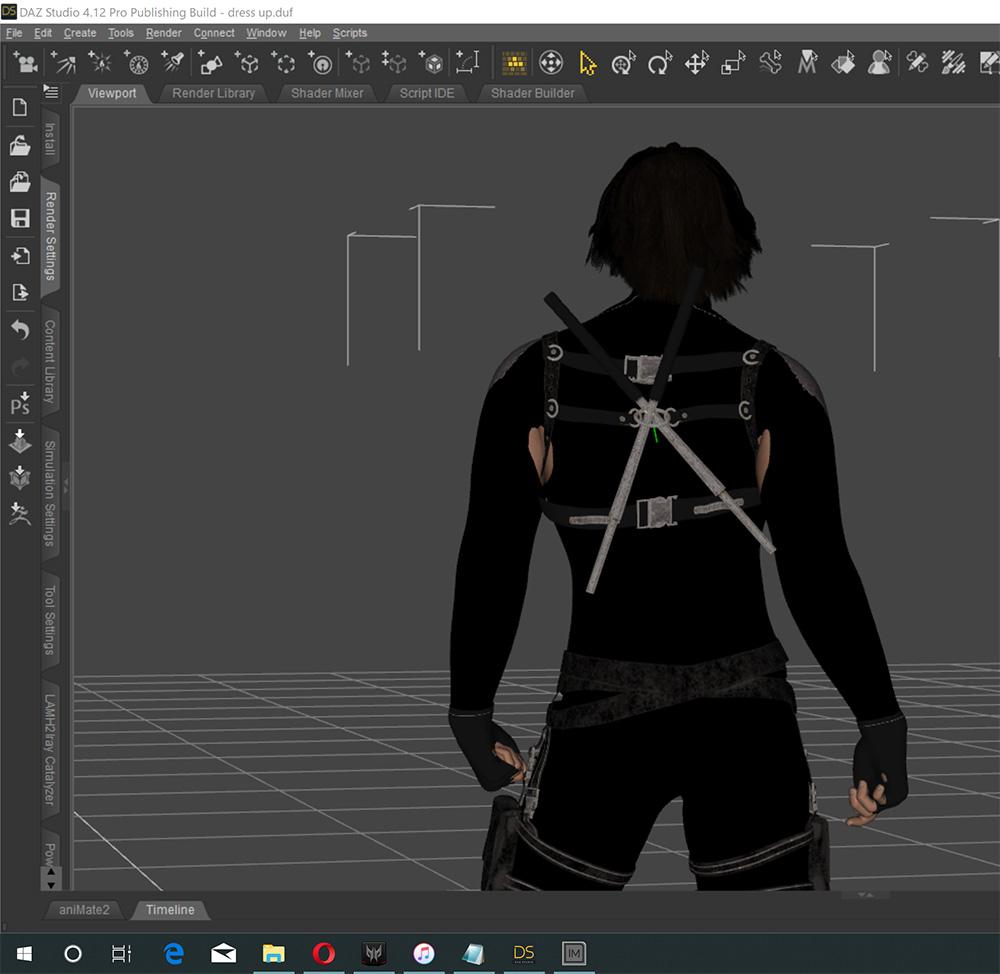
Armpits is the most common problem I have with G8M too.
SereneNight's Sci-Fi Fun Thread 2I don't know if you've had a chance to take the rest of the Jonathan 8 bundle out for a test drive yet, but I have some time this weekend and I'm going through everything since I got burned on the Landon 8 bundle.
The Iron Wasp suit looked like fun, but when I place it on a default Michael 8 (a supported shape) and his arms are near his torso, the material on the inner arms and the torso sinks into the figure. I had to raise his arms almost to the point of being horizontal to the ground to get it to disappear. Morphs don't really address this issue. Yes, I can fix it in post. Yes, I can try to use morph grabber to fix it. But I wish this simply worked out of the box.
Now the promos with the weird arm/chest poses make sense.
Iron Wasp top loads with smoothing off by default, for some reason. Mind, smoothing doesn't get rid of the issue completely at its default setting, but it helps. I had to turn smoothing and collision up to 9 and 13 respectively, and use the top's Expand All morph up to 33% to make the issue disappear. (On Kai. The scrawny guy in the bundle. OK, then.)
I wish I understood why quality is getting so incredibly slipshod. It's one thing to be in the end days/months of the generation (one can but assume) and be trying to shove as much stuff out the door as fast as possible, but letting quality slide this far is going to screw their reputation. About the only thing that's making this work is that they're almost the only place in town to get this stuff. And if they blow up their reputation shoving Genesis 8 stuff out, Genesis 9 is going to be a very hard sell whenever it comes out.
Also, kind of baffled as to how that is even possible.
Also, kind of baffled as to how that group of people produced an item with that issue. Bobbie25, Moonscape Graphics and Sade do better work than that normally.
SereneNight's Sci-Fi Fun Thread 2I don't know if you've had a chance to take the rest of the Jonathan 8 bundle out for a test drive yet, but I have some time this weekend and I'm going through everything since I got burned on the Landon 8 bundle.
The Iron Wasp suit looked like fun, but when I place it on a default Michael 8 (a supported shape) and his arms are near his torso, the material on the inner arms and the torso sinks into the figure. I had to raise his arms almost to the point of being horizontal to the ground to get it to disappear. Morphs don't really address this issue. Yes, I can fix it in post. Yes, I can try to use morph grabber to fix it. But I wish this simply worked out of the box.
Now the promos with the weird arm/chest poses make sense.
Install Manager vs Daz ConnectOne potential advantage of Connect is that for updates it downloads only the updated files, not the whole Zip as DIM does. Morph expansions for some content (Victoria 4/Michael 4/Kids 4/SubDragon) must currently be installed through DIM, as must plug-ins, some shaders and some scripts (anything that places files in the application folder). Both give the choice of which content directory to use (organising content after install is better handled with links or through categorsation). Connect can isntall needed files (that it knows you own) on scene load, if some products used are not installed.
Yet another Pro-Bundle this week...?I kinda blame the 80's action hero cycle followed by the post Batman superhero phase for that. Arnold in his early films and Stallone's Rambo look were ridiculously over the top, but when they started scultpting the actors body's entirely with what are essentially prosthetic body suits and then digitally enhancing that, realistic perceptions of what male bodies should look like went off the rails. Everyone talks about the horrible things that actresses and models do to stay in camera-ready shape, but have you ever heard Hugh Jackman talking about the training reginmen he has to endure every time he plays Wolverine? It's nuts.
Yes. It's probably heavily influenced by that type of thing. To be honest if they just fixed the strangely short arms and bizarre trapezius muscles it wouldn't be quite so bizarre and unnatural.
It's also weird how theres all these ridiculously unnatural muscled guys, but not a single "8" DAZ woman with "significatly larger than normal" or "surgically enhanced" breasts. Though everyone would probably wildly protest about it.
Though slightly mean, all the bizarre muscled pro bundles should soo have a "roid" morph for the anatomical elements for "realism"...
 XTransfer Module 1- Genesis 3 to Genesis 8 Morph Converter (Commercial)
River did mentioned G2 is very different than G3. Plus pre-update XT conflicts with Morph Rigger, so any Gen X morph couldn't be fixed. In contrast, Gen X didn't get a G3 add-on until almost the Iray Update and XT would need another overhaul just for older gen, that's time not many artists have.
I'm not disputing what you said, but the reason Zev0 gave earlier in the thread for not making XTransfer for earlier generations is that GenX already fills that gap. I don't know that XTransfer for G2 would be an overhaul of XT as much as a separate product; that's for Zev0 to figure out if they decide to take it on. I was only appealing to them to do so. As far as the pre-update conflicts with GenX morphs, wouldn't that be a moot point given that XTransfer for earlier generations would supplant the need to use GenX? Even if not, it's something that Zev0 now has experience tackling, so even if the solution weren't cut-and-paste, it would probably be a lot easier to solve now.
Well, I agree. I'd even like waht DimensionX originally did, which was to transfer morphs or figures as far back as David 3 and Michael4 to Genesis 1. I'd like to be able to take those "originals" and move them into Genesis 8. I bought the transfer from DimiensionX for Genesis 2, but was not happy with the results: they were getting away from D3 and M4. When I saw what was happening to some people's figures moving them from Genesis 2 to Genesis 3, I stopped there. I did not buy the Genesis 3 product.
XTransfer Module 1- Genesis 3 to Genesis 8 Morph Converter (Commercial)I've managed to bolix G8M and am going to need some help digging my way out of the crater. Suggestions are being asked for.
Starting at the beginning;
I saved one of my G3M dial-spins as a character preset. I didn't go the extra mile of saving it as a dial, just as a preset, since my workflow doesn't require a dial. Now, there's already a sting in the tail here. The dial-spin has some fairly major problems. It looks all right and can be posed without issue, but it doesn't take expressions well. It's a Toon character put together from a number of resources (some of them freebies) and a good 55% of the expressions one tries to apply cause the nose and mouth to warp completely out of shape. I've had to work around this problem with the project the character is for. Enough other expressions can be used for it to be workable, if not optimal.
I daresay I was off in cloud-cuckooland hoping that porting it to G8M would reduce this problem. It didn't. In fact, if anyting, it's worse. So I deleted the result.
Now G8M loads as this dial-spin. *With* the expression glitch. I can zero out the figure shape and get it back to looking like G8M. But the expression glitch remains. I can see that reinstalling the G8M Starter Essentials is on the agenda. But I'm not going to count on this fixing the problem.
Selecting the figure and going to 'Currently Used' doesn't show any of the facial morphs which would affect this. Particularly not once the shape has been zeroed out.
I went into the data file trying to find this morph so I could delete it. However, since it isn't a *named* morph on a dial, I'm not sure I can find it. I *thought* I could see where it was, and moved the suspected folders out of the collection. But it still loads as the Toon.
The expressions now *seem* to work once the figure has been zeroed out, however. But I would just as soon be able to load the base directly.
ETA: TimeMachine is your friend. I found the date that I did the port, and went into TimeMachine back to the day before, and restored both the G8M base morphs and the XTransfer folder.
G8M now loads as himself. He still came in with a half a dozen rndom navel morphs which was odd. So I wnet back to the data folder and got rid of those. I think I've got it as fixed as is likely to happen now. But really!
Darwins' Schtuff Pt DeuxAnd I just finished up the morph pack and sent it on to vwrangler who tested out the first set!
Face TransferBy all my pictures, I get why I get 'face transfer failed to generate try a different source image' What's wrong, notting work. This isn't funny !
Just tried out face transfer free and I was getting the same message for almost every photo. The solution was to rename the source image, and remove all special characters from filename (eg. spaces, dashes, accented letters, etc.), just give it a simple very short name. Btw. Headshop has the same problem, it also cannot process long special filenames. Also make sure the path either does not contain special characters. After this all photos were accepted.
Teenage Mutant Ninja Turtle WIPI've been on a bit of a TMNT kick lately, so I decided on a whim to see if I could construct a decent semblance of a hero in a half-shell in Poser. The best morph and texture set I could find was Turtle Power by Joe Quick on ShareCG. Since it was for G3M, I tried for a couple of days to convert it to G8F, for which I have a male base morph. The main reason is that I have many more morphs available for G8F that I can use to customize and refine the shape. In particular, the snout needed to be larger and rounder if it was to come at least within a stone's throw of the classic 1990s look. Alas, no matter what I tried, the morph didn't quite transfer properly. There was always some weird mesh issues between the fingers and toes. What I ended up doing was using some new tricks I'd learned with Daz's Transfer Utility to apply G8F morphs to a G3M mesh. Then, for some reason, morphs that worked perfectly well in DS would mysteriously have no effect in Poser, even though all previously installed morphs worked just fine in both. I could recreate the morphs directly in Poser by loading the relevant OBJs, but that made it less likely that DSON woiuld be able to fit any clothing to the figure. I also realized that I couldn't subdivide G3M in Poser like I could G8 for some reason. The ultimate solution was to shape and pose the character in DS, export the main figure and the shell as OBJs, assemble the two in Poser, apply SuperFly materials, and render. This is the result of that process.
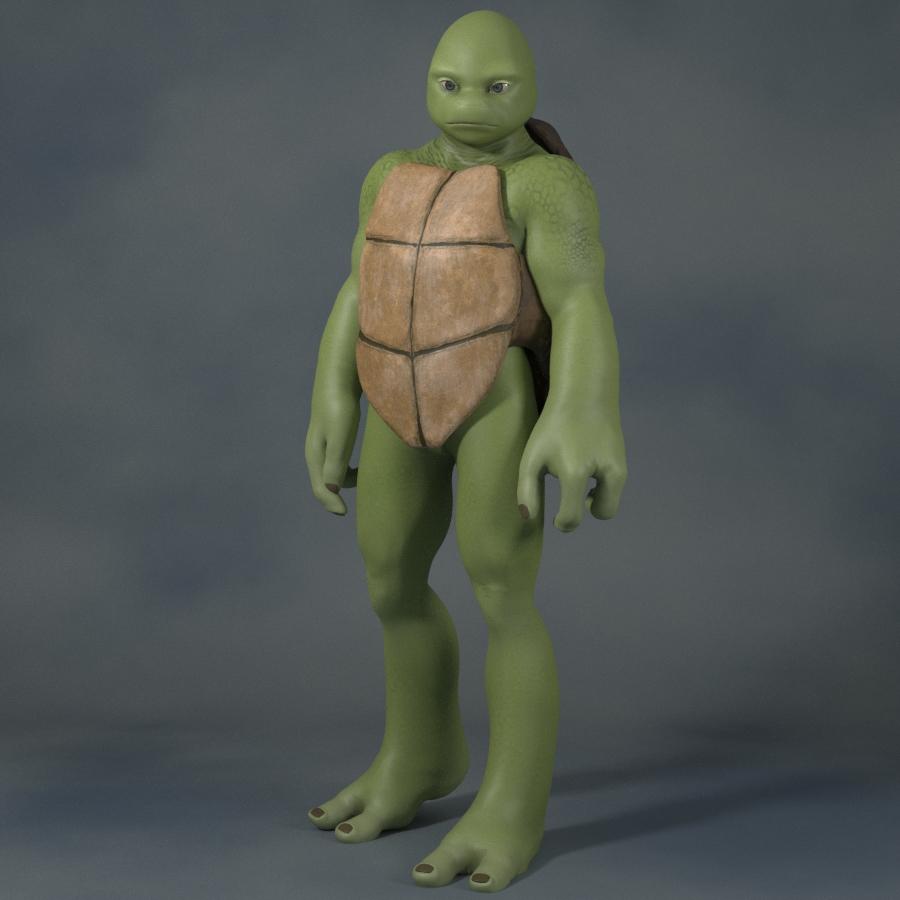
In addition to sculpting the snout, I also shrank and re-angled the eyes somewhat, added some more toned muscle, made the limbs a bit more evenly proportioned, and enlarged the character to a more human-like height than the original morph. Personally, I see echoes of the 2012 Nickelodeon CGI series in the resulting body shape, which I actually like in more subtle dosage, despite that look being my least favorite in its full form. The head is, like I said, my current best attempt to push more in the direction of the 1990 live-action film.
As you might be able to guess, this is just the preliminary work. I'll shortly be refining the textures/shaders and adding some clothing/gear. If anyone knows of any useful accessories (e.g. Japanese-style weapons, diagonal belts, martial-artsy poses), expecially freebies, please don't hesitate to share the links here. I'm particularly unsure of how I'm going to create the famous colored eye mask (or bandana, or whatever it's called). My best idea right now is to convert a Genesis 1 body suit and make all but the relevant zones invisible, but then there's the matter of the knot in the back.
As always, I welcome any comments, be they positive or constructively critical.
Exaggerated ExpressionI don't see this behavior. It is likely that zon-zero morphs have been saved. Check used values when you load a character, then load the expression.
Select you character, go to the parameters tab and click "currently used". This will likely hlep identify the problem although there are cases where the problematic morph slider may be hidden.
JCM Linear TransitionI've tried googling for this, but it seems my googlefu is failing me.
I'm setting up JCMs for thigh bend -90. I've got the thigh XRotate (Bend) in the Controllers > 1st Stage (Add/Subtract) with a Scalar of -0.016666666. There is a controller in 2nd Stage (Multiply/Divide) to tie the morph to a specific character.
This ensures the JCM is at max at no less than -90deg. Ideally I want the morph at 50% when the rotation is at -45deg. However, the morph is actually at 75%. There's clearly something here I don't fully understand about this.
Can anyone shed any light?
Thanks in advance!
Daz 3D is part of

Connect
DAZ Productions, Inc.
7533 S Center View Ct #4664
West Jordan, UT 84084Licensing Agreement | Terms of Service | Privacy Policy | EULA
© 2026 Daz Productions Inc. All Rights Reserved.