-
Problem with the Daz Studio timeline when switching to animate
I didn't have a lot of time to play around with it last night, I will later on today, but I couldn't move the rig in Blender when I tried on my first attempt. I figured at that point I would just get the animation exactly as I wanted it in Daz, save that animation as a pose, and then just do the lighting and final renders in Blender. But I will check this afternoon after I get done working if the morph can be moved and get back to you, and I'll also try to animate a morph!
Fit Control causes (again) heavy problemsNo I did open the studio and added fit control to morph a shirt a bit up and then freeeze...
I also had it one time, that fit control made my savefile 700mb big, normal is 20-40mb
Celebrity Look-a-Likes for 3D figures Part 2Hello are these done with the face transfer addon or are they sculpted in blender?
Wacky Modelling ~ In Carrara ~A new model with procedural shaders: Velouté, Enhance C

[It's] great to see these in practice.
Thank you Headwax for your comment. I make it a point to do everything in Carrara if I can; my eyeball is modelled and textured using Carrara and third-party plugins. The model isn't even UV mapped and this is what allows the Iris texture to animate along with the morph applied to the SubD model.Downgraded to Genesis 3 from Genesis 8By the way, it seems perfectly obvious—now—that in my request for "a properly sequenced, step-by-step guide to exactly how one arrives at a 'properly optimized G8 figure,' using as little in the way of unexplained abbreviated jargon as humanly possible," I grossly omitted to say:
If you're just going to tell me, "go do this and then do that and then do this other thing," without STEP-BY-STEP, CLEAR INSTRUCTIONS ON WHERE AND HOW TO DO each thing, please, please, please don't waste your valuable time. It really is a total waste of time and typing, and I am sure you have much better and more productive ways to spend your time.
Please forgive my oversight in not stating that clearly before in my request.
As mentioned, G8 isn't terribly different than G3 in terms of the geometry. If you want a speedier and more stable G8 figure,
- first look at your log to see if you are throwing any errors and deinstall, reinstall what is broken (your log is located at Daz Studio Main Menu >Help>Troubleshooting>View Log.... you will see errors but hopefully not a lot of them and the error will have the name of the errant file or morph},
- next, reduce the size of your figure's maps to match the size of your speediest G3 figure (The readme for the product will show you the path to the textures folder or you should be able to search it on your computer, and use your favorite image editor to reduce the file size...)
- next, you can squeeze a tiny bit of speed by moving characters/morphs to a different runtime that you can switch off in Content Manager (Daz Studio> Preferences> Content Manager> Daz Studio Content folders),
- and finally, match the SubD to your G3 figures (a SubD of 2 is much less resource hungry than a SubD of 3 or 4 Go to Daz Studio> Parameter Tab > Mesh Resolution to adjust SubD i.e. subdivision i.e. mesh resolution each number 2 to 3 makes the figure 10X more complex).
DS 4.12 Loading a new character does not reset all morphs. Why?Here are the preset morphs that are loaded with the G8F basic female: Scale: 92%, SC Lucy Body: 100%, Teen Josie Body: 50%, Eyelashes Curl: 100%, Eyelashes length lower: 100%, Eyelashes length upper: 100%, Head propagating scale:1.4%, SC Lucy head: 100%, Teen Josie head: 50%, Navel 100%.
https://www.daz3d.com/sc-lucy-for-teen-josie-8
In a fresh scene, load the G8F figure. If the above mentioned morphs {for Lucy and Josie} are listed as being used, try downloading and installing a fresh copy of Lucy for Teen Josie and see if that fixes the problem. If not, then a CS ticket needs to be filed to have the product fixed.
In the meantime, close D/S - search in the data folder for G8F ... Morphs ... Second Circle? ... find the morph for Lucy. One can use 7zip to decrypt it if necessary. Find the line wherein mention is made of the morphs [one for Lucy and one for Josie] having a value of "1" or anything aside from "0" -- make it a "0" and save the file.
Then when you open D/S and load G8F, those morphs should not be already applied.
DS 4.12 Loading a new character does not reset all morphs. Why?Thank you, Leana. You are being most helpful. But please bear with me; I still don't completely get it. It makes sense that when you load a figure that does not have a particular morph attached to it -- e.g. the G8 basic female -- the parameter's default will be set by the studio program. But that does mean that those defaults are in the program itself or a database it loads automatically, doesn't it. Where else could they come from? So my question becomes: If it does not happen when I save a figure or close the program, how do I reset those non-zero defaults to zero? I cannot do it without a figure being loaded because the parameters pane is empty. Is there a master list of default parameters that can be set without a figure being loaded? or perhaps even while ds studio is not running?
Again, Leana thank you for your generous help. I greatly appreciate it!
Alan
Can DAZ 3D Export to C4D@Singular3D Is "Genesis 3 in Daz Studio and the transfer to Cinema 4D" your document?
Transfer Utility G3F to G8FSorry to write another post about this but I thought that if I edit my post above no one will see that and hopefully reply if I just edit. I managed to transfer my Lara from G8 to G3 using the tutorial linked to above in reverse, using G8 every time it says G3 and so on. I set the resolution to base and the subdivision to 0 to both figures. It worked but the arms is really distorted:
 .
.I have adjusted rigging to shape and used erc freeze. Please is there anyone who can help me get my Lara transfered without this error? I can't use her in anything else than a head portrait without putting her in really bulky jacket or something
 . 3D Art Freebie Challenge-March 2020-"March Winds" -Main Thread Only
Also, I note that using any of the base models (Genesis - Genesis 8) are considered no count items, however I saw another entrant in this content list a few other things as "no count" items. May I ask what qualifies something as a no-count item? Thank you.
No counts (as I understand it):
- All Genesis base figures, Pre-Genesis base figures (Michael 3 & 4, Victoria 3 & 4, The Kids 4, Aiko 3, Hiro 3...)
- Items that come with the base program (eg the Shadow Thief Outfit, Aldora Hair, etc)
- Items that were originally free but are now unavailable (such as most PA XMas Freebies)
- Basic Morph Packs:
M4 Shapes++, V4 Shapes++
Genesis Evolution Body, Genesis Evolution Head
G2M Body, G2M Head, G2F Body, G2F Head
G3M Body, G3M Head, G3F Body, G3F Head
G8M Body, G8M Head, G8F Body, G8F HeadTransfer Utility G3F to G8FI've found the transfer utility is not so good for FBMs, as it's messing with the hands and arms.
This is an alternative, though slower method, with which I've had pretty good results. Tutorial and helper scene/morphs included.
Is there a version of this excellent tutorial and helper scene/morphs for transfering character morphs from G8 to G3? I have a character I made that I want to transfer to G3. I have more content for G3 so I really would love to have her for G3 also. Thanks in advance for any help with this!

Edit: I just tried the tutorial above with the helper scene, but I did everything reveresed, when it said G3 I choose G8. When I try morphloader pro I get this error: Warning: Geometry did not match, failed to create morph. I got the same error with my previous try with SickleYield's tutorial here:https://www.deviantart.com/sickleyield/journal/Tutorial-Transferring-Character-Morphs-G1G2G3G8-409437916. The character I'm trying to transfer is one of my own Lara characters made with different morphs.
DS 4.12 Loading a new character does not reset all morphs. Why?Thank you for your response, Leana. Do you mean that when I save a scene that includes morphed figures and then close the programs those morphs are supposed to stick around in Daz studio, to be applied in the next scene I create? They do, obviously, and I do not see how that could be anything but a bug in Studio. If I understand what you are saying, to avoid having residual morphs when I finish working on a scene and save it, then I need to zero out every morph in the scene and then quit without saving the scene. That is not a good work flow for sure.
That's not what I meant, morphs values don't "stick" when you save a scene.
When you load the base G8F or any saved figure, DS will read the list of G8F morphs you have to build the dials available in the parameters tab, then for each morph it will look in the .duf file you loaded to see if there's a reference to that morph with a specific value listed: if there's one, it will apply it, if not it will apply the default value for that morph.
For example, the default value for the "Eyelashes Length Lower" morph is 100%:
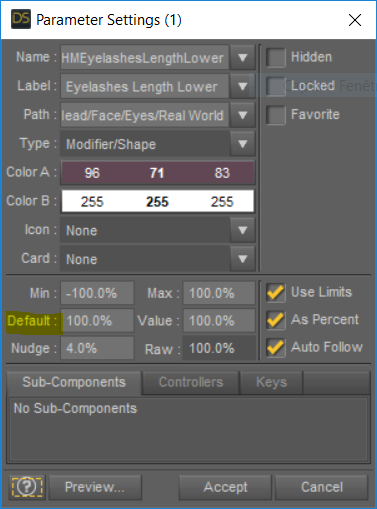
So unless the .duf file you load explicitely lists a different value for that morph, it will automatically be set to 100% when the figure is loaded. Most morphs have a default value of 0, so they will be set to 0 unless a specific value is included in the .duf file you load.
That behavior is normal and allows DS to handle morphs which were installed after the .duf file was created: the .duf file can't include a value for the new morph as it didn't exist at the time it was saved, so DS uses the default value for that morph when loading your file.
The problem you face is that some morphs you installed (usually from a character) have a default value which should be 0 but isn't. The .duf files for the base or from your saved scenes don't include values for that particular morph, so the default value is used, and so it loads automatically every time.
What needs to be fixed is not the base G8F or your scene, which don't include a value for that morph, it's the morph asset with the non-zero default value. That's why I said we need to find out which morph that is.
Novica & Forum Members Tips & Product Reviews Pt 12When I first started using DS, it was a previous version that had a 'rabbit' that gave you an option for various levels of speed or something. So you could do a quick render to test the scene, and evaluate it. Then two or three weeks later, that version was updated and it was gone. I was totally lost. Dropped DS, and then a month or so later got back into it.
It was easier to see on my iMac but had to switch to a Win10 computer built for 4.10 as my nVidia 660 card in the iMac just couldn't handle the improvements in DS. And I had three bad crashes of my iMac as it fought with nVidia updates to the driver.
I spot render often but what got me on the above render was what I thought was part of the tunic, was the shirt at the shoulders coming through. It took a bit to find the right adjustment morph to fix that. Then render again. The Shieldmaiden series is one that I would dearly love to see updated officially for G3F and G8F and later for G9 when it comes out. The quality of work that is in all those texture sets are incredible.
I think what you can do instead of the old fast render (sorry I missed that, sounds cool) is to render with like 100-300 samples and denoiser on. It won't look good enough for final result but it should give you a good idea of what the final render will look like.
I spot render (spot render to a new window, save as png) very often (either because of a mistake or to adjust shaders, morphs, expression, pose...) and then use a script in Photoshop (CS6) to load the render and its spot renders into a stack (file/script/load files into stack). That way it is aligned.
If you spot render to a new window and save that as a .png the spot-image will be exactly in the right place with no need for any chicanery
Damn, I didn't know you can do a spot render to a new window. And it follows the same settings of the normal render?
I could actually give it a try right now as I am not fully satisfied with the current expression :).
Yes, indeed - need to fire up the Tools tab (after picking Spot Render) and changing option to New window (need to do that every session as it is not remembered)
That actually works for me as I mostly do spot renders that I don't want in a new window, so only activating it when I need it is fine in this case.
Novica & Forum Members Tips & Product Reviews Pt 12When I first started using DS, it was a previous version that had a 'rabbit' that gave you an option for various levels of speed or something. So you could do a quick render to test the scene, and evaluate it. Then two or three weeks later, that version was updated and it was gone. I was totally lost. Dropped DS, and then a month or so later got back into it.
It was easier to see on my iMac but had to switch to a Win10 computer built for 4.10 as my nVidia 660 card in the iMac just couldn't handle the improvements in DS. And I had three bad crashes of my iMac as it fought with nVidia updates to the driver.
I spot render often but what got me on the above render was what I thought was part of the tunic, was the shirt at the shoulders coming through. It took a bit to find the right adjustment morph to fix that. Then render again. The Shieldmaiden series is one that I would dearly love to see updated officially for G3F and G8F and later for G9 when it comes out. The quality of work that is in all those texture sets are incredible.
Darwins' Schtuff Pt Deux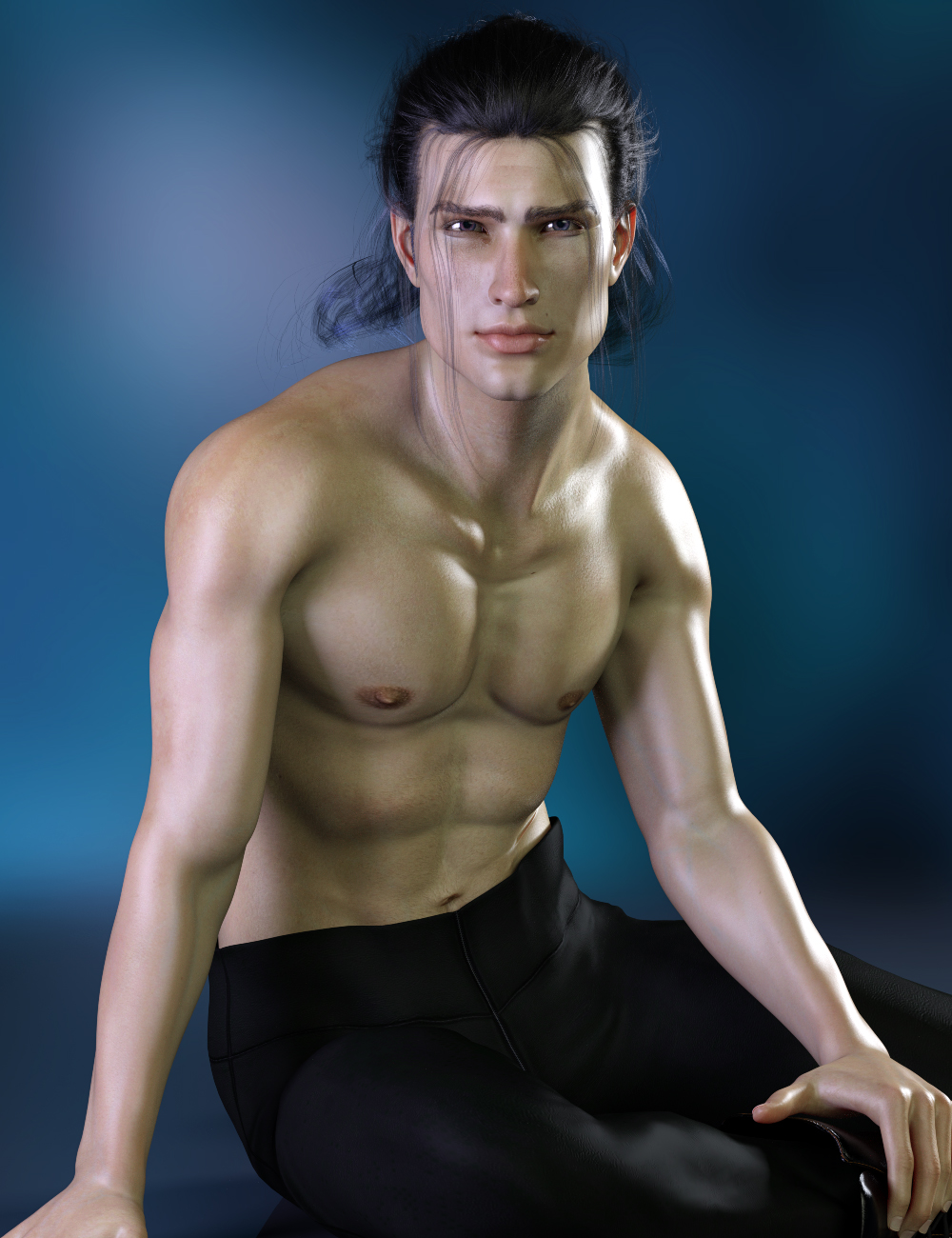
Tester render of the body/facial morph preset.
He's wearing Stryker's skin atm; will be using a MR base and photo references for this one, so it'll be a process before I can show a final skin material, but I wanna post a few wip's with tips along the way for the people that have asked me how I do my sets. Just 'coz. ;)
Porting PyCarrara to the MacI very much appreciate your offer. In return I offer your my help in building/compiling on the Mac. (HDRLightDome ?)For now the functionality of the mac version is the same as the windows version, except for the change in installation. It is my intension to release PyCarrara with its current set of functionality. And at a later time do the Python3 upgrade or even accept a request for change.
Thank you also for the offer.
I'll upload the HDRLightDome source to the CTS GitHub.
I dream to add 3 functionnalities to PyCarrara in order to make it a full feature script engine for Carrara:
- GUI. It would be very usefull if the script could open dialogs to interact with the users. I didn't have much succes using Python Libraries (crashing Carrara at the end of the script...).
- Primitive : It would be nice to be able to create or modify vertex primitives, create morph...
- Renderer : It would be really great to use Python to integrate external renderers. Thanks to Blender, most of major renderers have a Python interface.
Precious Unicorn UpdateIts for the pose sets, which included morph and position data when they should not have.
Pelt Style Capes / Cloaksyou could dforce a strand furred animal around a person
well do the animal first to create a morph maybe then apply the fur
Superheroes Rebooted - Renders Assemble
Oh yeah, those guys.
Three years later, here's some accessories I made three years ago: https://sharecg.com/v/95368/view/21/DAZ-Studio/TrtlDd-Accessories
There's stuff for Donnie and Leo. You might have to hit up the old g1 version for the weapons. You'll need to assign a few of the textures by hand. You can always save the MAT preset when you're done though.
Thanks, Joe! These look great! I may be doing something wrong though. At first, Daz seemed to have trouble finding the geometry,and while I've at least stopped getting an error message, this is what I get when I load the Bandit Mask. I seem to get similar results with the L Straps.
By the way, is there any chance you might be willing to release a G8M version? I've tried converting the morph myself, and it almost works perfectly, except that I get some very weird mesh explosions between the fingers and toes. Especially between the fingers, I get two long and very thin rods of mesh jutting out. I suspect this is an artifact of morphing the two middle fingers/toes on the human extremities back into the hands/feet that somehow doesn't manifest in the morph's native base but shows up in any attempt at conversion.
DS 4.12 Loading a new character does not reset all morphs. Why?It's usually a vendor mistake, a morph you bought or freebie, not a user mistake. You have to save in a specific way to get morphs to get stuck like that, just saving scenes doesn't do it.
Daz 3D is part of

Connect
DAZ Productions, Inc.
7533 S Center View Ct #4664
West Jordan, UT 84084Licensing Agreement | Terms of Service | Privacy Policy | EULA
© 2026 Daz Productions Inc. All Rights Reserved.